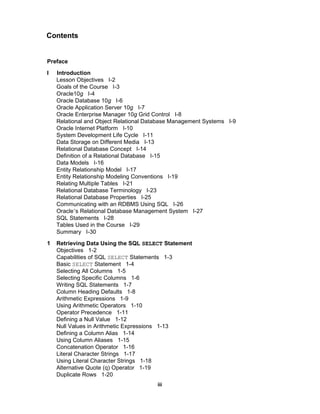
Preface I  Introduction  Lesson Objectives  I-2 Goals of the Course  I-3 Oracle10 g  I-4 Oracle Database 10 g  I-6 Oracle   Application Server 10 g  I-7 Oracle Enterprise Manager 10 g  Grid Control  I-8 Relational and Object Relational Database Management Systems  I-9 Oracle Internet Platform  I-10 System Development Life Cycle  I-11 Data Storage on Different Media  I-13 Relational Database Concept  I-14 Definition of a Relational Database  I-15 Data Models  I-16 Entity Relationship Model  I-17 Entity Relationship Modeling Conventions  I-19 Relating Multiple Tables  I-21 Relational Database Terminology  I-23 Relational Database Properties  I-25 Communicating with an RDBMS Using SQL  I-26 Oracle ’ s Relational Database Management System  I-27 SQL Statements  I-28 Tables Used in the Course  I-29 Summary  I-30 1 Retrieving Data Using the SQL  SELECT  Statement Objectives  1-2 Capabilities of SQL  SELECT  Statements  1-3 Basic  SELECT  Statement  1-4 Selecting All Columns  1-5 Selecting Specific Columns  1-6 Writing SQL Statements  1-7 Column Heading Defaults  1-8 Arithmetic Expressions  1-9 Using Arithmetic Operators  1-10 Operator Precedence  1-11 Defining a Null Value  1-12 Null Values in Arithmetic Expressions  1-13 Defining a Column Alias  1-14 Using Column Aliases  1-15 Concatenation Operator  1-16 Literal Character Strings  1-17 Using Literal Character Strings  1-18 Alternative Quote (q) Operator  1-19 Duplicate Rows  1-20 Contents iii
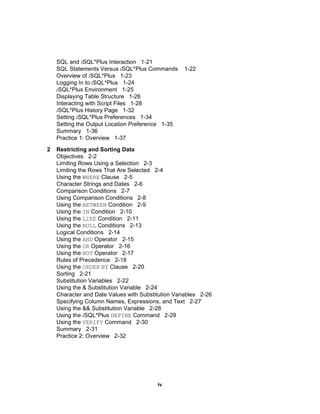
SQL and  i SQL*Plus Interaction  1-21 SQL Statements Versus  i SQL*Plus Commands  1-22 Overview of  i SQL*Plus  1-23 Logging In to  i SQL*Plus  1-24 i SQL*Plus Environment  1-25 Displaying Table Structure  1-26 Interacting with Script Files  1-28 i SQL*Plus History Page  1-32 Setting  i SQL*Plus Preferences  1-34 Setting the Output Location Preference  1-35 Summary  1-36 Practice 1: Overview  1-37 2 Restricting and Sorting Data Objectives  2-2 Limiting Rows Using a Selection  2-3 Limiting the Rows That Are Selected  2-4 Using the  WHERE  Clause  2-5 Character Strings and Dates  2-6 Comparison Conditions  2-7 Using Comparison Conditions  2-8 Using the  BETWEEN  Condition  2-9 Using the  IN  Condition  2-10 Using the  LIKE  Condition  2-11 Using the  NULL  Conditions  2-13 Logical Conditions  2-14 Using the  AND  Operator  2-15 Using the  OR  Operator  2-16 Using the  NOT  Operator  2-17 Rules of Precedence  2-18 Using the  ORDER   BY  Clause  2-20 Sorting  2-21 Substitution Variables  2-22 Using the & Substitution Variable  2-24 Character and Date Values with Substitution Variables  2-26 Specifying Column Names, Expressions, and Text  2-27 Using the && Substitution Variable  2-28 Using the  i SQL*Plus  DEFINE  Command  2-29 Using the  VERIFY  Command  2-30 Summary  2-31 Practice 2: Overview  2-32 iv
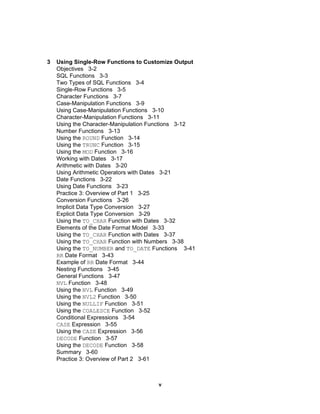
3 Using Single-Row Functions to Customize Output Objectives  3-2 SQL Functions  3-3 Two Types of SQL Functions  3-4 Single-Row Functions  3-5 Character Functions  3-7 Case-Manipulation Functions  3-9 Using Case-Manipulation Functions  3-10 Character-Manipulation Functions  3-11 Using the Character-Manipulation Functions  3-12 Number Functions  3-13 Using the  ROUND  Function  3-14 Using the  TRUNC  Function  3-15 Using the  MOD  Function  3-16 Working with Dates  3-17 Arithmetic with Dates  3-20 Using Arithmetic Operators with Dates  3-21 Date Functions  3-22 Using Date Functions  3-23 Practice 3: Overview of Part 1  3-25 Conversion Functions  3-26 Implicit Data Type Conversion  3-27 Explicit Data Type Conversion  3-29 Using the  TO_CHAR  Function with Dates  3-32 Elements of the Date Format Model  3-33 Using the  TO_CHAR  Function with Dates  3-37 Using the  TO_CHAR  Function with Numbers  3-38 Using the  TO_NUMBER  and  TO_DATE  Functions  3-41 RR  Date Format  3-43 Example of  RR  Date Format  3-44 Nesting Functions  3-45 General Functions  3-47 NVL  Function  3-48 Using the  NVL  Function  3-49 Using the  NVL2  Function  3-50 Using the  NULLIF  Function  3-51 Using the  COALESCE  Function  3-52 Conditional Expressions  3-54 CASE  Expression  3-55 Using the  CASE  Expression  3-56 DECODE  Function  3-57 Using the  DECODE  Function  3-58 Summary  3-60 Practice 3: Overview of Part 2  3-61 v
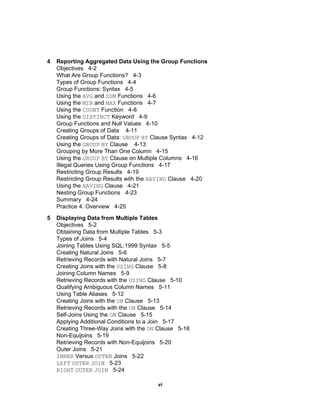
4 Reporting Aggregated Data Using the Group Functions Objectives  4-2 What Are Group Functions?  4-3 Types of Group Functions  4-4 Group Functions: Syntax  4-5 Using the  AVG  and  SUM  Functions  4-6 Using the  MIN  and  MAX  Functions  4-7 Using the  COUNT  Function  4-8 Using the  DISTINCT  Keyword  4-9 Group Functions and Null Values  4-10 Creating Groups of Data  4-11 Creating Groups of Data:  GROUP   BY  Clause Syntax  4-12 Using the  GROUP   BY  Clause  4-13 Grouping by More Than One Column  4-15 Using the  GROUP   BY  Clause on Multiple Columns  4-16 Illegal Queries Using Group Functions  4-17 Restricting Group Results  4-19 Restricting Group Results with the  HAVING  Clause  4-20 Using the  HAVING  Clause  4-21 Nesting Group Functions  4-23 Summary  4-24 Practice 4: Overview  4-25 5 Displaying Data from Multiple Tables Objectives  5-2 Obtaining Data from Multiple Tables  5-3 Types of Joins  5-4 Joining Tables Using SQL:1999 Syntax  5-5 Creating Natural Joins  5-6 Retrieving Records with Natural Joins  5-7 Creating Joins with the  USING  Clause  5-8 Joining Column Names  5-9 Retrieving Records with the  USING  Clause  5-10 Qualifying Ambiguous Column Names  5-11 Using Table Aliases  5-12 Creating Joins with the  ON  Clause  5-13 Retrieving Records with the  ON  Clause  5-14 Self-Joins Using the  ON  Clause  5-15 Applying Additional Conditions to a Join  5-17 Creating Three-Way Joins with the  ON  Clause  5-18 Non-Equijoins  5-19 Retrieving Records with Non-Equijoins  5-20 Outer Joins  5-21 INNER  Versus  OUTER  Joins  5-22 LEFT   OUTER   JOIN   5-23 RIGHT   OUTER   JOIN   5-24 vi
FULL   OUTER   JOIN   5-25 Cartesian Products  5-26 Generating a Cartesian Product  5-27 Creating Cross Joins  5-28 Summary  5-29 Practice 5: Overview  5-30 6 Using Subqueries to Solve Queries Objectives  6-2 Using a Subquery to Solve a Problem  6-3 Subquery Syntax  6-4 Using a Subquery  6-5 Guidelines for Using Subqueries  6-6 Types of Subqueries  6-7 Single-Row Subqueries  6-8 Executing Single-Row Subqueries  6-9 Using Group Functions in a Subquery  6-10 The  HAVING  Clause with Subqueries  6-11 What Is Wrong with This Statement?  6-12 Will This Statement Return Rows?  6-13 Multiple-Row Subqueries  6-14 Using the  ANY  Operator in Multiple-Row Subqueries  6-15 Using the  ALL  Operator in Multiple-Row Subqueries  6-16 Null Values in a Subquery  6-17 Summary  6-19 Practice 6: Overview  6-20 7 Using the Set Operators Objectives  7-2 Set Operators  7-3 Tables Used in This Lesson  7-4 UNION  Operator  7-8 Using the  UNION  Operator  7-9 UNION   ALL  Operator  7-11 Using the  UNION   ALL  Operator  7-12 INTERSECT  Operator  7-13 Using the  INTERSECT  Operator  7-14 MINUS  Operator  7-15 Set Operator Guidelines  7-17 The Oracle Server and Set Operators  7-18 Matching the  SELECT  Statements  7-19 Matching the  SELECT  Statement: Example  7-20 Controlling the Order of Rows  7-21 Summary  7-23 Practice 7: Overview  7-24 vii
8 Manipulating Data Objectives  8-2 Data Manipulation Language  8-3 Adding a New Row to a Table  8-4 INSERT  Statement Syntax  8-5 Inserting New Rows  8-6 Inserting Rows with Null Values  8-7 Inserting Special Values  8-8 Inserting Specific Date Values  8-9 Creating a Script  8-10 Copying Rows from Another Table  8-11 Changing Data in a Table  8-12 UPDATE  Statement Syntax  8-13 Updating Rows in a Table  8-14 Updating Two Columns with a Subquery  8-15 Updating Rows Based on Another Table  8-16 Removing a Row from a Table  8-17 DELETE  Statement  8-18 Deleting Rows from a Table  8-19 Deleting Rows Based on Another Table  8-20 TRUNCATE  Statement  8-21 Using a Subquery in an  INSERT  Statement  8-22 Database Transactions  8-24 Advantages of  COMMIT  and  ROLLBACK  Statements  8-26 Controlling Transactions  8-27 Rolling Back Changes to a Marker  8-28 Implicit Transaction Processing  8-29 State of the Data Before  COMMIT  or  ROLLBACK   8-31 State of the Data After  COMMIT   8-32 Committing Data  8-33 State of the Data After  ROLLBACK   8-34 Statement-Level Rollback  8-36 Read Consistency  8-37 Implementation of Read Consistency  8-38 Summary  8-39 Practice 8: Overview  8-40 9 Using DDL Statements to Create and Manage Tables Objectives  9-2 Database Objects  9-3 Naming Rules  9-4 CREATE   TABLE  Statement  9-5 Referencing Another User ’ s Tables  9-6 DEFAULT  Option  9-7 Creating Tables  9-8 Data Types  9-9 Datetime Data Types  9-11 viii
INTERVAL   DAY   TO   SECOND  Data Type  9-16 Including Constraints  9-17 Constraint Guidelines  9-18 Defining Constraints  9-19 NOT   NULL  Constraint  9-21 UNIQUE  Constraint  9-22 PRIMARY   KEY  Constraint  9-24 FOREIGN   KEY  Constraint  9-25 FOREIGN   KEY  Constraint: Keywords  9-27 CHECK  Constraint  9-28 CREATE   TABLE : Example  9-29 Violating Constraints  9-30 Creating a Table by Using a Subquery  9-32 ALTER   TABLE  Statement  9-34 Dropping a Table  9-35 Summary  9-36 Practice 9: Overview  9-37 10 Creating Other Schema Objects Objectives  10-2 Database Objects  10-3 What Is a View?  10-4 Advantages of Views  10-5 Simple Views and Complex Views  10-6 Creating a View  10-7 Retrieving Data from a View  10-10 Modifying a View  10-11 Creating a Complex View  10-12 Rules for Performing DML Operations on a View  10-13 Using the  WITH   CHECK   OPTION  Clause  10-16 Denying  DML  Operations  10-17 Removing a View  10-19 Practice 10: Overview of Part 1  10-20 Sequences  10-21 CREATE   SEQUENCE  Statement: Syntax  10-23 Creating a Sequence  10-24 NEXTVAL  and  CURRVAL  Pseudocolumns  10-25 Using a Sequence  10-27 Caching Sequence Values  10-28 Modifying a Sequence  10-29 Guidelines for Modifying a Sequence  10-30 Indexes  10-31 How Are Indexes Created?  10-33 Creating an Index  10-34 Index Creation Guidelines  10-35 Removing an Index  10-36 ix
Synonyms  10-37 Creating and Removing Synonyms  10-39 Summary  10-40 Practice 10: Overview of Part 2  10-41 11 Managing Objects with Data Dictionary Views  Objectives  11-2 The Data Dictionary  11-3 Data Dictionary Structure  11-4 How to Use the Dictionary Views  11-6 USER_OBJECTS  View  11-7 Table Information  11-9 Column Information  11-10 Constraint Information  11-12 View Information  11-15 Sequence Information  11-16 Synonym Information  11-18 Adding Comments to a Table  11-19 Summary  11-20 Practice 11: Overview  11-21 A Practice Solutions B Table Descriptions and Data C Oracle Join Syntax D Using SQL*Plus Index Additional Practices Additional Practices: Table Descriptions and Data Additional Practices: Solutions x

Toc

  • 1.
    Preface I Introduction Lesson Objectives I-2 Goals of the Course I-3 Oracle10 g I-4 Oracle Database 10 g I-6 Oracle Application Server 10 g I-7 Oracle Enterprise Manager 10 g Grid Control I-8 Relational and Object Relational Database Management Systems I-9 Oracle Internet Platform I-10 System Development Life Cycle I-11 Data Storage on Different Media I-13 Relational Database Concept I-14 Definition of a Relational Database I-15 Data Models I-16 Entity Relationship Model I-17 Entity Relationship Modeling Conventions I-19 Relating Multiple Tables I-21 Relational Database Terminology I-23 Relational Database Properties I-25 Communicating with an RDBMS Using SQL I-26 Oracle ’ s Relational Database Management System I-27 SQL Statements I-28 Tables Used in the Course I-29 Summary I-30 1 Retrieving Data Using the SQL SELECT Statement Objectives 1-2 Capabilities of SQL SELECT Statements 1-3 Basic SELECT Statement 1-4 Selecting All Columns 1-5 Selecting Specific Columns 1-6 Writing SQL Statements 1-7 Column Heading Defaults 1-8 Arithmetic Expressions 1-9 Using Arithmetic Operators 1-10 Operator Precedence 1-11 Defining a Null Value 1-12 Null Values in Arithmetic Expressions 1-13 Defining a Column Alias 1-14 Using Column Aliases 1-15 Concatenation Operator 1-16 Literal Character Strings 1-17 Using Literal Character Strings 1-18 Alternative Quote (q) Operator 1-19 Duplicate Rows 1-20 Contents iii
  • 2.
    SQL and i SQL*Plus Interaction 1-21 SQL Statements Versus i SQL*Plus Commands 1-22 Overview of i SQL*Plus 1-23 Logging In to i SQL*Plus 1-24 i SQL*Plus Environment 1-25 Displaying Table Structure 1-26 Interacting with Script Files 1-28 i SQL*Plus History Page 1-32 Setting i SQL*Plus Preferences 1-34 Setting the Output Location Preference 1-35 Summary 1-36 Practice 1: Overview 1-37 2 Restricting and Sorting Data Objectives 2-2 Limiting Rows Using a Selection 2-3 Limiting the Rows That Are Selected 2-4 Using the WHERE Clause 2-5 Character Strings and Dates 2-6 Comparison Conditions 2-7 Using Comparison Conditions 2-8 Using the BETWEEN Condition 2-9 Using the IN Condition 2-10 Using the LIKE Condition 2-11 Using the NULL Conditions 2-13 Logical Conditions 2-14 Using the AND Operator 2-15 Using the OR Operator 2-16 Using the NOT Operator 2-17 Rules of Precedence 2-18 Using the ORDER BY Clause 2-20 Sorting 2-21 Substitution Variables 2-22 Using the & Substitution Variable 2-24 Character and Date Values with Substitution Variables 2-26 Specifying Column Names, Expressions, and Text 2-27 Using the && Substitution Variable 2-28 Using the i SQL*Plus DEFINE Command 2-29 Using the VERIFY Command 2-30 Summary 2-31 Practice 2: Overview 2-32 iv
  • 3.
    3 Using Single-RowFunctions to Customize Output Objectives 3-2 SQL Functions 3-3 Two Types of SQL Functions 3-4 Single-Row Functions 3-5 Character Functions 3-7 Case-Manipulation Functions 3-9 Using Case-Manipulation Functions 3-10 Character-Manipulation Functions 3-11 Using the Character-Manipulation Functions 3-12 Number Functions 3-13 Using the ROUND Function 3-14 Using the TRUNC Function 3-15 Using the MOD Function 3-16 Working with Dates 3-17 Arithmetic with Dates 3-20 Using Arithmetic Operators with Dates 3-21 Date Functions 3-22 Using Date Functions 3-23 Practice 3: Overview of Part 1 3-25 Conversion Functions 3-26 Implicit Data Type Conversion 3-27 Explicit Data Type Conversion 3-29 Using the TO_CHAR Function with Dates 3-32 Elements of the Date Format Model 3-33 Using the TO_CHAR Function with Dates 3-37 Using the TO_CHAR Function with Numbers 3-38 Using the TO_NUMBER and TO_DATE Functions 3-41 RR Date Format 3-43 Example of RR Date Format 3-44 Nesting Functions 3-45 General Functions 3-47 NVL Function 3-48 Using the NVL Function 3-49 Using the NVL2 Function 3-50 Using the NULLIF Function 3-51 Using the COALESCE Function 3-52 Conditional Expressions 3-54 CASE Expression 3-55 Using the CASE Expression 3-56 DECODE Function 3-57 Using the DECODE Function 3-58 Summary 3-60 Practice 3: Overview of Part 2 3-61 v
  • 4.
    4 Reporting AggregatedData Using the Group Functions Objectives 4-2 What Are Group Functions? 4-3 Types of Group Functions 4-4 Group Functions: Syntax 4-5 Using the AVG and SUM Functions 4-6 Using the MIN and MAX Functions 4-7 Using the COUNT Function 4-8 Using the DISTINCT Keyword 4-9 Group Functions and Null Values 4-10 Creating Groups of Data 4-11 Creating Groups of Data: GROUP BY Clause Syntax 4-12 Using the GROUP BY Clause 4-13 Grouping by More Than One Column 4-15 Using the GROUP BY Clause on Multiple Columns 4-16 Illegal Queries Using Group Functions 4-17 Restricting Group Results 4-19 Restricting Group Results with the HAVING Clause 4-20 Using the HAVING Clause 4-21 Nesting Group Functions 4-23 Summary 4-24 Practice 4: Overview 4-25 5 Displaying Data from Multiple Tables Objectives 5-2 Obtaining Data from Multiple Tables 5-3 Types of Joins 5-4 Joining Tables Using SQL:1999 Syntax 5-5 Creating Natural Joins 5-6 Retrieving Records with Natural Joins 5-7 Creating Joins with the USING Clause 5-8 Joining Column Names 5-9 Retrieving Records with the USING Clause 5-10 Qualifying Ambiguous Column Names 5-11 Using Table Aliases 5-12 Creating Joins with the ON Clause 5-13 Retrieving Records with the ON Clause 5-14 Self-Joins Using the ON Clause 5-15 Applying Additional Conditions to a Join 5-17 Creating Three-Way Joins with the ON Clause 5-18 Non-Equijoins 5-19 Retrieving Records with Non-Equijoins 5-20 Outer Joins 5-21 INNER Versus OUTER Joins 5-22 LEFT OUTER JOIN 5-23 RIGHT OUTER JOIN 5-24 vi
  • 5.
    FULL OUTER JOIN 5-25 Cartesian Products 5-26 Generating a Cartesian Product 5-27 Creating Cross Joins 5-28 Summary 5-29 Practice 5: Overview 5-30 6 Using Subqueries to Solve Queries Objectives 6-2 Using a Subquery to Solve a Problem 6-3 Subquery Syntax 6-4 Using a Subquery 6-5 Guidelines for Using Subqueries 6-6 Types of Subqueries 6-7 Single-Row Subqueries 6-8 Executing Single-Row Subqueries 6-9 Using Group Functions in a Subquery 6-10 The HAVING Clause with Subqueries 6-11 What Is Wrong with This Statement? 6-12 Will This Statement Return Rows? 6-13 Multiple-Row Subqueries 6-14 Using the ANY Operator in Multiple-Row Subqueries 6-15 Using the ALL Operator in Multiple-Row Subqueries 6-16 Null Values in a Subquery 6-17 Summary 6-19 Practice 6: Overview 6-20 7 Using the Set Operators Objectives 7-2 Set Operators 7-3 Tables Used in This Lesson 7-4 UNION Operator 7-8 Using the UNION Operator 7-9 UNION ALL Operator 7-11 Using the UNION ALL Operator 7-12 INTERSECT Operator 7-13 Using the INTERSECT Operator 7-14 MINUS Operator 7-15 Set Operator Guidelines 7-17 The Oracle Server and Set Operators 7-18 Matching the SELECT Statements 7-19 Matching the SELECT Statement: Example 7-20 Controlling the Order of Rows 7-21 Summary 7-23 Practice 7: Overview 7-24 vii
  • 6.
    8 Manipulating DataObjectives 8-2 Data Manipulation Language 8-3 Adding a New Row to a Table 8-4 INSERT Statement Syntax 8-5 Inserting New Rows 8-6 Inserting Rows with Null Values 8-7 Inserting Special Values 8-8 Inserting Specific Date Values 8-9 Creating a Script 8-10 Copying Rows from Another Table 8-11 Changing Data in a Table 8-12 UPDATE Statement Syntax 8-13 Updating Rows in a Table 8-14 Updating Two Columns with a Subquery 8-15 Updating Rows Based on Another Table 8-16 Removing a Row from a Table 8-17 DELETE Statement 8-18 Deleting Rows from a Table 8-19 Deleting Rows Based on Another Table 8-20 TRUNCATE Statement 8-21 Using a Subquery in an INSERT Statement 8-22 Database Transactions 8-24 Advantages of COMMIT and ROLLBACK Statements 8-26 Controlling Transactions 8-27 Rolling Back Changes to a Marker 8-28 Implicit Transaction Processing 8-29 State of the Data Before COMMIT or ROLLBACK 8-31 State of the Data After COMMIT 8-32 Committing Data 8-33 State of the Data After ROLLBACK 8-34 Statement-Level Rollback 8-36 Read Consistency 8-37 Implementation of Read Consistency 8-38 Summary 8-39 Practice 8: Overview 8-40 9 Using DDL Statements to Create and Manage Tables Objectives 9-2 Database Objects 9-3 Naming Rules 9-4 CREATE TABLE Statement 9-5 Referencing Another User ’ s Tables 9-6 DEFAULT Option 9-7 Creating Tables 9-8 Data Types 9-9 Datetime Data Types 9-11 viii
  • 7.
    INTERVAL DAY TO SECOND Data Type 9-16 Including Constraints 9-17 Constraint Guidelines 9-18 Defining Constraints 9-19 NOT NULL Constraint 9-21 UNIQUE Constraint 9-22 PRIMARY KEY Constraint 9-24 FOREIGN KEY Constraint 9-25 FOREIGN KEY Constraint: Keywords 9-27 CHECK Constraint 9-28 CREATE TABLE : Example 9-29 Violating Constraints 9-30 Creating a Table by Using a Subquery 9-32 ALTER TABLE Statement 9-34 Dropping a Table 9-35 Summary 9-36 Practice 9: Overview 9-37 10 Creating Other Schema Objects Objectives 10-2 Database Objects 10-3 What Is a View? 10-4 Advantages of Views 10-5 Simple Views and Complex Views 10-6 Creating a View 10-7 Retrieving Data from a View 10-10 Modifying a View 10-11 Creating a Complex View 10-12 Rules for Performing DML Operations on a View 10-13 Using the WITH CHECK OPTION Clause 10-16 Denying DML Operations 10-17 Removing a View 10-19 Practice 10: Overview of Part 1 10-20 Sequences 10-21 CREATE SEQUENCE Statement: Syntax 10-23 Creating a Sequence 10-24 NEXTVAL and CURRVAL Pseudocolumns 10-25 Using a Sequence 10-27 Caching Sequence Values 10-28 Modifying a Sequence 10-29 Guidelines for Modifying a Sequence 10-30 Indexes 10-31 How Are Indexes Created? 10-33 Creating an Index 10-34 Index Creation Guidelines 10-35 Removing an Index 10-36 ix
  • 8.
    Synonyms 10-37Creating and Removing Synonyms 10-39 Summary 10-40 Practice 10: Overview of Part 2 10-41 11 Managing Objects with Data Dictionary Views Objectives 11-2 The Data Dictionary 11-3 Data Dictionary Structure 11-4 How to Use the Dictionary Views 11-6 USER_OBJECTS View 11-7 Table Information 11-9 Column Information 11-10 Constraint Information 11-12 View Information 11-15 Sequence Information 11-16 Synonym Information 11-18 Adding Comments to a Table 11-19 Summary 11-20 Practice 11: Overview 11-21 A Practice Solutions B Table Descriptions and Data C Oracle Join Syntax D Using SQL*Plus Index Additional Practices Additional Practices: Table Descriptions and Data Additional Practices: Solutions x