What is Gutenberg Block?
● The Default editor of wordpress
introduced in wordpress 5.0.
● Gutenberg Blocks are like building blocks
for your website content.
● Imagine each block as a different piece of
content you can add, such as text, images,
gallery, videos, etc..,
● Gutenberg isn't just for typing text. It
lets you add cool stuff like images,
buttons, and even interactive elements.
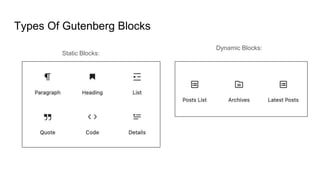
Types Of Gutenberg Blocks
Static Blocks:
Dynamic Blocks:
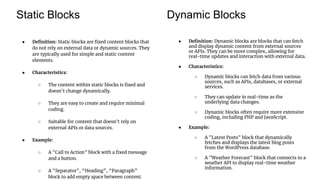
Static Blocks Dynamic Blocks
● Definition: Static blocks are fixed content blocks that
do not rely on external data or dynamic sources. They
are typically used for simple and static content
elements.
● Characteristics:
○ The content within static blocks is fixed and
doesn't change dynamically.
○ They are easy to create and require minimal
coding.
○ Suitable for content that doesn't rely on
external APIs or data sources.
● Example:
○ A "Call to Action" block with a fixed message
and a button.
○ A "Separator", “Heading”, “Paragraph”
block to add empty space between content.
● Definition: Dynamic blocks are blocks that can fetch
and display dynamic content from external sources
or APIs. They can be more complex, allowing for
real-time updates and interaction with external data.
● Characteristics:
○ Dynamic blocks can fetch data from various
sources, such as APIs, databases, or external
services.
○ They can update in real-time as the
underlying data changes.
○ Dynamic blocks often require more extensive
coding, including PHP and JavaScript.
● Example:
○ A "Latest Posts" block that dynamically
fetches and displays the latest blog posts
from the WordPress database.
○ A "Weather Forecast" block that connects to a
weather API to display real-time weather
information.
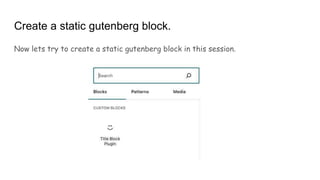
Create a static gutenberg block.
Now lets try to create a static gutenberg block in this session.
QUESTIONS???

Introduction to WordPress Custom Gutenberg Blocks

  • 2.
    What is GutenbergBlock? ● The Default editor of wordpress introduced in wordpress 5.0. ● Gutenberg Blocks are like building blocks for your website content. ● Imagine each block as a different piece of content you can add, such as text, images, gallery, videos, etc.., ● Gutenberg isn't just for typing text. It lets you add cool stuff like images, buttons, and even interactive elements.
  • 4.
    Types Of GutenbergBlocks Static Blocks: Dynamic Blocks:
  • 5.
    Static Blocks DynamicBlocks ● Definition: Static blocks are fixed content blocks that do not rely on external data or dynamic sources. They are typically used for simple and static content elements. ● Characteristics: ○ The content within static blocks is fixed and doesn't change dynamically. ○ They are easy to create and require minimal coding. ○ Suitable for content that doesn't rely on external APIs or data sources. ● Example: ○ A "Call to Action" block with a fixed message and a button. ○ A "Separator", “Heading”, “Paragraph” block to add empty space between content. ● Definition: Dynamic blocks are blocks that can fetch and display dynamic content from external sources or APIs. They can be more complex, allowing for real-time updates and interaction with external data. ● Characteristics: ○ Dynamic blocks can fetch data from various sources, such as APIs, databases, or external services. ○ They can update in real-time as the underlying data changes. ○ Dynamic blocks often require more extensive coding, including PHP and JavaScript. ● Example: ○ A "Latest Posts" block that dynamically fetches and displays the latest blog posts from the WordPress database. ○ A "Weather Forecast" block that connects to a weather API to display real-time weather information.
  • 6.
    Create a staticgutenberg block. Now lets try to create a static gutenberg block in this session.
  • 7.