Luigi Perrone
IBM Security – Executive IT Specialist
Security & Audit for zSystem & enterprise
Security Intelligence solution
luigi_perrone@it.ibm.com
https://www.linkedin.com/in/luigiperrone/
The matter of system integrity
System Integrity
the state of a system in terms of system functionalities without being
degraded or compromised by changes or disruptions
System Integrity on Z/OS
Protecting the system involves a number of tasks
• Maintenance of system integrity
• Use of the authorized programming facility
• Use of the resource access control facility (RACF)
• Changing system status
• Protecting low storage.
“There is no way for unauthorized programs to
bypass store or fetch protection, password
checking, RACF checking, or obtain control in
an authorized state”
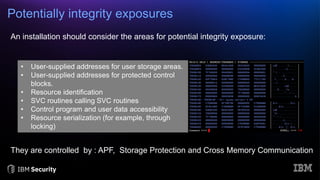
Potentially integrity exposures
• User-supplied addresses for user storage areas.
• User-supplied addresses for protected control
blocks.
• Resource identification
• SVC routines calling SVC routines
• Control program and user data accessibility
• Resource serialization (for example, through
locking)
They are controlled by : APF, Storage Protection and Cross Memory Communication
An installation should consider the areas for potential integrity exposure:
Protection from integrity exposures
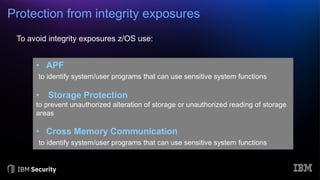
To avoid integrity exposures z/OS use:
• APF
to identify system/user programs that can use sensitive system functions
• Storage Protection
to prevent unauthorized alteration of storage or unauthorized reading of storage
areas
• Cross Memory Communication
to identify system/user programs that can use sensitive system functions
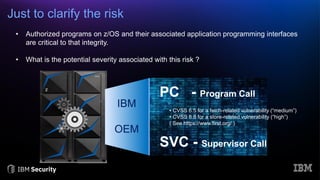
Just to clarify the risk
SVC - Supervisor Call
PC - Program Call
IBM
OEM
• Authorized programs on z/OS and their associated application programming interfaces
are critical to that integrity.
• What is the potential severity associated with this risk ?
• CVSS 6.5 for a fetch-related vulnerability (“medium”)
• CVSS 8.8 for a store-related vulnerability (“high”)
( See https://www.first.org/ )
IBM zACS – Authorized Code Scanner
• a new priced feature of z/OS version 2 release 4
• help support clients in their efforts to strengthen
the security posture of the z/OS dev/test pipeline
• scans the client’s authorized code and provides
diagnostic information for subsequent
investigation as needed
zACS searches for potential vulnerabilities
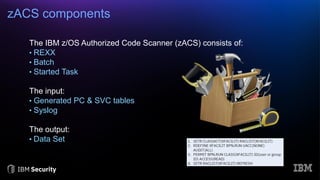
zACS components
The IBM z/OS Authorized Code Scanner (zACS) consists of:
• REXX
• Batch
• Started Task
The input:
• Generated PC & SVC tables
• Syslog
The output:
• Data Set
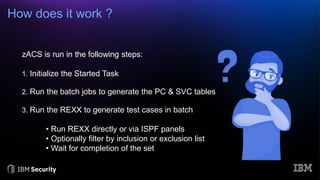
How does it work ?
zACS is run in the following steps:
1. Initialize the Started Task
2. Run the batch jobs to generate the PC & SVC tables
3. Run the REXX to generate test cases in batch
• Run REXX directly or via ISPF panels
• Optionally filter by inclusion or exclusion list
• Wait for completion of the set
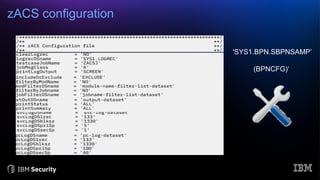
zACS configuration
'SYS1.BPN.SBPNSAMP’
(BPNCFG)‘
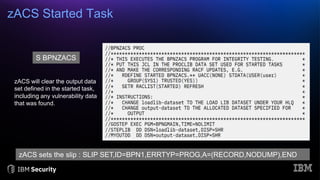
zACS Started Task
S BPNZACS
zACS will clear the output data
set defined in the started task,
including any vulnerability data
that was found.
zACS sets the slip : SLIP SET,ID=BPN1,ERRTYP=PROG,A=(RECORD,NODUMP),END
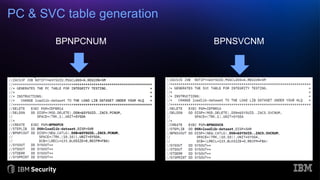
PC & SVC table generation
BPNPCNUM BPNSVCNM
Testing PC & SVC
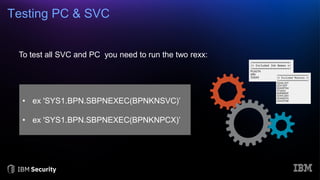
To test all SVC and PC you need to run the two rexx:
• ex 'SYS1.BPN.SBPNEXEC(BPNKNSVC)’
• ex 'SYS1.BPN.SBPNEXEC(BPNKNPCX)’
Using zACS ISPF panels (1/3)
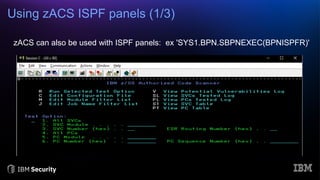
zACS can also be used with ISPF panels: ex 'SYS1.BPN.SBPNEXEC(BPNISPFR)'
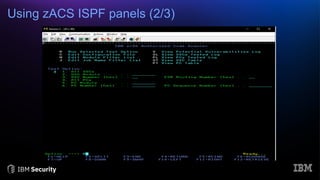
Using zACS ISPF panels (2/3)
Using zACS ISPF panels (3/3)
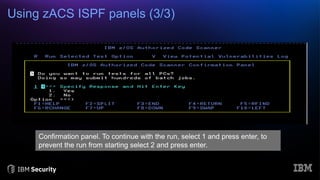
Confirmation panel. To continue with the run, select 1 and press enter, to
prevent the run from starting select 2 and press enter.
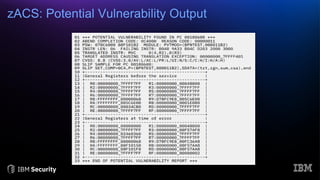
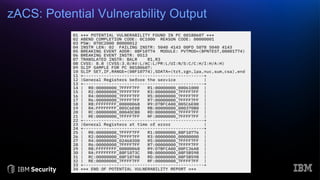
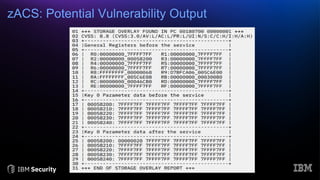
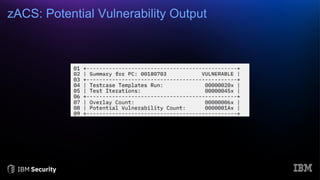
zACS: Potential Vulnerability Output

z/OS Authorized Code Scanner

  • 1.
    Luigi Perrone IBM Security– Executive IT Specialist Security & Audit for zSystem & enterprise Security Intelligence solution luigi_perrone@it.ibm.com https://www.linkedin.com/in/luigiperrone/
  • 2.
    The matter ofsystem integrity System Integrity the state of a system in terms of system functionalities without being degraded or compromised by changes or disruptions
  • 3.
    System Integrity onZ/OS Protecting the system involves a number of tasks • Maintenance of system integrity • Use of the authorized programming facility • Use of the resource access control facility (RACF) • Changing system status • Protecting low storage. “There is no way for unauthorized programs to bypass store or fetch protection, password checking, RACF checking, or obtain control in an authorized state”
  • 4.
    Potentially integrity exposures •User-supplied addresses for user storage areas. • User-supplied addresses for protected control blocks. • Resource identification • SVC routines calling SVC routines • Control program and user data accessibility • Resource serialization (for example, through locking) They are controlled by : APF, Storage Protection and Cross Memory Communication An installation should consider the areas for potential integrity exposure:
  • 5.
    Protection from integrityexposures To avoid integrity exposures z/OS use: • APF to identify system/user programs that can use sensitive system functions • Storage Protection to prevent unauthorized alteration of storage or unauthorized reading of storage areas • Cross Memory Communication to identify system/user programs that can use sensitive system functions
  • 6.
    Just to clarifythe risk SVC - Supervisor Call PC - Program Call IBM OEM • Authorized programs on z/OS and their associated application programming interfaces are critical to that integrity. • What is the potential severity associated with this risk ? • CVSS 6.5 for a fetch-related vulnerability (“medium”) • CVSS 8.8 for a store-related vulnerability (“high”) ( See https://www.first.org/ )
  • 7.
    IBM zACS –Authorized Code Scanner • a new priced feature of z/OS version 2 release 4 • help support clients in their efforts to strengthen the security posture of the z/OS dev/test pipeline • scans the client’s authorized code and provides diagnostic information for subsequent investigation as needed zACS searches for potential vulnerabilities
  • 8.
    zACS components The IBMz/OS Authorized Code Scanner (zACS) consists of: • REXX • Batch • Started Task The input: • Generated PC & SVC tables • Syslog The output: • Data Set
  • 9.
    How does itwork ? zACS is run in the following steps: 1. Initialize the Started Task 2. Run the batch jobs to generate the PC & SVC tables 3. Run the REXX to generate test cases in batch • Run REXX directly or via ISPF panels • Optionally filter by inclusion or exclusion list • Wait for completion of the set
  • 10.
  • 11.
    zACS Started Task SBPNZACS zACS will clear the output data set defined in the started task, including any vulnerability data that was found. zACS sets the slip : SLIP SET,ID=BPN1,ERRTYP=PROG,A=(RECORD,NODUMP),END
  • 12.
    PC & SVCtable generation BPNPCNUM BPNSVCNM
  • 13.
    Testing PC &SVC To test all SVC and PC you need to run the two rexx: • ex 'SYS1.BPN.SBPNEXEC(BPNKNSVC)’ • ex 'SYS1.BPN.SBPNEXEC(BPNKNPCX)’
  • 14.
    Using zACS ISPFpanels (1/3) zACS can also be used with ISPF panels: ex 'SYS1.BPN.SBPNEXEC(BPNISPFR)'
  • 15.
    Using zACS ISPFpanels (2/3)
  • 16.
    Using zACS ISPFpanels (3/3) Confirmation panel. To continue with the run, select 1 and press enter, to prevent the run from starting select 2 and press enter.
  • 17.
  • 19.
  • 20.
  • 21.