The 1st semi untethered Jailbreak for iOS 12.
iOS 12 Jailbreak with
Yangtze store
Yangtze is the first semi untethered jailbreak for iOS
12. Yangtze beta 1 version only supported for iOS 12
beta 2.
Yangtze iOS 12 Jailbreak is only available from the
Chinese language and English version will be
released soon.
What is Yangtze ?
You can install Yangtze IPA easily from Cydia
Impactor to Jailbreak iOS 12 beta 2. 
The number of Jailbreak tweaks and themes are
available in Yangtze Store.
Yangtze beta 1 version is only compatible with
iPhone 5S. Later versions will compatible with iPhone
6, iPhone 6S and iPhone 7.
How to install & compatibility
of Yangtze
Backup your iPhone using iTunes.
It is required to Turn OFF find my iPhone, Passcode
and the Touch ID.
Turn ON Airplane Mode during the jailbreak
process.
prerequisite to install Yangtze
Store
Download Cydia Impactor from the official site.
Then download Yangtze IPA
from http://yangtze.website/ 
Connect your device to the computer using USB
Cable.
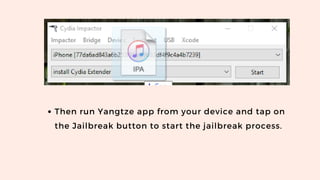
Launch Cydia Impactor and drag and drop Yangtze
IPA to Cydia Impactor to install Yangtze app on
your device. 
Step Guide
Then run Yangtze app from your device and tap on
the Jailbreak button to start the jailbreak process.
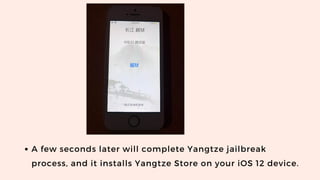
A few seconds later will complete Yangtze jailbreak
process, and it installs Yangtze Store on your iOS 12 device.
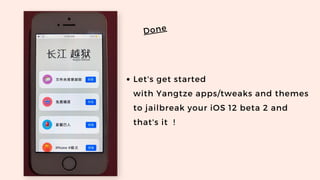
Let's get started
with Yangtze apps/tweaks and themes
to jailbreak your iOS 12 beta 2 and
that's it  !
Done

Yangtz jailbreak

  • 1.
    The 1st semiuntethered Jailbreak for iOS 12. iOS 12 Jailbreak with Yangtze store
  • 2.
    Yangtze is thefirst semi untethered jailbreak for iOS 12. Yangtze beta 1 version only supported for iOS 12 beta 2. Yangtze iOS 12 Jailbreak is only available from the Chinese language and English version will be released soon. What is Yangtze ?
  • 3.
    You can installYangtze IPA easily from Cydia Impactor to Jailbreak iOS 12 beta 2.  The number of Jailbreak tweaks and themes are available in Yangtze Store. Yangtze beta 1 version is only compatible with iPhone 5S. Later versions will compatible with iPhone 6, iPhone 6S and iPhone 7. How to install & compatibility of Yangtze
  • 4.
    Backup your iPhoneusing iTunes. It is required to Turn OFF find my iPhone, Passcode and the Touch ID. Turn ON Airplane Mode during the jailbreak process. prerequisite to install Yangtze Store
  • 5.
    Download Cydia Impactorfrom the official site. Then download Yangtze IPA from http://yangtze.website/  Connect your device to the computer using USB Cable. Launch Cydia Impactor and drag and drop Yangtze IPA to Cydia Impactor to install Yangtze app on your device.  Step Guide
  • 6.
    Then run Yangtzeapp from your device and tap on the Jailbreak button to start the jailbreak process.
  • 7.
    A few secondslater will complete Yangtze jailbreak process, and it installs Yangtze Store on your iOS 12 device.
  • 8.
    Let's get started with Yangtze apps/tweaksand themes to jailbreak your iOS 12 beta 2 and that's it  ! Done