Controlling IoT Devices via Voice
Using Watson APIs’
Markus van Kempen
Executive Architect &
Venture Capitalist
E: mvk@ca.ibm.com
T: @markusvankempen
24-Oct-2016
Please note
World of Watson 20162
IBM’s statements regarding its plans, directions, and intent are subject to change
or withdrawal without notice and at IBM’s sole discretion.
Information regarding potential future products is intended to outline our general
product direction and it should not be relied on in making a purchasing decision.
The information mentioned regarding potential future products is not a commitment, promise,
or legal obligation to deliver any material, code or functionality. Information about potential
future products may not be incorporated into any contract.
The development, release, and timing of any future features or functionality described for our
products remains at our sole discretion.
Performance is based on measurements and projections using standard IBM benchmarks in
a controlled environment. The actual throughput or performance that any user will experience
will vary depending upon many factors, including considerations such as the amount of
multiprogramming in the user’s job stream, the I/O configuration, the storage configuration, and
the workload processed. Therefore, no assurance can be given that an individual user will
achieve results similar to those stated here.
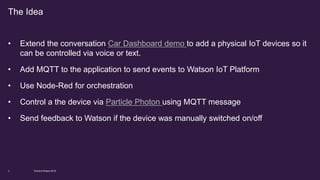
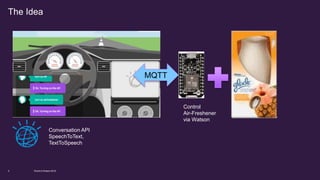
• Extend the conversation Car Dashboard demo to add a physical IoT devices so it
can be controlled via voice or text.
• Add MQTT to the application to send events to Watson IoT Platform
• Use Node-Red for orchestration
• Control a the device via Particle Photon using MQTT message
• Send feedback to Watson if the device was manually switched on/off
World of Watson 20163
The Idea
• Bluemix Account*
• Particle Account*
• A Particle Photon*
• Deployed IOT starter app in Bluemix
• Deployed enhance Car Dashboard
• Setup Conversation Workspace
• Setup Devices in WIoTP
• AirFreshener*
*Note: Instructor will provide accounts and devices
World of Watson 2016Page 4
Pre-requisites
The Idea
MQTT
Conversation API
SpeechToText,
TextToSpeech
Control
Air-Freshener
via Watson
World of Watson 20165
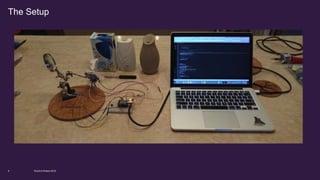
The Setup
World of Watson 20166
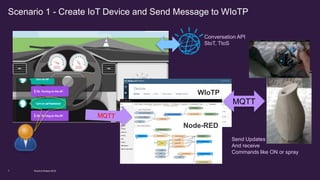
Scenario 1 - Create IoT Device and Send Message to WIoTP
Conversation API
StoT, TtoS
WIoTP
Node-RED
MQTT
Send Updates
And receive
Commands like ON or spray
World of Watson 20167
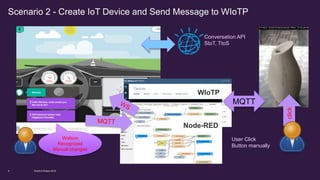
Scenario 2 - Create IoT Device and Send Message to WIoTP
Conversation API
StoT, TtoS
WIoTP
Node-RED
MQTT
User Click
Button manually
Watson
Recognized
Manual changes
click
World of Watson 20168
1. Deploy modified Node-RED and Car-Dashboard
2. Setup Workspace / check Car-Dashboard
3. Setup Iot Device on WIoTP and adjust Car-Dashboard code
4. Setup Photon as IoT device / adjust code and deploy to Photon
5. Test Car-Dashboard and Photon using blinker
6. Setup WebSocket/Adjust Car-Dashboard code
7. Test Car-Dashboard using blinker and switch off blinker manually
Extending the Car-Dashboard to physical device - Setup
World of Watson 20169
We have prepared id’s for Bluemix and Particle
Documentation & Code:
https://github.com/markusvankempen/WOW-LAB-HOL1264
Userid are wowhol1264###
World of Watson 201610
Userid and accounts
World of Watson 201611
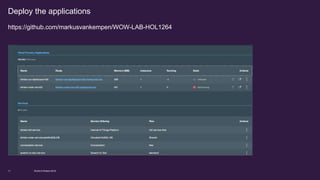
Deploy the applications
https://github.com/markusvankempen/WOW-LAB-HOL1264
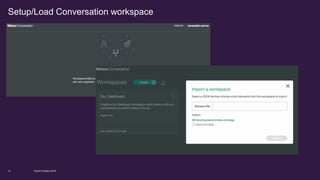
Setup/Load Conversation workspace
World of Watson 201612
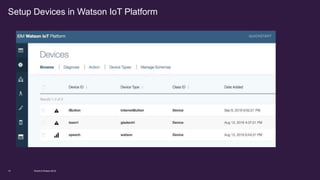
Setup Devices in Watson IoT Platform
World of Watson 201613
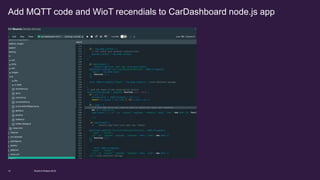
Add MQTT code and WioT recendials to CarDashboard node.js app
World of Watson 201614
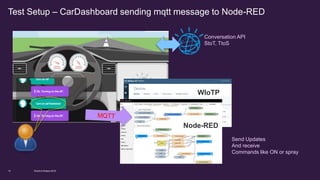
Test Setup – CarDashboard sending mqtt message to Node-RED
Conversation API
StoT, TtoS
WIoTP
Node-RED
Send Updates
And receive
Commands like ON or spray
World of Watson 201615
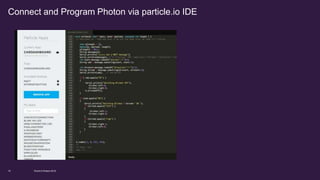
Connect and Program Photon via particle.io IDE
World of Watson 201616
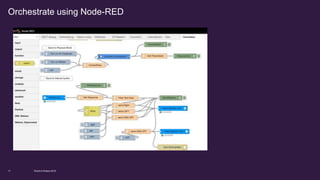
Orchestrate using Node-RED
World of Watson 201617
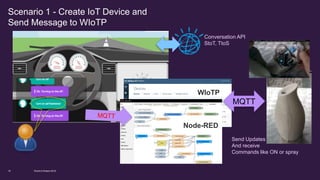
Scenario 1 - Create IoT Device and
Send Message to WIoTP
Conversation API
StoT, TtoS
WIoTP
Node-RED
MQTT
Send Updates
And receive
Commands like ON or spray
World of Watson 201618
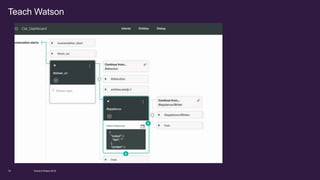
Teach Watson
World of Watson 201619
Demo/Video/Walkthru
World of Watson 201620
Code:
https://github.com/markusvankempen/
Video:
https://www.youtube.com/channel/UCwkBLJru8LW2FQ4l1qcYE9g
World of Watson 201621
References
World of Watson 201622
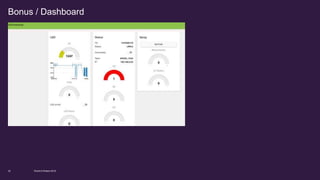
Bonus / Dashboard
Markus van Kempen
Executive Architect & Venture Capitalist
IBM SPEED / Corporate Strategy
Innovating with People and Technology
email: mvk@ ca.ibm.com
Twitter: @markusvankempen
Hashtag: #MVK
World of Watson 201623
Notices and
disclaimers
World of Watson 201624
Copyright © 2016 by International Business Machines Corporation (IBM). No part of this document may be reproduced or
transmitted in any form without written permission from IBM.
U.S. Government Users Restricted Rights - Use, duplication or disclosure restricted by GSA ADP Schedule Contract with
IBM.
Information in these presentations (including information relating to products that have not yet been announced by IBM) has been
reviewed for accuracy as of the date of initial publication and could include unintentional technical or typographical errors. IBM shall
have no responsibility to update this information. THIS DOCUMENT IS DISTRIBUTED "AS IS" WITHOUT ANY WARRANTY,
EITHER EXPRESS OR IMPLIED. IN NO EVENT SHALL IBM BE LIABLE FOR ANY DAMAGE ARISING FROM THE USE OF THIS
INFORMATION, INCLUDING BUT NOT LIMITED TO, LOSS OF DATA, BUSINESS INTERRUPTION, LOSS OF PROFIT OR LOSS
OF OPPORTUNITY. IBM products and services are warranted according to the terms and conditions of the agreements under
which they are provided.
IBM products are manufactured from new parts or new and used parts. In some cases, a product may not be new and may have
been previously installed. Regardless, our warranty terms apply.”
Any statements regarding IBM's future direction, intent or product plans are subject to change or withdrawal without
notice.
Performance data contained herein was generally obtained in a controlled, isolated environments. Customer examples are
presented as illustrations of how those customers have used IBM products and the results they may have achieved. Actual
performance, cost, savings or other results in other operating environments may vary.
References in this document to IBM products, programs, or services does not imply that IBM intends to make such products,
programs or services available in all countries in which IBM operates or does business.
Workshops, sessions and associated materials may have been prepared by independent session speakers, and do not necessarily
reflect the views of IBM. All materials and discussions are provided for informational purposes only, and are neither intended to, nor
shall constitute legal or other guidance or advice to any individual participant or their specific situation.
It is the customer’s responsibility to insure its own compliance with legal requirements and to obtain advice of competent legal
counsel as to the identification and interpretation of any relevant laws and regulatory requirements that may affect the customer’s
business and any actions the customer may need to take to comply with such laws. IBM does not provide legal advice or represent
or warrant that its services or products will ensure that the customer is in compliance with any law.
Notices and disclaimers continued
World of Watson 201625
Information concerning non-IBM products was obtained from the suppliers of those products, their published announcements or other
publicly available sources. IBM has not tested those products in connection with this publication and cannot confirm the accuracy of
performance, compatibility or any other claims related to non-IBM products. Questions on the capabilities of non-IBM products should be
addressed to the suppliers of those products. IBM does not warrant the quality of any third-party products, or the ability of any such third-
party products to interoperate with IBM’s products. IBM EXPRESSLY DISCLAIMS ALL WARRANTIES, EXPRESSED OR IMPLIED,
INCLUDING BUT NOT LIMITED TO, THE IMPLIED WARRANTIES OF MERCHANTABILITY AND FITNESS FOR A PARTICULAR
PURPOSE.
The provision of the information contained herein is not intended to, and does not, grant any right or license under any IBM patents,
copyrights, trademarks or other intellectual property right.
IBM, the IBM logo, ibm.com, Aspera®, Bluemix, Blueworks Live, CICS, Clearcase, Cognos®, DOORS®, Emptoris®, Enterprise Document
Management System™, FASP®, FileNet®, Global Business Services ®, Global Technology Services ®, IBM ExperienceOne™, IBM
SmartCloud®, IBM Social Business®, Information on Demand, ILOG, Maximo®, MQIntegrator®, MQSeries®, Netcool®, OMEGAMON,
OpenPower, PureAnalytics™, PureApplication®, pureCluster™, PureCoverage®, PureData®, PureExperience®, PureFlex®, pureQuery®,
pureScale®, PureSystems®, QRadar®, Rational®, Rhapsody®, Smarter Commerce®, SoDA, SPSS, Sterling Commerce®, StoredIQ,
Tealeaf®, Tivoli®, Trusteer®, Unica®, urban{code}®, Watson, WebSphere®, Worklight®, X-Force® and System z® Z/OS, are trademarks of
International Business Machines Corporation, registered in many jurisdictions worldwide. Other product and service names might be
trademarks of IBM or other companies. A current list of IBM trademarks is available on the Web at "Copyright and trademark information" at:
www.ibm.com/legal/copytrade.shtml.
Thank You

World of Watson HandsOnLab

  • 1.
    Controlling IoT Devicesvia Voice Using Watson APIs’ Markus van Kempen Executive Architect & Venture Capitalist E: mvk@ca.ibm.com T: @markusvankempen 24-Oct-2016
  • 2.
    Please note World ofWatson 20162 IBM’s statements regarding its plans, directions, and intent are subject to change or withdrawal without notice and at IBM’s sole discretion. Information regarding potential future products is intended to outline our general product direction and it should not be relied on in making a purchasing decision. The information mentioned regarding potential future products is not a commitment, promise, or legal obligation to deliver any material, code or functionality. Information about potential future products may not be incorporated into any contract. The development, release, and timing of any future features or functionality described for our products remains at our sole discretion. Performance is based on measurements and projections using standard IBM benchmarks in a controlled environment. The actual throughput or performance that any user will experience will vary depending upon many factors, including considerations such as the amount of multiprogramming in the user’s job stream, the I/O configuration, the storage configuration, and the workload processed. Therefore, no assurance can be given that an individual user will achieve results similar to those stated here.
  • 3.
    • Extend theconversation Car Dashboard demo to add a physical IoT devices so it can be controlled via voice or text. • Add MQTT to the application to send events to Watson IoT Platform • Use Node-Red for orchestration • Control a the device via Particle Photon using MQTT message • Send feedback to Watson if the device was manually switched on/off World of Watson 20163 The Idea
  • 4.
    • Bluemix Account* •Particle Account* • A Particle Photon* • Deployed IOT starter app in Bluemix • Deployed enhance Car Dashboard • Setup Conversation Workspace • Setup Devices in WIoTP • AirFreshener* *Note: Instructor will provide accounts and devices World of Watson 2016Page 4 Pre-requisites
  • 5.
  • 6.
    The Setup World ofWatson 20166
  • 7.
    Scenario 1 -Create IoT Device and Send Message to WIoTP Conversation API StoT, TtoS WIoTP Node-RED MQTT Send Updates And receive Commands like ON or spray World of Watson 20167
  • 8.
    Scenario 2 -Create IoT Device and Send Message to WIoTP Conversation API StoT, TtoS WIoTP Node-RED MQTT User Click Button manually Watson Recognized Manual changes click World of Watson 20168
  • 9.
    1. Deploy modifiedNode-RED and Car-Dashboard 2. Setup Workspace / check Car-Dashboard 3. Setup Iot Device on WIoTP and adjust Car-Dashboard code 4. Setup Photon as IoT device / adjust code and deploy to Photon 5. Test Car-Dashboard and Photon using blinker 6. Setup WebSocket/Adjust Car-Dashboard code 7. Test Car-Dashboard using blinker and switch off blinker manually Extending the Car-Dashboard to physical device - Setup World of Watson 20169
  • 10.
    We have preparedid’s for Bluemix and Particle Documentation & Code: https://github.com/markusvankempen/WOW-LAB-HOL1264 Userid are wowhol1264### World of Watson 201610 Userid and accounts
  • 11.
    World of Watson201611 Deploy the applications https://github.com/markusvankempen/WOW-LAB-HOL1264
  • 12.
  • 13.
    Setup Devices inWatson IoT Platform World of Watson 201613
  • 14.
    Add MQTT codeand WioT recendials to CarDashboard node.js app World of Watson 201614
  • 15.
    Test Setup –CarDashboard sending mqtt message to Node-RED Conversation API StoT, TtoS WIoTP Node-RED Send Updates And receive Commands like ON or spray World of Watson 201615
  • 16.
    Connect and ProgramPhoton via particle.io IDE World of Watson 201616
  • 17.
  • 18.
    Scenario 1 -Create IoT Device and Send Message to WIoTP Conversation API StoT, TtoS WIoTP Node-RED MQTT Send Updates And receive Commands like ON or spray World of Watson 201618
  • 19.
    Teach Watson World ofWatson 201619
  • 20.
  • 21.
  • 22.
    World of Watson201622 Bonus / Dashboard
  • 23.
    Markus van Kempen ExecutiveArchitect & Venture Capitalist IBM SPEED / Corporate Strategy Innovating with People and Technology email: mvk@ ca.ibm.com Twitter: @markusvankempen Hashtag: #MVK World of Watson 201623
  • 24.
    Notices and disclaimers World ofWatson 201624 Copyright © 2016 by International Business Machines Corporation (IBM). No part of this document may be reproduced or transmitted in any form without written permission from IBM. U.S. Government Users Restricted Rights - Use, duplication or disclosure restricted by GSA ADP Schedule Contract with IBM. Information in these presentations (including information relating to products that have not yet been announced by IBM) has been reviewed for accuracy as of the date of initial publication and could include unintentional technical or typographical errors. IBM shall have no responsibility to update this information. THIS DOCUMENT IS DISTRIBUTED "AS IS" WITHOUT ANY WARRANTY, EITHER EXPRESS OR IMPLIED. IN NO EVENT SHALL IBM BE LIABLE FOR ANY DAMAGE ARISING FROM THE USE OF THIS INFORMATION, INCLUDING BUT NOT LIMITED TO, LOSS OF DATA, BUSINESS INTERRUPTION, LOSS OF PROFIT OR LOSS OF OPPORTUNITY. IBM products and services are warranted according to the terms and conditions of the agreements under which they are provided. IBM products are manufactured from new parts or new and used parts. In some cases, a product may not be new and may have been previously installed. Regardless, our warranty terms apply.” Any statements regarding IBM's future direction, intent or product plans are subject to change or withdrawal without notice. Performance data contained herein was generally obtained in a controlled, isolated environments. Customer examples are presented as illustrations of how those customers have used IBM products and the results they may have achieved. Actual performance, cost, savings or other results in other operating environments may vary. References in this document to IBM products, programs, or services does not imply that IBM intends to make such products, programs or services available in all countries in which IBM operates or does business. Workshops, sessions and associated materials may have been prepared by independent session speakers, and do not necessarily reflect the views of IBM. All materials and discussions are provided for informational purposes only, and are neither intended to, nor shall constitute legal or other guidance or advice to any individual participant or their specific situation. It is the customer’s responsibility to insure its own compliance with legal requirements and to obtain advice of competent legal counsel as to the identification and interpretation of any relevant laws and regulatory requirements that may affect the customer’s business and any actions the customer may need to take to comply with such laws. IBM does not provide legal advice or represent or warrant that its services or products will ensure that the customer is in compliance with any law.
  • 25.
    Notices and disclaimerscontinued World of Watson 201625 Information concerning non-IBM products was obtained from the suppliers of those products, their published announcements or other publicly available sources. IBM has not tested those products in connection with this publication and cannot confirm the accuracy of performance, compatibility or any other claims related to non-IBM products. Questions on the capabilities of non-IBM products should be addressed to the suppliers of those products. IBM does not warrant the quality of any third-party products, or the ability of any such third- party products to interoperate with IBM’s products. IBM EXPRESSLY DISCLAIMS ALL WARRANTIES, EXPRESSED OR IMPLIED, INCLUDING BUT NOT LIMITED TO, THE IMPLIED WARRANTIES OF MERCHANTABILITY AND FITNESS FOR A PARTICULAR PURPOSE. The provision of the information contained herein is not intended to, and does not, grant any right or license under any IBM patents, copyrights, trademarks or other intellectual property right. IBM, the IBM logo, ibm.com, Aspera®, Bluemix, Blueworks Live, CICS, Clearcase, Cognos®, DOORS®, Emptoris®, Enterprise Document Management System™, FASP®, FileNet®, Global Business Services ®, Global Technology Services ®, IBM ExperienceOne™, IBM SmartCloud®, IBM Social Business®, Information on Demand, ILOG, Maximo®, MQIntegrator®, MQSeries®, Netcool®, OMEGAMON, OpenPower, PureAnalytics™, PureApplication®, pureCluster™, PureCoverage®, PureData®, PureExperience®, PureFlex®, pureQuery®, pureScale®, PureSystems®, QRadar®, Rational®, Rhapsody®, Smarter Commerce®, SoDA, SPSS, Sterling Commerce®, StoredIQ, Tealeaf®, Tivoli®, Trusteer®, Unica®, urban{code}®, Watson, WebSphere®, Worklight®, X-Force® and System z® Z/OS, are trademarks of International Business Machines Corporation, registered in many jurisdictions worldwide. Other product and service names might be trademarks of IBM or other companies. A current list of IBM trademarks is available on the Web at "Copyright and trademark information" at: www.ibm.com/legal/copytrade.shtml.
  • 26.