



ES6, REACT AND REDUX
MICHELE
CARRÌ
@KEOWN
MK@CODERS51.COM
GIANLUCA
PADOVANI
@GPAD619
GPADOVANI@CODERS51.COM
PASSIONATE DEVELOPERS
CTO & FOUNDERS
@CODERS51
ES6, REACT AND REDUX
‣ ES6
‣ React
‣ Redux
‣ Demo
‣ Case History
TOPICS
A SHORT
INTRO…
ECMASCRIPT 6 / ECMASCRIPT 2015
‣ Variable types
‣ Arrow functions
‣ Modules
‣ Classes
‣ A lot more…
WHAT’S NEW?
Complete Feature List: http://es6-features.org/
ECMASCRIPT 6 / ECMASCRIPT 2015
IMMUTABLE VARIABLES
1 const MY_CONSTANT = 1;
2 MY_CONSTANT = 2 // Error
https://www.smashingmagazine.com/2015/10/es6-whats-new-next-version-javascript/
ECMASCRIPT 6 / ECMASCRIPT 2015
BLOCK-SCOPED VARIABLES
1 if(true) {
2 let x = 1;
3 }
4 console.log(x); // undefined
5
6
7 for(let i = 0, l = list.length; i < l; i++) {
8 // do something with list[i]
9 }
10
11 console.log(i); // undefined
https://www.smashingmagazine.com/2015/10/es6-whats-new-next-version-javascript/
ECMASCRIPT 6 / ECMASCRIPT 2015
ARROW FUNCTIONS
https://www.smashingmagazine.com/2015/10/es6-whats-new-next-version-javascript/
1 let books = [
2 {title: 'X', price: 10},
3 {title: 'Y', price: 15}
4 ];
5
6 let titles = books.map( item => item.title );
7
8 // ES5 equivalent:
9 var titles = books.map(function(item) {
10 return item.title;
11 });
ECMASCRIPT 6 / ECMASCRIPT 2015
ARROW FUNCTIONS
https://www.smashingmagazine.com/2015/10/es6-whats-new-next-version-javascript/
1 let book = {
2 title: 'X',
3 sellers: ['A', 'B'],
4 printSellers() {
5 this.sellers.forEach((seller) => {
6 console.log(seller + ' sells ' + this.title);
7 });
8 }
9 }
ECMASCRIPT 6 / ECMASCRIPT 2015
ARROW FUNCTIONS
https://www.smashingmagazine.com/2015/10/es6-whats-new-next-version-javascript/
1 // ES5 equivalent:
2 var book = {
3 title: 'X',
4 sellers: ['A', 'B'],
5 printSellers: function() {
6 var that = this;
7 this.sellers.forEach(function(seller) {
8 console.log(seller + ' sells ' + that.title)
9 })
10 }
11 }
ECMASCRIPT 6 / ECMASCRIPT 2015
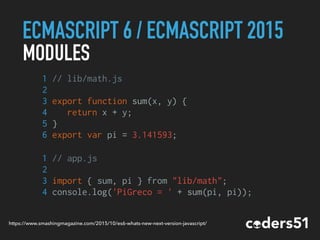
MODULES
1 // lib/math.js
2
3 export function sum(x, y) {
4 return x + y;
5 }
6 export var pi = 3.141593;
1 // app.js
2
3 import { sum, pi } from "lib/math";
4 console.log('PiGreco = ' + sum(pi, pi));
https://www.smashingmagazine.com/2015/10/es6-whats-new-next-version-javascript/
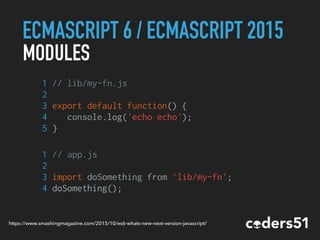
ECMASCRIPT 6 / ECMASCRIPT 2015
MODULES
1 // lib/my-fn.js
2
3 export default function() {
4 console.log('echo echo');
5 }
1 // app.js
2
3 import doSomething from 'lib/my-fn';
4 doSomething();
https://www.smashingmagazine.com/2015/10/es6-whats-new-next-version-javascript/
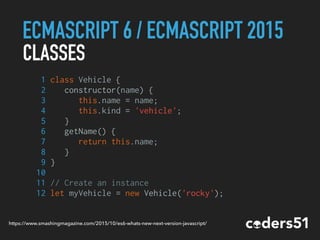
ECMASCRIPT 6 / ECMASCRIPT 2015
1 class Vehicle {
2 constructor(name) {
3 this.name = name;
4 this.kind = 'vehicle';
5 }
6 getName() {
7 return this.name;
8 }
9 }
10
11 // Create an instance
12 let myVehicle = new Vehicle('rocky');
CLASSES
https://www.smashingmagazine.com/2015/10/es6-whats-new-next-version-javascript/
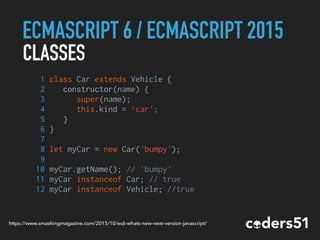
ECMASCRIPT 6 / ECMASCRIPT 2015
CLASSES
1 class Car extends Vehicle {
2 constructor(name) {
3 super(name);
4 this.kind = ‘car';
5 }
6 }
7
8 let myCar = new Car('bumpy');
9
10 myCar.getName(); // 'bumpy'
11 myCar instanceof Car; // true
12 myCar instanceof Vehicle; //true
https://www.smashingmagazine.com/2015/10/es6-whats-new-next-version-javascript/
ECMASCRIPT 6 / ECMASCRIPT 2015
SPREAD OPERATOR
https://www.smashingmagazine.com/2015/10/es6-whats-new-next-version-javascript/
1 let values = [1, 2, 4];
2 let some = [...values, 8];
3 // [1, 2, 4, 8]
4
5 let more = [...values, 8, ...values];
6 // [1, 2, 4, 8, 1, 2, 4]
7
8 // ES5 equivalent:
9 let values = [1, 2, 4];
10 // Iterate, push, sweat, repeat...
11 // Iterate, push, sweat, repeat...
ECMASCRIPT 6 / ECMASCRIPT 2015
SPREAD OPERATOR
https://www.smashingmagazine.com/2015/10/es6-whats-new-next-version-javascript/
1 let values = [1, 2, 4];
2
3 doSomething(...values);
4
5 function doSomething(x, y, z) {
6 // x = 1, y = 2, z = 4
7 }
8
9 // ES5 equivalent:
10 doSomething.apply(null, values);
ECMASCRIPT 6 / ECMASCRIPT 2015
SO, WHAT EXACTLY CAN I USE?
Browsers
Support inconsistent between browsers. Microsoft Edge is
one best in ES6 support. :-)
Node
Partial support. Some features are available only on versions
> 5 and need to be explicitly enabled with a runtime flag.
ECMASCRIPT 6 / ECMASCRIPT 2015
SO, WHAT EXACTLY CAN I USE?
https://babeljs.io
ECMASCRIPT 6 / ECMASCRIPT 2015
BABEL
LET’S TALK
ABOUT REACT
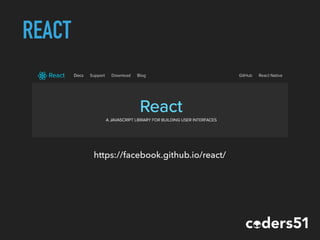
REACT IS A JAVASCRIPT LIBRARY
FOR BUILDING USER INTERFACES
REACT IS NOT A
FRAMEWORK
https://facebook.github.io/react/
REACT
REACT
JUST FOR THE UI
React is all about modular, composable
components. Not necessarily web
components.
It makes no assumptions about the rest
of your technology stack.
REACT
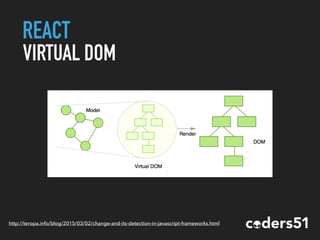
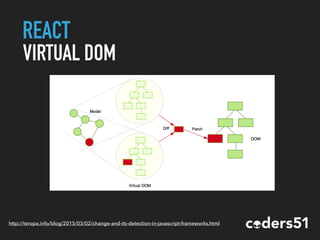
VIRTUAL DOM
Keep track of state in DOM is hard!
It’ll be so easier to re-render the whole
DOM on every change.
Unfortunately the DOM API is not so fast.
REACT
VIRTUAL DOM
http://teropa.info/blog/2015/03/02/change-and-its-detection-in-javascript-frameworks.html
REACT
VIRTUAL DOM
http://teropa.info/blog/2015/03/02/change-and-its-detection-in-javascript-frameworks.html
REACT
VIRTUAL DOM
‣ Batched DOM read/write operations
‣ Efficient update of sub-tree only
REACT
ONE WAY DATA FLOW
The only way to pass data thought
different components is from top to
bottom. No two way bindings.
REACT
JSX
return <div>Hello {this.props.name}</div>;
React components are written in JSX, a JavaScript
extension syntax allowing easy quoting of HTML
and using HTML tag syntax to render components.
REACT
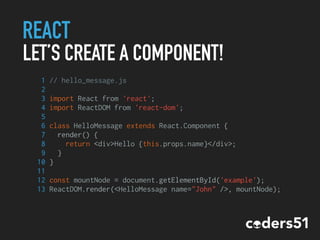
LET’S CREATE A COMPONENT!
1 // hello_message.js
2
3 import React from 'react';
4 import ReactDOM from 'react-dom';
5
6 class HelloMessage extends React.Component {
7 render() {
8 return <div>Hello {this.props.name}</div>;
9 }
10 }
11
12 const mountNode = document.getElementById('example');
13 ReactDOM.render(<HelloMessage name="John" />, mountNode);
REACT
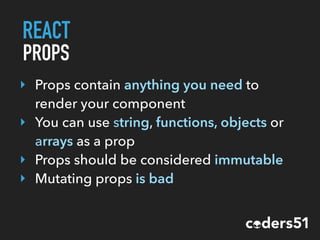
PROPS
‣ Props contain anything you need to
render your component
‣ You can use string, functions, objects or
arrays as a prop
‣ Props should be considered immutable
‣ Mutating props is bad
REACT
PROPTYPES
PropTypes defines type and which props are required.
1 //example 1
2 MyComponent.propTypes = {
3 size: React.PropTypes.number,
4 position: React.PropTypes.string.isRequired
5 }
6
7 //example 2
8 MyComponent.propTypes ={
9 position: React.PropTypes.oneOf(['fixed', 'absolute'])
10 }
REACT
PROPTYPES
1 //example 3
2
3 MyComponent.propTypes = {
4 email: (props, propName, componentName) => {
5 if (!/emailRegex/.test(props[email])) {
6 return new Error('Give me a real email!');
7 }
8 },
9 user: React.PropTypes.shape({
10 name: React.PropTypes.string.isRequired,
11 age: React.PropTypes.number
12 }).isRequired
13 }
REACT
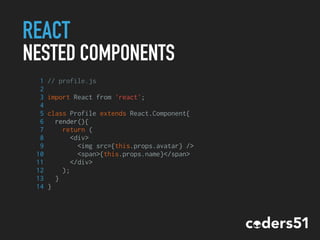
NESTED COMPONENTS
1 // profile.js
2
3 import React from 'react';
4
5 class Profile extends React.Component{
6 render(){
7 return (
8 <div>
9 <img src={this.props.avatar} />
10 <span>{this.props.name}</span>
11 </div>
12 );
13 }
14 }
REACT
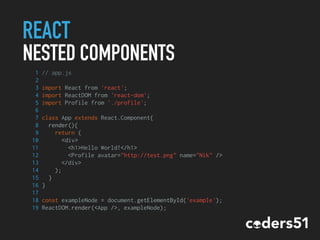
NESTED COMPONENTS
1 // app.js
2
3 import React from 'react';
4 import ReactDOM from 'react-dom';
5 import Profile from './profile';
6
7 class App extends React.Component{
8 render(){
9 return (
10 <div>
11 <h1>Hello World!</h1>
12 <Profile avatar="http://test.png" name="Nik" />
13 </div>
14 );
15 }
16 }
17
18 const exampleNode = document.getElementById('example');
19 ReactDOM.render(<App />, exampleNode);
REACT
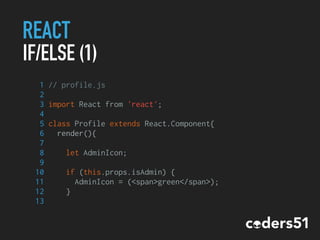
IF/ELSE (1)
1 // profile.js
2
3 import React from 'react';
4
5 class Profile extends React.Component{
6 render(){
7
8 let AdminIcon;
9
10 if (this.props.isAdmin) {
11 AdminIcon = (<span>green</span>);
12 }
13
REACT
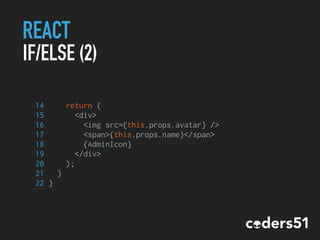
IF/ELSE (2)
14 return (
15 <div>
16 <img src={this.props.avatar} />
17 <span>{this.props.name}</span>
18 {AdminIcon}
19 </div>
20 );
21 }
22 }
REACT
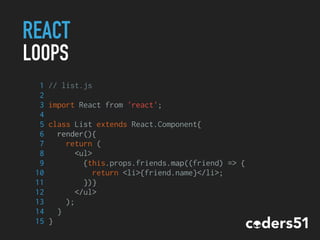
LOOPS
1 // list.js
2
3 import React from 'react';
4
5 class List extends React.Component{
6 render(){
7 return (
8 <ul>
9 {this.props.friends.map((friend) => {
10 return <li>{friend.name}</li>;
11 })}
12 </ul>
13 );
14 }
15 }
REACT
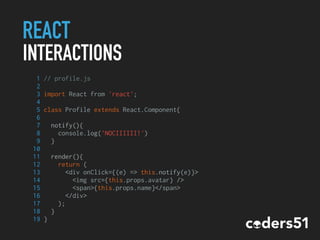
INTERACTIONS
1 // profile.js
2
3 import React from 'react';
4
5 class Profile extends React.Component{
6
7 notify(){
8 console.log('NOCIIIIII!')
9 }
10
11 render(){
12 return (
13 <div onClick={(e) => this.notify(e)}>
14 <img src={this.props.avatar} />
15 <span>{this.props.name}</span>
16 </div>
17 );
18 }
19 }
REACT
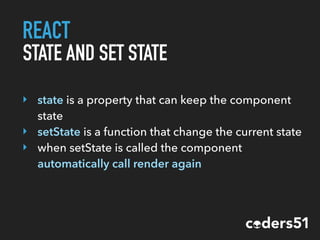
STATE AND SET STATE
‣ state is a property that can keep the component
state
‣ setState is a function that change the current state
‣ when setState is called the component
automatically call render again
REACT
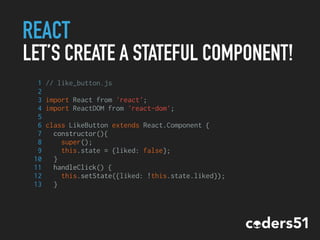
LET’S CREATE A STATEFUL COMPONENT!
1 // like_button.js
2
3 import React from 'react';
4 import ReactDOM from 'react-dom';
5
6 class LikeButton extends React.Component {
7 constructor(){
8 super();
9 this.state = {liked: false};
10 }
11 handleClick() {
12 this.setState({liked: !this.state.liked});
13 }
REACT
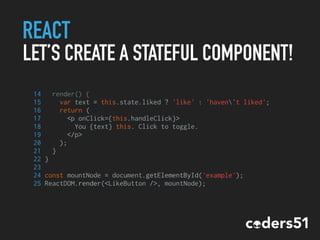
LET’S CREATE A STATEFUL COMPONENT!
14 render() {
15 var text = this.state.liked ? 'like' : 'haven't liked';
16 return (
17 <p onClick={this.handleClick}>
18 You {text} this. Click to toggle.
19 </p>
20 );
21 }
22 }
23
24 const mountNode = document.getElementById('example');
25 ReactDOM.render(<LikeButton />, mountNode);
REACT
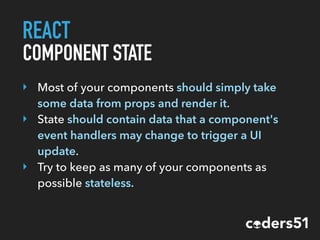
COMPONENT STATE
‣ Most of your components should simply take
some data from props and render it.
‣ State should contain data that a component's
event handlers may change to trigger a UI
update.
‣ Try to keep as many of your components as
possible stateless.
REACT
NOT ONLY ON THE DOM…
The react-dom/server package allows
you to render your components on
the server.
REACT
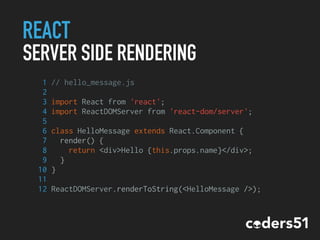
SERVER SIDE RENDERING
1 // hello_message.js
2
3 import React from 'react';
4 import ReactDOMServer from 'react-dom/server';
5
6 class HelloMessage extends React.Component {
7 render() {
8 return <div>Hello {this.props.name}</div>;
9 }
10 }
11
12 ReactDOMServer.renderToString(<HelloMessage />);
REACT
NOT ONLY ON THE DOM…
You can even build almost
native mobile applications!
REACT
REACT NATIVE
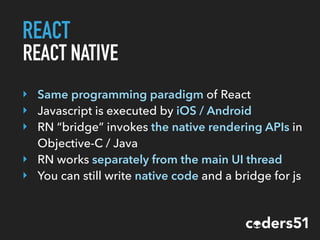
‣ Same programming paradigm of React
‣ Javascript is executed by iOS / Android
‣ RN “bridge” invokes the native rendering APIs in
Objective-C / Java
‣ RN works separately from the main UI thread
‣ You can still write native code and a bridge for js
REACT
REACT NATIVE
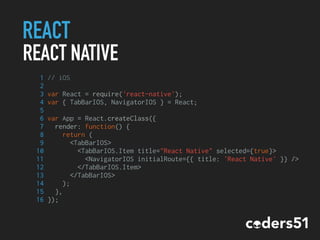
1 // iOS
2
3 var React = require('react-native');
4 var { TabBarIOS, NavigatorIOS } = React;
5
6 var App = React.createClass({
7 render: function() {
8 return (
9 <TabBarIOS>
10 <TabBarIOS.Item title="React Native" selected={true}>
11 <NavigatorIOS initialRoute={{ title: 'React Native' }} />
12 </TabBarIOS.Item>
13 </TabBarIOS>
14 );
15 },
16 });
REACT
TESTING
‣ Jest - https://facebook.github.io/jest
‣ Mocha
‣ Jasmine
‣ React Test Utilities
‣ Enzyme - https://github.com/airbnb/enzyme
REACT
SUMMARY
‣ We can build components
‣ We can build an applications with several
different components
‣ We can keep our application state inside the state
of our components
REACT
SUMMARY
But wait… shouldn’t React only deal
with the UI?
OK, GREAT!
REACT
SUMMARY
Be careful because maintaining
your application state within the
state of your components isn’t a
great idea…
REACT
SUMMARY
So where should i keep the
application state and how it
changes?
REDUXhttp://redux.js.org
REDUX
WHAAAAT?
Redux allows you to manage the
state with a minimal API but
completely predictable behaviour.
REDUX
THE APPLICATION STATE
1 {
2 todos: [
3 {
4 text: 'Learn React',
5 completed: true
6 },
7 {
8 text: 'Learn Redux',
9 completed: false
10 }
11 ]
12 }
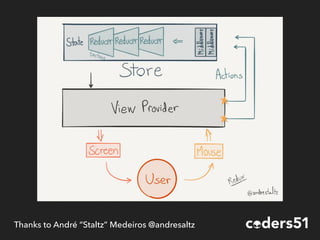
Thanks to André “Staltz” Medeiros @andresaltz
REDUX
BASICS
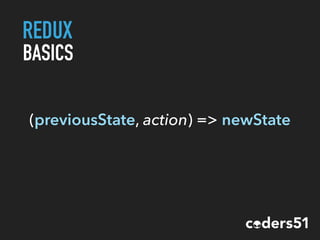
(previousState, action) => newState
REDUX
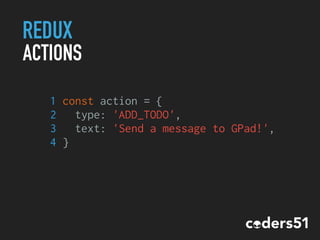
ACTIONS
1 const action = {
2 type: 'ADD_TODO',
3 text: 'Send a message to GPad!',
4 }
REDUX
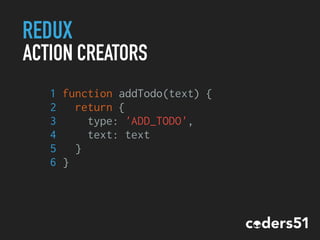
ACTION CREATORS
1 function addTodo(text) {
2 return {
3 type: 'ADD_TODO',
4 text: text
5 }
6 }
REDUX
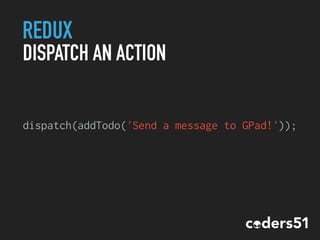
DISPATCH AN ACTION
dispatch(addTodo('Send a message to GPad!'));
REDUX
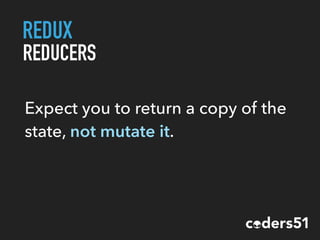
REDUCERS
1 const todos = (state = [], action) => {
2 switch (action.type) {
3 case 'ADD_TODO':
4 return [
5 ...state,
6 {
7 text: action.text,
8 completed: false
9 }
10 ]
11 default:
12 return state
13 }
14 }
REDUX
REDUCERS
Expect you to return a copy of the
state, not mutate it.
REDUX
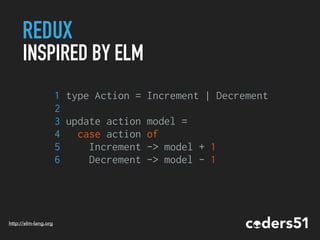
INSPIRED BY ELM
1 type Action = Increment | Decrement
2
3 update action model =
4 case action of
5 Increment -> model + 1
6 Decrement -> model - 1
http://elm-lang.org
REDUX
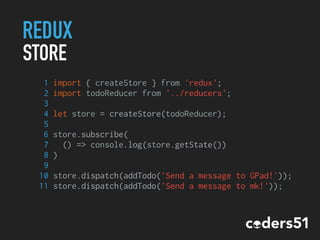
STORE
1 import { createStore } from 'redux';
2 import todoReducer from '../reducers';
3
4 let store = createStore(todoReducer);
5
6 store.subscribe(
7 () => console.log(store.getState())
8 )
9
10 store.dispatch(addTodo('Send a message to GPad!'));
11 store.dispatch(addTodo('Send a message to mk!'));
REDUX
ASYNC ACTION CREATORS
In Javascript actions are not always
synchronous (example: ajax calls)
REDUX
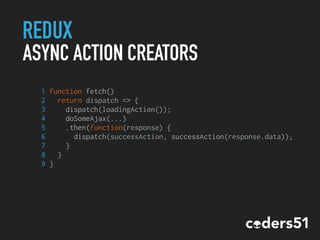
ASYNC ACTION CREATORS
1 function fetch()
2 return dispatch => {
3 dispatch(loadingAction());
4 doSomeAjax(...)
5 .then(function(response) {
6 dispatch(successAction, successAction(response.data));
7 }
8 }
9 }
REDUX
MIDDLEWARE
‣ Logging
‣ Async actions
‣ Dev tools
REDUX
NOT REACT SPECIFIC!
It’s just an event and state
management library!
REDUX
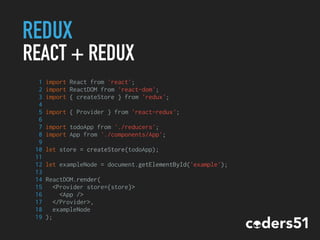
REACT + REDUX
1 import React from 'react';
2 import ReactDOM from 'react-dom';
3 import { createStore } from 'redux';
4
5 import { Provider } from 'react-redux';
6
7 import todoApp from './reducers';
8 import App from './components/App';
9
10 let store = createStore(todoApp);
11
12 let exampleNode = document.getElementById('example');
13
14 ReactDOM.render(
15 <Provider store={store}>
16 <App />
17 </Provider>,
18 exampleNode
19 );
REDUX
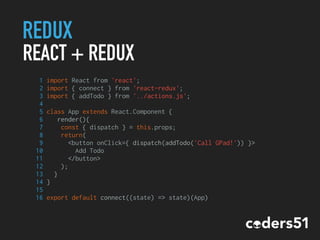
REACT + REDUX
1 import React from 'react';
2 import { connect } from 'react-redux';
3 import { addTodo } from '../actions.js';
4
5 class App extends React.Component {
6 render(){
7 const { dispatch } = this.props;
8 return(
9 <button onClick={ dispatch(addTodo('Call GPad!')) }>
10 Add Todo
11 </button>
12 );
13 }
14 }
15
16 export default connect((state) => state)(App)
REDUX
SMART AND DUMP COMPONENTS
Technically all components could
be connect to the store but that’s a
very bad idea!
REDUX
SMART AND DUMP COMPONENTS
The best behavior is to connect
only top level components and
pass actions to other components
using props.
REDUX
SMART AND DUMP COMPONENTS
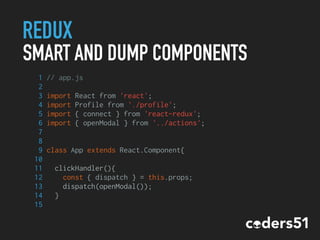
1 // app.js
2
3 import React from 'react';
4 import Profile from './profile';
5 import { connect } from 'react-redux';
6 import { openModal } from '../actions';
7
8
9 class App extends React.Component{
10
11 clickHandler(){
12 const { dispatch } = this.props;
13 dispatch(openModal());
14 }
15
REDUX
SMART AND DUMP COMPONENTS
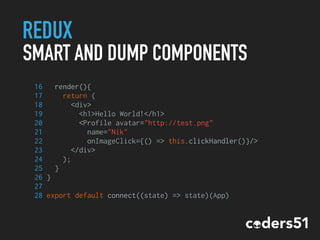
16 render(){
17 return (
18 <div>
19 <h1>Hello World!</h1>
20 <Profile avatar="http://test.png"
21 name="Nik"
22 onImageClick={() => this.clickHandler()}/>
23 </div>
24 );
25 }
26 }
27
28 export default connect((state) => state)(App)
REDUX
SMART AND DUMP COMPONENTS
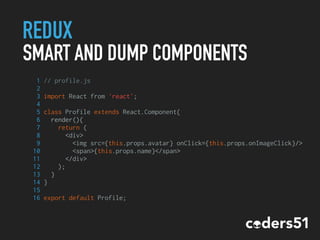
1 // profile.js
2
3 import React from 'react';
4
5 class Profile extends React.Component{
6 render(){
7 return (
8 <div>
9 <img src={this.props.avatar} onClick={this.props.onImageClick}/>
10 <span>{this.props.name}</span>
11 </div>
12 );
13 }
14 }
15
16 export default Profile;
REDUX
TESTING
http://rackt.org/redux/docs/recipes/WritingTests.html
Testing Redux is pretty easy
because action creators and
reducers are just functions.
REDUX
SUMMARY
‣ Reusable Components
‣ Easy to understand
‣ Performant & Lightweight
‣ Reducers are very easy to test
REACT & REDUX
ARE THEY PRODUCTION READY?
React - Used by Facebook, AirBnb and many
more…
Redux - Used by Firefox, Docker, coders51 and
many more… :-)
REACT & REDUX
SUPPORT
‣ https://facebook.github.io/react/
‣ http://redux.js.org
‣ https://egghead.io/series/getting-
started-with-redux
?
REACT & REDUX
ONE MORE
THING…
REACT & REDUX
TIME TRAVEL
DEMO
?
CASE
HISTORY
CASE HISTORY 1
CURRENT SCENARIO & REQUESTS
‣ Customer with several different applications
(Rails, Wordpress, etc)
‣ Need a way to show how much time is left to
the release date of a film
CASE HISTORY 1
SOLUTION
Javascript library that mounts a React
component. The component fetch the data
needed from an api and show the countdown.
CASE HISTORY 1
PRO
‣ No code duplication across different apps
‣ Easily embeddable by anyone in any stack
CASE HISTORY 2
CURRENT SCENARIO
‣ Medium size Rails app already in production
‣ Growing ecosystem with several different
applications
‣ Need to share some common basic features
between every application
CASE HISTORY 2
REQUESTED FEATURES
‣ Toolbar
‣ Real time notifications
‣ Friendship Management
‣ Internationalization Management
‣ Banner Management
‣ Footer
CASE HISTORY 2
SOLUTION
Javascript components library with some great
APIs to interact with the underlying
applications.
CASE HISTORY 2
PRO
‣ No code duplication across different apps
‣ Consistent way to manage real time
notifications and messaging via websocket
‣ Easily embeddable in any stack
CASE HISTORY 3
CURRENT SCENARIO
‣ HUGE size Rails app already in production
‣ Several pages with large list of articles (very
similar to a Facebook timeline…)
‣ A lot of duplicated code
‣ Poor rendering performance
‣ jQuery + Handlebars
CASE HISTORY 3
REQUESTED FEATURES
‣ Speed up render process
‣ SEO friendly
CASE HISTORY 3
SOLUTION
Timeline is now a react component and it’s
rendered both server side and client side (if
needed)
CASE HISTORY 3
PRO
‣ No code duplication (server side rendering)
‣ No more DOM based code
‣ More readable and testable code
‣ Fast
?
THANKS
EVERYBODY!
info@coders51.com

Workshop React.js

  • 1.
  • 2.
  • 3.
    ES6, REACT ANDREDUX ‣ ES6 ‣ React ‣ Redux ‣ Demo ‣ Case History TOPICS
  • 4.
  • 5.
    ECMASCRIPT 6 /ECMASCRIPT 2015 ‣ Variable types ‣ Arrow functions ‣ Modules ‣ Classes ‣ A lot more… WHAT’S NEW? Complete Feature List: http://es6-features.org/
  • 6.
    ECMASCRIPT 6 /ECMASCRIPT 2015 IMMUTABLE VARIABLES 1 const MY_CONSTANT = 1; 2 MY_CONSTANT = 2 // Error https://www.smashingmagazine.com/2015/10/es6-whats-new-next-version-javascript/
  • 7.
    ECMASCRIPT 6 /ECMASCRIPT 2015 BLOCK-SCOPED VARIABLES 1 if(true) { 2 let x = 1; 3 } 4 console.log(x); // undefined 5 6 7 for(let i = 0, l = list.length; i < l; i++) { 8 // do something with list[i] 9 } 10 11 console.log(i); // undefined https://www.smashingmagazine.com/2015/10/es6-whats-new-next-version-javascript/
  • 8.
    ECMASCRIPT 6 /ECMASCRIPT 2015 ARROW FUNCTIONS https://www.smashingmagazine.com/2015/10/es6-whats-new-next-version-javascript/ 1 let books = [ 2 {title: 'X', price: 10}, 3 {title: 'Y', price: 15} 4 ]; 5 6 let titles = books.map( item => item.title ); 7 8 // ES5 equivalent: 9 var titles = books.map(function(item) { 10 return item.title; 11 });
  • 9.
    ECMASCRIPT 6 /ECMASCRIPT 2015 ARROW FUNCTIONS https://www.smashingmagazine.com/2015/10/es6-whats-new-next-version-javascript/ 1 let book = { 2 title: 'X', 3 sellers: ['A', 'B'], 4 printSellers() { 5 this.sellers.forEach((seller) => { 6 console.log(seller + ' sells ' + this.title); 7 }); 8 } 9 }
  • 10.
    ECMASCRIPT 6 /ECMASCRIPT 2015 ARROW FUNCTIONS https://www.smashingmagazine.com/2015/10/es6-whats-new-next-version-javascript/ 1 // ES5 equivalent: 2 var book = { 3 title: 'X', 4 sellers: ['A', 'B'], 5 printSellers: function() { 6 var that = this; 7 this.sellers.forEach(function(seller) { 8 console.log(seller + ' sells ' + that.title) 9 }) 10 } 11 }
  • 11.
    ECMASCRIPT 6 /ECMASCRIPT 2015 MODULES 1 // lib/math.js 2 3 export function sum(x, y) { 4 return x + y; 5 } 6 export var pi = 3.141593; 1 // app.js 2 3 import { sum, pi } from "lib/math"; 4 console.log('PiGreco = ' + sum(pi, pi)); https://www.smashingmagazine.com/2015/10/es6-whats-new-next-version-javascript/
  • 12.
    ECMASCRIPT 6 /ECMASCRIPT 2015 MODULES 1 // lib/my-fn.js 2 3 export default function() { 4 console.log('echo echo'); 5 } 1 // app.js 2 3 import doSomething from 'lib/my-fn'; 4 doSomething(); https://www.smashingmagazine.com/2015/10/es6-whats-new-next-version-javascript/
  • 13.
    ECMASCRIPT 6 /ECMASCRIPT 2015 1 class Vehicle { 2 constructor(name) { 3 this.name = name; 4 this.kind = 'vehicle'; 5 } 6 getName() { 7 return this.name; 8 } 9 } 10 11 // Create an instance 12 let myVehicle = new Vehicle('rocky'); CLASSES https://www.smashingmagazine.com/2015/10/es6-whats-new-next-version-javascript/
  • 14.
    ECMASCRIPT 6 /ECMASCRIPT 2015 CLASSES 1 class Car extends Vehicle { 2 constructor(name) { 3 super(name); 4 this.kind = ‘car'; 5 } 6 } 7 8 let myCar = new Car('bumpy'); 9 10 myCar.getName(); // 'bumpy' 11 myCar instanceof Car; // true 12 myCar instanceof Vehicle; //true https://www.smashingmagazine.com/2015/10/es6-whats-new-next-version-javascript/
  • 15.
    ECMASCRIPT 6 /ECMASCRIPT 2015 SPREAD OPERATOR https://www.smashingmagazine.com/2015/10/es6-whats-new-next-version-javascript/ 1 let values = [1, 2, 4]; 2 let some = [...values, 8]; 3 // [1, 2, 4, 8] 4 5 let more = [...values, 8, ...values]; 6 // [1, 2, 4, 8, 1, 2, 4] 7 8 // ES5 equivalent: 9 let values = [1, 2, 4]; 10 // Iterate, push, sweat, repeat... 11 // Iterate, push, sweat, repeat...
  • 16.
    ECMASCRIPT 6 /ECMASCRIPT 2015 SPREAD OPERATOR https://www.smashingmagazine.com/2015/10/es6-whats-new-next-version-javascript/ 1 let values = [1, 2, 4]; 2 3 doSomething(...values); 4 5 function doSomething(x, y, z) { 6 // x = 1, y = 2, z = 4 7 } 8 9 // ES5 equivalent: 10 doSomething.apply(null, values);
  • 17.
    ECMASCRIPT 6 /ECMASCRIPT 2015 SO, WHAT EXACTLY CAN I USE? Browsers Support inconsistent between browsers. Microsoft Edge is one best in ES6 support. :-) Node Partial support. Some features are available only on versions > 5 and need to be explicitly enabled with a runtime flag.
  • 18.
    ECMASCRIPT 6 /ECMASCRIPT 2015 SO, WHAT EXACTLY CAN I USE? https://babeljs.io
  • 19.
    ECMASCRIPT 6 /ECMASCRIPT 2015 BABEL
  • 20.
  • 21.
    REACT IS AJAVASCRIPT LIBRARY FOR BUILDING USER INTERFACES
  • 22.
    REACT IS NOTA FRAMEWORK
  • 23.
  • 24.
    REACT JUST FOR THEUI React is all about modular, composable components. Not necessarily web components. It makes no assumptions about the rest of your technology stack.
  • 25.
    REACT VIRTUAL DOM Keep trackof state in DOM is hard! It’ll be so easier to re-render the whole DOM on every change. Unfortunately the DOM API is not so fast.
  • 26.
  • 27.
  • 28.
    REACT VIRTUAL DOM ‣ BatchedDOM read/write operations ‣ Efficient update of sub-tree only
  • 29.
    REACT ONE WAY DATAFLOW The only way to pass data thought different components is from top to bottom. No two way bindings.
  • 30.
    REACT JSX return <div>Hello {this.props.name}</div>; Reactcomponents are written in JSX, a JavaScript extension syntax allowing easy quoting of HTML and using HTML tag syntax to render components.
  • 31.
    REACT LET’S CREATE ACOMPONENT! 1 // hello_message.js 2 3 import React from 'react'; 4 import ReactDOM from 'react-dom'; 5 6 class HelloMessage extends React.Component { 7 render() { 8 return <div>Hello {this.props.name}</div>; 9 } 10 } 11 12 const mountNode = document.getElementById('example'); 13 ReactDOM.render(<HelloMessage name="John" />, mountNode);
  • 32.
    REACT PROPS ‣ Props containanything you need to render your component ‣ You can use string, functions, objects or arrays as a prop ‣ Props should be considered immutable ‣ Mutating props is bad
  • 33.
    REACT PROPTYPES PropTypes defines typeand which props are required. 1 //example 1 2 MyComponent.propTypes = { 3 size: React.PropTypes.number, 4 position: React.PropTypes.string.isRequired 5 } 6 7 //example 2 8 MyComponent.propTypes ={ 9 position: React.PropTypes.oneOf(['fixed', 'absolute']) 10 }
  • 34.
    REACT PROPTYPES 1 //example 3 2 3MyComponent.propTypes = { 4 email: (props, propName, componentName) => { 5 if (!/emailRegex/.test(props[email])) { 6 return new Error('Give me a real email!'); 7 } 8 }, 9 user: React.PropTypes.shape({ 10 name: React.PropTypes.string.isRequired, 11 age: React.PropTypes.number 12 }).isRequired 13 }
  • 35.
    REACT NESTED COMPONENTS 1 //profile.js 2 3 import React from 'react'; 4 5 class Profile extends React.Component{ 6 render(){ 7 return ( 8 <div> 9 <img src={this.props.avatar} /> 10 <span>{this.props.name}</span> 11 </div> 12 ); 13 } 14 }
  • 36.
    REACT NESTED COMPONENTS 1 //app.js 2 3 import React from 'react'; 4 import ReactDOM from 'react-dom'; 5 import Profile from './profile'; 6 7 class App extends React.Component{ 8 render(){ 9 return ( 10 <div> 11 <h1>Hello World!</h1> 12 <Profile avatar="http://test.png" name="Nik" /> 13 </div> 14 ); 15 } 16 } 17 18 const exampleNode = document.getElementById('example'); 19 ReactDOM.render(<App />, exampleNode);
  • 37.
    REACT IF/ELSE (1) 1 //profile.js 2 3 import React from 'react'; 4 5 class Profile extends React.Component{ 6 render(){ 7 8 let AdminIcon; 9 10 if (this.props.isAdmin) { 11 AdminIcon = (<span>green</span>); 12 } 13
  • 38.
    REACT IF/ELSE (2) 14 return( 15 <div> 16 <img src={this.props.avatar} /> 17 <span>{this.props.name}</span> 18 {AdminIcon} 19 </div> 20 ); 21 } 22 }
  • 39.
    REACT LOOPS 1 // list.js 2 3import React from 'react'; 4 5 class List extends React.Component{ 6 render(){ 7 return ( 8 <ul> 9 {this.props.friends.map((friend) => { 10 return <li>{friend.name}</li>; 11 })} 12 </ul> 13 ); 14 } 15 }
  • 40.
    REACT INTERACTIONS 1 // profile.js 2 3import React from 'react'; 4 5 class Profile extends React.Component{ 6 7 notify(){ 8 console.log('NOCIIIIII!') 9 } 10 11 render(){ 12 return ( 13 <div onClick={(e) => this.notify(e)}> 14 <img src={this.props.avatar} /> 15 <span>{this.props.name}</span> 16 </div> 17 ); 18 } 19 }
  • 41.
    REACT STATE AND SETSTATE ‣ state is a property that can keep the component state ‣ setState is a function that change the current state ‣ when setState is called the component automatically call render again
  • 42.
    REACT LET’S CREATE ASTATEFUL COMPONENT! 1 // like_button.js 2 3 import React from 'react'; 4 import ReactDOM from 'react-dom'; 5 6 class LikeButton extends React.Component { 7 constructor(){ 8 super(); 9 this.state = {liked: false}; 10 } 11 handleClick() { 12 this.setState({liked: !this.state.liked}); 13 }
  • 43.
    REACT LET’S CREATE ASTATEFUL COMPONENT! 14 render() { 15 var text = this.state.liked ? 'like' : 'haven't liked'; 16 return ( 17 <p onClick={this.handleClick}> 18 You {text} this. Click to toggle. 19 </p> 20 ); 21 } 22 } 23 24 const mountNode = document.getElementById('example'); 25 ReactDOM.render(<LikeButton />, mountNode);
  • 44.
    REACT COMPONENT STATE ‣ Mostof your components should simply take some data from props and render it. ‣ State should contain data that a component's event handlers may change to trigger a UI update. ‣ Try to keep as many of your components as possible stateless.
  • 45.
    REACT NOT ONLY ONTHE DOM… The react-dom/server package allows you to render your components on the server.
  • 46.
    REACT SERVER SIDE RENDERING 1// hello_message.js 2 3 import React from 'react'; 4 import ReactDOMServer from 'react-dom/server'; 5 6 class HelloMessage extends React.Component { 7 render() { 8 return <div>Hello {this.props.name}</div>; 9 } 10 } 11 12 ReactDOMServer.renderToString(<HelloMessage />);
  • 47.
    REACT NOT ONLY ONTHE DOM… You can even build almost native mobile applications!
  • 48.
    REACT REACT NATIVE ‣ Sameprogramming paradigm of React ‣ Javascript is executed by iOS / Android ‣ RN “bridge” invokes the native rendering APIs in Objective-C / Java ‣ RN works separately from the main UI thread ‣ You can still write native code and a bridge for js
  • 49.
    REACT REACT NATIVE 1 //iOS 2 3 var React = require('react-native'); 4 var { TabBarIOS, NavigatorIOS } = React; 5 6 var App = React.createClass({ 7 render: function() { 8 return ( 9 <TabBarIOS> 10 <TabBarIOS.Item title="React Native" selected={true}> 11 <NavigatorIOS initialRoute={{ title: 'React Native' }} /> 12 </TabBarIOS.Item> 13 </TabBarIOS> 14 ); 15 }, 16 });
  • 50.
    REACT TESTING ‣ Jest -https://facebook.github.io/jest ‣ Mocha ‣ Jasmine ‣ React Test Utilities ‣ Enzyme - https://github.com/airbnb/enzyme
  • 51.
    REACT SUMMARY ‣ We canbuild components ‣ We can build an applications with several different components ‣ We can keep our application state inside the state of our components
  • 52.
    REACT SUMMARY But wait… shouldn’tReact only deal with the UI? OK, GREAT!
  • 53.
    REACT SUMMARY Be careful becausemaintaining your application state within the state of your components isn’t a great idea…
  • 54.
    REACT SUMMARY So where shouldi keep the application state and how it changes?
  • 55.
  • 56.
    REDUX WHAAAAT? Redux allows youto manage the state with a minimal API but completely predictable behaviour.
  • 57.
    REDUX THE APPLICATION STATE 1{ 2 todos: [ 3 { 4 text: 'Learn React', 5 completed: true 6 }, 7 { 8 text: 'Learn Redux', 9 completed: false 10 } 11 ] 12 }
  • 58.
    Thanks to André“Staltz” Medeiros @andresaltz
  • 59.
  • 60.
    REDUX ACTIONS 1 const action= { 2 type: 'ADD_TODO', 3 text: 'Send a message to GPad!', 4 }
  • 61.
    REDUX ACTION CREATORS 1 functionaddTodo(text) { 2 return { 3 type: 'ADD_TODO', 4 text: text 5 } 6 }
  • 62.
  • 63.
    REDUX REDUCERS 1 const todos= (state = [], action) => { 2 switch (action.type) { 3 case 'ADD_TODO': 4 return [ 5 ...state, 6 { 7 text: action.text, 8 completed: false 9 } 10 ] 11 default: 12 return state 13 } 14 }
  • 64.
    REDUX REDUCERS Expect you toreturn a copy of the state, not mutate it.
  • 65.
    REDUX INSPIRED BY ELM 1type Action = Increment | Decrement 2 3 update action model = 4 case action of 5 Increment -> model + 1 6 Decrement -> model - 1 http://elm-lang.org
  • 66.
    REDUX STORE 1 import {createStore } from 'redux'; 2 import todoReducer from '../reducers'; 3 4 let store = createStore(todoReducer); 5 6 store.subscribe( 7 () => console.log(store.getState()) 8 ) 9 10 store.dispatch(addTodo('Send a message to GPad!')); 11 store.dispatch(addTodo('Send a message to mk!'));
  • 67.
    REDUX ASYNC ACTION CREATORS InJavascript actions are not always synchronous (example: ajax calls)
  • 68.
    REDUX ASYNC ACTION CREATORS 1function fetch() 2 return dispatch => { 3 dispatch(loadingAction()); 4 doSomeAjax(...) 5 .then(function(response) { 6 dispatch(successAction, successAction(response.data)); 7 } 8 } 9 }
  • 69.
  • 70.
    REDUX NOT REACT SPECIFIC! It’sjust an event and state management library!
  • 71.
    REDUX REACT + REDUX 1import React from 'react'; 2 import ReactDOM from 'react-dom'; 3 import { createStore } from 'redux'; 4 5 import { Provider } from 'react-redux'; 6 7 import todoApp from './reducers'; 8 import App from './components/App'; 9 10 let store = createStore(todoApp); 11 12 let exampleNode = document.getElementById('example'); 13 14 ReactDOM.render( 15 <Provider store={store}> 16 <App /> 17 </Provider>, 18 exampleNode 19 );
  • 72.
    REDUX REACT + REDUX 1import React from 'react'; 2 import { connect } from 'react-redux'; 3 import { addTodo } from '../actions.js'; 4 5 class App extends React.Component { 6 render(){ 7 const { dispatch } = this.props; 8 return( 9 <button onClick={ dispatch(addTodo('Call GPad!')) }> 10 Add Todo 11 </button> 12 ); 13 } 14 } 15 16 export default connect((state) => state)(App)
  • 73.
    REDUX SMART AND DUMPCOMPONENTS Technically all components could be connect to the store but that’s a very bad idea!
  • 74.
    REDUX SMART AND DUMPCOMPONENTS The best behavior is to connect only top level components and pass actions to other components using props.
  • 75.
    REDUX SMART AND DUMPCOMPONENTS 1 // app.js 2 3 import React from 'react'; 4 import Profile from './profile'; 5 import { connect } from 'react-redux'; 6 import { openModal } from '../actions'; 7 8 9 class App extends React.Component{ 10 11 clickHandler(){ 12 const { dispatch } = this.props; 13 dispatch(openModal()); 14 } 15
  • 76.
    REDUX SMART AND DUMPCOMPONENTS 16 render(){ 17 return ( 18 <div> 19 <h1>Hello World!</h1> 20 <Profile avatar="http://test.png" 21 name="Nik" 22 onImageClick={() => this.clickHandler()}/> 23 </div> 24 ); 25 } 26 } 27 28 export default connect((state) => state)(App)
  • 77.
    REDUX SMART AND DUMPCOMPONENTS 1 // profile.js 2 3 import React from 'react'; 4 5 class Profile extends React.Component{ 6 render(){ 7 return ( 8 <div> 9 <img src={this.props.avatar} onClick={this.props.onImageClick}/> 10 <span>{this.props.name}</span> 11 </div> 12 ); 13 } 14 } 15 16 export default Profile;
  • 78.
    REDUX TESTING http://rackt.org/redux/docs/recipes/WritingTests.html Testing Redux ispretty easy because action creators and reducers are just functions.
  • 79.
    REDUX SUMMARY ‣ Reusable Components ‣Easy to understand ‣ Performant & Lightweight ‣ Reducers are very easy to test
  • 80.
    REACT & REDUX ARETHEY PRODUCTION READY? React - Used by Facebook, AirBnb and many more… Redux - Used by Firefox, Docker, coders51 and many more… :-)
  • 81.
    REACT & REDUX SUPPORT ‣https://facebook.github.io/react/ ‣ http://redux.js.org ‣ https://egghead.io/series/getting- started-with-redux
  • 82.
  • 83.
    REACT & REDUX ONEMORE THING…
  • 84.
    REACT & REDUX TIMETRAVEL DEMO
  • 85.
  • 86.
  • 87.
    CASE HISTORY 1 CURRENTSCENARIO & REQUESTS ‣ Customer with several different applications (Rails, Wordpress, etc) ‣ Need a way to show how much time is left to the release date of a film
  • 88.
    CASE HISTORY 1 SOLUTION Javascriptlibrary that mounts a React component. The component fetch the data needed from an api and show the countdown.
  • 89.
    CASE HISTORY 1 PRO ‣No code duplication across different apps ‣ Easily embeddable by anyone in any stack
  • 90.
    CASE HISTORY 2 CURRENTSCENARIO ‣ Medium size Rails app already in production ‣ Growing ecosystem with several different applications ‣ Need to share some common basic features between every application
  • 91.
    CASE HISTORY 2 REQUESTEDFEATURES ‣ Toolbar ‣ Real time notifications ‣ Friendship Management ‣ Internationalization Management ‣ Banner Management ‣ Footer
  • 92.
    CASE HISTORY 2 SOLUTION Javascriptcomponents library with some great APIs to interact with the underlying applications.
  • 93.
    CASE HISTORY 2 PRO ‣No code duplication across different apps ‣ Consistent way to manage real time notifications and messaging via websocket ‣ Easily embeddable in any stack
  • 94.
    CASE HISTORY 3 CURRENTSCENARIO ‣ HUGE size Rails app already in production ‣ Several pages with large list of articles (very similar to a Facebook timeline…) ‣ A lot of duplicated code ‣ Poor rendering performance ‣ jQuery + Handlebars
  • 95.
    CASE HISTORY 3 REQUESTEDFEATURES ‣ Speed up render process ‣ SEO friendly
  • 96.
    CASE HISTORY 3 SOLUTION Timelineis now a react component and it’s rendered both server side and client side (if needed)
  • 97.
    CASE HISTORY 3 PRO ‣No code duplication (server side rendering) ‣ No more DOM based code ‣ More readable and testable code ‣ Fast
  • 98.
  • 99.
  • 100.