ALLWIN THOMAS
BCA, 2ND YEAR
16101003
1
INTRODUCTION
• It is an open source operating system for smartphones and tablets,
based on the Android mobile platform. It is developed as free and open
source software based on the official releases of Android by Google,
with added original and third-party code. It is based on a rolling
release development model.
• It offers features and options not found in the official firmware
distributed by vendors of these devices.
2
CYNOGENMOD
• Initially released in February 2011,for Android devices
• It is programmed in C, C++, and java
• It is derived from Android OS
3
WHY CYNOGENMOD ?..
• Secure
• Light footprint
• Bloat-free
• Customizable
4
FEATURE LIST
• CM Updater
• Privacy Guard
• Global Blacklist
• Quick Setting Ribbon
• Quick Settings Configuration
• Status Bar Behavior
• Profiles
• Navigation Bar
• Lock screen
• Root Access
5
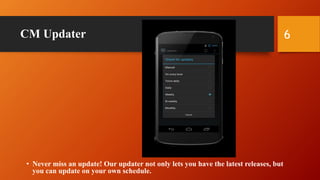
CM Updater
• Never miss an update! Our updater not only lets you have the latest releases, but
you can update on your own schedule.
6
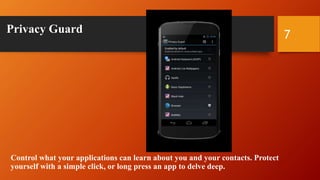
Privacy Guard
Control what your applications can learn about you and your contacts. Protect
yourself with a simple click, or long press an app to delve deep.
7
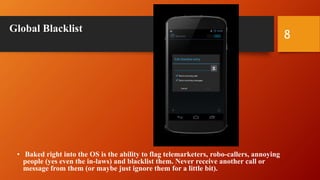
Global Blacklist
• Baked right into the OS is the ability to flag telemarketers, robo-callers, annoying
people (yes even the in-laws) and blacklist them. Never receive another call or
message from them (or maybe just ignore them for a little bit).
8
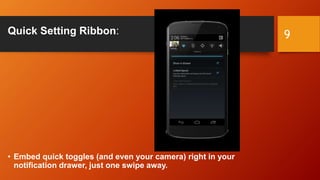
Quick Setting Ribbon:
• Embed quick toggles (and even your camera) right in your
notification drawer, just one swipe away.
9
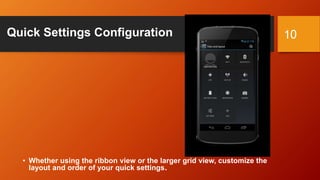
Quick Settings Configuration
• Whether using the ribbon view or the larger grid view, customize the
layout and order of your quick settings.
10
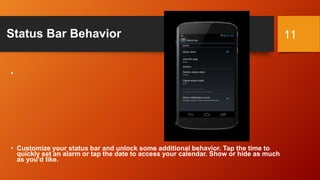
Status Bar Behavior
•
• Customize your status bar and unlock some additional behavior. Tap the time to
quickly set an alarm or tap the date to access your calendar. Show or hide as much
as you'd like.
11
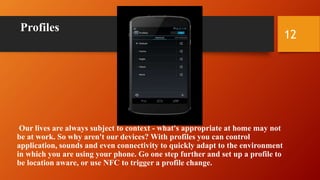
Profiles
Our lives are always subject to context - what's appropriate at home may not
be at work. So why aren't our devices? With profiles you can control
application, sounds and even connectivity to quickly adapt to the environment
in which you are using your phone. Go one step further and set up a profile to
be location aware, or use NFC to trigger a profile change.
12
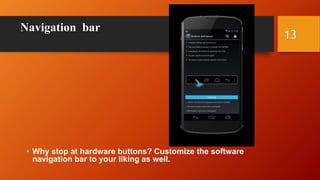
Navigation bar
• Why stop at hardware buttons? Customize the software
navigation bar to your liking as well.
13
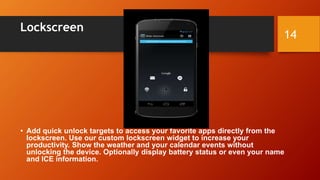
Lockscreen
• Add quick unlock targets to access your favorite apps directly from the
lockscreen. Use our custom lockscreen widget to increase your
productivity. Show the weather and your calendar events without
unlocking the device. Optionally display battery status or even your name
and ICE information.
14
Root Access
•
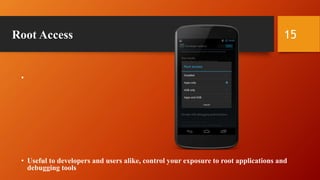
• Useful to developers and users alike, control your exposure to root applications and
debugging tools
15
Version of Cynogenmod
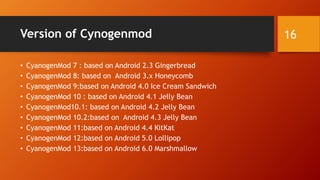
• CyanogenMod 7 : based on Android 2.3 Gingerbread
• CyanogenMod 8: based on Android 3.x Honeycomb
• CyanogenMod 9:based on Android 4.0 Ice Cream Sandwich
• CyanogenMod 10 : based on Android 4.1 Jelly Bean
• CyanogenMod10.1: based on Android 4.2 Jelly Bean
• CyanogenMod 10.2:based on Android 4.3 Jelly Bean
• CyanogenMod 11:based on Android 4.4 KitKat
• CyanogenMod 12:based on Android 5.0 Lollipop
• CyanogenMod 13:based on Android 6.0 Marshmallow
16
Advantages
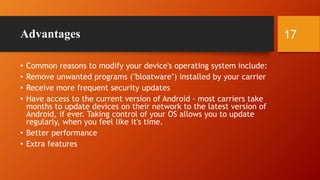
• Common reasons to modify your device's operating system include:
• Remove unwanted programs ("bloatware") installed by your carrier
• Receive more frequent security updates
• Have access to the current version of Android - most carriers take
months to update devices on their network to the latest version of
Android, if ever. Taking control of your OS allows you to update
regularly, when you feel like it's time.
• Better performance
• Extra features
17
Disadvantage
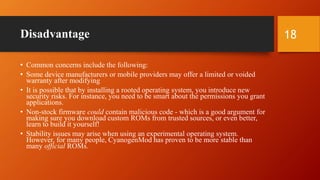
• Common concerns include the following:
• Some device manufacturers or mobile providers may offer a limited or voided
warranty after modifying
• It is possible that by installing a rooted operating system, you introduce new
security risks. For instance, you need to be smart about the permissions you grant
applications.
• Non-stock firmware could contain malicious code - which is a good argument for
making sure you download custom ROMs from trusted sources, or even better,
learn to build it yourself!
• Stability issues may arise when using an experimental operating system.
However, for many people, CyanogenMod has proven to be more stable than
many official ROMs.
18
Reference
• http://wiki.cyanogenmod.org/w/Why_Mod%3F
• http://www.cyanogenmod.org/
• https://web.archive.org/web/20161223020015.org
• https://www.cyanogenmod.org/blog/cm-13-0-release-znh5y.org
19
20
THANK YOU…
21

Working of Cyanogen mod

  • 1.
    ALLWIN THOMAS BCA, 2NDYEAR 16101003 1
  • 2.
    INTRODUCTION • It isan open source operating system for smartphones and tablets, based on the Android mobile platform. It is developed as free and open source software based on the official releases of Android by Google, with added original and third-party code. It is based on a rolling release development model. • It offers features and options not found in the official firmware distributed by vendors of these devices. 2
  • 3.
    CYNOGENMOD • Initially releasedin February 2011,for Android devices • It is programmed in C, C++, and java • It is derived from Android OS 3
  • 4.
    WHY CYNOGENMOD ?.. •Secure • Light footprint • Bloat-free • Customizable 4
  • 5.
    FEATURE LIST • CMUpdater • Privacy Guard • Global Blacklist • Quick Setting Ribbon • Quick Settings Configuration • Status Bar Behavior • Profiles • Navigation Bar • Lock screen • Root Access 5
  • 6.
    CM Updater • Nevermiss an update! Our updater not only lets you have the latest releases, but you can update on your own schedule. 6
  • 7.
    Privacy Guard Control whatyour applications can learn about you and your contacts. Protect yourself with a simple click, or long press an app to delve deep. 7
  • 8.
    Global Blacklist • Bakedright into the OS is the ability to flag telemarketers, robo-callers, annoying people (yes even the in-laws) and blacklist them. Never receive another call or message from them (or maybe just ignore them for a little bit). 8
  • 9.
    Quick Setting Ribbon: •Embed quick toggles (and even your camera) right in your notification drawer, just one swipe away. 9
  • 10.
    Quick Settings Configuration •Whether using the ribbon view or the larger grid view, customize the layout and order of your quick settings. 10
  • 11.
    Status Bar Behavior • •Customize your status bar and unlock some additional behavior. Tap the time to quickly set an alarm or tap the date to access your calendar. Show or hide as much as you'd like. 11
  • 12.
    Profiles Our lives arealways subject to context - what's appropriate at home may not be at work. So why aren't our devices? With profiles you can control application, sounds and even connectivity to quickly adapt to the environment in which you are using your phone. Go one step further and set up a profile to be location aware, or use NFC to trigger a profile change. 12
  • 13.
    Navigation bar • Whystop at hardware buttons? Customize the software navigation bar to your liking as well. 13
  • 14.
    Lockscreen • Add quickunlock targets to access your favorite apps directly from the lockscreen. Use our custom lockscreen widget to increase your productivity. Show the weather and your calendar events without unlocking the device. Optionally display battery status or even your name and ICE information. 14
  • 15.
    Root Access • • Usefulto developers and users alike, control your exposure to root applications and debugging tools 15
  • 16.
    Version of Cynogenmod •CyanogenMod 7 : based on Android 2.3 Gingerbread • CyanogenMod 8: based on Android 3.x Honeycomb • CyanogenMod 9:based on Android 4.0 Ice Cream Sandwich • CyanogenMod 10 : based on Android 4.1 Jelly Bean • CyanogenMod10.1: based on Android 4.2 Jelly Bean • CyanogenMod 10.2:based on Android 4.3 Jelly Bean • CyanogenMod 11:based on Android 4.4 KitKat • CyanogenMod 12:based on Android 5.0 Lollipop • CyanogenMod 13:based on Android 6.0 Marshmallow 16
  • 17.
    Advantages • Common reasonsto modify your device's operating system include: • Remove unwanted programs ("bloatware") installed by your carrier • Receive more frequent security updates • Have access to the current version of Android - most carriers take months to update devices on their network to the latest version of Android, if ever. Taking control of your OS allows you to update regularly, when you feel like it's time. • Better performance • Extra features 17
  • 18.
    Disadvantage • Common concernsinclude the following: • Some device manufacturers or mobile providers may offer a limited or voided warranty after modifying • It is possible that by installing a rooted operating system, you introduce new security risks. For instance, you need to be smart about the permissions you grant applications. • Non-stock firmware could contain malicious code - which is a good argument for making sure you download custom ROMs from trusted sources, or even better, learn to build it yourself! • Stability issues may arise when using an experimental operating system. However, for many people, CyanogenMod has proven to be more stable than many official ROMs. 18
  • 19.
    Reference • http://wiki.cyanogenmod.org/w/Why_Mod%3F • http://www.cyanogenmod.org/ •https://web.archive.org/web/20161223020015.org • https://www.cyanogenmod.org/blog/cm-13-0-release-znh5y.org 19
  • 20.
  • 21.