Submitted To:-
Balvindar Kaur
Submitted By :-
Aradhya Verma
Word
Processing
Word Processing?
• What is Word Processing
• Word Processing: Word Processing is the
use of computers to prepare documents.
– A word processor generally refers to a
WYSIWYG ("What You See Is What You Get")
system where the formatting takes place
while you enter your text; no further
processing is needed prior to sending
your work to a printer. Word and
WordPerfect and other similar personal
computer packages are examples of word
processors.
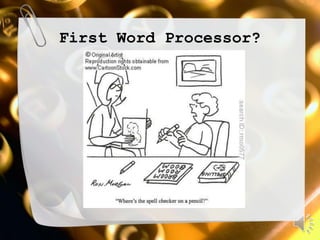
First Word Processor?
The first mechanical word
processor
• The typewriter
– The concept of a typewriter dates back at
least to 1714, when Englishman Henry Mill
filed a vaguely-worded patent for "an
artificial machine or method for the
impressing or transcribing of letters
singly or progressively one after another.“
– Numerous inventors in Europe and the U.S.
worked on typewriters in the 19th century,
but successful commercial production began
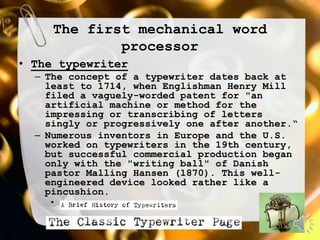
only with the "writing ball" of Danish
pastor Malling Hansen (1870). This well-
engineered device looked rather like a
pincushion.
•
Why the QWERTY?
• ...the Universal User Interface....
– The name "QWERTY" for our typewriter keyboard
comes from the first six letters in the top
alphabet row (the one just below the numbers).
It is also called the "Universal" keyboard for
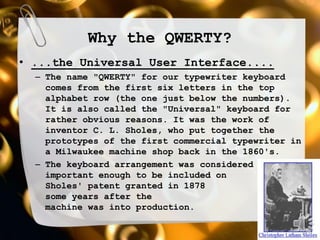
rather obvious reasons. It was the work of
inventor C. L. Sholes, who put together the
prototypes of the first commercial typewriter in
a Milwaukee machine shop back in the 1860's.
– The keyboard arrangement was considered
important enough to be included on
Sholes' patent granted in 1878
some years after the
machine was into production.
But when were they called
word processors?
• Term coined by IBM
– The term word processing
was invented by IBM in the late
1960s. By 1971 it was recognized by
the New York Times as a "buzz word".
A 1971 Times article referred to
"the brave new world of Word
Processing or W/P. That's
International Business Machines
talk... I.B.M. introduced W/P about
five years ago for its Magnetic
Selectric typewriter and other
electronic razzle-dazzle.“
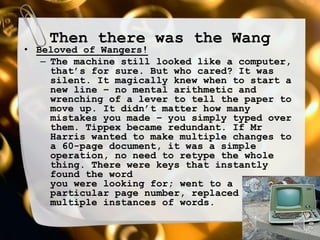
Then there was the Wang
• Beloved of Wangers!
– The machine still looked like a computer,
that’s for sure. But who cared? It was
silent. It magically knew when to start a
new line – no mental arithmetic and
wrenching of a lever to tell the paper to
move up. It didn’t matter how many
mistakes you made – you simply typed over
them. Tippex became redundant. If Mr
Harris wanted to make multiple changes to
a 60-page document, it was a simple
operation, no need to retype the whole
thing. There were keys that instantly
found the word
you were looking for; went to a
particular page number, replaced
multiple instances of words.
an early PC Word Processor:
No Mouse!
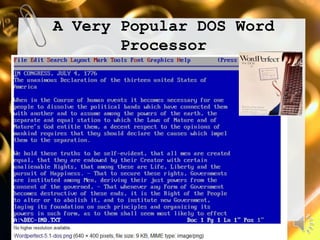
A Very Popular DOS Word
Processor
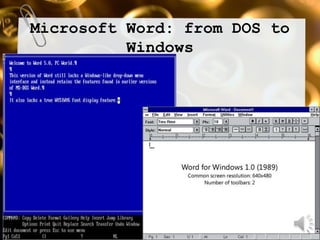
Microsoft Word: from DOS to
Windows
The evolution of Word 2002-2010
Word XP
Word
2003
Word
2007
Word
2010
New features in Word 2007
• The Microsoft Office Button
• The Quick Access Toolbar
Customizable
• The Ribbon
New features in Word 2010
• No button!
– In most of the Microsoft Office 2010
programs the Office Button (which was
only introduced in Office 2007), has
been replaced with a File menu. This is
not the same as the File menu in Office
2003. This new File Menu leads in to
the Microsoft Office Backstage™ view
which not only shows the popular
functions of Open, Save, Save As, Print
etc… but also the recently view files
section has been enhanced to include a
recent locations too.
Changes in File Extensions
• From .doc to .docx
– The standard file extension for Microsoft Word
2003 is .doc. When Microsoft launched Office
2007, users found that documents produced in
Word would by default save with a new extension
known as .docx. Documents can still be saved in
the previous version format of .doc by clicking
“Word 97-2003 Document” from the Save As menu.
Whilst the change did not pose considerable
harm to documents, if users were sending their
work electronically, they had to anticipate
whether the recipient was able to open it in
the new format.
A free alternative to Word
• Open Office
Word processing in the clouds
• What Is 'Cloud Computing'?
– "Cloud Computing" is a somewhat
nebulous word to describe users
"renting" or borrowing online software
instead of actually purchasing and
installing it on their own computers.
– All of the processing work and file
saving will be done "in the cloud" of
the Internet, and the users will plug
into that cloud every day to do their
computer work.
The Google “Cloud”
• Google docs
http://docs.google.com
Word processing

Word processing

  • 2.
  • 3.
  • 4.
    Word Processing? • Whatis Word Processing • Word Processing: Word Processing is the use of computers to prepare documents. – A word processor generally refers to a WYSIWYG ("What You See Is What You Get") system where the formatting takes place while you enter your text; no further processing is needed prior to sending your work to a printer. Word and WordPerfect and other similar personal computer packages are examples of word processors.
  • 5.
  • 6.
    The first mechanicalword processor • The typewriter – The concept of a typewriter dates back at least to 1714, when Englishman Henry Mill filed a vaguely-worded patent for "an artificial machine or method for the impressing or transcribing of letters singly or progressively one after another.“ – Numerous inventors in Europe and the U.S. worked on typewriters in the 19th century, but successful commercial production began only with the "writing ball" of Danish pastor Malling Hansen (1870). This well- engineered device looked rather like a pincushion. •
  • 7.
    Why the QWERTY? •...the Universal User Interface.... – The name "QWERTY" for our typewriter keyboard comes from the first six letters in the top alphabet row (the one just below the numbers). It is also called the "Universal" keyboard for rather obvious reasons. It was the work of inventor C. L. Sholes, who put together the prototypes of the first commercial typewriter in a Milwaukee machine shop back in the 1860's. – The keyboard arrangement was considered important enough to be included on Sholes' patent granted in 1878 some years after the machine was into production.
  • 8.
    But when werethey called word processors? • Term coined by IBM – The term word processing was invented by IBM in the late 1960s. By 1971 it was recognized by the New York Times as a "buzz word". A 1971 Times article referred to "the brave new world of Word Processing or W/P. That's International Business Machines talk... I.B.M. introduced W/P about five years ago for its Magnetic Selectric typewriter and other electronic razzle-dazzle.“
  • 9.
    Then there wasthe Wang • Beloved of Wangers! – The machine still looked like a computer, that’s for sure. But who cared? It was silent. It magically knew when to start a new line – no mental arithmetic and wrenching of a lever to tell the paper to move up. It didn’t matter how many mistakes you made – you simply typed over them. Tippex became redundant. If Mr Harris wanted to make multiple changes to a 60-page document, it was a simple operation, no need to retype the whole thing. There were keys that instantly found the word you were looking for; went to a particular page number, replaced multiple instances of words.
  • 10.
    an early PCWord Processor: No Mouse!
  • 11.
    A Very PopularDOS Word Processor
  • 12.
    Microsoft Word: fromDOS to Windows
  • 13.
    The evolution ofWord 2002-2010 Word XP Word 2003 Word 2007 Word 2010
  • 14.
    New features inWord 2007 • The Microsoft Office Button • The Quick Access Toolbar Customizable • The Ribbon
  • 15.
    New features inWord 2010 • No button! – In most of the Microsoft Office 2010 programs the Office Button (which was only introduced in Office 2007), has been replaced with a File menu. This is not the same as the File menu in Office 2003. This new File Menu leads in to the Microsoft Office Backstage™ view which not only shows the popular functions of Open, Save, Save As, Print etc… but also the recently view files section has been enhanced to include a recent locations too.
  • 16.
    Changes in FileExtensions • From .doc to .docx – The standard file extension for Microsoft Word 2003 is .doc. When Microsoft launched Office 2007, users found that documents produced in Word would by default save with a new extension known as .docx. Documents can still be saved in the previous version format of .doc by clicking “Word 97-2003 Document” from the Save As menu. Whilst the change did not pose considerable harm to documents, if users were sending their work electronically, they had to anticipate whether the recipient was able to open it in the new format.
  • 17.
    A free alternativeto Word • Open Office
  • 18.
    Word processing inthe clouds • What Is 'Cloud Computing'? – "Cloud Computing" is a somewhat nebulous word to describe users "renting" or borrowing online software instead of actually purchasing and installing it on their own computers. – All of the processing work and file saving will be done "in the cloud" of the Internet, and the users will plug into that cloud every day to do their computer work.
  • 19.
    The Google “Cloud” •Google docs http://docs.google.com