SDL Proprietary and ConfidentialSDL Proprietary and Confidential
What it Takes to Model
a Wiring Solution
Technical Track – Technical Perspective for How S1000D Applies to Supply
Chain/Component Suppliers
Remember this?
2
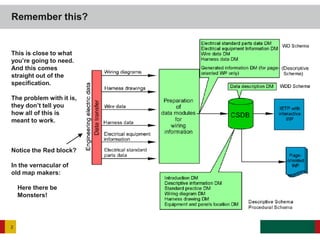
This is close to what
you’re going to need.
And this comes
straight out of the
specification.
The problem with it is,
they don’t tell you
how all of this is
meant to work.
Notice the Red block?
In the vernacular of
old map makers:
Here there be
Monsters!
• Most businesses have custom internal methods or custom software
solutions for documenting the wiring for their products
• Wiring information is usually entered or managed by engineers not
technical writers
• Wiring information is generally in a continuous state of flux
• Wiring data may be unique for specific customers
• What you need to track or manage may not be what your customers need
• Creating consumable schematics for paper is commonly a chore (difficult
to fit onto a single page)
• Electronic solutions tend to not be in charted waters (realm of monsters)
• Usable electronic solutions tend to be top heavy or non-portable (may not
fit into an IETP)
Almost All Wiring Solutions are Custom, and this is Why
3
• One of the common issues first time navigators of the specification
encounter is, wiring data starts to look a lot like part data
• Wiring data IS part data, examples:
– Harnesses/Bundles – have part numbers
– Connectors have part numbers
– Clips to connect harnesses/wires/connectors to mounting/routing points are
parts
• Wiring tends to span ZONES of a product (This is really important! – You
don’t want to be eaten by the dreaded zone monster.)
• Wiring harnesses generally have spare wires (are you carrying a spare
fuselage with you all the time?)
• Wiring in some products can be very difficult to replace or are an integral
part of a larger assembly – requiring both the wiring and the assembly to
be replaced as a single unit
• Wiring can be very difficult to test
Wiring and Part Data – What are the Differences?
4
• If you’re documenting a very small product – it’s possible
• If you’re documenting something with more than 50 wires in it, you might not
be able to manage the complexities of the configuration (50 wires, multiple
connectors, multiple attach points, multiple pins in each connector, wire
types, wire characteristics, colors, length, shielding, sheaths, etc)
• Authoring by hand implies you have no electronic schematic software or any
engineering CAD/CAM systems with data you can exploit
• For the vast majority of products on the market that require the horsepower
of S1000D, the answer is – No – you probably can’t effectively hand author
the wiring data modules that use the wrngdata.xsd schema.
• You are expected to hand author the descriptive data modules. However, it
is possible to auto-generate many of the descriptive data modules for a
system so a skeleton file with some of the information a technical writer will
need is present when they go to author content. For example, almost all
“diagram” related data modules must have a <figure> and <graphic>
reference. You might as well boilerplate those into a wiring data module
template for 051, 052, 054, and 055 information codes.
Can you Really Author by Hand?
5
• If you do have an engineering system with the wiring data stored in it, you
can use it as a source for the majority of your wrngdata.xsd based data
modules.
• Here there be Monsters! - Many of the schematic creation software
programs allow you to export the content of a schematic to another data
format. From that, you might be able to create a convertor to export the
data into an S1000D wrngdata.xsd format.
• The truth is, if you can’t convert the data from your engineering software,
you’re probably not going to be able to effectively and efficiently create a
wiring data manual.
Data Re-use – Potential Export or Import Sources
6
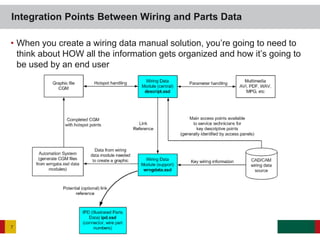
• When you create a wiring data manual solution, you’re going to need to
think about HOW all the information gets organized and how it’s going to
be used by an end user
Integration Points Between Wiring and Parts Data
7
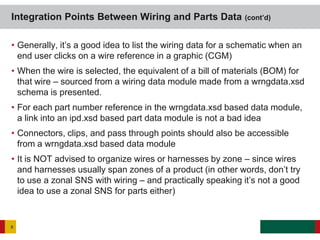
• Generally, it’s a good idea to list the wiring data for a schematic when an
end user clicks on a wire reference in a graphic (CGM)
• When the wire is selected, the equivalent of a bill of materials (BOM) for
that wire – sourced from a wiring data module made from a wrngdata.xsd
schema is presented.
• For each part number reference in the wrngdata.xsd based data module,
a link into an ipd.xsd based part data module is not a bad idea
• Connectors, clips, and pass through points should also be accessible
from a wrngdata.xsd based data module
• It is NOT advised to organize wires or harnesses by zone – since wires
and harnesses usually span zones of a product (in other words, don’t try
to use a zonal SNS with wiring – and practically speaking it’s not a good
idea to use a zonal SNS for parts either)
Integration Points Between Wiring and Parts Data (cont’d)
8
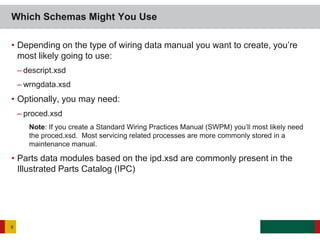
• Depending on the type of wiring data manual you want to create, you’re
most likely going to use:
– descript.xsd
– wrngdata.xsd
• Optionally, you may need:
– proced.xsd
Note: If you create a Standard Wiring Practices Manual (SWPM) you’ll most likely need
the proced.xsd. Most servicing related processes are more commonly stored in a
maintenance manual.
• Parts data modules based on the ipd.xsd are commonly present in the
Illustrated Parts Catalog (IPC)
Which Schemas Might You Use
9
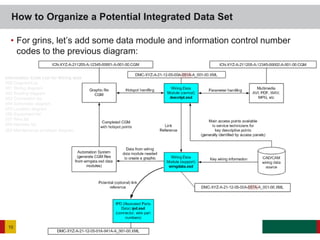
• For grins, let’s add some data module and information control number
codes to the previous diagram:
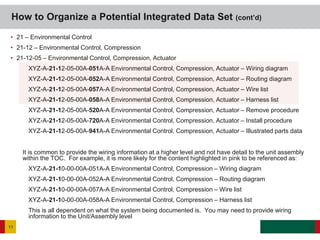
How to Organize a Potential Integrated Data Set
10
Information Code List for Wiring data
050 Diagram/List
051 Wiring diagram
052 Routing diagram
053 Connection list
054 Schematic diagram
055 Location diagram
056 Equipment list
057 Wire list
058 Harness list
059 Maintenance envelope diagram
• 21 – Environmental Control
• 21-12 – Environmental Control, Compression
• 21-12-05 – Environmental Control, Compression, Actuator
XYZ-A-21-12-05-00A-051A-A Environmental Control, Compression, Actuator – Wiring diagram
XYZ-A-21-12-05-00A-052A-A Environmental Control, Compression, Actuator – Routing diagram
XYZ-A-21-12-05-00A-057A-A Environmental Control, Compression, Actuator – Wire list
XYZ-A-21-12-05-00A-058A-A Environmental Control, Compression, Actuator – Harness list
XYZ-A-21-12-05-00A-520A-A Environmental Control, Compression, Actuator – Remove procedure
XYZ-A-21-12-05-00A-720A-A Environmental Control, Compression, Actuator – Install procedure
XYZ-A-21-12-05-00A-941A-A Environmental Control, Compression, Actuator – Illustrated parts data
It is common to provide the wiring information at a higher level and not have detail to the unit assembly
within the TOC. For example, it is more likely for the content highlighted in pink to be referenced as:
XYZ-A-21-10-00-00A-051A-A Environmental Control, Compression – Wiring diagram
XYZ-A-21-10-00-00A-052A-A Environmental Control, Compression – Routing diagram
XYZ-A-21-10-00-00A-057A-A Environmental Control, Compression – Wire list
XYZ-A-21-10-00-00A-058A-A Environmental Control, Compression – Harness list
This is all dependent on what the system being documented is. You may need to provide wiring
information to the Unit/Assembly level
How to Organize a Potential Integrated Data Set (cont’d)
11
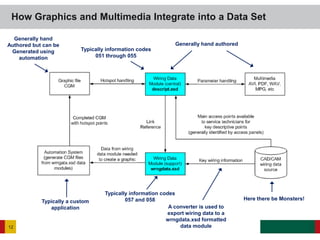
How Graphics and Multimedia Integrate into a Data Set
12
Here there be Monsters!
Generally hand authored
A converter is used to
export wiring data to a
wrngdata.xsd formatted
data module
Typically a custom
application
Typically information codes
057 and 058
Typically information codes
051 through 055
Generally hand
Authored but can be
Generated using
automation
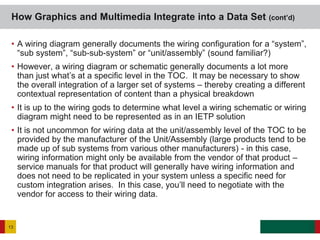
• A wiring diagram generally documents the wiring configuration for a “system”,
“sub system”, “sub-sub-system” or “unit/assembly” (sound familiar?)
• However, a wiring diagram or schematic generally documents a lot more
than just what’s at a specific level in the TOC. It may be necessary to show
the overall integration of a larger set of systems – thereby creating a different
contextual representation of content than a physical breakdown
• It is up to the wiring gods to determine what level a wiring schematic or wiring
diagram might need to be represented as in an IETP solution
• It is not uncommon for wiring data at the unit/assembly level of the TOC to be
provided by the manufacturer of the Unit/Assembly (large products tend to be
made up of sub systems from various other manufacturers) - in this case,
wiring information might only be available from the vendor of that product –
service manuals for that product will generally have wiring information and
does not need to be replicated in your system unless a specific need for
custom integration arises. In this case, you’ll need to negotiate with the
vendor for access to their wiring data.
How Graphics and Multimedia Integrate into a Data Set (cont’d)
13
• If you’re going to create a custom digital wiring solution for your
customers, take into account the following issues:
– Can it fit into an IETP or does it need to be a separate application?
– If it’s a separate application, is it accessible from the IETP?
– Is the IETP accessible from the custom digital application?
– Can you link to part data?
– Does your customer have custom configurations of your product requiring the
use of applicability?
– Does your solution solve a customer’s problem?
– Does the solution make it easier or faster for your customer to do work?
– Can your solution survive an audit?
– Will your solution use non-standard drivers or software requiring licenses (may
be a problem for military based solutions)
Analysis of Your Customer’s Needs
14
• In the overall scheme of solution options, there are areas where life can get complex very
quickly. Of all the areas you should be concerned about, the following four are important:
• Zones
– Use of zonal SNS WILL create havoc (talk about monsters! This can be very hard to recover from if you
do not understand the implications a zonal SNS will create for configurations of your project data and
subsequent recycling of content)
• LSAR
– Logistical Support Analysis – a realm of parts meets procedural data modules. Because wiring is also
a closely tied type of part, LSAR data may affect the procedural data modules you create. Links from
procedural data modules to wiring data modules may need to be closely monitored if an LSAR system
is used to update part/wiring data.
• Multimedia
– Due to the complexity of multimedia solutions, a change in the configuration of a product generally
invalidates the data in multimedia solutions. In some cases, generic instances of wiring data when
present in multimedia solutions may be necessary since it may be almost impossible for the creators of
multimedia data to keep up with changes.
• Dynamic Wiring Solutions
– If used, generally, this is the most effective way of keeping up with the engineering/configuration
changes of a product – when driven from the source CAD/CAM engineering data. However, this tends
to be a costly method and can increase overall costs of an automated wiring data solution. Long term
though, this may be the best approach since it can be managed through automation.
Where Angels Fear to Tread
15
• A coherent solution can take many forms – this is just a generic view
Pulling it Together to Make a Coherent Solution You Can
Publish
16
• You’ll need to identify the hierarchy of how the various wiring data modules call into each
other. Here’s an example. If you want to have the harness list be the master list of all wires
(for the equivalent of a work breakdown structure (physical)) you could use something like
what is depicted here. This example is just to give you an idea of what is possible.
• In many cases, service techs can only get at the wiring data through a procedural data
module simply because it is expected they would have no need to navigate the wiring data
in an ad-hoc manner. But that’s up to you. There is no rule governing how you should
reveal wiring data. Do what makes sense for your project.
Pulling it Together to Make a Coherent Solution You Can
Publish (cont’d)
17
• Providing you keep track of where all the wiring information came from,
part data, and connectors, you should be able to identify the necessary
information for ordering parts.
• If forethought is put into the design effort of your IETP solution,
information needed by a technician or engineer can be copied from the
source data for use in an ordering system. Therefore, supplier
information should be available (when possible) as part of a wrngdata.xsd
data module – or if a link is available to an ipd.xsd data module, the
supplier information and part information should be available too.
• Depending on the solution, if your customer has specific ordering needs,
it might not be a bad idea to provide the equivalent of a generic order
form so an end user can print out a part order form, or submit the order
form to a procurement agent.
Integrating a Solution into the Supply Chain
18
Copyright © 2008-2012 SDL plc. All rights reserved.. All company names, brand names, trademarks,
service marks, images and logos are the property of their respective owners.
This presentation and its content are SDL confidential unless otherwise specified, and may not be
copied, used or distributed except as authorised by SDL.

What_it_Takes_to_Model_a_Wiring_Solution

  • 1.
    SDL Proprietary andConfidentialSDL Proprietary and Confidential What it Takes to Model a Wiring Solution Technical Track – Technical Perspective for How S1000D Applies to Supply Chain/Component Suppliers
  • 2.
    Remember this? 2 This isclose to what you’re going to need. And this comes straight out of the specification. The problem with it is, they don’t tell you how all of this is meant to work. Notice the Red block? In the vernacular of old map makers: Here there be Monsters!
  • 3.
    • Most businesseshave custom internal methods or custom software solutions for documenting the wiring for their products • Wiring information is usually entered or managed by engineers not technical writers • Wiring information is generally in a continuous state of flux • Wiring data may be unique for specific customers • What you need to track or manage may not be what your customers need • Creating consumable schematics for paper is commonly a chore (difficult to fit onto a single page) • Electronic solutions tend to not be in charted waters (realm of monsters) • Usable electronic solutions tend to be top heavy or non-portable (may not fit into an IETP) Almost All Wiring Solutions are Custom, and this is Why 3
  • 4.
    • One ofthe common issues first time navigators of the specification encounter is, wiring data starts to look a lot like part data • Wiring data IS part data, examples: – Harnesses/Bundles – have part numbers – Connectors have part numbers – Clips to connect harnesses/wires/connectors to mounting/routing points are parts • Wiring tends to span ZONES of a product (This is really important! – You don’t want to be eaten by the dreaded zone monster.) • Wiring harnesses generally have spare wires (are you carrying a spare fuselage with you all the time?) • Wiring in some products can be very difficult to replace or are an integral part of a larger assembly – requiring both the wiring and the assembly to be replaced as a single unit • Wiring can be very difficult to test Wiring and Part Data – What are the Differences? 4
  • 5.
    • If you’redocumenting a very small product – it’s possible • If you’re documenting something with more than 50 wires in it, you might not be able to manage the complexities of the configuration (50 wires, multiple connectors, multiple attach points, multiple pins in each connector, wire types, wire characteristics, colors, length, shielding, sheaths, etc) • Authoring by hand implies you have no electronic schematic software or any engineering CAD/CAM systems with data you can exploit • For the vast majority of products on the market that require the horsepower of S1000D, the answer is – No – you probably can’t effectively hand author the wiring data modules that use the wrngdata.xsd schema. • You are expected to hand author the descriptive data modules. However, it is possible to auto-generate many of the descriptive data modules for a system so a skeleton file with some of the information a technical writer will need is present when they go to author content. For example, almost all “diagram” related data modules must have a <figure> and <graphic> reference. You might as well boilerplate those into a wiring data module template for 051, 052, 054, and 055 information codes. Can you Really Author by Hand? 5
  • 6.
    • If youdo have an engineering system with the wiring data stored in it, you can use it as a source for the majority of your wrngdata.xsd based data modules. • Here there be Monsters! - Many of the schematic creation software programs allow you to export the content of a schematic to another data format. From that, you might be able to create a convertor to export the data into an S1000D wrngdata.xsd format. • The truth is, if you can’t convert the data from your engineering software, you’re probably not going to be able to effectively and efficiently create a wiring data manual. Data Re-use – Potential Export or Import Sources 6
  • 7.
    • When youcreate a wiring data manual solution, you’re going to need to think about HOW all the information gets organized and how it’s going to be used by an end user Integration Points Between Wiring and Parts Data 7
  • 8.
    • Generally, it’sa good idea to list the wiring data for a schematic when an end user clicks on a wire reference in a graphic (CGM) • When the wire is selected, the equivalent of a bill of materials (BOM) for that wire – sourced from a wiring data module made from a wrngdata.xsd schema is presented. • For each part number reference in the wrngdata.xsd based data module, a link into an ipd.xsd based part data module is not a bad idea • Connectors, clips, and pass through points should also be accessible from a wrngdata.xsd based data module • It is NOT advised to organize wires or harnesses by zone – since wires and harnesses usually span zones of a product (in other words, don’t try to use a zonal SNS with wiring – and practically speaking it’s not a good idea to use a zonal SNS for parts either) Integration Points Between Wiring and Parts Data (cont’d) 8
  • 9.
    • Depending onthe type of wiring data manual you want to create, you’re most likely going to use: – descript.xsd – wrngdata.xsd • Optionally, you may need: – proced.xsd Note: If you create a Standard Wiring Practices Manual (SWPM) you’ll most likely need the proced.xsd. Most servicing related processes are more commonly stored in a maintenance manual. • Parts data modules based on the ipd.xsd are commonly present in the Illustrated Parts Catalog (IPC) Which Schemas Might You Use 9
  • 10.
    • For grins,let’s add some data module and information control number codes to the previous diagram: How to Organize a Potential Integrated Data Set 10 Information Code List for Wiring data 050 Diagram/List 051 Wiring diagram 052 Routing diagram 053 Connection list 054 Schematic diagram 055 Location diagram 056 Equipment list 057 Wire list 058 Harness list 059 Maintenance envelope diagram
  • 11.
    • 21 –Environmental Control • 21-12 – Environmental Control, Compression • 21-12-05 – Environmental Control, Compression, Actuator XYZ-A-21-12-05-00A-051A-A Environmental Control, Compression, Actuator – Wiring diagram XYZ-A-21-12-05-00A-052A-A Environmental Control, Compression, Actuator – Routing diagram XYZ-A-21-12-05-00A-057A-A Environmental Control, Compression, Actuator – Wire list XYZ-A-21-12-05-00A-058A-A Environmental Control, Compression, Actuator – Harness list XYZ-A-21-12-05-00A-520A-A Environmental Control, Compression, Actuator – Remove procedure XYZ-A-21-12-05-00A-720A-A Environmental Control, Compression, Actuator – Install procedure XYZ-A-21-12-05-00A-941A-A Environmental Control, Compression, Actuator – Illustrated parts data It is common to provide the wiring information at a higher level and not have detail to the unit assembly within the TOC. For example, it is more likely for the content highlighted in pink to be referenced as: XYZ-A-21-10-00-00A-051A-A Environmental Control, Compression – Wiring diagram XYZ-A-21-10-00-00A-052A-A Environmental Control, Compression – Routing diagram XYZ-A-21-10-00-00A-057A-A Environmental Control, Compression – Wire list XYZ-A-21-10-00-00A-058A-A Environmental Control, Compression – Harness list This is all dependent on what the system being documented is. You may need to provide wiring information to the Unit/Assembly level How to Organize a Potential Integrated Data Set (cont’d) 11
  • 12.
    How Graphics andMultimedia Integrate into a Data Set 12 Here there be Monsters! Generally hand authored A converter is used to export wiring data to a wrngdata.xsd formatted data module Typically a custom application Typically information codes 057 and 058 Typically information codes 051 through 055 Generally hand Authored but can be Generated using automation
  • 13.
    • A wiringdiagram generally documents the wiring configuration for a “system”, “sub system”, “sub-sub-system” or “unit/assembly” (sound familiar?) • However, a wiring diagram or schematic generally documents a lot more than just what’s at a specific level in the TOC. It may be necessary to show the overall integration of a larger set of systems – thereby creating a different contextual representation of content than a physical breakdown • It is up to the wiring gods to determine what level a wiring schematic or wiring diagram might need to be represented as in an IETP solution • It is not uncommon for wiring data at the unit/assembly level of the TOC to be provided by the manufacturer of the Unit/Assembly (large products tend to be made up of sub systems from various other manufacturers) - in this case, wiring information might only be available from the vendor of that product – service manuals for that product will generally have wiring information and does not need to be replicated in your system unless a specific need for custom integration arises. In this case, you’ll need to negotiate with the vendor for access to their wiring data. How Graphics and Multimedia Integrate into a Data Set (cont’d) 13
  • 14.
    • If you’regoing to create a custom digital wiring solution for your customers, take into account the following issues: – Can it fit into an IETP or does it need to be a separate application? – If it’s a separate application, is it accessible from the IETP? – Is the IETP accessible from the custom digital application? – Can you link to part data? – Does your customer have custom configurations of your product requiring the use of applicability? – Does your solution solve a customer’s problem? – Does the solution make it easier or faster for your customer to do work? – Can your solution survive an audit? – Will your solution use non-standard drivers or software requiring licenses (may be a problem for military based solutions) Analysis of Your Customer’s Needs 14
  • 15.
    • In theoverall scheme of solution options, there are areas where life can get complex very quickly. Of all the areas you should be concerned about, the following four are important: • Zones – Use of zonal SNS WILL create havoc (talk about monsters! This can be very hard to recover from if you do not understand the implications a zonal SNS will create for configurations of your project data and subsequent recycling of content) • LSAR – Logistical Support Analysis – a realm of parts meets procedural data modules. Because wiring is also a closely tied type of part, LSAR data may affect the procedural data modules you create. Links from procedural data modules to wiring data modules may need to be closely monitored if an LSAR system is used to update part/wiring data. • Multimedia – Due to the complexity of multimedia solutions, a change in the configuration of a product generally invalidates the data in multimedia solutions. In some cases, generic instances of wiring data when present in multimedia solutions may be necessary since it may be almost impossible for the creators of multimedia data to keep up with changes. • Dynamic Wiring Solutions – If used, generally, this is the most effective way of keeping up with the engineering/configuration changes of a product – when driven from the source CAD/CAM engineering data. However, this tends to be a costly method and can increase overall costs of an automated wiring data solution. Long term though, this may be the best approach since it can be managed through automation. Where Angels Fear to Tread 15
  • 16.
    • A coherentsolution can take many forms – this is just a generic view Pulling it Together to Make a Coherent Solution You Can Publish 16
  • 17.
    • You’ll needto identify the hierarchy of how the various wiring data modules call into each other. Here’s an example. If you want to have the harness list be the master list of all wires (for the equivalent of a work breakdown structure (physical)) you could use something like what is depicted here. This example is just to give you an idea of what is possible. • In many cases, service techs can only get at the wiring data through a procedural data module simply because it is expected they would have no need to navigate the wiring data in an ad-hoc manner. But that’s up to you. There is no rule governing how you should reveal wiring data. Do what makes sense for your project. Pulling it Together to Make a Coherent Solution You Can Publish (cont’d) 17
  • 18.
    • Providing youkeep track of where all the wiring information came from, part data, and connectors, you should be able to identify the necessary information for ordering parts. • If forethought is put into the design effort of your IETP solution, information needed by a technician or engineer can be copied from the source data for use in an ordering system. Therefore, supplier information should be available (when possible) as part of a wrngdata.xsd data module – or if a link is available to an ipd.xsd data module, the supplier information and part information should be available too. • Depending on the solution, if your customer has specific ordering needs, it might not be a bad idea to provide the equivalent of a generic order form so an end user can print out a part order form, or submit the order form to a procurement agent. Integrating a Solution into the Supply Chain 18
  • 19.
    Copyright © 2008-2012SDL plc. All rights reserved.. All company names, brand names, trademarks, service marks, images and logos are the property of their respective owners. This presentation and its content are SDL confidential unless otherwise specified, and may not be copied, used or distributed except as authorised by SDL.