




WHAT IS A ROBOT CLASS?
IMPORTANCE OF ROBOT CLASS
DIFFERENT METHODS UNDER ROBOT CLASS
ADVANTAGES AND DISADVANTAGES
www.edureka.co/testing-with-selenium-webdriver
HOW TO IMPLEMENT A ROBOT CLASS
www.edureka.co/testing-with-selenium-webdriver
The purpose of Robot class is to facilitate automated testing of Java platform implementations. In simple terms, this
class provides control over the mouse and keyboard devices.
www.edureka.co/testing-with-selenium-webdriver
IMPORTANCE OF
ROBOT CLASS
Uploading the file Handles the pop-ups
Handles mouse and keyboard functions
www.edureka.co/testing-with-selenium-webdriver
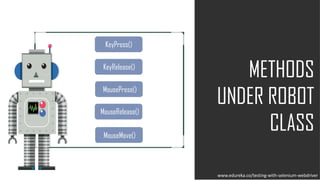
METHODS
UNDER ROBOT
CLASS
KeyRelease()
KeyPress()
MouseMove()
MousePress()
MouseRelease()
www.edureka.co/testing-with-selenium-webdriver
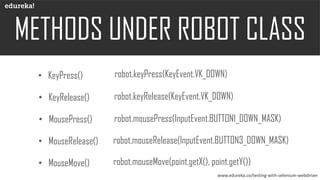
• KeyPress() robot.keyPress(KeyEvent.VK_DOWN)
• KeyRelease() robot.keyRelease(KeyEvent.VK_DOWN)
• MousePress() robot.mousePress(InputEvent.BUTTON1_DOWN_MASK)
• MouseRelease() robot.mouseRelease(InputEvent.BUTTON3_DOWN_MASK)
• MouseMove() robot.mouseMove(point.getX(), point.getY())
www.edureka.co/testing-with-selenium-webdriver
Mouse or keyboard event will only work on the current instance of the window
It is difficult to switch among different frames or window
MouseMove() depends on the screen resolution
www.edureka.co/testing-with-selenium-webdriver

What is Robot Class in Selenium WebDriver? Edureka