What I learned about
Firebase Analytics
By Nick Guebhard, 23 November 2016
Ground work
Find a willing client Client: “I want to track my
App. Can you do the GA?”
Nick: “Yes, but Google have
released this new thing called
Firefly or something.”
Client: “Great. Our developers
love new shinies.”
Nick: “But I haven’t done it
before”.
Client: “Grow some huevos,
Nick!”.
Firebase Analytics vs. Google Analytics
500 Events Unlimited Events and unlimited
Screen views
25 parameters per event
25 user properties
20 custom dimensions (user,
session, hit, product) +
Enhanced Ecom dimensions
1 “value” parameter per event
(i.e. 500 custom metrics)
Many pageview, event, social,
ecom metrics (+ 20 custom
metrics)
Audiences + user level filters Report filters, Segments
BigQuery export No BigQuery (free version)
GTM compatible GTM compatible
No API API
Just very
close
platonic
friends
Events
★ Up to 500 events (event names)
★ 32 character limit for event names
★ Automatically collected events -
○ first_open, in_app_purchase, etc.
★ Predefined events
○ General - select_content, search, etc.
○ Retail/Ecommerce - view_item,
add_to_cart, etc.
○ Lead gen - generate_lead, view_item
○ Games - Level_up, post_score, etc
★ Custom events
○ click_to_call, customer_service_submit
○ bank_robbery, train_robbery, poker_game,
gun_fight, hanging
Parameters
★ Up to 25 parameters per event
★ 40 character limit for parameter names, 100 for parameter values
★ Some automatically collected events have associated automatic params
★ Predefined parameters
○ view_item - item_id
○ add_to_cart - quantity, item_id, item_category
○ generate_lead - value, currency
○ level_up - level
★ Custom parameters
○ click_to_call - 0800_number, click_to_call_screen
○ edit_photo_save - filter_style, horizon_adjustment, crop_dimensions
User properties
★ Automatically collected
○ Age, Gender, Interests
○ Device category, brand and model (+ID)
○ Country, language
○ Operating system version
○ App version, App store
○ First open time, new/established
★ Custom (up to 25)
○ Login ID
○ Purchase history
○ User type
Scoping
Get to know everything about the app
Tracking spec
Event Name Parameter 1 Parameter 2 Parameter 3 Parameter 4 Parameter 5
item_view item_id item_name item_size item_colour item_category
<when prod is
viewed>
{{product sku}} {{prod name}} {{prod size}} {{prod colour}} {{prod category}
SD1234 10 Gallon hat Big White Hats
Bigger Black
Ridiculous Brown
add_to_wishlist item_id item_name item_size item_colour item_category
<product save> (as above)
Build
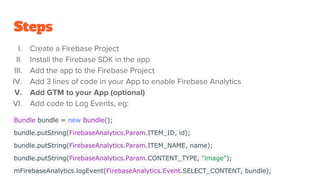
Steps
I. Create a Firebase Project
II. Install the Firebase SDK in the app
III. Add the app to the Firebase Project
IV. Add 3 lines of code in your App to enable Firebase Analytics
V. Add GTM to your App (optional)
VI. Add code to Log Events, eg:
Bundle bundle = new Bundle();
bundle.putString(FirebaseAnalytics.Param.ITEM_ID, id);
bundle.putString(FirebaseAnalytics.Param.ITEM_NAME, name);
bundle.putString(FirebaseAnalytics.Param.CONTENT_TYPE, "image");
mFirebaseAnalytics.logEvent(FirebaseAnalytics.Event.SELECT_CONTENT, bundle);
Quality
Assurance
Testing (Android Debug Bridge)
1. Install Android Debug Bridge (ADB) from Android SDK
2. Add test app to your phone/emulator
3. Connect phone/emulator to ADB
4. Run command line/terminal commands to filter to Firebase Analytics data in log
data:
adb shell setprop log.tag.FA VERBOSE
adb shell setprop log.tag.FA-SVC VERBOSE
adb logcat -v time -s FA FA-SVC
(For iOS use Xcode Debug Console)
Note results of QA
Event Name Parameter 1 Parameter 2 Parameter
3
Parameter
4
Parameter
5
P item_view item_id item_name item_size item_colour item_catego
ry
<when prod is
viewed>
{{product
sku}}
{{prod name}} {{prod
size}}
{{prod
colour}}
{{prod
category}
SD1234 10 Gallon hat Big White Hats
Bigger Black
Ridiculous Brown
F add_to_wishlist item_id item_name item_size item_colour item_catego
ry
<product save> (as above)
Firebase
analytics
configuration
Manually Add all user properties
Configure links and postbacks
Configure audiences
Add Goals
Add funnels
Live reporting
demo
Configure GTM
Firebase Tracking acts as a Data Layer
Add GA tags (optional)
Add any other tracking tags
Connect to
BigQuery
Connect to BigQuery
★ Do this through Firebase. It will
automatically create Project & Tables
★ A link then appears in your events tab
Run JavaScript or SQL queries
The End

What I learned about firebase analytics

  • 1.
    What I learnedabout Firebase Analytics By Nick Guebhard, 23 November 2016
  • 2.
  • 3.
    Find a willingclient Client: “I want to track my App. Can you do the GA?” Nick: “Yes, but Google have released this new thing called Firefly or something.” Client: “Great. Our developers love new shinies.” Nick: “But I haven’t done it before”. Client: “Grow some huevos, Nick!”.
  • 4.
    Firebase Analytics vs.Google Analytics 500 Events Unlimited Events and unlimited Screen views 25 parameters per event 25 user properties 20 custom dimensions (user, session, hit, product) + Enhanced Ecom dimensions 1 “value” parameter per event (i.e. 500 custom metrics) Many pageview, event, social, ecom metrics (+ 20 custom metrics) Audiences + user level filters Report filters, Segments BigQuery export No BigQuery (free version) GTM compatible GTM compatible No API API
  • 5.
  • 6.
    Events ★ Up to500 events (event names) ★ 32 character limit for event names ★ Automatically collected events - ○ first_open, in_app_purchase, etc. ★ Predefined events ○ General - select_content, search, etc. ○ Retail/Ecommerce - view_item, add_to_cart, etc. ○ Lead gen - generate_lead, view_item ○ Games - Level_up, post_score, etc ★ Custom events ○ click_to_call, customer_service_submit ○ bank_robbery, train_robbery, poker_game, gun_fight, hanging
  • 7.
    Parameters ★ Up to25 parameters per event ★ 40 character limit for parameter names, 100 for parameter values ★ Some automatically collected events have associated automatic params ★ Predefined parameters ○ view_item - item_id ○ add_to_cart - quantity, item_id, item_category ○ generate_lead - value, currency ○ level_up - level ★ Custom parameters ○ click_to_call - 0800_number, click_to_call_screen ○ edit_photo_save - filter_style, horizon_adjustment, crop_dimensions
  • 8.
    User properties ★ Automaticallycollected ○ Age, Gender, Interests ○ Device category, brand and model (+ID) ○ Country, language ○ Operating system version ○ App version, App store ○ First open time, new/established ★ Custom (up to 25) ○ Login ID ○ Purchase history ○ User type
  • 9.
  • 10.
    Get to knoweverything about the app
  • 11.
    Tracking spec Event NameParameter 1 Parameter 2 Parameter 3 Parameter 4 Parameter 5 item_view item_id item_name item_size item_colour item_category <when prod is viewed> {{product sku}} {{prod name}} {{prod size}} {{prod colour}} {{prod category} SD1234 10 Gallon hat Big White Hats Bigger Black Ridiculous Brown add_to_wishlist item_id item_name item_size item_colour item_category <product save> (as above)
  • 12.
  • 13.
    Steps I. Create aFirebase Project II. Install the Firebase SDK in the app III. Add the app to the Firebase Project IV. Add 3 lines of code in your App to enable Firebase Analytics V. Add GTM to your App (optional) VI. Add code to Log Events, eg: Bundle bundle = new Bundle(); bundle.putString(FirebaseAnalytics.Param.ITEM_ID, id); bundle.putString(FirebaseAnalytics.Param.ITEM_NAME, name); bundle.putString(FirebaseAnalytics.Param.CONTENT_TYPE, "image"); mFirebaseAnalytics.logEvent(FirebaseAnalytics.Event.SELECT_CONTENT, bundle);
  • 14.
  • 15.
    Testing (Android DebugBridge) 1. Install Android Debug Bridge (ADB) from Android SDK 2. Add test app to your phone/emulator 3. Connect phone/emulator to ADB 4. Run command line/terminal commands to filter to Firebase Analytics data in log data: adb shell setprop log.tag.FA VERBOSE adb shell setprop log.tag.FA-SVC VERBOSE adb logcat -v time -s FA FA-SVC (For iOS use Xcode Debug Console)
  • 16.
    Note results ofQA Event Name Parameter 1 Parameter 2 Parameter 3 Parameter 4 Parameter 5 P item_view item_id item_name item_size item_colour item_catego ry <when prod is viewed> {{product sku}} {{prod name}} {{prod size}} {{prod colour}} {{prod category} SD1234 10 Gallon hat Big White Hats Bigger Black Ridiculous Brown F add_to_wishlist item_id item_name item_size item_colour item_catego ry <product save> (as above)
  • 17.
  • 18.
    Manually Add alluser properties
  • 19.
  • 20.
  • 21.
  • 22.
  • 23.
  • 24.
  • 25.
    Firebase Tracking actsas a Data Layer
  • 26.
    Add GA tags(optional)
  • 27.
    Add any othertracking tags
  • 28.
  • 29.
    Connect to BigQuery ★Do this through Firebase. It will automatically create Project & Tables ★ A link then appears in your events tab
  • 30.
    Run JavaScript orSQL queries
  • 31.