Microsoft Student Partner Program                                               @Anna University of Technology   Coimbatore
WebMatrix: Part 2byN.YuvarajYuvaraj.N@msptechrep.com
AgendaOverviewIntroducing WebMatrixPutting things into perspectiveWho is WebMatrix for?Who is Web Matrix intended for?Typical Usage ScenariosWhat it actually consists ofThe ASP.NET familyWeb Matrix Project Feature OverviewCommunity / Code Sharing FeaturesInstallation of webmatrixWebPagesA lap around WebMatrix
AgendaIntroducing Razor
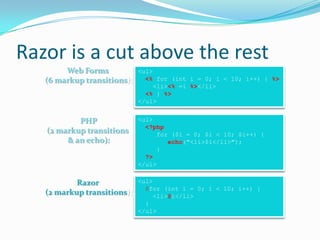
Razor is a cut above the rest
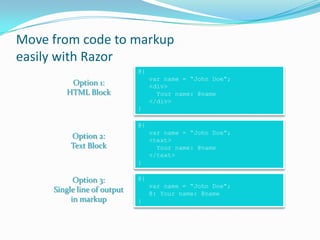
Move from code to markup  easily with Razor
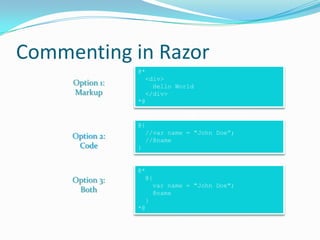
Commenting in Razor
Razor syntax
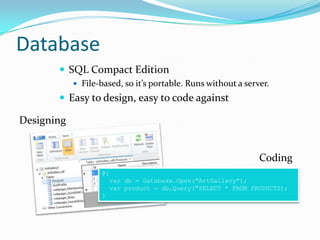
Database
SQL CE + IIS Express
Database Access
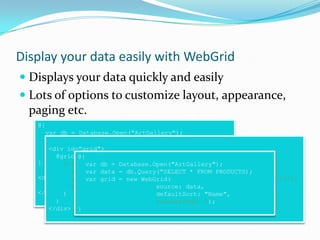
Display your data easily with WebGrid
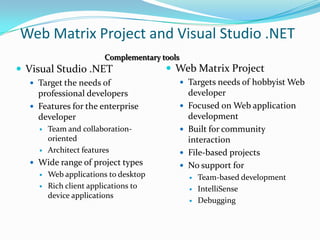
Web Matrix Project and Visual Studio .NET
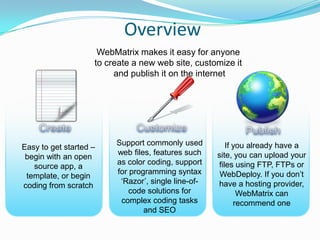
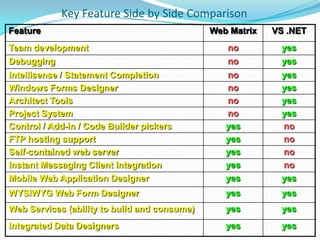
Key Feature Side by Side ComparisonOverviewCustomer Promise: WebMatrix makes it easy for anyone to create a new web site, customize it and publish it on the internetCreateCustomizePublishEasy to get started –begin with an open source app, a template, or begin coding from scratchSupport commonly used web files, features such as color coding, support for programming syntax ‘Razor’, single line-of-code solutions for complex coding tasks and SEO If you already have a site, you can upload your files using FTP, FTPs or WebDeploy. If you don’t have a hosting provider, WebMatrix can recommend one
Introducing WebMatrixWeb ServerDatabaseDevelopment Tool
Introducing WebMatrixThe Microsoft ASP.NET Web Matrix Project is a lightweight, easy to use, community-oriented tool for developing Web applications with ASP.NET
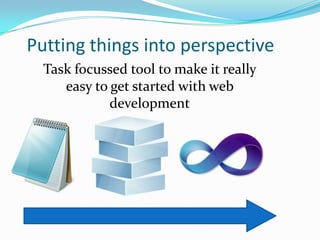
Putting things into perspectiveTask focussed tool to make it really easy to get started with web development
Who is WebMatrix for?I’m a professional software developer and I build complex, large scale web sites with a team of developersI want to build web sites myself with an easy to learn tool and frameworkI <3 Web Apps. I just need a tool that makes them easier to configure, customize and publish themWebMatrixWebMatrixVisual Studio 2010
Who is Web Matrix intended for? Hobbyist / Student developersLearn ASP.NETBuild simple sitesWork independently Want to get connected to ASP.NET communityDevelopers who wish to try out ASP.NETZero-cost opportunityDiscover the technology and the active community
Typical Usage ScenariosHobbyist Web developer Personal / family / community sitePhoto album, sports team, community picnic etc.Web developers currently using other technologies:Investigate / evaluate ASP.NET at zero costNew developer / Student Learn about ASP.NET for work / school project Current ASP developer Migrate simple ASP site to ASP.NETMigrate skills to ASP.NET
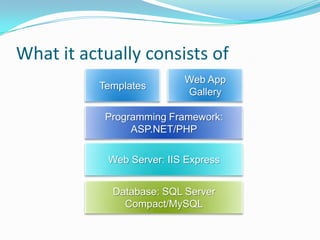
What it actually consists ofTemplatesWeb App GalleryProgramming Framework: ASP.NET/PHPWeb Server: IIS ExpressDatabase: SQL Server Compact/MySQL
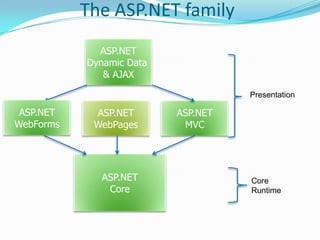
The ASP.NET familyASP.NETDynamic Data & AJAXPresentationASP.NETWebFormsASP.NETWebPagesASP.NETMVCASP.NETCoreCore Runtime
Web Matrix Project Feature OverviewSimple / Easy to useFile based workspace (no projects)WYSIWYG Web Form DesignerIntegrated Data DesignersTask based tools and wizardsFTP hosting supportCode Builders (code-generating wizards)Code Snippet Sharing
Web Matrix Project Feature OverviewLightweightSmall footprint (~1MB + .NET Framework Redist) / fast downloadNo project system (entirely file based)Self contained web server for testing (does not serve pages externally)Community OrientedControl / Add-in / Code builder Gallery PickersInstant Messaging Client Integration (Web Matrix buddies)Integrated Chat ClientCommunity Tab with links to community
Community / Code Sharing FeaturesSnippetsImport / ExportControls gallery integrationDownload controls from the WebCommunity tabCollection of resourcesMSN Messenger integration	Web Matrix  buddy listCommunity searchSearch community listservsMSDN integrated class browser
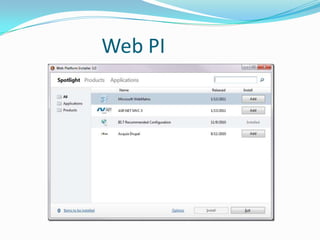
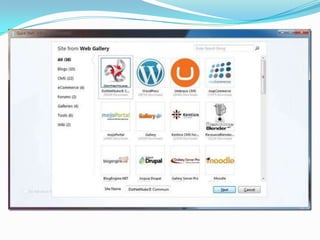
Web PI
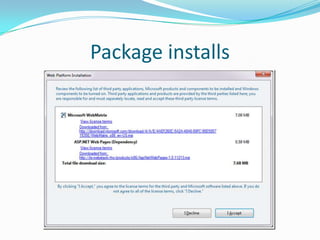
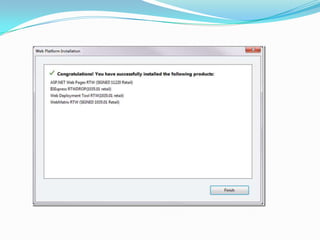
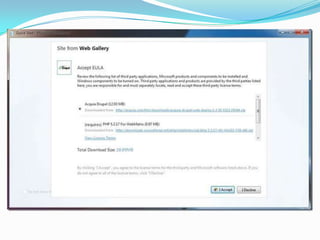
Package installs
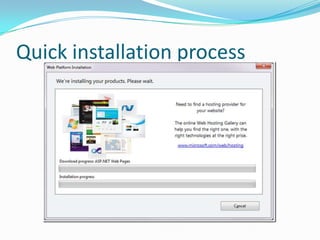
Quick installation process
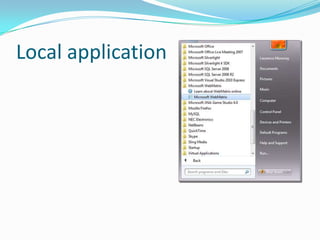
Local application
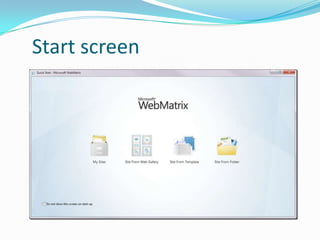
Start screen
WebPagesConvention Backend logic on top Frontend logic below (html5 + code)Simpler to use, but still ASP.NET power
A lap around WebMatrixDemonstration
Introducing RazorThe easiest way to code websitesEasy to mix HTML and CodeLots of useful Helpers
Razor is a cut above the restWeb Forms (6 markup transitions):<ul><% for (int i = 0; i < 10; i++) { %>    <li><% =i %></li><% } %></ul><ul><?phpfor ($i = 0; $i < 10; $i++) {echo("<li>$i</li>");     }      ?></ul>PHP(2 markup transitions & an echo):<ul>@for (int i = 0; i < 10; i++) {    <li>@i</li>  }</ul>Razor (2 markup transitions):
Move from code to markup easily with Razor@{var name = “John Doe”;   <div>     Your name: @name  </div>}Option 1:HTML Block@{var name = “John Doe”;   <text>     Your name: @name  </text>}Option 2:Text Block@{var name = “John Doe”;   @: Your name: @name}Option 3:Single line of outputin markup
Commenting in Razor@* <div>    Hello World  </div>*@Option 1:Markup@{   //var name = "John Doe”;  //@name}Option 2:Code@* @{ var name = "John Doe";   @name  }*@Option 3:Both

Web matrix part 2

  • 1.

    Microsoft Student Partner Program @Anna University of Technology Coimbatore
  • 2.
  • 3.
    AgendaOverviewIntroducing WebMatrixPutting thingsinto perspectiveWho is WebMatrix for?Who is Web Matrix intended for?Typical Usage ScenariosWhat it actually consists ofThe ASP.NET familyWeb Matrix Project Feature OverviewCommunity / Code Sharing FeaturesInstallation of webmatrixWebPagesA lap around WebMatrix
  • 4.
  • 5.
    Razor is acut above the rest
  • 6.
    Move from codeto markup easily with Razor
  • 7.
  • 8.
  • 9.
  • 10.
    SQL CE +IIS Express
  • 11.
  • 12.
    Display your dataeasily with WebGrid
  • 13.
    Web Matrix Projectand Visual Studio .NET
  • 14.
    Key Feature Sideby Side ComparisonOverviewCustomer Promise: WebMatrix makes it easy for anyone to create a new web site, customize it and publish it on the internetCreateCustomizePublishEasy to get started –begin with an open source app, a template, or begin coding from scratchSupport commonly used web files, features such as color coding, support for programming syntax ‘Razor’, single line-of-code solutions for complex coding tasks and SEO If you already have a site, you can upload your files using FTP, FTPs or WebDeploy. If you don’t have a hosting provider, WebMatrix can recommend one
  • 15.
  • 16.
    Introducing WebMatrixThe MicrosoftASP.NET Web Matrix Project is a lightweight, easy to use, community-oriented tool for developing Web applications with ASP.NET
  • 17.
    Putting things intoperspectiveTask focussed tool to make it really easy to get started with web development
  • 18.
    Who is WebMatrixfor?I’m a professional software developer and I build complex, large scale web sites with a team of developersI want to build web sites myself with an easy to learn tool and frameworkI <3 Web Apps. I just need a tool that makes them easier to configure, customize and publish themWebMatrixWebMatrixVisual Studio 2010
  • 19.
    Who is WebMatrix intended for? Hobbyist / Student developersLearn ASP.NETBuild simple sitesWork independently Want to get connected to ASP.NET communityDevelopers who wish to try out ASP.NETZero-cost opportunityDiscover the technology and the active community
  • 20.
    Typical Usage ScenariosHobbyistWeb developer Personal / family / community sitePhoto album, sports team, community picnic etc.Web developers currently using other technologies:Investigate / evaluate ASP.NET at zero costNew developer / Student Learn about ASP.NET for work / school project Current ASP developer Migrate simple ASP site to ASP.NETMigrate skills to ASP.NET
  • 21.
    What it actuallyconsists ofTemplatesWeb App GalleryProgramming Framework: ASP.NET/PHPWeb Server: IIS ExpressDatabase: SQL Server Compact/MySQL
  • 22.
    The ASP.NET familyASP.NETDynamicData & AJAXPresentationASP.NETWebFormsASP.NETWebPagesASP.NETMVCASP.NETCoreCore Runtime
  • 23.
    Web Matrix ProjectFeature OverviewSimple / Easy to useFile based workspace (no projects)WYSIWYG Web Form DesignerIntegrated Data DesignersTask based tools and wizardsFTP hosting supportCode Builders (code-generating wizards)Code Snippet Sharing
  • 24.
    Web Matrix ProjectFeature OverviewLightweightSmall footprint (~1MB + .NET Framework Redist) / fast downloadNo project system (entirely file based)Self contained web server for testing (does not serve pages externally)Community OrientedControl / Add-in / Code builder Gallery PickersInstant Messaging Client Integration (Web Matrix buddies)Integrated Chat ClientCommunity Tab with links to community
  • 25.
    Community / CodeSharing FeaturesSnippetsImport / ExportControls gallery integrationDownload controls from the WebCommunity tabCollection of resourcesMSN Messenger integration Web Matrix buddy listCommunity searchSearch community listservsMSDN integrated class browser
  • 26.
  • 27.
  • 28.
  • 30.
  • 31.
  • 34.
    WebPagesConvention Backend logicon top Frontend logic below (html5 + code)Simpler to use, but still ASP.NET power
  • 35.
    A lap aroundWebMatrixDemonstration
  • 36.
    Introducing RazorThe easiestway to code websitesEasy to mix HTML and CodeLots of useful Helpers
  • 37.
    Razor is acut above the restWeb Forms (6 markup transitions):<ul><% for (int i = 0; i < 10; i++) { %> <li><% =i %></li><% } %></ul><ul><?phpfor ($i = 0; $i < 10; $i++) {echo("<li>$i</li>"); } ?></ul>PHP(2 markup transitions & an echo):<ul>@for (int i = 0; i < 10; i++) { <li>@i</li> }</ul>Razor (2 markup transitions):
  • 38.
    Move from codeto markup easily with Razor@{var name = “John Doe”; <div> Your name: @name </div>}Option 1:HTML Block@{var name = “John Doe”; <text> Your name: @name </text>}Option 2:Text Block@{var name = “John Doe”; @: Your name: @name}Option 3:Single line of outputin markup
  • 39.
    Commenting in Razor@*<div> Hello World </div>*@Option 1:Markup@{ //var name = "John Doe”; //@name}Option 2:Code@* @{ var name = "John Doe"; @name }*@Option 3:Both

Editor's Notes

  • #4 1 minuteThis session is broken down into three parts, each of approximately 50-60 minutes. At the end of this training you will have a good base understanding of WebMatrix and how to build websites and web applications using the tool and framework.In Part 1 you will learn what WebMatrix is, who the intended users are for WebMatrix and what the Razor Syntax is. You will also learn how to access a database and how to use a WebGrid control to present its data in table format.In Part 2 you will learn how to use Layouts to maintain a consistent look and feel across all of the pages within your website. You will also be introduced to the use of helpers to manage different themes in your site, connecting to Facebook and more. Then you will learn about security and websites membership. Finally you will explore how the URL routing works in WebMatrix.In Part 3 you will discover how to create your own helpers to reuse your components in WebMatrix and we will discuss about WebMatrix and Open Source Software Web Applications integration. You will then learn how to publish your web applications. We will also discuss about when and how to move to Visual Studio and ASP.NET MVC application development.
  • #7 1 minuteWebMatrix comes with everything you need to get started building websites and web applications:A complete and integrated development environment, with a small download and a simple install. You get a database engine (SQL Server Compact Edition) to handle your data. All the structures you create in this database engine will be compatible with professional versions of SQL Server.WebMatrix supports a Web Server (IIS Express) to serve all your web pages. This web server is compatible with the professional versions of IIS as well.WebMatrix also comes with a new, simple programming framework that allows for rapid development of web sites and web applications. It supports Razor, the latest and simplifiedway to code web sites. It also provides a gallery of free open source applications to complement your development.It comes with an integrated installer that manages the heavy lifting of downloading and installing each component.
  • #10 3 minutesWhen we look at all the different profiles of people creating websites we see certain patterns emerge.First, there’s a group of people that like to use the large number of rich web applications out there as a starting point, and then add some specific functionality. They need a quick and easy way to customize and publish their solutions. Many of these web applications are tailored for specific tasks like Content Management Systems or eCommerce websites. These developers will often repeat this process many times for each customer, their goal is to make the process of acquiring the application, customization and publishing it as quick as possible.A second group need to create web apps from scratch. These developers are hobbyists, beginners and people who need a tool that is easy to learn and that allows them to focus on the application functionality instead of developers’ details.Finally, the group of professional developers. They need a powerful tool, full of features and able to work in team, perhaps distributed ones. They will use a source and version control and will need a testing framework to write their own unit tests. This tool needs to support the addition of 3rd party powerful extensions.WebMatrix is built for those developers that like to start from scratch or by building from a 3rd party web applications.
  • #27 10 minutesSee demo script for overview
  • #28 1 minuteWhen you create a new website from scratch in WebMatrix, you will be using the new Razor syntax. It’s very compact and easy to read and write, and allows you to flow between code and markup seamlessly. You can write your code in languages such as C# or VB, and it’s extensible via Helpers (we’ll talk about Helpers in Part 3)
  • #29 2 minutesWe’ve designed Razor to be concise and easy to use. When we think about the way developers use a language we take into account the context switching they have to do and also the number of keystrokes. The way that Razor allows you to transition seamlessly between markup and code makes for a much more natural and fluent style and also helps to reduce the number of keystrokes and context switching that a developer has to do, thinking about markup and code separately. With Razor, markup and code are really the same thing.We think it’s the easiest way to code websites and when you compare it to the other languages out there, it’s easy to see why.
  • #30 1 minuteThe transition from code to markup is one of the most elegant things about Razor but there a few rules that are worth knowing about. Option 1:Code is the primary citizen in a code block, not HTML. This means the parser will always expect code unless it finds valid opening (and closing) tags. In the first option block you see that after the @{ a name variable is defined. No additional tag is necessary. A &lt;div&gt; section tells Razor that what follows should be taken as literal. Then the @name indicates a variable that needs to be replaced with its value.Option 2:Similarly, to explicitly call out text in a code block as HTML, wrap it in a &lt;text&gt; tagOption 3:Single line of output within markup can be denoted by @:This option is useful when you don’t want to render an HTML element as part of the output. Extra Knowledge (Advanced):The Parser that understands Razor is itself a standalone assembly (System.Web.Razor.dll) which has no dependencies on ASP.NET which means you can use it to parse CSHTML/VBHTML files and produce C#/VB code in any .NET application.
  • #31 1 minuteIt’s always good practice to comment your code. In Razor we have the following options for commenting:Option 1:You can comment a block by using @* … *@Please note that this method could not be recursive (you could not have a @* inside another @*)Option 2:You can comment lines by using // (in C#) the same way you do in your code files.Option 3:If you need to comment a whole razor block, you should add a @* before the beginning of the code block and a *@ after it’s finish.
  • #32 5 minutesSyntax moving from code to markupObjectInfo()ServerInfo()
  • #33 2 minutesThe database that comes with WebMatrix is SQL Compact Edition, or SQL CE for short.It’s free, lightweight and doesn’t require a separate server to run – which makes it much easier to get setup and running than traditional versions of SQL Server like SQL Server Express.SQL Compact Edition includes tools to manage your tables and data and because it’s file-based, you simply need to copy the database files to transport your database to another machine. This is really useful if you are sharing a database with another developer.This sample code shows how to connect to an ArtGallery Database and then perform a query with SQL to retrieve the ArtGallery products.
  • #35 5 minutesCreating DBDesigning DBAccessing DB using Razor(introduce URLData)
  • #36 2 minutesAs we’ve seen, the database design and access from Razor code in WebMatrix is easy. Often when we’re building websites, we’ll want to render data in some form of table. The WebGrid can help to make this easy to do. Build 1In it’s simplest form, just give the WebGrid data and it will render it out in a valid HTML table. WebMatrix will make all the magic for you. But this has a few drawbacks: You’re not choosing the columns you want to show and they will be named as the field names in the database.Build 2 In the second sample, you explicitly state which columns to include in the WebGrid, their title (e.g.: «Product» instead of «Name») and how they will be formatted: Product column will use a CSS style, Description will appear in italic font, and so on.Build 3In the last sample, you can see that we order the data by the «Name» column and by simply defining one parameter, we state that we want 3 rows per page. WebMatrix will do the rest for you.
  • #39 Any Queries
  • #40 Thanking You