Web Components
Introduction
Eugenio Romano
2016
ENGINEER @
https://uk.linkedin.com/in/eugenio-romano-a28a4948
https://twitter.com/RomanoEugenio
http://eromano.github.io/
EUGENIO ROMANO
ALFRESCO
AGENDA
PART 1
INFO
PART 2
EXAMPLE
CREATE
WEB COMPONENTS IN 4 STEPS
PART 1 INFO
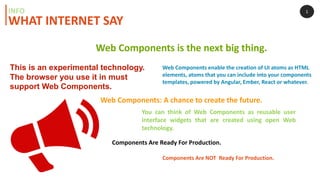
Web Components enable the creation of UI atoms as HTML
elements, atoms that you can include into your components
templates, powered by Angular, Ember, React or whatever.
Web Components is the next big thing.
WHAT INTERNET SAY
You can think of Web Components as reusable user
interface widgets that are created using open Web
technology.
Components Are Ready For Production.
Components Are NOT Ready For Production.
This is an experimental technology.
The browser you use it in must
support Web Components.
Web Components: A chance to create the future.
1INFO
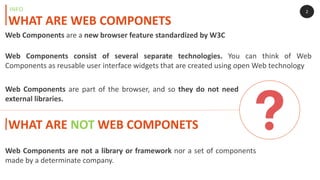
Web Components consist of several separate technologies. You can think of Web
Components as reusable user interface widgets that are created using open Web technology
2
WHAT ARE WEB COMPONETS
INFO
WHAT ARE NOT WEB COMPONETS
Web Components are not a library or framework nor a set of components
made by a determinate company.
Web Components are a new browser feature standardized by W3C
Web Components are part of the browser, and so they do not need
external libraries.
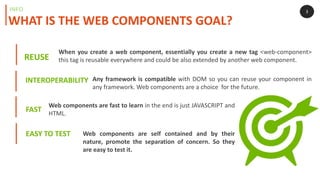
REUSE
3
WHAT IS THE WEB COMPONENTS GOAL?
INFO
FAST
EASY TO TEST
INTEROPERABILITY
When you create a web component, essentially you create a new tag <web-component>
this tag is reusable everywhere and could be also extended by another web component.
Web components are fast to learn in the end is just JAVASCRIPT and
HTML.
Any framework is compatible with DOM so you can reuse your component in
any framework. Web components are a choice for the future.
Web components are self contained and by their
nature, promote the separation of concern. So they
are easy to test it.
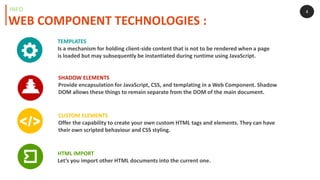
HTML IMPORT
Let’s you import other HTML documents into the current one.
TEMPLATES
Is a mechanism for holding client-side content that is not to be rendered when a page
is loaded but may subsequently be instantiated during runtime using JavaScript.
CUSTOM ELEMENTS
Offer the capability to create your own custom HTML tags and elements. They can have
their own scripted behaviour and CSS styling.
SHADOW ELEMENTS
Provide encapsulation for JavaScript, CSS, and templating in a Web Component. Shadow
DOM allows these things to remain separate from the DOM of the main document.
4
WEB COMPONENT TECHNOLOGIES :
INFO
5
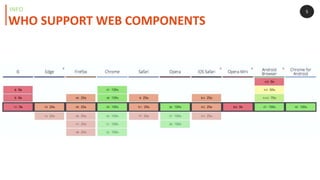
WHO SUPPORT WEB COMPONENTS
INFO
6
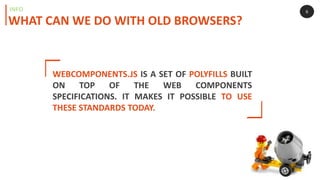
WHAT CAN WE DO WITH OLD BROWSERS?
INFO
WEBCOMPONENTS.JS IS A SET OF POLYFILLS BUILT
ON TOP OF THE WEB COMPONENTS
SPECIFICATIONS. IT MAKES IT POSSIBLE TO USE
THESE STANDARDS TODAY.
7
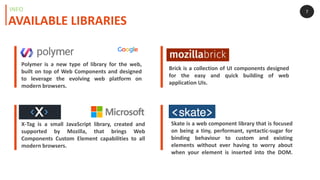
Polymer is a new type of library for the web,
built on top of Web Components and designed
to leverage the evolving web platform on
modern browsers.
X-Tag is a small JavaScript library, created and
supported by Mozilla, that brings Web
Components Custom Element capabilities to all
modern browsers.
Brick is a collection of UI components designed
for the easy and quick building of web
application UIs.
Skate is a web component library that is focused
on being a tiny, performant, syntactic-sugar for
binding behaviour to custom and existing
elements without ever having to worry about
when your element is inserted into the DOM.
AVAILABLE LIBRARIES
INFO
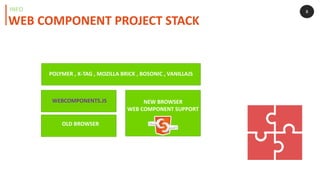
WEB COMPONENT PROJECT STACK
INFO 8
NEW BROWSER
WEB COMPONENT SUPPORT
OLD BROWSER
WEBCOMPONENTS.JS
POLYMER , X-TAG , MOZILLA BRICK , BOSONIC , VANILLAJS
PART 2 EXAMPLE
CREATE A WEB COMPONENTS IN 4 STEP
9
YEOMAN GENERATOR
EXAMPLE STEP 1
OLD
BROWSER
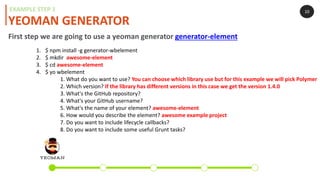
1. $ npm install -g generator-wbelement
2. $ mkdir awesome-element
3. $ cd awesome-element
4. $ yo wbelement
1. What do you want to use? You can choose which library use but for this example we will pick Polymer
2. Which version? If the library has different versions in this case we get the version 1.4.0
3. What's the GitHub repository?
4. What's your GitHub username?
5. What's the name of your element? awesome-element
6. How would you describe the element? awesome example project
7. Do you want to include lifecycle callbacks?
8. Do you want to include some useful Grunt tasks?
First step we are going to use a yeoman generator generator-element
10
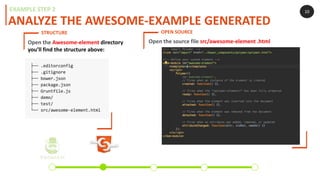
ANALYZE THE AWESOME-EXAMPLE GENERATED
EXAMPLE STEP 2
OLD
BROWSER
Open the Awesome-element directory
you’ll find the structure above:
10
STRUCTURE OPEN SOURCE
Open the source file src/awesome-element .html
ADD SOME CODE
EXAMPLE STEP 2
<template>
<h1>[[title]]</h1>
<p>
<a href="http://thecatapi.com">
<img src="http://thecatapi.com/api/images/get?format=src&type=gif">
</a>
</p>
</template>
ready: function() {
this.title = 'CAT';
},
TEMPLATE READY JAVASCRIPT
You can find the entire code here : https://github.com/eromano/example-web-componet
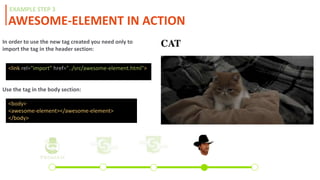
AWESOME-ELEMENT IN ACTION
EXAMPLE STEP 3
In order to use the new tag created you need only to
import the tag in the header section:
<link rel="import" href="../src/awesome-element.html">
Use the tag in the body section:
<body>
<awesome-element></awesome-element>
</body>
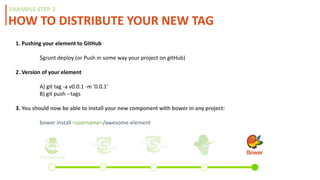
HOW TO DISTRIBUTE YOUR NEW TAG
EXAMPLE STEP 3
1. Pushing your element to GitHub
$grunt deploy (or Push in some way your project on gitHub)
2. Version of your element
A) git tag -a v0.0.1 -m '0.0.1'
B) git push --tags
3. Register on bower:
bower register example-web-component https://github.com/(yourusername)/example-web-component.git
4. You should now be able to install your new component with bower in any project:
bower install <username>/awesome-element
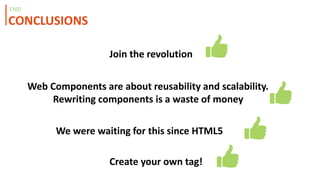
CONCLUSIONS
END
Join the revolution
Web Components are about reusability and scalability.
Rewriting components is a waste of money
Create your own tag!
We were waiting for this since HTML5
• http://webcomponents.org/
• https://developer.mozilla.org/en-US/docs/Web/Web_Components
• http://www.2ality.com/2015/08/web-component-status.html
• https://www.youtube.com/watch?v=JUzjr1bIRUg
BIBLIOGRAPHY
END
THANK YOU

Web components Introduction

  • 1.
  • 2.
  • 3.
  • 4.
  • 5.
    Web Components enablethe creation of UI atoms as HTML elements, atoms that you can include into your components templates, powered by Angular, Ember, React or whatever. Web Components is the next big thing. WHAT INTERNET SAY You can think of Web Components as reusable user interface widgets that are created using open Web technology. Components Are Ready For Production. Components Are NOT Ready For Production. This is an experimental technology. The browser you use it in must support Web Components. Web Components: A chance to create the future. 1INFO
  • 6.
    Web Components consistof several separate technologies. You can think of Web Components as reusable user interface widgets that are created using open Web technology 2 WHAT ARE WEB COMPONETS INFO WHAT ARE NOT WEB COMPONETS Web Components are not a library or framework nor a set of components made by a determinate company. Web Components are a new browser feature standardized by W3C Web Components are part of the browser, and so they do not need external libraries.
  • 7.
    REUSE 3 WHAT IS THEWEB COMPONENTS GOAL? INFO FAST EASY TO TEST INTEROPERABILITY When you create a web component, essentially you create a new tag <web-component> this tag is reusable everywhere and could be also extended by another web component. Web components are fast to learn in the end is just JAVASCRIPT and HTML. Any framework is compatible with DOM so you can reuse your component in any framework. Web components are a choice for the future. Web components are self contained and by their nature, promote the separation of concern. So they are easy to test it.
  • 8.
    HTML IMPORT Let’s youimport other HTML documents into the current one. TEMPLATES Is a mechanism for holding client-side content that is not to be rendered when a page is loaded but may subsequently be instantiated during runtime using JavaScript. CUSTOM ELEMENTS Offer the capability to create your own custom HTML tags and elements. They can have their own scripted behaviour and CSS styling. SHADOW ELEMENTS Provide encapsulation for JavaScript, CSS, and templating in a Web Component. Shadow DOM allows these things to remain separate from the DOM of the main document. 4 WEB COMPONENT TECHNOLOGIES : INFO
  • 9.
    5 WHO SUPPORT WEBCOMPONENTS INFO
  • 10.
    6 WHAT CAN WEDO WITH OLD BROWSERS? INFO WEBCOMPONENTS.JS IS A SET OF POLYFILLS BUILT ON TOP OF THE WEB COMPONENTS SPECIFICATIONS. IT MAKES IT POSSIBLE TO USE THESE STANDARDS TODAY.
  • 11.
    7 Polymer is anew type of library for the web, built on top of Web Components and designed to leverage the evolving web platform on modern browsers. X-Tag is a small JavaScript library, created and supported by Mozilla, that brings Web Components Custom Element capabilities to all modern browsers. Brick is a collection of UI components designed for the easy and quick building of web application UIs. Skate is a web component library that is focused on being a tiny, performant, syntactic-sugar for binding behaviour to custom and existing elements without ever having to worry about when your element is inserted into the DOM. AVAILABLE LIBRARIES INFO
  • 12.
    WEB COMPONENT PROJECTSTACK INFO 8 NEW BROWSER WEB COMPONENT SUPPORT OLD BROWSER WEBCOMPONENTS.JS POLYMER , X-TAG , MOZILLA BRICK , BOSONIC , VANILLAJS
  • 13.
    PART 2 EXAMPLE CREATEA WEB COMPONENTS IN 4 STEP 9
  • 14.
    YEOMAN GENERATOR EXAMPLE STEP1 OLD BROWSER 1. $ npm install -g generator-wbelement 2. $ mkdir awesome-element 3. $ cd awesome-element 4. $ yo wbelement 1. What do you want to use? You can choose which library use but for this example we will pick Polymer 2. Which version? If the library has different versions in this case we get the version 1.4.0 3. What's the GitHub repository? 4. What's your GitHub username? 5. What's the name of your element? awesome-element 6. How would you describe the element? awesome example project 7. Do you want to include lifecycle callbacks? 8. Do you want to include some useful Grunt tasks? First step we are going to use a yeoman generator generator-element 10
  • 15.
    ANALYZE THE AWESOME-EXAMPLEGENERATED EXAMPLE STEP 2 OLD BROWSER Open the Awesome-element directory you’ll find the structure above: 10 STRUCTURE OPEN SOURCE Open the source file src/awesome-element .html
  • 16.
    ADD SOME CODE EXAMPLESTEP 2 <template> <h1>[[title]]</h1> <p> <a href="http://thecatapi.com"> <img src="http://thecatapi.com/api/images/get?format=src&type=gif"> </a> </p> </template> ready: function() { this.title = 'CAT'; }, TEMPLATE READY JAVASCRIPT You can find the entire code here : https://github.com/eromano/example-web-componet
  • 17.
    AWESOME-ELEMENT IN ACTION EXAMPLESTEP 3 In order to use the new tag created you need only to import the tag in the header section: <link rel="import" href="../src/awesome-element.html"> Use the tag in the body section: <body> <awesome-element></awesome-element> </body>
  • 18.
    HOW TO DISTRIBUTEYOUR NEW TAG EXAMPLE STEP 3 1. Pushing your element to GitHub $grunt deploy (or Push in some way your project on gitHub) 2. Version of your element A) git tag -a v0.0.1 -m '0.0.1' B) git push --tags 3. Register on bower: bower register example-web-component https://github.com/(yourusername)/example-web-component.git 4. You should now be able to install your new component with bower in any project: bower install <username>/awesome-element
  • 19.
    CONCLUSIONS END Join the revolution WebComponents are about reusability and scalability. Rewriting components is a waste of money Create your own tag! We were waiting for this since HTML5
  • 20.
    • http://webcomponents.org/ • https://developer.mozilla.org/en-US/docs/Web/Web_Components •http://www.2ality.com/2015/08/web-component-status.html • https://www.youtube.com/watch?v=JUzjr1bIRUg BIBLIOGRAPHY END
  • 21.