Exception Handling
The Exception Handling in Java is one of the powerful mechanism to
handle the runtime errors so that the normal flow of the application can
be maintained.
What is Exception ?
An exception is an event that disrupts the normal flow of the
program.
It is an object which is thrown at runtime.
What is Exception Handling?
Exception Handling is a mechanism to handle runtime errors such as
ClassNotFoundException, IOException, SQLException,
RemoteException, etc.
Advantage of Exception Handling
The core advantage of exception handling is to maintain the normal flow
of the application. An exception normally disrupts the normal flow of
the application; that is why we need to handle exceptions.
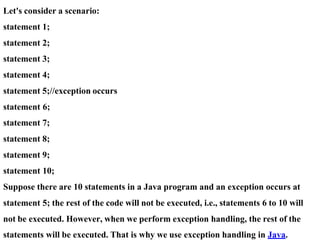
Let's consider a scenario:
statement 1;
statement 2;
statement 3;
statement 4;
statement 5;//exception occurs
statement 6;
statement 7;
statement 8;
statement 9;
statement 10;
Suppose there are 10 statements in a Java program and an exception occurs at
statement 5; the rest of the code will not be executed, i.e., statements 6 to 10 will
not be executed. However, when we perform exception handling, the rest of the
statements will be executed. That is why we use exception handling in Java.
Benefits of using exception handling in Java include:
1. Improved program reliability: By handling exceptions, the program can
recover from errors and continue executing, improving its overall consistency.
2. Better code organization: Exception handling separates error-handling logic
from the main program logic, making the code easier to read and maintain.
3. More robust error reporting: Exception handling provides detailed information
about the error that occurred, making it easier to diagnose and fix problems.
4. Increased flexibility: Exception handling allows the programmer to define
custom error-handling logic for different types of exceptions, providing greater
flexibility in how errors are handled.
Overall, exception handling is an important feature of Java programming that
helps improve program reliability and maintainability.
Classification of exception handling
Refers to the different types of exceptions that can occur in a Java
program.
These include checked exceptions, which must be explicitly handled
by the programmer, and unchecked exceptions, which do not need
to be handled but can still cause the program to terminate if not
caught.
Hierarchy of Java Exception classes
The java.lang.Throwable class is the root class of Java Exception
hierarchy inherited by two subclasses: Exception and Error. The
hierarchy of Java Exception classes is given below:
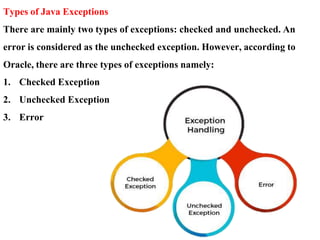
Types of Java Exceptions
There are mainly two types of exceptions: checked and unchecked. An
error is considered as the unchecked exception. However, according to
Oracle, there are three types of exceptions namely:
1. Checked Exception
2. Unchecked Exception
3. Error
Difference between Checked and Unchecked Exceptions
1) Checked Exception
The classes that directly inherit the Throwable class except RuntimeException and
Error are known as checked exceptions. For example, IOException,
SQLException, etc. Checked exceptions are checked at compile-time.
2) Unchecked Exception
The classes that inherit the RuntimeException are known as unchecked
exceptions. For example, ArithmeticException, NullPointerException,
ArrayIndexOutOfBoundsException, etc. Unchecked exceptions are not checked at
compile-time, but they are checked at runtime.
3) Error
Error is irrecoverable. Some example of errors are OutOfMemoryError,
VirtualMachineError, AssertionError etc.
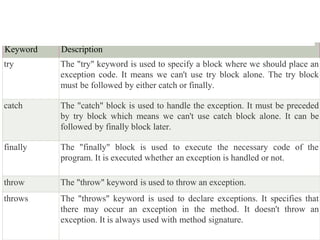
Java Exception Keywords
Java provides five keywords that are used to handle the exception. The following table
describes each.
Keyword Description
try The "try" keyword is used to specify a block where we should place an
exception code. It means we can't use try block alone. The try block
must be followed by either catch or finally.
catch The "catch" block is used to handle the exception. It must be preceded
by try block which means we can't use catch block alone. It can be
followed by finally block later.
finally The "finally" block is used to execute the necessary code of the
program. It is executed whether an exception is handled or not.
throw The "throw" keyword is used to throw an exception.
throws The "throws" keyword is used to declare exceptions. It specifies that
there may occur an exception in the method. It doesn't throw an
exception. It is always used with method signature.
Java Exception Handling Example
Let's see an example of Java Exception Handling in which we are using a try-catch statement
to handle the exception.
JavaExceptionExample.java
1.public class JavaExceptionExample{
2. public static void main(String args[]){
3. try{
4. //code that may raise exception
5. int data=100/0;
6. }catch(ArithmeticException e){System.out.println(e);}
7. //rest code of the program
8. System.out.println("rest of the code...");
9. }
10.}
Test it Now
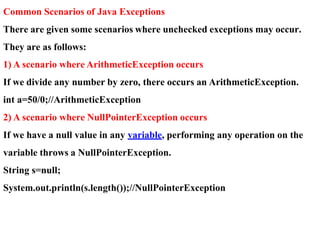
Common Scenarios of Java Exceptions
There are given some scenarios where unchecked exceptions may occur.
They are as follows:
1) A scenario where ArithmeticException occurs
If we divide any number by zero, there occurs an ArithmeticException.
int a=50/0;//ArithmeticException
2) A scenario where NullPointerException occurs
If we have a null value in any variable, performing any operation on the
variable throws a NullPointerException.
String s=null;
System.out.println(s.length());//NullPointerException

VTU MCA 2022 JAVA Exceeption Handling.docx

  • 1.
    Exception Handling The ExceptionHandling in Java is one of the powerful mechanism to handle the runtime errors so that the normal flow of the application can be maintained. What is Exception ? An exception is an event that disrupts the normal flow of the program. It is an object which is thrown at runtime. What is Exception Handling? Exception Handling is a mechanism to handle runtime errors such as ClassNotFoundException, IOException, SQLException, RemoteException, etc.
  • 2.
    Advantage of ExceptionHandling The core advantage of exception handling is to maintain the normal flow of the application. An exception normally disrupts the normal flow of the application; that is why we need to handle exceptions.
  • 3.
    Let's consider ascenario: statement 1; statement 2; statement 3; statement 4; statement 5;//exception occurs statement 6; statement 7; statement 8; statement 9; statement 10; Suppose there are 10 statements in a Java program and an exception occurs at statement 5; the rest of the code will not be executed, i.e., statements 6 to 10 will not be executed. However, when we perform exception handling, the rest of the statements will be executed. That is why we use exception handling in Java.
  • 4.
    Benefits of usingexception handling in Java include: 1. Improved program reliability: By handling exceptions, the program can recover from errors and continue executing, improving its overall consistency. 2. Better code organization: Exception handling separates error-handling logic from the main program logic, making the code easier to read and maintain. 3. More robust error reporting: Exception handling provides detailed information about the error that occurred, making it easier to diagnose and fix problems. 4. Increased flexibility: Exception handling allows the programmer to define custom error-handling logic for different types of exceptions, providing greater flexibility in how errors are handled. Overall, exception handling is an important feature of Java programming that helps improve program reliability and maintainability.
  • 5.
    Classification of exceptionhandling Refers to the different types of exceptions that can occur in a Java program. These include checked exceptions, which must be explicitly handled by the programmer, and unchecked exceptions, which do not need to be handled but can still cause the program to terminate if not caught.
  • 6.
    Hierarchy of JavaException classes The java.lang.Throwable class is the root class of Java Exception hierarchy inherited by two subclasses: Exception and Error. The hierarchy of Java Exception classes is given below:
  • 8.
    Types of JavaExceptions There are mainly two types of exceptions: checked and unchecked. An error is considered as the unchecked exception. However, according to Oracle, there are three types of exceptions namely: 1. Checked Exception 2. Unchecked Exception 3. Error
  • 9.
    Difference between Checkedand Unchecked Exceptions 1) Checked Exception The classes that directly inherit the Throwable class except RuntimeException and Error are known as checked exceptions. For example, IOException, SQLException, etc. Checked exceptions are checked at compile-time. 2) Unchecked Exception The classes that inherit the RuntimeException are known as unchecked exceptions. For example, ArithmeticException, NullPointerException, ArrayIndexOutOfBoundsException, etc. Unchecked exceptions are not checked at compile-time, but they are checked at runtime. 3) Error Error is irrecoverable. Some example of errors are OutOfMemoryError, VirtualMachineError, AssertionError etc.
  • 10.
    Java Exception Keywords Javaprovides five keywords that are used to handle the exception. The following table describes each. Keyword Description try The "try" keyword is used to specify a block where we should place an exception code. It means we can't use try block alone. The try block must be followed by either catch or finally. catch The "catch" block is used to handle the exception. It must be preceded by try block which means we can't use catch block alone. It can be followed by finally block later. finally The "finally" block is used to execute the necessary code of the program. It is executed whether an exception is handled or not. throw The "throw" keyword is used to throw an exception. throws The "throws" keyword is used to declare exceptions. It specifies that there may occur an exception in the method. It doesn't throw an exception. It is always used with method signature.
  • 11.
    Java Exception HandlingExample Let's see an example of Java Exception Handling in which we are using a try-catch statement to handle the exception. JavaExceptionExample.java 1.public class JavaExceptionExample{ 2. public static void main(String args[]){ 3. try{ 4. //code that may raise exception 5. int data=100/0; 6. }catch(ArithmeticException e){System.out.println(e);} 7. //rest code of the program 8. System.out.println("rest of the code..."); 9. } 10.} Test it Now
  • 12.
    Common Scenarios ofJava Exceptions There are given some scenarios where unchecked exceptions may occur. They are as follows: 1) A scenario where ArithmeticException occurs If we divide any number by zero, there occurs an ArithmeticException. int a=50/0;//ArithmeticException 2) A scenario where NullPointerException occurs If we have a null value in any variable, performing any operation on the variable throws a NullPointerException. String s=null; System.out.println(s.length());//NullPointerException