• Visual Network Monitor (VNM) is the heterogeneous
software system for visual monitoring of the mobile
networks objects stage monitoring and roaming
monitoring. It has been implemented for NMT, GSM-
900, GSM-1800, dual-band GSM-900/1800 standards
networks (no any limitations for any another
standards).
• VNM implementation signifies a qualitative leap in
mobile operator service.
• VNM lets eliminate errors before calls of non-satisfied
clients.
• VNM is a source of concentrated and visual information
to be used for mobile network real-time control and
optimization.
• The main destination is the following: let a
network duty operator see all events at each network
object - from switches and destinations to particular
blocks of base stations, understand their causes and
immediately reach correct decisions. Built-in
geographic information system (GIS), statistical
analysis tools and reporting functions easy forms a
solid time-space imagination of network operation
both momentary - to find failures - and for long time
period – for detail mobile network operation analysis
and for its optimization.
• Easy-to-use PC based system
• Powerful database
• Multi user, client-server architecture
• Records and displays all network performance
parameters, alarms and counters
• The ability to deliver real-time analysis capabilities
• User-friendly menu structure - an ideal tool for both
real-time and post measurement analysis
• Automatic fault finding and problem solving diagnostic
capabilities
• Statistical, graphical and geographical display
• Open architecture lets grow system features just with
adding of new modules or modifying of existing ones
• Decreases response time
• Simplifies network operator’s work
• Increases failure detection probability
• Allows visual analysis
• Increases service quality
• No conflicts with other components of mobile
networks
• Installs during network operation
• Attractive project price
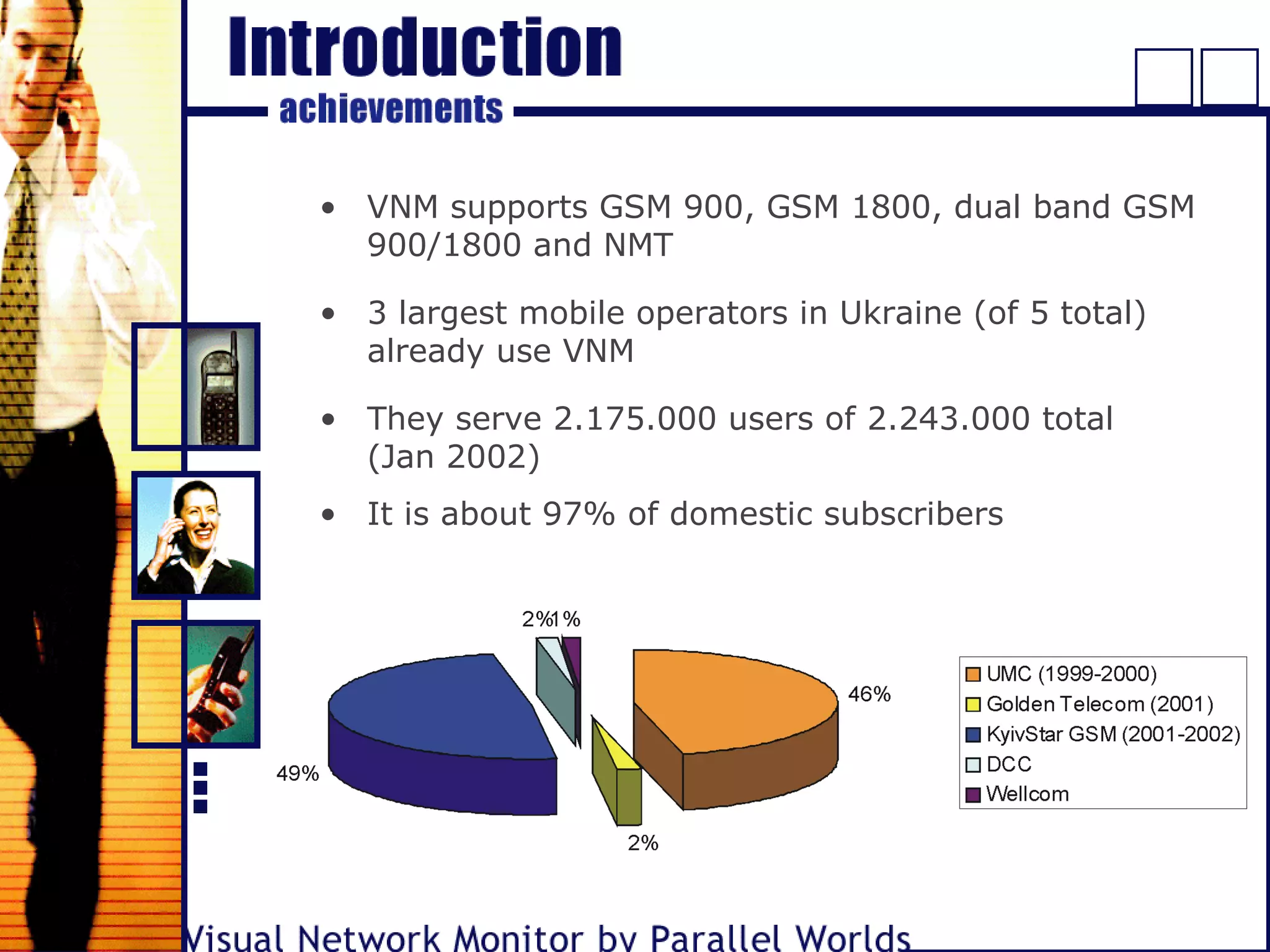
• 3 largest mobile operators in Ukraine (of 5 total)
already use VNM
• VNM supports GSM 900, GSM 1800, dual band GSM
900/1800 and NMT
• They serve 2.175.000 users of 2.243.000 total
(Jan 2002)
• It is about 97% of domestic subscribers
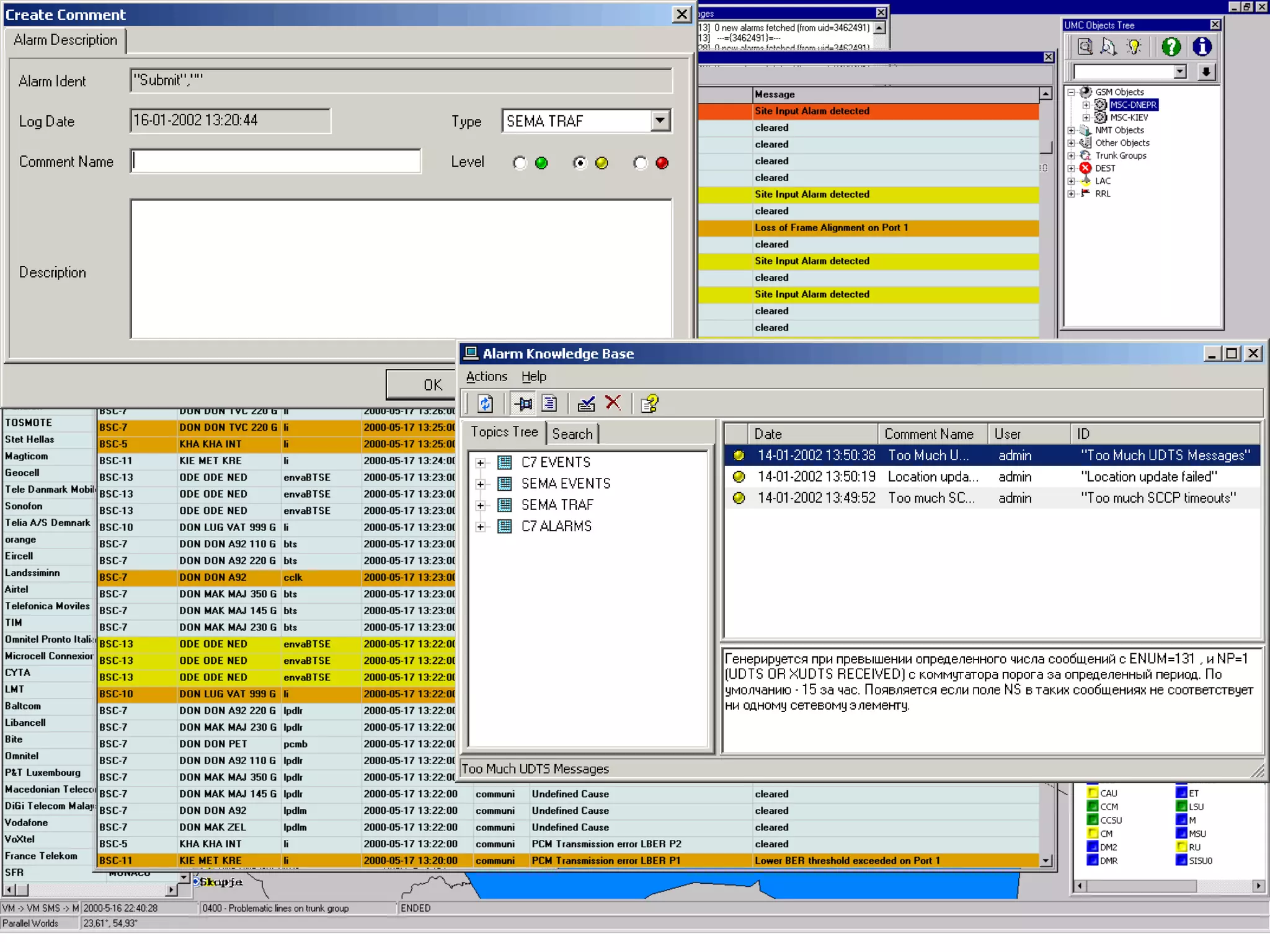
• Operator can use a knowledge base with online help
for each alarm type. It simplifies his work, and
increases problem solving diagnostic capabilities
• The duty operator must react to critical alarms (say
call to the dispatched object or to the person in
charge), then he must put out the semaphore. All his
actions automatically saved into the system journal.
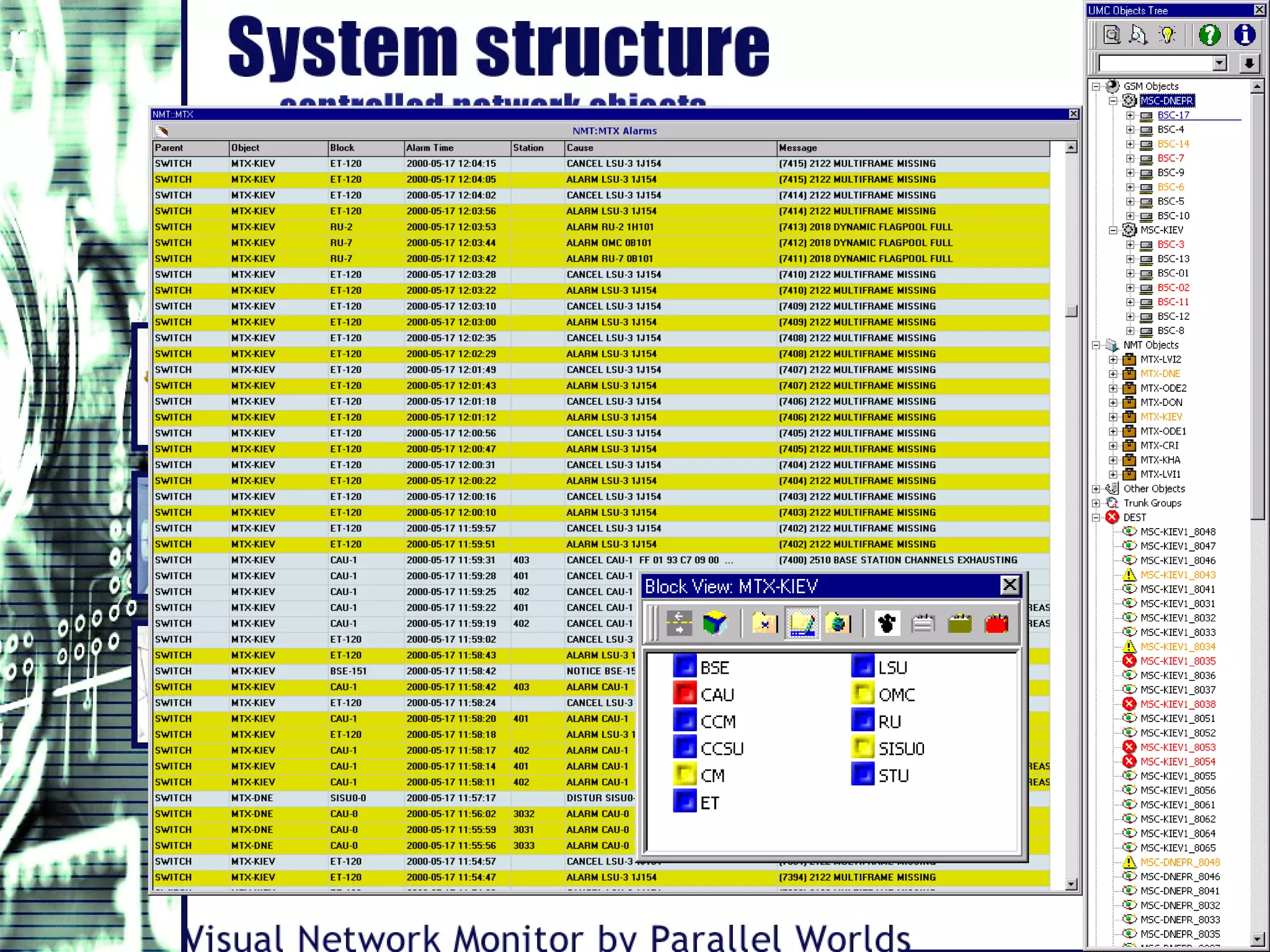
• It is the most critical function of the system for the
duty operator. Each incoming alarm displays at the
special window. Alarms can be sorted by time
(default), by criticality, by the dispatched objects, by
the cases. The most critical ("red") ones indicate
additionally by sound. Besides the current alarms
window the duty operator can investigate any detail
information about the alarm (just click it). The
corresponding dispatched object will be immediately
focused on the map and its color will also correspond
to alarm color. The semaphores on top also indicate
coming of critical events.
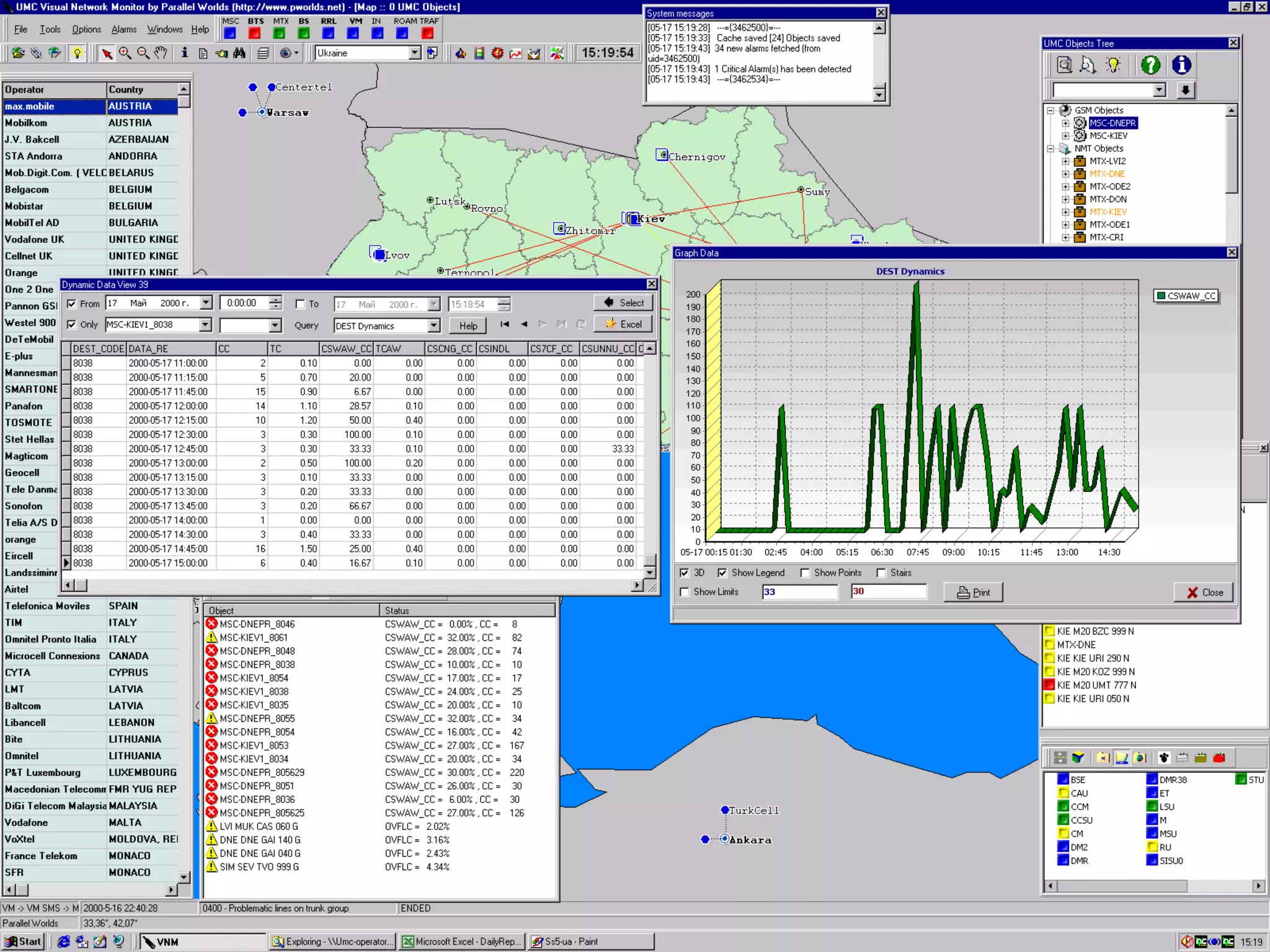
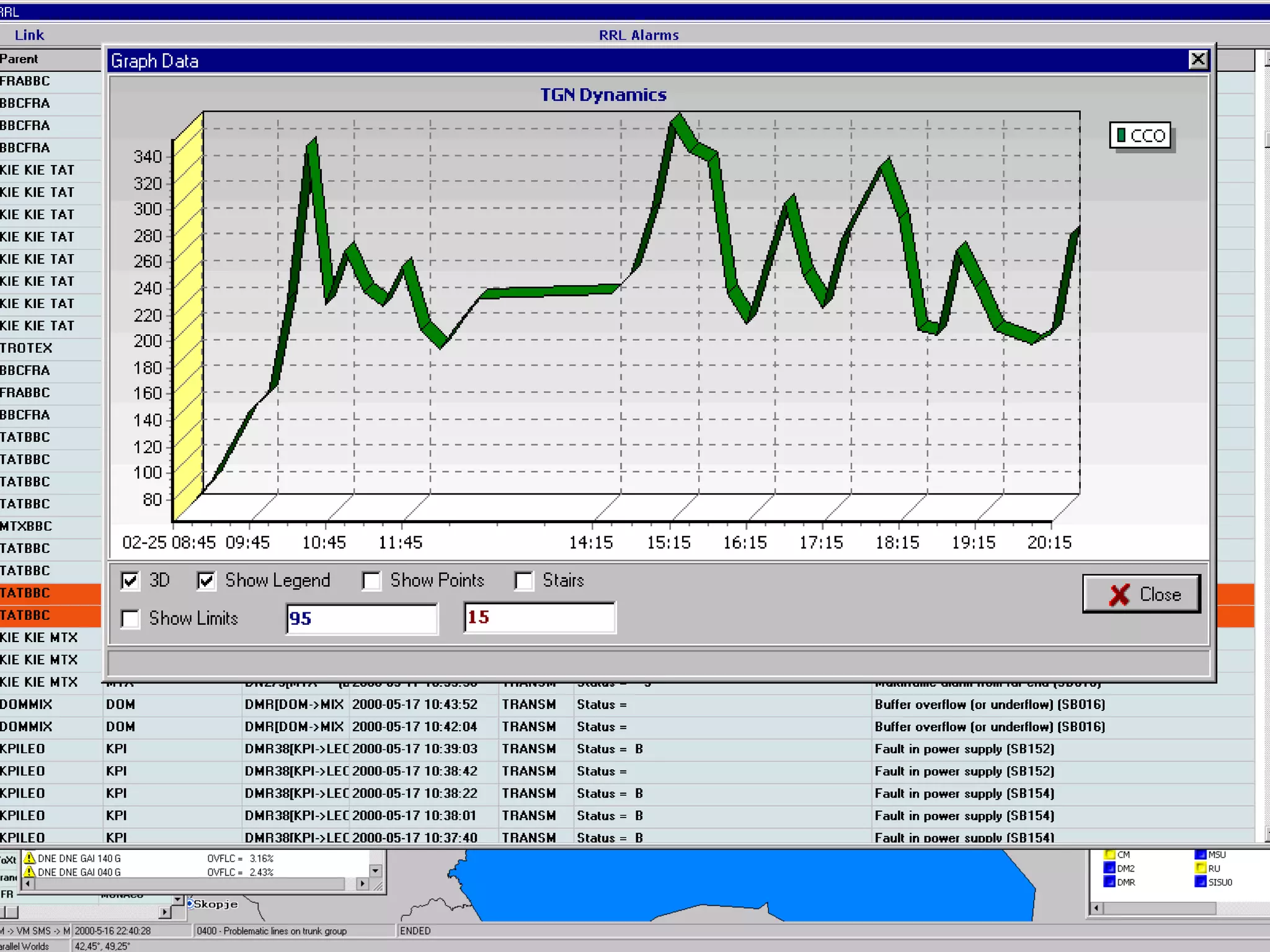
• It is also an extremely critical function. It happens
that the quality of network operation and particular
critical problems looks the most clearly after
investigating of the network operation parameters. If
the particular parameters overflow the critical
threshold values then the corresponding objects
became "red" or "yellow"; it displays immediately at
the list of objects, on the map, on the semaphores
and also by sound (for "red" ones). As well as the
critical alarm, a critical parameter value is the signal
for the duty operator to investigate the problem and
immediately solve it. The interrogation period for
network operation parameters is 15 min
(customized), in contrary to alarm messages
incoming in real time. It makes possible to solve
urgent problems in time and to avoid false alarms.
• Sample parameters: traffic, number of successful
calls divided by number of total calls, etc.
• Roaming operator accessibility is
determines with DPC analysis or
with corresponding SS7 alarms
analysis.
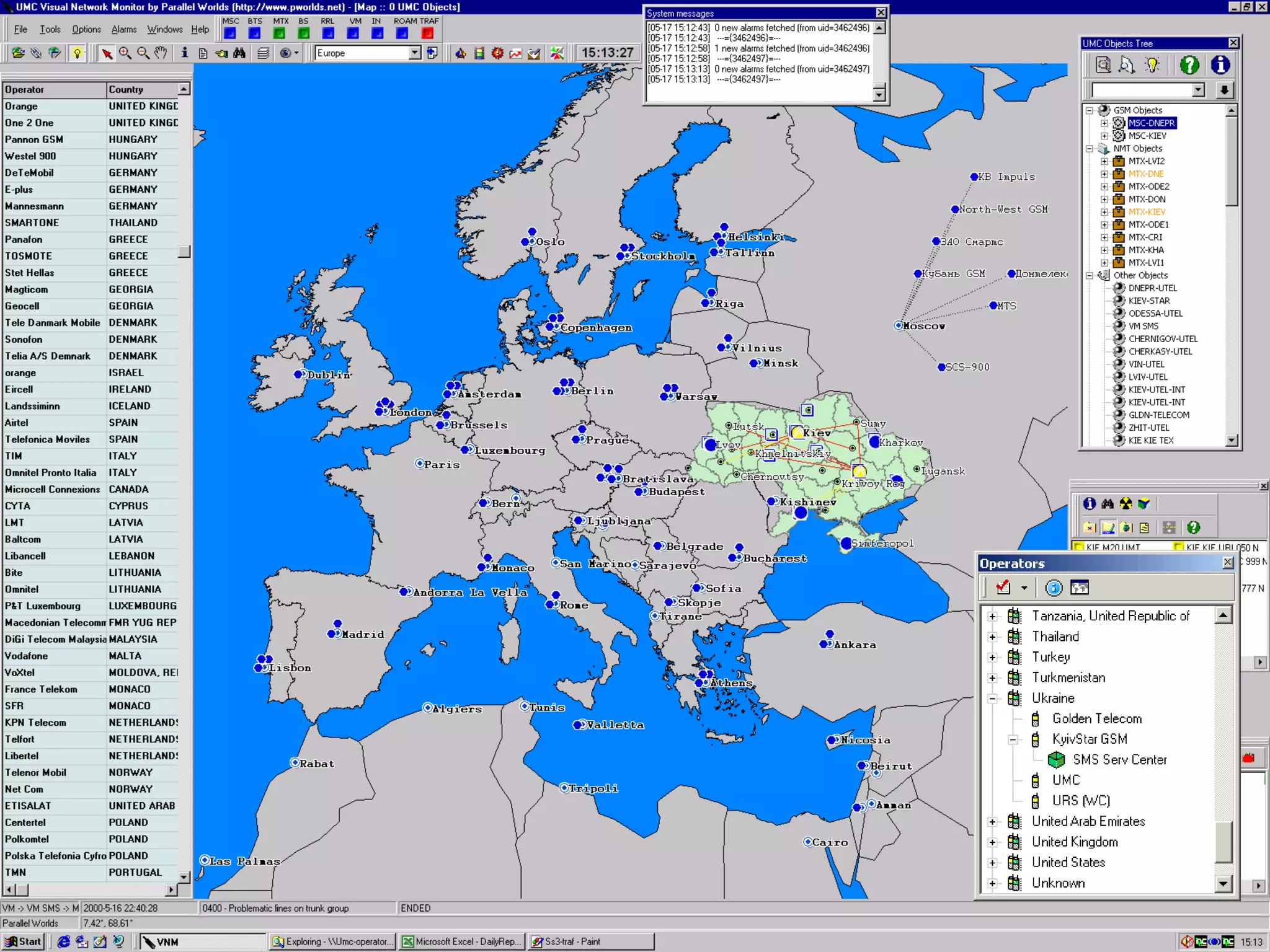
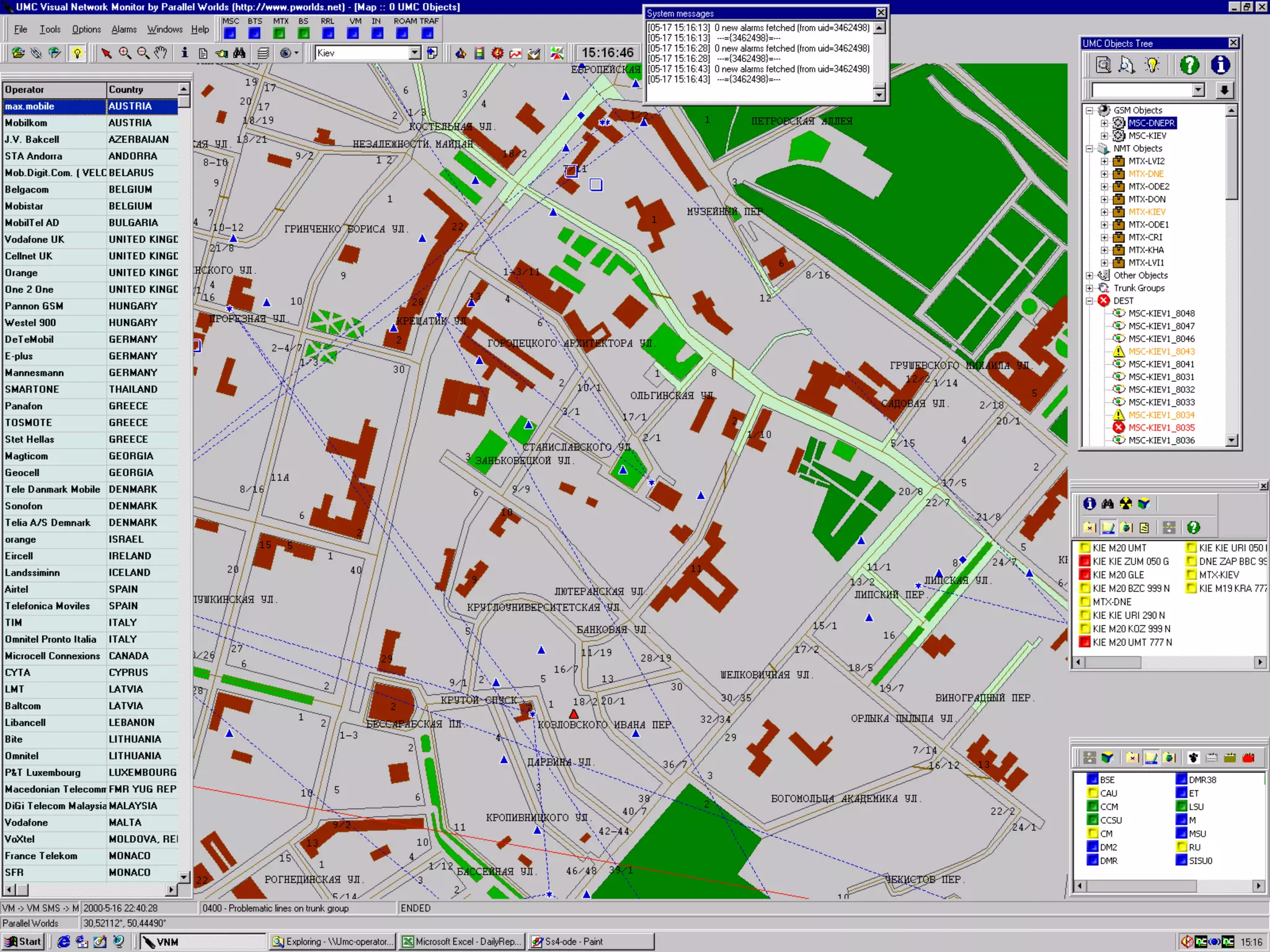
• Network operator can observe the map (say Europe
or World) and see roaming quality with each country
as well as with each roaming operator as the set of
special highlighted symbols (operators) and links
(destinations to countries). Roaming quality indicates
as native blue, yellow and red (each operator and
destinations on each country). The roaming stage
with the operators is also displayed on the special
window. Queue entry of critical event indicates at the
special semaphore.
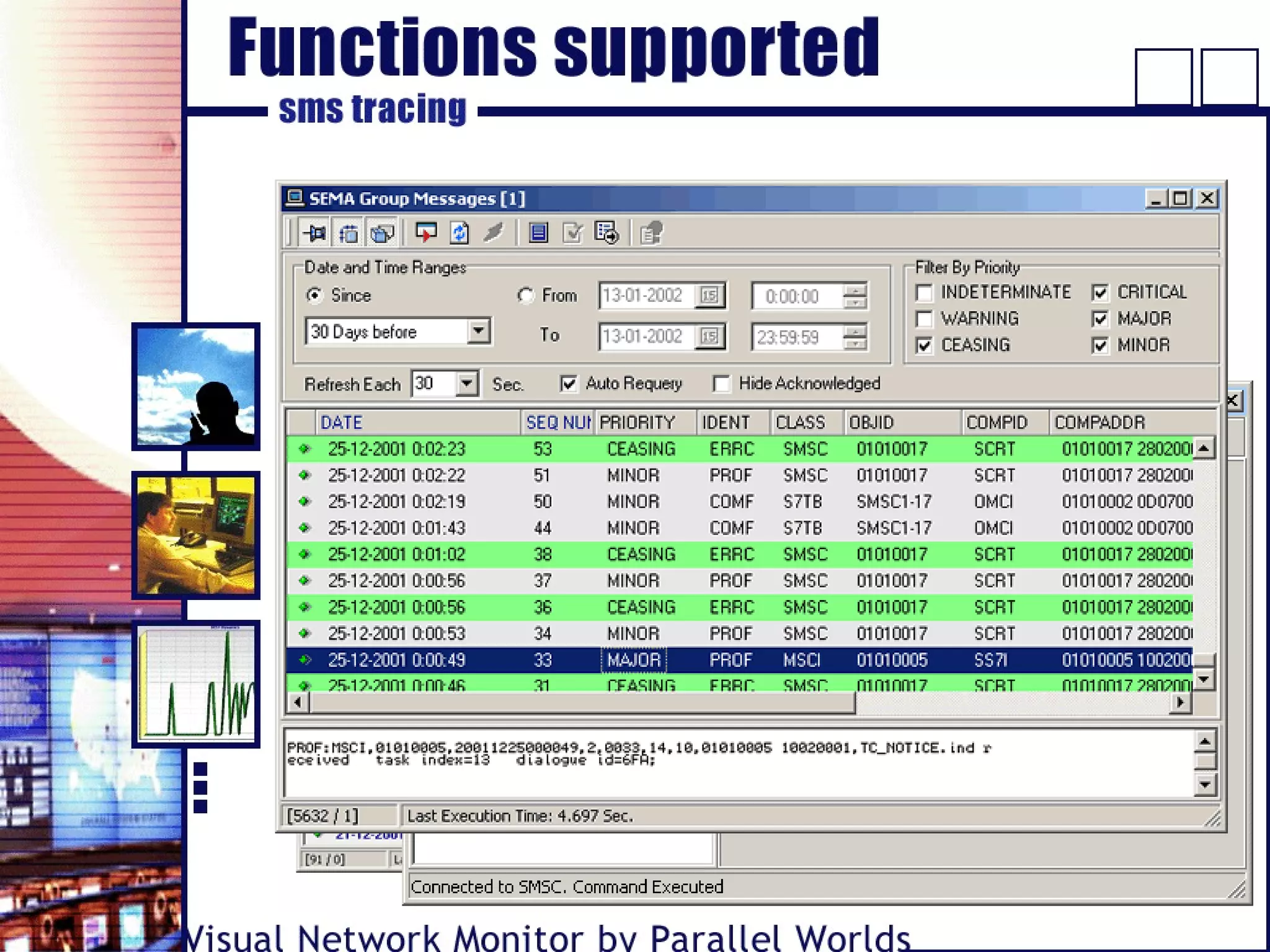
• Real-time SMS alarms monitoring
• “Live” tracing of SMS messages:
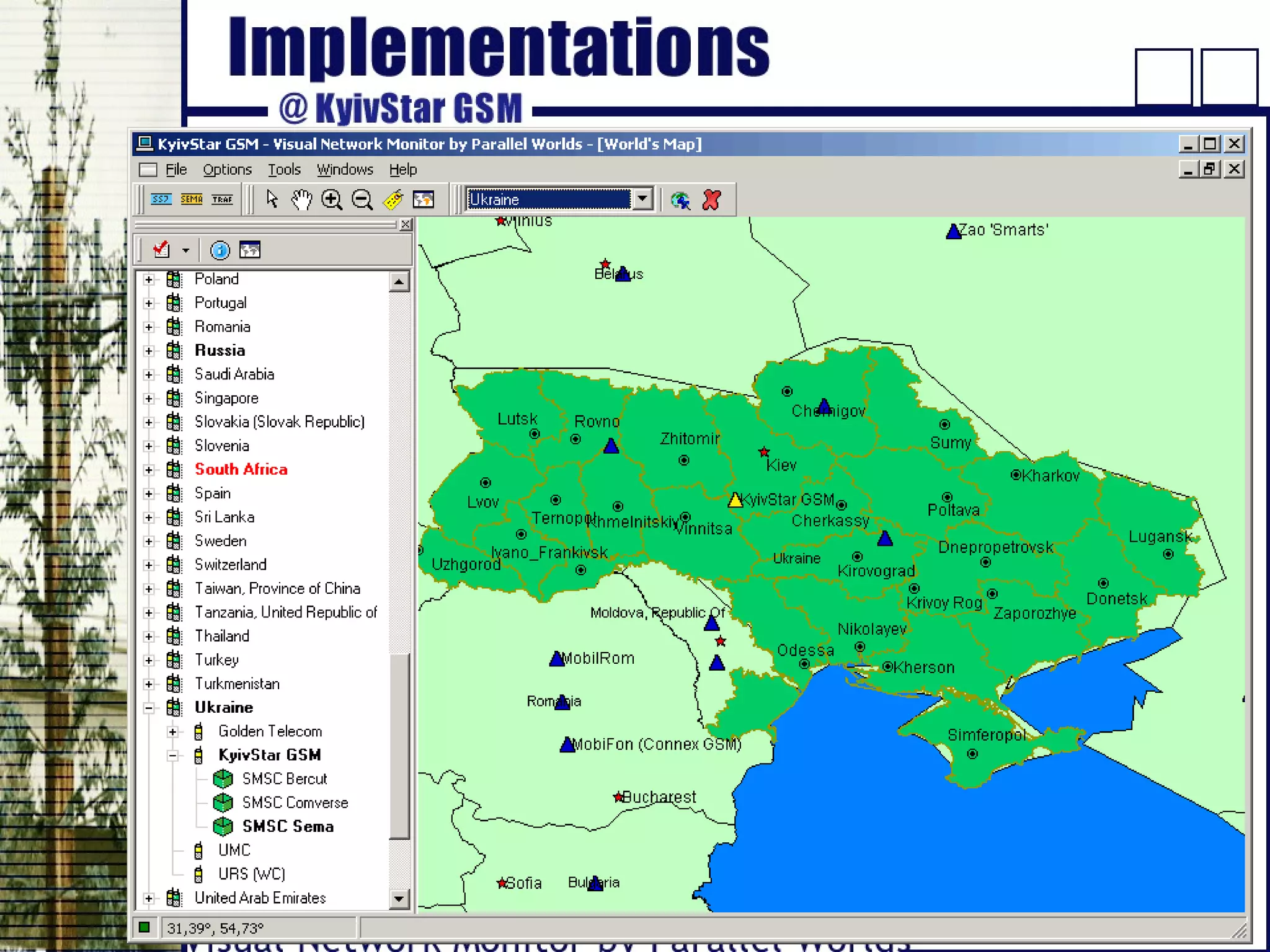
• Investigate roaming on the map of world or Europe…
• …see coverage, communication centers and domestic
links on a map of your country…
• …magnify more to follow the links between your base
stations…
• …and find base stations on a roof of the building…
• It is not just a nice background – each map object is
an indicator and a control.
• GIS is a powerful tool for integrated time-space
network perception.
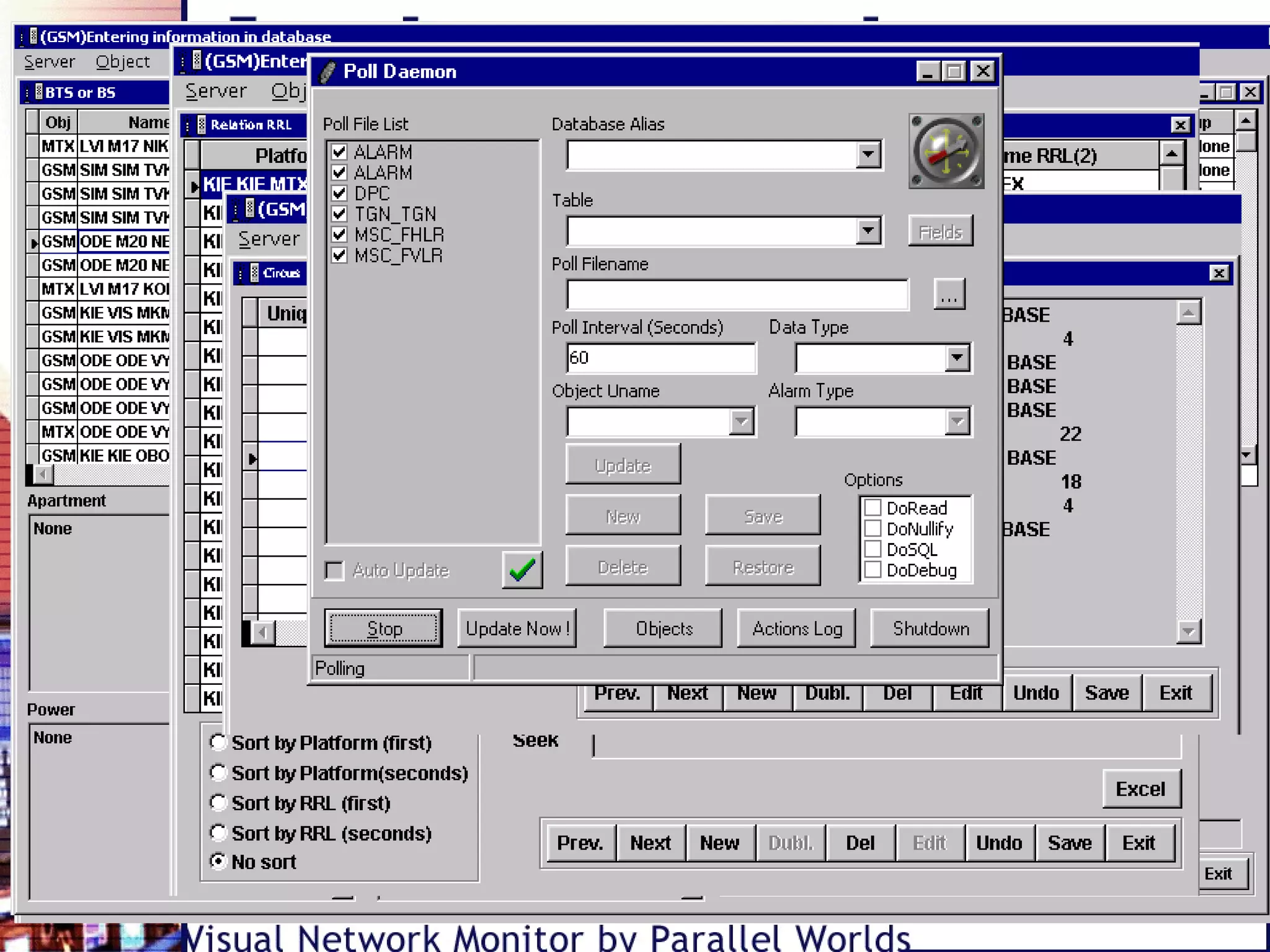
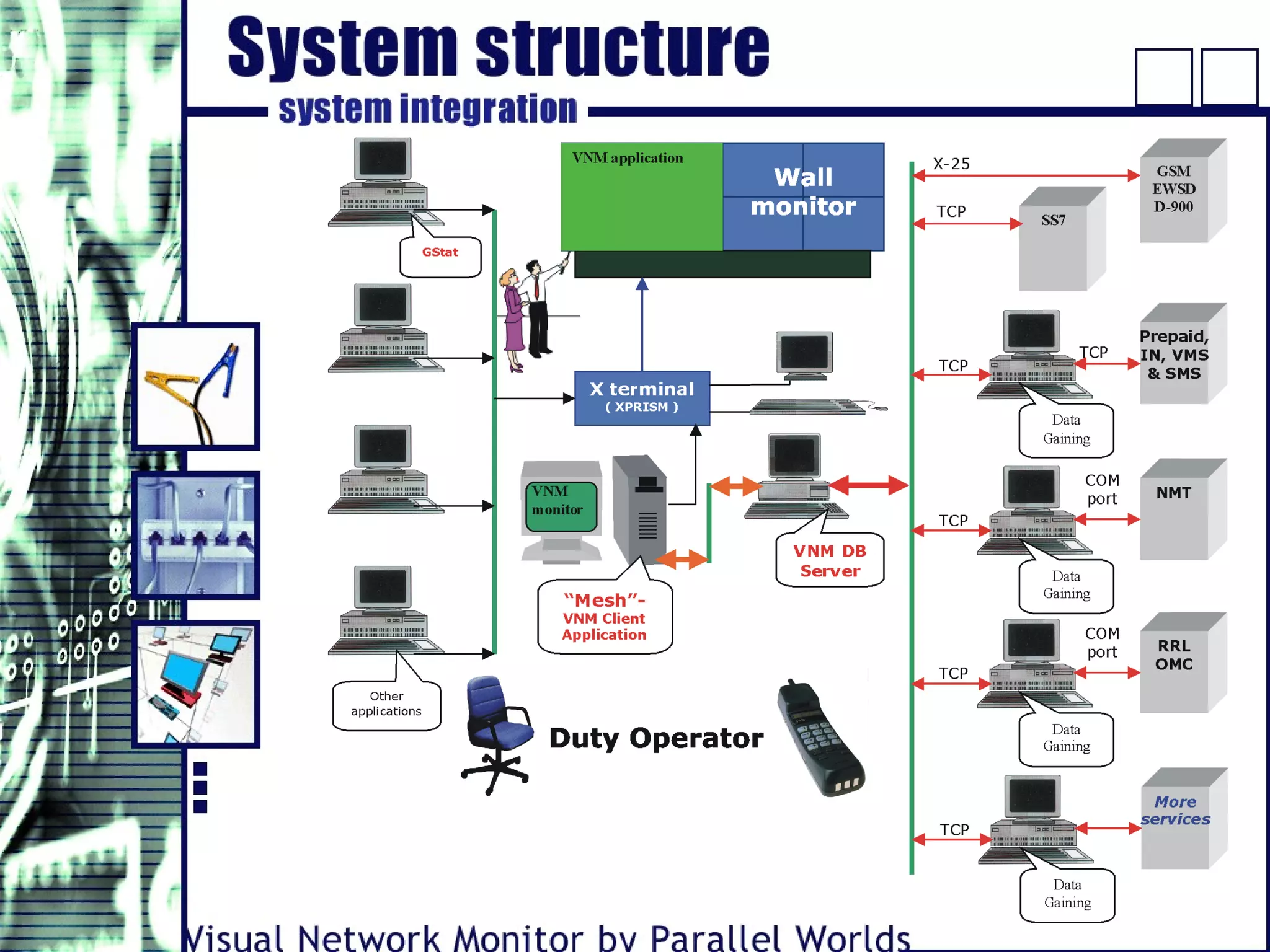
• Client-server architecture and optimized database
structure lets share the system functions between
independent parts installed on different computers.
It mean reducing of hardware and network
bandwidth requirements, or – correspondingly
increasing of system performance
• Built-in data validity check
• Contains supplemental information for all network
objects
• Number of online data sources is limited only with
hardware capabilities and network capacity
• Automated data fill and new data insert. For
example, if a message form a new base station will
be found – it will be allowed to add corresponding
database object and its relations
• Additionally to real-time modes described before,
VNM has powerful tools for post measurement
analysis
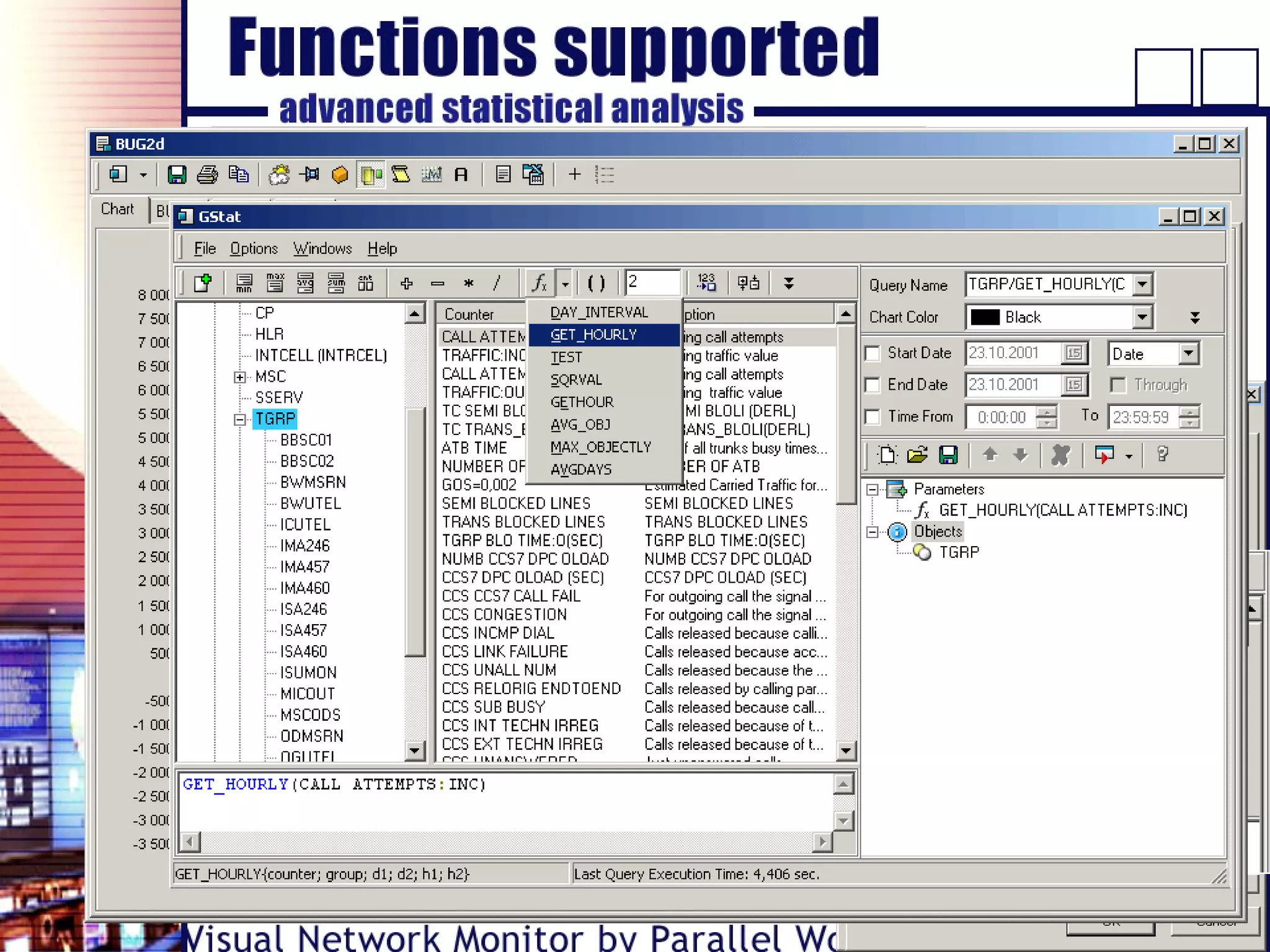
• Data collection and analysis for whole network as well
as for each network object (say, for each cell).
• Creation of user’s library of
customized statistical functions.
• Limitations (if any) only due to properties of the
particular hardware installed at network.
• Client-server architecture and
multi-user access mediation.
• Flexible graphic interface.
• Powerful tools for statistical analysis (visual query
editor).
• Data export and reports creation.
• Can be supplied as a separate application.
• GSM:
- MSC-S
• Commutation Lines
• SS7
• Commutation Objects
- BSC
- BTS
- ATS
- Commutation centers
- Domestic links
- Trunk groups
- Radio Relay Lines (RRL)
- Cable Lines
- More…
- Platforms
- IN
- DEST
- LAC
- WAP
• Roaming:
- Operators
• Other systems and components:
• NMT:
- DPS
- MTX
- BS
- SMS
- VMS
- PPS
• Y2K - tested
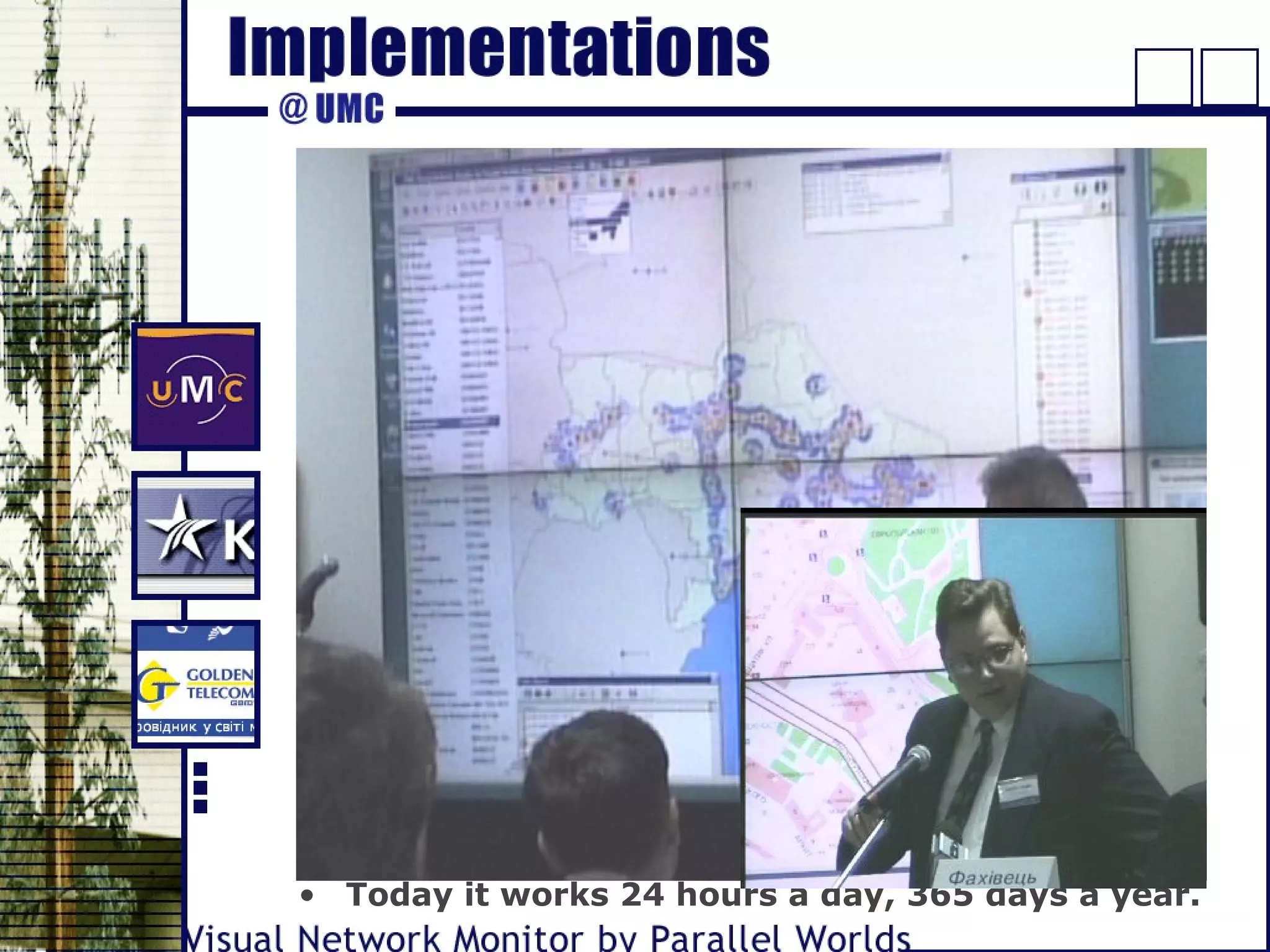
• Heart of Center-2000 (eyes and brains, more
exactly)
• Press-conference April 07, 2000
- Soccer match Real Madrid-FC Dinamo Kiev
- Parliament’s sitting
- Earthquake in Turkey
• Reference
Mr. Anatoly Volynets, Technical Director of Center-
2000:
- The software installed at UMS’s Center-2000 is
high-quality. The only difference between VNM and
Western software is neither the quality nor the
functionality but the price: VNM is essentially
cheaper.
• Today it works 24 hours a day, 365 days a year.
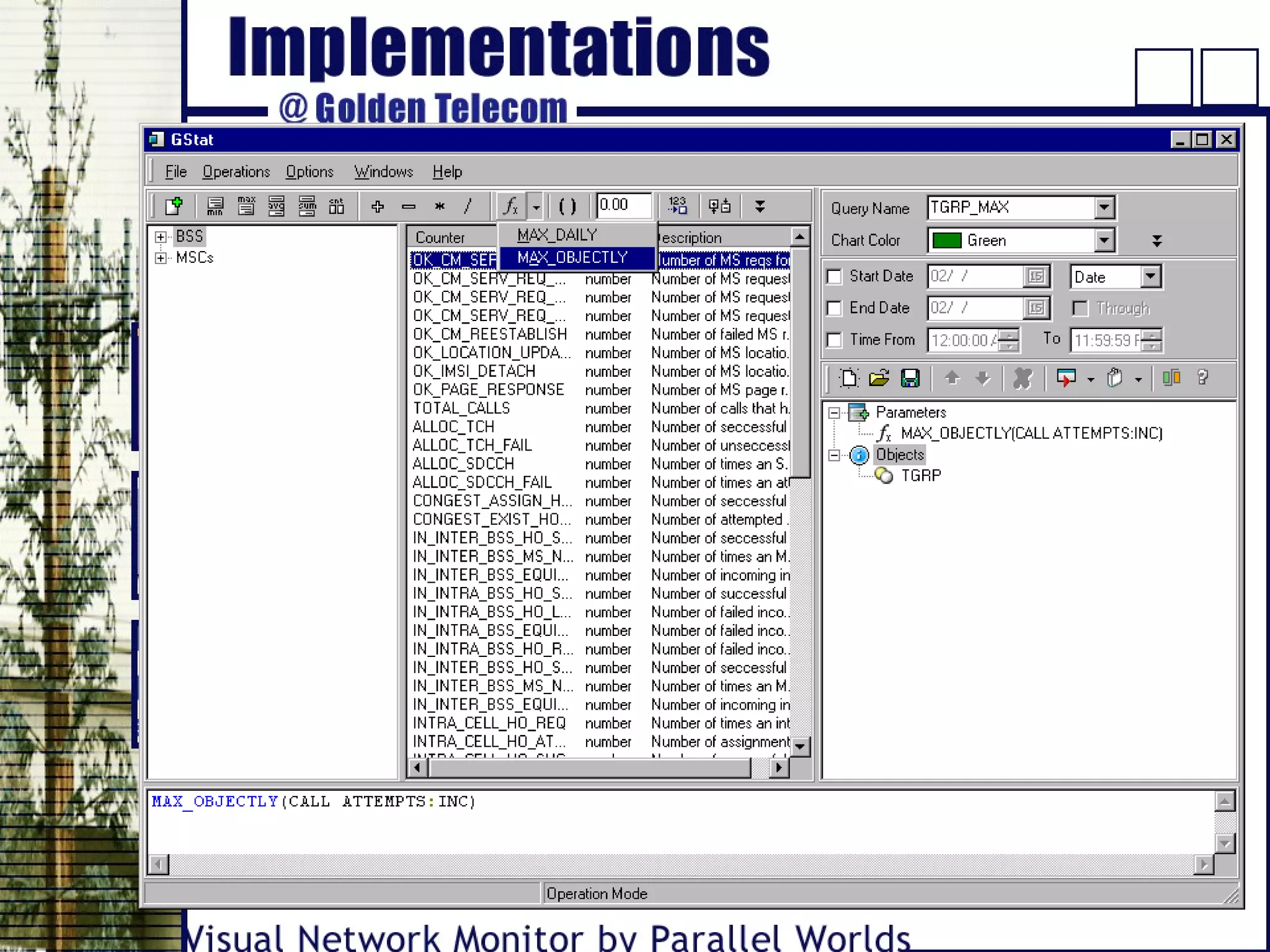
• Advanced analysis of statistical data (GStat)
• Statistics collected from:
- BSC
- MSC
- LMT
• Reference
Mr. Yuri Nebosenko, Head of Network Planning and
Development Department:
- We were impressed with both comfortable work
with Parallel Worlds and the quality of their
software.
- Online base of knowledge
• Last version of VNM
• Additional capabilities:
- SS7 monitoring
- SMS tracing
• Reference
Mr. Bogdan Senyuk, Technical Director of KyivStar
GSM:
- We have detected and eliminated the network
defects which were invisible before Visual Network
Monitor implementation. It helps us to serve our
subscribers better and their number increases. We
will continue our collaboration with Parallel Worlds
to add more capabilities for network monitoring.
- More…
• Structure of the Network
• Functions to be supported
• Soft- and hardware requirements
• Access to the network switches (generally, to the
source[s] of information to be monitored)
• Full description of network data access protocols
• Optional:
- Digital maps
- Wall monitor (projection monitor)
• Adaptation to the network
• Complete design and development of control rooms
(control centers) for wireless network monitoring
including the following:
- network investigation
- structure design
- supply of soft- and hardware
- installation
- start-and-adjustment
- support
- all will be installed during the network operation
• Custom software development: monitoring systems
based on VNM including any additional modules
exactly for your needs.
• Supply and custom adaptation of the software.
• Software and system support.
• Users’ training (for network duty operators, for
example).
• Technical and business consulting.
• Customer Oriented Product Development &
Implementation Cycle
• Modern Design & Development Methods
• Comprehensive Subject Area Expertise
& General System Approach
• Competitive Rates
• Reliable Quality Assurance
• Extensive Software Design & Development
Experience
• Long Term Partnership Focus
• Security and Non-disclosure Agreements
• Guarantee of High Quality
• Our Address:
9/12 Baumana Street
Office #33
03190, Kiev, Ukraine
• Phone: +380 (44) 459 6062, 442 6077, 443 0155
• Fax: +380 (44) 459 6062
• http://www.pworlds.com
• http://vnm.pworlds.com
• Contact Person:
Mr. Victor Yu. Chekh, General Manager
E-Mail: chekh@pworlds.com

VNM2

  • 2.
    • Visual NetworkMonitor (VNM) is the heterogeneous software system for visual monitoring of the mobile networks objects stage monitoring and roaming monitoring. It has been implemented for NMT, GSM- 900, GSM-1800, dual-band GSM-900/1800 standards networks (no any limitations for any another standards). • VNM implementation signifies a qualitative leap in mobile operator service. • VNM lets eliminate errors before calls of non-satisfied clients. • VNM is a source of concentrated and visual information to be used for mobile network real-time control and optimization.
  • 3.
    • The maindestination is the following: let a network duty operator see all events at each network object - from switches and destinations to particular blocks of base stations, understand their causes and immediately reach correct decisions. Built-in geographic information system (GIS), statistical analysis tools and reporting functions easy forms a solid time-space imagination of network operation both momentary - to find failures - and for long time period – for detail mobile network operation analysis and for its optimization.
  • 4.
    • Easy-to-use PCbased system • Powerful database • Multi user, client-server architecture • Records and displays all network performance parameters, alarms and counters • The ability to deliver real-time analysis capabilities • User-friendly menu structure - an ideal tool for both real-time and post measurement analysis • Automatic fault finding and problem solving diagnostic capabilities • Statistical, graphical and geographical display • Open architecture lets grow system features just with adding of new modules or modifying of existing ones
  • 5.
    • Decreases responsetime • Simplifies network operator’s work • Increases failure detection probability • Allows visual analysis • Increases service quality • No conflicts with other components of mobile networks • Installs during network operation • Attractive project price
  • 6.
    • 3 largestmobile operators in Ukraine (of 5 total) already use VNM • VNM supports GSM 900, GSM 1800, dual band GSM 900/1800 and NMT • They serve 2.175.000 users of 2.243.000 total (Jan 2002) • It is about 97% of domestic subscribers
  • 7.
    • Operator canuse a knowledge base with online help for each alarm type. It simplifies his work, and increases problem solving diagnostic capabilities • The duty operator must react to critical alarms (say call to the dispatched object or to the person in charge), then he must put out the semaphore. All his actions automatically saved into the system journal. • It is the most critical function of the system for the duty operator. Each incoming alarm displays at the special window. Alarms can be sorted by time (default), by criticality, by the dispatched objects, by the cases. The most critical ("red") ones indicate additionally by sound. Besides the current alarms window the duty operator can investigate any detail information about the alarm (just click it). The corresponding dispatched object will be immediately focused on the map and its color will also correspond to alarm color. The semaphores on top also indicate coming of critical events.
  • 8.
    • It isalso an extremely critical function. It happens that the quality of network operation and particular critical problems looks the most clearly after investigating of the network operation parameters. If the particular parameters overflow the critical threshold values then the corresponding objects became "red" or "yellow"; it displays immediately at the list of objects, on the map, on the semaphores and also by sound (for "red" ones). As well as the critical alarm, a critical parameter value is the signal for the duty operator to investigate the problem and immediately solve it. The interrogation period for network operation parameters is 15 min (customized), in contrary to alarm messages incoming in real time. It makes possible to solve urgent problems in time and to avoid false alarms. • Sample parameters: traffic, number of successful calls divided by number of total calls, etc.
  • 9.
    • Roaming operatoraccessibility is determines with DPC analysis or with corresponding SS7 alarms analysis. • Network operator can observe the map (say Europe or World) and see roaming quality with each country as well as with each roaming operator as the set of special highlighted symbols (operators) and links (destinations to countries). Roaming quality indicates as native blue, yellow and red (each operator and destinations on each country). The roaming stage with the operators is also displayed on the special window. Queue entry of critical event indicates at the special semaphore.
  • 10.
    • Real-time SMSalarms monitoring • “Live” tracing of SMS messages:
  • 11.
    • Investigate roamingon the map of world or Europe… • …see coverage, communication centers and domestic links on a map of your country… • …magnify more to follow the links between your base stations… • …and find base stations on a roof of the building… • It is not just a nice background – each map object is an indicator and a control. • GIS is a powerful tool for integrated time-space network perception.
  • 12.
    • Client-server architectureand optimized database structure lets share the system functions between independent parts installed on different computers. It mean reducing of hardware and network bandwidth requirements, or – correspondingly increasing of system performance • Built-in data validity check • Contains supplemental information for all network objects • Number of online data sources is limited only with hardware capabilities and network capacity • Automated data fill and new data insert. For example, if a message form a new base station will be found – it will be allowed to add corresponding database object and its relations
  • 13.
    • Additionally toreal-time modes described before, VNM has powerful tools for post measurement analysis • Data collection and analysis for whole network as well as for each network object (say, for each cell). • Creation of user’s library of customized statistical functions. • Limitations (if any) only due to properties of the particular hardware installed at network. • Client-server architecture and multi-user access mediation. • Flexible graphic interface. • Powerful tools for statistical analysis (visual query editor). • Data export and reports creation. • Can be supplied as a separate application.
  • 15.
    • GSM: - MSC-S •Commutation Lines • SS7 • Commutation Objects - BSC - BTS - ATS - Commutation centers - Domestic links - Trunk groups - Radio Relay Lines (RRL) - Cable Lines
  • 16.
    - More… - Platforms -IN - DEST - LAC - WAP • Roaming: - Operators • Other systems and components: • NMT: - DPS - MTX - BS - SMS - VMS - PPS
  • 18.
    • Y2K -tested • Heart of Center-2000 (eyes and brains, more exactly) • Press-conference April 07, 2000 - Soccer match Real Madrid-FC Dinamo Kiev - Parliament’s sitting - Earthquake in Turkey • Reference Mr. Anatoly Volynets, Technical Director of Center- 2000: - The software installed at UMS’s Center-2000 is high-quality. The only difference between VNM and Western software is neither the quality nor the functionality but the price: VNM is essentially cheaper. • Today it works 24 hours a day, 365 days a year.
  • 19.
    • Advanced analysisof statistical data (GStat) • Statistics collected from: - BSC - MSC - LMT • Reference Mr. Yuri Nebosenko, Head of Network Planning and Development Department: - We were impressed with both comfortable work with Parallel Worlds and the quality of their software.
  • 20.
    - Online baseof knowledge • Last version of VNM • Additional capabilities: - SS7 monitoring - SMS tracing • Reference Mr. Bogdan Senyuk, Technical Director of KyivStar GSM: - We have detected and eliminated the network defects which were invisible before Visual Network Monitor implementation. It helps us to serve our subscribers better and their number increases. We will continue our collaboration with Parallel Worlds to add more capabilities for network monitoring. - More…
  • 21.
    • Structure ofthe Network • Functions to be supported • Soft- and hardware requirements • Access to the network switches (generally, to the source[s] of information to be monitored) • Full description of network data access protocols • Optional: - Digital maps - Wall monitor (projection monitor) • Adaptation to the network
  • 22.
    • Complete designand development of control rooms (control centers) for wireless network monitoring including the following: - network investigation - structure design - supply of soft- and hardware - installation - start-and-adjustment - support - all will be installed during the network operation • Custom software development: monitoring systems based on VNM including any additional modules exactly for your needs. • Supply and custom adaptation of the software. • Software and system support. • Users’ training (for network duty operators, for example). • Technical and business consulting.
  • 23.
    • Customer OrientedProduct Development & Implementation Cycle • Modern Design & Development Methods • Comprehensive Subject Area Expertise & General System Approach • Competitive Rates • Reliable Quality Assurance • Extensive Software Design & Development Experience • Long Term Partnership Focus • Security and Non-disclosure Agreements • Guarantee of High Quality
  • 24.
    • Our Address: 9/12Baumana Street Office #33 03190, Kiev, Ukraine • Phone: +380 (44) 459 6062, 442 6077, 443 0155 • Fax: +380 (44) 459 6062 • http://www.pworlds.com • http://vnm.pworlds.com • Contact Person: Mr. Victor Yu. Chekh, General Manager E-Mail: chekh@pworlds.com