11312 US 15 501 Hwy North Suite 107151 Contact: David Goldston
Chapel Hill, NC 27517 Email: info@veracitylogic.com
Managing	
  Protocol	
  Devia0ons:	
  
Authoriza0on	
  Codes	
  
using	
  Veracity	
  Logic’s	
  Interac0ve	
  
Response	
  Technology	
  (VLIRT®)	
  
11312 US 15 501 Hwy North Suite 107151 Contact: David Goldston
Chapel Hill, NC 27517 Email: info@veracitylogic.com
SeEng	
  Up	
  Authoriza0on	
  Codes	
  
•  Define	
  when	
  Authoriza0on	
  Codes	
  (Auth	
  Codes)	
  
will	
  be	
  used	
  
–  Subject	
  out	
  of	
  age	
  range	
  
–  Recording	
  ac0vity	
  out	
  of	
  ‘hard’	
  window*	
  
•  Provide	
  an	
  ini0al	
  set	
  of	
  authoriza0on	
  codes	
  to	
  a	
  
medical	
  monitor	
  and	
  a	
  back-­‐up	
  
–  The	
  medical	
  monitors	
  can	
  keep	
  copies	
  of	
  the	
  
authoriza0on	
  codes	
  in	
  their	
  wallets	
  so	
  they	
  have	
  them	
  
when	
  site	
  users	
  call	
  
*	
  A	
  ‘hard’	
  window	
  is	
  defined	
  as	
  an	
  ac2vity	
  window	
  that	
  requires	
  authoriza2on	
  from	
  a	
  
medical	
  monitor	
  before	
  the	
  ac2vity	
  can	
  be	
  recorded.	
  
11312 US 15 501 Hwy North Suite 107151 Contact: David Goldston
Chapel Hill, NC 27517 Email: info@veracitylogic.com
Using	
  Auth	
  Code	
  for	
  Age	
  Range	
  
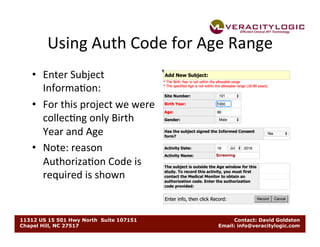
•  Enter	
  Subject	
  
Informa0on:	
  
•  For	
  this	
  project	
  we	
  were	
  
collec0ng	
  only	
  Birth	
  
Year	
  and	
  Age	
  
•  Note:	
  reason	
  
Authoriza0on	
  Code	
  is	
  
required	
  is	
  shown	
  
11312 US 15 501 Hwy North Suite 107151 Contact: David Goldston
Chapel Hill, NC 27517 Email: info@veracitylogic.com
Using	
  Auth	
  Code	
  for	
  Ac0vity	
  Out	
  of	
  Window	
  
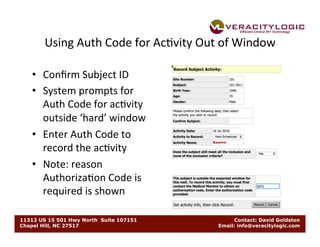
•  Confirm	
  Subject	
  ID	
  
•  System	
  prompts	
  for	
  
Auth	
  Code	
  for	
  ac0vity	
  
outside	
  ‘hard’	
  window	
  
•  Enter	
  Auth	
  Code	
  to	
  
record	
  the	
  ac0vity	
  
•  Note:	
  reason	
  
Authoriza0on	
  Code	
  is	
  
required	
  is	
  shown	
  
11312 US 15 501 Hwy North Suite 107151 Contact: David Goldston
Chapel Hill, NC 27517 Email: info@veracitylogic.com
Repor0ng	
  Auth	
  Code	
  Usage	
  
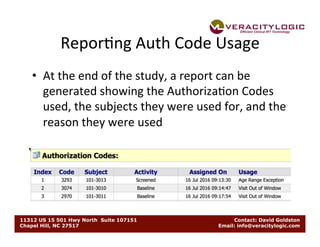
•  At	
  the	
  end	
  of	
  the	
  study,	
  a	
  report	
  can	
  be	
  
generated	
  showing	
  the	
  Authoriza0on	
  Codes	
  
used,	
  the	
  subjects	
  they	
  were	
  used	
  for,	
  and	
  the	
  
reason	
  they	
  were	
  used	
  
11312 US 15 501 Hwy North Suite 107151 Contact: David Goldston
Chapel Hill, NC 27517 Email: info@veracitylogic.com
Ques0ons?	
  
•  If	
  you	
  have	
  ques0ons	
  about	
  how	
  you	
  can	
  take	
  
advantage	
  of	
  using	
  authoriza0on	
  codes	
  to	
  
manage	
  protocol	
  devia0ons	
  for	
  your	
  project,	
  
email:	
  
•  David	
  Goldston	
  
info@veracitylogic.com	
  

VL Presentation: Managing Protocol Deviation using Authorization Codes

  • 1.
    11312 US 15501 Hwy North Suite 107151 Contact: David Goldston Chapel Hill, NC 27517 Email: info@veracitylogic.com Managing  Protocol  Devia0ons:   Authoriza0on  Codes   using  Veracity  Logic’s  Interac0ve   Response  Technology  (VLIRT®)  
  • 2.
    11312 US 15501 Hwy North Suite 107151 Contact: David Goldston Chapel Hill, NC 27517 Email: info@veracitylogic.com SeEng  Up  Authoriza0on  Codes   •  Define  when  Authoriza0on  Codes  (Auth  Codes)   will  be  used   –  Subject  out  of  age  range   –  Recording  ac0vity  out  of  ‘hard’  window*   •  Provide  an  ini0al  set  of  authoriza0on  codes  to  a   medical  monitor  and  a  back-­‐up   –  The  medical  monitors  can  keep  copies  of  the   authoriza0on  codes  in  their  wallets  so  they  have  them   when  site  users  call   *  A  ‘hard’  window  is  defined  as  an  ac2vity  window  that  requires  authoriza2on  from  a   medical  monitor  before  the  ac2vity  can  be  recorded.  
  • 3.
    11312 US 15501 Hwy North Suite 107151 Contact: David Goldston Chapel Hill, NC 27517 Email: info@veracitylogic.com Using  Auth  Code  for  Age  Range   •  Enter  Subject   Informa0on:   •  For  this  project  we  were   collec0ng  only  Birth   Year  and  Age   •  Note:  reason   Authoriza0on  Code  is   required  is  shown  
  • 4.
    11312 US 15501 Hwy North Suite 107151 Contact: David Goldston Chapel Hill, NC 27517 Email: info@veracitylogic.com Using  Auth  Code  for  Ac0vity  Out  of  Window   •  Confirm  Subject  ID   •  System  prompts  for   Auth  Code  for  ac0vity   outside  ‘hard’  window   •  Enter  Auth  Code  to   record  the  ac0vity   •  Note:  reason   Authoriza0on  Code  is   required  is  shown  
  • 5.
    11312 US 15501 Hwy North Suite 107151 Contact: David Goldston Chapel Hill, NC 27517 Email: info@veracitylogic.com Repor0ng  Auth  Code  Usage   •  At  the  end  of  the  study,  a  report  can  be   generated  showing  the  Authoriza0on  Codes   used,  the  subjects  they  were  used  for,  and  the   reason  they  were  used  
  • 6.
    11312 US 15501 Hwy North Suite 107151 Contact: David Goldston Chapel Hill, NC 27517 Email: info@veracitylogic.com Ques0ons?   •  If  you  have  ques0ons  about  how  you  can  take   advantage  of  using  authoriza0on  codes  to   manage  protocol  devia0ons  for  your  project,   email:   •  David  Goldston   info@veracitylogic.com