VISUAL
STUDIO
VS
VISUAL
STUDIO
CODE
Are you confused between the Visual Studio Vs. Visual Studio
Code? Do you want to know the difference and the scope of both
tools? If yes, that’s great. You are in the correct place.
Well, you are not the one who is confused about Visual Studio Vs.
Visual Studio Code. Many people do not know the difference and
similarities between both. If you are thinking of making your career
in one of both tools, this blog will help you. Thus, in this blog, I will
mention Visual Studio Vs. Visual Studio Code and give you some
additional knowledge about it.
Let’s start discussing with the overview of Visual Studio and Visual
Studio Code.
Visual Studio vs
Visual Studio
Code
Defination
Microsoft Visual Studio is one of the IDE (Integrated Development Environment)
that is launched by Microsoft. It has the capability of producing both managed
code and native code. This is utilized to develop websites, web services, computer
programs, and mobile apps.
Visual Studio Code is one of the free source code editors used for Linux,
Windows, and macOS. Several features are supported by Visual Studio Code,
such as syntax highlighting, snippets, embedded Git, intelligent code completion,
and code refactoring. The users have the option to change the keyboard
shortcuts, themes, preferences.
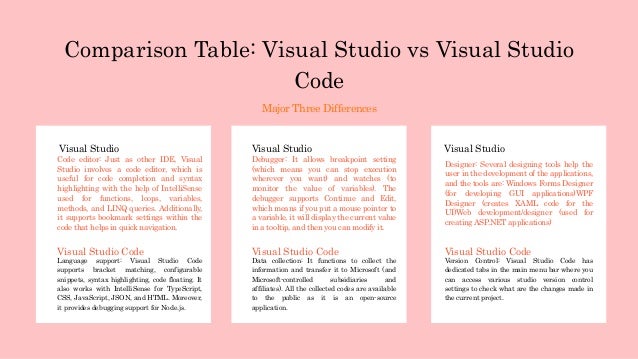
Comparison Table: Visual Studio vs Visual Studio
Code
Major Three Differences
Code editor: Just as other IDE, Visual
Studio involves a code editor, which is
useful for code completion and syntax
highlighting with the help of IntelliSense
used for functions, loops, variables,
methods, and LINQ queries. Additionally,
it supports bookmark settings within the
code that helps in quick navigation.
Language support: Visual Studio Code
supports bracket matching, configurable
snippets, syntax highlighting, code floating. It
also works with IntelliSense for TypeScript,
CSS, JavaScript, JSON, and HTML. Moreover,
it provides debugging support for Node.js.
Visual Studio
Visual Studio Code
Visual Studio
Debugger: It allows breakpoint setting
(which means you can stop execution
wherever you want) and watches (to
monitor the value of variables). The
debugger supports Continue and Edit,
which means if you put a mouse pointer to
a variable, it will display the current value
in a tooltip, and then you can modify it.
Visual Studio Code
Data collection: It functions to collect the
information and transfer it to Microsoft (and
Microsoft-controlled subsidiaries and
affiliates). All the collected codes are available
to the public as it is an open-source
application.
Visual Studio
Designer: Several designing tools help the
user in the development of the applications,
and the tools are: Windows Forms Designer
(for developing GUI applications)WPF
Designer (creates XAML code for the
UI)Web development/designer (used for
creating ASP.NET applications)
Visual Studio Code
Version Control: Visual Studio Code has
dedicated tabs in the main menu bar where you
can access various studio version control
settings to check what are the changes made in
the current project.
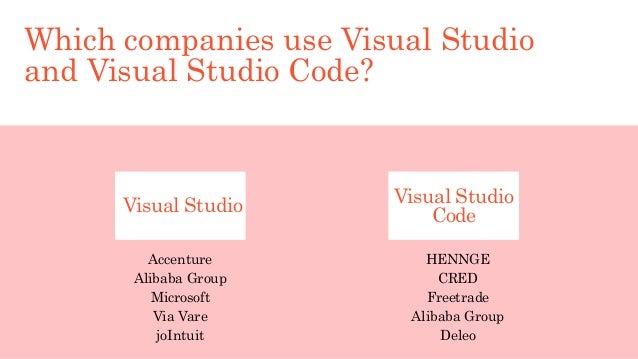
Which companies use Visual Studio
and Visual Studio Code?
Accenture
Alibaba Group
Microsoft
Via Vare
joIntuit
HENNGE
CRED
Freetrade
Alibaba Group
Deleo
Visual Studio Visual Studio
Code
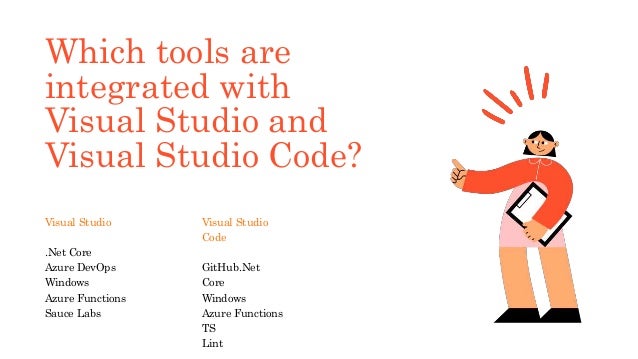
Which tools are
integrated with
Visual Studio and
Visual Studio Code?
Visual Studio
.Net Core
Azure DevOps
Windows
Azure Functions
Sauce Labs
Visual Studio
Code
GitHub.Net
Core
Windows
Azure Functions
TS
Lint
Is Visual Studio
Code better
than Visual
Studio?
Deciding between Visual Studio or Visual Studio Code is not an easy task. It is because mainly programming
languages in VS Code are quite close to an IDE.
Let’s take an example; if your development method is test-driven, Visual Studio will be best. On the other side,
for VS Code, there are 15 test-driven development extensions supporting Node.js, Go, .Net, and PHP.
Similarly, Visual Studio does an excellent job working with databases, mainly Microsoft SQL Server and its
relatives, but VS Code has lots of database extensions.
Visual Studio has excellent refactoring support, but Visual Studio Code performs the basic refactoring
operations for different languages.
Visual Studio doesn’t work on Linux, but VS Code does. In contrast, Visual Studio for Windows has a Linux/C++
workload and Azure support.
Thus, If you work on a development project for hours, then Visual Studio will be better. If you tend to work into
development for short periods and switch between other tasks, then Visual Studio Code might make you
happier.
Thank you
Follow
us on:

Visual studio vs visual studio code

  • 1.
  • 2.
    Are you confusedbetween the Visual Studio Vs. Visual Studio Code? Do you want to know the difference and the scope of both tools? If yes, that’s great. You are in the correct place. Well, you are not the one who is confused about Visual Studio Vs. Visual Studio Code. Many people do not know the difference and similarities between both. If you are thinking of making your career in one of both tools, this blog will help you. Thus, in this blog, I will mention Visual Studio Vs. Visual Studio Code and give you some additional knowledge about it. Let’s start discussing with the overview of Visual Studio and Visual Studio Code.
  • 3.
    Visual Studio vs VisualStudio Code Defination Microsoft Visual Studio is one of the IDE (Integrated Development Environment) that is launched by Microsoft. It has the capability of producing both managed code and native code. This is utilized to develop websites, web services, computer programs, and mobile apps. Visual Studio Code is one of the free source code editors used for Linux, Windows, and macOS. Several features are supported by Visual Studio Code, such as syntax highlighting, snippets, embedded Git, intelligent code completion, and code refactoring. The users have the option to change the keyboard shortcuts, themes, preferences.
  • 4.
    Comparison Table: VisualStudio vs Visual Studio Code Major Three Differences Code editor: Just as other IDE, Visual Studio involves a code editor, which is useful for code completion and syntax highlighting with the help of IntelliSense used for functions, loops, variables, methods, and LINQ queries. Additionally, it supports bookmark settings within the code that helps in quick navigation. Language support: Visual Studio Code supports bracket matching, configurable snippets, syntax highlighting, code floating. It also works with IntelliSense for TypeScript, CSS, JavaScript, JSON, and HTML. Moreover, it provides debugging support for Node.js. Visual Studio Visual Studio Code Visual Studio Debugger: It allows breakpoint setting (which means you can stop execution wherever you want) and watches (to monitor the value of variables). The debugger supports Continue and Edit, which means if you put a mouse pointer to a variable, it will display the current value in a tooltip, and then you can modify it. Visual Studio Code Data collection: It functions to collect the information and transfer it to Microsoft (and Microsoft-controlled subsidiaries and affiliates). All the collected codes are available to the public as it is an open-source application. Visual Studio Designer: Several designing tools help the user in the development of the applications, and the tools are: Windows Forms Designer (for developing GUI applications)WPF Designer (creates XAML code for the UI)Web development/designer (used for creating ASP.NET applications) Visual Studio Code Version Control: Visual Studio Code has dedicated tabs in the main menu bar where you can access various studio version control settings to check what are the changes made in the current project.
  • 5.
    Which companies useVisual Studio and Visual Studio Code? Accenture Alibaba Group Microsoft Via Vare joIntuit HENNGE CRED Freetrade Alibaba Group Deleo Visual Studio Visual Studio Code
  • 6.
    Which tools are integratedwith Visual Studio and Visual Studio Code? Visual Studio .Net Core Azure DevOps Windows Azure Functions Sauce Labs Visual Studio Code GitHub.Net Core Windows Azure Functions TS Lint
  • 7.
    Is Visual Studio Codebetter than Visual Studio? Deciding between Visual Studio or Visual Studio Code is not an easy task. It is because mainly programming languages in VS Code are quite close to an IDE. Let’s take an example; if your development method is test-driven, Visual Studio will be best. On the other side, for VS Code, there are 15 test-driven development extensions supporting Node.js, Go, .Net, and PHP. Similarly, Visual Studio does an excellent job working with databases, mainly Microsoft SQL Server and its relatives, but VS Code has lots of database extensions. Visual Studio has excellent refactoring support, but Visual Studio Code performs the basic refactoring operations for different languages. Visual Studio doesn’t work on Linux, but VS Code does. In contrast, Visual Studio for Windows has a Linux/C++ workload and Azure support. Thus, If you work on a development project for hours, then Visual Studio will be better. If you tend to work into development for short periods and switch between other tasks, then Visual Studio Code might make you happier.
  • 8.