VISUAL PROGRAMMING
CONCEPTS
VISUAL PROGRAMMING
Visual programming is a programming language
that allows people to create programs using
graphics such as blocks, buttons, icons and
figures. It enables the programmer to develop
programs using terms that human
beings understand.
We can also say
Visual coding offers the ability to code
graphically, or visually, usually through the use of
blocks and drag-and-drop (also referred to as click
and drag) processes as opposed to doing so
Types of visual programming
applications
There are many applications that can
enable you to create programs in visual
programming. Examples include:
Code.org
Microsoft Make
Scratch
Blockly
Sprite box
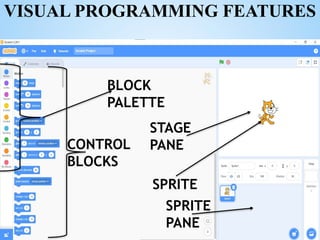
VISUAL PROGRAMMING FEATURES
CONTROL
BLOCKS
STAGE
PANE
SPRITE
SPRITE
PANE
BLOCK
PALETTE
FUNCTIONS OF FEATURES OF
SCRATCH PROGRAMMING
Stage pane
This is the area where the sprites move
according to the instructions given. The
programmer can set the stage to have different
backgrounds.
Sprite
These are images, objects or actors that can be
programmed. They respond to the instructions
given using the blocks.
Script
An instruction that tells the actors what to
say or do. Each sprite is programmed with
a script to perform different actions.
Block palette
This is the area where the different blocks
used to program are located.
Control blocks
These are the shapes that are used to create
codes in scratch. They are found on the
programming palette, they are color-coded
and they fit into each other like a jigsaw
puzzle
Sprite pane.
This shows icons of all sprites and backdrops
available in the project with the selected item
highlighted. It allows easy access and
modification of sprites.
Backpack
This is a small area to the bottom of the
Block Palette that stores scripts, costumes,
and sounds. It allows for them to be
transferred from one project to another.
TERMS USED IN VISUAL PROGRAMMING
Reserved words
A reserved word is a word that has a unique
meaning and function in the application or the
programming language in use. It looks like a
normal word but is not used as a normal word
in that programming language.
Examples of reserved words in scratch includes
move, turn, when clicked, repeat and if then.
Syntax
Syntax refers to the rules that define how
symbols are arranged in a programming
language to be considered correctly structured.
This means that specific words or graphics, set
in a specific order, tell a computer what you
want it to do. When you try to run a program
without proper syntax for example a missing
punctuation mark it results in a syntax error.
Variables
Variable refers to names of objects that store
data and information in a program. Variables
act as containers for storing data and
information before and after program
execution.
Variable declaration
A variable declaration defines the name and
the type of the variable.
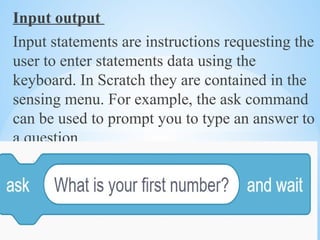
Input output
Input statements are instructions requesting the
user to enter statements data using the
keyboard. In Scratch they are contained in the
sensing menu. For example, the ask command
can be used to prompt you to type an answer to
a question.
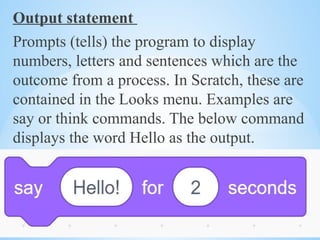
Output statement
Prompts (tells) the program to display
numbers, letters and sentences which are the
outcome from a process. In Scratch, these are
contained in the Looks menu. Examples are
say or think commands. The below command
displays the word Hello as the output.
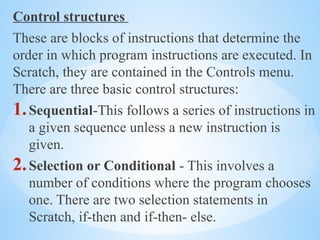
Control structures
These are blocks of instructions that determine the
order in which program instructions are executed. In
Scratch, they are contained in the Controls menu.
There are three basic control structures:
1.Sequential-This follows a series of instructions in
a given sequence unless a new instruction is
given.
2.Selection or Conditional - This involves a
number of conditions where the program chooses
one. There are two selection statements in
Scratch, if-then and if-then- else.
3. Loop-Loops are control structures that allow
sections of code to be executed repeatedly.
Question
Why did the Scratch cat bring a
ladder to the computer lab?
Because it wanted to reach the
higher "code"-fidence level!

VISUAL PROGRAMMING CONCEPTS for junior sch

  • 1.
  • 2.
    VISUAL PROGRAMMING Visual programmingis a programming language that allows people to create programs using graphics such as blocks, buttons, icons and figures. It enables the programmer to develop programs using terms that human beings understand. We can also say Visual coding offers the ability to code graphically, or visually, usually through the use of blocks and drag-and-drop (also referred to as click and drag) processes as opposed to doing so
  • 3.
    Types of visualprogramming applications There are many applications that can enable you to create programs in visual programming. Examples include: Code.org Microsoft Make Scratch Blockly Sprite box
  • 4.
  • 5.
    FUNCTIONS OF FEATURESOF SCRATCH PROGRAMMING Stage pane This is the area where the sprites move according to the instructions given. The programmer can set the stage to have different backgrounds. Sprite These are images, objects or actors that can be programmed. They respond to the instructions given using the blocks.
  • 6.
    Script An instruction thattells the actors what to say or do. Each sprite is programmed with a script to perform different actions. Block palette This is the area where the different blocks used to program are located.
  • 7.
    Control blocks These arethe shapes that are used to create codes in scratch. They are found on the programming palette, they are color-coded and they fit into each other like a jigsaw puzzle Sprite pane. This shows icons of all sprites and backdrops available in the project with the selected item highlighted. It allows easy access and modification of sprites.
  • 8.
    Backpack This is asmall area to the bottom of the Block Palette that stores scripts, costumes, and sounds. It allows for them to be transferred from one project to another.
  • 9.
    TERMS USED INVISUAL PROGRAMMING Reserved words A reserved word is a word that has a unique meaning and function in the application or the programming language in use. It looks like a normal word but is not used as a normal word in that programming language. Examples of reserved words in scratch includes move, turn, when clicked, repeat and if then.
  • 10.
    Syntax Syntax refers tothe rules that define how symbols are arranged in a programming language to be considered correctly structured. This means that specific words or graphics, set in a specific order, tell a computer what you want it to do. When you try to run a program without proper syntax for example a missing punctuation mark it results in a syntax error.
  • 11.
    Variables Variable refers tonames of objects that store data and information in a program. Variables act as containers for storing data and information before and after program execution. Variable declaration A variable declaration defines the name and the type of the variable.
  • 12.
    Input output Input statementsare instructions requesting the user to enter statements data using the keyboard. In Scratch they are contained in the sensing menu. For example, the ask command can be used to prompt you to type an answer to a question.
  • 13.
    Output statement Prompts (tells)the program to display numbers, letters and sentences which are the outcome from a process. In Scratch, these are contained in the Looks menu. Examples are say or think commands. The below command displays the word Hello as the output.
  • 14.
    Control structures These areblocks of instructions that determine the order in which program instructions are executed. In Scratch, they are contained in the Controls menu. There are three basic control structures: 1.Sequential-This follows a series of instructions in a given sequence unless a new instruction is given. 2.Selection or Conditional - This involves a number of conditions where the program chooses one. There are two selection statements in Scratch, if-then and if-then- else.
  • 15.
    3. Loop-Loops arecontrol structures that allow sections of code to be executed repeatedly.
  • 16.
    Question Why did theScratch cat bring a ladder to the computer lab? Because it wanted to reach the higher "code"-fidence level!