P
S h i t a l i n f o t e c h . c o m
Visitor Management System Developed By ShitalInfotech 2017
S h i t a l i n f o t e c h . c o m Page 1
Visitor
Management
System
Software
User
Document
P
S h i t a l i n f o t e c h . c o m
Visitor Management System Developed By ShitalInfotech 2017
S h i t a l i n f o t e c h . c o m Page 2
Sr.No Detail Page No
1 Login Page 3
2 Dashboard Page 4
3 User Master Page 5
4 Change Password Page 6
5 Department Master Page 7
6 Visitor Registration Page 8
7 Report Page 9
8 About Developed By Company 10
P
S h i t a l i n f o t e c h . c o m
Visitor Management System Developed By ShitalInfotech 2017
S h i t a l i n f o t e c h . c o m Page 3
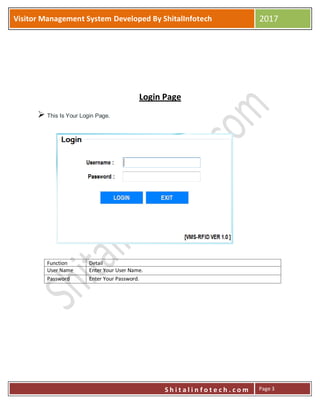
Login Page
 This Is Your Login Page.
Function Detail
User Name Enter Your User Name.
Password Enter Your Password.
P
S h i t a l i n f o t e c h . c o m
Visitor Management System Developed By ShitalInfotech 2017
S h i t a l i n f o t e c h . c o m Page 4
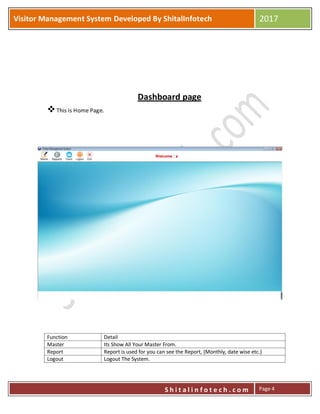
Dashboard page
This is Home Page.
Function Detail
Master Its Show All Your Master From.
Report Report is used for you can see the Report, (Monthly, date wise etc.)
Logout Logout The System.
P
S h i t a l i n f o t e c h . c o m
Visitor Management System Developed By ShitalInfotech 2017
S h i t a l i n f o t e c h . c o m Page 5
Users User Login Is Used For Create a New user and the Change the Password.
Exit Exit the System.
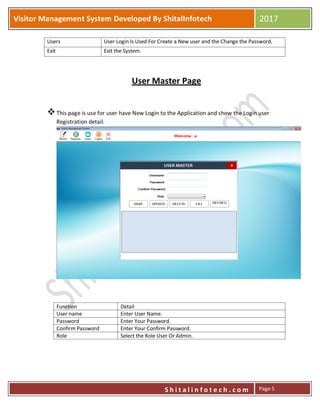
User Master Page
This page is use for user have New Login to the Application and show the Login user
Registration detail.
Function Detail
User name Enter User Name.
Password Enter Your Password.
Confirm Password Enter Your Confirm Password.
Role Select the Role User Or Admin.
P
S h i t a l i n f o t e c h . c o m
Visitor Management System Developed By ShitalInfotech 2017
S h i t a l i n f o t e c h . c o m Page 6
Change Password Page
This page is uses for user have change the Password.
Function Detail
Old Password Enter Your Old Password.
New Password Enter Your New Password.
Confirm Password Enter Your Confirm Password.
P
S h i t a l i n f o t e c h . c o m
Visitor Management System Developed By ShitalInfotech 2017
S h i t a l i n f o t e c h . c o m Page 7
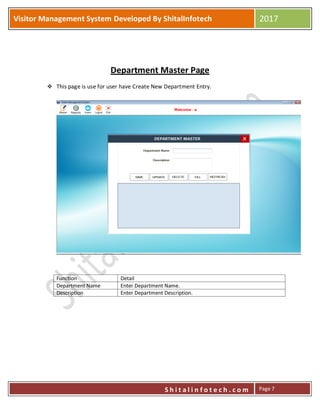
Department Master Page
 This page is use for user have Create New Department Entry.
Function Detail
Department Name Enter Department Name.
Description Enter Department Description.
P
S h i t a l i n f o t e c h . c o m
Visitor Management System Developed By ShitalInfotech 2017
S h i t a l i n f o t e c h . c o m Page 8
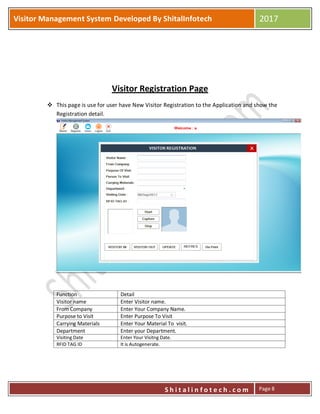
Visitor Registration Page
 This page is use for user have New Visitor Registration to the Application and show the
Registration detail.
Function Detail
Visitor name Enter Visitor name.
From Company Enter Your Company Name.
Purpose to Visit Enter Purpose To Visit
Carrying Materials Enter Your Material To visit.
Department Enter your Department.
Visiting Date Enter Your Visitng Date.
RFID TAG ID It is Autogenerate.
P
S h i t a l i n f o t e c h . c o m
Visitor Management System Developed By ShitalInfotech 2017
S h i t a l i n f o t e c h . c o m Page 9
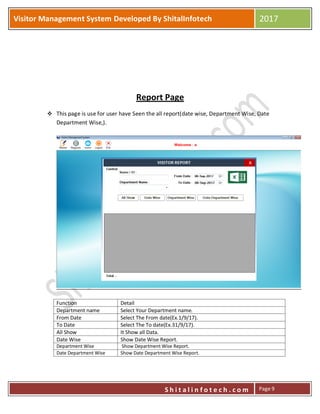
Report Page
 This page is use for user have Seen the all report(date wise, Department Wise, Date
Department Wise,).
Function Detail
Department name Select Your Department name.
From Date Select The From date(Ex.1/9/17).
To Date Select The To date(Ex.31/9/17).
All Show It Show all Data.
Date Wise Show Date Wise Report.
Department Wise Show Department Wise Report.
Date Department Wise Show Date Department Wise Report.
P
S h i t a l i n f o t e c h . c o m
Visitor Management System Developed By ShitalInfotech 2017
S h i t a l i n f o t e c h . c o m Page 10
Thank you
For Viewing This
Document
Please Contact us
Info@shitalinfotech.com
www.shitalinfotech.com

Visitor management software user manual by shital infotech

  • 1.
    P S h it a l i n f o t e c h . c o m Visitor Management System Developed By ShitalInfotech 2017 S h i t a l i n f o t e c h . c o m Page 1 Visitor Management System Software User Document
  • 2.
    P S h it a l i n f o t e c h . c o m Visitor Management System Developed By ShitalInfotech 2017 S h i t a l i n f o t e c h . c o m Page 2 Sr.No Detail Page No 1 Login Page 3 2 Dashboard Page 4 3 User Master Page 5 4 Change Password Page 6 5 Department Master Page 7 6 Visitor Registration Page 8 7 Report Page 9 8 About Developed By Company 10
  • 3.
    P S h it a l i n f o t e c h . c o m Visitor Management System Developed By ShitalInfotech 2017 S h i t a l i n f o t e c h . c o m Page 3 Login Page  This Is Your Login Page. Function Detail User Name Enter Your User Name. Password Enter Your Password.
  • 4.
    P S h it a l i n f o t e c h . c o m Visitor Management System Developed By ShitalInfotech 2017 S h i t a l i n f o t e c h . c o m Page 4 Dashboard page This is Home Page. Function Detail Master Its Show All Your Master From. Report Report is used for you can see the Report, (Monthly, date wise etc.) Logout Logout The System.
  • 5.
    P S h it a l i n f o t e c h . c o m Visitor Management System Developed By ShitalInfotech 2017 S h i t a l i n f o t e c h . c o m Page 5 Users User Login Is Used For Create a New user and the Change the Password. Exit Exit the System. User Master Page This page is use for user have New Login to the Application and show the Login user Registration detail. Function Detail User name Enter User Name. Password Enter Your Password. Confirm Password Enter Your Confirm Password. Role Select the Role User Or Admin.
  • 6.
    P S h it a l i n f o t e c h . c o m Visitor Management System Developed By ShitalInfotech 2017 S h i t a l i n f o t e c h . c o m Page 6 Change Password Page This page is uses for user have change the Password. Function Detail Old Password Enter Your Old Password. New Password Enter Your New Password. Confirm Password Enter Your Confirm Password.
  • 7.
    P S h it a l i n f o t e c h . c o m Visitor Management System Developed By ShitalInfotech 2017 S h i t a l i n f o t e c h . c o m Page 7 Department Master Page  This page is use for user have Create New Department Entry. Function Detail Department Name Enter Department Name. Description Enter Department Description.
  • 8.
    P S h it a l i n f o t e c h . c o m Visitor Management System Developed By ShitalInfotech 2017 S h i t a l i n f o t e c h . c o m Page 8 Visitor Registration Page  This page is use for user have New Visitor Registration to the Application and show the Registration detail. Function Detail Visitor name Enter Visitor name. From Company Enter Your Company Name. Purpose to Visit Enter Purpose To Visit Carrying Materials Enter Your Material To visit. Department Enter your Department. Visiting Date Enter Your Visitng Date. RFID TAG ID It is Autogenerate.
  • 9.
    P S h it a l i n f o t e c h . c o m Visitor Management System Developed By ShitalInfotech 2017 S h i t a l i n f o t e c h . c o m Page 9 Report Page  This page is use for user have Seen the all report(date wise, Department Wise, Date Department Wise,). Function Detail Department name Select Your Department name. From Date Select The From date(Ex.1/9/17). To Date Select The To date(Ex.31/9/17). All Show It Show all Data. Date Wise Show Date Wise Report. Department Wise Show Department Wise Report. Date Department Wise Show Date Department Wise Report.
  • 10.
    P S h it a l i n f o t e c h . c o m Visitor Management System Developed By ShitalInfotech 2017 S h i t a l i n f o t e c h . c o m Page 10 Thank you For Viewing This Document Please Contact us Info@shitalinfotech.com www.shitalinfotech.com