INFORMATION ABOUT .NET
FRAMEWORK ANDVB.NET
- Shivangi Chaurasiya
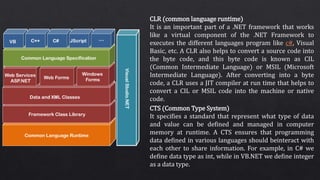
CLR (common language runtime)
It is an important part of a .NET framework that works
like a virtual component of the .NET Framework to
executes the different languages program like c#, Visual
Basic, etc. A CLR also helps to convert a source code into
the byte code, and this byte code is known as CIL
(Common Intermediate Language) or MSIL (Microsoft
Intermediate Language). After converting into a byte
code, a CLR uses a JIT compiler at run time that helps to
convert a CIL or MSIL code into the machine or native
code.
CTS (Common Type System)
It specifies a standard that represent what type of data
and value can be defined and managed in computer
memory at runtime. A CTS ensures that programming
data defined in various languages should beinteract with
each other to share information. For example, in C# we
define data type as int, while in VB.NET we define integer
as a data type.
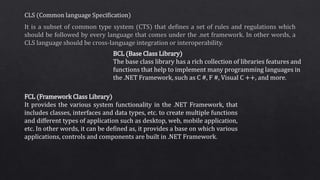
BCL (Base Class Library)
The base class library has a rich collection of libraries features and
functions that help to implement many programming languages in
the .NET Framework, such as C #, F #, Visual C ++, and more.
FCL (Framework Class Library)
It provides the various system functionality in the .NET Framework, that
includes classes, interfaces and data types, etc. to create multiple functions
and different types of application such as desktop, web, mobile application,
etc. In other words, it can be defined as, it provides a base on which various
applications, controls and components are built in .NET Framework.
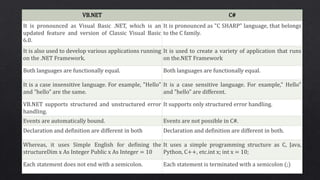
VB.NET C#
It is pronounced as Visual Basic .NET, which is an
updated feature and version of Classic Visual Basic
6.0.
It is pronounced as "C SHARP" language, that belongs
to the C family.
It is also used to develop various applications running
on the .NET Framework.
It is used to create a variety of application that runs
on the.NET Framework
Both languages are functionally equal. Both languages are functionally equal.
It is a case insensitive language. For example, "Hello"
and "hello" are the same.
It is a case sensitive language. For example," Hello"
and "hello" are different.
VB.NET supports structured and unstructured error
handling.
It supports only structured error handling.
Events are automatically bound. Events are not possible in C#.
Declaration and definition are different in both Declaration and definition are different in both.
Whereas, it uses Simple English for defining the
structureDim x As Integer Public x As Integer = 10
It uses a simple programming structure as C, Java,
Python, C++, etc.int x; int x = 10;
Each statement does not end with a semicolon. Each statement is terminated with a semicolon (;)
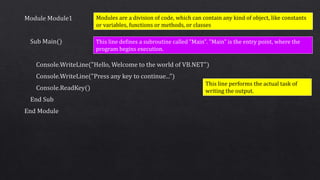
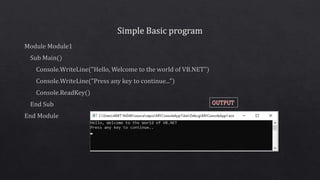
Modules are a division of code, which can contain any kind of object, like constants
or variables, functions or methods, or classes
This line defines a subroutine called "Main". "Main" is the entry point, where the
program begins execution.
This line performs the actual task of
writing the output.
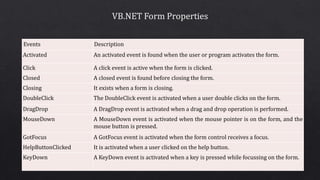
Events Description
Activated An activated event is found when the user or program activates the form.
Click A click event is active when the form is clicked.
Closed A closed event is found before closing the form.
Closing It exists when a form is closing.
DoubleClick The DoubleClick event is activated when a user double clicks on the form.
DragDrop A DragDrop event is activated when a drag and drop operation is performed.
MouseDown A MouseDown event is activated when the mouse pointer is on the form, and the
mouse button is pressed.
GotFocus A GotFocus event is activated when the form control receives a focus.
HelpButtonClicked It is activated when a user clicked on the help button.
KeyDown A KeyDown event is activated when a key is pressed while focussing on the form.
The following are the most important list of events related to a form.
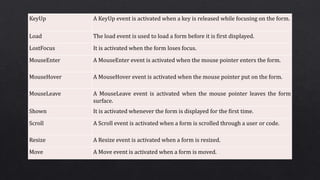
KeyUp A KeyUp event is activated when a key is released while focusing on the form.
Load The load event is used to load a form before it is first displayed.
LostFocus It is activated when the form loses focus.
MouseEnter A MouseEnter event is activated when the mouse pointer enters the form.
MouseHover A MouseHover event is activated when the mouse pointer put on the form.
MouseLeave A MouseLeave event is activated when the mouse pointer leaves the form
surface.
Shown It is activated whenever the form is displayed for the first time.
Scroll A Scroll event is activated when a form is scrolled through a user or code.
Resize A Resize event is activated when a form is resized.
Move A Move event is activated when a form is moved.
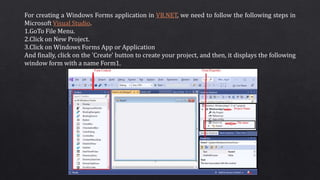
For creating a Windows Forms application in VB.NET, we need to follow the following steps in
Microsoft Visual Studio.
1.GoTo File Menu.
2.Click on New Project.
3.Click on Windows Forms App or Application
And finally, click on the 'Create' button to create your project, and then, it displays the following
window form with a name Form1.
.
Solution Explorer: It shows the files on which the
user is currently working.
Code Editor: Where the user will write code.
Output Window: Here the Visual Studio shows the outputs,
compiler warnings, error messages and debugging
information.
Properties: It will give additional information and context
about the selected parts of the current project.

Vb.net and .Net Framework

  • 1.
    INFORMATION ABOUT .NET FRAMEWORKANDVB.NET - Shivangi Chaurasiya
  • 3.
    CLR (common languageruntime) It is an important part of a .NET framework that works like a virtual component of the .NET Framework to executes the different languages program like c#, Visual Basic, etc. A CLR also helps to convert a source code into the byte code, and this byte code is known as CIL (Common Intermediate Language) or MSIL (Microsoft Intermediate Language). After converting into a byte code, a CLR uses a JIT compiler at run time that helps to convert a CIL or MSIL code into the machine or native code. CTS (Common Type System) It specifies a standard that represent what type of data and value can be defined and managed in computer memory at runtime. A CTS ensures that programming data defined in various languages should beinteract with each other to share information. For example, in C# we define data type as int, while in VB.NET we define integer as a data type.
  • 4.
    BCL (Base ClassLibrary) The base class library has a rich collection of libraries features and functions that help to implement many programming languages in the .NET Framework, such as C #, F #, Visual C ++, and more. FCL (Framework Class Library) It provides the various system functionality in the .NET Framework, that includes classes, interfaces and data types, etc. to create multiple functions and different types of application such as desktop, web, mobile application, etc. In other words, it can be defined as, it provides a base on which various applications, controls and components are built in .NET Framework.
  • 9.
    VB.NET C# It ispronounced as Visual Basic .NET, which is an updated feature and version of Classic Visual Basic 6.0. It is pronounced as "C SHARP" language, that belongs to the C family. It is also used to develop various applications running on the .NET Framework. It is used to create a variety of application that runs on the.NET Framework Both languages are functionally equal. Both languages are functionally equal. It is a case insensitive language. For example, "Hello" and "hello" are the same. It is a case sensitive language. For example," Hello" and "hello" are different. VB.NET supports structured and unstructured error handling. It supports only structured error handling. Events are automatically bound. Events are not possible in C#. Declaration and definition are different in both Declaration and definition are different in both. Whereas, it uses Simple English for defining the structureDim x As Integer Public x As Integer = 10 It uses a simple programming structure as C, Java, Python, C++, etc.int x; int x = 10; Each statement does not end with a semicolon. Each statement is terminated with a semicolon (;)
  • 10.
    Modules are adivision of code, which can contain any kind of object, like constants or variables, functions or methods, or classes This line defines a subroutine called "Main". "Main" is the entry point, where the program begins execution. This line performs the actual task of writing the output.
  • 13.
    Events Description Activated Anactivated event is found when the user or program activates the form. Click A click event is active when the form is clicked. Closed A closed event is found before closing the form. Closing It exists when a form is closing. DoubleClick The DoubleClick event is activated when a user double clicks on the form. DragDrop A DragDrop event is activated when a drag and drop operation is performed. MouseDown A MouseDown event is activated when the mouse pointer is on the form, and the mouse button is pressed. GotFocus A GotFocus event is activated when the form control receives a focus. HelpButtonClicked It is activated when a user clicked on the help button. KeyDown A KeyDown event is activated when a key is pressed while focussing on the form. The following are the most important list of events related to a form.
  • 14.
    KeyUp A KeyUpevent is activated when a key is released while focusing on the form. Load The load event is used to load a form before it is first displayed. LostFocus It is activated when the form loses focus. MouseEnter A MouseEnter event is activated when the mouse pointer enters the form. MouseHover A MouseHover event is activated when the mouse pointer put on the form. MouseLeave A MouseLeave event is activated when the mouse pointer leaves the form surface. Shown It is activated whenever the form is displayed for the first time. Scroll A Scroll event is activated when a form is scrolled through a user or code. Resize A Resize event is activated when a form is resized. Move A Move event is activated when a form is moved.
  • 15.
    For creating aWindows Forms application in VB.NET, we need to follow the following steps in Microsoft Visual Studio. 1.GoTo File Menu. 2.Click on New Project. 3.Click on Windows Forms App or Application And finally, click on the 'Create' button to create your project, and then, it displays the following window form with a name Form1.
  • 17.
    . Solution Explorer: Itshows the files on which the user is currently working. Code Editor: Where the user will write code. Output Window: Here the Visual Studio shows the outputs, compiler warnings, error messages and debugging information. Properties: It will give additional information and context about the selected parts of the current project.