Understanding the Changes Upgrade Scenarios, FAQ, Known Issues
V4.0 NCE READY
V4.0 NCE READY
Understanding the Changes Upgrade Scenarios, FAQ, Known Issues
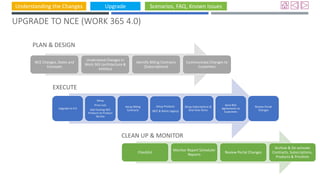
UPGRADE TO NCE (WORK 365 4.0)
NCE Changes, Dates and
Concepts
Understand Changes in
Work 365 (architecture &
entities)
Identify Billing Contracts
(Subscriptions)
Communicate Changes to
Customers
Checklist
Monitor Report Scheduler
Reports
Review Portal Changes
Archive & De-activate
Contracts, Subscriptions,
Products & Pricelists
Upgrade to 4.0
Setup
Price Lists
Add Existing NCE
Products to Product
Service
Setup Billing
Contracts
Setup Products
(NCE & Retire Legacy)
Setup Subscriptions &
One-time Items
Send NCE
Agreements to
Customers
Review Portal
Changes
PLAN & DESIGN
EXECUTE
CLEAN UP & MONITOR
Understanding the Changes Upgrade Scenarios, FAQ, Known Issues
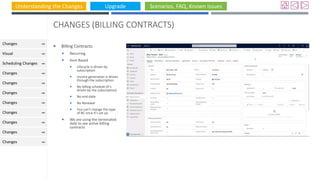
CHANGES (BILLING CONTRACTS)
 Billing Contracts:
 Recurring
 Item Based
 Lifecycle is driven by
subscription
 Invoice generation is driven
through the subscription
 No billing schedule (it’s
driven by the subscription)
 No end-date
 No Renewal
 You can’t change the type
of BC once it’s set up
 We are using the terminated
date to see active billing
contracts
Changes
Visual
Scheduling Changes
Changes
Changes
Changes
Changes
Changes
Changes
Changes
Changes
Understanding the Changes Upgrade Scenarios, FAQ, Known Issues
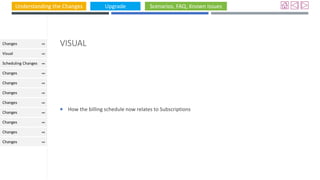
VISUAL
 How the billing schedule now relates to Subscriptions
Changes
Visual
Scheduling Changes
Changes
Changes
Changes
Changes
Changes
Changes
Changes
Changes
Understanding the Changes Upgrade Scenarios, FAQ, Known Issues
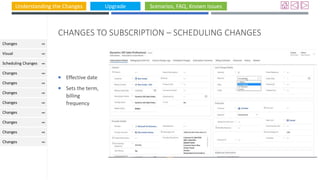
CHANGES TO SUBSCRIPTION – SCHEDULING CHANGES
 Effective date
 Sets the term,
billing
frequency
Changes
Visual
Scheduling Changes
Changes
Changes
Changes
Changes
Changes
Changes
Changes
Changes
Understanding the Changes Upgrade Scenarios, FAQ, Known Issues
CHANGES (SUBSCRIPTION)
 Subscription:
 Billing Schedule shows up
here (linked to item
Based billing contract)
Understanding the Changes Upgrade Scenarios, FAQ, Known Issues
CHANGES (SUBSCRIPTIONS)
 Control Portal Changes
 How do we know if it’s an
NCE Subscription?
Understanding the Changes Upgrade Scenarios, FAQ, Known Issues
CHANGES (SUBSCRIPTIONS)
 Scheduling Changes (TODO)
Understanding the Changes Upgrade Scenarios, FAQ, Known Issues
CHANGES (SUBSCRIPTION)
Quantity Control - to
adhere to commitments
//todo where is the window
Understanding the Changes Upgrade Scenarios, FAQ, Known Issues
CHANGES TO SUBSCRIPTION
 The provider section
helps you identify the
terms with Microsoft
 The part number helps
you identify whether it’s
an NCE Product
Understanding the Changes Upgrade Scenarios, FAQ, Known Issues
CHANGES SUBSCRIPTION (SETTING IN ADMIN HUB)
 Drives the
behaviour
change on the
change of
subscription
Understanding the Changes Upgrade Scenarios, FAQ, Known Issues
 The change
window comes
through
automatically if
it’s an NCE
product
Understanding the Changes Upgrade Scenarios, FAQ, Known Issues
CHANGES (SUBSCRIPTION)
 Pause and
Resume
Subscriptions
Understanding the Changes Upgrade Scenarios, FAQ, Known Issues
CHANGES (SUBSCRIPTION)
 Change is Lifecycle – Suspended, Deactivated //TODO: Product team to draw out a table showing the states and what
they mean
 Status Reason: Active: Active, Suspend (billing will continue in both PC and Work 365)
 Cancelled
 Note: you might experience some delay in between pause and resume
 When is the subscription is actually provisioned: Actual Provision on Field (//TODO move to the correct plance
Understanding the Changes Upgrade Scenarios, FAQ, Known Issues
CHANGES (TO
SUBSCRIPTION SYNC
PROCESS)
 Subscriptions will have to be
added to Billing Contracts
manually going forward and
won’t be synched
automatically.
 Changes to subscriptions
which are synced in Work 365
will come through
Understanding the Changes Upgrade Scenarios, FAQ, Known Issues
SUBSCRIPTION SYNC
 It will link the product
 It will set the cost price
and selling price when
the subscription syncs
Understanding the Changes Upgrade Scenarios, FAQ, Known Issues
FUNDAMENTAL CHANGE TO PRODUCT & PRODUCT SERVICE TO ALIGN
WITH NCE
 Pricing is now driven by pricelists
 You will therefore not see the default price list in the admin hub.
 Guidance is create a manual pricelist (in the future we’ll populate the market and provider for now you have to do
manually)
 Should you set up price lists separately for NCE & Legacy
 Recommendation is keep one common pricing for legacy & NCE
 Set up separate price list based on segment
Understanding the Changes Upgrade Scenarios, FAQ, Known Issues
CHANGES (PRODUCT SERVICE)
 Add Products helps you discover products
 Note: products might be missing or price is
missing or price could be wrong and that
means when we synch we will not be able
to synch prices
 Costs may or may not be on the product
Understanding the Changes Upgrade Scenarios, FAQ, Known Issues
CHANGES (PRODUCT SERVICE)
 Keep Alternate Id – this will
help you identify whether it’s
an NCE Subscription
(add to checklist)
 Note: products might be
missing or price is missing or
price could be wrong and
that means when we synch
we will not be able to synch
prices
 Costs may or may not be on
the product
Understanding the Changes Upgrade Scenarios, FAQ, Known Issues
CHANGES (PRODUCT SERVICE)
 NCE Products are highlighted
 Costs may or may not be on
the product and cost is driven
by the pricelist
 Cost is different for a product
in NCE based on Term (egs
monthly price is different for
annual vs monthly).
 Costs are reflective of the real
costs (real-time)
 The cost is looked up by the
product service ONLY if there
isn’t a cost associated with
the product
 //TODO: Currency Conversion
Understanding the Changes Upgrade Scenarios, FAQ, Known Issues
CHANGES (PRODUCT SERVICE)
 Reserved Instances,
Software Subscriptions
 We don’t’ support
marketplace products (yet)
Understanding the Changes Upgrade Scenarios, FAQ, Known Issues
CHANGES (PRODUCT SERVICE)
 Known issue on NCE
product (Cost)
Understanding the Changes Upgrade Scenarios, FAQ, Known Issues
CHANGES (PRICE LIST)
 New form (Work
365 Price List)
Understanding the Changes Upgrade Scenarios, FAQ, Known Issues
CHANGES (PRICE LIST)  Multi-dimensional
 Segment
 Market
 Provider
Understanding the Changes Upgrade Scenarios, FAQ, Known Issues
CHANGES TO PRODUCT
 //Work 365 doesn’t
differentiate between
NCE and Legacy
Product
Understanding the Changes Upgrade Scenarios, FAQ, Known Issues
CHANGES (PRODUCT)
 Unit for NCE
Understanding the Changes Upgrade Scenarios, FAQ, Known Issues
GUIDANCE ON PRODUCT SET UP & PRICE LISTS
 You will need to separate Pricelists based on segments, markets, currency and providers.
 Example you sell in Australia and US ONLY in USD. You would still need 2 separate price lists
 You don’t need to split pricelists based on legacy or NCE. Keeping them in the same price list will help with quoting,
opportunity management etc.
 For example you sold only in the US only to commercial you could modify your old pricelist and DON’T need to create another one
Understanding the Changes Upgrade Scenarios, FAQ, Known Issues
GUIDANCE
CUSTOMER
BILLING
EXPERIENCE
IMPACT OF
MONTHLY
COMMITMENTS
LEVERAGE ITEM
BASED BILLING
CONTRACTS
Understanding the Changes Upgrade Scenarios, FAQ, Known Issues
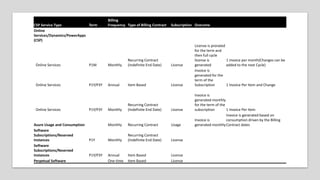
CSP Service Type Term
Billing
Frequency Type of Billing Contract Subscription Outcome
Online
Services/Dynamics/PowerApps
(CSP)
Online Services P1M Monthly
Recurring Contract
(Indefinite End Date) License
License is prorated
for the term and
then full cycle
license is
generated
1 invoice per month(Changes can be
added to the next Cycle)
Online Services P1Y/P3Y Annual Item Based License
Invoice is
generated for the
term of the
Subscription 1 Invoice Per Item and Change
Online Services P1Y/P3Y Monthly
Recurring Contract
(Indefinite End Date) License
Invoice is
generated monthly
for the term of the
subscription 1 Invoice Per Item
Azure Usage and Consumption Monthly Recurring Contract Usage
Invoice is
generated monthly
Invoice is generated based on
consumption driven by the Billing
Contract dates
Software
Subscriptions/Reserved
Instances P1Y Monthly
Recurring Contract
(Indefinite End Date) License
Software
Subscriptions/Reserved
Instances P1Y/P3Y Annual Item Based License
Perpetual Software One-time Item Based License
Understanding the Changes Upgrade Scenarios, FAQ, Known Issues
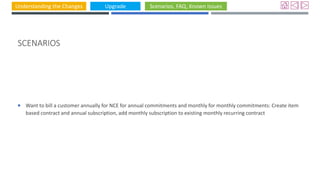
SCENARIOS
 Want to bill a customer annually for NCE for annual commitments and monthly for monthly commitments: Create item
based contract and annual subscription, add monthly subscription to existing monthly recurring contract
Understanding the Changes Upgrade Scenarios, FAQ, Known Issues
REPORT SCHEDULER - LIST OF NEW VIEWS
Understanding the Changes Upgrade Scenarios, FAQ, Known Issues
REPORT SCHEDULER - SCENARIOS
 How do I know when the 72 hour window of a subscription is approaching?
 How do I track renewals?
Understanding the Changes Upgrade Scenarios, FAQ, Known Issues
UNDERSTANDING THE DATES ON SUBSCRIPTION & LICENSE CHANGE LOGS
Understanding the Changes Upgrade Scenarios, FAQ, Known Issues
UPGRADE TO 4.0 (EAP)
 Install Solution from here:
 After Installation
 Delete the Work365.APICredential
 Checklist:
 Admin Hub: Unit: Triennial
Understanding the Changes Upgrade Scenarios, FAQ, Known Issues
UPGRADE TO 4.0 (IN PRODUCTION)
Understanding the Changes Upgrade Scenarios, FAQ, Known Issues
SCENARIOS & USE CASES
 Manage Renewals
 Generate Invoices in Advance (Billing)
 Provision Reserved Instances (Provisioning)
 Sync Existing NCE Subscriptions (Provisioning)
 Migrate Legacy to NCE Subscriptions (Provisioning)
 Pricelist - how to upgrade and manage?
 How do I manage the promotional pricing?
 How will pro-ration work? We do it on a calendar day and not in a 24 hour window.
 What should we do with the current portal to control changes?
 Set up the subscription
 (difference between end customer control and absolute control changes driven through the advanced tab in Subscription)
Understanding the Changes Upgrade Scenarios, FAQ, Known Issues
KNOWN ISSUES
 The billing contracts chart on the start page is wrong (only in Skyblue,

V4.0 NCE Ready

  • 1.
    Understanding the ChangesUpgrade Scenarios, FAQ, Known Issues V4.0 NCE READY V4.0 NCE READY
  • 2.
    Understanding the ChangesUpgrade Scenarios, FAQ, Known Issues UPGRADE TO NCE (WORK 365 4.0) NCE Changes, Dates and Concepts Understand Changes in Work 365 (architecture & entities) Identify Billing Contracts (Subscriptions) Communicate Changes to Customers Checklist Monitor Report Scheduler Reports Review Portal Changes Archive & De-activate Contracts, Subscriptions, Products & Pricelists Upgrade to 4.0 Setup Price Lists Add Existing NCE Products to Product Service Setup Billing Contracts Setup Products (NCE & Retire Legacy) Setup Subscriptions & One-time Items Send NCE Agreements to Customers Review Portal Changes PLAN & DESIGN EXECUTE CLEAN UP & MONITOR
  • 3.
    Understanding the ChangesUpgrade Scenarios, FAQ, Known Issues CHANGES (BILLING CONTRACTS)  Billing Contracts:  Recurring  Item Based  Lifecycle is driven by subscription  Invoice generation is driven through the subscription  No billing schedule (it’s driven by the subscription)  No end-date  No Renewal  You can’t change the type of BC once it’s set up  We are using the terminated date to see active billing contracts Changes Visual Scheduling Changes Changes Changes Changes Changes Changes Changes Changes Changes
  • 4.
    Understanding the ChangesUpgrade Scenarios, FAQ, Known Issues VISUAL  How the billing schedule now relates to Subscriptions Changes Visual Scheduling Changes Changes Changes Changes Changes Changes Changes Changes Changes
  • 5.
    Understanding the ChangesUpgrade Scenarios, FAQ, Known Issues CHANGES TO SUBSCRIPTION – SCHEDULING CHANGES  Effective date  Sets the term, billing frequency Changes Visual Scheduling Changes Changes Changes Changes Changes Changes Changes Changes Changes
  • 6.
    Understanding the ChangesUpgrade Scenarios, FAQ, Known Issues CHANGES (SUBSCRIPTION)  Subscription:  Billing Schedule shows up here (linked to item Based billing contract)
  • 7.
    Understanding the ChangesUpgrade Scenarios, FAQ, Known Issues CHANGES (SUBSCRIPTIONS)  Control Portal Changes  How do we know if it’s an NCE Subscription?
  • 8.
    Understanding the ChangesUpgrade Scenarios, FAQ, Known Issues CHANGES (SUBSCRIPTIONS)  Scheduling Changes (TODO)
  • 9.
    Understanding the ChangesUpgrade Scenarios, FAQ, Known Issues CHANGES (SUBSCRIPTION) Quantity Control - to adhere to commitments //todo where is the window
  • 10.
    Understanding the ChangesUpgrade Scenarios, FAQ, Known Issues CHANGES TO SUBSCRIPTION  The provider section helps you identify the terms with Microsoft  The part number helps you identify whether it’s an NCE Product
  • 11.
    Understanding the ChangesUpgrade Scenarios, FAQ, Known Issues CHANGES SUBSCRIPTION (SETTING IN ADMIN HUB)  Drives the behaviour change on the change of subscription
  • 12.
    Understanding the ChangesUpgrade Scenarios, FAQ, Known Issues  The change window comes through automatically if it’s an NCE product
  • 13.
    Understanding the ChangesUpgrade Scenarios, FAQ, Known Issues CHANGES (SUBSCRIPTION)  Pause and Resume Subscriptions
  • 14.
    Understanding the ChangesUpgrade Scenarios, FAQ, Known Issues CHANGES (SUBSCRIPTION)  Change is Lifecycle – Suspended, Deactivated //TODO: Product team to draw out a table showing the states and what they mean  Status Reason: Active: Active, Suspend (billing will continue in both PC and Work 365)  Cancelled  Note: you might experience some delay in between pause and resume  When is the subscription is actually provisioned: Actual Provision on Field (//TODO move to the correct plance
  • 15.
    Understanding the ChangesUpgrade Scenarios, FAQ, Known Issues CHANGES (TO SUBSCRIPTION SYNC PROCESS)  Subscriptions will have to be added to Billing Contracts manually going forward and won’t be synched automatically.  Changes to subscriptions which are synced in Work 365 will come through
  • 16.
    Understanding the ChangesUpgrade Scenarios, FAQ, Known Issues SUBSCRIPTION SYNC  It will link the product  It will set the cost price and selling price when the subscription syncs
  • 17.
    Understanding the ChangesUpgrade Scenarios, FAQ, Known Issues FUNDAMENTAL CHANGE TO PRODUCT & PRODUCT SERVICE TO ALIGN WITH NCE  Pricing is now driven by pricelists  You will therefore not see the default price list in the admin hub.  Guidance is create a manual pricelist (in the future we’ll populate the market and provider for now you have to do manually)  Should you set up price lists separately for NCE & Legacy  Recommendation is keep one common pricing for legacy & NCE  Set up separate price list based on segment
  • 18.
    Understanding the ChangesUpgrade Scenarios, FAQ, Known Issues CHANGES (PRODUCT SERVICE)  Add Products helps you discover products  Note: products might be missing or price is missing or price could be wrong and that means when we synch we will not be able to synch prices  Costs may or may not be on the product
  • 19.
    Understanding the ChangesUpgrade Scenarios, FAQ, Known Issues CHANGES (PRODUCT SERVICE)  Keep Alternate Id – this will help you identify whether it’s an NCE Subscription (add to checklist)  Note: products might be missing or price is missing or price could be wrong and that means when we synch we will not be able to synch prices  Costs may or may not be on the product
  • 20.
    Understanding the ChangesUpgrade Scenarios, FAQ, Known Issues
  • 21.
    Understanding the ChangesUpgrade Scenarios, FAQ, Known Issues CHANGES (PRODUCT SERVICE)  NCE Products are highlighted  Costs may or may not be on the product and cost is driven by the pricelist  Cost is different for a product in NCE based on Term (egs monthly price is different for annual vs monthly).  Costs are reflective of the real costs (real-time)  The cost is looked up by the product service ONLY if there isn’t a cost associated with the product  //TODO: Currency Conversion
  • 22.
    Understanding the ChangesUpgrade Scenarios, FAQ, Known Issues CHANGES (PRODUCT SERVICE)  Reserved Instances, Software Subscriptions  We don’t’ support marketplace products (yet)
  • 23.
    Understanding the ChangesUpgrade Scenarios, FAQ, Known Issues CHANGES (PRODUCT SERVICE)  Known issue on NCE product (Cost)
  • 24.
    Understanding the ChangesUpgrade Scenarios, FAQ, Known Issues CHANGES (PRICE LIST)  New form (Work 365 Price List)
  • 25.
    Understanding the ChangesUpgrade Scenarios, FAQ, Known Issues CHANGES (PRICE LIST)  Multi-dimensional  Segment  Market  Provider
  • 26.
    Understanding the ChangesUpgrade Scenarios, FAQ, Known Issues CHANGES TO PRODUCT  //Work 365 doesn’t differentiate between NCE and Legacy Product
  • 27.
    Understanding the ChangesUpgrade Scenarios, FAQ, Known Issues CHANGES (PRODUCT)  Unit for NCE
  • 28.
    Understanding the ChangesUpgrade Scenarios, FAQ, Known Issues GUIDANCE ON PRODUCT SET UP & PRICE LISTS  You will need to separate Pricelists based on segments, markets, currency and providers.  Example you sell in Australia and US ONLY in USD. You would still need 2 separate price lists  You don’t need to split pricelists based on legacy or NCE. Keeping them in the same price list will help with quoting, opportunity management etc.  For example you sold only in the US only to commercial you could modify your old pricelist and DON’T need to create another one
  • 29.
    Understanding the ChangesUpgrade Scenarios, FAQ, Known Issues GUIDANCE CUSTOMER BILLING EXPERIENCE IMPACT OF MONTHLY COMMITMENTS LEVERAGE ITEM BASED BILLING CONTRACTS
  • 30.
    Understanding the ChangesUpgrade Scenarios, FAQ, Known Issues CSP Service Type Term Billing Frequency Type of Billing Contract Subscription Outcome Online Services/Dynamics/PowerApps (CSP) Online Services P1M Monthly Recurring Contract (Indefinite End Date) License License is prorated for the term and then full cycle license is generated 1 invoice per month(Changes can be added to the next Cycle) Online Services P1Y/P3Y Annual Item Based License Invoice is generated for the term of the Subscription 1 Invoice Per Item and Change Online Services P1Y/P3Y Monthly Recurring Contract (Indefinite End Date) License Invoice is generated monthly for the term of the subscription 1 Invoice Per Item Azure Usage and Consumption Monthly Recurring Contract Usage Invoice is generated monthly Invoice is generated based on consumption driven by the Billing Contract dates Software Subscriptions/Reserved Instances P1Y Monthly Recurring Contract (Indefinite End Date) License Software Subscriptions/Reserved Instances P1Y/P3Y Annual Item Based License Perpetual Software One-time Item Based License
  • 31.
    Understanding the ChangesUpgrade Scenarios, FAQ, Known Issues SCENARIOS  Want to bill a customer annually for NCE for annual commitments and monthly for monthly commitments: Create item based contract and annual subscription, add monthly subscription to existing monthly recurring contract
  • 32.
    Understanding the ChangesUpgrade Scenarios, FAQ, Known Issues REPORT SCHEDULER - LIST OF NEW VIEWS
  • 33.
    Understanding the ChangesUpgrade Scenarios, FAQ, Known Issues REPORT SCHEDULER - SCENARIOS  How do I know when the 72 hour window of a subscription is approaching?  How do I track renewals?
  • 34.
    Understanding the ChangesUpgrade Scenarios, FAQ, Known Issues UNDERSTANDING THE DATES ON SUBSCRIPTION & LICENSE CHANGE LOGS
  • 35.
    Understanding the ChangesUpgrade Scenarios, FAQ, Known Issues UPGRADE TO 4.0 (EAP)  Install Solution from here:  After Installation  Delete the Work365.APICredential  Checklist:  Admin Hub: Unit: Triennial
  • 36.
    Understanding the ChangesUpgrade Scenarios, FAQ, Known Issues UPGRADE TO 4.0 (IN PRODUCTION)
  • 37.
    Understanding the ChangesUpgrade Scenarios, FAQ, Known Issues SCENARIOS & USE CASES  Manage Renewals  Generate Invoices in Advance (Billing)  Provision Reserved Instances (Provisioning)  Sync Existing NCE Subscriptions (Provisioning)  Migrate Legacy to NCE Subscriptions (Provisioning)  Pricelist - how to upgrade and manage?  How do I manage the promotional pricing?  How will pro-ration work? We do it on a calendar day and not in a 24 hour window.  What should we do with the current portal to control changes?  Set up the subscription  (difference between end customer control and absolute control changes driven through the advanced tab in Subscription)
  • 38.
    Understanding the ChangesUpgrade Scenarios, FAQ, Known Issues KNOWN ISSUES  The billing contracts chart on the start page is wrong (only in Skyblue,

Editor's Notes

  • #32 So with that discussion I want to share some specific guidance today on what type of billing contract you should use and when. The first three rows I think are the most important to consider. If you are selling a monthly commitment term which would be billed monthly use the current Recurring Billing Contract If you are selling an Annual Commitment term billed Annually use the Item Based Contract If you are selling Annual or Trianual term on a Monthly basis use the Recurring Billing Contract The billing schedule for an item-based contract will based on the subscriptions and not at the contract level