VISUALIZING THE LINUX KERNEL
WITH GOURCE
Dawn M. Foster
@geekygirldawn	
  
dawn@dawnfoster.com	
  
fastwonderblog.com
Community	
  and	
  Open	
  
Source	
  Consultant	
  
The	
  Scale	
  Factory
PhD	
  Student	
  
University	
  of	
  Greenwich	
  
London,	
  UK
WHOAMI
Geek, traveler, reader
Community and open source consultant
20+ year tech career. Past 15 years
doing community & open source 

(Intel, Jive, Puppet Labs, etc.)
PhD student at University of Greenwich
researching Linux kernel Photos by Josh Bancroft, Don Park
Image from WebOps.com
GETTING STARTED
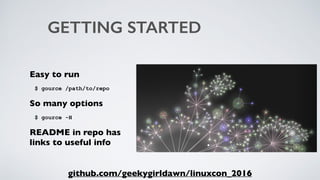
Easy to run
$ gource /path/to/repo
So many options
$ gource -H
README in repo has 

links to useful info
github.com/geekygirldawn/linuxcon_2016
DATES AND SPEED
Dates
--start-date '2015-01-01'

--stop-date '2015-01-31'
Seconds Per Day
-s 30
github.com/geekygirldawn/linuxcon_2016/kernel_example
Photo by Ozzy Delaney
REDUCE AMOUNT OF INFO
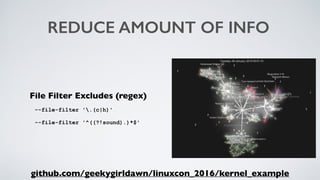
File Filter Excludes (regex)
--file-filter '.(c|h)'
--file-filter '^((?!sound).)*$'
github.com/geekygirldawn/linuxcon_2016/kernel_example
EXAMPLES: SLOWER & FILTERED
Exclude ".c" and ".h" files
gource --start-date '2015-01-01' --stop-date '2015-01-31' --file-filter '.(c|h)'
Exclude everything not related to sound
gource --start-date '2015-01-01' --stop-date '2015-01-31' 

--file-filter '^((?!sound).)*$' -s 30
github.com/geekygirldawn/linuxcon_2016
Image from WebOps.com
MAKE IT LOOK BETTER
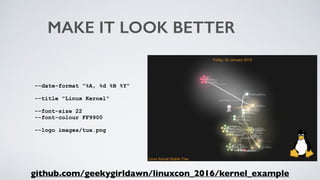
--date-format "%A, %d %B %Y"
--title "Linux Kernel"
--font-size 22 

--font-colour FF9900
--logo images/tux.png
github.com/geekygirldawn/linuxcon_2016/kernel_example
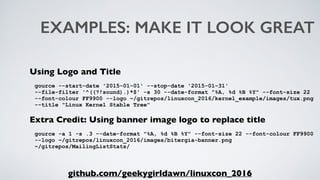
EXAMPLES: MAKE IT LOOK GREAT
Using Logo and Title
gource --start-date '2015-01-01' --stop-date '2015-01-31' 

--file-filter '^((?!sound).)*$' -s 30 --date-format "%A, %d %B %Y" --font-size 22
--font-colour FF9900 --logo ~/gitrepos/linuxcon_2016/kernel_example/images/tux.png
--title "Linux Kernel Stable Tree"
Extra Credit: Using banner image logo to replace title
gource -a 1 -s .3 --date-format "%A, %d %B %Y" --font-size 22 --font-colour FF9900
--logo ~/gitrepos/linuxcon_2016/images/bitergia-banner.png 

~/gitrepos/MailingListStats/
github.com/geekygirldawn/linuxcon_2016
Image from WebOps.com
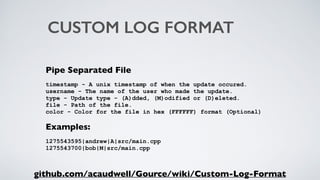
CUSTOM LOG FORMAT
Pipe Separated File
timestamp - A unix timestamp of when the update occured.

username - The name of the user who made the update.

type - Update type - (A)dded, (M)odified or (D)eleted.

file - Path of the file.

color - Color for the file in hex (FFFFFF) format (Optional)
Examples:
1275543595|andrew|A|src/main.cpp

1275543700|bob|M|src/main.cpp
github.com/acaudwell/Gource/wiki/Custom-Log-Format
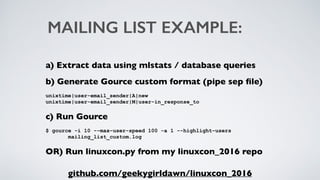
MAILING LIST EXAMPLE:
a) Extract data using mlstats / database queries
b) Generate Gource custom format (pipe sep file)
unixtime|user-email_sender|A|new

unixtime|user-email_sender|M|user-in_response_to
c) Run Gource
$ gource -i 10 --max-user-speed 100 -a 1 --highlight-users 

mailing_list_custom.log
OR) Run linuxcon.py from my linuxcon_2016 repo
github.com/geekygirldawn/linuxcon_2016
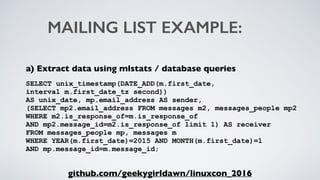
MAILING LIST EXAMPLE:
a) Extract data using mlstats / database queries
SELECT unix_timestamp(DATE_ADD(m.first_date, 

interval m.first_date_tz second)) 

AS unix_date, mp.email_address AS sender, 

(SELECT mp2.email_address FROM messages m2, messages_people mp2 

WHERE m2.is_response_of=m.is_response_of 

AND mp2.message_id=m2.is_response_of limit 1) AS receiver 

FROM messages_people mp, messages m 

WHERE YEAR(m.first_date)=2015 AND MONTH(m.first_date)=1 

AND mp.message_id=m.message_id;
github.com/geekygirldawn/linuxcon_2016
Image from WebOps.com
ADDITIONAL OPTIONS
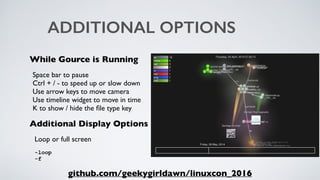
While Gource is Running
Space bar to pause

Ctrl + / - to speed up or slow down

Use arrow keys to move camera

Use timeline widget to move in time

K to show / hide the file type key
Additional Display Options
Loop or full screen
-loop

-f
github.com/geekygirldawn/linuxcon_2016
GENERATING VIDEO
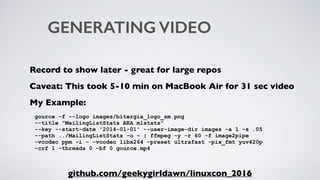
Record to show later - great for large repos
Caveat: This took 5-10 min on MacBook Air for 31 sec video
My Example:
gource -f --logo images/bitergia_logo_sm.png 

--title "MailingListStats AKA mlstats"

--key --start-date '2014-01-01' --user-image-dir images -a 1 -s .05

--path ../MailingListStats -o - | ffmpeg -y -r 60 -f image2pipe 

-vcodec ppm -i - -vcodec libx264 -preset ultrafast -pix_fmt yuv420p 

-crf 1 -threads 0 -bf 0 gource.mp4
github.com/geekygirldawn/linuxcon_2016
PhD Student
Centre for Business Network Analysis
University of Greenwich
THANK YOU
Consultant
Open Source / Community Building
The Scale Factory
Dawn Foster
@geekygirldawn
dawn@fastwonder.com
fastwonderblog.com
THE REST OF THESE SLIDES
INCLUDE STUFF I DIDN'T
HAVE TIME TO SHOW :)
ADD USER AVATARS
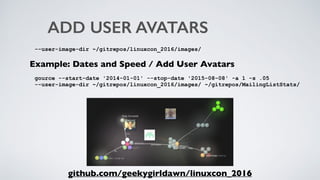
--user-image-dir ~/gitrepos/linuxcon_2016/images/
Example: Dates and Speed / Add User Avatars
gource --start-date '2014-01-01' --stop-date '2015-08-08' -a 1 -s .05 

--user-image-dir ~/gitrepos/linuxcon_2016/images/ ~/gitrepos/MailingListStats/
github.com/geekygirldawn/linuxcon_2016
CAPTIONS
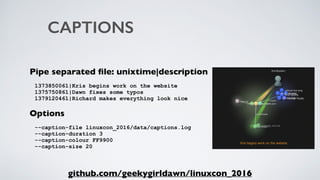
Pipe separated file: unixtime|description
1373850061|Kris begins work on the website

1375750861|Dawn fixes some typos

1379120461|Richard makes everything look nice
Options
--caption-file linuxcon_2016/data/captions.log

--caption-duration 3

--caption-colour FF9900

--caption-size 20
github.com/geekygirldawn/linuxcon_2016
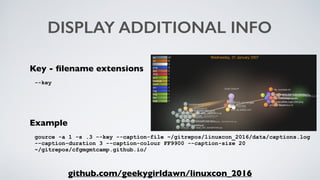
DISPLAY ADDITIONAL INFO
Key - filename extensions
--key
Example
gource -a 1 -s .3 --key --caption-file ~/gitrepos/linuxcon_2016/data/captions.log
--caption-duration 3 --caption-colour FF9900 --caption-size 20 

~/gitrepos/cfgmgmtcamp.github.io/
github.com/geekygirldawn/linuxcon_2016
BUG EXAMPLE:
a) Extract data using Bicho / database queries
b) Generate Gource custom format (pipe sep file)
unixtime|user-bug-submitter|A|module/bug-number|FFFFFF

unixtime|user-bug-modifier|M|module/bug-number|FFFFFF
c) Run Gource
$ gource -a 1 -s 1 --highlight-users ~/gitrepos/linuxcon_2016/data/bugs_custom.log
github.com/geekygirldawn/linuxcon_2016

Using Gource to visualize Linux kernel data

  • 1.
    VISUALIZING THE LINUXKERNEL WITH GOURCE Dawn M. Foster @geekygirldawn   dawn@dawnfoster.com   fastwonderblog.com Community  and  Open   Source  Consultant   The  Scale  Factory PhD  Student   University  of  Greenwich   London,  UK
  • 2.
    WHOAMI Geek, traveler, reader Communityand open source consultant 20+ year tech career. Past 15 years doing community & open source 
 (Intel, Jive, Puppet Labs, etc.) PhD student at University of Greenwich researching Linux kernel Photos by Josh Bancroft, Don Park
  • 3.
  • 4.
    GETTING STARTED Easy torun $ gource /path/to/repo So many options $ gource -H README in repo has 
 links to useful info github.com/geekygirldawn/linuxcon_2016
  • 5.
    DATES AND SPEED Dates --start-date'2015-01-01'
 --stop-date '2015-01-31' Seconds Per Day -s 30 github.com/geekygirldawn/linuxcon_2016/kernel_example Photo by Ozzy Delaney
  • 6.
    REDUCE AMOUNT OFINFO File Filter Excludes (regex) --file-filter '.(c|h)' --file-filter '^((?!sound).)*$' github.com/geekygirldawn/linuxcon_2016/kernel_example
  • 7.
    EXAMPLES: SLOWER &FILTERED Exclude ".c" and ".h" files gource --start-date '2015-01-01' --stop-date '2015-01-31' --file-filter '.(c|h)' Exclude everything not related to sound gource --start-date '2015-01-01' --stop-date '2015-01-31' 
 --file-filter '^((?!sound).)*$' -s 30 github.com/geekygirldawn/linuxcon_2016
  • 8.
  • 9.
    MAKE IT LOOKBETTER --date-format "%A, %d %B %Y" --title "Linux Kernel" --font-size 22 
 --font-colour FF9900 --logo images/tux.png github.com/geekygirldawn/linuxcon_2016/kernel_example
  • 10.
    EXAMPLES: MAKE ITLOOK GREAT Using Logo and Title gource --start-date '2015-01-01' --stop-date '2015-01-31' 
 --file-filter '^((?!sound).)*$' -s 30 --date-format "%A, %d %B %Y" --font-size 22 --font-colour FF9900 --logo ~/gitrepos/linuxcon_2016/kernel_example/images/tux.png --title "Linux Kernel Stable Tree" Extra Credit: Using banner image logo to replace title gource -a 1 -s .3 --date-format "%A, %d %B %Y" --font-size 22 --font-colour FF9900 --logo ~/gitrepos/linuxcon_2016/images/bitergia-banner.png 
 ~/gitrepos/MailingListStats/ github.com/geekygirldawn/linuxcon_2016
  • 11.
  • 12.
    CUSTOM LOG FORMAT PipeSeparated File timestamp - A unix timestamp of when the update occured.
 username - The name of the user who made the update.
 type - Update type - (A)dded, (M)odified or (D)eleted.
 file - Path of the file.
 color - Color for the file in hex (FFFFFF) format (Optional) Examples: 1275543595|andrew|A|src/main.cpp
 1275543700|bob|M|src/main.cpp github.com/acaudwell/Gource/wiki/Custom-Log-Format
  • 13.
    MAILING LIST EXAMPLE: a)Extract data using mlstats / database queries b) Generate Gource custom format (pipe sep file) unixtime|user-email_sender|A|new
 unixtime|user-email_sender|M|user-in_response_to c) Run Gource $ gource -i 10 --max-user-speed 100 -a 1 --highlight-users 
 mailing_list_custom.log OR) Run linuxcon.py from my linuxcon_2016 repo github.com/geekygirldawn/linuxcon_2016
  • 14.
    MAILING LIST EXAMPLE: a)Extract data using mlstats / database queries SELECT unix_timestamp(DATE_ADD(m.first_date, 
 interval m.first_date_tz second)) 
 AS unix_date, mp.email_address AS sender, 
 (SELECT mp2.email_address FROM messages m2, messages_people mp2 
 WHERE m2.is_response_of=m.is_response_of 
 AND mp2.message_id=m2.is_response_of limit 1) AS receiver 
 FROM messages_people mp, messages m 
 WHERE YEAR(m.first_date)=2015 AND MONTH(m.first_date)=1 
 AND mp.message_id=m.message_id; github.com/geekygirldawn/linuxcon_2016
  • 15.
  • 16.
    ADDITIONAL OPTIONS While Gourceis Running Space bar to pause
 Ctrl + / - to speed up or slow down
 Use arrow keys to move camera
 Use timeline widget to move in time
 K to show / hide the file type key Additional Display Options Loop or full screen -loop
 -f github.com/geekygirldawn/linuxcon_2016
  • 17.
    GENERATING VIDEO Record toshow later - great for large repos Caveat: This took 5-10 min on MacBook Air for 31 sec video My Example: gource -f --logo images/bitergia_logo_sm.png 
 --title "MailingListStats AKA mlstats"
 --key --start-date '2014-01-01' --user-image-dir images -a 1 -s .05
 --path ../MailingListStats -o - | ffmpeg -y -r 60 -f image2pipe 
 -vcodec ppm -i - -vcodec libx264 -preset ultrafast -pix_fmt yuv420p 
 -crf 1 -threads 0 -bf 0 gource.mp4 github.com/geekygirldawn/linuxcon_2016
  • 18.
    PhD Student Centre forBusiness Network Analysis University of Greenwich THANK YOU Consultant Open Source / Community Building The Scale Factory Dawn Foster @geekygirldawn dawn@fastwonder.com fastwonderblog.com
  • 19.
    THE REST OFTHESE SLIDES INCLUDE STUFF I DIDN'T HAVE TIME TO SHOW :)
  • 20.
    ADD USER AVATARS --user-image-dir~/gitrepos/linuxcon_2016/images/ Example: Dates and Speed / Add User Avatars gource --start-date '2014-01-01' --stop-date '2015-08-08' -a 1 -s .05 
 --user-image-dir ~/gitrepos/linuxcon_2016/images/ ~/gitrepos/MailingListStats/ github.com/geekygirldawn/linuxcon_2016
  • 21.
    CAPTIONS Pipe separated file:unixtime|description 1373850061|Kris begins work on the website
 1375750861|Dawn fixes some typos
 1379120461|Richard makes everything look nice Options --caption-file linuxcon_2016/data/captions.log
 --caption-duration 3
 --caption-colour FF9900
 --caption-size 20 github.com/geekygirldawn/linuxcon_2016
  • 22.
    DISPLAY ADDITIONAL INFO Key- filename extensions --key Example gource -a 1 -s .3 --key --caption-file ~/gitrepos/linuxcon_2016/data/captions.log --caption-duration 3 --caption-colour FF9900 --caption-size 20 
 ~/gitrepos/cfgmgmtcamp.github.io/ github.com/geekygirldawn/linuxcon_2016
  • 23.
    BUG EXAMPLE: a) Extractdata using Bicho / database queries b) Generate Gource custom format (pipe sep file) unixtime|user-bug-submitter|A|module/bug-number|FFFFFF
 unixtime|user-bug-modifier|M|module/bug-number|FFFFFF c) Run Gource $ gource -a 1 -s 1 --highlight-users ~/gitrepos/linuxcon_2016/data/bugs_custom.log github.com/geekygirldawn/linuxcon_2016