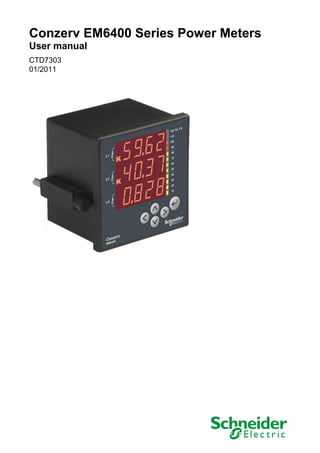
Conzerv EM6400 Series Power Meters
User manual
CTD7303
01/2011
2   © 2011 Schneider Electric. All rights reserved.
Hazard Categories and Special Symbols
                                              Read these instructions carefully and look at the equipment to become
                                              familiar with the device before trying to install, operate, service or maintain it.
                                              The following special messages may appear throughout this manual or on the
                                              equipment to warn of potential hazards or to call attention to information that
                                              clarifies or simplifies a procedure.

                                              SAFETY SYMBOLS

                                              The addition of either symbol to a ―Danger‖ or ―Warning‖ safety label indicates
                                              that an electrical hazard exists which will result in personal injury if the
                                              instructions are not followed.

                                              This is the safety alert symbol. It is used to alert you to potential personal
                                              injury hazards. Obey all safety messages that follow this symbol to avoid
                                              possible injury or death.

                                              SAFETY MESSAGES


                                                  DANGER indicates an imminently hazardous situation which, if not avoided, will
                                                  result in death or serious injury.


                                                  WARNING indicates a potentially hazardous situation which, if not avoided, can
                                                  result in death or serious injury.


                                                  CAUTION indicates a potentially hazardous situation which, if not avoided, can
                                                  result in minor or moderate injury.


                                                  CAUTION used without the safety alert symbol, indicates a potentially hazardous
                                                  situation which, if not avoided, can result in property damage.


                                              OTHER SYMBOLS

                                              This symbol indicates direct and alternating currents

                                              This is double insulation symbol which indicates that, the user-accessible area
                                              is protected throughout by double insulation or reinforced insulation.


© 2011 Schneider Electric. All rights reserved.                                                                                     3
PLEASE NOTE
    Electrical equipment should be installed, operated, serviced, and maintained
    only by qualified personnel. No responsibility is assumed by Schneider
    Electric for any consequences arising out of the use of this material.


4                                               © 2011 Schneider Electric. All rights reserved.
CTD7303                                                                                                                                EM6400 Series Power Meters
01/2011                                                                                                                                          Table of contents


Chapter 1 – EM6400 Series Power Meters Product Description ....................................................................7
  Physical Description ..........................................................................................................................................7
   Front Panel......................................................................................................................................................8
     Eight-segment LED display ..........................................................................................................................8
     Analog Load Bar ..........................................................................................................................................8
     The Indicators – Kilo, Mega, and Negative ..................................................................................................9
     Smart Keys .................................................................................................................................................10
     Keypad Operation ......................................................................................................................................11
     Auto-scroll ..................................................................................................................................................12
     Default Display (View) Page ......................................................................................................................12
   Rear Panel ....................................................................................................................................................13
  Models and Parameters with EM6400 Series Power Meters ..........................................................................14
  EM6400 Series Power Meters Technical Specification ...................................................................................16
Chapter 2: Safety Precautions ........................................................................................................................17
Chapter 3: Quick Start Guide ..........................................................................................................................19
  PROG Menu — Setup .....................................................................................................................................19
   Quick setup – While powering ON ................................................................................................................19
   Enter Setup Menu in View (Read-Only) Mode ..............................................................................................21
   Enter Setup Menu in Edit Mode ....................................................................................................................21
   Setup Parameters in View and Edit Modes ..................................................................................................22
   Edit Set Parameters in PROG Menu ............................................................................................................24
     Edit and Accept Setup ...............................................................................................................................24
     Save the New Value to Setup ....................................................................................................................25
   Clear INTG and Maximum Demand (MD) ....................................................................................................26
  Energy Integrator .............................................................................................................................................28
   Integrator Overflow .......................................................................................................................................28
     OLD Data Register .....................................................................................................................................28
  Demand Power Calculation Methods ..............................................................................................................29
     Auto (sliding block) .....................................................................................................................................29
     User (fixed block) .......................................................................................................................................29
  EM6400 Series Power Meters Menu Hierarchy ..............................................................................................30
   EM6459 Meter Menu Hierarchy ....................................................................................................................30
   EM6433 Power Meter Menu Hierarchy .........................................................................................................31
   EM6436 Power Meter Menu Hierarchy .........................................................................................................32
   EM6434 Power Meter Menu Hierarchy .........................................................................................................33
   EM6400 Power Meter Menu Hierarchy .........................................................................................................34
Chapter 4: AC Power Measurement ................................................................................................................37
  3-Phase Systems .............................................................................................................................................37
  Consumption and Poor Power Factor .............................................................................................................38
  ―3D‖ kVA Measurement ...................................................................................................................................38
Chapter 5: Installation ......................................................................................................................................39
  Mechanical Installation ....................................................................................................................................39
    Installation Procedure ...................................................................................................................................40
      Usage .........................................................................................................................................................40
      Panel Considerations and Environment ....................................................................................................40
      Viewing .......................................................................................................................................................40
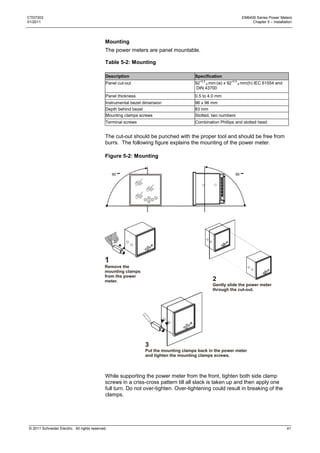
      Mounting ....................................................................................................................................................41
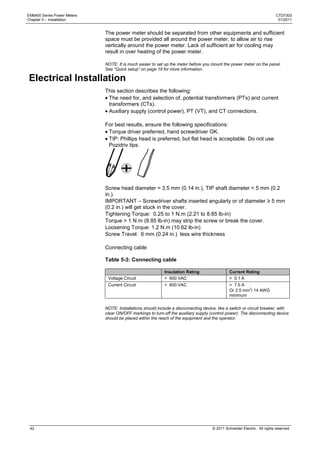
  Electrical Installation ........................................................................................................................................42
    Terminal connections using lugs...................................................................................................................43
    Auxiliary Supply (Control Power) ..................................................................................................................44
    PTs (VTs) and CTs .......................................................................................................................................44
      PT (VT), CT Wiring.....................................................................................................................................44
    Voltage Signal Connections ..........................................................................................................................45
      PT Connections..........................................................................................................................................45
      Selecting the voltage fuses ........................................................................................................................45
    Current Signal Connections ..........................................................................................................................45


© 2011 Schneider Electric. All rights reserved.                                                                                                                      5
EM6400 Series Power Meters                                                                                                                                     CTD7303
Table of contents                                                                                                                                               01/2011


       CT Connections .........................................................................................................................................46
       CT Polarity .................................................................................................................................................46
       CT Connection Reversal ............................................................................................................................46
      Setup — System Type ..................................................................................................................................47
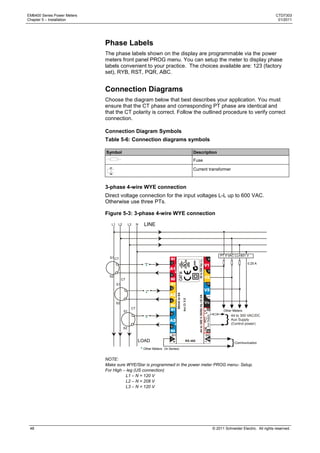
      Phase Labels ................................................................................................................................................48
      Connection Diagrams ...................................................................................................................................48
       Connection Diagram Symbols ...................................................................................................................48
       3-phase 4-wire WYE connection................................................................................................................48
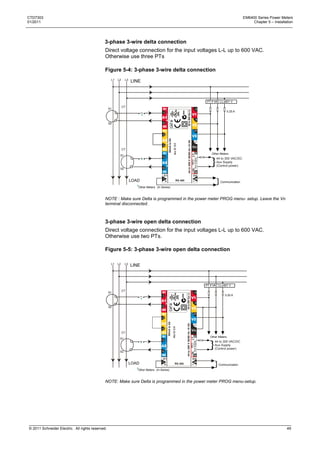
       3-phase 3-wire delta connection ................................................................................................................49
       3-phase 3-wire open delta connection .......................................................................................................49
       Figure 5-5: 3-phase 3-wire open delta connection ....................................................................................49
       2-phase 3-wire connection .........................................................................................................................50
       Single-phase connection ............................................................................................................................50
Chapter 6: Data Communication .....................................................................................................................51
    RS 485 Data Port .............................................................................................................................................51
    Installation ........................................................................................................................................................51
    Communication Capabilities ............................................................................................................................52
    Daisy-chaining Devices to the Power Meter ....................................................................................................52
    Data Formats and Settings ..............................................................................................................................53
      Parameter Settings for Different SCADA Software.......................................................................................54
      Communication Test .....................................................................................................................................55
      Data Address ................................................................................................................................................57
        Individual Parameter Address ....................................................................................................................57
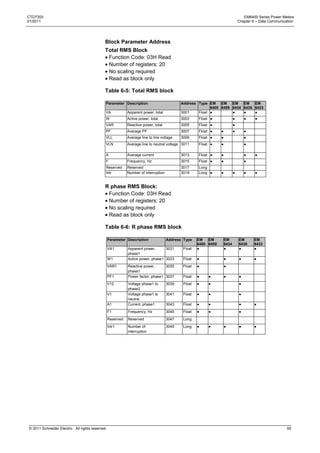
        Block Parameter Address ..........................................................................................................................59
Chapter 7: Maintenance and Troubleshooting ..............................................................................................67
    Introduction ......................................................................................................................................................67
    Troubleshooting ...............................................................................................................................................68
Appendix A – Technical Data ..........................................................................................................................71
    Accuracy ..........................................................................................................................................................71
    Auxiliary supply (Control power) ......................................................................................................................71
    Front Panel Display .........................................................................................................................................71
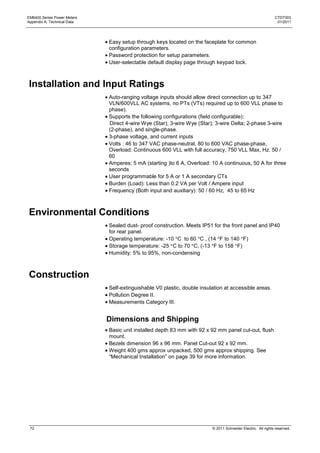
    Installation and Input Ratings ..........................................................................................................................72
    Environmental Conditions ................................................................................................................................72
    Construction .....................................................................................................................................................72
      Dimensions and Shipping .............................................................................................................................72
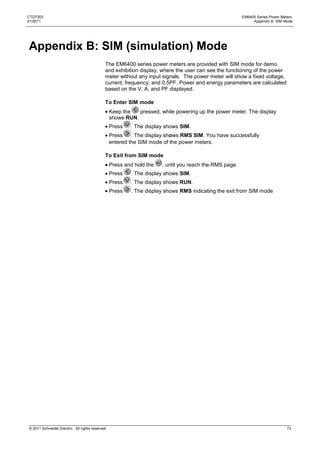
Appendix B: SIM (simulation) Mode ...............................................................................................................73
Appendix C: Glossary ......................................................................................................................................75
      Terms ............................................................................................................................................................75
      Abbreviations ................................................................................................................................................77
INDEX .................................................................................................................................................................79


6                                                                                                                       © 2011 Schneider Electric. All rights reserved.
CTD7303                                                                                                       EM6400 Series Power Meters
01/2011                                                                          Chapter 1 – EM6400 Series Power Meters Product Description


Chapter 1 – EM6400 Series Power Meters
Product Description
                                              The EM6400 series power meters are digital power meters that offer
                                              comprehensive 3-phase electrical instrumentation and load management
                                              facilities in a compact and rugged package.

                                              This chapter contains the main operating instructions. The remaining
                                              chapters explain the installation and setup steps before the power meter is
                                              ready for use, and maintenance and troubleshooting procedures for the
                                              power meter after installation.

                                              The EM6400 series power meter is an universal power meter. Before use,
                                              please program the SYS (measurement system configuration) and the PT
                                              (VT) and CT ratios through the front panel keys. Otherwise, it will read your
                                              system incorrectly. Other settings, such as communication parameters, must
                                              also be programmed as needed.

                                              Schneider Electric stands behind your EM6400 power meters with complete
                                              user support and service.

                                              Intended use: EM6400 series power meter is designed for use in industrial
                                              and commercial installations by trained and qualified professionals, not for
                                              domestic use.


Physical Description
                                              FRONT: The front panel has three rows of four digits/characters each, with
                                              auto scaling Kilo (K), Mega (M), and minus (-) indications. The K and M
                                              indicators lit together to show Giga readings. The load bar graph to the right
                                              of the display gives the indication of consumption in terms of the % amperes
                                              load with respect to the full scale (FS) selected. Five smart keys make
                                              navigating the parameters very quick and intuitive for viewing data and
                                              configuring the power meter.

                                              REAR: The voltage and current terminals and the communication port are
                                              located on the back of the power meter. Refer to ―Rear Panel‖ on page 13
                                              for more information.


© 2011 Schneider Electric. All rights reserved.                                                                                          7
EM6400 Series Power Meters                                                                                                           CTD7303
Chapter 1 – EM6400 Series Power Meters Product Description                                                                            01/2011


                                           Front Panel
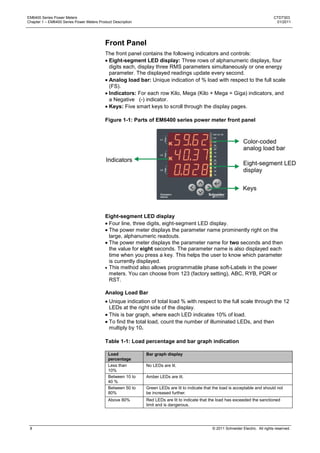
                                           The front panel contains the following indicators and controls:
                                            Eight-segment LED display: Three rows of alphanumeric displays, four
                                            digits each, display three RMS parameters simultaneously or one energy
                                            parameter. The displayed readings update every second.
                                            Analog load bar: Unique indication of % load with respect to the full scale
                                            (FS).
                                            Indicators: For each row Kilo, Mega (Kilo + Mega = Giga) indicators, and
                                            a Negative (-) indicator.
                                            Keys: Five smart keys to scroll through the display pages.

                                           Figure 1-1: Parts of EM6400 series power meter front panel


                                           Eight-segment LED display
                                            Four line, three digits, eight-segment LED display.
                                            The power meter displays the parameter name prominently right on the
                                            large, alphanumeric readouts.
                                            The power meter displays the parameter name for two seconds and then
                                            the value for eight seconds. The parameter name is also displayed each
                                            time when you press a key. This helps the user to know which parameter
                                            is currently displayed.
                                            This method also allows programmable phase soft-Labels in the power
                                            meters. You can choose from 123 (factory setting), ABC, RYB, PQR or
                                            RST.

                                           Analog Load Bar
                                             Unique indication of total load % with respect to the full scale through the 12
                                             LEDs at the right side of the display.
                                             This is bar graph, where each LED indicates 10% of load.
                                             To find the total load, count the number of illuminated LEDs, and then
                                             multiply by 10.

                                           Table 1-1: Load percentage and bar graph indication

                                            Load             Bar graph display
                                            percentage
                                            Less than        No LEDs are lit.
                                            10%
                                            Between 10 to    Amber LEDs are lit.
                                            40 %
                                            Between 50 to    Green LEDs are lit to indicate that the load is acceptable and should not
                                            80%              be increased further.
                                            Above 80%        Red LEDs are lit to indicate that the load has exceeded the sanctioned
                                                             limit and is dangerous.


 8                                                                                              © 2011 Schneider Electric. All rights reserved.
CTD7303                                                                                                                    EM6400 Series Power Meters
01/2011                                                                                       Chapter 1 – EM6400 Series Power Meters Product Description


                                              The Indicators – Kilo, Mega, and Negative

                                              Table 1-2 Indicators

                                                                   Kilo: When lit, indicates that the reading is in Kilo (103). 10,000 is displayed
                                                                   as 10.00 K and 1.0 K as 1000.


                                                                   Mega: When lit, indicates that the reading is in Mega, (106). 10,000 K is
                                                                   shown as 10.00 M. and 1.0 M as 1000 K.


                                                                   Giga: When Kilo and Mega are lit together, the reading is in Giga (109).
                                                                   10,000 M is shown as 10.00 G and 1.0 G as 1000 M.


                                                                   Negative: When lit, indicates that the reading is negative as per IEEE 100
                                                                   and industry standard practice.
                                                                   When PF (power factor) is lead (capacitive load): Both PF and VAR
                                                                   (reactive power) sign will be negative. When current is reversed: W (active
                                                                   power) is negative.


                                              Table 1-3: Giga, Mega (M), Kilo (K), and decimal point scaling

                                                  RMS Reading             Indicator
                                                  Less than 0.001         K, M OFF, displays 0.000

                                                  Less than 9999          K, M OFF
                                                  Above 9999              K ON, M OFF
                                                  Above 9999 K            M ON, K OFF
                                                  Above 9999 M            Giga (k + M indicators ON)
                                                  Up to 9999 G            Giga
                                                  Above 9999 G            Display shows Hi for positive numbers, Lo for negative numbers

                                              RMS readings are four digits. Energy readings have eight digits, including
                                              four additional fractional digits. The maximum number the power meter
                                              handles is 9,999 G for RMS and energy values.

                                              This means that the energy readings of the power meter will overflow at
                                              three values of Wh (active energy) or VAh (Apparent energy) (selectable
                                              through PROG menu - setup) depending upon the PT (VT) and CT ratios
                                              programmed.


© 2011 Schneider Electric. All rights reserved.                                                                                                       9
EM6400 Series Power Meters                                                                                                           CTD7303
Chapter 1 – EM6400 Series Power Meters Product Description                                                                            01/2011


                                           Smart Keys
                                           Operating the power meter is easy, using the five smart keys to navigate
                                           through the display pages. The display pages expand as you go to the right,
                                           much like the directory or explorer tree displayed on any computer. The
                                           display shows where you are headed.

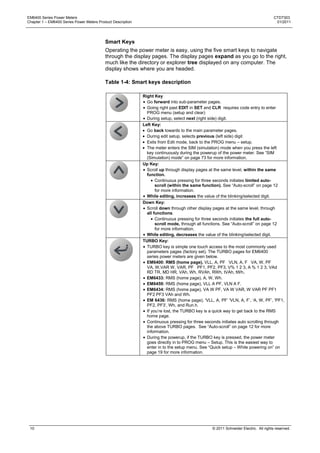
                                           Table 1-4: Smart keys description

                                                             Right Key
                                                               Go forward into sub-parameter pages.
                                                               Going right past EDIT in SET and CLR requires code entry to enter
                                                               PROG menu (setup and clear)
                                                               During setup, select next (right side) digit.
                                                             Left Key:
                                                               Go back towards to the main parameter pages.
                                                               During edit setup, selects previous (left side) digit
                                                               Exits from Edit mode, back to the PROG menu – setup.
                                                               The meter enters the SIM (simulation) mode when you press the left
                                                               key continuously during the powerup of the power meter. See ―SIM
                                                               (Simulation) mode‖ on page 73 for more information.
                                                             Up Key:
                                                               Scroll up through display pages at the same level, within the same
                                                               function.
                                                                    Continuous pressing for three seconds initiates limited auto-
                                                                    scroll (within the same function). See ―Auto-scroll‖ on page 12
                                                                    for more information.
                                                               While editing, increases the value of the blinking/selected digit.
                                                             Down Key:
                                                               Scroll down through other display pages at the same level, through
                                                               all functions.
                                                                    Continuous pressing for three seconds initiates the full auto-
                                                                    scroll mode, through all functions. See ―Auto-scroll‖ on page 12
                                                                    for more information.
                                                               While editing, decreases the value of the blinking/selected digit.
                                                             TURBO Key:
                                                               TURBO key is simple one touch access to the most commonly used
                                                               parameters pages (factory set). The TURBO pages for EM6400
                                                               series power meters are given below.
                                                               EM6400: RMS (home page), VLL, A, PF VLN, A, F VA, W, PF
                                                               VA, W,VAR W, VAR, PF PF1, PF2, PF3, V% 1 2 3, A % 1 2 3, VAd
                                                               RD TR, MD HR, VAh, Wh, RVAh, RWh, tVAh, tWh.
                                                               EM6433: RMS (home page), A, W, Wh.
                                                               EM6459: RMS (home page), VLL A PF, VLN A F.
                                                               EM6434: RMS (home page), VA W PF, VA W VAR, W VAR PF PF1
                                                               PF2 PF3 VAh and Wh.
                                                               EM 6436: RMS (home page), 'VLL, A, PF‘ 'VLN, A, F‘, ‗A, W, PF‘, 'PF1,
                                                               PF2, PF3‘, Wh, and Run.h.
                                                               If you‘re lost, the TURBO key is a quick way to get back to the RMS
                                                               home page.
                                                               Continuous pressing for three seconds initiates auto scrolling through
                                                               the above TURBO pages. See ―Auto-scroll‖ on page 12 for more
                                                               information.
                                                               During the powerup, if the TURBO key is pressed, the power meter
                                                               goes directly in to PROG menu – Setup. This is the easiest way to
                                                               enter in to the setup menu. See ―Quick setup – While powering on‖ on
                                                               page 19 for more information.


 10                                                                                             © 2011 Schneider Electric. All rights reserved.
CTD7303                                                                                                           EM6400 Series Power Meters
01/2011                                                                              Chapter 1 – EM6400 Series Power Meters Product Description


                                              Keypad Operation
                                              Press the key in the direction you want to go. The display shows where you
                                              are headed. Press the key that takes you in the desired direction.

                                              The following example explains how to navigate from the RMS page to the
                                              VLN A F page and back to the RMS page in the EM6400 power meter.

                                                             Navigation Concept


                                                        RMS VLL      V12
                                                            A         23
                                                            PF        31


                                                               VLN
                                                               A
                                                               F


                                              1. From the RMS page, press           . The display shows VLL
                                                                                                          A
                                                                                                         PF
                                              2. Now press       .The display shows VLN
                                                                                      A
                                                                                      F
                                              3. To return to RMS, press          .The display shows RMS.

                                              Use        to go forward to the sub-parameter page and use                  to go
                                              backward to the main parameter pages. Use                 and        to scroll up and
                                              down through the display pages.

                                                  Now, try getting around to other parameters, by moving up, down, right,
                                                  and left. The readings are organized as display pages to the right of RMS
                                                  and INTG.
                                                  The Kilo, Mega, and Negative Indicators are automatic. Kilo and Mega
                                                  light up together to show Giga. See ―The indicators‖ on page 9 for more
                                                  information.
                                                  You cannot go right into CLR, to clear INTG and MD values, unless you
                                                  enter a code.
                                                  Going right through SET, you can go down to VIEW or EDIT. Going right
                                                  through EDIT requires code entry to program these power meter settings.
                                                  When done:
                                                  Go Left all the way back to SET.
                                                  Go down to CLR.
                                                  Go Right into RMS to view the display pages again.


© 2011 Schneider Electric. All rights reserved.                                                                                             11
EM6400 Series Power Meters                                                                                                                CTD7303
Chapter 1 – EM6400 Series Power Meters Product Description                                                                                 01/2011


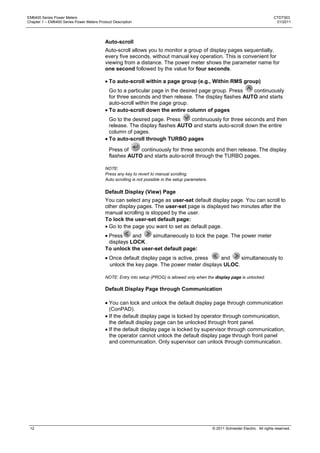
                                           Auto-scroll
                                           Auto-scroll allows you to monitor a group of display pages sequentially,
                                           every five seconds, without manual key operation. This is convenient for
                                           viewing from a distance. The power meter shows the parameter name for
                                           one second followed by the value for four seconds.

                                             To auto-scroll within a page group (e.g., Within RMS group)
                                             Go to a particular page in the desired page group. Press   continuously
                                             for three seconds and then release. The display flashes AUTO and starts
                                             auto-scroll within the page group.
                                             To auto-scroll down the entire column of pages
                                             Go to the desired page. Press    continuously for three seconds and then
                                             release. The display flashes AUTO and starts auto-scroll down the entire
                                             column of pages.
                                             To auto-scroll through TURBO pages

                                             Press of    continuously for three seconds and then release. The display
                                             flashes AUTO and starts auto-scroll through the TURBO pages.

                                           NOTE:
                                           Press any key to revert to manual scrolling.
                                           Auto scrolling is not possible in the setup parameters.

                                           Default Display (View) Page
                                           You can select any page as user-set default display page. You can scroll to
                                           other display pages. The user-set page is displayed two minutes after the
                                           manual scrolling is stopped by the user.
                                           To lock the user-set default page:
                                             Go to the page you want to set as default page.
                                            Press     and    simultaneously to lock the page. The power meter
                                            displays LOCK.
                                           To unlock the user-set default page:
                                             Once default display page is active, press   and    simultaneously to
                                             unlock the key page. The power meter displays ULOC.

                                           NOTE: Entry into setup (PROG) is allowed only when the display page is unlocked.

                                           Default Display Page through Communication

                                             You can lock and unlock the default display page through communication
                                             (ConPAD).
                                             If the default display page is locked by operator through communication,
                                             the default display page can be unlocked through front panel.
                                             If the default display page is locked by supervisor through communication,
                                             the operator cannot unlock the default display page through front panel
                                             and communication. Only supervisor can unlock through communication.


 12                                                                                                  © 2011 Schneider Electric. All rights reserved.
CTD7303                                                                                                     EM6400 Series Power Meters
01/2011                                                                        Chapter 1 – EM6400 Series Power Meters Product Description


                                              Rear Panel
                                              The EM6400 series power meter terminals are located on the rear panel. 14
                                              terminals are provided, seven terminals on each side:
                                                Six terminals for current, one in and one out per phase.
                                                Four terminals for voltage, for three phases and neutral.
                                                Two terminals for auxiliary power supply (control power).
                                                Two terminals for the RS 485 communication port.

                                              Figure 1-2: Rear panel


                                              Input current
                                              terminals                                              Input voltage terminals
                                              A1, A2, A3                                             V1, V2, V3, VN


                                                                                                     Auxiliary supply
                                                                                                     (control power) terminals
                                                                                                     RS 485 communication
                                                                                                     terminals


© 2011 Schneider Electric. All rights reserved.                                                                                       13
EM6400 Series Power Meters                                                                                                         CTD7303
Chapter 1 – EM6400 Series Power Meters Product Description                                                                          01/2011


Models and Parameters with EM6400 Series Power
Meters
                                           The power meter can measure, locally display and remotely transfer over
                                           Modbus RTU, the following parameters:

                                           Table 1-5: Models and parameters with EM6400 series power meters

                                                                            EM     EM          EM            EM            EM
                                            Parameter
                                                                            6459   6433        6434          6436           6400
                                            RMS        VLLV12, V23, V31                                                  
                                                       VLN V1, V2, V3
                                                       A A1 A2 A3                                                       
                                                       An                   C                                              C
                                                       Neutral current
                                                       F                                                                 
                                                       %L – Amps                                                          
                                                       % V Unbal                                                          
                                                       % A Unbal
                                                       PF PF1 PF2 PF3                                                   

                                                       %A FS                                                           
                                                       Analog color coded
                                                       load bar
                                                       RPM                                                                
                                                       Aº Phase Angle                                                     
                                                       Aº1 Aº2 Aº3
                                                       W W1 W2 W3                                                       
                                                       VA VA1 VA2 VA3                                                   
                                                       VAR VAR1 VAR2                                                      
                                                       VAR3
                                            DM         Demand VA/ W/ A
                                                       Rising demand                                                       DM
                                                       Time remaining
                                                       Maximum Demand
                                                       (MD)
                                                       Hr MD occurred
                                            INTG       Wh                                                                   
                                            FWD        VAh                                                                  
                                                       VARh                                                                   
                                                       -VARh                                                                  
                                                       Run hours                                                            
                                                       ON hours                                                            
                                                       INTR                                                                
                                            INTG       R.Wh
                                            REV        R.VAh                                                               I/E
                                                       R.VARh
                                                       -R.VARh
                                                       Run hours
                                            OLD        Wh                                                                   
                                            FWD        VAh                                                                  
                                                       VARh                                                                   
                                                       -VARh                                                                  
                                                       Run hours                                                            
                                            OLD        R.Wh
                                            REV                                                                            I/E
                                                       R.VAh
                                                       R.VARh
                                                       -R.VARh
                                                       Run hours
                                                       RS 485                      Built-in    Built-in


 14                                                                                           © 2011 Schneider Electric. All rights reserved.
CTD7303                                                                                                             EM6400 Series Power Meters
01/2011                                                                                Chapter 1 – EM6400 Series Power Meters Product Description


                                              NOTE:
                                               – Standard;    – Option specified while ordering; C – Only through communication;  –
                                              Selectable through setup.
                                              FWD: Forward indicating the import of power into the plant/grid
                                              REV: Reverse indicating the export of power from the plant/grid

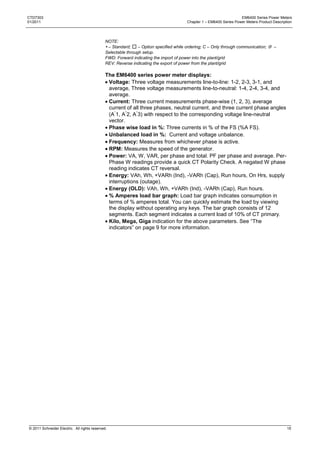
                                              The EM6400 series power meter displays:
                                               Voltage: Three voltage measurements line-to-line: 1-2, 2-3, 3-1, and
                                               average, Three voltage measurements line-to-neutral: 1-4, 2-4, 3-4, and
                                               average.
                                               Current: Three current measurements phase-wise (1, 2, 3), average
                                               current of all three phases, neutral current, and three current phase angles
                                               (A 1, A 2, A 3) with respect to the corresponding voltage line-neutral
                                               vector.
                                               Phase wise load in %: Three currents in % of the FS (%A FS).
                                               Unbalanced load in %: Current and voltage unbalance.
                                               Frequency: Measures from whichever phase is active.
                                               RPM: Measures the speed of the generator.
                                               Power: VA, W, VAR, per phase and total. PF per phase and average. Per-
                                               Phase W readings provide a quick CT Polarity Check. A negated W phase
                                               reading indicates CT reversal.
                                               Energy: VAh, Wh, +VARh (Ind), -VARh (Cap), Run hours, On Hrs, supply
                                               interruptions (outage).
                                               Energy (OLD): VAh, Wh, +VARh (Ind), -VARh (Cap), Run hours.
                                               % Amperes load bar graph: Load bar graph indicates consumption in
                                               terms of % amperes total. You can quickly estimate the load by viewing
                                               the display without operating any keys. The bar graph consists of 12
                                               segments. Each segment indicates a current load of 10% of CT primary.
                                               Kilo, Mega, Giga indication for the above parameters. See ―The
                                               indicators‖ on page 9 for more information.


© 2011 Schneider Electric. All rights reserved.                                                                                               15
EM6400 Series Power Meters                                                                                                              CTD7303
Chapter 1 – EM6400 Series Power Meters Product Description                                                                               01/2011


EM6400 Series Power Meters Technical Specification
                                           The EM6400 series power meters are high-accuracy, low cost, ultra-
                                           compact, power, and energy meter series. It offers ISO 9001 quality,
                                           accuracy and functional flexibility. Selective models of this series have
                                           Modbus RTU communications capability. The standard unit flush-mounts in
                                           a DIN 96 cutout and conforms to UL product standards.

                                           The power meters are designed for retrofit applications such as replacement
                                           of analog meters. Each can be used as standalone meter in electrical
                                           control panels, power distribution unit (PDU), switch boards, uninterrupted
                                           power supply (UPS), generator sets, and motor control center (MCC)
                                           systems. It also provides easy communication to program logic control
                                           (PLC), distributed control system (DCS), building management system
                                           (BMS), and other systems. The following table gives the technical
                                           specifications of the power meters. Refer to ―Technical data‖ on page 71 for
                                           more information.

                                           Table 1-6: Technical specifications

                                            Description                   Specification
                                            Sensing/Measurement           True RMS, one second update time, four quadrant power
                                                                          and energy
                                            Accuracy*                     Class 1.0 as per IEC 62052-11 and IEC 62053-21
                                                                          Optional: Class 0.5S, 0.2S as per IEC 62052-11, 62053-22
                                                                          and ANSIC12.20
                                            Auxiliary supply              44 to 300 VAC/DC
                                            (Control power)
                                            Burden                        Voltage and current input < 0.2 VA per phase
                                                                          Auxiliary supply (Control power) < 3 VA at 240 V
                                            Display                       Alphanumeric bright LED
                                            Resolution                    RMS four digits, INTG eight digits
                                            Input voltage                 Four voltage inputs (V1, V2, V3, VN) 110 or 415 VACLL
                                                                          nominal (Range 80 to 600 VAC LL)
                                            Input current                 Current inputs (A1, A2, A3)
                                            (Energy measurement)          5 A Class 1.0/0.5: 5 mA (starting) to 6 A*
                                                                          5 A Class 0.5S/0.2S: 5 mA (starting) to 6 A
                                                                          1 A Class 0.5S/0.2S: 1 mA (starting) to 1.2 A
                                            Frequency                     45 to 65 Hz
                                            Overload                      5 A: 10 A max continuous
                                                                          1 A: 2 A max continuous
                                            Environmental                 Operating temperature: -10 C to 60 C (14 F to 140 F)
                                                                          Storage temperature: -25 C to +70 C (-13 F to 158 F)
                                                                          Humidity 5% to 95% non condensing
                                            Standard                             - Measurement category III,
                                                                          Pollution Degree 2,
                                                                              - Double insulation at user-accessible area
                                            Weight                        400 gms approx, unpacked
                                                                          500 gms approx, shipping
                                            Communication                 RS 485 serial channel connection Industry standard Modbus
                                            (optional)                    RTU protocol
                                            EM6400 series                 Emission : CISPR22; Fast Transient: 4kV IEC 61000-4-4;
                                            conforms to                   Surge withstand: IEC 61000-4-5;
                                                                          Damped Oscillatory: IEC 61000-4-12; ESD: IEC 61000-4- 2;
                                                                          Impulse voltage: 6 kV, IEC 60060, 1.2/50 µs
                                            Isolation                     2k VAC isolation for one min between all isolated circuits
                                                                          including communication port
                                             Protection against dust      Front – IP 51; Back – IP 40
                                             and water
                                           NOTE: * For 5 A universal power meter additional error of 0.05% of full scale, for power meter
                                           input current below 100 mA.


 16                                                                                                © 2011 Schneider Electric. All rights reserved.
CTD7303                                                                                                           EM6400 Series Power Meters
01/2011                                                                                                          Chapter 2 – Safety Precautions


Chapter 2: Safety Precautions
                                              This section contains important safety precautions that must be followed
                                              before attempting to install, service, or maintain electrical equipment.
                                              Carefully read and follow the safety precautions outlined below.


                                              HAZARD OF ELECTRIC SHOCK, EXPLOSION, OR ARC FLASH
                                                  Apply appropriate personal protective equipment (PPE) and follow safe electrical
                                                  work practices. In the USA, see NFPA 70E.
                                                  Only qualified electrical workers should install this equipment. Such work should be
                                                  performed only after reading this entire set of instructions.
                                                  If the equipment is not used in a manner specified by the manufacturer, the
                                                  protection provided by the equipment may be impaired.
                                                  NEVER work alone.
                                                  Before performing visual inspections, tests, or maintenance on this equipment,
                                                  disconnect all sources of electric power. Assume that all circuits are live until they
                                                  have been completely de-energized, tested, and tagged. Pay particular attention to
                                                  the design of the power system. Consider all sources of power, including the
                                                  possibility of back feeding.
                                                  Turn off all power supplying the power meter and the equipment in which it is
                                                  installed before working on it.
                                                  Always use a properly rated voltage sensing device to confirm that all power is off.
                                                  Before closing all covers and doors, inspect the work area for tools and objects that
                                                  may have been left inside the equipment.
                                                   When removing or installing panels do not allow them to extend into the energized
                                                  bus.
                                                  The successful operation of this equipment depends upon proper handling,
                                                  installation, and operation. Neglecting fundamental installation requirements may
                                                  lead to personal injury as well as damage to electrical equipment or other property.
                                                  NEVER bypass external fusing.
                                                  NEVER short the secondary of a PT.
                                                  NEVER open circuit a CT; use the shorting block to short circuit the leads of the CT
                                                  before removing the connection from the power meter.
                                                  Before performing Dielectric (Hi-Pot) or Megger testing on any equipment in which
                                                  the power meter is installed, disconnect all input and output wires to the power
                                                  meter. High voltage testing may damage electronic components contained in the
                                                  power meter.
                                                  The power meter should be installed in a suitable electrical enclosure.

                                              Failure to follow these instructions will result in death or serious injury


© 2011 Schneider Electric. All rights reserved.                                                                                            17
EM6400 Series Power Meters                                            CTD7303
Chapter 2 – Safety Precautions                                         01/2011


 18                              © 2011 Schneider Electric. All rights reserved.
CTD7303                                                                                                   EM6400 Series Power Meters
01/2011                                                                                                   Chapter 3 – Quick Start Guide


Chapter 3: Quick Start Guide

PROG Menu — Setup
                                                  The power meter must be configured to match the application settings,
                                                  before use. Otherwise, the readings will be incorrect.
                                                  All the setup values can be re-programmed at any time, using SET.
                                                  However, the settings: SYS (WYE (Star)/Delta/single-phase / 2-Phase),
                                                  Vpri, Vsec, Apri, Asec critically determine the scaling of measured
                                                  readings.
                                                  The scaling may be used to reduce the errors in readings due to
                                                  Instrument Transformer errors. However, incorrect settings will introduce
                                                  errors in readings of other running systems.


                                                  HAZARD OF UNINTENDED OPERATION

                                                  Only qualified personnel are authorized to set up the power meter.

                                                  Failure to follow this instruction can result in injury or equipment
                                                  damage.

                                              You can enter the PROG menu - setup in
                                               View only mode: To view the set parameters.
                                               Edit mode: To view or edit set parameters.


                                              Quick Setup – While powering ON
                                                   This is the easiest way to enter the PROG menu setup.
                                                   To make connections, see ―Connection diagrams‖ on page 48. Here are
                                                  few tips.


                                              Figure 3-1: Quick setup - connections


                                                           2
                                              Use CT1                                  3
                                                                                    Use PT1
                                              Use CT2
                                                                                    Use PT2
                                              Use CT3                               Use PT3


                                                      RS 485
                                                      communication                            Aux supply
                                                                                                           1
                                                          4                                    (control power)
                                                                                               44 to 300 VAC/DC


© 2011 Schneider Electric. All rights reserved.                                                                                     19
EM6400 Series Power Meters                                                                                       CTD7303
Chapter 3 – Quick Start Guide                                                                                     01/2011


                                1. Connect auxiliary supply (control power) 44 to 300 VAC/DC to terminals 12
                                   and 13 in order to power ON the power meter.
                                    Keep      pressed for two seconds, while powering up the power meter.
                                    The power meter enters directly into PROG menu setup and displays
                                    EDIT A.PRI 100.0.
                                   Program the following setup parameters for accurate readings:
                                       A.pri, A.sec: Set these values to match your CT primary and
                                       secondary values. For example, if your CT Ratio is 200:5, set A.pri =
                                       200.0 and A.sec = 5.000.
                                       V.pri, V.sec:
                                         Set these values to match the input voltage VLL of circuit, if the
                                         input voltage < 600 VAC LL. For example, if input voltage = 300
                                         VAC LL, set V.pri = 300.0 and V.sec = 300.0.
                                         Use potential transformer (PT/VT), if the input voltage > 600 VAC
                                         LL. Set the V.pri and V.sec values to match the primary and
                                         secondary of the PT(VT) respectively. For example, if PT(VT) ratio
                                         is 11 kV: 110, set V.pri = 11.00 k and V.sec = 110.0.
                                    Select one of the following systems according to your wiring
                                    configuration:
                                       SYS: DLTA for 3-phase 3-wire system
                                       SYS: WYE/Star for 3-phase 4-wire system
                                       SYS: 2-phase for 2-phase 3-wire system
                                       SYS: single-phase for single-phase 2-wire system
                                2. Connect the current transformers (CTs).

                                     CT1                      CT2                          CT3

                                     1, 2                     3, 4                         5, 6


                                3. Connect the voltage inputs. Use PT (VT), if voltage exceeds 600 VAC LL.

                                     PT1                PT2                PT3                      Neutral

                                     8                  9                  10                       11

                                4. RS 485 terminals

                                     +ve                                  -ve
                                     7                                    14


 20                                                                         © 2011 Schneider Electric. All rights reserved.
CTD7303                                                                                                             EM6400 Series Power Meters
01/2011                                                                                                             Chapter 3 – Quick Start Guide


                                              Enter Setup Menu in View (Read-Only) Mode


                                              1. From RMS, press            . The display shows CLR.
                                              2. Press       . The display shows SET.
                                              3. Press       . The display shows VIEW.
                                              4. Press     . Use       and           to scroll and view the setup parameters and
                                                 their current settings.


                                              Enter Setup Menu in Edit Mode


                                              NOTE:    means blinking
                                                      2 Means blinking 2


                                              1. From RMS, press           . The display shows CLR.
                                              2. Press      . The display shows SET.
                                              3. Press       . The display shows VIEW.
                                              4. Press   . The display shows EDIT. CODE entry is required to enter the
                                                  setup menu in edit mode.
                                              5. Press     for two seconds. The display shows CODE 2000 with 2 blinking
                                                 The factory set code is 1000.
                                              6. Press      . The display shows CODE 1000 with 1 blinking.
                                              7. Press     once or       four times to accept the new CODE value.
                                                 The display shows PASS and then EDIT A.PRI 100.0 indicating the
                                                  successful entry to the setup menu in edit mode.

                                              NOTE: If you enter an incorrect code, the display flashes FAIL, and then displays EDIT. Repeat
                                              the procedure and make sure that you enter the correct code.


© 2011 Schneider Electric. All rights reserved.                                                                                                21
EM6400 Series Power Meters                                                                                                      CTD7303
Chapter 3 – Quick Start Guide                                                                                                    01/2011


                                Setup Parameters in View and Edit Modes
                                         2


                                                           A.PRI = Current primary winding (CT)*; Input range 1 A to 99 kA.
                                                           Default value is 100.0


                                                           A.SEC = Current secondary winding (CT);
                                                           Default value is 5.000


                                                           V.PRI = Voltage primary winding (PT), line to line*; Input range 100 V to 999
                                                           kV; Default value is 415.0


                                                           V.SEC = Voltage secondary winding (PT), line to line*; Input range 80 V to
                                                           600 V; Default value is 415.0


                                                           SYS = System configuration; Select from StAR, dLtA, 2 ph, 1 ph; Default
                                                           value is StAR.


                                                           LAbL = Phase labeling; Select from 123, RYB, RST, PQR, ABC; Default value
                                                           is 123.


                                                           VA.Fn = VA function selection; Select between 3D, ARTH; Default value
                                                           is 3D.


                                                           d.SEL = Demand selection*; Select from AUTO, User; Default value is
                                                           AUTO.


                                             1

                                NOTE:* Changing these values while device is in use is not recommended.
                                BAUD, PRTY, and ID are applicable only for EM6400 series power meters with RS 485
                                communication option.


 22                                                                                       © 2011 Schneider Electric. All rights reserved.
CTD7303                                                                                                                  EM6400 Series Power Meters
01/2011                                                                                                                  Chapter 3 – Quick Start Guide


                                              Setup Parameters in View and Edit Modes
                                              (continued)

                                                     1


                                                                     d.PAR = Demand parameter selection*; Select from VA, W, A; Default value
                                                                     is VA.


                                                                     d.PRD = Demand period; Select from 5, 10, 15, 20, 25, 30; Default value is
                                                                     15.


                                                                     Baud = Baud rate; Select from 1200, 2400, 4800, 9600, 19200; Default value
                                                                     is 9600.


                                                                     PRTY = Parity and stop bit settings; Select from EVN.1, EVN.2, OD.1,
                                                                     ODD.2, no.1, no.2; Default value is EVN.1.


                                                                     ID = RS 485 device ID number; Select from 1.000 to 247.0; Default value is
                                                                     1.000.


                                                                     F.S% = Full scale percentage; Set the full scale between 1.000 to 100.0;
                                                                     Default value is 100.0


                                                                     OFLO = Overflow parameter selection; Select from Wh, VAh;


                                                                     POLE = Number of poles for RPM; Select from 2.000, 4.000, 6.000, 8.000,
                                                                     10.00, 12.00, 14.00, 16.00; Default value is 4.000.


                                                          2    NOTE: * Changing these values is not recommended, while the device
                                                               is in use.


                                              NOTE:* Changing these values while device is in use is not recommended.
                                              BAUD, PRTY, and ID are applicable only for EM6400 series power meters with RS 485
                                              communication option.


© 2011 Schneider Electric. All rights reserved.                                                                                                    23
EM6400 Series Power Meters                                                                                                    CTD7303
Chapter 3 – Quick Start Guide                                                                                                  01/2011


                                Edit Set Parameters in PROG Menu
                                This example explains how to edit the value of A.PRI from 100.0 to 5000 in
                                PROG menu setup of the EM6400 series power meter. Then it shows how
                                to save the value to the setup.

                                NOTE: After entering into setup, the power meter exits from the setup automatically, if there is no
                                key press for > 2 min.

                                Edit and Accept Setup


                                                                                              Press   four
                                                                                              times


                                                                                           Press      four times


                                NOTE:     means blinking
                                         2 Means blinking 2

                                1. After you have successfully entered setup menu in edit mode, (Refer to
                                   ―Enter setup menu in Edit mode‖ on page 21 for more information) press
                                        . The display shows EDIT A.PRI 100.0 with blinking 1. This indicates
                                    that the value can be edited.
                                2. Press       for four times. The display shows EDIT A.PRI 5.000 with
                                   blinking 5. The value can be edited.
                                3. Press         four times. The display shows EDIT A.PRI 500.0 with blinking
                                   ―.‖.
                                4. Press       . The display shows EDIT A.PRI 5000. with blinking ―.‖.
                                5. Press        to accept the new value.
                                To edit the next parameter, press               and repeat the above steps.


 24                                                                                      © 2011 Schneider Electric. All rights reserved.
CTD7303                                                                                                          EM6400 Series Power Meters
01/2011                                                                                                          Chapter 3 – Quick Start Guide


                                              Save the New Value to Setup


                                              NOTE:     means blinking
                                                      y means blinking y


                                              1. After you edit the parameter as described above, press                . The display
                                                 shows SAVE y with blinking y.
                                              2. Press    or    to save the new value. The display flashes PASS and
                                                 then shows EDIT.
                                              3. Press        to return to SET.

                                              NOTE: If you do not want to save the new value, press    to change the value from SAVE y to
                                              SAVE n in step 1. Then press      or     . The display flashes FAIL and shows EDIT. Proceed
                                              to step 3.


© 2011 Schneider Electric. All rights reserved.                                                                                            25
EM6400 Series Power Meters                                                                                                      CTD7303
Chapter 3 – Quick Start Guide                                                                                                    01/2011


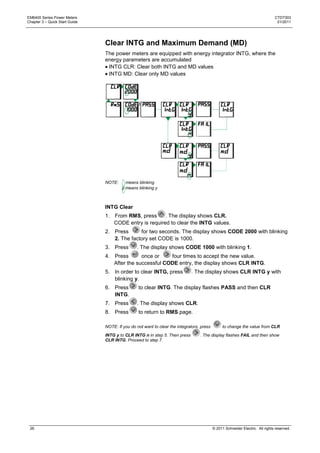
                                Clear INTG and Maximum Demand (MD)
                                The power meters are equipped with energy integrator INTG, where the
                                energy parameters are accumulated
                                 INTG CLR: Clear both INTG and MD values
                                 INTG MD: Clear only MD values


                                NOTE:     means blinking
                                        y means blinking y


                                INTG Clear
                                1. From RMS, press      . The display shows CLR.
                                   CODE entry is required to clear the INTG values.
                                2. Press      for two seconds. The display shows CODE 2000 with blinking
                                   2. The factory set CODE is 1000.
                                3. Press        . The display shows CODE 1000 with blinking 1.
                                4. Press       once or    four times to accept the new value.
                                   After the successful CODE entry, the display shows CLR INTG.
                                5. In order to clear INTG, press             . The display shows CLR INTG y with
                                   blinking y.
                                6. Press         to clear INTG. The display flashes PASS and then CLR
                                   INTG.
                                7. Press        . The display shows CLR.
                                8. Press         to return to RMS page.

                                NOTE: If you do not want to clear the integrators, press         to change the value from CLR
                                INTG y to CLR INTG n in step 5. Then press        . The display flashes FAIL and then show
                                CLR INTG. Proceed to step 7.


 26                                                                                        © 2011 Schneider Electric. All rights reserved.
CTD7303                                                                                                           EM6400 Series Power Meters
01/2011                                                                                                           Chapter 3 – Quick Start Guide


                                              MD Clear
                                              1. From RMS, press      . The display shows CLR.
                                                 CODE entry is required to clear the INTG values.
                                              2. Press      for two seconds. The display shows CODE 2000 with blinking
                                                 2. The factory set CODE is 1000.
                                              3. Press        . The display shows CODE 1000 with blinking 1.
                                              4. Press       once or    four times to accept the new value.
                                                 After the successful CODE entry, the display shows CLR INTG.
                                              5. Press        . The display shows CLR MD
                                              6. Press        . The display shows CLR MD y with blinking y.
                                              7. Press         to clear MD. The display flashes PASS and then CLR MD.
                                              8. Press        . The display shows CLR.
                                              9. Press         to return to RMS page.

                                              NOTE: If you do not want to clear the MD, press     to change the value from CLR MD y to
                                              CLR MD n in step 6. Then press      . The display flashes FAIL and then show CLR MD.
                                              Proceed to step 8.


© 2011 Schneider Electric. All rights reserved.                                                                                             27
EM6400 Series Power Meters                                                                                                      CTD7303
Chapter 3 – Quick Start Guide                                                                                                    01/2011


 Energy Integrator
                                The EM6400 series power meter is equipped with an energy integrator
                                function. It provides several parameters for Energy Management: VAh, Wh,
                                VARh (Ind), -VARh (Cap), run.h (run hours), on.h (on hours), INTR
                                (Interruptions/outages).

                                A few of these need explanation:
                                RUN.h: Indicates the period the load has been ON and has run. This
                                counter accumulates as long as the load is ON.
                                On.h: The period for which the power meter (supply) is ON.
                                INTR: Number of supply outages, means the number of auxiliary supply
                                interruptions. If the power meter auxiliary supply is from a UPS then the
                                INTR (number of interruptions) will be zero (as long as the UPS stays ON),
                                even if the voltage signals die out from time to time.

                                NOTE:
                                CT Reversal: Auto-correction for energy integration in star (wye) mode. In star (wye) mode
                                energy integration always be in forward direction irrespective of the direction of current flow or
                                sign of the power reading per phase (not applicable IE models).


                                Integrator Overflow
                                The EM6400 series power meter contains a comprehensive integrator to
                                support energy management. It accumulates several parameters over time,
                                as explained above. All values are direct readings and have a high
                                resolution. This is necessary for accurate energy analysis over short
                                intervals of time. It also means that the readings max out and reset sooner
                                or later, as given below. Since the Integrator contains counters for several
                                parameters (VAh, Wh, VARh, -VARh, Run Hours, On Hours, Interruptions),
                                they all reset together when any one of them overflows (usually Wh – but
                                can be changed to VAh through the Setup). This makes energy
                                management calculations such as average PF very easy.

                                The maximum number that the power meter handles is 9,999 Giga for RMS
                                and energy values. The value at which the power meter overflows is given
                                below.

                                The overflow value depends on the product of the primary voltage and
                                current rating.

                                Table 3-1: Integrator overflow
                                  V.PRI x A.PRI x             Max reading             Max time to              Max time to
                                  1.732                       (Wh/VAh)                reset the                overflow in
                                                                                      integrator in            months at full
                                                                                      Run Hours                scale
                                  1 VA to 1000 VA             9999 k                  9999                     13.88
                                  1 kVA to 1000 kVA           9999 M                  9999                     13.88
                                  1 MVA to 1000 MVA           9999 G                  9999                     13.88

                                  > 1000 MVA                                          <9999                    <1 year

                                OLD Data Register
                                 The power meters have an OLD data register, where the cleared INTG
                                 values are stored.
                                 The energy values in the integrator are transferred to the OLD register
                                 when the INTG is cleared (manually/due to overflow). Thus the OLD
                                 energy values are not lost even after the integrator is cleared and can be
                                 viewed with the OLD parameter. Remember that the OLD values will be


 28                                                                                        © 2011 Schneider Electric. All rights reserved.
CTD7303                                                                                                EM6400 Series Power Meters
01/2011                                                                                                Chapter 3 – Quick Start Guide


                                                  overwritten, when the INTG is cleared next time.
                                                  The values of parameters Wh, VAh, VARh, -VARh, and Run.h are stored
                                                  in the OLD register when the INTG is cleared.


Demand Power Calculation Methods
                                              Demand power is the energy accumulated during a specified period divided
                                              by the length of that period. How the power meter performs this calculation
                                              depending on the method you select. To be compatible with electric utility
                                              billing practices, the power meter provides the following types of demand
                                              power calculations:
                                                Auto (sliding block)
                                                User (fixed block)

                                              Auto (sliding block)
                                              In the auto demand power calculation, you select an interval between five
                                              and 30 minutes in steps of five minutes. The demand calculation updates
                                              every 15 seconds.

                                              Auto demand power calculation is the default calculation for EM6400 series
                                              power meters.

                                              User (fixed block)
                                              In the user demand power calculation, you select an interval between five
                                              and 30 minutes in steps of five minutes. The demand calculation updates at
                                              the end of the interval. User demand power calculation can be selected
                                              through setup. See ―Setup parameters in View and Edit modes‖ on page 22
                                              for more information.


                                                              15 minute interval                 Demand value is the
                                                                                                 average for the last
                                                                                                 completed interval
                             Calculation updates
                             every 15 seconds


                                                                                                                   Time
                     15 30 45 60                                                                                   (second)

                                                     Auto (Sliding block) demand calculation


                                                                                                 Demand value is the
                                                                                                 average for the last
                                                                                                 completed interval

                                15 minute interval                15 minute interval


                                                                                                                   Time
                    15                                                                                             (Second)
                                                     User (Fixed block) demand calculation


© 2011 Schneider Electric. All rights reserved.                                                                                  29
EM6400 Series Power Meters                                                                                              CTD7303
Chapter 3 – Quick Start Guide                                                                                            01/2011


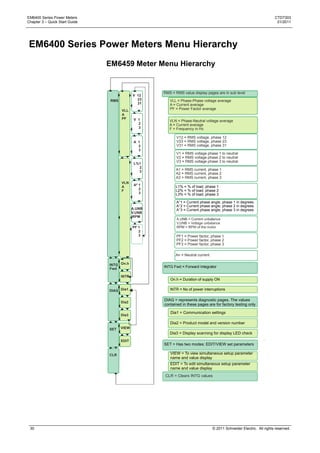
 EM6400 Series Power Meters Menu Hierarchy
                                EM6459 Meter Menu Hierarchy


                                                      RMS = RMS value display pages are in sub level
                                              V 12
                                 RMS            23       VLL = Phase-Phase voltage average
                                                31       A = Current average
                                       VLL               PF = Power Factor average
                                       A
                                       PF      V 1       VLN = Phase-Neutral voltage average
                                                 2       A = Current average
                                                 3       F = Frequency in Hz

                                                             V12 = RMS voltage, phase 12
                                               A 1           V23 = RMS voltage, phase 23
                                                 2           V31 = RMS voltage, phase 31
                                                 3
                                                             V1 = RMS voltage phase 1 to neutral
                                                             V2 = RMS voltage phase 2 to neutral
                                                             V3 = RMS voltage phase 3 to neutral
                                               L%1
                                                 2
                                                            A1 = RMS current, phase 1
                                                 3
                                                            A2 = RMS current, phase 2
                                                            A3 = RMS current, phase 3
                                       VLN
                                       A       Aº 1         L1% = % of load, phase 1
                                                  2         L2% = % of load, phase 2
                                       F
                                                  3         L3% = % of load, phase 3

                                                             A°1 = Current phase angle, phase 1 in degrees
                                                             A°2 = Current phase angle, phase 2 in degrees
                                              A.UNB          A°3 = Current phase angle, phase 3 in degrees
                                              V.UNB
                                              RPM

                                              PF 1
                                                 2
                                                 3           PF1 = Power factor, phase 1
                                                             PF2 = Power factor, phase 2
                                                             PF3 = Power factor, phase 3

                                                            An = Neutral current

                                INTG On.h
                                                      INTG Fwd = Forward Integrator
                                Fwd

                                       INTR
                                                         On.h = Duration of supply ON

                                DIAG Dia1                INTR = No of power interruptions

                                                      DIAG = represents diagnostic pages. The values
                                       Dia2
                                                      contained in these pages are for factory testing only

                                                         Dia1 = Communication settings
                                       Dia3

                                                         Dia2 = Product model and version number
                                SET    VIEW
                                                         Dia3 = Display scanning for display LED check
                                       EDIT
                                                      SET = Has two modes: EDIT/VIEW set parameters

                                CLR                      VIEW = To view simultaneous setup parameter
                                                         name and value display
                                                         EDIT = To edit simultaneous setup parameter
                                                         name and value display
                                                       CLR = Clears INTG values


 30                                                                                © 2011 Schneider Electric. All rights reserved.
CTD7303                                                                                                    EM6400 Series Power Meters
01/2011                                                                                                    Chapter 3 – Quick Start Guide


                                              EM6433 Power Meter Menu Hierarchy

                                                                       RMS = RMS value display pages are in sub level

                                                                          A = Current average
                                                                 A 1      W = Watt total
                                                   RMS
                                                                   2
                                                                   3           A1 = RMS current, phase 1
                                                          A                    A2 = RMS current, phase 2
                                                          W                    A3 = RMS current, phase 3
                                                                 W1
                                                                  2
                                                                  3


                                                  INTG   Wh
                                                  Fwd

                                                         Run.h             Wh = Forward Watt hours. Wh integrates always in the
                                                                           forward direction irrespective of the direction of flow of
                                                                           current for star (Wye) mode

                                                         On.h              Run.h = Forward run hours, Total hours the load was
                                                                           ON
                                                                           On,h = Duration of supply ON
                                                         INTR
                                                                           INTR = No of power interruptions

                                                                       OLD Fwd = The energy values stored in the integrator will
                                                  OLD     Wh           be transferred to the OLD register when the integrator is
                                                  Fwd                  cleared (manually or due to overflow)

                                                         Run.h             Wh = OLD Forward Watt hours.

                                                                           Run.h = OLD Forward run hours

                                                  DIAG    Dia1


                                                          Dia2


                                                         Dia3


                                                  SET    VIEW


                                                          EDIT


                                                  CLR


© 2011 Schneider Electric. All rights reserved.                                                                                         31
EM6400 Series Power Meters                                                                                             CTD7303
Chapter 3 – Quick Start Guide                                                                                           01/2011


                                EM6436 Power Meter Menu Hierarchy

                                                      RMS = RMS value display pages are in sub level

                                                         VLL = Phase-Phase voltage average
                                               V 12      A = Current average
                                        VLL      23      PF = Power Factor average
                                 RMS    A        31
                                        PF
                                                         VLN = Phase-Neutral voltage average
                                                         A = Current average
                                                         F = Frequency in Hz
                                        VLN    V 1
                                        A        2
                                        F        3


                                                              V12 = RMS voltage, phase 12
                                        A      A 1            V23 = RMS voltage, phase 23
                                        W        2            V31 = RMS voltage, phase 31
                                        PF       3
                                                              V1 = RMS voltage phase 1 to neutral
                                                              V2 = RMS voltage phase 2 to neutral
                                               W1             V3 = RMS voltage phase 3 to neutral
                                                2
                                                3
                                                              A1 = RMS current, phase 1
                                                              A2 = RMS current, phase 2
                                               PF 1           A3 = RMS current, phase 3
                                                  2
                                                  3


                                INTG   Wh
                                Fwd

                                       Run.h


                                       On.h               Wh = Forward Watt hours. Wh integrates always in the
                                                          forward direction irrespective of the direction of flow of
                                                          current for star (Wye) mode
                                       INTR               Run.h = Forward run hours, Total hours the load was
                                                          ON
                                                          On,h = Duration of supply ON
                                OLD     Wh
                                Fwd                       INTR = No of power interruptions

                                       Run.h          OLD Fwd = The energy values stored in the integrator will
                                                      be transferred to the OLD register when the integrator is
                                                      cleared (manually or due to overflow)

                                                          Wh = OLD Forward Watt hours.
                                DIAG    Dia1

                                                          Run.h = OLD Forward run hours
                                        Dia2


                                       Dia3


                                SET    VIEW


                                        EDIT


                                CLR


 32                                                                              © 2011 Schneider Electric. All rights reserved.
CTD7303                                                                                                                 EM6400 Series Power Meters
01/2011                                                                                                                 Chapter 3 – Quick Start Guide


                                              EM6434 Power Meter Menu Hierarchy


                                                  1
                                                                       RMS = RMS value display pages are in sub level
                                                         VA     VA 1
                                                  RMS    W         2       VA = Apparent power total
                                                         PF        3       W = Active power total
                                                                           PF = Power factor average
                                                                W1
                                                         VA      2         VA = Apparent power total
                                                         W       3         W = Active power total
                                                         VAR               VAR = Reactive power total
                                                                VAR1
                                                                   2       W = Active power total
                                                                   3       VAR = Reactive power total
                                                         W
                                                         VAR               PF = Power factor average
                                                         PF PF 2
                                                               1
                                                               3               VA1 = Volt-amperes, phase 1
                                                                               VA2 = Volt-amperes, phase 2
                                                                               VA3 = Volt-amperes, phase 3

                                                  INTG VAh                     W1 = Watts, phase 1
                                                                               W2 = Watts, phase 2
                                                  Fwd                          W3 = Watts, phase 3
                                                         Wh                    VAR1 = VAR, phase 1
                                                                               VAR2 = VAR, phase 2
                                                                               VAR3 = VAR, phase 3
                                                        VARh                  PF1 = Power factor, phase 1
                                                                              PF2 = Power factor, phase 2
                                                                              PF3 = Power factor, phase 3
                                                        -VARh
                                                                       INTG Fwd = Forward Integrator
                                                        Run.h
                                                                          VAh = Fwd Volt-ampere hours

                                                  OLD   VAh               Wh = Fwd Watt hours
                                                  Fwd
                                                                          VARh = Fwd Reactive energy, inductive
                                                        Wh
                                                                          -VARh = Fwd Reactive energy, capacitive

                                                        VARh               Run.h = Fwd Run hours

                                                                       OLD Fwd = OLD Forward Integrator
                                                        -VARh

                                                                          VAh = OLD Fwd Volt-ampere hours
                                                        Run.h
                                                                          Wh = OLD Fwd Watt hours

                                                  DIAG Dia1               VARh = OLD Fwd Reactive energy, inductive

                                                         Dia2             -VARh = OLD Fwd Reactive energy, capacitive

                                                                           Run.h = OLD Fwd Run hours
                                                        Dia3
                                                                       DIAG = represents diagnostic pages. The values
                                                                       contained in these pages are for factory testing only

                                                  SET   VIEW              Dia1 = Communication settings

                                                                          Dia2 = Product model and version number
                                                         EDIT
                                                                          Dia3 = Display scanning for display LED check

                                                  CLR                  SET = Has two modes: EDIT/VIEW set parameters

                                                                          VIEW = To view simultaneous setup parameter
                                                                          name and value display
                                                   1                      EDIT = To edit simultaneous setup parameter
                                                                          name and value display

                                                                       CLR = Clears INTG values


© 2011 Schneider Electric. All rights reserved.                                                                                                   33
EM6400 Series Power Meters                                                                                                     CTD7303
Chapter 3 – Quick Start Guide                                                                                                   01/2011


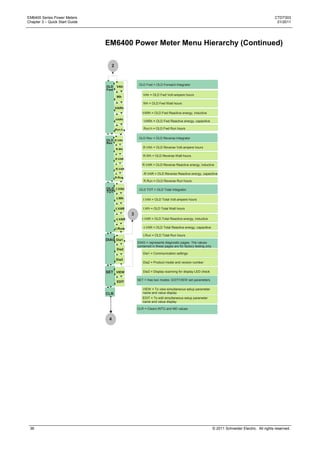
                                EM6400 Power Meter Menu Hierarchy
                                  4         3

                                                           RMS = RMS value display pages are in sub level
                                                V 12
                                  RMS             23          VLL = Phase-Phase voltage average
                                                  31          A = Current average
                                        VLL                   PF = Power Factor average
                                        A
                                        PF  V 1               VLN = Phase-Neutral voltage average
                                              2               A = Current average
                                              3               F = Frequency in Hz


                                                 A 1          VA = Apparent power total
                                                   2          W = Active power total
                                                   3          PF = Power factor average

                                                                  V12 = RMS voltage, phase 12
                                                L%1               V23 = RMS voltage, phase 23
                                                  2               V31 = RMS voltage, phase 31
                                                  3
                                                                 V1 = RMS voltage phase 1 to neutral
                                                                 V2 = RMS voltage phase 2 to neutral
                                        VLN                      V3 = RMS voltage phase 3 to neutral
                                        A   Aº 1
                                        F      2                 A1 = RMS current, phase 1
                                               3                 A2 = RMS current, phase 2
                                                                 A3 = RMS current, phase 3

                                                A.UNB            L1% = % of load, phase 1
                                                V.UNB            L2% = % of load, phase 2
                                                RPM              L3% = % of load, phase 3
                                                                 A°1 = Current phase angle, phase 1 in degrees
                                                                 A°2 = Current phase angle, phase 2 in degrees
                                                                 A°3 = Current phase angle, phase 3 in degrees
                                        VA      VA 1
                                        W                        A.UNB = Current unbalance
                                                   2             V.UNB = Voltage unbalance
                                        PF         3             RPM = RPM of the motor
                                                 W1
                                        VA        2              VA1 = Volt-amperes, phase 1
                                        W         3              VA2 = Volt-amperes, phase 2
                                        VAR                      VA3 = Volt-amperes, phase 3
                                                VAR1             W1 = Watts, phase 1
                                                   2             W2 = Watts, phase 2
                                                   3             W3 = Watts, phase 3
                                        W
                                        VAR
                                        PF PF 2
                                              1                  VAR1 = VAR, phase 1
                                                                 VAR2 = VAR, phase 2
                                              3                  VAR3 = VAR, phase 3
                                                                 PF1 = Power factor, phase 1
                                  THD   V00 1                    PF2 = Power factor, phase 2
                                            2                    PF3 = Power factor, phase 3
                                            3             THD = Total Harmonic Distortion
                                        A00 1                 V00 1 = Voltage THD, Phase 1
                                            2                 V00 2 = Voltage THD, Phase 2
                                            3                 V00 3 = Voltage THD, Phase 3
                                                             A00 1 = Current THD, Phase 1
                                   DM                        A00 2 = Current THD, Phase 2
                                   VA   VAd                  A00 3 = Current THD, Phase 3
                                        Rd                 DM VA = VA Demand
                                        TR

                                                              VAd = VA demand
                                        MD                    Rd = Rising demand
                                        HR
                                                              TR = Time remaining
                                                             MD = Maximum demand
                                                             HR = On hours at which maximum demand has
                                                             occurred


                                        1

                                NOTE: THD values are indicative only


 34                                                                                       © 2011 Schneider Electric. All rights reserved.
CTD7303                                                                                                           EM6400 Series Power Meters
01/2011                                                                                                           Chapter 3 – Quick Start Guide


                                              EM6400 Power Meter Menu Hierarchy (Continued)


                                                    1


                                              INTG VAh           INTG Fwd = Forward Integrator
                                              Fwd
                                                                   VAh = Fwd Volt-ampere hours
                                                         Wh

                                                                   Wh = Fwd Watt hours
                                                        VARh
                                                                   VARh = Fwd Reactive energy, inductive

                                                        -VARh
                                                                   -VARh = Fwd Reactive energy, capacitive

                                                        Run.h      Run.h = Fwd Run hours

                                                                 INTG Rev = Reverse Integrator
                                                  INTG R.VAh
                                                  Rev
                                                                   R.VAh = Reverse Volt-ampere hours
                                                        R.Wh

                                                                   R.Wh = Reverse Watt hours
                                                        R.VAR

                                                                   R.VAR = Reverse Reactive energy, inductive
                                                        -R.VAR
                                                                   -R.VAR = Reverse Reactive energy, capacitive
                                                        R.Run
                                                                   R.Run = Reverse Run hours

                                              INTG t.VAh         INTG TOT = Total Integrator
                                              TOT
                                                        t.Wh       t.VAh = Total Volt-ampere hours

                                                        t.VAR      t.Wh = Total Watt hours


                                                        -t.VAR     t.VAR = Total Reactive energy, inductive

                                                        t.Run      -t.VAR = Total Reactive energy, capacitive

                                                                   t.Run = Total Run hours
                                                        On.h
                                                                   On.h = Duration of supply ON
                                                        INTR
                                                                   INTR = Number of power interruptions


                                                        2


© 2011 Schneider Electric. All rights reserved.                                                                                             35
EM6400 Series Power Meters                                                                                                                       CTD7303
Chapter 3 – Quick Start Guide                                                                                                                     01/2011


                                EM6400 Power Meter Menu Hierarchy (Continued)

                                   2


                                                     OLD Fwd = OLD Forward Integrator
                                OLD     VAh
                                Fwd
                                                        VAh = OLD Fwd Volt-ampere hours
                                        Wh

                                                        Wh = OLD Fwd Watt hours
                                       VARh
                                                       VARh = OLD Fwd Reactive energy, inductive
                                       -VARh
                                                       -VARh = OLD Fwd Reactive energy, capacitive

                                       Run.h            Run.h = OLD Fwd Run hours


                                                     OLD Rev = OLD Reverse Integrator
                                OLD R.VAh
                                Rev
                                                       R.VAh = OLD Reverse Volt-ampere hours
                                       R.Wh

                                                        R.Wh = OLD Reverse Watt hours
                                       R.VAR

                                                       R.VAR = OLD Reverse Reactive energy, inductive
                                       -R.VAR
                                                       -R.VAR = OLD Reverse Reactive energy, capacitive
                                       R.Run
                                                        R.Run = OLD Reverse Run hours

                                OLD t.VAh            OLD TOT = OLD Total Integrator
                                TOT
                                        t.Wh           t.VAh = OLD Total Volt-ampere hours

                                       t.VAR            t.Wh = OLD Total Watt hours
                                                3
                                       -t.VAR          t.VAR = OLD Total Reactive energy, inductive


                                       t.Run           -t.VAR = OLD Total Reactive energy, capacitive

                                                        t.Run = OLD Total Run hours
                                DIAG Dia1
                                                    DIAG = represents diagnostic pages. The values
                                                    contained in these pages are for factory testing only
                                        Dia2
                                                       Dia1 = Communication settings
                                       Dia3
                                                       Dia2 = Product model and version number


                                SET VIEW                Dia3 = Display scanning for display LED check

                                                    SET = Has two modes: EDIT/VIEW set parameters
                                        EDIT

                                                       VIEW = To view simultaneous setup parameter
                                CLR                    name and value display
                                                       EDIT = To edit simultaneous setup parameter
                                                       name and value display

                                                    CLR = Clears INTG and MD values


                                 4


 36                                                                                                         © 2011 Schneider Electric. All rights reserved.
CTD7303                                                                                                EM6400 Series Power Meters
01/2011                                                                                           Chapter 4 – AC Power Measurement


Chapter 4: AC Power Measurement

3-Phase Systems
                                              A 3-phase system delivers higher levels of power for industrial and
                                              commercial applications. The three phases correspond to three potential
                                              lines. A 120° phase shift exists between the three potential lines.
                                              A typical configuration has either a Delta connection or a Wye (Star)
                                              connection

                                              In a 3-phase system, the voltage levels between the phases and the neutral
                                              are ideally defined by V1 = V2 = V3 = V12 / √3 = V23 / √3 = V31 / √3. In
                                              practice, there will be some unbalance (difference).


                                              Voltages between the phases vary, depending on loading factors and the
                                              quality of distribution transformers.

                                              Power measurement in a poly-phase system is governed by Blondel's
                                              Theorem. Blondel‘s Theorem states that, in a power distribution network,
                                              which has N conductors, the number of measurement elements required to
                                              determine power is N-1. A typical configuration of a poly-phase system has
                                              either a Delta connection or a Wye (Star) connection (see Figure below).


                                              Where EAB= Voltage across points A and B
                                                   ECB= Voltage across points C and B
                                                   EAN= Voltage across points A and N (Neutral)
                                                   EBN= Voltage across points B and N (Neutral)
                                                   ECN= Voltage across points C and N (Neutral)
                                                    IA = Current through conductor A
                                                    IB = Current through conductor B
                                                    IC = Current through conductor C


© 2011 Schneider Electric. All rights reserved.                                                                               37
EM6400 Series Power Meters                                                                                                  CTD7303
Chapter 4 – AC Power Measurement                                                                                             01/2011


Consumption and Poor Power Factor
                                   CONSUMPTION: W h = W x T, where W = instantaneous power, T = time in
                                   hours.

                                   The total electric energy usage over a time period is the consumption of Wh.
                                   Typically, the unit in which consumption is specified is the kilowatt-hour
                                   (kWh): one thousand watts consumed over one hour. Utilities use the Wh
                                   equation to determine the overall consumption in a billing period.

                                   Poor power factor: Results in reactive power consumption. Transferring
                                   reactive power over a distribution network causes energy loss. To force
                                   consumers to correct their power factor, utilities monitor reactive power
                                   consumption and penalize the user for poor power factor.


―3D‖ kVA Measurement
                                   The power meters are equipped with 3D Measurement of kVA. This
                                   advanced method provides the most accurate and predictable measurement
                                   under unbalanced as well as distorted waveform conditions.

                                   However, in case the power meters need to match the reading of older or
                                   simpler power meters, which use the Arithmetic kVA definition, this too is
                                   available as a Setup option.

                                   Table 4-1: ―3D‖ kVA Measurement

                                   kVA                                                       Other
                                                Formula                                                      Which one?
                                   Function                                                  Names
                                   3D Factory                                                U,              Best, all around
                                   setting
                                                kVAD
                                                   3
                                                             W2      VAR2      D2            Apparent,
                                                Where D = Distortion Power per IEEE 100      Vector kVA

                                   Arth         kVAArth      kVA     kVA2     kVA3           Arithmetic,     Good under
                                                                1                            Scalar kVA      Low unbalance,
                                                                                                             to match
                                                                                                             simpler meters
                                                                                                             without 3D
                                                                                                             capability


 38                                                                                   © 2011 Schneider Electric. All rights reserved.
CTD7303                                                                                                EM6400 Series Power Meters
01/2011                                                                                                    Chapter 5 – Installation


Chapter 5: Installation

Mechanical Installation
                                              The EM6400 series power meters are panel-mounted and have reliable,
                                              rear-mounted terminal strips rated at 600 V.
                                              The 92 x 92 mm (3.62 x 3.62 in.) cut-out and 96 x 96 mm (3.78 x 3.78 in.)
                                              bezel dimensions adhere to IEC 61554 and DIN 43700.

                                              The diagram below displays the various dimensions of mechanical
                                              installations.

                                              Figure 5-1: Mechanical dimensions, and recommended panel cut-out


                                                                                     83.0     8.0
                                                                                     3.26     0.31


                                                          90.0
                                                          3.54


                                                          96.0
                                                          3.78


© 2011 Schneider Electric. All rights reserved.                                                                                39
EM6400 Series Power Meters                                                                                        CTD7303
Chapter 5 – Installation                                                                                           01/2011


                             Installation Procedure
                             Usage
                             First, decide how the power meter is to be used. If you do not already have an
                             energy management program in operation, then your energy consultant
                             should be able to help you identify which load(s) offer maximum savings
                             potential. This will help you decide which point is to be monitored, from where
                             the readings will be viewed from, who must have access to the instrument and
                             how often. Otherwise, decide the location of the power meter and install it. For
                             best performance, choose a location that provides all the required signals with
                             minimum wiring lengths.

                             Panel Considerations and Environment
                             The power meter is high-precision measuring instrument, and its operating
                             environment is of utmost importance. For maximum performance, the
                             instrument should be mounted in a dry, dust-free location, away from heat
                             sources and strong electromagnetic fields. To operate reliably, the following
                             conditions must be met:

                             Table 5-1: Environmental Conditions

                             Description                          Specification
                             Storage temperature                  -25 C to 70 C, (-13 F to 158 F)
                             Operating temperature                -10 C to 60 C, (14 F to 140 F)
                             Relative humidity                    5% to 95%, non-condensing


                             The power meters should be separated from other equipment, and sufficient
                             space must be provided all around for cooling air to rise vertically past the
                             instrument. The cooling air temperature must be below the specified
                             operating temperature.

                             The panel or housing, in which the EM6400 power meter is mounted, should
                             protect it from dust, moisture, oil, corrosive vapors, etc.

                             The panel doors must be easily opened to provide easy access to the power
                             meter wiring for troubleshooting. Allow clearance if the unit is going to swing
                             out, as well as adequate slack in the wiring. Allow space for terminal blocks,
                             CT shorting blocks, fuses, auxiliary contactors, and other necessary
                             components.

                             Viewing
                             For ease of operation, the location should be preferably at, or slightly above,
                             eye-level. For viewing comfort, minimize glare and reflections from strong
                             light sources.


 40                                                                         © 2011 Schneider Electric. All rights reserved.
CTD7303                                                                                                             EM6400 Series Power Meters
01/2011                                                                                                                  Chapter 5 – Installation


                                              Mounting
                                              The power meters are panel mountable.

                                              Table 5-2: Mounting

                                              Description                               Specification
                                              Panel cut-out                             92+0.5-0 mm (w) x 92+0.5-0 mm(h) IEC 61554 and
                                                                                         DIN 43700
                                              Panel thickness                           0.5 to 4.0 mm
                                              Instrumental bezel dimension              96 x 96 mm
                                              Depth behind bezel                        83 mm
                                              Mounting clamps screws                    Slotted, two numbers
                                              Terminal screws                           Combination Phillips and slotted head


                                              The cut-out should be punched with the proper tool and should be free from
                                              burrs. The following figure explains the mounting of the power meter.

                                              Figure 5-2: Mounting


                                                  90                                                           90


                                             1
                                             Remove the
                                             mounting clamps
                                             from the power
                                             meter.                                              2
                                                                                                 Gently slide the power meter
                                                                                                 through the cut-out.


                                                                 3
                                                                 Put the mounting clamps back in the power meter
                                                                 and tighten the mounting clamps screws.


                                              While supporting the power meter from the front, tighten both side clamp
                                              screws in a criss-cross pattern till all slack is taken up and then apply one
                                              full turn. Do not over-tighten. Over-tightening could result in breaking of the
                                              clamps.


© 2011 Schneider Electric. All rights reserved.                                                                                               41
EM6400 Series Power Meters                                                                                                 CTD7303
Chapter 5 – Installation                                                                                                    01/2011


                             The power meter should be separated from other equipments and sufficient
                             space must be provided all around the power meter, to allow air to rise
                             vertically around the power meter. Lack of sufficient air for cooling may
                             result in over heating of the power meter.

                             NOTE: It is much easier to set up the meter before you mount the power meter on the panel.
                             See “Quick setup” on page 19 for more information.

Electrical Installation
                             This section describes the following:
                              The need for, and selection of, potential transformers (PTs) and current
                              transformers (CTs).
                              Auxiliary supply (control power), PT (VT), and CT connections.

                             For best results, ensure the following specifications:
                              Torque driver preferred, hand screwdriver OK.
                              TIP: Phillips head is preferred, but flat head is acceptable. Do not use
                              Pozidriv tips.


                             Screw head diameter = 3.5 mm (0.14 in.), TIP shaft diameter < 5 mm (0.2
                             in.).
                             IMPORTANT – Screwdriver shafts inserted angularly or of diameter ≥ 5 mm
                             (0.2 in.) will get stuck in the cover.
                             Tightening Torque: 0.25 to 1 N.m (2.21 to 8.85 lb-in)
                             Torque > 1 N.m (8.85 lb-in) may strip the screw or break the cover.
                             Loosening Torque: 1.2 N.m (10.62 lb-in)
                             Screw Travel: 6 mm (0.24 in.) less wire thickness

                             Connecting cable

                             Table 5-3: Connecting cable

                                                            Insulation Rating                  Current Rating
                              Voltage Circuit               > 600 VAC                          > 0.1 A
                              Current Circuit               > 600 VAC                          > 7.5 A
                                                                                               Or 2.5 mm2/ 14 AWG
                                                                                               minimum


                             NOTE: Installations should include a disconnecting device, like a switch or circuit breaker, with
                             clear ON/OFF markings to turn-off the auxiliary supply (control power). The disconnecting device
                             should be placed within the reach of the equipment and the operator.


 42                                                                                  © 2011 Schneider Electric. All rights reserved.
CTD7303                                                                                                             EM6400 Series Power Meters
01/2011                                                                                                                  Chapter 5 – Installation


                                              Terminal connections using lugs

                                              Terminal connection using U lugs
                                              Lug type: Insulated sleeved U lugs
                                                                     2
                                              Cross-section: 2.5 mm /14 AWG

                                              It is very simple and easy to connect the terminals using the U lugs. The
                                              following steps explain how to connect the power meter terminals using U
                                              lugs.
                                                       1                               2                                   3


                                              1. Loosen the terminal screw.
                                              2. Connect the wire with the U lug to the power meter terminal.
                                              3. Tighten the terminal screw.

                                              Terminal connections using ring lugs
                                              Lug type: Ring lugs
                                                                   2
                                              Cross-section: 2.5 mm /14 AWG

                                              To connect the terminals using ring lugs, follow the steps explained below.
                                                           1                    2                       3


                                                               4                             5


                                              1. Remove the protective cover from the power meter.
                                              2. Remove the terminal screw from the power meter.
                                              3. Connect the wire with the ring lug to the power meter terminal.
                                              4. Place the terminal screw back in the terminal and tighten the terminal
                                              screw.
                                              5. Place the protective cover back and tighten the protective cover.

                                              NOTE: The above example explains connection for only one terminal. In order to connect the
                                              other terminals, repeat the steps 2 and 3 for as many numbers of terminals. Then proceed to
                                              the remaining steps.


© 2011 Schneider Electric. All rights reserved.                                                                                              43
EM6400 Series Power Meters                                                                                               CTD7303
Chapter 5 – Installation                                                                                                  01/2011


                             Auxiliary Supply (Control Power)
                             The EM6400 power meter requires a single-phase AC/DC auxiliary (control)
                             power supply to powerup its internal electronic circuitry. External surge
                             suppressors are necessary in the auxiliary supply circuit for proper operation
                             during extreme surge conditions, where the voltage surges exceed the
                             auxiliary supply limits (for example, rural areas and outlying areas prone to
                             lightning strikes).
                             Range:
                               44 to 300 VAC/DC.
                               Burden (load) < 3 VA at 240 V.
                               The control power may be derived from the voltage signals.
                                If you have a 440 V 3-wire delta system and a reliable neutral is not
                               available, use a 440 V: 240 V supply transformer to provide the standard
                               240 V auxiliary supply.

                             NOTE: It is much easier to set up the meter before you mount the meter on the panel. See
                             “Quick setup” on page 19 for more information.


                             PTs (VTs) and CTs
                             Large electrical installations have high voltages and currents, which may
                             exceed the direct connection rating of the power meter. In this case,
                             potential transformers (PTs) and current transformers (CTs) are used to
                             precisely step down or reduce the voltage and current levels to suit the
                             power meter rating. Potential transformers usually have a full scale output of
                             110 VAC RMS line-line and current transformers usually have a full scale
                             output of 5 A or sometimes 1 A.

                             The PTs (VTs) and CTs must be planned, installed, and tested by a qualified
                             electrical contractor before wiring the power meter. The accuracy of the
                             measurement also depends on the accuracy and phase angle error of the
                             PTs (VTs) and CTs. Instrument class 1 or better PTs and CTs are
                             recommended. Do not use protection class (10P10, etc.) CTs to feed the
                             power meters; they have poor accuracy and phase characteristics.
                             Ensure that the CT Primary rating has been selected so that your normal load
                             variation lies between 40% and 80% of its full scale. If your CT is over-rated,
                             e.g., if the load is always less than 10% of the CT primary rating, then the
                             accuracy suffers. On the other hand, if the CT is under-rated, then you may
                             exceed its full-scale. As a result, both the CT and the power meter will burn
                             out.

                             PT (VT), CT Wiring
                             The PTs (VTs) and CTs must have adequate VA rating to support the
                             burden (loading) on the secondaries. You may want to support the auxiliary
                             supply burden from one of the PTs (VTs). CT wiring can impose additional
                             burden (loading) on the CT. For example, if the CT has a 5 A secondary and
                             the wire resistance is 1.0 Ω, then the CT has to support an additional burden
                             of 5 VA. If the wiring distance from the CT secondary is greater than stated
                             in Table 5-5 on page 41, then the CT could get over-burdened and give
                             large errors. Choosing a 1 A CT secondary can reduce this error. The CT
                             secondary value must be user programmed into the power meter.

                             The power meters should be conveniently located for easy connections of
                             voltage (PT), current (CT) signals, and auxiliary (control) supply.

                             NOTE: The power meters user programmable PT and CT primary or secondary settings, may
                             be utilized to Calibrate out the PT and CT amplitude error, for improved accuracy.


 44                                                                                © 2011 Schneider Electric. All rights reserved.
CTD7303                                                                                                         EM6400 Series Power Meters
01/2011                                                                                                              Chapter 5 – Installation


                                              Voltage Signal Connections
                                              For proper power meter operation, the voltage connection must be
                                              maintained. The voltage must correspond to the correct terminal. The cable
                                              required to terminate the voltage sense circuit should have an insulation
                                              rating greater than 600 VAC and a current rating greater than 0.1 A.
                                              There are four input voltage terminals marked V1, V2, V3, and Vn. See the
                                              connection diagrams that follow, for details. For Delta connection, the Vn
                                              terminal should be left unconnected.

                                              PT Connections
                                              The power meters directly accept LV voltage inputs of up to 600 VAC RMS
                                              line to line (347 VLN). Voltages greater than this, typically HV systems,
                                              must be connected through Potential transformers (PTs). The power meters
                                              allow user programming of both PT primary and secondary voltages.
                                                User programmable PT primary range: 0.1 to 999 kVAC RMS LL
                                                User programmable PT secondary range: 80 to 601 VAC RMS LL
                                                Power meter voltage Input burden: < 0.2 VA per input

                                              NOTE: The PT primary and secondary values must be user programmed before using the
                                              power meter. Otherwise, the readings will be incorrect.

                                              Selecting the voltage fuses
                                              We strongly recommend using fuses on each of the sense voltages (except
                                              for neutral) and the control / auxiliary power.

                                              Table 5-4: Fuse recommendation

                                                  Power Source                Source voltage             Fuse (A)
                                                  Line voltage                80 to 600 VLL              0.25

                                                  Auxiliary supply (Control                              0.25
                                                  power)


                                              Current Signal Connections
                                              The power meter accepts up to 6 A AC RMS per channel directly. Above
                                              that, a current transformer must be interposed to scale down the current.
                                              There are three pairs of current input terminals marked A1, A2, and A3.
                                              Each pair of input terminals is labeled as S1, S2 and has an arrow indicating
                                              the direction of current flow. For proper measurements, the phase
                                              identification, and the polarity of the current signals must be correct. The
                                              forward flow (import by consumer) current direction must be into the S1
                                              terminal and the exit from the S2 terminal. Maintain the correct sequence
                                              and polarity to avoid incorrect readings.

                                              Any unused current input terminals must be shorted together, e.g., in Delta
                                              connection, the terminals A2 (S1, S2) must be shorted together. The shorted
                                              terminals do not need to be grounded.

                                              Install the wiring for the current circuit at 600 VAC insulation as a minimum.
                                              The cable connection should be rated for 7.5 A or greater and have a cross-
                                                                          2
                                              sectional area of 2.5 mm (14 AWG) minimum.


© 2011 Schneider Electric. All rights reserved.                                                                                          45
EM6400 Series Power Meters                                                                                                CTD7303
Chapter 5 – Installation                                                                                                   01/2011


                             CT Connections
                             Mount the current transformers (CTs) as close as possible to the power
                             meter for best accuracy. The following table illustrates the maximum
                             recommended distances for various CT sizes, assuming the connection is
                                        2
                             via 2.5 mm (14 AWG) cable.

                             Table: 5-5: CT size and maximum distance

                                                         Maximum Distance in metres (in feet/inch)
                              5 A CT size
                                                         (CT to EM6400 power meter)
                              2.5 VA                     3.05 m (10 ft/120 in.)
                              5.0 VA                     4.6 m (15 ft/181 in,)
                              7.5 VA                     9.15 m (30 ft/360 in.)
                              10.0 VA                    12.2 m (40 ft/480 in.)
                              15.0 VA                    18.3 m (60 ft/720 in.)
                              30.0 VA                    36.6 m (120 ft/1441 in.)
                              User programmable CT primary range: 1 A to 99 kA AC.
                              CT secondary: 1 A or 5 A AC (programmable)
                              Other values are also programmable to compensate CT errors if desired.
                              Power meters CT burden: 0.2 VA maximum per input.

                             See the ―PROG menu — Setup‖ on page 19 for more information.

                             NOTE:
                             The PT primary and secondary values must be user programmed before using the power
                             meter. Otherwise, the readings will be incorrect.
                             With dual- range CTs; select the best range for programming the power meter. If you change
                             the range thereafter without re-programming the power meter, the power meter will read
                             erroneous values.

                             CT Polarity
                             When the power meter is connected using the CTs, you must maintain
                             correct CT polarities. CT polarities are dependent upon correct connections
                             of CT leads, and upon the direction the CTs are facing when clamped
                             around conductors. The dot on the CT must face the line side; the
                             corresponding secondary connection must connect to the appropriate input
                             on the power meter.

                             Failure to connect CTs properly results in inaccurate power readings. If your
                             power meter is not reading power properly, it is more than likely that the CT
                             is incorrectly wired. If one or two CTs are reversed, then energy parameters
                             accumulate only one phase value. If two or all the phases of the CT are
                             reversed, energy will not accumulate. (Energy import will not be measured).

                             CT Connection Reversal
                             To check the polarity of the CT after the power meter has been installed,
                             simply look at the phase-wise W (Watt) readings to see that each of the
                             readings are positive (assuming you are consuming power). If one of the W
                             readings is negative, that particular phase CT is reversed and must be
                             corrected. On the other hand if you are exporting power, all three phase-
                             wise W readings must be negative.


 46                                                                                 © 2011 Schneider Electric. All rights reserved.
CTD7303                                                                                                    EM6400 Series Power Meters
01/2011                                                                                                         Chapter 5 – Installation


                                              Setup — System Type
                                              The power meter needs to know the type of system to which it is connected
                                              to. This information is programmed in the setup procedure, before using the
                                              power meter. The power meter does allow you to change this setting while it
                                              is running; however, this capability is meant for correcting a gross error, or
                                              for training or educational purposes; it is not to be changed on regular basis.
                                              The options are:

                                                  Wye/Star: For 3-phase 4-wire, three Watt-meter or three Element
                                                  circuits. Here, all three voltage phase signals, the neutral voltage
                                                  connection, and all three current input signals need to be wired in. This
                                                  means all the four voltage terminals, and six current terminals described in
                                                  the following section, need to be wired. For wye/star wiring configuration,
                                                  see ―3-phase 4-wire WYE connection with 3 CTs and 3 PTs‖ on page 48
                                                  for more information.
                                                  Delta: For 3-phase 3-wire, two Watt-meter or two Element circuits. For
                                                  delta and open delta wiring configuration, see ―3-phase 3-wire Delta
                                                  connection with 2 CTs and 3 PTs‖ and ―3-Phase 3-Wire Open Delta
                                                  connection with 2 CTs and 2 PTs‖ on page 49 for more information.
                                                  2-phase: For 2-phase 3-wire, two Watt-meter or two Element circuits.
                                                  Here, the two voltage phase signals, the neutral voltage connection, and
                                                  two current input signals need to be wired in. This means that the three
                                                  voltage terminals and four current terminals described in the following
                                                  section, need to be wired. For two phase wiring configuration, see ―2-phase
                                                  3-wire connection with 2 CTs‖ on page 50 for more information.
                                                  Single-phase: For single-phase 2-wire, one Watt-meter or one Element
                                                  circuits. Here a single voltage Phase signal, the neutral voltage
                                                  connection, and a single current input signal need to be wired in. This
                                                  means that two voltage terminals and one current terminal described in the
                                                  following section need to be wired. For Single phase wiring configuration,
                                                  see ―Single phase connection with 1 CT‖ on page 50 for more information.


© 2011 Schneider Electric. All rights reserved.                                                                                     47
EM6400 Series Power Meters                                                                                                                                                                                       CTD7303
Chapter 5 – Installation                                                                                                                                                                                          01/2011


                             Phase Labels
                             The phase labels shown on the display are programmable via the power
                             meters front panel PROG menu. You can setup the meter to display phase
                             labels convenient to your practice. The choices available are: 123 (factory
                             set), RYB, RST, PQR, ABC.


                             Connection Diagrams
                             Choose the diagram below that best describes your application. You must
                             ensure that the CT phase and corresponding PT phase are identical and
                             that the CT polarity is correct. Follow the outlined procedure to verify correct
                             connection.

                             Connection Diagram Symbols
                             Table 5-6: Connection diagrams symbols

                             Symbol                                                                                            Description
                                                                                                                               Fuse

                                                                                                                               Current transformer


                             3-phase 4-wire WYE connection
                             Direct voltage connection for the input voltages L-L up to 600 VAC.
                             Otherwise use three PTs.

                             Figure 5-3: 3-phase 4-wire WYE connection
                                L1 L2          L3    N       LINE


                                                                                                                                                                               PT if VAC LL 601 V
                               S1 CT
                                                                                                                                      80 to 600 Vac LL
                                                                                                                               N998


                                                                                                                                                                                                0.25 A
                                                              *
                               S2
                                         CT
                                    S1


                                                              *
                                                                                     50mA to 6A


                                                                                                                                         44 to 300 V 50/60 Hz <5 VA
                                                                                                  S/N:COYWWDXXXX Acc CI: X.X


                                    S2
                                                CT
                                          S1                                                                                                                                     Other Meters
                                                                                                                                                                                      44 to 300 VAC/DC
                                                              *                                                                                                                       Aux Supply
                                                                                                                                                                                      (Control power)
                                          S2

                                                                                D1                                                                                    D0
                                                     LOAD                                                           RS 485
                                                                                                                                                                                        Communication

                                                         *   Other Meters (In Series)


                             NOTE:
                             Make sure WYE/Star is programmed in the power meter PROG menu- Setup.
                             For High – leg (US connection)
                                       L1 – N = 120 V
                                       L2 – N = 208 V
                                       L3 – N = 120 V


 48                                                                                                                                                                        © 2011 Schneider Electric. All rights reserved.
CTD7303                                                                                                                                                                                                                           EM6400 Series Power Meters
01/2011                                                                                                                                                                                                                                Chapter 5 – Installation


                                             3-phase 3-wire delta connection
                                              Direct voltage connection for the input voltages L-L up to 600 VAC.
                                              Otherwise use three PTs

                                              Figure 5-4: 3-phase 3-wire delta connection
                                                   L1   L2    L3
                                                                   LINE


                                                                                                                                                                                                        PT if VAC LL 601 V
                                                             CT
                                                  S1


                                                                                                                                                               80 to 600 Vac LL
                                                                                                                                                                                                                         0.25 A


                                                                                                                                                    N998
                                                                          *
                                                  S2


                                                                                                   50mA to 6A


                                                                                                                                                                     44 to 300 V 50/60 Hz <5 VA
                                                                                                                      S/N:COYWWDXXXX Acc CI: X.X
                                                             CT
                                                                                                                                                                                                           Other Meters
                                                         S1
                                                                                                                                                                                                              44 to 300 VAC/DC
                                                                          *                                                                                                                                   Aux Supply
                                                                                                                                                                                                              (Control power)
                                                         S2

                                                                                            D1                                                                                                    D0
                                                                   LOAD                                                                 RS 485
                                                                                                                                                                                                                 Communication
                                                                      *Other Meters   (In Series)


                                              NOTE : Make sure Delta is programmed in the power meter PROG menu- setup. Leave the Vn
                                              terminal disconnected.


                                              3-phase 3-wire open delta connection
                                              Direct voltage connection for the input voltages L-L up to 600 VAC.
                                              Otherwise use two PTs.

                                              Figure 5-5: 3-phase 3-wire open delta connection

                                                   L1   L2    L3
                                                                   LINE


                                                                                                                                                                                                       PT if VAC LL 601 V
                                                             CT
                                                  S1
                                                                                                                                                           80 to 600 Vac LL
                                                                                                                                                   N998


                                                                                                                                                                                                                    0.25 A
                                                                          *
                                                  S2
                                                                                                 50mA to 6A


                                                                                                                                                              44 to 300 V 50/60 Hz <5 VA
                                                                                                                S/N:COYWWDXXXX Acc CI: X.X


                                                             CT
                                                                                                                                                                                                          Other Meters
                                                         S1
                                                                                                                                                                                                             44 to 300 VAC/DC
                                                                          *                                                                                                                                  Aux Supply
                                                                                                                                                                                                             (Control power)
                                                         S2

                                                                                           D1                                                                                                     D0
                                                                   LOAD                                                           RS 485                                                                        Communication
                                                                      *Other Meters   (In Series)


                                              NOTE: Make sure Delta is programmed in the power meter PROG menu-setup.


© 2011 Schneider Electric. All rights reserved.                                                                                                                                                                                                            49
EM6400 Series Power Meters                                                                                                                                                                                                                                                           CTD7303
Chapter 5 – Installation                                                                                                                                                                                                                                                              01/2011


                             2-phase 3-wire connection
                             Direct voltage connection for the input voltages L-L up to 600 VAC.
                             Otherwise use two PTs.

                             Figure 5-6: 2-phase 3-wire connection


                                                          * Other meters (in series)                                                                                                                                              AC


                                                                                                                                                                                 80 to 600 Vac LL
                                                                                                                                                                          N998
                                                                                                                      50mA to 6A


                                                                                                                                                                                    44 to 300 V 50/60 Hz <5 VA
                                                                                                                                   S/N:COYWWDXXXX Acc CI: X.X
                                                                                                                                                                                                                                  44 to 300 VAC/DC


                                                                                                                D1                                                                                               D0
                                                                                                                                                      RS 485


                             NOTE: Make sure 2-phase is programmed in the power meter PROG menu- setup.

                             Single-phase connection
                             Direct voltage connection for the input voltages L-L up to 600 VAC.
                             Otherwise use one PT.
                             1. Program the power meter in single-phase mode.
                                However, voltages primary and secondary need to be programmed as
                                Line to Line.
                             2. Connect the voltage and current inputs only to the V1 and A1 voltage
                                and current terminals of the power meter.
                             3. The unused current terminals (A2 and A3) must be shorted together to
                                reduce noise picked up in the power meter.
                             4. However, the energy parameter readings will be accurate.

                             Figure 5-7: Single-phase connection
                               L1       N

                                            LINE


                                   CT             * Other meters (in series)

                              S1                                                                                                                                                                                      0.25 A
                                                                                                                                   80 to 600 Vac LL
                                                                                                                     N998


                                              *
                              S2
                                                                      50mA to 6A


                                                                                                                                        44 to 300 V 50/60 Hz <5 VA
                                                                                   S/N:COYWWDXXXX Acc CI: X.X


                                                                                                                                                                                                                      Other Meters


                                                                                                                                                                                                                        44 to 300 VAC/DC
                                                                                                                                                                                                                        Aux Supply
                                                                                                                                                                                                                        (Control power)

                                                                 D1                                                                                                  D0
                                        LOAD
                                                                                                     RS 485
                                                                                                                                                                                                                               Communication


 50                                                                                                                                                                                                                                            © 2011 Schneider Electric. All rights reserved.
CTD7303                                                                                                   EM6400 Series Power Meters
01/2011                                                                                                 Chapter 6 – Data Communication


Chapter 6: Data Communication
                                              This section is applicable only for EM6400 series power meters with RS 485
                                              communication option.


RS 485 Data Port
                                              Data Port advantages:
                                               Rapid, on-line, real time readings into
                                               Your own SCADA software or PLC.
                                               Schneider Electric energy management software products such as ION™
                                               Enterprise, Vijeo Citect, PowerLogic SCADA for pinpointing energy usage
                                               and waste.
                                               Schneider Electric ConPAD: Power meter programming and basic data
                                               reading utility.
                                               Data port has built-in impedance matched design for low reflectance on
                                               long data cables at high Baud rates. Eliminates need for complicated
                                               impedance matching resistors at the ends of long data cables.
                                               Fast 16 ms power meter response, average time to read 10 parameters is
                                               90 to 100 ms (9600 Baud, Even parity, One stop bit).
                                               Direct reading, pre-scaled Float readings. Accurate, full precision low, and
                                               high readings. No need for additional scaling factors or decimal
                                               adjustment.
                                               Fast, easy-to-use grouping of parameters tuned for field requirements.
                                               TURBO area for single point polling (upto 50 per query)
                                               Block area for even faster access to pre-configured data blocks


Installation
                                              Figure 6-1: 2-wire half duplex communication connection


                                                                                         EM 6400 power meters rear view


                                                              RS 485
                                                              communication port


                                                                        R                                                      R


                                                   G   -+
                                                   RS 485


                                                   RS 485
                                                    Data
                                                  Converter

                                                   RS 232


© 2011 Schneider Electric. All rights reserved.                                                                                    51
EM6400 Series Power Meters                                                                                                                         CTD7303
Chapter 6 – Data Communication                                                                                                                      01/2011


                                 Figure 6-2: Closed loop, 2-wire half duplex.
                                 Advantage – Reliable communications, tolerant to one break in the
                                 cable.
                                                                                                       EM6400 power meters rear view


                                                 RS 485
                                                 communication port


                                                               G
                                 RS232


                                                       RS485
                                         RS 485 Data


                                                               - +
                                          Converter


Communication Capabilities
                                 Table 6-1: RS 485 communication distances
                                     Baud Rate                          Maximum communication distances 1 to 32 devices
                                                                        Meters
                                     9600                               1200
                                     19200                              900

                                 NOTE: Distances listed should be used as guide only and cannot be guaranteed for non-
                                 Schneider Electric devices. Above distances subject to vary based on the quality of the cable.


Daisy-chaining Devices to the Power Meter
                                 RS 485 slave port allows the power meter to be connected in a daisy chain
                                 with up to 31 2-wire devices. In this bulletin, communications link refers to a
                                 chain of devices that are connected by a communications cable. See Figure
                                 6-3.

                                 Figure 6-3: Daisy-chaining 2-wire devices


                                                                                                                      MCT2W-485 terminator
                                                                                                                      on the last device of
                                                                                                                      the daisy chain


                                                  + -
                                         Towards PC
                                                                     EM6400 series power or other Schneider Electric 2-wire compatible devices
                                     If the power meter is the first device on the daisy chain, connect it to the
                                     host device using a RS 232 to RS 422/RS 485 converter or RS 485 to
                                     Ethernet converter.
                                     If the power meter is the last device on the daisy chain, terminate it with
                                     the terminator provided.


 52                                                                                                           © 2011 Schneider Electric. All rights reserved.
CTD7303                                                                                                             EM6400 Series Power Meters
01/2011                                                                                                           Chapter 6 – Data Communication


                                                  See ―Table 6-1‖ on page 52, for the maximum daisy-chain communications
                                                  distances for 2-wire devices.
                                                  The terminal‘s voltage and current ratings are compliant with the
                                                  requirements of the EIA RS 485 communications standard.
                                              NOTE: For better performance, Schneider Electric recommend to use SWG 100 % shielded
                                              cable with low resistance (Belden or Lapp make).


Data Formats and Settings
                                              Your SCADA software must be configured for Modbus RTU communication,
                                              before integrating the Schneider Electric EM6400 series power meter.
                                              The mode of transmission is defined in the following which is compatible
                                              with Modbus RTU Mode:

                                              Table 6-2: Power meter communication and protocol settings

                                              Power meter communication settings
                                              Protocol                Modbus RTU
                                              Data bits               8
                                              Baud rate               9600 Baud, User set 1200 to 19200
                                                                      Range:1200, 2400, 4800, 9600, 19200
                                                                      Normal use: 9600 Baud
                                                                      Noisy, EMI, RFI, long data cable: 4800/2400 Baud
                                                                      Short cable (< 300 meters or 975 feet): 19200 Baud

                                              Parity                  Even
                                              Device Address          1


                                              Stop bit                1
                                              Modbus Protocol
                                              Device Address          1 to 247
                                                                      Upto 247 meters per COM port with repeaters

                                              Function Code           03 (Read)
                                              Data Address            Refer to ‖Data address‖ on page 57 for more information
                                              Data type               32-bit float (real) :
                                                                         All parameters.
                                                                         Direct reading, little end
                                                                         ian float, no scaling required
                                                                      32-bit unsigned integer :
                                                                         INTR (number of interruptions (outages) - RMS Blocks)
                                                                         RunSec (Run seconds – Integ Block)
                                              No of Registers         2 to 50 (optional) per power meter data block of 10 x 32 bit values
                                                                      must be configured to suit the power meter


                                              NOTE: The polling interval to poll the data from EM6400 power meter will depend on baud rate.
                                              We recommend polling interval of one second at 9600 Baud rate.


© 2011 Schneider Electric. All rights reserved.                                                                                               53
EM6400 Series Power Meters                                                                                               CTD7303
Chapter 6 – Data Communication                                                                                            01/2011


                                 Parameter Settings for Different SCADA Software
                                 The following table explains how to read the parameter VA (See ―Individual
                                 parameter address‖ on page 57 for more information) in different Modbus
                                 master software/PLC‘s.

                                 Table 6-3: Parameter settings

                                 SL. SCADA software   Start     Function      No. of          Data Type         Remarks
                                 No                   Address   Code          Register
                                 1 ION™ Enterprise    43901     Internally    2               Swapped Float Direct
                                                                configured                                   conversion
                                 2   PowerLogic       43901     Internally    2               Real           Direct
                                     SCADA                      configured                                   conversion
                                 3   Vijeo Citect     43901     Internally    2               Real           Direct
                                                                configured                                   conversion
                                 4   Intouch          43901 F   Nil           2               Float          Direct
                                                                                                             conversion
                                 5   Modscan          3901      03 –          2               Floating point Unswapped FP
                                     (Master)                   HOLDING                                      mode
                                                                REGISTERS
                                 6   MODTEST          43901     03 –          Points -1       Float-
                                                                Rosemount                     Rosemount
                                 7   CIMPLICITY       43901     Nil           100             Real           Direct
                                                                                                             conversion. The
                                                                                                             array concept
                                                                                                             can be used
                                                                                                             here to poll all
                                                                                                             the data in
                                                                                                             single scan.
                                 8   Allenbradly –    43901     03-HOLDING    2               Floating point Direct
                                     Micrologix PLC             REGISTERS
                                     (Slave/Master)
                                 9   GE Fanuc PLC     43901      03-HOLDING   2               Real              Direct
                                                                 REGISTERS
                                 10 ABB RTU 560       Index-3900 03- Read     Query           MFI – Analog Under sub
                                    (Mater)                      HOLDING      Range - 2       measured       parameters,
                                                                 REGISTERS                    Floating value ―Sign and
                                                                                                             Exponent in
                                                                                                             First Register‖
                                                                                                             should be
                                                                                                             disabled
                                                                                                             (Unchecked)
                                 11 SEIMENS PLC       3900      03-HOLDING    2               Real           Direct
                                    (Master)                    REGISTERS
                                 12 MOVICON           43901     Nil           2               Real              Direct
                                 13 RSVIEW            43901     03-HOLDING    2               Real              Direct
                                                                REGISTERS
                                 14 ABB Microscada    3900      Format – 9    Interval – 2 Real                 Direct


 54                                                                               © 2011 Schneider Electric. All rights reserved.
CTD7303                                                                                                  EM6400 Series Power Meters
01/2011                                                                                               Chapter 6 – Data Communication


                                              Communication Test
                                              Communication test: EM6400 series power meter can be successfully
                                              used for communication using Modscan software as Modbus master in PC.
                                              Details of the settings in Modscan are given below.

                                              Settings in Modscan v3.D05-00 software to establish communication
                                              with power meters:
                                               Free download demo Modscan software from http://www.win-tech.com.
                                               The following explains how to read apparent power total (VA total) from
                                               register 3901.


                                              1. After starting the Modscan, to read Apparent power total (VA total), enter
                                                 address as 3901 (decimal), length as 2, device ID as 1, Modbus point
                                                 type as 03, and HOLDING REGISTER.
                                              2. Modify the connection details: Click connection > connect, to see the
                                                 connection detail window. Change all the settings to match the
                                                 following screen. These are default settings of the power meter.


© 2011 Schneider Electric. All rights reserved.                                                                                 55
EM6400 Series Power Meters                                                                                       CTD7303
Chapter 6 – Data Communication                                                                                    01/2011


                                 3. Set the Modbus protocol selections: On Connection details window
                                    (shown in previous step), click on Protocol Selections. Enter the
                                    protocol settings as shown below and click OK in all the windows.


                                 4. The Modscan software starts polling the configured COM port for the
                                    Device ID 1.
                                    Modscan Demo software will stop polling after 3.5 minutes on successful
                                    communication.


                                 This shows that the power meter is communicating with the Modbus
                                 Modscan master software successfully on the PC. The power meter is
                                 Modbus RTU compliant.


 56                                                                         © 2011 Schneider Electric. All rights reserved.
CTD7303                                                                                                                      EM6400 Series Power Meters
01/2011                                                                                                                   Chapter 6 – Data Communication


                                              Data Address
                                              The EM6400 power meter supports the transfer of whole block and also of
                                              individual data values (two registers are used for storing single data value).
                                                In the transfer of individual data values, it treats two registers as an object
                                                with the starting address (e.g., 3900) considered as the object name. This
                                                enables you to transfer required data values for energy management.
                                                In the transfer of the whole block, it basically treats each block as an object
                                                with the starting address (e.g.,3000) considered as the object name. This
                                                enables fast block transfers, since energy management usually requires a
                                                block of related readings for the same point of time. This method also
                                                eliminates time-skew within readings of that block.
                                                The device address, block start address, number of registers, must be
                                                configured to suit the power meter. You must also make the related
                                                SCADA settings for polling priority, logging, and viewing the data. Refer
                                                your SCADA software instructions to learn how to do this.

                                              Individual Parameter Address
                                                   Function Code: 03 Read
                                                   No scaling required
                                                   Read as block or individual parameters

                                              Table 6-4: Individual parameter address

                                                  Parameter       Description                    Address   Type    EM     EM     EM      EM      EM
                                                                                                                   6400   6459   6434    6436    6433
                                                  Metering
                                                  Metering - Current
                                                  A                Current average               3913      Float   ●      ●              ●       ●
                                                  A1              Current, phase 1               3929      Float   ●      ●              ●       ●
                                                  A2              Current, phase 2               3943      Float   ●      ●              ●       ●
                                                  A3              Current, phase 3               3957      Float   ●      ●              ●       ●
                                                  Metering – Voltage
                                                  VLL             Line to line average voltage   3909      Float   ●      ●              ●
                                                  VLN             Line to neutral voltage        3911      Float   ●      ●              ●
                                                  V12             Voltage phase 1 to phase 2     3925      Float   ●      ●              ●
                                                  V23             Voltage phase 2 to phase 3     3939      Float   ●      ●              ●
                                                  V31             Voltage phase 3 to phase 1     3953      Float   ●      ●              ●
                                                  V1              Voltage phase 1 to neutral     3927      Float   ●      ●              ●
                                                  V2              Voltage phase 2 to neutral     3941      Float   ●      ●              ●
                                                  V3              Voltage phase 3 to neutral     3955      Float   ●      ●              ●
                                                  Metering – Power
                                                  W               Active power, total            3903      Float   ●             ●       ●       ●
                                                  W1              Active power, phase 1          3919      Float   ●             ●       ●       ●
                                                  W2              Active power, phase 2          3933      Float   ●             ●       ●       ●
                                                  W3              Active power, phase 3          3947      Float   ●             ●       ●       ●
                                                  VAR             Reactive power, total          3905      Float   ●             ●
                                                  VAR1            Reactive power, phase 1        3921      Float   ●             ●
                                                  VAR2            Reactive power, phase 2        3935      Float   ●             ●
                                                  VAR3            Reactive power, phase3         3949      Float   ●             ●
                                                  VA              Apparent power, total          3901      Float   ●             ●       ●       ●
                                                  VA1             Apparent power, phase 1        3917      Float   ●             ●       ●       ●
                                                  VA2             Apparent power, phase 2        3931      Float   ●             ●       ●       ●
                                                  VA3             Apparent power, phase 3        3945      Float   ●             ●       ●       ●
                                                  Metering – Power Factor
                                                  PF              Power factor average           3907      Float   ●      ●      ●       ●
                                                  PF1             Power factor, phase 1          3923      Float   ●      ●      ●       ●
                                                  PF2             Power factor, phase 2          3937      Float   ●      ●      ●       ●


© 2011 Schneider Electric. All rights reserved.                                                                                                      57
EM6400 Series Power Meters                                                                                                        CTD7303
Chapter 6 – Data Communication                                                                                                     01/2011


                                 Parameter        Description                   Address   Type    EM      EM      EM       EM       EM
                                                                                                  6400    6459    6434     6436     6433


                                 PF3              Power factor, phase 3         3951      Float   ●       ●       ●        ●
                                 Metering - Frequency
                                 F               Frequency, Hz                  3915      Float   ●       ●                ●
                                 Power Quality
                                 THD
                                  %V1             Voltage THD, phase 1          3861      Float
                                  %V2             Voltage THD, phase 2          3863      Float
                                  %V3             Voltage THD, phase 3          3865      Float
                                  %A1             Current THD, phase 1          3867      Float
                                  %A2             Current THD, phase 2          3869      Float
                                  %A3             Current THD, phase 3          3871      Float
                                 Energy
                                 FwdVAh           Forward apparent energy       3959      Float   ●               ●        ●        ●
                                 FwdWh            Forward active energy         3961      Float   ●               ●        ●        ●
                                 FwdVARh          Forward reactive inductive    3963      Float   ●               ●
                                                  energy
                                 FwdVARh          Forward reactive capacitive   3965      Float   ●               ●
                                                  energy
                                 RevVAh           Reverse apparent energy       3967      Float   ●
                                 RevWh            Reverse active energy         3969      Float   ●
                                 RevVARh          Reverse reactive inductive    3971      Float   ●
                                                  Energy
                                 RevVARh          Reverse reactive capacitive   3973      Float   ●
                                                  Energy
                                 On hrs1.1.1.    On hours                       3993      Long    ●       ●       ●        ●        ●
                                 FwdRun secs      Forward run seconds           3995      Long    ●               ●        ●        ●
                                 RevRun secs      Reverse run seconds           3997      Long
                                 Intr             Number of power               3999      Long    ●       ●       ●        ●        ●
                                                  interruptions
                                 Demand
                                 Present Demand Present demand                  3975      Float   ●
                                 Rising Demand    Rising demand                 3977      Float   ●
                                 Max MD           Maximum demand                3979      Float   ●
                                 Max DM1.1.2.  Maximum demand occurrence 3981             Long    ●
                                 Occurrence Time time
                                 Percentage of Load parameters
                                 % Avg Load       Average load percentage       3881      Float   ●
                                 %L1              Percentage of phase 1 load 3883         Float   ●
                                 %L2              Percentage of phase 2 load 3885         Float   ●
                                 %L3              Percentage of phase 3 load 3887         Float   ●
                                 Unbalanced
                                       1.1.3.     Unbalanced %load              3889      Float   ●
                                 %Load
                                 Unbalanced %
                                       1.1.4.     Unbalanced % voltage          3891      Float   ●
                                 voltage


                                 NOTE: THD values are indicative only.


 58                                                                                        © 2011 Schneider Electric. All rights reserved.
CTD7303                                                                                                                             EM6400 Series Power Meters
01/2011                                                                                                                          Chapter 6 – Data Communication


                                              Block Parameter Address
                                              Total RMS Block
                                               Function Code: 03H Read
                                               Number of registers: 20
                                               No scaling required
                                               Read as block only

                                              Table 6-5: Total RMS block

                                              Parameter Description                          Address Type EM EM      EM EM EM
                                                                                                           6400 6459 6434 6436 6433
                                              VA             Apparent power, total           3001    Float ●         ●    ●    ●
                                              W              Active power, total             3003     Float ●                ●       ●    ●
                                              VAR            Reactive power, total           3005     Float ●                ●
                                              PF             Average PF                      3007     Float ●     ●          ●       ●
                                              VLL            Average line to line voltage    3009     Float ●     ●                  ●
                                              VLN            Average line to neutral voltage 3011     Float ●     ●                  ●

                                              A              Average current                 3013     Float ●     ●                  ●    ●
                                              F              Frequency, Hz                   3015     Float ●     ●                  ●
                                              Reserved       Reserved                        3017     Long
                                              Intr           Number of interruption          3019     Long ●      ●          ●       ●    ●


                                              R phase RMS Block:
                                               Function Code: 03H Read
                                               Number of registers: 20
                                               No scaling required
                                               Read as block only

                                              Table 6-6: R phase RMS block

                                                  Parameter Description               Address Type    EM   EM         EM         EM      EM
                                                                                                      6400 6459       6434       6436    6433
                                                  VA1        Apparent power,      3031        Float   ●               ●          ●       ●
                                                             phase1
                                                  W1         Active power, phase1 3033        Float   ●               ●          ●       ●
                                                  VAR1       Reactive power,      3035        Float   ●               ●
                                                             phase1
                                                  PF1        Power factor, phase1 3037        Float   ●    ●          ●          ●
                                                  V12        Voltage phase1 to        3039    Float   ●    ●                     ●
                                                             phase2
                                                  V1         Voltage phase1 to        3041    Float   ●    ●                     ●
                                                             neutral
                                                  A1         Current, phase1          3043    Float   ●    ●                     ●       ●
                                                  F1         Frequency, Hz            3045    Float   ●    ●                     ●
                                                  Reserved   Reserved                 3047    Long
                                                  Intr1      Number of                3049    Long    ●    ●          ●          ●       ●
                                                             interruption


© 2011 Schneider Electric. All rights reserved.                                                                                                            59
EM6400 Series Power Meters                                                                                                            CTD7303
Chapter 6 – Data Communication                                                                                                         01/2011


                                 Y phase RMS Block:
                                  Function Code: 03H Read
                                  Number of registers: 20
                                  No scaling required
                                  Read as block only

                                 Table 6-7: Y phase RMS block

                                 Parameter     Description                  Address   Type            EM      EM       EM         EM      EM
                                                                                                      6400    6459     6434       6436    6433
                                 VA2           Apparent power, phase 2      3061      Float           ●                ●          ●       ●
                                 W2            Active power, phase 2        3063      Float           ●                ●          ●       ●
                                 VAR2          Reactive power, phase 2      3065      Float           ●                ●


                                 PF2           Power factor, phase 2        3067      Float           ●       ●        ●          ●
                                 V23           Voltage phase 2 to phase 3 3069        Float           ●       ●                   ●


                                 V2            Voltage phase 2 to neutral   3071      Float           ●       ●                   ●
                                 A2            Current, phase 2             3073      Float           ●       ●                   ●       ●
                                 F2            Frequency, Hz                3075      Float           ●       ●                   ●
                                 Reserved      Reserved                     3077      Long
                                 Intr2         Number of interruption       3079      Long            ●       ●        ●          ●       ●


                                 B phase RMS Block:
                                  Function Code: 03H Read
                                  Number of registers: 20
                                  No scaling required
                                  Read as block only

                                 Table 6-8: B phase RMS block

                                 Parameter Description              Address Type        EM        EM         EM            EM         EM
                                                                                        6400      6459       6434          6436       6433
                                 VA3         Apparent power,       3091      Float      ●                    ●             ●          ●
                                             phase 3
                                 W3          Active power, phase 3 3093      Float      ●                    ●             ●          ●

                                 VAR3        Reactive power, phase 3095      Float      ●                    ●
                                             3
                                 PF3         Power factor, phase 3 3097      Float      ●         ●          ●             ●

                                 V31         Voltage phase 3 to     3099     Float      ●         ●                        ●
                                             phase 1
                                 V3          Voltage phase 3 to     3101     Float      ●         ●                        ●
                                             neutral
                                 A3          Current, phase 3       3103     Float      ●         ●                        ●          ●

                                 F3          Frequency, Hz          3105     Float      ●         ●                        ●

                                 Reserved    Reserved               3107     Long

                                 Intr3       Number of interruption 3109     Long       ●         ●          ●             ●          ●


 60                                                                                           © 2011 Schneider Electric. All rights reserved.
CTD7303                                                                                                                    EM6400 Series Power Meters
01/2011                                                                                                                 Chapter 6 – Data Communication


                                              Forward Integrated Block
                                               Function Code: 03H Read
                                               Number of registers: 20
                                               No scaling required
                                               Read as block only

                                              Table 6-9: Forward integrated block

                                              Parameter    Description                           Address   Type EM          EM      EM     EM     EM
                                                                                                                 6400       6459    6434   6436   6433
                                              FwdVAh       Forward apparent energy               3121      Float ●                  ●      ●      ●
                                              FwdWh        Forward active energy                 3123      Float    ●               ●      ●      ●
                                              FwdVARh      Forward reactive inductive energy     3125      Float    ●               ●

                                              Reserved     Reserved                              3127      Float
                                              Reserved     Reserved                              3129      Float
                                              FwdVARh      Forward reactive capacitive energy    3131      Float    ●               ●

                                              Reserved     Reserved                              3133      Float
                                              Reserved     Reserved                              3135      Float
                                              Reserved     Reserved                              3137      Long
                                              FwdRunsecs   Forward run seconds                   3139      Long     ●               ●      ●      ●


                                              Reverse Integrated Block:
                                               Function Code: 03H Read
                                               Number of registers: 20
                                               No scaling required
                                               Read as block only

                                              Table 6-10: Reverse integrated block

                                              Parameter     Description                          Address    Type EM          EM     EM     EM     EM
                                                                                                                  6400       6459   6434   6436   6433
                                              RevVAh        Reverse apparent energy              3151       Float ●

                                              RevWh         Reverse active energy                3153       Float   ●
                                              RevVARh       Reverse reactive inductive energy    3155       Float   ●

                                              Reserved      Reserved                             3157       Float
                                              Reserved      Reserved                             3159       Float
                                              RevVARh       Reverse reactive capacitive energy   3161       Float   ●

                                              Reserved      Reserved                             3163       Float
                                              Reserved      Reserved                             3165       Float
                                              Reserved      Reserved                             3167       Long
                                              RevRunsecs    Reverse run seconds                  3169       Long    ●


© 2011 Schneider Electric. All rights reserved.                                                                                                       61
EM6400 Series Power Meters                                                                                                            CTD7303
Chapter 6 – Data Communication                                                                                                         01/2011


                                 Total Integrated Block:
                                  Function Code: 03H Read
                                  Number of registers: 20
                                  No scaling required
                                  Read as block only

                                 Table 6-11: Total integrated block

                                 Parameter        Description                         Address        Type    EM     EM      EM     EM     EM
                                                                                                             6400   6459    6434   6436   6433
                                 TotVAh           Total apparent energy               3181           Float   ●
                                 TotWh            Total active energy                 3183           Float   ●
                                 TotVARh          Total reactive inductive energy     3185           Float   ●

                                 Reserved         Reserved                            3187           Float
                                 Reserved         Reserved                            3189           Float
                                 TotVARh          Total reactive capacitive energy    3191           Float   ●

                                 Reserved         Reserved                            3193           Float
                                 Reserved         Reserved                            3195           Float
                                 Reserved         Reserved                            3197           Long
                                 TotRunsecs       Total run seconds                   3199           Long    ●


                                 Demand Block:
                                  Function Code: 03H Read
                                  Number of registers: 22
                                  No scaling required
                                  Read as block only

                                 Table 6-12: Demand block

                                 Parameter             Description             Address       Type      EM        EM        EM      EM     EM
                                                                                                       6400      6459      6434    6436   6433
                                 Reserved              Reserved                3721          Long
                                 Reserved              Reserved                3723          Float
                                 Reserved              Reserved                3725          Float
                                 Reserved              Reserved                3727          Float
                                 Reserved              Reserved                3729          Float
                                 Reserved              Reserved                3731          Float
                                 Reserved              Reserved                3733          Float
                                 Present demand        Present demand          3735          Float     ●
                                 Rising demand         Rising demand           3737          Float     ●
                                 Time remaining        Time remaining          3739          Long      ●
                                 Reserved              Reserved                3741          Float


                                 Note: The address 3741 is overlapped between the demand and max demand blocks.


 62                                                                                           © 2011 Schneider Electric. All rights reserved.
CTD7303                                                                                                                      EM6400 Series Power Meters
01/2011                                                                                                                   Chapter 6 – Data Communication


                                              Max Demand Block:
                                               Function Code: 03H Read
                                               Number of registers: 36
                                               No scaling required
                                               Read as block only

                                              Table 6-13: Max demand block

                                              Parameter    Description                            Address    Type    EM   EM   EM   EM   EM
                                                                                                                     6400 6459 6434 6436 6433
                                                                                                         1.1.5. 6400
                                              MaxDM        Maximum demand                         3741       Float ●

                                              MaxDMTime    Maximum demand occurrence time         3743       Long ●
                                              Reserved     Reserved                               3745       Float

                                              Reserved     Reserved                               3747       Long

                                              Reserved     Reserved                               3749       Float

                                              Reserved     Reserved                               3751       Long

                                              Reserved     Reserved                               3753       Float
                                              Reserved     Reserved                               3755       Long

                                              Reserved     Reserved                               3757       Float

                                              Reserved     Reserved                               3759       Long

                                              Reserved     Reserved                               3761       Float

                                              Reserved     Reserved                               3763       Long

                                              Reserved     Reserved                               3765       Float

                                              Reserved     Reserved                               3767       Long

                                              Reserved     Reserved                               3769       Float

                                              Reserved     Reserved                               3771       Long
                                              Reserved     Reserved                               3773       Float
                                              Reserved     Reserved                               3775       Long


                                              Note: The address 3741 is overlapped between the Demand and Max Demand blocks

                                              Old Forward Integrated Block
                                               Function Code: 03H Read
                                               Number of registers: 20
                                               No scaling required
                                               Read as block only

                                              Table 6-14: Old forward integrated block

                                              Parameter       Description                             Address Type EM EM EM EM          EM
                                                                                                                    6400 6459 6434 6436 6433
                                              OldFwdVAh       Old forward apparent energy             3122    Float ●         ●    ●    ●
                                              OldFwdWh        Old forward active energy               3124      Float ●            ●     ●     ●
                                              OldFwdVARh      Old forward reactive inductive energy   3126      Float ●            ●

                                              Reserved        Reserved                               3128       Float
                                              Reserved        Reserved                               3130       Float
                                              OldFwdVARh      Old forward reactive capacitive energy 3132       Float ●            ●
                                              Reserved        Reserved                                3134      Float
                                              Reserved        Reserved                                3136      Float
                                              Reserved        Reserved                                3138      Long
                                              OldFwdRunsecs   Old forward run seconds                 3140      Long ●             ●     ●     ●


© 2011 Schneider Electric. All rights reserved.                                                                                                     63
EM6400 Series Power Meters                                                                                                            CTD7303
Chapter 6 – Data Communication                                                                                                         01/2011


                                 Old Reverse Integrated Block:
                                  Function Code: 03H Read
                                  Number of registers: 20
                                  No scaling required
                                  Read as block only

                                 Table 6-15: Old reverse integrated block

                                 Parameter       Description                              Address Type EM EM EM EM EM
                                                                                                        6400 6459 6434 6436 6433
                                 OldRevVAh       Old reverse apparent energy              3152    Float ●

                                 OldRevWh        Old reverse active energy                3154        Float ●

                                 OldRevVARh      Old reverse reactive inductive energy    3156        Float ●

                                 Reserved        Reserved                               3158          Float
                                 Reserved        Reserved                               3160          Float
                                 OldRevVARh      Old reverse reactive capacitive energy 3162          Float ●

                                 Reserved        Reserved                                 3164        Float
                                 Reserved        Reserved                                 3166        Float
                                 Reserved        Reserved                                 3168        Long
                                 OldRevRunsecs   Old reverse run seconds                  3170        Long ●


                                 Old Total Integrated Block:
                                  Function Code: 03H Read
                                  Number of registers: 20
                                  No scaling required
                                  Read as block only

                                 Table 6-16: Old total integrated block

                                 Parameter       Description                             Address     Type EM   EM   EM   EM   EM
                                                                                                          6400 6459 6434 6436 6433
                                 OldTotVAh       Old total apparent energy               3182        Float   ●
                                 OldTotWh        Old total active energy                 3184        Float   ●
                                 OldTotVARh      Old total reactive inductive energy     3186        Float   ●
                                 Reserved        Reserved                                3188        Float
                                 Reserved        Reserved                                3190        Float
                                 OldTotVARh      Old total reactive capacitive energy    3192        Float   ●

                                 Reserved        Reserved                                3194        Float
                                 Reserved        Reserved                                3196        Float
                                 Reserved        Reserved                                3198        Long
                                 OldTotRunsecs   Old total run seconds                   3200        Long ●


 64                                                                                              © 2011 Schneider Electric. All rights reserved.
CTD7303                                                                                                               EM6400 Series Power Meters
01/2011                                                                                                            Chapter 6 – Data Communication


                                              Phase Angle Block:
                                               Function Code: 03H Read
                                               Number of registers: 18
                                               No scaling required
                                               Read as block only
                                              Table 6-17: Phase angle block
                                              Parameter         Description                    Address Type    EM     EM     EM     EM     EM
                                                                                                               6400   6459   6434   6436   6433
                                              Neutral voltage   Neutral voltage                3701    Float   ●      ●

                                              An                Neutral current                3703    Float   ●      ●
                                              V1                Voltage phase angle, phase 1   3705    Float   ●      ●

                                              V2                Voltage phase angle, phase 2   3707    Float   ●      ●
                                              V3                Voltage phase angle, phase 3   3709    Float   ●      ●
                                              A1                Current phase angle, phase 1   3711    Float   ●      ●

                                              A2                Current phase angle, phase 2   3713    Float   ●      ●
                                              A3                Current phase angle, phase 3   3715    Float   ●      ●
                                              RPM               Rotations per minute           3717    Float   ●      ●


                                              Note: The parameters V1, V2, V3 (voltage phase angles), neutral voltage, and neutral current
                                              are available only through communication.

                                              NOTE:
                                               Most of the reserved and unavailable parameters return zero value.
                                               The SCADA software must support register blocks consisting of different data types (integers
                                               and floats) to transfer of whole block.
                                               Each Modbus register size is 16 bits. All the power meter readings are 32 bits. Therefore,
                                               each power meter reading occupies two consecutive Modbus registers. For example, VA
                                               parameter absolute address is 3901. It occupies both 3901 and 3902 Modbus registers.
                                               Address configuration: All addresses are in decimal. Some SCADA software supports
                                               Modbus register address instead of absolute register address. In this case add 40000 to the
                                               above address and use it. For example, VA parameter absolute address is 3901. Modbus
                                               address can be 43901 (40000+3901).
                                               Phase Angle Block: Voltage phase angles (0,120,240) are hard coded (not measured).
                                               Hence, these values are also available in communication in the absence of input signals;
                                               however, these voltage phase angles are not available in the power meter display.
                                               TURBO, and Percentage of Load Blocks: These parameters can be read individually or as a
                                               block
                                               TURBO block: 50 parameters maximum
                                               Percentage of Load block: 5 parameters maximum
                                               All power meters addresses should be set between 1 and 247.
                                               All power meters should have uniform communication settings like Baud rate, parity and stop
                                               bit.
                                               Use Diagnostic mode display in the power meter to analyze the problem in communication.
                                               Error: u – Invalid unit ID
                                                      A – Invalid Address
                                                      c – CRC error (cyclic redundancy checking)
                                                      t – Transmitting
                                                      r – Receiving
                                                      F – Invalid function code
                                                      o – Parity, framing or overrun error
                                                      O- Buffer overflow


© 2011 Schneider Electric. All rights reserved.                                                                                               65
EM6400 Series Power Meters                                            CTD7303
Chapter 6 – Data Communication                                         01/2011


 66                              © 2011 Schneider Electric. All rights reserved.
CTD7303                                                                                                           EM6400 Series Power Meters
01/2011                                                                                            Chapter 7 – Maintenance And Troubleshooting


Chapter 7: Maintenance and Troubleshooting

Introduction
                                              This chapter describes information related to maintenance of your power
                                              meter.

                                              The power meter does not contain any user-serviceable parts. If the power
                                              meter requires service, contact your local sales representative. Do not open
                                              the power meter. Opening the power meter voids the warranty.


                                                  HAZARD OF EQUIPMENT DAMAGE
                                                   Do not perform a Dielectric (Hi-Pot) or Megger test on the power meter, test
                                                   voltages may damage the power meter..
                                                   Before performing Hi-Pot or Megger testing on any equipment in
                                                   which the power meter is installed, disconnect all input and output
                                                    wires to the power meter.

                                                  Failure to follow these instructions will result in equipment damage.


© 2011 Schneider Electric. All rights reserved.                                                                                          67
EM6400 Series Power Meters                                                                                                           CTD7303
Chapter 7 – Maintenance And Troubleshooting                                                                                           01/2011


Troubleshooting
                                              The information in Table 7–1 describes potential problems and their possible
                                              causes. It also includes possible checks to perform or solutions to the
                                              problems. After referring to this table, if you cannot resolve the problem,
                                              contact your local Schneider Electric sales representative for assistance.


                                                                               D DANGER
                                              HAZARD OF ELECTRIC SHOCK, EXPLOSION, OR ARC FLASH
                                                 Apply appropriate personal protective equipment (PPE) and
                                                 follow safe electrical practices. For example, in the United
                                                 States, see NFPA 70E.
                                                 This equipment must be installed and serviced only by qualified
                                                 personnel.
                                                 Turn off all power supplying this equipment before working on or inside.
                                                 Always use a properly rated voltage sensing device to confirm
                                                 that all power is off.
                                                 Carefully inspect the work area for tools and objects that may
                                                 have been left inside the equipment.
                                                 Use caution while removing or installing panels so that they do
                                                 not extend into the energized bus; avoid handling the panels,
                                                 which could cause personal injury.
                                               Failure to follow these instructions will result in death or serious
                                               injury.

                                              Table 7-1: Trouble shooting

                                               Potential Problem           Possible Cause                    Possible Solution
                                               The data being displayed    Incorrect setup values            Check that the correct
                                               is inaccurate or not what                                     values have been entered
                                               you expect.                                                   for power meter setup
                                                                                                             parameters (CT and PT
                                                                                                             ratings, system type, and
                                                                                                             so on). See ―PROG menu
                                                                                                             - Setup‖ on page 19 for
                                                                                                             setup instructions.
                                                                           Usage of protection class         Use instrument class 1 or
                                                                           (10P10 etc.) CTs/PTs              better CTs/PTs, which will
                                                                                                             have better accuracy than
                                                                                                             the protection class
                                                                                                             CTs/PTs.
                                                                           Improper wiring                   Check whether all the PTs
                                                                                                             and CTs are connected
                                                                                                             properly (proper polarity is
                                                                                                             observed) and that they
                                                                                                             are energized. Check
                                                                                                             shorting terminals. See
                                                                                                             ―connection diagrams ―on
                                                                                                             page 48 for more
                                                                                                             information.
                                               Active Power (W) reading    CT may be reversed                Check and correct the CT
                                               is negative                                                   connections.
                                                                           Power may be in export            1. Check the mode. If the
                                                                           mode                                 mode is in import, s1 s2
                                                                                                                need to be interchanged
                                                                                                                in one or two or in all the
                                                                                                                three phases. Under
                                                                                                                this condition, the
                                                                                                                energy will update in
                                                                                                                INTG Rev.
                                                                                                             2. Check the mode. If it is
                                                                                                                in export, then the
                                                                                                                energy will update in
                                                                                                                INTG Rev.


 68                                                                                             © 2011 Schneider Electric. All rights reserved.
CTD7303                                                                                                             EM6400 Series Power Meters
01/2011                                                                                              Chapter 7 – Maintenance And Troubleshooting


                                                  Potential Problem         Possible Cause                     Possible Solution
                                                  The display went blank    Over voltage/temperature           Interrupt the power supply
                                                  suddenly.                                                    or reduce the voltage or
                                                                                                               temperature within the
                                                                                                               limit.
                                                                            Fuse connection                    Check whether a fuse with
                                                                                                               rating of 0.25 A is
                                                                                                               connected on each
                                                                                                               voltage input. If not
                                                                                                               connect the 0.25 A rated
                                                                                                               fuse to the voltage input.
                                                  The power meter stopped   Communications lines are           Verify the power meter
                                                  communication abruptly.   improperly connected.              communications
                                                                                                               connections. See ―Chapter
                                                                                                               6 – Data communication‖
                                                                                                               on page 51 for more
                                                                                                               information.
                                                                            Over voltage/temperature           Interrupt the power supply
                                                                                                               or reduce the voltage or
                                                                                                               temperature within the
                                                                                                               allowable limits.
                                                  Incorrect Load bar        Incorrect F.S% selection           Select the full scale load
                                                  indication                                                   percentage setting as per
                                                                                                               your circuit.
                                                  The power meter is over   Lack of sufficient air for         Provide sufficient space all
                                                  heated                    cooling                            around the power meter.
                                                                                                               Separate the power meter
                                                                                                               from other equipment for
                                                                                                               cooling air.


© 2011 Schneider Electric. All rights reserved.                                                                                               69
EM6400 Series Power Meters                                                         CTD7303
Chapter 7 – Maintenance And Troubleshooting                                         01/2011


 70                                           © 2011 Schneider Electric. All rights reserved.
CTD7303                                                                                                                 EM6400 Series Power Meters
01/2011                                                                                                                   Chapter A: Technical Data


Appendix A – Technical Data

Accuracy
                                              Table A-1: Accuracy

                                                  Measurement                     Accuracy % of Reading
                                                                                   Class 1.0        Class 0.5S         Class 0.2S
                                                  Voltage LN per phase and         1.0              0.5                0.2
                                                  average
                                                  Voltage LL per phase and         1.0              0.5                0.2
                                                  average
                                                  Amp per phase and average        1.0              0.5                0.2
                                                  Amp, phase angle per phase       2º               1º                 1º
                                                  Frequency                        0.1              0.1                0.1
                                                  Active power, (kW) per           1.0              0.5                0.2
                                                  phase and total
                                                  Reactive power, (kVAR) per       2.0              1.0                0.5
                                                  phase and total
                                                  Apparent power, (kVA) per        1.0              0.5                0.2
                                                  phase and total
                                                  Active energy (kWh)              1.0              0.5                0.2
                                                  Import/Export
                                                  Reactive energy (kVARh)          2.0              1.0                0.5
                                                  (Inductive / Capacitive)
                                                  Apparent energy ( kVAh)          1.0              0.5                0.2
                                                  RPM                              1.0              0.5                0.2

                                              NOTE:
                                              5 A meter - Additional error of 0.05 % of full scale for meter input current below 100 mA.
                                              1 A meter - Additional error of 0.05 % of full scale for meter input current below 20 mA.
                                              PF error limit is same as W error limit in %.


Auxiliary supply (Control power)
                                              The power meter needs a single-phase AC or DC control supply to power its
                                              internal electronics.
                                              Range: 44 to 300 VAC/DC.
                                              Burden (load): 3 VA max on Auxiliary supply.


Front Panel Display
                                                  Brilliant three lines four digits (digit height 14.2 mm/0.56 in.) per line, high
                                                  readability alpha numeric LED display with auto scaling capability for Kilo,
                                                  Mega, Giga.
                                                  The display provides the user access to all phase voltages (phase to
                                                  neutral and phase to phase), currents (per phase and average), Watts,
                                                  VARs, VA, power factor, frequency, kWh, kVAh, and kVARh.
                                                  The power meters display average volts, amps, and frequency
                                                  simultaneously.
                                                  Load bar graph for the indication of consumption in terms of % amperes
                                                  total.
                                                  Set of four red LED‘s in the load bar start blinking when the load is greater
                                                  than 120%, to indicate overload.


© 2011 Schneider Electric. All rights reserved.                                                                                                71
EM6400 Series Power Meters                                                                                    CTD7303
Appendix A: Technical Data                                                                                     01/2011


                             Easy setup through keys located on the faceplate for common
                             configuration parameters.
                             Password protection for setup parameters.
                             User-selectable default display page through keypad lock.


Installation and Input Ratings
                             Auto-ranging voltage inputs should allow direct connection up to 347
                             VLN/600VLL AC systems, no PTs (VTs) required up to 600 VLL phase to
                             phase).
                             Supports the following configurations (field configurable):
                             Direct 4-wire Wye (Star); 3-wire Wye (Star); 3-wire Delta; 2-phase 3-wire
                             (2-phase), and single-phase.
                             3-phase voltage, and current inputs
                             Volts : 46 to 347 VAC phase-neutral, 80 to 600 VAC phase-phase,
                             Overload: Continuous 600 VLL with full accuracy, 750 VLL Max, Hz. 50 /
                             60
                             Amperes: 5 mA (starting )to 6 A, Overload: 10 A continuous, 50 A for three
                             seconds
                             User programmable for 5 A or 1 A secondary CTs
                             Burden (Load): Less than 0.2 VA per Volt / Ampere input
                             Frequency (Both input and auxiliary): 50 / 60 Hz, 45 to 65 Hz


Environmental Conditions
                             Sealed dust- proof construction. Meets IP51 for the front panel and IP40
                             for rear panel.
                             Operating temperature: -10 C to 60 C , (14 F to 140 F)
                             Storage temperature: -25 C to 70 C, (-13 F to 158 F)
                             Humidity: 5% to 95%, non-condensing


Construction
                             Self-extinguishable V0 plastic, double insulation at accessible areas.
                             Pollution Degree II.
                             Measurements Category III.


                             Dimensions and Shipping
                             Basic unit installed depth 83 mm with 92 x 92 mm panel cut-out, flush
                             mount.
                             Bezels dimension 96 x 96 mm. Panel Cut-out 92 x 92 mm.
                             Weight 400 gms approx unpacked, 500 gms approx shipping. See
                             ―Mechanical Installation‖ on page 39 for more information.


 72                                                                      © 2011 Schneider Electric. All rights reserved.
CTD7303                                                                                                  EM6400 Series Power Meters
01/2011                                                                                                       Appendix B: SIM Mode


Appendix B: SIM (simulation) Mode
                                              The EM6400 series power meters are provided with SIM mode for demo
                                              and exhibition display, where the user can see the functioning of the power
                                              meter without any input signals. The power meter will show a fixed voltage,
                                              current, frequency, and 0.5PF. Power and energy parameters are calculated
                                              based on the V, A, and PF displayed.

                                              To Enter SIM mode
                                                  Keep the   pressed, while powering up the power meter. The display
                                                  shows RUN.
                                                  Press   . The display shows SIM.
                                                  Press    . The display shows RMS SIM. You have successfully
                                                  entered the SIM mode of the power meters.

                                              To Exit from SIM mode
                                                  Press and hold the   , until you reach the RMS page.
                                                  Press   . The display shows SIM.
                                                  Press   . The display shows RUN.
                                                  Press   . The display shows RMS indicating the exit from SIM mode


© 2011 Schneider Electric. All rights reserved.                                                                                 73
EM6400 Series Power Meters                                        CTD7303
Appendix B – SIM Mode                                              01/2011


 74                          © 2011 Schneider Electric. All rights reserved.
CTD7303                                                                                                   EM6400 Series Power Meters
01/2011                                                                                                        Appendix C – Glossary


Appendix C: Glossary
                                              Terms
                                              Auto (sliding block): An interval selected from five to 30 minutes. The
                                              power meter calculates and updates the demand every 15 seconds.

                                              Baud rate: Specifies how fast data is transmitted across a network port.

                                              Communications link: A chain of devices connected by a communications
                                              cable to a communications port.

                                              Current Transformer (CT): Current transformers for current inputs.

                                              Demand: Average value of a quantity, such as power, over a specified
                                              interval of time.

                                              Firmware: Operating system within the power meter.

                                              Float: A 32-bit floating point value returned by a register (See ―Data
                                              Address‖ on page 57 for more information).

                                              Forward: Importing the power into the plant/grid.

                                              Frequency: Number of cycles in one second.

                                              Line-to-line voltages: Measurement of the RMS line-to-line voltages of the
                                              circuit.

                                              Line-to-neutral voltages: Measurement of the RMS line-to-neutral voltages
                                              of the circuit.

                                              LOCK: Default display page lock (See ―Default display (View) page‖ on page
                                              12 for more information).

                                              Long: A 32-bit value returned by a register (See ―Data Address‖ on page 57
                                              for more information).

                                              Maximum demand: Highest average load during a specific time interval.

                                              Nominal: Typical or average

                                              Parity: Refers to binary numbers sent over the communications link. An extra
                                              bit is added so that the number of ones in the binary number is either even or
                                              odd, depending on your configuration. Used to detect errors in the
                                              transmission of data.

                                              Power factor: True power factor is the ratio of real power to apparent power
                                              using the complete harmonic content of real and apparent power.

                                              Reverse: Exporting the power from the plant/grid.

                                              RMS: Root mean square. The power meters are true RMS sensing devices.

                                              Run mode: This is the normal operating mode of the power meter, where
                                              the readings are taken.

                                              Total Harmonic Distortion (THD): Indicates the degree to which the
                                              voltage or current signal is distorted in a circuit.

                                              ULOC: Default display page unlock (See ―Default display (View) page‖ on
                                              page 12 for more information).


© 2011 Schneider Electric. All rights reserved.                                                                                 75
EM6400 Series Power Meters                                                                                   CTD7303
Appendix C – Glossary                                                                                         01/2011


                             User (fixed block): An interval selected between five to 30 minutes. The
                             power meter calculates and updates the demand at the end of each interval.


 76                                                                     © 2011 Schneider Electric. All rights reserved.
CTD7303                                                                                        EM6400 Series Power Meters
01/2011                                                                                             Appendix C – Glossary


                                              Abbreviations
                                                  %A FS       % Amperes full scale
                                                  A, Amps     Amperes
                                                  An          Neutral current
                                                  A.PRI       Current primary winding

                                                  A.SEC       Current secondary winding
                                                  Avg         Average
                                                  CLR         Clear
                                                  CT          Current transformer
                                                  Dia, DIAG   Diagnostic
                                                  ft          Feet/foot
                                                  FW          Firmware
                                                  FWD         Forward
                                                  Hz          Hertz
                                                  ID          Identity
                                                  in.         Inch
                                                  INTG        Integrator
                                                  IP          Ingress protection
                                                  kVAh        Kilo volt-ampere hour
                                                  kVARh       Kilo volt-ampere reactive hour
                                                  kWh         Kilo watt hour
                                                  LSB         Least significant bit
                                                  MD          Maximum demand
                                                  Min         Minimum
                                                  ms          Milliseconds
                                                  MSB         Most significant bit
                                                  O.F         Overflow
                                                  PF          Power factor
                                                  PT          Potential transformer
                                                  R.d         Rising demand
                                                  Rev         Reverse
                                                  RPM         Revolution per minute
                                                  SYS         System configuration
                                                  THD         Total harmonic distortion
                                                  ULOC        Unlock
                                                  Unb         Unbalance
                                                  V           Voltage
                                                  VA          Apparent power
                                                  VAh         Apparent energy
                                                  VAR         Reactive power
                                                  VARh        Reactive energy (inductive)
                                                  -VARh       Reactive energy (capacitive)
                                                  V.PRI       Voltage primary winding
                                                  V.SEC       Voltage secondary winding
                                                  VT          Voltage transformer
                                                  W           Active power
                                                  Wh          Active energy


© 2011 Schneider Electric. All rights reserved.                                                                      77
EM6400 Series Power Meters                                        CTD7303
Appendix C – Glossary                                              01/2011


 78                          © 2011 Schneider Electric. All rights reserved.
CTD7303                                                                            EM6400 Series Power Meters
01/2011                                                                                                 Index


INDEX
AC Power Measurement                                Display lock and unlock, 12

  3D kVA Measurement, 38                          Demand Power Calculation Methods

  Consumption and Poor PF, 38                       Auto - Sliding block, User - Fixed block, 29

  3-phase systems, 37                             Electrical installation, 42

Auto scroll                                       Energy Integrator

  Within page group, column of pages and            Integrator overflow, OLD data register, 28
   TURBO pages, 12                                Front panel
Block parameter address                             Kilo, Mega, Giga and negative indicators, 9
  B Phase RMS block, 60                             LED display, Load bar, 8
  Forward Integrated block, Reverse Integrated    INTR, 28
   block, 61
                                                  Keys
  Max Demand block, OLD Forward Integrated
   block, 63                                        Left, Right, Up, Down keys, 10
  OLD Reverse Integrated block, OLD Total           Operation, 11
   Integrated block, 64
                                                  Maintenance and troubleshooting, 67
  Phase angle block, SETUP block, 65
                                                  Mechanical Installation, 39
  Total Integrated block, Demand block, 62
                                                    Panel considerations and Environment, 40
  Total RMS block, R phase RMS block, 59
                                                  on.h, 28
  Y Phase RMS block, 60
                                                  Parameters with power meters,14
Clear
                                                  EM6400 Series Menu hierarchy, 34
  INTG, 26
                                                  EM6400 series power meters product
  MD, 27                                           description, 7
Communication Test, 55                            PROG menu - Setup
Connections                                         List of setup parameters in View & Edit modes,
                                                      22
  Connection diagram symbols, 48
                                                    Quick setup - While powering on, 19
  Delta connection, 49
                                                    Setup entry in View mode, 21
  Fuse recommendations, 45
                                                    Setup entry in Edit mode, 21
  Open delta connection, 49
                                                    Setup parameters editing, 24
   Single-phase      connection, 50
                                                  Rear Panel, 13
  2-phase connection, 50
                                                  Safety
   Wye/star connection, 48
                                                    Precautions, 17
Data Address
                                                    Symbols, 3
  Block parameter address, 59
                                                  SIM (simulation) mode, 73
  Individual parameter address, 57
                                                  Technical specifications, 16
Data communication, 51
                                                  Total RMS block, 59
  Daisy chaining devices to the power meter, 52
                                                  TURBO Key, 10
  Data formats and settings, 53
Default display (View) page


© 2011 Schneider Electric. All rights reserved.                                                          79
EM6400 Series Power Meters                                        CTD7303
Index                                                              01/2011


 80                          © 2011 Schneider Electric. All rights reserved.
Schneider Electric India Pvt Ltd           Conzerv, PowerLogic, and ION Enterprise are either trademarks or registered
44 P, Electronics City East Phase, Hosur   trademarks of Schneider Electric.
Road, Bangalore - 560 100 , India
E: in-care@in.schneider-electric.com
Toll Free Help desk Numbers: 1800 180
1707, 1800 103 0011
www.schneider-electric.co.in               Electrical equipment should be installed, operated, serviced, and maintained only by
                                           qualified personnel. No responsibility is assumed by Schneider Electric for any
                                           consequences arising out of the use of this material.
                                           © 2011 Schneider Electric All Rights Reserved
                                           SEI/EM6400UM/0111/V01.d10

Usermanual em6400.v01.d10

  • 1.
    Conzerv EM6400 SeriesPower Meters User manual CTD7303 01/2011
  • 2.
    2 © 2011 Schneider Electric. All rights reserved.
  • 3.
    Hazard Categories andSpecial Symbols Read these instructions carefully and look at the equipment to become familiar with the device before trying to install, operate, service or maintain it. The following special messages may appear throughout this manual or on the equipment to warn of potential hazards or to call attention to information that clarifies or simplifies a procedure. SAFETY SYMBOLS The addition of either symbol to a ―Danger‖ or ―Warning‖ safety label indicates that an electrical hazard exists which will result in personal injury if the instructions are not followed. This is the safety alert symbol. It is used to alert you to potential personal injury hazards. Obey all safety messages that follow this symbol to avoid possible injury or death. SAFETY MESSAGES DANGER indicates an imminently hazardous situation which, if not avoided, will result in death or serious injury. WARNING indicates a potentially hazardous situation which, if not avoided, can result in death or serious injury. CAUTION indicates a potentially hazardous situation which, if not avoided, can result in minor or moderate injury. CAUTION used without the safety alert symbol, indicates a potentially hazardous situation which, if not avoided, can result in property damage. OTHER SYMBOLS This symbol indicates direct and alternating currents This is double insulation symbol which indicates that, the user-accessible area is protected throughout by double insulation or reinforced insulation. © 2011 Schneider Electric. All rights reserved. 3
  • 4.
    PLEASE NOTE Electrical equipment should be installed, operated, serviced, and maintained only by qualified personnel. No responsibility is assumed by Schneider Electric for any consequences arising out of the use of this material. 4 © 2011 Schneider Electric. All rights reserved.
  • 5.
    CTD7303 EM6400 Series Power Meters 01/2011 Table of contents Chapter 1 – EM6400 Series Power Meters Product Description ....................................................................7 Physical Description ..........................................................................................................................................7 Front Panel......................................................................................................................................................8 Eight-segment LED display ..........................................................................................................................8 Analog Load Bar ..........................................................................................................................................8 The Indicators – Kilo, Mega, and Negative ..................................................................................................9 Smart Keys .................................................................................................................................................10 Keypad Operation ......................................................................................................................................11 Auto-scroll ..................................................................................................................................................12 Default Display (View) Page ......................................................................................................................12 Rear Panel ....................................................................................................................................................13 Models and Parameters with EM6400 Series Power Meters ..........................................................................14 EM6400 Series Power Meters Technical Specification ...................................................................................16 Chapter 2: Safety Precautions ........................................................................................................................17 Chapter 3: Quick Start Guide ..........................................................................................................................19 PROG Menu — Setup .....................................................................................................................................19 Quick setup – While powering ON ................................................................................................................19 Enter Setup Menu in View (Read-Only) Mode ..............................................................................................21 Enter Setup Menu in Edit Mode ....................................................................................................................21 Setup Parameters in View and Edit Modes ..................................................................................................22 Edit Set Parameters in PROG Menu ............................................................................................................24 Edit and Accept Setup ...............................................................................................................................24 Save the New Value to Setup ....................................................................................................................25 Clear INTG and Maximum Demand (MD) ....................................................................................................26 Energy Integrator .............................................................................................................................................28 Integrator Overflow .......................................................................................................................................28 OLD Data Register .....................................................................................................................................28 Demand Power Calculation Methods ..............................................................................................................29 Auto (sliding block) .....................................................................................................................................29 User (fixed block) .......................................................................................................................................29 EM6400 Series Power Meters Menu Hierarchy ..............................................................................................30 EM6459 Meter Menu Hierarchy ....................................................................................................................30 EM6433 Power Meter Menu Hierarchy .........................................................................................................31 EM6436 Power Meter Menu Hierarchy .........................................................................................................32 EM6434 Power Meter Menu Hierarchy .........................................................................................................33 EM6400 Power Meter Menu Hierarchy .........................................................................................................34 Chapter 4: AC Power Measurement ................................................................................................................37 3-Phase Systems .............................................................................................................................................37 Consumption and Poor Power Factor .............................................................................................................38 ―3D‖ kVA Measurement ...................................................................................................................................38 Chapter 5: Installation ......................................................................................................................................39 Mechanical Installation ....................................................................................................................................39 Installation Procedure ...................................................................................................................................40 Usage .........................................................................................................................................................40 Panel Considerations and Environment ....................................................................................................40 Viewing .......................................................................................................................................................40 Mounting ....................................................................................................................................................41 Electrical Installation ........................................................................................................................................42 Terminal connections using lugs...................................................................................................................43 Auxiliary Supply (Control Power) ..................................................................................................................44 PTs (VTs) and CTs .......................................................................................................................................44 PT (VT), CT Wiring.....................................................................................................................................44 Voltage Signal Connections ..........................................................................................................................45 PT Connections..........................................................................................................................................45 Selecting the voltage fuses ........................................................................................................................45 Current Signal Connections ..........................................................................................................................45 © 2011 Schneider Electric. All rights reserved. 5
  • 6.
    EM6400 Series PowerMeters CTD7303 Table of contents 01/2011 CT Connections .........................................................................................................................................46 CT Polarity .................................................................................................................................................46 CT Connection Reversal ............................................................................................................................46 Setup — System Type ..................................................................................................................................47 Phase Labels ................................................................................................................................................48 Connection Diagrams ...................................................................................................................................48 Connection Diagram Symbols ...................................................................................................................48 3-phase 4-wire WYE connection................................................................................................................48 3-phase 3-wire delta connection ................................................................................................................49 3-phase 3-wire open delta connection .......................................................................................................49 Figure 5-5: 3-phase 3-wire open delta connection ....................................................................................49 2-phase 3-wire connection .........................................................................................................................50 Single-phase connection ............................................................................................................................50 Chapter 6: Data Communication .....................................................................................................................51 RS 485 Data Port .............................................................................................................................................51 Installation ........................................................................................................................................................51 Communication Capabilities ............................................................................................................................52 Daisy-chaining Devices to the Power Meter ....................................................................................................52 Data Formats and Settings ..............................................................................................................................53 Parameter Settings for Different SCADA Software.......................................................................................54 Communication Test .....................................................................................................................................55 Data Address ................................................................................................................................................57 Individual Parameter Address ....................................................................................................................57 Block Parameter Address ..........................................................................................................................59 Chapter 7: Maintenance and Troubleshooting ..............................................................................................67 Introduction ......................................................................................................................................................67 Troubleshooting ...............................................................................................................................................68 Appendix A – Technical Data ..........................................................................................................................71 Accuracy ..........................................................................................................................................................71 Auxiliary supply (Control power) ......................................................................................................................71 Front Panel Display .........................................................................................................................................71 Installation and Input Ratings ..........................................................................................................................72 Environmental Conditions ................................................................................................................................72 Construction .....................................................................................................................................................72 Dimensions and Shipping .............................................................................................................................72 Appendix B: SIM (simulation) Mode ...............................................................................................................73 Appendix C: Glossary ......................................................................................................................................75 Terms ............................................................................................................................................................75 Abbreviations ................................................................................................................................................77 INDEX .................................................................................................................................................................79 6 © 2011 Schneider Electric. All rights reserved.
  • 7.
    CTD7303 EM6400 Series Power Meters 01/2011 Chapter 1 – EM6400 Series Power Meters Product Description Chapter 1 – EM6400 Series Power Meters Product Description The EM6400 series power meters are digital power meters that offer comprehensive 3-phase electrical instrumentation and load management facilities in a compact and rugged package. This chapter contains the main operating instructions. The remaining chapters explain the installation and setup steps before the power meter is ready for use, and maintenance and troubleshooting procedures for the power meter after installation. The EM6400 series power meter is an universal power meter. Before use, please program the SYS (measurement system configuration) and the PT (VT) and CT ratios through the front panel keys. Otherwise, it will read your system incorrectly. Other settings, such as communication parameters, must also be programmed as needed. Schneider Electric stands behind your EM6400 power meters with complete user support and service. Intended use: EM6400 series power meter is designed for use in industrial and commercial installations by trained and qualified professionals, not for domestic use. Physical Description FRONT: The front panel has three rows of four digits/characters each, with auto scaling Kilo (K), Mega (M), and minus (-) indications. The K and M indicators lit together to show Giga readings. The load bar graph to the right of the display gives the indication of consumption in terms of the % amperes load with respect to the full scale (FS) selected. Five smart keys make navigating the parameters very quick and intuitive for viewing data and configuring the power meter. REAR: The voltage and current terminals and the communication port are located on the back of the power meter. Refer to ―Rear Panel‖ on page 13 for more information. © 2011 Schneider Electric. All rights reserved. 7
  • 8.
    EM6400 Series PowerMeters CTD7303 Chapter 1 – EM6400 Series Power Meters Product Description 01/2011 Front Panel The front panel contains the following indicators and controls: Eight-segment LED display: Three rows of alphanumeric displays, four digits each, display three RMS parameters simultaneously or one energy parameter. The displayed readings update every second. Analog load bar: Unique indication of % load with respect to the full scale (FS). Indicators: For each row Kilo, Mega (Kilo + Mega = Giga) indicators, and a Negative (-) indicator. Keys: Five smart keys to scroll through the display pages. Figure 1-1: Parts of EM6400 series power meter front panel Eight-segment LED display Four line, three digits, eight-segment LED display. The power meter displays the parameter name prominently right on the large, alphanumeric readouts. The power meter displays the parameter name for two seconds and then the value for eight seconds. The parameter name is also displayed each time when you press a key. This helps the user to know which parameter is currently displayed. This method also allows programmable phase soft-Labels in the power meters. You can choose from 123 (factory setting), ABC, RYB, PQR or RST. Analog Load Bar Unique indication of total load % with respect to the full scale through the 12 LEDs at the right side of the display. This is bar graph, where each LED indicates 10% of load. To find the total load, count the number of illuminated LEDs, and then multiply by 10. Table 1-1: Load percentage and bar graph indication Load Bar graph display percentage Less than No LEDs are lit. 10% Between 10 to Amber LEDs are lit. 40 % Between 50 to Green LEDs are lit to indicate that the load is acceptable and should not 80% be increased further. Above 80% Red LEDs are lit to indicate that the load has exceeded the sanctioned limit and is dangerous. 8 © 2011 Schneider Electric. All rights reserved.
  • 9.
    CTD7303 EM6400 Series Power Meters 01/2011 Chapter 1 – EM6400 Series Power Meters Product Description The Indicators – Kilo, Mega, and Negative Table 1-2 Indicators Kilo: When lit, indicates that the reading is in Kilo (103). 10,000 is displayed as 10.00 K and 1.0 K as 1000. Mega: When lit, indicates that the reading is in Mega, (106). 10,000 K is shown as 10.00 M. and 1.0 M as 1000 K. Giga: When Kilo and Mega are lit together, the reading is in Giga (109). 10,000 M is shown as 10.00 G and 1.0 G as 1000 M. Negative: When lit, indicates that the reading is negative as per IEEE 100 and industry standard practice. When PF (power factor) is lead (capacitive load): Both PF and VAR (reactive power) sign will be negative. When current is reversed: W (active power) is negative. Table 1-3: Giga, Mega (M), Kilo (K), and decimal point scaling RMS Reading Indicator Less than 0.001 K, M OFF, displays 0.000 Less than 9999 K, M OFF Above 9999 K ON, M OFF Above 9999 K M ON, K OFF Above 9999 M Giga (k + M indicators ON) Up to 9999 G Giga Above 9999 G Display shows Hi for positive numbers, Lo for negative numbers RMS readings are four digits. Energy readings have eight digits, including four additional fractional digits. The maximum number the power meter handles is 9,999 G for RMS and energy values. This means that the energy readings of the power meter will overflow at three values of Wh (active energy) or VAh (Apparent energy) (selectable through PROG menu - setup) depending upon the PT (VT) and CT ratios programmed. © 2011 Schneider Electric. All rights reserved. 9
  • 10.
    EM6400 Series PowerMeters CTD7303 Chapter 1 – EM6400 Series Power Meters Product Description 01/2011 Smart Keys Operating the power meter is easy, using the five smart keys to navigate through the display pages. The display pages expand as you go to the right, much like the directory or explorer tree displayed on any computer. The display shows where you are headed. Table 1-4: Smart keys description Right Key Go forward into sub-parameter pages. Going right past EDIT in SET and CLR requires code entry to enter PROG menu (setup and clear) During setup, select next (right side) digit. Left Key: Go back towards to the main parameter pages. During edit setup, selects previous (left side) digit Exits from Edit mode, back to the PROG menu – setup. The meter enters the SIM (simulation) mode when you press the left key continuously during the powerup of the power meter. See ―SIM (Simulation) mode‖ on page 73 for more information. Up Key: Scroll up through display pages at the same level, within the same function. Continuous pressing for three seconds initiates limited auto- scroll (within the same function). See ―Auto-scroll‖ on page 12 for more information. While editing, increases the value of the blinking/selected digit. Down Key: Scroll down through other display pages at the same level, through all functions. Continuous pressing for three seconds initiates the full auto- scroll mode, through all functions. See ―Auto-scroll‖ on page 12 for more information. While editing, decreases the value of the blinking/selected digit. TURBO Key: TURBO key is simple one touch access to the most commonly used parameters pages (factory set). The TURBO pages for EM6400 series power meters are given below. EM6400: RMS (home page), VLL, A, PF VLN, A, F VA, W, PF VA, W,VAR W, VAR, PF PF1, PF2, PF3, V% 1 2 3, A % 1 2 3, VAd RD TR, MD HR, VAh, Wh, RVAh, RWh, tVAh, tWh. EM6433: RMS (home page), A, W, Wh. EM6459: RMS (home page), VLL A PF, VLN A F. EM6434: RMS (home page), VA W PF, VA W VAR, W VAR PF PF1 PF2 PF3 VAh and Wh. EM 6436: RMS (home page), 'VLL, A, PF‘ 'VLN, A, F‘, ‗A, W, PF‘, 'PF1, PF2, PF3‘, Wh, and Run.h. If you‘re lost, the TURBO key is a quick way to get back to the RMS home page. Continuous pressing for three seconds initiates auto scrolling through the above TURBO pages. See ―Auto-scroll‖ on page 12 for more information. During the powerup, if the TURBO key is pressed, the power meter goes directly in to PROG menu – Setup. This is the easiest way to enter in to the setup menu. See ―Quick setup – While powering on‖ on page 19 for more information. 10 © 2011 Schneider Electric. All rights reserved.
  • 11.
    CTD7303 EM6400 Series Power Meters 01/2011 Chapter 1 – EM6400 Series Power Meters Product Description Keypad Operation Press the key in the direction you want to go. The display shows where you are headed. Press the key that takes you in the desired direction. The following example explains how to navigate from the RMS page to the VLN A F page and back to the RMS page in the EM6400 power meter. Navigation Concept RMS VLL V12 A 23 PF 31 VLN A F 1. From the RMS page, press . The display shows VLL A PF 2. Now press .The display shows VLN A F 3. To return to RMS, press .The display shows RMS. Use to go forward to the sub-parameter page and use to go backward to the main parameter pages. Use and to scroll up and down through the display pages. Now, try getting around to other parameters, by moving up, down, right, and left. The readings are organized as display pages to the right of RMS and INTG. The Kilo, Mega, and Negative Indicators are automatic. Kilo and Mega light up together to show Giga. See ―The indicators‖ on page 9 for more information. You cannot go right into CLR, to clear INTG and MD values, unless you enter a code. Going right through SET, you can go down to VIEW or EDIT. Going right through EDIT requires code entry to program these power meter settings. When done: Go Left all the way back to SET. Go down to CLR. Go Right into RMS to view the display pages again. © 2011 Schneider Electric. All rights reserved. 11
  • 12.
    EM6400 Series PowerMeters CTD7303 Chapter 1 – EM6400 Series Power Meters Product Description 01/2011 Auto-scroll Auto-scroll allows you to monitor a group of display pages sequentially, every five seconds, without manual key operation. This is convenient for viewing from a distance. The power meter shows the parameter name for one second followed by the value for four seconds. To auto-scroll within a page group (e.g., Within RMS group) Go to a particular page in the desired page group. Press continuously for three seconds and then release. The display flashes AUTO and starts auto-scroll within the page group. To auto-scroll down the entire column of pages Go to the desired page. Press continuously for three seconds and then release. The display flashes AUTO and starts auto-scroll down the entire column of pages. To auto-scroll through TURBO pages Press of continuously for three seconds and then release. The display flashes AUTO and starts auto-scroll through the TURBO pages. NOTE: Press any key to revert to manual scrolling. Auto scrolling is not possible in the setup parameters. Default Display (View) Page You can select any page as user-set default display page. You can scroll to other display pages. The user-set page is displayed two minutes after the manual scrolling is stopped by the user. To lock the user-set default page: Go to the page you want to set as default page. Press and simultaneously to lock the page. The power meter displays LOCK. To unlock the user-set default page: Once default display page is active, press and simultaneously to unlock the key page. The power meter displays ULOC. NOTE: Entry into setup (PROG) is allowed only when the display page is unlocked. Default Display Page through Communication You can lock and unlock the default display page through communication (ConPAD). If the default display page is locked by operator through communication, the default display page can be unlocked through front panel. If the default display page is locked by supervisor through communication, the operator cannot unlock the default display page through front panel and communication. Only supervisor can unlock through communication. 12 © 2011 Schneider Electric. All rights reserved.
  • 13.
    CTD7303 EM6400 Series Power Meters 01/2011 Chapter 1 – EM6400 Series Power Meters Product Description Rear Panel The EM6400 series power meter terminals are located on the rear panel. 14 terminals are provided, seven terminals on each side: Six terminals for current, one in and one out per phase. Four terminals for voltage, for three phases and neutral. Two terminals for auxiliary power supply (control power). Two terminals for the RS 485 communication port. Figure 1-2: Rear panel Input current terminals Input voltage terminals A1, A2, A3 V1, V2, V3, VN Auxiliary supply (control power) terminals RS 485 communication terminals © 2011 Schneider Electric. All rights reserved. 13
  • 14.
    EM6400 Series PowerMeters CTD7303 Chapter 1 – EM6400 Series Power Meters Product Description 01/2011 Models and Parameters with EM6400 Series Power Meters The power meter can measure, locally display and remotely transfer over Modbus RTU, the following parameters: Table 1-5: Models and parameters with EM6400 series power meters EM EM EM EM EM Parameter 6459 6433 6434 6436 6400 RMS VLLV12, V23, V31    VLN V1, V2, V3 A A1 A2 A3     An C C Neutral current F    %L – Amps   % V Unbal   % A Unbal PF PF1 PF2 PF3     %A FS      Analog color coded load bar RPM   Aº Phase Angle   Aº1 Aº2 Aº3 W W1 W2 W3     VA VA1 VA2 VA3     VAR VAR1 VAR2   VAR3 DM Demand VA/ W/ A Rising demand DM Time remaining Maximum Demand (MD) Hr MD occurred INTG Wh     FWD VAh     VARh   -VARh   Run hours     ON hours      INTR      INTG R.Wh REV R.VAh I/E R.VARh -R.VARh Run hours OLD Wh     FWD VAh     VARh   -VARh   Run hours     OLD R.Wh REV I/E R.VAh R.VARh -R.VARh Run hours RS 485 Built-in Built-in 14 © 2011 Schneider Electric. All rights reserved.
  • 15.
    CTD7303 EM6400 Series Power Meters 01/2011 Chapter 1 – EM6400 Series Power Meters Product Description NOTE:  – Standard; – Option specified while ordering; C – Only through communication;  – Selectable through setup. FWD: Forward indicating the import of power into the plant/grid REV: Reverse indicating the export of power from the plant/grid The EM6400 series power meter displays: Voltage: Three voltage measurements line-to-line: 1-2, 2-3, 3-1, and average, Three voltage measurements line-to-neutral: 1-4, 2-4, 3-4, and average. Current: Three current measurements phase-wise (1, 2, 3), average current of all three phases, neutral current, and three current phase angles (A 1, A 2, A 3) with respect to the corresponding voltage line-neutral vector. Phase wise load in %: Three currents in % of the FS (%A FS). Unbalanced load in %: Current and voltage unbalance. Frequency: Measures from whichever phase is active. RPM: Measures the speed of the generator. Power: VA, W, VAR, per phase and total. PF per phase and average. Per- Phase W readings provide a quick CT Polarity Check. A negated W phase reading indicates CT reversal. Energy: VAh, Wh, +VARh (Ind), -VARh (Cap), Run hours, On Hrs, supply interruptions (outage). Energy (OLD): VAh, Wh, +VARh (Ind), -VARh (Cap), Run hours. % Amperes load bar graph: Load bar graph indicates consumption in terms of % amperes total. You can quickly estimate the load by viewing the display without operating any keys. The bar graph consists of 12 segments. Each segment indicates a current load of 10% of CT primary. Kilo, Mega, Giga indication for the above parameters. See ―The indicators‖ on page 9 for more information. © 2011 Schneider Electric. All rights reserved. 15
  • 16.
    EM6400 Series PowerMeters CTD7303 Chapter 1 – EM6400 Series Power Meters Product Description 01/2011 EM6400 Series Power Meters Technical Specification The EM6400 series power meters are high-accuracy, low cost, ultra- compact, power, and energy meter series. It offers ISO 9001 quality, accuracy and functional flexibility. Selective models of this series have Modbus RTU communications capability. The standard unit flush-mounts in a DIN 96 cutout and conforms to UL product standards. The power meters are designed for retrofit applications such as replacement of analog meters. Each can be used as standalone meter in electrical control panels, power distribution unit (PDU), switch boards, uninterrupted power supply (UPS), generator sets, and motor control center (MCC) systems. It also provides easy communication to program logic control (PLC), distributed control system (DCS), building management system (BMS), and other systems. The following table gives the technical specifications of the power meters. Refer to ―Technical data‖ on page 71 for more information. Table 1-6: Technical specifications Description Specification Sensing/Measurement True RMS, one second update time, four quadrant power and energy Accuracy* Class 1.0 as per IEC 62052-11 and IEC 62053-21 Optional: Class 0.5S, 0.2S as per IEC 62052-11, 62053-22 and ANSIC12.20 Auxiliary supply 44 to 300 VAC/DC (Control power) Burden Voltage and current input < 0.2 VA per phase Auxiliary supply (Control power) < 3 VA at 240 V Display Alphanumeric bright LED Resolution RMS four digits, INTG eight digits Input voltage Four voltage inputs (V1, V2, V3, VN) 110 or 415 VACLL nominal (Range 80 to 600 VAC LL) Input current Current inputs (A1, A2, A3) (Energy measurement) 5 A Class 1.0/0.5: 5 mA (starting) to 6 A* 5 A Class 0.5S/0.2S: 5 mA (starting) to 6 A 1 A Class 0.5S/0.2S: 1 mA (starting) to 1.2 A Frequency 45 to 65 Hz Overload 5 A: 10 A max continuous 1 A: 2 A max continuous Environmental Operating temperature: -10 C to 60 C (14 F to 140 F) Storage temperature: -25 C to +70 C (-13 F to 158 F) Humidity 5% to 95% non condensing Standard - Measurement category III, Pollution Degree 2, - Double insulation at user-accessible area Weight 400 gms approx, unpacked 500 gms approx, shipping Communication RS 485 serial channel connection Industry standard Modbus (optional) RTU protocol EM6400 series Emission : CISPR22; Fast Transient: 4kV IEC 61000-4-4; conforms to Surge withstand: IEC 61000-4-5; Damped Oscillatory: IEC 61000-4-12; ESD: IEC 61000-4- 2; Impulse voltage: 6 kV, IEC 60060, 1.2/50 µs Isolation 2k VAC isolation for one min between all isolated circuits including communication port Protection against dust Front – IP 51; Back – IP 40 and water NOTE: * For 5 A universal power meter additional error of 0.05% of full scale, for power meter input current below 100 mA. 16 © 2011 Schneider Electric. All rights reserved.
  • 17.
    CTD7303 EM6400 Series Power Meters 01/2011 Chapter 2 – Safety Precautions Chapter 2: Safety Precautions This section contains important safety precautions that must be followed before attempting to install, service, or maintain electrical equipment. Carefully read and follow the safety precautions outlined below. HAZARD OF ELECTRIC SHOCK, EXPLOSION, OR ARC FLASH Apply appropriate personal protective equipment (PPE) and follow safe electrical work practices. In the USA, see NFPA 70E. Only qualified electrical workers should install this equipment. Such work should be performed only after reading this entire set of instructions. If the equipment is not used in a manner specified by the manufacturer, the protection provided by the equipment may be impaired. NEVER work alone. Before performing visual inspections, tests, or maintenance on this equipment, disconnect all sources of electric power. Assume that all circuits are live until they have been completely de-energized, tested, and tagged. Pay particular attention to the design of the power system. Consider all sources of power, including the possibility of back feeding. Turn off all power supplying the power meter and the equipment in which it is installed before working on it. Always use a properly rated voltage sensing device to confirm that all power is off. Before closing all covers and doors, inspect the work area for tools and objects that may have been left inside the equipment. When removing or installing panels do not allow them to extend into the energized bus. The successful operation of this equipment depends upon proper handling, installation, and operation. Neglecting fundamental installation requirements may lead to personal injury as well as damage to electrical equipment or other property. NEVER bypass external fusing. NEVER short the secondary of a PT. NEVER open circuit a CT; use the shorting block to short circuit the leads of the CT before removing the connection from the power meter. Before performing Dielectric (Hi-Pot) or Megger testing on any equipment in which the power meter is installed, disconnect all input and output wires to the power meter. High voltage testing may damage electronic components contained in the power meter. The power meter should be installed in a suitable electrical enclosure. Failure to follow these instructions will result in death or serious injury © 2011 Schneider Electric. All rights reserved. 17
  • 18.
    EM6400 Series PowerMeters CTD7303 Chapter 2 – Safety Precautions 01/2011 18 © 2011 Schneider Electric. All rights reserved.
  • 19.
    CTD7303 EM6400 Series Power Meters 01/2011 Chapter 3 – Quick Start Guide Chapter 3: Quick Start Guide PROG Menu — Setup The power meter must be configured to match the application settings, before use. Otherwise, the readings will be incorrect. All the setup values can be re-programmed at any time, using SET. However, the settings: SYS (WYE (Star)/Delta/single-phase / 2-Phase), Vpri, Vsec, Apri, Asec critically determine the scaling of measured readings. The scaling may be used to reduce the errors in readings due to Instrument Transformer errors. However, incorrect settings will introduce errors in readings of other running systems. HAZARD OF UNINTENDED OPERATION Only qualified personnel are authorized to set up the power meter. Failure to follow this instruction can result in injury or equipment damage. You can enter the PROG menu - setup in View only mode: To view the set parameters. Edit mode: To view or edit set parameters. Quick Setup – While powering ON This is the easiest way to enter the PROG menu setup. To make connections, see ―Connection diagrams‖ on page 48. Here are few tips. Figure 3-1: Quick setup - connections 2 Use CT1 3 Use PT1 Use CT2 Use PT2 Use CT3 Use PT3 RS 485 communication Aux supply 1 4 (control power) 44 to 300 VAC/DC © 2011 Schneider Electric. All rights reserved. 19
  • 20.
    EM6400 Series PowerMeters CTD7303 Chapter 3 – Quick Start Guide 01/2011 1. Connect auxiliary supply (control power) 44 to 300 VAC/DC to terminals 12 and 13 in order to power ON the power meter. Keep pressed for two seconds, while powering up the power meter. The power meter enters directly into PROG menu setup and displays EDIT A.PRI 100.0. Program the following setup parameters for accurate readings: A.pri, A.sec: Set these values to match your CT primary and secondary values. For example, if your CT Ratio is 200:5, set A.pri = 200.0 and A.sec = 5.000. V.pri, V.sec: Set these values to match the input voltage VLL of circuit, if the input voltage < 600 VAC LL. For example, if input voltage = 300 VAC LL, set V.pri = 300.0 and V.sec = 300.0. Use potential transformer (PT/VT), if the input voltage > 600 VAC LL. Set the V.pri and V.sec values to match the primary and secondary of the PT(VT) respectively. For example, if PT(VT) ratio is 11 kV: 110, set V.pri = 11.00 k and V.sec = 110.0. Select one of the following systems according to your wiring configuration: SYS: DLTA for 3-phase 3-wire system SYS: WYE/Star for 3-phase 4-wire system SYS: 2-phase for 2-phase 3-wire system SYS: single-phase for single-phase 2-wire system 2. Connect the current transformers (CTs). CT1 CT2 CT3 1, 2 3, 4 5, 6 3. Connect the voltage inputs. Use PT (VT), if voltage exceeds 600 VAC LL. PT1 PT2 PT3 Neutral 8 9 10 11 4. RS 485 terminals +ve -ve 7 14 20 © 2011 Schneider Electric. All rights reserved.
  • 21.
    CTD7303 EM6400 Series Power Meters 01/2011 Chapter 3 – Quick Start Guide Enter Setup Menu in View (Read-Only) Mode 1. From RMS, press . The display shows CLR. 2. Press . The display shows SET. 3. Press . The display shows VIEW. 4. Press . Use and to scroll and view the setup parameters and their current settings. Enter Setup Menu in Edit Mode NOTE: means blinking 2 Means blinking 2 1. From RMS, press . The display shows CLR. 2. Press . The display shows SET. 3. Press . The display shows VIEW. 4. Press . The display shows EDIT. CODE entry is required to enter the setup menu in edit mode. 5. Press for two seconds. The display shows CODE 2000 with 2 blinking The factory set code is 1000. 6. Press . The display shows CODE 1000 with 1 blinking. 7. Press once or four times to accept the new CODE value. The display shows PASS and then EDIT A.PRI 100.0 indicating the successful entry to the setup menu in edit mode. NOTE: If you enter an incorrect code, the display flashes FAIL, and then displays EDIT. Repeat the procedure and make sure that you enter the correct code. © 2011 Schneider Electric. All rights reserved. 21
  • 22.
    EM6400 Series PowerMeters CTD7303 Chapter 3 – Quick Start Guide 01/2011 Setup Parameters in View and Edit Modes 2 A.PRI = Current primary winding (CT)*; Input range 1 A to 99 kA. Default value is 100.0 A.SEC = Current secondary winding (CT); Default value is 5.000 V.PRI = Voltage primary winding (PT), line to line*; Input range 100 V to 999 kV; Default value is 415.0 V.SEC = Voltage secondary winding (PT), line to line*; Input range 80 V to 600 V; Default value is 415.0 SYS = System configuration; Select from StAR, dLtA, 2 ph, 1 ph; Default value is StAR. LAbL = Phase labeling; Select from 123, RYB, RST, PQR, ABC; Default value is 123. VA.Fn = VA function selection; Select between 3D, ARTH; Default value is 3D. d.SEL = Demand selection*; Select from AUTO, User; Default value is AUTO. 1 NOTE:* Changing these values while device is in use is not recommended. BAUD, PRTY, and ID are applicable only for EM6400 series power meters with RS 485 communication option. 22 © 2011 Schneider Electric. All rights reserved.
  • 23.
    CTD7303 EM6400 Series Power Meters 01/2011 Chapter 3 – Quick Start Guide Setup Parameters in View and Edit Modes (continued) 1 d.PAR = Demand parameter selection*; Select from VA, W, A; Default value is VA. d.PRD = Demand period; Select from 5, 10, 15, 20, 25, 30; Default value is 15. Baud = Baud rate; Select from 1200, 2400, 4800, 9600, 19200; Default value is 9600. PRTY = Parity and stop bit settings; Select from EVN.1, EVN.2, OD.1, ODD.2, no.1, no.2; Default value is EVN.1. ID = RS 485 device ID number; Select from 1.000 to 247.0; Default value is 1.000. F.S% = Full scale percentage; Set the full scale between 1.000 to 100.0; Default value is 100.0 OFLO = Overflow parameter selection; Select from Wh, VAh; POLE = Number of poles for RPM; Select from 2.000, 4.000, 6.000, 8.000, 10.00, 12.00, 14.00, 16.00; Default value is 4.000. 2 NOTE: * Changing these values is not recommended, while the device is in use. NOTE:* Changing these values while device is in use is not recommended. BAUD, PRTY, and ID are applicable only for EM6400 series power meters with RS 485 communication option. © 2011 Schneider Electric. All rights reserved. 23
  • 24.
    EM6400 Series PowerMeters CTD7303 Chapter 3 – Quick Start Guide 01/2011 Edit Set Parameters in PROG Menu This example explains how to edit the value of A.PRI from 100.0 to 5000 in PROG menu setup of the EM6400 series power meter. Then it shows how to save the value to the setup. NOTE: After entering into setup, the power meter exits from the setup automatically, if there is no key press for > 2 min. Edit and Accept Setup Press four times Press four times NOTE: means blinking 2 Means blinking 2 1. After you have successfully entered setup menu in edit mode, (Refer to ―Enter setup menu in Edit mode‖ on page 21 for more information) press . The display shows EDIT A.PRI 100.0 with blinking 1. This indicates that the value can be edited. 2. Press for four times. The display shows EDIT A.PRI 5.000 with blinking 5. The value can be edited. 3. Press four times. The display shows EDIT A.PRI 500.0 with blinking ―.‖. 4. Press . The display shows EDIT A.PRI 5000. with blinking ―.‖. 5. Press to accept the new value. To edit the next parameter, press and repeat the above steps. 24 © 2011 Schneider Electric. All rights reserved.
  • 25.
    CTD7303 EM6400 Series Power Meters 01/2011 Chapter 3 – Quick Start Guide Save the New Value to Setup NOTE: means blinking y means blinking y 1. After you edit the parameter as described above, press . The display shows SAVE y with blinking y. 2. Press or to save the new value. The display flashes PASS and then shows EDIT. 3. Press to return to SET. NOTE: If you do not want to save the new value, press to change the value from SAVE y to SAVE n in step 1. Then press or . The display flashes FAIL and shows EDIT. Proceed to step 3. © 2011 Schneider Electric. All rights reserved. 25
  • 26.
    EM6400 Series PowerMeters CTD7303 Chapter 3 – Quick Start Guide 01/2011 Clear INTG and Maximum Demand (MD) The power meters are equipped with energy integrator INTG, where the energy parameters are accumulated INTG CLR: Clear both INTG and MD values INTG MD: Clear only MD values NOTE: means blinking y means blinking y INTG Clear 1. From RMS, press . The display shows CLR. CODE entry is required to clear the INTG values. 2. Press for two seconds. The display shows CODE 2000 with blinking 2. The factory set CODE is 1000. 3. Press . The display shows CODE 1000 with blinking 1. 4. Press once or four times to accept the new value. After the successful CODE entry, the display shows CLR INTG. 5. In order to clear INTG, press . The display shows CLR INTG y with blinking y. 6. Press to clear INTG. The display flashes PASS and then CLR INTG. 7. Press . The display shows CLR. 8. Press to return to RMS page. NOTE: If you do not want to clear the integrators, press to change the value from CLR INTG y to CLR INTG n in step 5. Then press . The display flashes FAIL and then show CLR INTG. Proceed to step 7. 26 © 2011 Schneider Electric. All rights reserved.
  • 27.
    CTD7303 EM6400 Series Power Meters 01/2011 Chapter 3 – Quick Start Guide MD Clear 1. From RMS, press . The display shows CLR. CODE entry is required to clear the INTG values. 2. Press for two seconds. The display shows CODE 2000 with blinking 2. The factory set CODE is 1000. 3. Press . The display shows CODE 1000 with blinking 1. 4. Press once or four times to accept the new value. After the successful CODE entry, the display shows CLR INTG. 5. Press . The display shows CLR MD 6. Press . The display shows CLR MD y with blinking y. 7. Press to clear MD. The display flashes PASS and then CLR MD. 8. Press . The display shows CLR. 9. Press to return to RMS page. NOTE: If you do not want to clear the MD, press to change the value from CLR MD y to CLR MD n in step 6. Then press . The display flashes FAIL and then show CLR MD. Proceed to step 8. © 2011 Schneider Electric. All rights reserved. 27
  • 28.
    EM6400 Series PowerMeters CTD7303 Chapter 3 – Quick Start Guide 01/2011 Energy Integrator The EM6400 series power meter is equipped with an energy integrator function. It provides several parameters for Energy Management: VAh, Wh, VARh (Ind), -VARh (Cap), run.h (run hours), on.h (on hours), INTR (Interruptions/outages). A few of these need explanation: RUN.h: Indicates the period the load has been ON and has run. This counter accumulates as long as the load is ON. On.h: The period for which the power meter (supply) is ON. INTR: Number of supply outages, means the number of auxiliary supply interruptions. If the power meter auxiliary supply is from a UPS then the INTR (number of interruptions) will be zero (as long as the UPS stays ON), even if the voltage signals die out from time to time. NOTE: CT Reversal: Auto-correction for energy integration in star (wye) mode. In star (wye) mode energy integration always be in forward direction irrespective of the direction of current flow or sign of the power reading per phase (not applicable IE models). Integrator Overflow The EM6400 series power meter contains a comprehensive integrator to support energy management. It accumulates several parameters over time, as explained above. All values are direct readings and have a high resolution. This is necessary for accurate energy analysis over short intervals of time. It also means that the readings max out and reset sooner or later, as given below. Since the Integrator contains counters for several parameters (VAh, Wh, VARh, -VARh, Run Hours, On Hours, Interruptions), they all reset together when any one of them overflows (usually Wh – but can be changed to VAh through the Setup). This makes energy management calculations such as average PF very easy. The maximum number that the power meter handles is 9,999 Giga for RMS and energy values. The value at which the power meter overflows is given below. The overflow value depends on the product of the primary voltage and current rating. Table 3-1: Integrator overflow V.PRI x A.PRI x Max reading Max time to Max time to 1.732 (Wh/VAh) reset the overflow in integrator in months at full Run Hours scale 1 VA to 1000 VA 9999 k 9999 13.88 1 kVA to 1000 kVA 9999 M 9999 13.88 1 MVA to 1000 MVA 9999 G 9999 13.88 > 1000 MVA <9999 <1 year OLD Data Register The power meters have an OLD data register, where the cleared INTG values are stored. The energy values in the integrator are transferred to the OLD register when the INTG is cleared (manually/due to overflow). Thus the OLD energy values are not lost even after the integrator is cleared and can be viewed with the OLD parameter. Remember that the OLD values will be 28 © 2011 Schneider Electric. All rights reserved.
  • 29.
    CTD7303 EM6400 Series Power Meters 01/2011 Chapter 3 – Quick Start Guide overwritten, when the INTG is cleared next time. The values of parameters Wh, VAh, VARh, -VARh, and Run.h are stored in the OLD register when the INTG is cleared. Demand Power Calculation Methods Demand power is the energy accumulated during a specified period divided by the length of that period. How the power meter performs this calculation depending on the method you select. To be compatible with electric utility billing practices, the power meter provides the following types of demand power calculations: Auto (sliding block) User (fixed block) Auto (sliding block) In the auto demand power calculation, you select an interval between five and 30 minutes in steps of five minutes. The demand calculation updates every 15 seconds. Auto demand power calculation is the default calculation for EM6400 series power meters. User (fixed block) In the user demand power calculation, you select an interval between five and 30 minutes in steps of five minutes. The demand calculation updates at the end of the interval. User demand power calculation can be selected through setup. See ―Setup parameters in View and Edit modes‖ on page 22 for more information. 15 minute interval Demand value is the average for the last completed interval Calculation updates every 15 seconds Time 15 30 45 60 (second) Auto (Sliding block) demand calculation Demand value is the average for the last completed interval 15 minute interval 15 minute interval Time 15 (Second) User (Fixed block) demand calculation © 2011 Schneider Electric. All rights reserved. 29
  • 30.
    EM6400 Series PowerMeters CTD7303 Chapter 3 – Quick Start Guide 01/2011 EM6400 Series Power Meters Menu Hierarchy EM6459 Meter Menu Hierarchy RMS = RMS value display pages are in sub level V 12 RMS 23 VLL = Phase-Phase voltage average 31 A = Current average VLL PF = Power Factor average A PF V 1 VLN = Phase-Neutral voltage average 2 A = Current average 3 F = Frequency in Hz V12 = RMS voltage, phase 12 A 1 V23 = RMS voltage, phase 23 2 V31 = RMS voltage, phase 31 3 V1 = RMS voltage phase 1 to neutral V2 = RMS voltage phase 2 to neutral V3 = RMS voltage phase 3 to neutral L%1 2 A1 = RMS current, phase 1 3 A2 = RMS current, phase 2 A3 = RMS current, phase 3 VLN A Aº 1 L1% = % of load, phase 1 2 L2% = % of load, phase 2 F 3 L3% = % of load, phase 3 A°1 = Current phase angle, phase 1 in degrees A°2 = Current phase angle, phase 2 in degrees A.UNB A°3 = Current phase angle, phase 3 in degrees V.UNB RPM PF 1 2 3 PF1 = Power factor, phase 1 PF2 = Power factor, phase 2 PF3 = Power factor, phase 3 An = Neutral current INTG On.h INTG Fwd = Forward Integrator Fwd INTR On.h = Duration of supply ON DIAG Dia1 INTR = No of power interruptions DIAG = represents diagnostic pages. The values Dia2 contained in these pages are for factory testing only Dia1 = Communication settings Dia3 Dia2 = Product model and version number SET VIEW Dia3 = Display scanning for display LED check EDIT SET = Has two modes: EDIT/VIEW set parameters CLR VIEW = To view simultaneous setup parameter name and value display EDIT = To edit simultaneous setup parameter name and value display CLR = Clears INTG values 30 © 2011 Schneider Electric. All rights reserved.
  • 31.
    CTD7303 EM6400 Series Power Meters 01/2011 Chapter 3 – Quick Start Guide EM6433 Power Meter Menu Hierarchy RMS = RMS value display pages are in sub level A = Current average A 1 W = Watt total RMS 2 3 A1 = RMS current, phase 1 A A2 = RMS current, phase 2 W A3 = RMS current, phase 3 W1 2 3 INTG Wh Fwd Run.h Wh = Forward Watt hours. Wh integrates always in the forward direction irrespective of the direction of flow of current for star (Wye) mode On.h Run.h = Forward run hours, Total hours the load was ON On,h = Duration of supply ON INTR INTR = No of power interruptions OLD Fwd = The energy values stored in the integrator will OLD Wh be transferred to the OLD register when the integrator is Fwd cleared (manually or due to overflow) Run.h Wh = OLD Forward Watt hours. Run.h = OLD Forward run hours DIAG Dia1 Dia2 Dia3 SET VIEW EDIT CLR © 2011 Schneider Electric. All rights reserved. 31
  • 32.
    EM6400 Series PowerMeters CTD7303 Chapter 3 – Quick Start Guide 01/2011 EM6436 Power Meter Menu Hierarchy RMS = RMS value display pages are in sub level VLL = Phase-Phase voltage average V 12 A = Current average VLL 23 PF = Power Factor average RMS A 31 PF VLN = Phase-Neutral voltage average A = Current average F = Frequency in Hz VLN V 1 A 2 F 3 V12 = RMS voltage, phase 12 A A 1 V23 = RMS voltage, phase 23 W 2 V31 = RMS voltage, phase 31 PF 3 V1 = RMS voltage phase 1 to neutral V2 = RMS voltage phase 2 to neutral W1 V3 = RMS voltage phase 3 to neutral 2 3 A1 = RMS current, phase 1 A2 = RMS current, phase 2 PF 1 A3 = RMS current, phase 3 2 3 INTG Wh Fwd Run.h On.h Wh = Forward Watt hours. Wh integrates always in the forward direction irrespective of the direction of flow of current for star (Wye) mode INTR Run.h = Forward run hours, Total hours the load was ON On,h = Duration of supply ON OLD Wh Fwd INTR = No of power interruptions Run.h OLD Fwd = The energy values stored in the integrator will be transferred to the OLD register when the integrator is cleared (manually or due to overflow) Wh = OLD Forward Watt hours. DIAG Dia1 Run.h = OLD Forward run hours Dia2 Dia3 SET VIEW EDIT CLR 32 © 2011 Schneider Electric. All rights reserved.
  • 33.
    CTD7303 EM6400 Series Power Meters 01/2011 Chapter 3 – Quick Start Guide EM6434 Power Meter Menu Hierarchy 1 RMS = RMS value display pages are in sub level VA VA 1 RMS W 2 VA = Apparent power total PF 3 W = Active power total PF = Power factor average W1 VA 2 VA = Apparent power total W 3 W = Active power total VAR VAR = Reactive power total VAR1 2 W = Active power total 3 VAR = Reactive power total W VAR PF = Power factor average PF PF 2 1 3 VA1 = Volt-amperes, phase 1 VA2 = Volt-amperes, phase 2 VA3 = Volt-amperes, phase 3 INTG VAh W1 = Watts, phase 1 W2 = Watts, phase 2 Fwd W3 = Watts, phase 3 Wh VAR1 = VAR, phase 1 VAR2 = VAR, phase 2 VAR3 = VAR, phase 3 VARh PF1 = Power factor, phase 1 PF2 = Power factor, phase 2 PF3 = Power factor, phase 3 -VARh INTG Fwd = Forward Integrator Run.h VAh = Fwd Volt-ampere hours OLD VAh Wh = Fwd Watt hours Fwd VARh = Fwd Reactive energy, inductive Wh -VARh = Fwd Reactive energy, capacitive VARh Run.h = Fwd Run hours OLD Fwd = OLD Forward Integrator -VARh VAh = OLD Fwd Volt-ampere hours Run.h Wh = OLD Fwd Watt hours DIAG Dia1 VARh = OLD Fwd Reactive energy, inductive Dia2 -VARh = OLD Fwd Reactive energy, capacitive Run.h = OLD Fwd Run hours Dia3 DIAG = represents diagnostic pages. The values contained in these pages are for factory testing only SET VIEW Dia1 = Communication settings Dia2 = Product model and version number EDIT Dia3 = Display scanning for display LED check CLR SET = Has two modes: EDIT/VIEW set parameters VIEW = To view simultaneous setup parameter name and value display 1 EDIT = To edit simultaneous setup parameter name and value display CLR = Clears INTG values © 2011 Schneider Electric. All rights reserved. 33
  • 34.
    EM6400 Series PowerMeters CTD7303 Chapter 3 – Quick Start Guide 01/2011 EM6400 Power Meter Menu Hierarchy 4 3 RMS = RMS value display pages are in sub level V 12 RMS 23 VLL = Phase-Phase voltage average 31 A = Current average VLL PF = Power Factor average A PF V 1 VLN = Phase-Neutral voltage average 2 A = Current average 3 F = Frequency in Hz A 1 VA = Apparent power total 2 W = Active power total 3 PF = Power factor average V12 = RMS voltage, phase 12 L%1 V23 = RMS voltage, phase 23 2 V31 = RMS voltage, phase 31 3 V1 = RMS voltage phase 1 to neutral V2 = RMS voltage phase 2 to neutral VLN V3 = RMS voltage phase 3 to neutral A Aº 1 F 2 A1 = RMS current, phase 1 3 A2 = RMS current, phase 2 A3 = RMS current, phase 3 A.UNB L1% = % of load, phase 1 V.UNB L2% = % of load, phase 2 RPM L3% = % of load, phase 3 A°1 = Current phase angle, phase 1 in degrees A°2 = Current phase angle, phase 2 in degrees A°3 = Current phase angle, phase 3 in degrees VA VA 1 W A.UNB = Current unbalance 2 V.UNB = Voltage unbalance PF 3 RPM = RPM of the motor W1 VA 2 VA1 = Volt-amperes, phase 1 W 3 VA2 = Volt-amperes, phase 2 VAR VA3 = Volt-amperes, phase 3 VAR1 W1 = Watts, phase 1 2 W2 = Watts, phase 2 3 W3 = Watts, phase 3 W VAR PF PF 2 1 VAR1 = VAR, phase 1 VAR2 = VAR, phase 2 3 VAR3 = VAR, phase 3 PF1 = Power factor, phase 1 THD V00 1 PF2 = Power factor, phase 2 2 PF3 = Power factor, phase 3 3 THD = Total Harmonic Distortion A00 1 V00 1 = Voltage THD, Phase 1 2 V00 2 = Voltage THD, Phase 2 3 V00 3 = Voltage THD, Phase 3 A00 1 = Current THD, Phase 1 DM A00 2 = Current THD, Phase 2 VA VAd A00 3 = Current THD, Phase 3 Rd DM VA = VA Demand TR VAd = VA demand MD Rd = Rising demand HR TR = Time remaining MD = Maximum demand HR = On hours at which maximum demand has occurred 1 NOTE: THD values are indicative only 34 © 2011 Schneider Electric. All rights reserved.
  • 35.
    CTD7303 EM6400 Series Power Meters 01/2011 Chapter 3 – Quick Start Guide EM6400 Power Meter Menu Hierarchy (Continued) 1 INTG VAh INTG Fwd = Forward Integrator Fwd VAh = Fwd Volt-ampere hours Wh Wh = Fwd Watt hours VARh VARh = Fwd Reactive energy, inductive -VARh -VARh = Fwd Reactive energy, capacitive Run.h Run.h = Fwd Run hours INTG Rev = Reverse Integrator INTG R.VAh Rev R.VAh = Reverse Volt-ampere hours R.Wh R.Wh = Reverse Watt hours R.VAR R.VAR = Reverse Reactive energy, inductive -R.VAR -R.VAR = Reverse Reactive energy, capacitive R.Run R.Run = Reverse Run hours INTG t.VAh INTG TOT = Total Integrator TOT t.Wh t.VAh = Total Volt-ampere hours t.VAR t.Wh = Total Watt hours -t.VAR t.VAR = Total Reactive energy, inductive t.Run -t.VAR = Total Reactive energy, capacitive t.Run = Total Run hours On.h On.h = Duration of supply ON INTR INTR = Number of power interruptions 2 © 2011 Schneider Electric. All rights reserved. 35
  • 36.
    EM6400 Series PowerMeters CTD7303 Chapter 3 – Quick Start Guide 01/2011 EM6400 Power Meter Menu Hierarchy (Continued) 2 OLD Fwd = OLD Forward Integrator OLD VAh Fwd VAh = OLD Fwd Volt-ampere hours Wh Wh = OLD Fwd Watt hours VARh VARh = OLD Fwd Reactive energy, inductive -VARh -VARh = OLD Fwd Reactive energy, capacitive Run.h Run.h = OLD Fwd Run hours OLD Rev = OLD Reverse Integrator OLD R.VAh Rev R.VAh = OLD Reverse Volt-ampere hours R.Wh R.Wh = OLD Reverse Watt hours R.VAR R.VAR = OLD Reverse Reactive energy, inductive -R.VAR -R.VAR = OLD Reverse Reactive energy, capacitive R.Run R.Run = OLD Reverse Run hours OLD t.VAh OLD TOT = OLD Total Integrator TOT t.Wh t.VAh = OLD Total Volt-ampere hours t.VAR t.Wh = OLD Total Watt hours 3 -t.VAR t.VAR = OLD Total Reactive energy, inductive t.Run -t.VAR = OLD Total Reactive energy, capacitive t.Run = OLD Total Run hours DIAG Dia1 DIAG = represents diagnostic pages. The values contained in these pages are for factory testing only Dia2 Dia1 = Communication settings Dia3 Dia2 = Product model and version number SET VIEW Dia3 = Display scanning for display LED check SET = Has two modes: EDIT/VIEW set parameters EDIT VIEW = To view simultaneous setup parameter CLR name and value display EDIT = To edit simultaneous setup parameter name and value display CLR = Clears INTG and MD values 4 36 © 2011 Schneider Electric. All rights reserved.
  • 37.
    CTD7303 EM6400 Series Power Meters 01/2011 Chapter 4 – AC Power Measurement Chapter 4: AC Power Measurement 3-Phase Systems A 3-phase system delivers higher levels of power for industrial and commercial applications. The three phases correspond to three potential lines. A 120° phase shift exists between the three potential lines. A typical configuration has either a Delta connection or a Wye (Star) connection In a 3-phase system, the voltage levels between the phases and the neutral are ideally defined by V1 = V2 = V3 = V12 / √3 = V23 / √3 = V31 / √3. In practice, there will be some unbalance (difference). Voltages between the phases vary, depending on loading factors and the quality of distribution transformers. Power measurement in a poly-phase system is governed by Blondel's Theorem. Blondel‘s Theorem states that, in a power distribution network, which has N conductors, the number of measurement elements required to determine power is N-1. A typical configuration of a poly-phase system has either a Delta connection or a Wye (Star) connection (see Figure below). Where EAB= Voltage across points A and B ECB= Voltage across points C and B EAN= Voltage across points A and N (Neutral) EBN= Voltage across points B and N (Neutral) ECN= Voltage across points C and N (Neutral) IA = Current through conductor A IB = Current through conductor B IC = Current through conductor C © 2011 Schneider Electric. All rights reserved. 37
  • 38.
    EM6400 Series PowerMeters CTD7303 Chapter 4 – AC Power Measurement 01/2011 Consumption and Poor Power Factor CONSUMPTION: W h = W x T, where W = instantaneous power, T = time in hours. The total electric energy usage over a time period is the consumption of Wh. Typically, the unit in which consumption is specified is the kilowatt-hour (kWh): one thousand watts consumed over one hour. Utilities use the Wh equation to determine the overall consumption in a billing period. Poor power factor: Results in reactive power consumption. Transferring reactive power over a distribution network causes energy loss. To force consumers to correct their power factor, utilities monitor reactive power consumption and penalize the user for poor power factor. ―3D‖ kVA Measurement The power meters are equipped with 3D Measurement of kVA. This advanced method provides the most accurate and predictable measurement under unbalanced as well as distorted waveform conditions. However, in case the power meters need to match the reading of older or simpler power meters, which use the Arithmetic kVA definition, this too is available as a Setup option. Table 4-1: ―3D‖ kVA Measurement kVA Other Formula Which one? Function Names 3D Factory U, Best, all around setting kVAD 3 W2 VAR2 D2 Apparent, Where D = Distortion Power per IEEE 100 Vector kVA Arth kVAArth kVA kVA2 kVA3 Arithmetic, Good under 1 Scalar kVA Low unbalance, to match simpler meters without 3D capability 38 © 2011 Schneider Electric. All rights reserved.
  • 39.
    CTD7303 EM6400 Series Power Meters 01/2011 Chapter 5 – Installation Chapter 5: Installation Mechanical Installation The EM6400 series power meters are panel-mounted and have reliable, rear-mounted terminal strips rated at 600 V. The 92 x 92 mm (3.62 x 3.62 in.) cut-out and 96 x 96 mm (3.78 x 3.78 in.) bezel dimensions adhere to IEC 61554 and DIN 43700. The diagram below displays the various dimensions of mechanical installations. Figure 5-1: Mechanical dimensions, and recommended panel cut-out 83.0 8.0 3.26 0.31 90.0 3.54 96.0 3.78 © 2011 Schneider Electric. All rights reserved. 39
  • 40.
    EM6400 Series PowerMeters CTD7303 Chapter 5 – Installation 01/2011 Installation Procedure Usage First, decide how the power meter is to be used. If you do not already have an energy management program in operation, then your energy consultant should be able to help you identify which load(s) offer maximum savings potential. This will help you decide which point is to be monitored, from where the readings will be viewed from, who must have access to the instrument and how often. Otherwise, decide the location of the power meter and install it. For best performance, choose a location that provides all the required signals with minimum wiring lengths. Panel Considerations and Environment The power meter is high-precision measuring instrument, and its operating environment is of utmost importance. For maximum performance, the instrument should be mounted in a dry, dust-free location, away from heat sources and strong electromagnetic fields. To operate reliably, the following conditions must be met: Table 5-1: Environmental Conditions Description Specification Storage temperature -25 C to 70 C, (-13 F to 158 F) Operating temperature -10 C to 60 C, (14 F to 140 F) Relative humidity 5% to 95%, non-condensing The power meters should be separated from other equipment, and sufficient space must be provided all around for cooling air to rise vertically past the instrument. The cooling air temperature must be below the specified operating temperature. The panel or housing, in which the EM6400 power meter is mounted, should protect it from dust, moisture, oil, corrosive vapors, etc. The panel doors must be easily opened to provide easy access to the power meter wiring for troubleshooting. Allow clearance if the unit is going to swing out, as well as adequate slack in the wiring. Allow space for terminal blocks, CT shorting blocks, fuses, auxiliary contactors, and other necessary components. Viewing For ease of operation, the location should be preferably at, or slightly above, eye-level. For viewing comfort, minimize glare and reflections from strong light sources. 40 © 2011 Schneider Electric. All rights reserved.
  • 41.
    CTD7303 EM6400 Series Power Meters 01/2011 Chapter 5 – Installation Mounting The power meters are panel mountable. Table 5-2: Mounting Description Specification Panel cut-out 92+0.5-0 mm (w) x 92+0.5-0 mm(h) IEC 61554 and DIN 43700 Panel thickness 0.5 to 4.0 mm Instrumental bezel dimension 96 x 96 mm Depth behind bezel 83 mm Mounting clamps screws Slotted, two numbers Terminal screws Combination Phillips and slotted head The cut-out should be punched with the proper tool and should be free from burrs. The following figure explains the mounting of the power meter. Figure 5-2: Mounting 90 90 1 Remove the mounting clamps from the power meter. 2 Gently slide the power meter through the cut-out. 3 Put the mounting clamps back in the power meter and tighten the mounting clamps screws. While supporting the power meter from the front, tighten both side clamp screws in a criss-cross pattern till all slack is taken up and then apply one full turn. Do not over-tighten. Over-tightening could result in breaking of the clamps. © 2011 Schneider Electric. All rights reserved. 41
  • 42.
    EM6400 Series PowerMeters CTD7303 Chapter 5 – Installation 01/2011 The power meter should be separated from other equipments and sufficient space must be provided all around the power meter, to allow air to rise vertically around the power meter. Lack of sufficient air for cooling may result in over heating of the power meter. NOTE: It is much easier to set up the meter before you mount the power meter on the panel. See “Quick setup” on page 19 for more information. Electrical Installation This section describes the following: The need for, and selection of, potential transformers (PTs) and current transformers (CTs). Auxiliary supply (control power), PT (VT), and CT connections. For best results, ensure the following specifications: Torque driver preferred, hand screwdriver OK. TIP: Phillips head is preferred, but flat head is acceptable. Do not use Pozidriv tips. Screw head diameter = 3.5 mm (0.14 in.), TIP shaft diameter < 5 mm (0.2 in.). IMPORTANT – Screwdriver shafts inserted angularly or of diameter ≥ 5 mm (0.2 in.) will get stuck in the cover. Tightening Torque: 0.25 to 1 N.m (2.21 to 8.85 lb-in) Torque > 1 N.m (8.85 lb-in) may strip the screw or break the cover. Loosening Torque: 1.2 N.m (10.62 lb-in) Screw Travel: 6 mm (0.24 in.) less wire thickness Connecting cable Table 5-3: Connecting cable Insulation Rating Current Rating Voltage Circuit > 600 VAC > 0.1 A Current Circuit > 600 VAC > 7.5 A Or 2.5 mm2/ 14 AWG minimum NOTE: Installations should include a disconnecting device, like a switch or circuit breaker, with clear ON/OFF markings to turn-off the auxiliary supply (control power). The disconnecting device should be placed within the reach of the equipment and the operator. 42 © 2011 Schneider Electric. All rights reserved.
  • 43.
    CTD7303 EM6400 Series Power Meters 01/2011 Chapter 5 – Installation Terminal connections using lugs Terminal connection using U lugs Lug type: Insulated sleeved U lugs 2 Cross-section: 2.5 mm /14 AWG It is very simple and easy to connect the terminals using the U lugs. The following steps explain how to connect the power meter terminals using U lugs. 1 2 3 1. Loosen the terminal screw. 2. Connect the wire with the U lug to the power meter terminal. 3. Tighten the terminal screw. Terminal connections using ring lugs Lug type: Ring lugs 2 Cross-section: 2.5 mm /14 AWG To connect the terminals using ring lugs, follow the steps explained below. 1 2 3 4 5 1. Remove the protective cover from the power meter. 2. Remove the terminal screw from the power meter. 3. Connect the wire with the ring lug to the power meter terminal. 4. Place the terminal screw back in the terminal and tighten the terminal screw. 5. Place the protective cover back and tighten the protective cover. NOTE: The above example explains connection for only one terminal. In order to connect the other terminals, repeat the steps 2 and 3 for as many numbers of terminals. Then proceed to the remaining steps. © 2011 Schneider Electric. All rights reserved. 43
  • 44.
    EM6400 Series PowerMeters CTD7303 Chapter 5 – Installation 01/2011 Auxiliary Supply (Control Power) The EM6400 power meter requires a single-phase AC/DC auxiliary (control) power supply to powerup its internal electronic circuitry. External surge suppressors are necessary in the auxiliary supply circuit for proper operation during extreme surge conditions, where the voltage surges exceed the auxiliary supply limits (for example, rural areas and outlying areas prone to lightning strikes). Range: 44 to 300 VAC/DC. Burden (load) < 3 VA at 240 V. The control power may be derived from the voltage signals. If you have a 440 V 3-wire delta system and a reliable neutral is not available, use a 440 V: 240 V supply transformer to provide the standard 240 V auxiliary supply. NOTE: It is much easier to set up the meter before you mount the meter on the panel. See “Quick setup” on page 19 for more information. PTs (VTs) and CTs Large electrical installations have high voltages and currents, which may exceed the direct connection rating of the power meter. In this case, potential transformers (PTs) and current transformers (CTs) are used to precisely step down or reduce the voltage and current levels to suit the power meter rating. Potential transformers usually have a full scale output of 110 VAC RMS line-line and current transformers usually have a full scale output of 5 A or sometimes 1 A. The PTs (VTs) and CTs must be planned, installed, and tested by a qualified electrical contractor before wiring the power meter. The accuracy of the measurement also depends on the accuracy and phase angle error of the PTs (VTs) and CTs. Instrument class 1 or better PTs and CTs are recommended. Do not use protection class (10P10, etc.) CTs to feed the power meters; they have poor accuracy and phase characteristics. Ensure that the CT Primary rating has been selected so that your normal load variation lies between 40% and 80% of its full scale. If your CT is over-rated, e.g., if the load is always less than 10% of the CT primary rating, then the accuracy suffers. On the other hand, if the CT is under-rated, then you may exceed its full-scale. As a result, both the CT and the power meter will burn out. PT (VT), CT Wiring The PTs (VTs) and CTs must have adequate VA rating to support the burden (loading) on the secondaries. You may want to support the auxiliary supply burden from one of the PTs (VTs). CT wiring can impose additional burden (loading) on the CT. For example, if the CT has a 5 A secondary and the wire resistance is 1.0 Ω, then the CT has to support an additional burden of 5 VA. If the wiring distance from the CT secondary is greater than stated in Table 5-5 on page 41, then the CT could get over-burdened and give large errors. Choosing a 1 A CT secondary can reduce this error. The CT secondary value must be user programmed into the power meter. The power meters should be conveniently located for easy connections of voltage (PT), current (CT) signals, and auxiliary (control) supply. NOTE: The power meters user programmable PT and CT primary or secondary settings, may be utilized to Calibrate out the PT and CT amplitude error, for improved accuracy. 44 © 2011 Schneider Electric. All rights reserved.
  • 45.
    CTD7303 EM6400 Series Power Meters 01/2011 Chapter 5 – Installation Voltage Signal Connections For proper power meter operation, the voltage connection must be maintained. The voltage must correspond to the correct terminal. The cable required to terminate the voltage sense circuit should have an insulation rating greater than 600 VAC and a current rating greater than 0.1 A. There are four input voltage terminals marked V1, V2, V3, and Vn. See the connection diagrams that follow, for details. For Delta connection, the Vn terminal should be left unconnected. PT Connections The power meters directly accept LV voltage inputs of up to 600 VAC RMS line to line (347 VLN). Voltages greater than this, typically HV systems, must be connected through Potential transformers (PTs). The power meters allow user programming of both PT primary and secondary voltages. User programmable PT primary range: 0.1 to 999 kVAC RMS LL User programmable PT secondary range: 80 to 601 VAC RMS LL Power meter voltage Input burden: < 0.2 VA per input NOTE: The PT primary and secondary values must be user programmed before using the power meter. Otherwise, the readings will be incorrect. Selecting the voltage fuses We strongly recommend using fuses on each of the sense voltages (except for neutral) and the control / auxiliary power. Table 5-4: Fuse recommendation Power Source Source voltage Fuse (A) Line voltage 80 to 600 VLL 0.25 Auxiliary supply (Control 0.25 power) Current Signal Connections The power meter accepts up to 6 A AC RMS per channel directly. Above that, a current transformer must be interposed to scale down the current. There are three pairs of current input terminals marked A1, A2, and A3. Each pair of input terminals is labeled as S1, S2 and has an arrow indicating the direction of current flow. For proper measurements, the phase identification, and the polarity of the current signals must be correct. The forward flow (import by consumer) current direction must be into the S1 terminal and the exit from the S2 terminal. Maintain the correct sequence and polarity to avoid incorrect readings. Any unused current input terminals must be shorted together, e.g., in Delta connection, the terminals A2 (S1, S2) must be shorted together. The shorted terminals do not need to be grounded. Install the wiring for the current circuit at 600 VAC insulation as a minimum. The cable connection should be rated for 7.5 A or greater and have a cross- 2 sectional area of 2.5 mm (14 AWG) minimum. © 2011 Schneider Electric. All rights reserved. 45
  • 46.
    EM6400 Series PowerMeters CTD7303 Chapter 5 – Installation 01/2011 CT Connections Mount the current transformers (CTs) as close as possible to the power meter for best accuracy. The following table illustrates the maximum recommended distances for various CT sizes, assuming the connection is 2 via 2.5 mm (14 AWG) cable. Table: 5-5: CT size and maximum distance Maximum Distance in metres (in feet/inch) 5 A CT size (CT to EM6400 power meter) 2.5 VA 3.05 m (10 ft/120 in.) 5.0 VA 4.6 m (15 ft/181 in,) 7.5 VA 9.15 m (30 ft/360 in.) 10.0 VA 12.2 m (40 ft/480 in.) 15.0 VA 18.3 m (60 ft/720 in.) 30.0 VA 36.6 m (120 ft/1441 in.) User programmable CT primary range: 1 A to 99 kA AC. CT secondary: 1 A or 5 A AC (programmable) Other values are also programmable to compensate CT errors if desired. Power meters CT burden: 0.2 VA maximum per input. See the ―PROG menu — Setup‖ on page 19 for more information. NOTE: The PT primary and secondary values must be user programmed before using the power meter. Otherwise, the readings will be incorrect. With dual- range CTs; select the best range for programming the power meter. If you change the range thereafter without re-programming the power meter, the power meter will read erroneous values. CT Polarity When the power meter is connected using the CTs, you must maintain correct CT polarities. CT polarities are dependent upon correct connections of CT leads, and upon the direction the CTs are facing when clamped around conductors. The dot on the CT must face the line side; the corresponding secondary connection must connect to the appropriate input on the power meter. Failure to connect CTs properly results in inaccurate power readings. If your power meter is not reading power properly, it is more than likely that the CT is incorrectly wired. If one or two CTs are reversed, then energy parameters accumulate only one phase value. If two or all the phases of the CT are reversed, energy will not accumulate. (Energy import will not be measured). CT Connection Reversal To check the polarity of the CT after the power meter has been installed, simply look at the phase-wise W (Watt) readings to see that each of the readings are positive (assuming you are consuming power). If one of the W readings is negative, that particular phase CT is reversed and must be corrected. On the other hand if you are exporting power, all three phase- wise W readings must be negative. 46 © 2011 Schneider Electric. All rights reserved.
  • 47.
    CTD7303 EM6400 Series Power Meters 01/2011 Chapter 5 – Installation Setup — System Type The power meter needs to know the type of system to which it is connected to. This information is programmed in the setup procedure, before using the power meter. The power meter does allow you to change this setting while it is running; however, this capability is meant for correcting a gross error, or for training or educational purposes; it is not to be changed on regular basis. The options are: Wye/Star: For 3-phase 4-wire, three Watt-meter or three Element circuits. Here, all three voltage phase signals, the neutral voltage connection, and all three current input signals need to be wired in. This means all the four voltage terminals, and six current terminals described in the following section, need to be wired. For wye/star wiring configuration, see ―3-phase 4-wire WYE connection with 3 CTs and 3 PTs‖ on page 48 for more information. Delta: For 3-phase 3-wire, two Watt-meter or two Element circuits. For delta and open delta wiring configuration, see ―3-phase 3-wire Delta connection with 2 CTs and 3 PTs‖ and ―3-Phase 3-Wire Open Delta connection with 2 CTs and 2 PTs‖ on page 49 for more information. 2-phase: For 2-phase 3-wire, two Watt-meter or two Element circuits. Here, the two voltage phase signals, the neutral voltage connection, and two current input signals need to be wired in. This means that the three voltage terminals and four current terminals described in the following section, need to be wired. For two phase wiring configuration, see ―2-phase 3-wire connection with 2 CTs‖ on page 50 for more information. Single-phase: For single-phase 2-wire, one Watt-meter or one Element circuits. Here a single voltage Phase signal, the neutral voltage connection, and a single current input signal need to be wired in. This means that two voltage terminals and one current terminal described in the following section need to be wired. For Single phase wiring configuration, see ―Single phase connection with 1 CT‖ on page 50 for more information. © 2011 Schneider Electric. All rights reserved. 47
  • 48.
    EM6400 Series PowerMeters CTD7303 Chapter 5 – Installation 01/2011 Phase Labels The phase labels shown on the display are programmable via the power meters front panel PROG menu. You can setup the meter to display phase labels convenient to your practice. The choices available are: 123 (factory set), RYB, RST, PQR, ABC. Connection Diagrams Choose the diagram below that best describes your application. You must ensure that the CT phase and corresponding PT phase are identical and that the CT polarity is correct. Follow the outlined procedure to verify correct connection. Connection Diagram Symbols Table 5-6: Connection diagrams symbols Symbol Description Fuse Current transformer 3-phase 4-wire WYE connection Direct voltage connection for the input voltages L-L up to 600 VAC. Otherwise use three PTs. Figure 5-3: 3-phase 4-wire WYE connection L1 L2 L3 N LINE PT if VAC LL 601 V S1 CT 80 to 600 Vac LL N998 0.25 A * S2 CT S1 * 50mA to 6A 44 to 300 V 50/60 Hz <5 VA S/N:COYWWDXXXX Acc CI: X.X S2 CT S1 Other Meters 44 to 300 VAC/DC * Aux Supply (Control power) S2 D1 D0 LOAD RS 485 Communication * Other Meters (In Series) NOTE: Make sure WYE/Star is programmed in the power meter PROG menu- Setup. For High – leg (US connection) L1 – N = 120 V L2 – N = 208 V L3 – N = 120 V 48 © 2011 Schneider Electric. All rights reserved.
  • 49.
    CTD7303 EM6400 Series Power Meters 01/2011 Chapter 5 – Installation 3-phase 3-wire delta connection Direct voltage connection for the input voltages L-L up to 600 VAC. Otherwise use three PTs Figure 5-4: 3-phase 3-wire delta connection L1 L2 L3 LINE PT if VAC LL 601 V CT S1 80 to 600 Vac LL 0.25 A N998 * S2 50mA to 6A 44 to 300 V 50/60 Hz <5 VA S/N:COYWWDXXXX Acc CI: X.X CT Other Meters S1 44 to 300 VAC/DC * Aux Supply (Control power) S2 D1 D0 LOAD RS 485 Communication *Other Meters (In Series) NOTE : Make sure Delta is programmed in the power meter PROG menu- setup. Leave the Vn terminal disconnected. 3-phase 3-wire open delta connection Direct voltage connection for the input voltages L-L up to 600 VAC. Otherwise use two PTs. Figure 5-5: 3-phase 3-wire open delta connection L1 L2 L3 LINE PT if VAC LL 601 V CT S1 80 to 600 Vac LL N998 0.25 A * S2 50mA to 6A 44 to 300 V 50/60 Hz <5 VA S/N:COYWWDXXXX Acc CI: X.X CT Other Meters S1 44 to 300 VAC/DC * Aux Supply (Control power) S2 D1 D0 LOAD RS 485 Communication *Other Meters (In Series) NOTE: Make sure Delta is programmed in the power meter PROG menu-setup. © 2011 Schneider Electric. All rights reserved. 49
  • 50.
    EM6400 Series PowerMeters CTD7303 Chapter 5 – Installation 01/2011 2-phase 3-wire connection Direct voltage connection for the input voltages L-L up to 600 VAC. Otherwise use two PTs. Figure 5-6: 2-phase 3-wire connection * Other meters (in series) AC 80 to 600 Vac LL N998 50mA to 6A 44 to 300 V 50/60 Hz <5 VA S/N:COYWWDXXXX Acc CI: X.X 44 to 300 VAC/DC D1 D0 RS 485 NOTE: Make sure 2-phase is programmed in the power meter PROG menu- setup. Single-phase connection Direct voltage connection for the input voltages L-L up to 600 VAC. Otherwise use one PT. 1. Program the power meter in single-phase mode. However, voltages primary and secondary need to be programmed as Line to Line. 2. Connect the voltage and current inputs only to the V1 and A1 voltage and current terminals of the power meter. 3. The unused current terminals (A2 and A3) must be shorted together to reduce noise picked up in the power meter. 4. However, the energy parameter readings will be accurate. Figure 5-7: Single-phase connection L1 N LINE CT * Other meters (in series) S1 0.25 A 80 to 600 Vac LL N998 * S2 50mA to 6A 44 to 300 V 50/60 Hz <5 VA S/N:COYWWDXXXX Acc CI: X.X Other Meters 44 to 300 VAC/DC Aux Supply (Control power) D1 D0 LOAD RS 485 Communication 50 © 2011 Schneider Electric. All rights reserved.
  • 51.
    CTD7303 EM6400 Series Power Meters 01/2011 Chapter 6 – Data Communication Chapter 6: Data Communication This section is applicable only for EM6400 series power meters with RS 485 communication option. RS 485 Data Port Data Port advantages: Rapid, on-line, real time readings into Your own SCADA software or PLC. Schneider Electric energy management software products such as ION™ Enterprise, Vijeo Citect, PowerLogic SCADA for pinpointing energy usage and waste. Schneider Electric ConPAD: Power meter programming and basic data reading utility. Data port has built-in impedance matched design for low reflectance on long data cables at high Baud rates. Eliminates need for complicated impedance matching resistors at the ends of long data cables. Fast 16 ms power meter response, average time to read 10 parameters is 90 to 100 ms (9600 Baud, Even parity, One stop bit). Direct reading, pre-scaled Float readings. Accurate, full precision low, and high readings. No need for additional scaling factors or decimal adjustment. Fast, easy-to-use grouping of parameters tuned for field requirements. TURBO area for single point polling (upto 50 per query) Block area for even faster access to pre-configured data blocks Installation Figure 6-1: 2-wire half duplex communication connection EM 6400 power meters rear view RS 485 communication port R R G -+ RS 485 RS 485 Data Converter RS 232 © 2011 Schneider Electric. All rights reserved. 51
  • 52.
    EM6400 Series PowerMeters CTD7303 Chapter 6 – Data Communication 01/2011 Figure 6-2: Closed loop, 2-wire half duplex. Advantage – Reliable communications, tolerant to one break in the cable. EM6400 power meters rear view RS 485 communication port G RS232 RS485 RS 485 Data - + Converter Communication Capabilities Table 6-1: RS 485 communication distances Baud Rate Maximum communication distances 1 to 32 devices Meters 9600 1200 19200 900 NOTE: Distances listed should be used as guide only and cannot be guaranteed for non- Schneider Electric devices. Above distances subject to vary based on the quality of the cable. Daisy-chaining Devices to the Power Meter RS 485 slave port allows the power meter to be connected in a daisy chain with up to 31 2-wire devices. In this bulletin, communications link refers to a chain of devices that are connected by a communications cable. See Figure 6-3. Figure 6-3: Daisy-chaining 2-wire devices MCT2W-485 terminator on the last device of the daisy chain + - Towards PC EM6400 series power or other Schneider Electric 2-wire compatible devices If the power meter is the first device on the daisy chain, connect it to the host device using a RS 232 to RS 422/RS 485 converter or RS 485 to Ethernet converter. If the power meter is the last device on the daisy chain, terminate it with the terminator provided. 52 © 2011 Schneider Electric. All rights reserved.
  • 53.
    CTD7303 EM6400 Series Power Meters 01/2011 Chapter 6 – Data Communication See ―Table 6-1‖ on page 52, for the maximum daisy-chain communications distances for 2-wire devices. The terminal‘s voltage and current ratings are compliant with the requirements of the EIA RS 485 communications standard. NOTE: For better performance, Schneider Electric recommend to use SWG 100 % shielded cable with low resistance (Belden or Lapp make). Data Formats and Settings Your SCADA software must be configured for Modbus RTU communication, before integrating the Schneider Electric EM6400 series power meter. The mode of transmission is defined in the following which is compatible with Modbus RTU Mode: Table 6-2: Power meter communication and protocol settings Power meter communication settings Protocol Modbus RTU Data bits 8 Baud rate 9600 Baud, User set 1200 to 19200 Range:1200, 2400, 4800, 9600, 19200 Normal use: 9600 Baud Noisy, EMI, RFI, long data cable: 4800/2400 Baud Short cable (< 300 meters or 975 feet): 19200 Baud Parity Even Device Address 1 Stop bit 1 Modbus Protocol Device Address 1 to 247 Upto 247 meters per COM port with repeaters Function Code 03 (Read) Data Address Refer to ‖Data address‖ on page 57 for more information Data type 32-bit float (real) : All parameters. Direct reading, little end ian float, no scaling required 32-bit unsigned integer : INTR (number of interruptions (outages) - RMS Blocks) RunSec (Run seconds – Integ Block) No of Registers 2 to 50 (optional) per power meter data block of 10 x 32 bit values must be configured to suit the power meter NOTE: The polling interval to poll the data from EM6400 power meter will depend on baud rate. We recommend polling interval of one second at 9600 Baud rate. © 2011 Schneider Electric. All rights reserved. 53
  • 54.
    EM6400 Series PowerMeters CTD7303 Chapter 6 – Data Communication 01/2011 Parameter Settings for Different SCADA Software The following table explains how to read the parameter VA (See ―Individual parameter address‖ on page 57 for more information) in different Modbus master software/PLC‘s. Table 6-3: Parameter settings SL. SCADA software Start Function No. of Data Type Remarks No Address Code Register 1 ION™ Enterprise 43901 Internally 2 Swapped Float Direct configured conversion 2 PowerLogic 43901 Internally 2 Real Direct SCADA configured conversion 3 Vijeo Citect 43901 Internally 2 Real Direct configured conversion 4 Intouch 43901 F Nil 2 Float Direct conversion 5 Modscan 3901 03 – 2 Floating point Unswapped FP (Master) HOLDING mode REGISTERS 6 MODTEST 43901 03 – Points -1 Float- Rosemount Rosemount 7 CIMPLICITY 43901 Nil 100 Real Direct conversion. The array concept can be used here to poll all the data in single scan. 8 Allenbradly – 43901 03-HOLDING 2 Floating point Direct Micrologix PLC REGISTERS (Slave/Master) 9 GE Fanuc PLC 43901 03-HOLDING 2 Real Direct REGISTERS 10 ABB RTU 560 Index-3900 03- Read Query MFI – Analog Under sub (Mater) HOLDING Range - 2 measured parameters, REGISTERS Floating value ―Sign and Exponent in First Register‖ should be disabled (Unchecked) 11 SEIMENS PLC 3900 03-HOLDING 2 Real Direct (Master) REGISTERS 12 MOVICON 43901 Nil 2 Real Direct 13 RSVIEW 43901 03-HOLDING 2 Real Direct REGISTERS 14 ABB Microscada 3900 Format – 9 Interval – 2 Real Direct 54 © 2011 Schneider Electric. All rights reserved.
  • 55.
    CTD7303 EM6400 Series Power Meters 01/2011 Chapter 6 – Data Communication Communication Test Communication test: EM6400 series power meter can be successfully used for communication using Modscan software as Modbus master in PC. Details of the settings in Modscan are given below. Settings in Modscan v3.D05-00 software to establish communication with power meters: Free download demo Modscan software from http://www.win-tech.com. The following explains how to read apparent power total (VA total) from register 3901. 1. After starting the Modscan, to read Apparent power total (VA total), enter address as 3901 (decimal), length as 2, device ID as 1, Modbus point type as 03, and HOLDING REGISTER. 2. Modify the connection details: Click connection > connect, to see the connection detail window. Change all the settings to match the following screen. These are default settings of the power meter. © 2011 Schneider Electric. All rights reserved. 55
  • 56.
    EM6400 Series PowerMeters CTD7303 Chapter 6 – Data Communication 01/2011 3. Set the Modbus protocol selections: On Connection details window (shown in previous step), click on Protocol Selections. Enter the protocol settings as shown below and click OK in all the windows. 4. The Modscan software starts polling the configured COM port for the Device ID 1. Modscan Demo software will stop polling after 3.5 minutes on successful communication. This shows that the power meter is communicating with the Modbus Modscan master software successfully on the PC. The power meter is Modbus RTU compliant. 56 © 2011 Schneider Electric. All rights reserved.
  • 57.
    CTD7303 EM6400 Series Power Meters 01/2011 Chapter 6 – Data Communication Data Address The EM6400 power meter supports the transfer of whole block and also of individual data values (two registers are used for storing single data value). In the transfer of individual data values, it treats two registers as an object with the starting address (e.g., 3900) considered as the object name. This enables you to transfer required data values for energy management. In the transfer of the whole block, it basically treats each block as an object with the starting address (e.g.,3000) considered as the object name. This enables fast block transfers, since energy management usually requires a block of related readings for the same point of time. This method also eliminates time-skew within readings of that block. The device address, block start address, number of registers, must be configured to suit the power meter. You must also make the related SCADA settings for polling priority, logging, and viewing the data. Refer your SCADA software instructions to learn how to do this. Individual Parameter Address Function Code: 03 Read No scaling required Read as block or individual parameters Table 6-4: Individual parameter address Parameter Description Address Type EM EM EM EM EM 6400 6459 6434 6436 6433 Metering Metering - Current A Current average 3913 Float ● ● ● ● A1 Current, phase 1 3929 Float ● ● ● ● A2 Current, phase 2 3943 Float ● ● ● ● A3 Current, phase 3 3957 Float ● ● ● ● Metering – Voltage VLL Line to line average voltage 3909 Float ● ● ● VLN Line to neutral voltage 3911 Float ● ● ● V12 Voltage phase 1 to phase 2 3925 Float ● ● ● V23 Voltage phase 2 to phase 3 3939 Float ● ● ● V31 Voltage phase 3 to phase 1 3953 Float ● ● ● V1 Voltage phase 1 to neutral 3927 Float ● ● ● V2 Voltage phase 2 to neutral 3941 Float ● ● ● V3 Voltage phase 3 to neutral 3955 Float ● ● ● Metering – Power W Active power, total 3903 Float ● ● ● ● W1 Active power, phase 1 3919 Float ● ● ● ● W2 Active power, phase 2 3933 Float ● ● ● ● W3 Active power, phase 3 3947 Float ● ● ● ● VAR Reactive power, total 3905 Float ● ● VAR1 Reactive power, phase 1 3921 Float ● ● VAR2 Reactive power, phase 2 3935 Float ● ● VAR3 Reactive power, phase3 3949 Float ● ● VA Apparent power, total 3901 Float ● ● ● ● VA1 Apparent power, phase 1 3917 Float ● ● ● ● VA2 Apparent power, phase 2 3931 Float ● ● ● ● VA3 Apparent power, phase 3 3945 Float ● ● ● ● Metering – Power Factor PF Power factor average 3907 Float ● ● ● ● PF1 Power factor, phase 1 3923 Float ● ● ● ● PF2 Power factor, phase 2 3937 Float ● ● ● ● © 2011 Schneider Electric. All rights reserved. 57
  • 58.
    EM6400 Series PowerMeters CTD7303 Chapter 6 – Data Communication 01/2011 Parameter Description Address Type EM EM EM EM EM 6400 6459 6434 6436 6433 PF3 Power factor, phase 3 3951 Float ● ● ● ● Metering - Frequency F Frequency, Hz 3915 Float ● ● ● Power Quality THD %V1 Voltage THD, phase 1 3861 Float %V2 Voltage THD, phase 2 3863 Float %V3 Voltage THD, phase 3 3865 Float %A1 Current THD, phase 1 3867 Float %A2 Current THD, phase 2 3869 Float %A3 Current THD, phase 3 3871 Float Energy FwdVAh Forward apparent energy 3959 Float ● ● ● ● FwdWh Forward active energy 3961 Float ● ● ● ● FwdVARh Forward reactive inductive 3963 Float ● ● energy FwdVARh Forward reactive capacitive 3965 Float ● ● energy RevVAh Reverse apparent energy 3967 Float ● RevWh Reverse active energy 3969 Float ● RevVARh Reverse reactive inductive 3971 Float ● Energy RevVARh Reverse reactive capacitive 3973 Float ● Energy On hrs1.1.1. On hours 3993 Long ● ● ● ● ● FwdRun secs Forward run seconds 3995 Long ● ● ● ● RevRun secs Reverse run seconds 3997 Long Intr Number of power 3999 Long ● ● ● ● ● interruptions Demand Present Demand Present demand 3975 Float ● Rising Demand Rising demand 3977 Float ● Max MD Maximum demand 3979 Float ● Max DM1.1.2. Maximum demand occurrence 3981 Long ● Occurrence Time time Percentage of Load parameters % Avg Load Average load percentage 3881 Float ● %L1 Percentage of phase 1 load 3883 Float ● %L2 Percentage of phase 2 load 3885 Float ● %L3 Percentage of phase 3 load 3887 Float ● Unbalanced 1.1.3. Unbalanced %load 3889 Float ● %Load Unbalanced % 1.1.4. Unbalanced % voltage 3891 Float ● voltage NOTE: THD values are indicative only. 58 © 2011 Schneider Electric. All rights reserved.
  • 59.
    CTD7303 EM6400 Series Power Meters 01/2011 Chapter 6 – Data Communication Block Parameter Address Total RMS Block Function Code: 03H Read Number of registers: 20 No scaling required Read as block only Table 6-5: Total RMS block Parameter Description Address Type EM EM EM EM EM 6400 6459 6434 6436 6433 VA Apparent power, total 3001 Float ● ● ● ● W Active power, total 3003 Float ● ● ● ● VAR Reactive power, total 3005 Float ● ● PF Average PF 3007 Float ● ● ● ● VLL Average line to line voltage 3009 Float ● ● ● VLN Average line to neutral voltage 3011 Float ● ● ● A Average current 3013 Float ● ● ● ● F Frequency, Hz 3015 Float ● ● ● Reserved Reserved 3017 Long Intr Number of interruption 3019 Long ● ● ● ● ● R phase RMS Block: Function Code: 03H Read Number of registers: 20 No scaling required Read as block only Table 6-6: R phase RMS block Parameter Description Address Type EM EM EM EM EM 6400 6459 6434 6436 6433 VA1 Apparent power, 3031 Float ● ● ● ● phase1 W1 Active power, phase1 3033 Float ● ● ● ● VAR1 Reactive power, 3035 Float ● ● phase1 PF1 Power factor, phase1 3037 Float ● ● ● ● V12 Voltage phase1 to 3039 Float ● ● ● phase2 V1 Voltage phase1 to 3041 Float ● ● ● neutral A1 Current, phase1 3043 Float ● ● ● ● F1 Frequency, Hz 3045 Float ● ● ● Reserved Reserved 3047 Long Intr1 Number of 3049 Long ● ● ● ● ● interruption © 2011 Schneider Electric. All rights reserved. 59
  • 60.
    EM6400 Series PowerMeters CTD7303 Chapter 6 – Data Communication 01/2011 Y phase RMS Block: Function Code: 03H Read Number of registers: 20 No scaling required Read as block only Table 6-7: Y phase RMS block Parameter Description Address Type EM EM EM EM EM 6400 6459 6434 6436 6433 VA2 Apparent power, phase 2 3061 Float ● ● ● ● W2 Active power, phase 2 3063 Float ● ● ● ● VAR2 Reactive power, phase 2 3065 Float ● ● PF2 Power factor, phase 2 3067 Float ● ● ● ● V23 Voltage phase 2 to phase 3 3069 Float ● ● ● V2 Voltage phase 2 to neutral 3071 Float ● ● ● A2 Current, phase 2 3073 Float ● ● ● ● F2 Frequency, Hz 3075 Float ● ● ● Reserved Reserved 3077 Long Intr2 Number of interruption 3079 Long ● ● ● ● ● B phase RMS Block: Function Code: 03H Read Number of registers: 20 No scaling required Read as block only Table 6-8: B phase RMS block Parameter Description Address Type EM EM EM EM EM 6400 6459 6434 6436 6433 VA3 Apparent power, 3091 Float ● ● ● ● phase 3 W3 Active power, phase 3 3093 Float ● ● ● ● VAR3 Reactive power, phase 3095 Float ● ● 3 PF3 Power factor, phase 3 3097 Float ● ● ● ● V31 Voltage phase 3 to 3099 Float ● ● ● phase 1 V3 Voltage phase 3 to 3101 Float ● ● ● neutral A3 Current, phase 3 3103 Float ● ● ● ● F3 Frequency, Hz 3105 Float ● ● ● Reserved Reserved 3107 Long Intr3 Number of interruption 3109 Long ● ● ● ● ● 60 © 2011 Schneider Electric. All rights reserved.
  • 61.
    CTD7303 EM6400 Series Power Meters 01/2011 Chapter 6 – Data Communication Forward Integrated Block Function Code: 03H Read Number of registers: 20 No scaling required Read as block only Table 6-9: Forward integrated block Parameter Description Address Type EM EM EM EM EM 6400 6459 6434 6436 6433 FwdVAh Forward apparent energy 3121 Float ● ● ● ● FwdWh Forward active energy 3123 Float ● ● ● ● FwdVARh Forward reactive inductive energy 3125 Float ● ● Reserved Reserved 3127 Float Reserved Reserved 3129 Float FwdVARh Forward reactive capacitive energy 3131 Float ● ● Reserved Reserved 3133 Float Reserved Reserved 3135 Float Reserved Reserved 3137 Long FwdRunsecs Forward run seconds 3139 Long ● ● ● ● Reverse Integrated Block: Function Code: 03H Read Number of registers: 20 No scaling required Read as block only Table 6-10: Reverse integrated block Parameter Description Address Type EM EM EM EM EM 6400 6459 6434 6436 6433 RevVAh Reverse apparent energy 3151 Float ● RevWh Reverse active energy 3153 Float ● RevVARh Reverse reactive inductive energy 3155 Float ● Reserved Reserved 3157 Float Reserved Reserved 3159 Float RevVARh Reverse reactive capacitive energy 3161 Float ● Reserved Reserved 3163 Float Reserved Reserved 3165 Float Reserved Reserved 3167 Long RevRunsecs Reverse run seconds 3169 Long ● © 2011 Schneider Electric. All rights reserved. 61
  • 62.
    EM6400 Series PowerMeters CTD7303 Chapter 6 – Data Communication 01/2011 Total Integrated Block: Function Code: 03H Read Number of registers: 20 No scaling required Read as block only Table 6-11: Total integrated block Parameter Description Address Type EM EM EM EM EM 6400 6459 6434 6436 6433 TotVAh Total apparent energy 3181 Float ● TotWh Total active energy 3183 Float ● TotVARh Total reactive inductive energy 3185 Float ● Reserved Reserved 3187 Float Reserved Reserved 3189 Float TotVARh Total reactive capacitive energy 3191 Float ● Reserved Reserved 3193 Float Reserved Reserved 3195 Float Reserved Reserved 3197 Long TotRunsecs Total run seconds 3199 Long ● Demand Block: Function Code: 03H Read Number of registers: 22 No scaling required Read as block only Table 6-12: Demand block Parameter Description Address Type EM EM EM EM EM 6400 6459 6434 6436 6433 Reserved Reserved 3721 Long Reserved Reserved 3723 Float Reserved Reserved 3725 Float Reserved Reserved 3727 Float Reserved Reserved 3729 Float Reserved Reserved 3731 Float Reserved Reserved 3733 Float Present demand Present demand 3735 Float ● Rising demand Rising demand 3737 Float ● Time remaining Time remaining 3739 Long ● Reserved Reserved 3741 Float Note: The address 3741 is overlapped between the demand and max demand blocks. 62 © 2011 Schneider Electric. All rights reserved.
  • 63.
    CTD7303 EM6400 Series Power Meters 01/2011 Chapter 6 – Data Communication Max Demand Block: Function Code: 03H Read Number of registers: 36 No scaling required Read as block only Table 6-13: Max demand block Parameter Description Address Type EM EM EM EM EM 6400 6459 6434 6436 6433 1.1.5. 6400 MaxDM Maximum demand 3741 Float ● MaxDMTime Maximum demand occurrence time 3743 Long ● Reserved Reserved 3745 Float Reserved Reserved 3747 Long Reserved Reserved 3749 Float Reserved Reserved 3751 Long Reserved Reserved 3753 Float Reserved Reserved 3755 Long Reserved Reserved 3757 Float Reserved Reserved 3759 Long Reserved Reserved 3761 Float Reserved Reserved 3763 Long Reserved Reserved 3765 Float Reserved Reserved 3767 Long Reserved Reserved 3769 Float Reserved Reserved 3771 Long Reserved Reserved 3773 Float Reserved Reserved 3775 Long Note: The address 3741 is overlapped between the Demand and Max Demand blocks Old Forward Integrated Block Function Code: 03H Read Number of registers: 20 No scaling required Read as block only Table 6-14: Old forward integrated block Parameter Description Address Type EM EM EM EM EM 6400 6459 6434 6436 6433 OldFwdVAh Old forward apparent energy 3122 Float ● ● ● ● OldFwdWh Old forward active energy 3124 Float ● ● ● ● OldFwdVARh Old forward reactive inductive energy 3126 Float ● ● Reserved Reserved 3128 Float Reserved Reserved 3130 Float OldFwdVARh Old forward reactive capacitive energy 3132 Float ● ● Reserved Reserved 3134 Float Reserved Reserved 3136 Float Reserved Reserved 3138 Long OldFwdRunsecs Old forward run seconds 3140 Long ● ● ● ● © 2011 Schneider Electric. All rights reserved. 63
  • 64.
    EM6400 Series PowerMeters CTD7303 Chapter 6 – Data Communication 01/2011 Old Reverse Integrated Block: Function Code: 03H Read Number of registers: 20 No scaling required Read as block only Table 6-15: Old reverse integrated block Parameter Description Address Type EM EM EM EM EM 6400 6459 6434 6436 6433 OldRevVAh Old reverse apparent energy 3152 Float ● OldRevWh Old reverse active energy 3154 Float ● OldRevVARh Old reverse reactive inductive energy 3156 Float ● Reserved Reserved 3158 Float Reserved Reserved 3160 Float OldRevVARh Old reverse reactive capacitive energy 3162 Float ● Reserved Reserved 3164 Float Reserved Reserved 3166 Float Reserved Reserved 3168 Long OldRevRunsecs Old reverse run seconds 3170 Long ● Old Total Integrated Block: Function Code: 03H Read Number of registers: 20 No scaling required Read as block only Table 6-16: Old total integrated block Parameter Description Address Type EM EM EM EM EM 6400 6459 6434 6436 6433 OldTotVAh Old total apparent energy 3182 Float ● OldTotWh Old total active energy 3184 Float ● OldTotVARh Old total reactive inductive energy 3186 Float ● Reserved Reserved 3188 Float Reserved Reserved 3190 Float OldTotVARh Old total reactive capacitive energy 3192 Float ● Reserved Reserved 3194 Float Reserved Reserved 3196 Float Reserved Reserved 3198 Long OldTotRunsecs Old total run seconds 3200 Long ● 64 © 2011 Schneider Electric. All rights reserved.
  • 65.
    CTD7303 EM6400 Series Power Meters 01/2011 Chapter 6 – Data Communication Phase Angle Block: Function Code: 03H Read Number of registers: 18 No scaling required Read as block only Table 6-17: Phase angle block Parameter Description Address Type EM EM EM EM EM 6400 6459 6434 6436 6433 Neutral voltage Neutral voltage 3701 Float ● ● An Neutral current 3703 Float ● ● V1 Voltage phase angle, phase 1 3705 Float ● ● V2 Voltage phase angle, phase 2 3707 Float ● ● V3 Voltage phase angle, phase 3 3709 Float ● ● A1 Current phase angle, phase 1 3711 Float ● ● A2 Current phase angle, phase 2 3713 Float ● ● A3 Current phase angle, phase 3 3715 Float ● ● RPM Rotations per minute 3717 Float ● ● Note: The parameters V1, V2, V3 (voltage phase angles), neutral voltage, and neutral current are available only through communication. NOTE: Most of the reserved and unavailable parameters return zero value. The SCADA software must support register blocks consisting of different data types (integers and floats) to transfer of whole block. Each Modbus register size is 16 bits. All the power meter readings are 32 bits. Therefore, each power meter reading occupies two consecutive Modbus registers. For example, VA parameter absolute address is 3901. It occupies both 3901 and 3902 Modbus registers. Address configuration: All addresses are in decimal. Some SCADA software supports Modbus register address instead of absolute register address. In this case add 40000 to the above address and use it. For example, VA parameter absolute address is 3901. Modbus address can be 43901 (40000+3901). Phase Angle Block: Voltage phase angles (0,120,240) are hard coded (not measured). Hence, these values are also available in communication in the absence of input signals; however, these voltage phase angles are not available in the power meter display. TURBO, and Percentage of Load Blocks: These parameters can be read individually or as a block TURBO block: 50 parameters maximum Percentage of Load block: 5 parameters maximum All power meters addresses should be set between 1 and 247. All power meters should have uniform communication settings like Baud rate, parity and stop bit. Use Diagnostic mode display in the power meter to analyze the problem in communication. Error: u – Invalid unit ID A – Invalid Address c – CRC error (cyclic redundancy checking) t – Transmitting r – Receiving F – Invalid function code o – Parity, framing or overrun error O- Buffer overflow © 2011 Schneider Electric. All rights reserved. 65
  • 66.
    EM6400 Series PowerMeters CTD7303 Chapter 6 – Data Communication 01/2011 66 © 2011 Schneider Electric. All rights reserved.
  • 67.
    CTD7303 EM6400 Series Power Meters 01/2011 Chapter 7 – Maintenance And Troubleshooting Chapter 7: Maintenance and Troubleshooting Introduction This chapter describes information related to maintenance of your power meter. The power meter does not contain any user-serviceable parts. If the power meter requires service, contact your local sales representative. Do not open the power meter. Opening the power meter voids the warranty. HAZARD OF EQUIPMENT DAMAGE Do not perform a Dielectric (Hi-Pot) or Megger test on the power meter, test voltages may damage the power meter.. Before performing Hi-Pot or Megger testing on any equipment in which the power meter is installed, disconnect all input and output wires to the power meter. Failure to follow these instructions will result in equipment damage. © 2011 Schneider Electric. All rights reserved. 67
  • 68.
    EM6400 Series PowerMeters CTD7303 Chapter 7 – Maintenance And Troubleshooting 01/2011 Troubleshooting The information in Table 7–1 describes potential problems and their possible causes. It also includes possible checks to perform or solutions to the problems. After referring to this table, if you cannot resolve the problem, contact your local Schneider Electric sales representative for assistance. D DANGER HAZARD OF ELECTRIC SHOCK, EXPLOSION, OR ARC FLASH Apply appropriate personal protective equipment (PPE) and follow safe electrical practices. For example, in the United States, see NFPA 70E. This equipment must be installed and serviced only by qualified personnel. Turn off all power supplying this equipment before working on or inside. Always use a properly rated voltage sensing device to confirm that all power is off. Carefully inspect the work area for tools and objects that may have been left inside the equipment. Use caution while removing or installing panels so that they do not extend into the energized bus; avoid handling the panels, which could cause personal injury. Failure to follow these instructions will result in death or serious injury. Table 7-1: Trouble shooting Potential Problem Possible Cause Possible Solution The data being displayed Incorrect setup values Check that the correct is inaccurate or not what values have been entered you expect. for power meter setup parameters (CT and PT ratings, system type, and so on). See ―PROG menu - Setup‖ on page 19 for setup instructions. Usage of protection class Use instrument class 1 or (10P10 etc.) CTs/PTs better CTs/PTs, which will have better accuracy than the protection class CTs/PTs. Improper wiring Check whether all the PTs and CTs are connected properly (proper polarity is observed) and that they are energized. Check shorting terminals. See ―connection diagrams ―on page 48 for more information. Active Power (W) reading CT may be reversed Check and correct the CT is negative connections. Power may be in export 1. Check the mode. If the mode mode is in import, s1 s2 need to be interchanged in one or two or in all the three phases. Under this condition, the energy will update in INTG Rev. 2. Check the mode. If it is in export, then the energy will update in INTG Rev. 68 © 2011 Schneider Electric. All rights reserved.
  • 69.
    CTD7303 EM6400 Series Power Meters 01/2011 Chapter 7 – Maintenance And Troubleshooting Potential Problem Possible Cause Possible Solution The display went blank Over voltage/temperature Interrupt the power supply suddenly. or reduce the voltage or temperature within the limit. Fuse connection Check whether a fuse with rating of 0.25 A is connected on each voltage input. If not connect the 0.25 A rated fuse to the voltage input. The power meter stopped Communications lines are Verify the power meter communication abruptly. improperly connected. communications connections. See ―Chapter 6 – Data communication‖ on page 51 for more information. Over voltage/temperature Interrupt the power supply or reduce the voltage or temperature within the allowable limits. Incorrect Load bar Incorrect F.S% selection Select the full scale load indication percentage setting as per your circuit. The power meter is over Lack of sufficient air for Provide sufficient space all heated cooling around the power meter. Separate the power meter from other equipment for cooling air. © 2011 Schneider Electric. All rights reserved. 69
  • 70.
    EM6400 Series PowerMeters CTD7303 Chapter 7 – Maintenance And Troubleshooting 01/2011 70 © 2011 Schneider Electric. All rights reserved.
  • 71.
    CTD7303 EM6400 Series Power Meters 01/2011 Chapter A: Technical Data Appendix A – Technical Data Accuracy Table A-1: Accuracy Measurement Accuracy % of Reading Class 1.0 Class 0.5S Class 0.2S Voltage LN per phase and 1.0 0.5 0.2 average Voltage LL per phase and 1.0 0.5 0.2 average Amp per phase and average 1.0 0.5 0.2 Amp, phase angle per phase 2º 1º 1º Frequency 0.1 0.1 0.1 Active power, (kW) per 1.0 0.5 0.2 phase and total Reactive power, (kVAR) per 2.0 1.0 0.5 phase and total Apparent power, (kVA) per 1.0 0.5 0.2 phase and total Active energy (kWh) 1.0 0.5 0.2 Import/Export Reactive energy (kVARh) 2.0 1.0 0.5 (Inductive / Capacitive) Apparent energy ( kVAh) 1.0 0.5 0.2 RPM 1.0 0.5 0.2 NOTE: 5 A meter - Additional error of 0.05 % of full scale for meter input current below 100 mA. 1 A meter - Additional error of 0.05 % of full scale for meter input current below 20 mA. PF error limit is same as W error limit in %. Auxiliary supply (Control power) The power meter needs a single-phase AC or DC control supply to power its internal electronics. Range: 44 to 300 VAC/DC. Burden (load): 3 VA max on Auxiliary supply. Front Panel Display Brilliant three lines four digits (digit height 14.2 mm/0.56 in.) per line, high readability alpha numeric LED display with auto scaling capability for Kilo, Mega, Giga. The display provides the user access to all phase voltages (phase to neutral and phase to phase), currents (per phase and average), Watts, VARs, VA, power factor, frequency, kWh, kVAh, and kVARh. The power meters display average volts, amps, and frequency simultaneously. Load bar graph for the indication of consumption in terms of % amperes total. Set of four red LED‘s in the load bar start blinking when the load is greater than 120%, to indicate overload. © 2011 Schneider Electric. All rights reserved. 71
  • 72.
    EM6400 Series PowerMeters CTD7303 Appendix A: Technical Data 01/2011 Easy setup through keys located on the faceplate for common configuration parameters. Password protection for setup parameters. User-selectable default display page through keypad lock. Installation and Input Ratings Auto-ranging voltage inputs should allow direct connection up to 347 VLN/600VLL AC systems, no PTs (VTs) required up to 600 VLL phase to phase). Supports the following configurations (field configurable): Direct 4-wire Wye (Star); 3-wire Wye (Star); 3-wire Delta; 2-phase 3-wire (2-phase), and single-phase. 3-phase voltage, and current inputs Volts : 46 to 347 VAC phase-neutral, 80 to 600 VAC phase-phase, Overload: Continuous 600 VLL with full accuracy, 750 VLL Max, Hz. 50 / 60 Amperes: 5 mA (starting )to 6 A, Overload: 10 A continuous, 50 A for three seconds User programmable for 5 A or 1 A secondary CTs Burden (Load): Less than 0.2 VA per Volt / Ampere input Frequency (Both input and auxiliary): 50 / 60 Hz, 45 to 65 Hz Environmental Conditions Sealed dust- proof construction. Meets IP51 for the front panel and IP40 for rear panel. Operating temperature: -10 C to 60 C , (14 F to 140 F) Storage temperature: -25 C to 70 C, (-13 F to 158 F) Humidity: 5% to 95%, non-condensing Construction Self-extinguishable V0 plastic, double insulation at accessible areas. Pollution Degree II. Measurements Category III. Dimensions and Shipping Basic unit installed depth 83 mm with 92 x 92 mm panel cut-out, flush mount. Bezels dimension 96 x 96 mm. Panel Cut-out 92 x 92 mm. Weight 400 gms approx unpacked, 500 gms approx shipping. See ―Mechanical Installation‖ on page 39 for more information. 72 © 2011 Schneider Electric. All rights reserved.
  • 73.
    CTD7303 EM6400 Series Power Meters 01/2011 Appendix B: SIM Mode Appendix B: SIM (simulation) Mode The EM6400 series power meters are provided with SIM mode for demo and exhibition display, where the user can see the functioning of the power meter without any input signals. The power meter will show a fixed voltage, current, frequency, and 0.5PF. Power and energy parameters are calculated based on the V, A, and PF displayed. To Enter SIM mode Keep the pressed, while powering up the power meter. The display shows RUN. Press . The display shows SIM. Press . The display shows RMS SIM. You have successfully entered the SIM mode of the power meters. To Exit from SIM mode Press and hold the , until you reach the RMS page. Press . The display shows SIM. Press . The display shows RUN. Press . The display shows RMS indicating the exit from SIM mode © 2011 Schneider Electric. All rights reserved. 73
  • 74.
    EM6400 Series PowerMeters CTD7303 Appendix B – SIM Mode 01/2011 74 © 2011 Schneider Electric. All rights reserved.
  • 75.
    CTD7303 EM6400 Series Power Meters 01/2011 Appendix C – Glossary Appendix C: Glossary Terms Auto (sliding block): An interval selected from five to 30 minutes. The power meter calculates and updates the demand every 15 seconds. Baud rate: Specifies how fast data is transmitted across a network port. Communications link: A chain of devices connected by a communications cable to a communications port. Current Transformer (CT): Current transformers for current inputs. Demand: Average value of a quantity, such as power, over a specified interval of time. Firmware: Operating system within the power meter. Float: A 32-bit floating point value returned by a register (See ―Data Address‖ on page 57 for more information). Forward: Importing the power into the plant/grid. Frequency: Number of cycles in one second. Line-to-line voltages: Measurement of the RMS line-to-line voltages of the circuit. Line-to-neutral voltages: Measurement of the RMS line-to-neutral voltages of the circuit. LOCK: Default display page lock (See ―Default display (View) page‖ on page 12 for more information). Long: A 32-bit value returned by a register (See ―Data Address‖ on page 57 for more information). Maximum demand: Highest average load during a specific time interval. Nominal: Typical or average Parity: Refers to binary numbers sent over the communications link. An extra bit is added so that the number of ones in the binary number is either even or odd, depending on your configuration. Used to detect errors in the transmission of data. Power factor: True power factor is the ratio of real power to apparent power using the complete harmonic content of real and apparent power. Reverse: Exporting the power from the plant/grid. RMS: Root mean square. The power meters are true RMS sensing devices. Run mode: This is the normal operating mode of the power meter, where the readings are taken. Total Harmonic Distortion (THD): Indicates the degree to which the voltage or current signal is distorted in a circuit. ULOC: Default display page unlock (See ―Default display (View) page‖ on page 12 for more information). © 2011 Schneider Electric. All rights reserved. 75
  • 76.
    EM6400 Series PowerMeters CTD7303 Appendix C – Glossary 01/2011 User (fixed block): An interval selected between five to 30 minutes. The power meter calculates and updates the demand at the end of each interval. 76 © 2011 Schneider Electric. All rights reserved.
  • 77.
    CTD7303 EM6400 Series Power Meters 01/2011 Appendix C – Glossary Abbreviations %A FS % Amperes full scale A, Amps Amperes An Neutral current A.PRI Current primary winding A.SEC Current secondary winding Avg Average CLR Clear CT Current transformer Dia, DIAG Diagnostic ft Feet/foot FW Firmware FWD Forward Hz Hertz ID Identity in. Inch INTG Integrator IP Ingress protection kVAh Kilo volt-ampere hour kVARh Kilo volt-ampere reactive hour kWh Kilo watt hour LSB Least significant bit MD Maximum demand Min Minimum ms Milliseconds MSB Most significant bit O.F Overflow PF Power factor PT Potential transformer R.d Rising demand Rev Reverse RPM Revolution per minute SYS System configuration THD Total harmonic distortion ULOC Unlock Unb Unbalance V Voltage VA Apparent power VAh Apparent energy VAR Reactive power VARh Reactive energy (inductive) -VARh Reactive energy (capacitive) V.PRI Voltage primary winding V.SEC Voltage secondary winding VT Voltage transformer W Active power Wh Active energy © 2011 Schneider Electric. All rights reserved. 77
  • 78.
    EM6400 Series PowerMeters CTD7303 Appendix C – Glossary 01/2011 78 © 2011 Schneider Electric. All rights reserved.
  • 79.
    CTD7303 EM6400 Series Power Meters 01/2011 Index INDEX AC Power Measurement Display lock and unlock, 12 3D kVA Measurement, 38 Demand Power Calculation Methods Consumption and Poor PF, 38 Auto - Sliding block, User - Fixed block, 29 3-phase systems, 37 Electrical installation, 42 Auto scroll Energy Integrator Within page group, column of pages and Integrator overflow, OLD data register, 28 TURBO pages, 12 Front panel Block parameter address Kilo, Mega, Giga and negative indicators, 9 B Phase RMS block, 60 LED display, Load bar, 8 Forward Integrated block, Reverse Integrated INTR, 28 block, 61 Keys Max Demand block, OLD Forward Integrated block, 63 Left, Right, Up, Down keys, 10 OLD Reverse Integrated block, OLD Total Operation, 11 Integrated block, 64 Maintenance and troubleshooting, 67 Phase angle block, SETUP block, 65 Mechanical Installation, 39 Total Integrated block, Demand block, 62 Panel considerations and Environment, 40 Total RMS block, R phase RMS block, 59 on.h, 28 Y Phase RMS block, 60 Parameters with power meters,14 Clear EM6400 Series Menu hierarchy, 34 INTG, 26 EM6400 series power meters product MD, 27 description, 7 Communication Test, 55 PROG menu - Setup Connections List of setup parameters in View & Edit modes, 22 Connection diagram symbols, 48 Quick setup - While powering on, 19 Delta connection, 49 Setup entry in View mode, 21 Fuse recommendations, 45 Setup entry in Edit mode, 21 Open delta connection, 49 Setup parameters editing, 24 Single-phase connection, 50 Rear Panel, 13 2-phase connection, 50 Safety Wye/star connection, 48 Precautions, 17 Data Address Symbols, 3 Block parameter address, 59 SIM (simulation) mode, 73 Individual parameter address, 57 Technical specifications, 16 Data communication, 51 Total RMS block, 59 Daisy chaining devices to the power meter, 52 TURBO Key, 10 Data formats and settings, 53 Default display (View) page © 2011 Schneider Electric. All rights reserved. 79
  • 80.
    EM6400 Series PowerMeters CTD7303 Index 01/2011 80 © 2011 Schneider Electric. All rights reserved.
  • 81.
    Schneider Electric IndiaPvt Ltd Conzerv, PowerLogic, and ION Enterprise are either trademarks or registered 44 P, Electronics City East Phase, Hosur trademarks of Schneider Electric. Road, Bangalore - 560 100 , India E: in-care@in.schneider-electric.com Toll Free Help desk Numbers: 1800 180 1707, 1800 103 0011 www.schneider-electric.co.in Electrical equipment should be installed, operated, serviced, and maintained only by qualified personnel. No responsibility is assumed by Schneider Electric for any consequences arising out of the use of this material. © 2011 Schneider Electric All Rights Reserved SEI/EM6400UM/0111/V01.d10