NAME :- K.Jeevan
anand
REG.NO :-241FM04010
BRANCH :-BS-DS
 A User-Defined Function (UDF)
is a function created by the user to
perform specific tasks in a program
 A module can define functions,
classes, and variables
 A module can also include runnable
code
INTRODUCTION
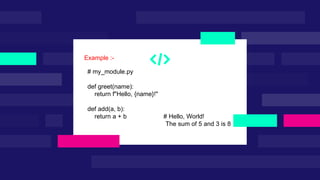
# my_module.py
def greet(name):
return f"Hello, {name}!"
def add(a, b):
return a + b # Hello, World!
The sum of 5 and 3 is 8
Example :-
Creating a User Defined Module
 A UDM can be created using a simple
function definition in the programming
language.
 It involves encapsulating code within a
recognizable name for easy access.
 Proper naming conventions are critical
for
 the clarity and usability of modules.
 Modules can be imported into other
programs using import statements.
 This allows the functions and
variables defined in the module to
be accessible.
 Different languages have varying
syntax and methods for importing
modules.
Importing User Defined Modules
Structure of a User Defined Module
 A UDM typically includes a header,
function definitions, and
documentation.
 It may also contain variables and
classes relevant to the functionality.
 Clear documentation within the module
is key for future reference and
usability.
Error Handling in User Defined Modules
Implementing error handling within
UDMs is crucial for robust
applications.
Use try-except blocks to manage
exceptions gracefully.
Proper error messages in UDMs can
significantly aid in debugging.
Example of User Defined Modules
# calculator.py
def add(x, y):
return x + y
def subtract(x, y):
return x – y
def multiply(x, y):
return x * y
def divide(x, y):
if y == 0:
return "Cannot divide by zero!"
return x / y

# main.py
import calculator
num1 = 10
num2 = 5
print("Addition:", calculator.add(num1,num2)) #15
print("Subtraction:", calculator.subtract(num1, num2)) #5
print("Multiplication:", calculator.multiply(num1, num2)) #50
print("Division:", calculator.divide(num1, num2)) # 2
THANK YOU

user defined modules in python programing.pptx

  • 1.
    NAME :- K.Jeevan anand REG.NO:-241FM04010 BRANCH :-BS-DS
  • 4.
     A User-DefinedFunction (UDF) is a function created by the user to perform specific tasks in a program  A module can define functions, classes, and variables  A module can also include runnable code INTRODUCTION
  • 5.
    # my_module.py def greet(name): returnf"Hello, {name}!" def add(a, b): return a + b # Hello, World! The sum of 5 and 3 is 8 Example :-
  • 6.
    Creating a UserDefined Module  A UDM can be created using a simple function definition in the programming language.  It involves encapsulating code within a recognizable name for easy access.  Proper naming conventions are critical for  the clarity and usability of modules.
  • 7.
     Modules canbe imported into other programs using import statements.  This allows the functions and variables defined in the module to be accessible.  Different languages have varying syntax and methods for importing modules. Importing User Defined Modules
  • 8.
    Structure of aUser Defined Module  A UDM typically includes a header, function definitions, and documentation.  It may also contain variables and classes relevant to the functionality.  Clear documentation within the module is key for future reference and usability.
  • 9.
    Error Handling inUser Defined Modules Implementing error handling within UDMs is crucial for robust applications. Use try-except blocks to manage exceptions gracefully. Proper error messages in UDMs can significantly aid in debugging.
  • 10.
    Example of UserDefined Modules # calculator.py def add(x, y): return x + y def subtract(x, y): return x – y def multiply(x, y): return x * y def divide(x, y): if y == 0: return "Cannot divide by zero!" return x / y
  • 11.
    # main.py import calculator num1= 10 num2 = 5 print("Addition:", calculator.add(num1,num2)) #15 print("Subtraction:", calculator.subtract(num1, num2)) #5 print("Multiplication:", calculator.multiply(num1, num2)) #50 print("Division:", calculator.divide(num1, num2)) # 2
  • 12.