Copyright © 2016 Ramez Elmasri and Shamkant B. Navathe
FUNDAMENTAL OF DATABASE SYSTEM
CHAPTER-2
RELATIONAL DATA MODEL
Slide 2- 1
Copyright © 2016 Ramez Elmasri and Shamkant B. Navathe Slide 2- 2
Chapter Outline
 Relational Model Concepts
 Relational Database Schemas
 Relational Model Constraints
 Relational Algebra Operations
Copyright © 2016 Ramez Elmasri and Shamkant B. Navathe Slide 2- 3
Informal Definitions
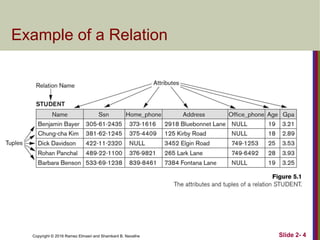
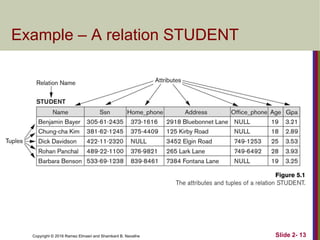
 Informally, a relation looks like a table of values.
 A relation typically contains a set of rows.
 The data elements in each row represent certain facts
that correspond to a real-world entity or relationship
 In the formal model, rows are called tuples
 Each column has a column header that gives an indication of the
meaning of the data items in that column
 In the formal model, the column header is called an
attribute name (or just attribute)
Copyright © 2016 Ramez Elmasri and Shamkant B. Navathe Slide 2- 4
Example of a Relation
Copyright © 2016 Ramez Elmasri and Shamkant B. Navathe Slide 2- 5
Informal Definitions
 Key of a Relation:
 Each row has a value of a data item (or set of items) that
uniquely identifies that row in the table
 Called the key
 In the STUDENT table, SSN is the key
 Sometimes row-ids or sequential numbers are assigned as
keys to identify the rows in a table
 Called artificial key or surrogate key
Copyright © 2016 Ramez Elmasri and Shamkant B. Navathe Slide 2- 6
Formal Definitions - Schema
 The Schema (or description) of a Relation:
 Denoted by R(A1, A2, .....An)
 R is the name of the relation
 The attributes of the relation are A1, A2, ..., An
 Example:
CUSTOMER (Cust-id, Cust-name, Address, Phone#)
 CUSTOMER is the relation name
 Defined over the four attributes: Cust-id, Cust-name, Address,
Phone#
 Each attribute has a domain or a set of valid values.
 For example, the domain of Cust-id is 6 digit numbers.
Copyright © 2016 Ramez Elmasri and Shamkant B. Navathe Slide 2- 7
Formal Definitions - Tuple
 A tuple is an ordered set of values (enclosed in angled brackets
‘< … >’)
 Each value is derived from an appropriate domain.
 A row in the CUSTOMER relation is a 4-tuple and would
consist of four values, for example:
 <632895, "John Smith", "101 Main St. Atlanta, GA 30332",
"(404) 894-2000">
 This is called a 4-tuple as it has 4 values
 A relation is a set of such tuples (rows)
Copyright © 2016 Ramez Elmasri and Shamkant B. Navathe Slide 2- 8
Formal Definitions - Domain
 A domain has a logical definition:
 Example: “USA_phone_numbers” are the set of 10 digit phone numbers
valid in the U.S.
 A domain also has a data-type or a format defined for it.
 The USA_phone_numbers may have a format: (ddd)ddd-dddd where each d
is a decimal digit.
 Dates have various formats such as year, month, date formatted as yyyy-
mm-dd, or as dd mm,yyyy etc.
 The attribute name designates the role played by a domain in a relation:
 Used to interpret the meaning of the data elements corresponding to that
attribute
 Example: The domain Date may be used to define two attributes named
“Invoice-date” and “Payment-date” with different meanings
Copyright © 2016 Ramez Elmasri and Shamkant B. Navathe Slide 2- 9
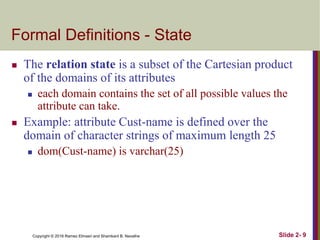
Formal Definitions - State
 The relation state is a subset of the Cartesian product
of the domains of its attributes
 each domain contains the set of all possible values the
attribute can take.
 Example: attribute Cust-name is defined over the
domain of character strings of maximum length 25
 dom(Cust-name) is varchar(25)
Copyright © 2016 Ramez Elmasri and Shamkant B. Navathe Slide 2- 10
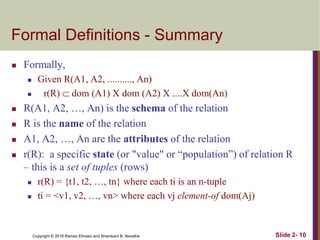
Formal Definitions - Summary
 Formally,
 Given R(A1, A2, .........., An)
 r(R)  dom (A1) X dom (A2) X ....X dom(An)
 R(A1, A2, …, An) is the schema of the relation
 R is the name of the relation
 A1, A2, …, An are the attributes of the relation
 r(R): a specific state (or "value" or “population”) of relation R
– this is a set of tuples (rows)
 r(R) = {t1, t2, …, tn} where each ti is an n-tuple
 ti = <v1, v2, …, vn> where each vj element-of dom(Aj)
Copyright © 2016 Ramez Elmasri and Shamkant B. Navathe Slide 2- 11
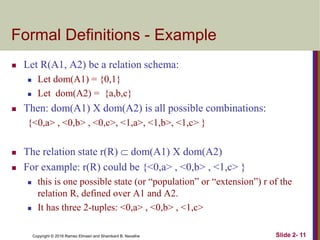
Formal Definitions - Example
 Let R(A1, A2) be a relation schema:
 Let dom(A1) = {0,1}
 Let dom(A2) = {a,b,c}
 Then: dom(A1) X dom(A2) is all possible combinations:
{<0,a> , <0,b> , <0,c>, <1,a>, <1,b>, <1,c> }
 The relation state r(R)  dom(A1) X dom(A2)
 For example: r(R) could be {<0,a> , <0,b> , <1,c> }
 this is one possible state (or “population” or “extension”) r of the
relation R, defined over A1 and A2.
 It has three 2-tuples: <0,a> , <0,b> , <1,c>
Copyright © 2016 Ramez Elmasri and Shamkant B. Navathe Slide 2- 12
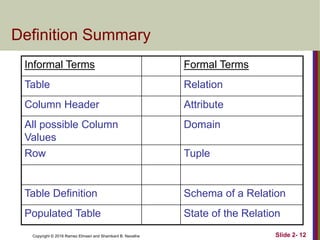
Definition Summary
Informal Terms Formal Terms
Table Relation
Column Header Attribute
All possible Column
Values
Domain
Row Tuple
Table Definition Schema of a Relation
Populated Table State of the Relation
Copyright © 2016 Ramez Elmasri and Shamkant B. Navathe Slide 2- 13
Example – A relation STUDENT
Copyright © 2016 Ramez Elmasri and Shamkant B. Navathe Slide 2- 14
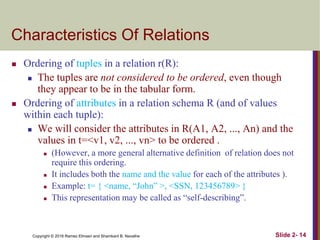
Characteristics Of Relations
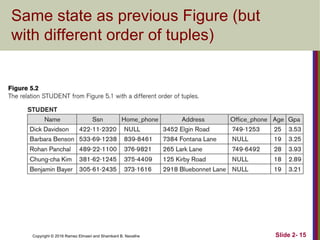
 Ordering of tuples in a relation r(R):
 The tuples are not considered to be ordered, even though
they appear to be in the tabular form.
 Ordering of attributes in a relation schema R (and of values
within each tuple):
 We will consider the attributes in R(A1, A2, ..., An) and the
values in t=<v1, v2, ..., vn> to be ordered .
 (However, a more general alternative definition of relation does not
require this ordering.
 It includes both the name and the value for each of the attributes ).
 Example: t= { <name, “John” >, <SSN, 123456789> }
 This representation may be called as “self-describing”.
Copyright © 2016 Ramez Elmasri and Shamkant B. Navathe Slide 2- 15
Same state as previous Figure (but
with different order of tuples)
Copyright © 2016 Ramez Elmasri and Shamkant B. Navathe Slide 2- 16
Characteristics Of Relations
 Values in a tuple:
 All values are considered atomic (indivisible).
 Each value in a tuple must be from the domain of the
attribute for that column
 If tuple t = <v1, v2, …, vn> is a tuple (row) in the
relation state r of R(A1, A2, …, An)
 Then each vi must be a value from dom(Ai)
 A special null value is used to represent values that are
unknown or not available or inapplicable in certain
tuples.
Copyright © 2016 Ramez Elmasri and Shamkant B. Navathe Slide 2- 17
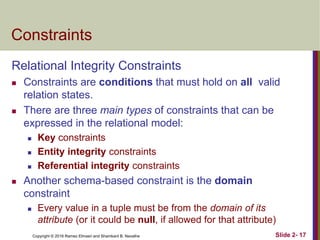
Constraints
Relational Integrity Constraints
 Constraints are conditions that must hold on all valid
relation states.
 There are three main types of constraints that can be
expressed in the relational model:
 Key constraints
 Entity integrity constraints
 Referential integrity constraints
 Another schema-based constraint is the domain
constraint
 Every value in a tuple must be from the domain of its
attribute (or it could be null, if allowed for that attribute)
Copyright © 2016 Ramez Elmasri and Shamkant B. Navathe Slide 2- 18
Key Constraints
 Superkey of R:
 Is a set of attributes SK of R with the following condition:
 No two tuples in any valid relation state r(R) will have the
same value for SK
 That is, for any distinct tuples t1 and t2 in r(R), t1[SK]  t2[SK]
 This condition must hold in any valid state r(R)
 Key of R:
 A "minimal" superkey
 That is, a key is a superkey K such that removal of any
attribute from K results in a set of attributes that is not a
superkey (does not possess the superkey uniqueness
property)
 A Key is a Superkey but not vice versa
Copyright © 2016 Ramez Elmasri and Shamkant B. Navathe Slide 2- 19
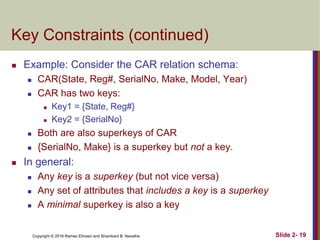
Key Constraints (continued)
 Example: Consider the CAR relation schema:
 CAR(State, Reg#, SerialNo, Make, Model, Year)
 CAR has two keys:
 Key1 = {State, Reg#}
 Key2 = {SerialNo}
 Both are also superkeys of CAR
 {SerialNo, Make} is a superkey but not a key.
 In general:
 Any key is a superkey (but not vice versa)
 Any set of attributes that includes a key is a superkey
 A minimal superkey is also a key
Copyright © 2016 Ramez Elmasri and Shamkant B. Navathe Slide 2- 20
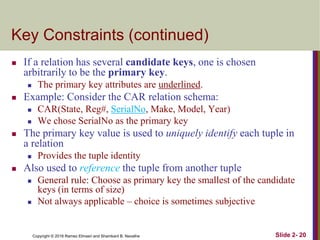
Key Constraints (continued)
 If a relation has several candidate keys, one is chosen
arbitrarily to be the primary key.
 The primary key attributes are underlined.
 Example: Consider the CAR relation schema:
 CAR(State, Reg#, SerialNo, Make, Model, Year)
 We chose SerialNo as the primary key
 The primary key value is used to uniquely identify each tuple in
a relation
 Provides the tuple identity
 Also used to reference the tuple from another tuple
 General rule: Choose as primary key the smallest of the candidate
keys (in terms of size)
 Not always applicable – choice is sometimes subjective
Copyright © 2016 Ramez Elmasri and Shamkant B. Navathe Slide 2- 21
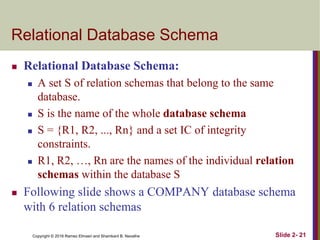
Relational Database Schema
 Relational Database Schema:
 A set S of relation schemas that belong to the same
database.
 S is the name of the whole database schema
 S = {R1, R2, ..., Rn} and a set IC of integrity
constraints.
 R1, R2, …, Rn are the names of the individual relation
schemas within the database S
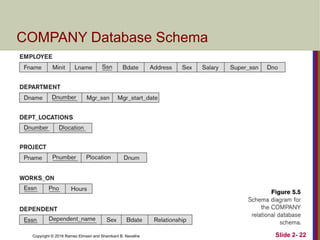
 Following slide shows a COMPANY database schema
with 6 relation schemas
Copyright © 2016 Ramez Elmasri and Shamkant B. Navathe Slide 2- 22
COMPANY Database Schema
Copyright © 2016 Ramez Elmasri and Shamkant B. Navathe
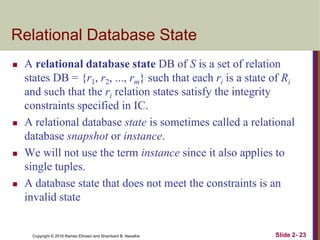
Relational Database State
 A relational database state DB of S is a set of relation
states DB = {r1, r2, ..., rm} such that each ri is a state of Ri
and such that the ri relation states satisfy the integrity
constraints specified in IC.
 A relational database state is sometimes called a relational
database snapshot or instance.
 We will not use the term instance since it also applies to
single tuples.
 A database state that does not meet the constraints is an
invalid state
Slide 2- 23
Copyright © 2016 Ramez Elmasri and Shamkant B. Navathe Slide 2- 24
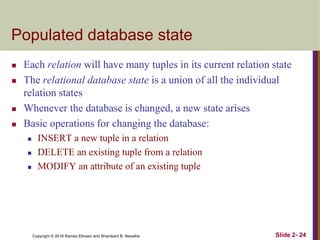
Populated database state
 Each relation will have many tuples in its current relation state
 The relational database state is a union of all the individual
relation states
 Whenever the database is changed, a new state arises
 Basic operations for changing the database:
 INSERT a new tuple in a relation
 DELETE an existing tuple from a relation
 MODIFY an attribute of an existing tuple
Copyright © 2016 Ramez Elmasri and Shamkant B. Navathe Slide 2- 25
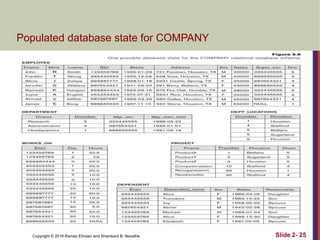
Populated database state for COMPANY
Copyright © 2016 Ramez Elmasri and Shamkant B. Navathe Slide 2- 26
Entity Integrity
 Entity Integrity:
 The primary key attributes PK of each relation schema
R in S cannot have null values in any tuple of r(R).
 This is because primary key values are used to identify the
individual tuples.
 t[PK]  null for any tuple t in r(R)
 If PK has several attributes, null is not allowed in any of these
attributes
 Note: Other attributes of R may be constrained to
disallow null values, even though they are not
members of the primary key.
Copyright © 2016 Ramez Elmasri and Shamkant B. Navathe Slide 2- 27
Referential Integrity
 A constraint involving two relations
 The previous constraints involve a single relation.
 Used to specify a relationship among tuples in
two relations:
 The referencing relation and the referenced
relation.
Copyright © 2016 Ramez Elmasri and Shamkant B. Navathe Slide 2- 28
Referential Integrity
 Tuples in the referencing relation R1 have attributes
FK (called foreign key attributes) that reference the
primary key attributes PK of the referenced relation
R2.
 A tuple t1 in R1 is said to reference a tuple t2 in R2 if
t1[FK] = t2[PK].
 A referential integrity constraint can be displayed in a
relational database schema as a directed arc from
R1.FK to R2.
Copyright © 2016 Ramez Elmasri and Shamkant B. Navathe Slide 2- 29
Referential Integrity (or foreign key)
Constraint
 Statement of the constraint
 The value in the foreign key column (or columns) FK of
the the referencing relation R1 can be either:
 (1) a value of an existing primary key value of a
corresponding primary key PK in the referenced
relation R2, or
 (2) a null.
 In case (2), the FK in R1 should not be a part of its
own primary key.
Copyright © 2016 Ramez Elmasri and Shamkant B. Navathe Slide 2- 30
Displaying a relational database
schema and its constraints
 Each relation schema can be displayed as a row of attribute
names
 The name of the relation is written above the attribute names
 The primary key attribute (or attributes) will be underlined
 A foreign key (referential integrity) constraints is displayed as a
directed arc (arrow) from the foreign key attributes to the
referenced table
 Can also point the the primary key of the referenced relation for
clarity
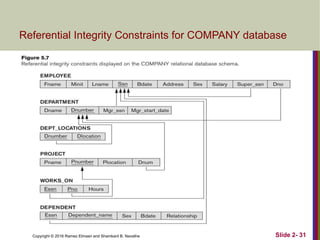
 Next slide shows the COMPANY relational schema diagram
with referential integrity constraints
Copyright © 2016 Ramez Elmasri and Shamkant B. Navathe Slide 2- 31
Referential Integrity Constraints for COMPANY database
Copyright © 2016 Ramez Elmasri and Shamkant B. Navathe Slide 2- 32
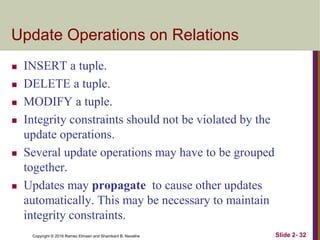
Update Operations on Relations
 INSERT a tuple.
 DELETE a tuple.
 MODIFY a tuple.
 Integrity constraints should not be violated by the
update operations.
 Several update operations may have to be grouped
together.
 Updates may propagate to cause other updates
automatically. This may be necessary to maintain
integrity constraints.
Copyright © 2016 Ramez Elmasri and Shamkant B. Navathe Slide 2- 33
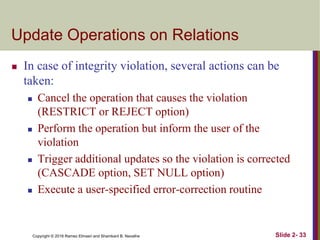
Update Operations on Relations
 In case of integrity violation, several actions can be
taken:
 Cancel the operation that causes the violation
(RESTRICT or REJECT option)
 Perform the operation but inform the user of the
violation
 Trigger additional updates so the violation is corrected
(CASCADE option, SET NULL option)
 Execute a user-specified error-correction routine
Copyright © 2016 Ramez Elmasri and Shamkant B. Navathe Slide 2- 34
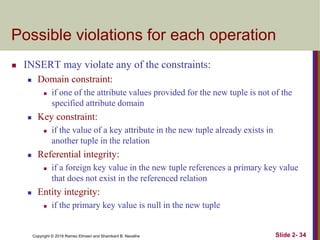
Possible violations for each operation
 INSERT may violate any of the constraints:
 Domain constraint:
 if one of the attribute values provided for the new tuple is not of the
specified attribute domain
 Key constraint:
 if the value of a key attribute in the new tuple already exists in
another tuple in the relation
 Referential integrity:
 if a foreign key value in the new tuple references a primary key value
that does not exist in the referenced relation
 Entity integrity:
 if the primary key value is null in the new tuple
Copyright © 2016 Ramez Elmasri and Shamkant B. Navathe Slide 2- 35
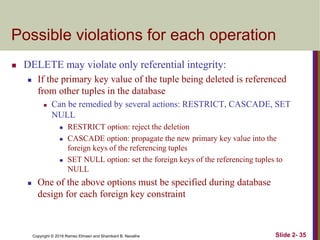
Possible violations for each operation
 DELETE may violate only referential integrity:
 If the primary key value of the tuple being deleted is referenced
from other tuples in the database
 Can be remedied by several actions: RESTRICT, CASCADE, SET
NULL
 RESTRICT option: reject the deletion
 CASCADE option: propagate the new primary key value into the
foreign keys of the referencing tuples
 SET NULL option: set the foreign keys of the referencing tuples to
NULL
 One of the above options must be specified during database
design for each foreign key constraint
Copyright © 2016 Ramez Elmasri and Shamkant B. Navathe Slide 2- 36
Possible violations for each operation
 UPDATE may violate domain constraint and NOT NULL
constraint on an attribute being modified
 Any of the other constraints may also be violated, depending on
the attribute being updated:
 Updating the primary key (PK):
 Similar to a DELETE followed by an INSERT
 Need to specify similar options to DELETE
 Updating a foreign key (FK):
 May violate referential integrity
 Updating an ordinary attribute (neither PK nor FK):
 Can only violate domain constraints
Copyright © 2016 Ramez Elmasri and Shamkant B. Navathe Slide 2- 37
Lecture Summary
 Presented Relational Model Concepts
 Definitions
 Characteristics of relations
 Relational Model Constraints and Relational Database Schemas
 Domain constraints
 Key constraints
 Entity integrity
 Referential integrity
 Relational Update Algebra Operations and Dealing with
Constraint Violations

Upload a presentation to download APPLICATIChapter-02 -

  • 1.
    Copyright © 2016Ramez Elmasri and Shamkant B. Navathe FUNDAMENTAL OF DATABASE SYSTEM CHAPTER-2 RELATIONAL DATA MODEL Slide 2- 1
  • 2.
    Copyright © 2016Ramez Elmasri and Shamkant B. Navathe Slide 2- 2 Chapter Outline  Relational Model Concepts  Relational Database Schemas  Relational Model Constraints  Relational Algebra Operations
  • 3.
    Copyright © 2016Ramez Elmasri and Shamkant B. Navathe Slide 2- 3 Informal Definitions  Informally, a relation looks like a table of values.  A relation typically contains a set of rows.  The data elements in each row represent certain facts that correspond to a real-world entity or relationship  In the formal model, rows are called tuples  Each column has a column header that gives an indication of the meaning of the data items in that column  In the formal model, the column header is called an attribute name (or just attribute)
  • 4.
    Copyright © 2016Ramez Elmasri and Shamkant B. Navathe Slide 2- 4 Example of a Relation
  • 5.
    Copyright © 2016Ramez Elmasri and Shamkant B. Navathe Slide 2- 5 Informal Definitions  Key of a Relation:  Each row has a value of a data item (or set of items) that uniquely identifies that row in the table  Called the key  In the STUDENT table, SSN is the key  Sometimes row-ids or sequential numbers are assigned as keys to identify the rows in a table  Called artificial key or surrogate key
  • 6.
    Copyright © 2016Ramez Elmasri and Shamkant B. Navathe Slide 2- 6 Formal Definitions - Schema  The Schema (or description) of a Relation:  Denoted by R(A1, A2, .....An)  R is the name of the relation  The attributes of the relation are A1, A2, ..., An  Example: CUSTOMER (Cust-id, Cust-name, Address, Phone#)  CUSTOMER is the relation name  Defined over the four attributes: Cust-id, Cust-name, Address, Phone#  Each attribute has a domain or a set of valid values.  For example, the domain of Cust-id is 6 digit numbers.
  • 7.
    Copyright © 2016Ramez Elmasri and Shamkant B. Navathe Slide 2- 7 Formal Definitions - Tuple  A tuple is an ordered set of values (enclosed in angled brackets ‘< … >’)  Each value is derived from an appropriate domain.  A row in the CUSTOMER relation is a 4-tuple and would consist of four values, for example:  <632895, "John Smith", "101 Main St. Atlanta, GA 30332", "(404) 894-2000">  This is called a 4-tuple as it has 4 values  A relation is a set of such tuples (rows)
  • 8.
    Copyright © 2016Ramez Elmasri and Shamkant B. Navathe Slide 2- 8 Formal Definitions - Domain  A domain has a logical definition:  Example: “USA_phone_numbers” are the set of 10 digit phone numbers valid in the U.S.  A domain also has a data-type or a format defined for it.  The USA_phone_numbers may have a format: (ddd)ddd-dddd where each d is a decimal digit.  Dates have various formats such as year, month, date formatted as yyyy- mm-dd, or as dd mm,yyyy etc.  The attribute name designates the role played by a domain in a relation:  Used to interpret the meaning of the data elements corresponding to that attribute  Example: The domain Date may be used to define two attributes named “Invoice-date” and “Payment-date” with different meanings
  • 9.
    Copyright © 2016Ramez Elmasri and Shamkant B. Navathe Slide 2- 9 Formal Definitions - State  The relation state is a subset of the Cartesian product of the domains of its attributes  each domain contains the set of all possible values the attribute can take.  Example: attribute Cust-name is defined over the domain of character strings of maximum length 25  dom(Cust-name) is varchar(25)
  • 10.
    Copyright © 2016Ramez Elmasri and Shamkant B. Navathe Slide 2- 10 Formal Definitions - Summary  Formally,  Given R(A1, A2, .........., An)  r(R)  dom (A1) X dom (A2) X ....X dom(An)  R(A1, A2, …, An) is the schema of the relation  R is the name of the relation  A1, A2, …, An are the attributes of the relation  r(R): a specific state (or "value" or “population”) of relation R – this is a set of tuples (rows)  r(R) = {t1, t2, …, tn} where each ti is an n-tuple  ti = <v1, v2, …, vn> where each vj element-of dom(Aj)
  • 11.
    Copyright © 2016Ramez Elmasri and Shamkant B. Navathe Slide 2- 11 Formal Definitions - Example  Let R(A1, A2) be a relation schema:  Let dom(A1) = {0,1}  Let dom(A2) = {a,b,c}  Then: dom(A1) X dom(A2) is all possible combinations: {<0,a> , <0,b> , <0,c>, <1,a>, <1,b>, <1,c> }  The relation state r(R)  dom(A1) X dom(A2)  For example: r(R) could be {<0,a> , <0,b> , <1,c> }  this is one possible state (or “population” or “extension”) r of the relation R, defined over A1 and A2.  It has three 2-tuples: <0,a> , <0,b> , <1,c>
  • 12.
    Copyright © 2016Ramez Elmasri and Shamkant B. Navathe Slide 2- 12 Definition Summary Informal Terms Formal Terms Table Relation Column Header Attribute All possible Column Values Domain Row Tuple Table Definition Schema of a Relation Populated Table State of the Relation
  • 13.
    Copyright © 2016Ramez Elmasri and Shamkant B. Navathe Slide 2- 13 Example – A relation STUDENT
  • 14.
    Copyright © 2016Ramez Elmasri and Shamkant B. Navathe Slide 2- 14 Characteristics Of Relations  Ordering of tuples in a relation r(R):  The tuples are not considered to be ordered, even though they appear to be in the tabular form.  Ordering of attributes in a relation schema R (and of values within each tuple):  We will consider the attributes in R(A1, A2, ..., An) and the values in t=<v1, v2, ..., vn> to be ordered .  (However, a more general alternative definition of relation does not require this ordering.  It includes both the name and the value for each of the attributes ).  Example: t= { <name, “John” >, <SSN, 123456789> }  This representation may be called as “self-describing”.
  • 15.
    Copyright © 2016Ramez Elmasri and Shamkant B. Navathe Slide 2- 15 Same state as previous Figure (but with different order of tuples)
  • 16.
    Copyright © 2016Ramez Elmasri and Shamkant B. Navathe Slide 2- 16 Characteristics Of Relations  Values in a tuple:  All values are considered atomic (indivisible).  Each value in a tuple must be from the domain of the attribute for that column  If tuple t = <v1, v2, …, vn> is a tuple (row) in the relation state r of R(A1, A2, …, An)  Then each vi must be a value from dom(Ai)  A special null value is used to represent values that are unknown or not available or inapplicable in certain tuples.
  • 17.
    Copyright © 2016Ramez Elmasri and Shamkant B. Navathe Slide 2- 17 Constraints Relational Integrity Constraints  Constraints are conditions that must hold on all valid relation states.  There are three main types of constraints that can be expressed in the relational model:  Key constraints  Entity integrity constraints  Referential integrity constraints  Another schema-based constraint is the domain constraint  Every value in a tuple must be from the domain of its attribute (or it could be null, if allowed for that attribute)
  • 18.
    Copyright © 2016Ramez Elmasri and Shamkant B. Navathe Slide 2- 18 Key Constraints  Superkey of R:  Is a set of attributes SK of R with the following condition:  No two tuples in any valid relation state r(R) will have the same value for SK  That is, for any distinct tuples t1 and t2 in r(R), t1[SK]  t2[SK]  This condition must hold in any valid state r(R)  Key of R:  A "minimal" superkey  That is, a key is a superkey K such that removal of any attribute from K results in a set of attributes that is not a superkey (does not possess the superkey uniqueness property)  A Key is a Superkey but not vice versa
  • 19.
    Copyright © 2016Ramez Elmasri and Shamkant B. Navathe Slide 2- 19 Key Constraints (continued)  Example: Consider the CAR relation schema:  CAR(State, Reg#, SerialNo, Make, Model, Year)  CAR has two keys:  Key1 = {State, Reg#}  Key2 = {SerialNo}  Both are also superkeys of CAR  {SerialNo, Make} is a superkey but not a key.  In general:  Any key is a superkey (but not vice versa)  Any set of attributes that includes a key is a superkey  A minimal superkey is also a key
  • 20.
    Copyright © 2016Ramez Elmasri and Shamkant B. Navathe Slide 2- 20 Key Constraints (continued)  If a relation has several candidate keys, one is chosen arbitrarily to be the primary key.  The primary key attributes are underlined.  Example: Consider the CAR relation schema:  CAR(State, Reg#, SerialNo, Make, Model, Year)  We chose SerialNo as the primary key  The primary key value is used to uniquely identify each tuple in a relation  Provides the tuple identity  Also used to reference the tuple from another tuple  General rule: Choose as primary key the smallest of the candidate keys (in terms of size)  Not always applicable – choice is sometimes subjective
  • 21.
    Copyright © 2016Ramez Elmasri and Shamkant B. Navathe Slide 2- 21 Relational Database Schema  Relational Database Schema:  A set S of relation schemas that belong to the same database.  S is the name of the whole database schema  S = {R1, R2, ..., Rn} and a set IC of integrity constraints.  R1, R2, …, Rn are the names of the individual relation schemas within the database S  Following slide shows a COMPANY database schema with 6 relation schemas
  • 22.
    Copyright © 2016Ramez Elmasri and Shamkant B. Navathe Slide 2- 22 COMPANY Database Schema
  • 23.
    Copyright © 2016Ramez Elmasri and Shamkant B. Navathe Relational Database State  A relational database state DB of S is a set of relation states DB = {r1, r2, ..., rm} such that each ri is a state of Ri and such that the ri relation states satisfy the integrity constraints specified in IC.  A relational database state is sometimes called a relational database snapshot or instance.  We will not use the term instance since it also applies to single tuples.  A database state that does not meet the constraints is an invalid state Slide 2- 23
  • 24.
    Copyright © 2016Ramez Elmasri and Shamkant B. Navathe Slide 2- 24 Populated database state  Each relation will have many tuples in its current relation state  The relational database state is a union of all the individual relation states  Whenever the database is changed, a new state arises  Basic operations for changing the database:  INSERT a new tuple in a relation  DELETE an existing tuple from a relation  MODIFY an attribute of an existing tuple
  • 25.
    Copyright © 2016Ramez Elmasri and Shamkant B. Navathe Slide 2- 25 Populated database state for COMPANY
  • 26.
    Copyright © 2016Ramez Elmasri and Shamkant B. Navathe Slide 2- 26 Entity Integrity  Entity Integrity:  The primary key attributes PK of each relation schema R in S cannot have null values in any tuple of r(R).  This is because primary key values are used to identify the individual tuples.  t[PK]  null for any tuple t in r(R)  If PK has several attributes, null is not allowed in any of these attributes  Note: Other attributes of R may be constrained to disallow null values, even though they are not members of the primary key.
  • 27.
    Copyright © 2016Ramez Elmasri and Shamkant B. Navathe Slide 2- 27 Referential Integrity  A constraint involving two relations  The previous constraints involve a single relation.  Used to specify a relationship among tuples in two relations:  The referencing relation and the referenced relation.
  • 28.
    Copyright © 2016Ramez Elmasri and Shamkant B. Navathe Slide 2- 28 Referential Integrity  Tuples in the referencing relation R1 have attributes FK (called foreign key attributes) that reference the primary key attributes PK of the referenced relation R2.  A tuple t1 in R1 is said to reference a tuple t2 in R2 if t1[FK] = t2[PK].  A referential integrity constraint can be displayed in a relational database schema as a directed arc from R1.FK to R2.
  • 29.
    Copyright © 2016Ramez Elmasri and Shamkant B. Navathe Slide 2- 29 Referential Integrity (or foreign key) Constraint  Statement of the constraint  The value in the foreign key column (or columns) FK of the the referencing relation R1 can be either:  (1) a value of an existing primary key value of a corresponding primary key PK in the referenced relation R2, or  (2) a null.  In case (2), the FK in R1 should not be a part of its own primary key.
  • 30.
    Copyright © 2016Ramez Elmasri and Shamkant B. Navathe Slide 2- 30 Displaying a relational database schema and its constraints  Each relation schema can be displayed as a row of attribute names  The name of the relation is written above the attribute names  The primary key attribute (or attributes) will be underlined  A foreign key (referential integrity) constraints is displayed as a directed arc (arrow) from the foreign key attributes to the referenced table  Can also point the the primary key of the referenced relation for clarity  Next slide shows the COMPANY relational schema diagram with referential integrity constraints
  • 31.
    Copyright © 2016Ramez Elmasri and Shamkant B. Navathe Slide 2- 31 Referential Integrity Constraints for COMPANY database
  • 32.
    Copyright © 2016Ramez Elmasri and Shamkant B. Navathe Slide 2- 32 Update Operations on Relations  INSERT a tuple.  DELETE a tuple.  MODIFY a tuple.  Integrity constraints should not be violated by the update operations.  Several update operations may have to be grouped together.  Updates may propagate to cause other updates automatically. This may be necessary to maintain integrity constraints.
  • 33.
    Copyright © 2016Ramez Elmasri and Shamkant B. Navathe Slide 2- 33 Update Operations on Relations  In case of integrity violation, several actions can be taken:  Cancel the operation that causes the violation (RESTRICT or REJECT option)  Perform the operation but inform the user of the violation  Trigger additional updates so the violation is corrected (CASCADE option, SET NULL option)  Execute a user-specified error-correction routine
  • 34.
    Copyright © 2016Ramez Elmasri and Shamkant B. Navathe Slide 2- 34 Possible violations for each operation  INSERT may violate any of the constraints:  Domain constraint:  if one of the attribute values provided for the new tuple is not of the specified attribute domain  Key constraint:  if the value of a key attribute in the new tuple already exists in another tuple in the relation  Referential integrity:  if a foreign key value in the new tuple references a primary key value that does not exist in the referenced relation  Entity integrity:  if the primary key value is null in the new tuple
  • 35.
    Copyright © 2016Ramez Elmasri and Shamkant B. Navathe Slide 2- 35 Possible violations for each operation  DELETE may violate only referential integrity:  If the primary key value of the tuple being deleted is referenced from other tuples in the database  Can be remedied by several actions: RESTRICT, CASCADE, SET NULL  RESTRICT option: reject the deletion  CASCADE option: propagate the new primary key value into the foreign keys of the referencing tuples  SET NULL option: set the foreign keys of the referencing tuples to NULL  One of the above options must be specified during database design for each foreign key constraint
  • 36.
    Copyright © 2016Ramez Elmasri and Shamkant B. Navathe Slide 2- 36 Possible violations for each operation  UPDATE may violate domain constraint and NOT NULL constraint on an attribute being modified  Any of the other constraints may also be violated, depending on the attribute being updated:  Updating the primary key (PK):  Similar to a DELETE followed by an INSERT  Need to specify similar options to DELETE  Updating a foreign key (FK):  May violate referential integrity  Updating an ordinary attribute (neither PK nor FK):  Can only violate domain constraints
  • 37.
    Copyright © 2016Ramez Elmasri and Shamkant B. Navathe Slide 2- 37 Lecture Summary  Presented Relational Model Concepts  Definitions  Characteristics of relations  Relational Model Constraints and Relational Database Schemas  Domain constraints  Key constraints  Entity integrity  Referential integrity  Relational Update Algebra Operations and Dealing with Constraint Violations