BCA IV SEM
BCA 206
INTRODUCTION
 Java is a high-level programming language originally
developed by Sun Microsystems and released in 1995.
 Java runs on a variety of platforms, such as Windows,
Mac OS, and the various versions of UNIX.
INTRODUCTION
 Java programming language was originally developed
by Sun Microsystems which was initiated by James
Gosling and released in 1995 as core component of Sun
Microsystems' Java platform (Java 1.0 [J2SE]).
 The latest release of the Java Standard Edition is Java
SE 8. With the advancement of Java and its widespread
popularity, multiple configurations were built to suit
various types of platforms.
Types of Java Applications
 There are mainly 4 type of applications that can be created
using java programming:
 1) Standalone Application
 It is also known as desktop application or window-based
application. An application that we need to install on every
machine such as media player, antivirus etc. AWT and
Swing are used in java for creating standalone applications.
 2) Web Application
 An application that runs on the server side and creates
dynamic page, is called web application. Currently, servlet,
jsp, struts, jsf etc. technologies are used for creating web
applications in java.
Types of Java Applications
 3) Enterprise Application
 An application that is distributed in nature, such as
banking applications etc. It has the advantage of high
level security, load balancing and clustering. In java,
EJB is used for creating enterprise applications.
 4) Mobile Application
 An application that is created for mobile devices.
Currently Android and Java ME are used for creating
mobile applications.
FEATURES OF JAVA
 Java is guaranteed to be Write Once, Run Anywhere.
 Java is −
 Object Oriented − In Java, everything is an Object. Java can be
easily extended since it is based on the Object model.
 Platform Independent − Unlike many other programming
languages including C and C++, when Java is compiled, it is not
compiled into platform specific machine, rather into platform
independent byte code. This byte code is distributed over the
web and interpreted by the Virtual Machine (JVM) on whichever
platform it is being run on.
 Simple − Java is designed to be easy to learn. If you understand
the basic concept of OOP Java, it would be easy to master.
FEATURES OF JAVA
 Secure − With Java's secure feature it enables to develop
virus-free, tamper-free systems. Authentication techniques
are based on public-key encryption.
 Architecture-neutral − Java compiler generates an
architecture-neutral object file format, which makes the
compiled code executable on many processors, with the
presence of Java runtime system.
 Portable − Being architecture-neutral and having no
implementation dependent aspects of the specification
makes Java portable. Compiler in Java is written in ANSI C
with a clean portability boundary, which is a POSIX subset.
FEATURES OF JAVA
 Robust − Java makes an effort to eliminate error prone
situations by emphasizing mainly on compile time error
checking and runtime checking.
 Multithreaded − With Java's multithreaded feature it is
possible to write programs that can perform many tasks
simultaneously. This design feature allows the developers
to construct interactive applications that can run smoothly.
 Interpreted − Java byte code is translated on the fly to
native machine instructions and is not stored anywhere.
The development process is more rapid and analytical since
the linking is an incremental and light-weight process.
FEATURES OF JAVA
 High Performance − With the use of Just-In-Time
compilers, Java enables high performance.
 Distributed − Java is designed for the distributed
environment of the internet.
 Dynamic − Java is considered to be more dynamic
than C or C++ since it is designed to adapt to an
evolving environment. Java programs can carry
extensive amount of run-time information that can be
used to verify and resolve accesses to objects on run-
time.
History of Java
 James Gosling initiated Java language
project in June 1991 for use in one of his
many set-top box projects. The language,
initially called ‘Oak’ after an oak tree that
stood outside Gosling's office, also went by
the name ‘Green’ and ended up later being
renamed as Java, from a list of random
words.
History of Java
 Sun released the first public implementation as Java
1.0 in 1995. It promised Write Once, Run
Anywhere (WORA), providing no-cost run-times on
popular platforms.
 On 13 November, 2006, Sun released much of Java as
free and open source software under the terms of the
GNU General Public License (GPL).
JVM
 JVM is an abbreviated form of Java Virtual
Machine. It is a Java byte code processing engine
that converts Java byte code into machine
language, which is then executed by the machine
(computer). Java byte code is an intermediary
language between Java and the machine on which
it has to be executed, and this execution can be
done when JVM processes Java byte code into the
machine language.
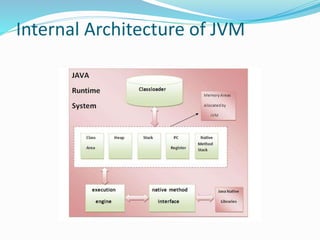
Internal Architecture of JVM
What is JVM
 It is:
 A specification where working of Java Virtual
Machine is specified. But implementation provider is
independent to choose the algorithm. Its
implementation has been provided by Sun and other
companies.
 An implementation Its implementation is known as
JRE (Java Runtime Environment).
 Runtime Instance Whenever you write java
command on the command prompt to run the java
class, an instance of JVM is created.
What it does
 The JVM performs following operation:
 Loads code
 Verifies code
 Executes code
 Provides runtime environment
JVM provides definitions for the:
 Memory area
 Class file format
 Register set
 Garbage-collected heap
 Fatal error reporting etc.
ABOUT JVM
 1) Class loader
Class loader is a subsystem of JVM that is used to load class files.
 2) Class(Method) Area
Class(Method) Area stores per-class structures such as the runtime
constant pool, field and method data, the code for methods.
 3) Heap
It is the runtime data area in which objects are allocated.
 4) Stack
Java Stack stores frames. It holds local variables and partial results,
and plays a part in method invocation and return. Each thread
has a private JVM stack, created at the same time as thread. A
new frame is created each time a method is invoked. A frame is
destroyed when its method invocation completes.5) Program
Counter Register
 PC (program counter) register. It contains the address of the Java
virtual machine instruction currently being executed.
ABOUT JVM
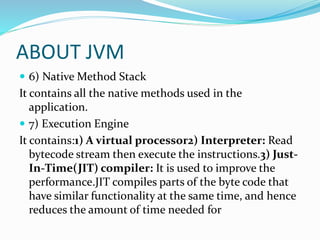
 6) Native Method Stack
It contains all the native methods used in the
application.
 7) Execution Engine
It contains:1) A virtual processor2) Interpreter: Read
bytecode stream then execute the instructions.3) Just-
In-Time(JIT) compiler: It is used to improve the
performance.JIT compiles parts of the byte code that
have similar functionality at the same time, and hence
reduces the amount of time needed for
Simple Program
 class hello
 {
 public static void main(String args[])
 {
 System.out.println("hello");

 }
 }
Javac hello.java
Java hello
Understanding first java program
 class keyword is used to declare a class in java.
 public keyword is an access modifier which represents
visibility, it means it is visible to all.
 static is a keyword, if we declare any method as static, it is
known as static method. The core advantage of static
method is that there is no need to create object to invoke
the static method. The main method is executed by the
JVM, so it doesn't require to create object to invoke the
main method. So it saves memory.
 void is the return type of the method, it means it doesn't
return any value.
 main represents startup of the program.
 String[] args is used for command line argument.
 System.out.println() is used print statement.
DATA TYPES
 Variables are nothing but reserved memory locations
to store values. This means that when you create a
variable you reserve some space in the memory.
 Based on the data type of a variable, the operating
system allocates memory and decides what can be
stored in the reserved memory. Therefore, by
assigning different data types to variables, you can
store integers, decimals, or characters in these
variables.
There are two data types available in Java −
 Primitive Data Types
 Reference/Object Data Types
Primitive Data Types
 There are eight primitive datatypes supported by Java.
1) BYTE
Byte data type is an 8-bit signed two's complement
integer
Minimum value is -128 (-2^7)
Maximum value is 127 (inclusive)(2^7 -1)
Default value is 0
Byte data type is used to save space in large arrays,
mainly in place of integers, since a byte is four times
smaller than an integer.
Example: byte a = 100, byte b = -50
2) short
Short data type is a 16-bit signed two's complement
integer
Minimum value is -32,768 (-2^15)
Maximum value is 32,767 (inclusive) (2^15 -1)
Short data type can also be used to save memory as byte
data type. A short is 2 times smaller than an integer
Default value is 0.
Example: short s = 10000, short r = -20000
 int
Int data type is a 32-bit signed two's complement integer.
Minimum value is - 2,147,483,648 (-2^31)
Maximum value is 2,147,483,647(inclusive) (2^31 -1)
Integer is generally used as the default data type for
integral values unless there is a concern about
memory.
The default value is 0
Example: int a = 100000, int b = -200000
 long
Long data type is a 64-bit signed two's complement
integer
Minimum value is -9,223,372,036,854,775,808(-2^63)
Maximum value is 9,223,372,036,854,775,807
(inclusive)(2^63 -1)
This type is used when a wider range than int is needed
Default value is 0L
Example: long a = 100000L, long b = -200000L
 float
Float data type is a single-precision 32-bit IEEE 754
floating point
Float is mainly used to save memory in large arrays of
floating point numbers
Default value is 0.0f
Float data type is never used for precise values such as
currency
Example: float f1 = 234.5f
 double
double data type is a double-precision 64-bit IEEE 754
floating point
This data type is generally used as the default data type
for decimal values, generally the default choice
Double data type should never be used for precise values
such as currency
Default value is 0.0d
Example: double d1 = 123.4
 boolean
boolean data type represents one bit of information
There are only two possible values: true and false
This data type is used for simple flags that track
true/false conditions
Default value is false
Example: boolean one = true
 char
char data type is a single 16-bit Unicode character
Minimum value is 'u0000' (or 0)
Maximum value is 'uffff' (or 65,535 inclusive)
Char data type is used to store any character
Example: char letterA = 'A'
Reference Data types
 Reference variables are created using defined
constructors of the classes. They are used to access
objects. These variables are declared to be of a specific
type that cannot be changed. For example, Employee,
Puppy, etc.
 Class objects and various type of array variables come
under reference datatype.
 Default value of any reference variable is null.
 A reference variable can be used to refer any object of
the declared type or any compatible type.
 Example: Animal animal = new Animal("giraffe");
VARIABLES
 A variable provides us with named storage that our
programs can manipulate. Each variable in Java
has a specific type, which determines the size and
layout of the variable's memory; the range of
values that can be stored within that memory; and
the set of operations that can be applied to the
variable.
There are three kinds of variables in Java −
 Local variables
 Instance variables
 Class/Static variables
Local Variables
 Local variables are declared in methods, constructors, or
blocks.
 Local variables are created when the method, constructor
or block is entered and the variable will be destroyed once
it exits the method, constructor, or block.
 Access modifiers cannot be used for local variables.
 Local variables are visible only within the declared method,
constructor, or block.
 Local variables are implemented at stack level internally.
 There is no default value for local variables, so local
variables should be declared and an initial value should be
assigned before the first use.
 Example
 Example
 Here, age is a local variable. This is defined
inside pupAge() method and its scope is limited to only this
method.
 public class Test
 { public void pupAge() { int age = 0; age = age + 7;
System.out.println("Puppy age is : " + age); }
 public static void main(String args[]) {
 Test test = new Test(); test.pupAge(); } }This will produce
the following result −
 Output
 Puppy age is: 7
Instance Variables
 Instance variables are declared in a class, but outside a
method, constructor or any block.
 When a space is allocated for an object in the heap, a slot
for each instance variable value is created.
 Instance variables are created when an object is created
with the use of the keyword 'new' and destroyed when the
object is destroyed.
 Instance variables hold values that must be referenced by
more than one method, constructor or block, or essential
parts of an object's state that must be present throughout
the class.
 Instance variables can be declared in class level before or
after use.
 Access modifiers can be given for instance variables.
 The instance variables are visible for all methods,
constructors and block in the class. Normally, it is
recommended to make these variables private (access
level). However, visibility for subclasses can be given for
these variables with the use of access modifiers.
 Instance variables have default values. For numbers, the
default value is 0, for Booleans it is false, and for object
references it is null. Values can be assigned during the
declaration or within the constructor.
 Instance variables can be accessed directly by calling the
variable name inside the class.
Class/Static Variables
 Class variables also known as static variables are declared
with the static keyword in a class, but outside a method,
constructor or a block.
 There would only be one copy of each class variable per
class, regardless of how many objects are created from it.
 Static variables are rarely used other than being declared as
constants. Constants are variables that are declared as
public/private, final, and static. Constant variables never
change from their initial value.
 Static variables are stored in the static memory. It is rare to
use static variables other than declared final and used as
either public or private constants.
 Static variables are created when the program starts and
destroyed when the program stops.
Class/Static Variables
 Visibility is similar to instance variables. However, most
static variables are declared public since they must be
available for users of the class.
 Default values are same as instance variables. For numbers,
the default value is 0; for Booleans, it is false; and for object
references, it is null. Values can be assigned during the
declaration or within the constructor. Additionally, values
can be assigned in special static initializer blocks.
 Static variables can be accessed by calling with the class
name ClassName.VariableName.
 When declaring class variables as public static final, then
variable names (constants) are all in upper case. If the
static variables are not public and final, the naming syntax
is the same as instance and local variables.
Arrays
 java provides a data structure, the array, which stores a
fixed-size sequential collection of elements of the
same type. An array is used to store a collection of
data, but it is often more useful to think of an array as
a collection of variables of the same type.
Declaring Array Variables
 To use an array in a program, you must declare a variable to
reference the array, and you must specify the type of array
the variable can reference.
 Syntax
 dataType[] arrayRefVar; // preferred way. or dataType
arrayRefVar[]; // works but not preferred way. Note − The
style dataType[] arrayRefVar is preferred. The
style dataType arrayRefVar[] comes from the C/C++
language and was adopted in Java to accommodate C/C++
programmers.
 Example
 The following code snippets are examples of this syntax −
 double[] myList; // preferred way. Or
 double myList[]; // works but not preferred way.
Creating Arrays
 You can create an array by using the new operator with
the following syntax −
 Syntax
 arrayRefVar = new dataType[arraySize]; The above
statement does two things −
 It creates an array using new dataType[arraySize].
 It assigns the reference of the newly created array to
the variable arrayRefVar.
 Declaring an array variable, creating an array, and assigning
the reference of the array to the variable can be combined
in one statement, as shown below −
 dataType[] arrayRefVar = new dataType[arraySize];
 Example
 Following statement declares an array variable, myList,
creates an array of 10 elements of double type and assigns
its reference to myList −
 double[] myList = new double[10];Following picture
represents array myList. Here, myList holds ten double
values and the indices are from 0 to 9.
ARRAYS
 Advantage of Java Array
 Code Optimization: It makes the code optimized, we
can retrieve or sort the data easily.
 Random access: We can get any data located at any
index position.
 Disadvantage of Java Array
 Size Limit: We can store only fixed size of elements in
the array. It doesn't grow its size at runtime. To solve
this problem, collection framework is used in java.
TYPES OF ARRAYS
There are two types of array.
 Single Dimensional Array
 Multidimensional Array
Single Dimensional Array in java
 Syntax to Declare an Array in java
 Example of single dimensional java array
 Let's see the simple example of java array, where we are going to declare,
instantiate, initialize and traverse an array.
 class Testarray{
 public static void main(String args[]){

 int a[]=new int[5];//declaration and instantiation
 a[0]=10;//initialization
 a[1]=20;
 a[2]=70;
 a[3]=40;
 a[4]=50;

 //printing array
 for(int i=0;i<a.length;i++)//length is the property of array
 System.out.println(a[i]);

 }}
Multidimensional array in java
 In such case, data is stored in row and column based
index (also known as matrix form).
 Syntax to Declare Multidimensional Array in java
 dataType[][] arrayRefVar; (or)
 Example to instantiate Multidimensional Array in java
 int[][] arr=new int[3][3];//3 row and 3 column
Example of Multidimensional java
array
 class Testarray3{
 public static void main(String args[]){

 //declaring and initializing 2D array
 int arr[][]={{1,2,3},{2,4,5},{4,4,5}};

 //printing 2D array
 for(int i=0;i<3;i++){
 for(int j=0;j<3;j++){
 System.out.print(arr[i][j]+" ");
 }
 System.out.println();
 }

 }}
CONTROL STATEMENTS
 Decision making structures have one or more
conditions to be evaluated or tested by the program,
along with a statement or statements that are to be
executed if the condition is determined to be true, and
optionally, other statements to be executed if the
condition is determined to be false.
If Statements
If else statements
Selection statements
 Following is the general form
of a typical decision making
structure found in most of
the programming languages −
If else statements
 in if statement can be followed by an
optional else statement, which
executes when the Boolean
expression is false.
 Syntax
 Following is the syntax of an if...else
statement −
 if(Boolean_expression)
 {
 // Executes when the Boolean
expression is true }
 else { // Executes when the Boolean
expression is false }
 If the boolean expression evaluates
to true, then the if block of code will
be executed, otherwise else block of
code will be executed.
The if...else if...else Statement
 An if statement can be
followed by an
optional else
if...else statement, which is
very useful to test various
conditions using single
if...else if statemen
 Syntax
 Following is the syntax of
an if...else statement −
 t.
 if(Boolean_expression 1) {
// Executes when the
Boolean expression 1 is
true }
 else if(Boolean_expression
2) { // Executes when the
Boolean expression 2 is
true }
 else if(Boolean_expression
3) { // Executes when the
Boolean expression 3 is
true }
 else { // Executes when the
none of the above
condition is true.
Example
 public class Test { public static void main(String args[])
{ int x = 30;
 if( x == 10 ) { System.out.print("Value of X is 10"); }
 else if( x == 20 ) { System.out.print("Value of X is 20");
}else if( x == 30 ) { System.out.print("Value of X is 30");
}else { System.out.print("This is else statement"); } } }
 This will produce the following result −
 Output
 Value of X is 30
Loop Control
 There may be a situation when you need to execute a
block of code several number of times. In general,
statements are executed sequentially: The first
statement in a function is executed first, followed by
th
 A loop statement allows us to execute a statement or
group of statements multiple times and following is
the general form of a loop statement in most of the
programming languages .
while Loop in java
 A while loop statement
in Java programming
language repeatedly
executes a target
statement as long as a
given condition is true.
 Syntax
 The syntax of a while
loop is −
 while(Boolean_expressio
n) { // Statements }
for loop in java
 A for loop is a repetition
control structure that allows
you to efficiently write a loop
that needs to be executed a
specific number of times.
 A for loop is useful when you
know how many times a task
is to be repeated.
 Syntax
 The syntax of a for loop is −
 for(initialization;
Boolean_expression; update)
{ // Statements }
do while loop
 A do...while loop is
similar to a while loop,
except that a do...while
loop is guaranteed to
execute at least one time.
 Syntax
 Following is the syntax
of a do...while loop −
 do { // Statements
}while(Boolean_expressi
on);
Loop Control Statements
 Loop control statements change execution from its
normal sequence. When execution leaves a scope, all
automatic objects that were created in that scope are
destroyed.
 Java supports the following control statements.
 break statement
 continue statement
Break statement in java
 the break statement in Java
programming language has
the following two usages −
 When the break statement is
encountered inside a loop,
the loop is immediately
terminated and the program
control resumes at the next
statement following the loop.
 It can be used to terminate a
case in the switch statement
(covered in the next chapter).
 Syntax
 break;
Continue statement in java
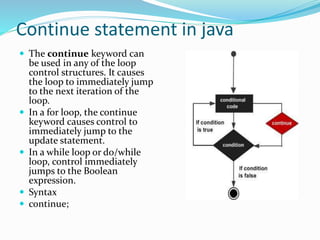
 The continue keyword can
be used in any of the loop
control structures. It causes
the loop to immediately jump
to the next iteration of the
loop.
 In a for loop, the continue
keyword causes control to
immediately jump to the
update statement.
 In a while loop or do/while
loop, control immediately
jumps to the Boolean
expression.
 Syntax
 continue;
Basic Operators
 Java provides a rich set of operators to manipulate
variables. We can divide all the Java operators into the
following groups −
 Arithmetic Operators
 Relational Operators
 Bitwise Operators
 Logical Operators
 Assignment Operators
 Misc Operators
Arithmetic Operators
 Arithmetic operators are used in mathematical expressions in the same
way that they are used in algebra. The following table lists the
arithmetic operators −
 Assume integer variable A holds 10 and variable B holds 20, then −
 Show Examples
 Operator Description Example
 + (Addition) Adds values on either side of the operator. A + B will give
30
 - (Subtraction) Subtracts right-hand operand from left-hand operand.
A - B will give -10
 * (Multiplication)Multiplies values on either side of the operator.A * B
will give 200
 / (Division)Divides left-hand operand by right-hand operand.B / A will
give 2
 % (Modulus)Divides left-hand operand by right-hand operand and
returns remainder.B % A will give 0
++ (Increment)Increases the value of operand by 1.B++ gives 21
 -- (Decrement)Decreases the value of operand by 1.B-- gives 1
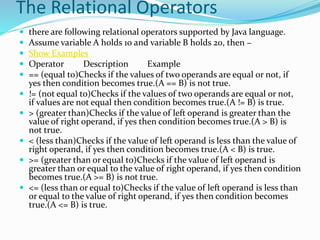
The Relational Operators
 there are following relational operators supported by Java language.
 Assume variable A holds 10 and variable B holds 20, then −
 Show Examples
 Operator Description Example
 == (equal to)Checks if the values of two operands are equal or not, if
yes then condition becomes true.(A == B) is not true.
 != (not equal to)Checks if the values of two operands are equal or not,
if values are not equal then condition becomes true.(A != B) is true.
 > (greater than)Checks if the value of left operand is greater than the
value of right operand, if yes then condition becomes true.(A > B) is
not true.
 < (less than)Checks if the value of left operand is less than the value of
right operand, if yes then condition becomes true.(A < B) is true.
 >= (greater than or equal to)Checks if the value of left operand is
greater than or equal to the value of right operand, if yes then condition
becomes true.(A >= B) is not true.
 <= (less than or equal to)Checks if the value of left operand is less than
or equal to the value of right operand, if yes then condition becomes
true.(A <= B) is true.
The Logical Operators
 Operator Description Example
 && (logical and)Called Logical AND operator. If both
the operands are non-zero, then the condition
becomes true.(A && B) is false
 || (logical or)Called Logical OR Operator. If any of the
two operands are non-zero, then the condition
becomes true.(A || B) is true
 ! (logical not)Called Logical NOT Operator. Use to
reverses the logical state of its operand. If a condition
is true then Logical NOT operator will make false.!(A
&& B) is true
Conditional Operator ( ? : )
 Conditional operator is also known as the ternary
operator. This operator consists of three operands
and is used to evaluate Boolean expressions. The goal
of the operator is to decide, which value should be
assigned to the variable. The operator is written as −
 variable x = (expression) ? value if true : value if false
Example
 public class Test
 { public static void main(String args[])
 { int a, b; a = 10; b = (a == 1) ? 20: 30;
System.out.println( "Value of b is : " + b );
 b = (a == 10) ? 20: 30;
 System.out.println( "Value of b is : " + b ); } }
 Output
 Value of b is : 30 Value of b is : 20
CLASS AND OBJECTS
Java is an Object-Oriented Language. As a language that has
the Object-Oriented feature, Java supports the following
fundamental concepts −
 Polymorphism
 Inheritance
 Encapsulation
 Abstraction
 Classes
 Objects
 Instance
 Method
 Message Parsing
 Object − Objects have states and behaviors. Example:
A dog has states - color, name, breed as well as
behaviors – wagging the tail, barking, eating. An object
is an instance of a class.
 Class − A class can be defined as a template/blueprint
that describes the behavior/state that the object of its
type support.
Objects in Java
 Object is the physical as well as logical entity whereas class
is the logical entity only.
 An entity that has state and behavior is known as an object
e.g. chair, bike, marker, pen, table, car etc. It can be
physical or logical (tangible and intangible). The example
of intangible object is banking system.
An object has three characteristics:
 state: represents data (value) of an object.
 behavior: represents the behavior (functionality) of an
object such as deposit, withdraw etc.
 identity: Object identity is typically implemented via a
unique ID. The value of the ID is not visible to the external
user. But, it is used internally by the JVM to identify each
object uniquely.
Objects in java
 For Example: Pen is an
object. Its name is
Reynolds, color is white
etc. known as its state. It is
used to write, so writing is
its behavior.
 Object is an instance of a
class. Class is a template or
blueprint from which
objects are created. So
object is the
instance(result) of a class.
Classes in Java
 A class is a group of objects that has common properties. It is a
template or blueprint from which objects are created.
A class in java can contain:
 data member
 method
 constructor
 block
 class and interface
Syntax to declare a class:
class <class_name>{
data member;
method;
}
A class can contain any of the
following variable types
 Local variables − Variables defined inside methods,
constructors or blocks are called local variables. The
variable will be declared and initialized within the method
and the variable will be destroyed when the method has
completed.
 Instance variables − Instance variables are variables
within a class but outside any method. These variables are
initialized when the class is instantiated. Instance variables
can be accessed from inside any method, constructor or
blocks of that particular class.
 Class variables − Class variables are variables declared
within a class, outside any method, with the static
keyword.
Simple Example of Object and Class
class Student1{
int id;//data member (also instance variable)
String name;//data member(also instance variable)
public static void main(String args[]){
Student1 s1=new Student1();//creating an object of Student
System.out.println(s1.id);
System.out.println(s1.name);
}
}
Output:0 null
Method in Java
 In java, a method is like function i.e. used to expose
behavior of an object.
Advantage of Method
 Code Reusability
 Code Optimization
NEW KEYWORD
 The new keyword is used to allocate memory at
runtime.
Example of Object and class that
maintains the records of students
class Student2{
int rollno;
String name;
void insertRecord(int r, String n){ //method
rollno=r;
name=n; }
void displayInformation(){System.out.println(rollno+" "+name);}/
/method
public static void main(String args[]){
Student2 s1=new Student2();
Student2 s2=new Student2();
s1.insertRecord(111,"Karan");
s2.insertRecord(222,"Aryan");
s1.displayInformation();
s2.displayInformation(); }}
Another Example of Object and
Class
class Rectangle{
int length;
int width;
void insert(int l,int w){
length=l;
width=w; }
void calculateArea(){System.out.println(length*width);}
public static void main(String args[]){
Rectangle r1=new Rectangle();
Rectangle r2=new Rectangle();
r1.insert(11,5);
r2.insert(3,15);
r1.calculateArea();
r2.calculateArea(); }}
Output:55 45
Java - Methods
 A Java method is a collection of statements that are
grouped together to perform an operation. When you
call the System.out.println() method, for example,
the system actually executes several statements in
order to display a message on the console.
Creating Method
Considering the following example to explain the syntax
of a method −
Syntax
public static int methodName(int a, int b) { // body }
Here,
public static − modifier
int − return type
methodName − name of the method
a, b − formal parameters
int a, int b − list of parameters
Syntax of Method
modifier returnType nameOfMethod (Parameter List)
{ // method body }
 The syntax shown above includes −
 modifier − It defines the access type of the method and it
is optional to use.
 returnType − Method may return a value.
 nameOfMethod − This is the method name. The method
signature consists of the method name and the parameter
list.
 Parameter List − The list of parameters, it is the type,
order, and number of parameters of a method. These are
optional, method may contain zero parameters.
 method body − The method body defines what the
method does with the statements.
Following is the example to demonstrate how to
define a method and how to call it −
 public class ExampleMinNumber
 { public static void main(String[] args) {
 int a = 11; int b = 6; int c = minFunction(a, b);
System.out.println("Minimum Value = " + c); } /** returns
the minimum of two numbers */
 public static int minFunction(int n1, int n2) {
 int min;
 if (n1 > n2) min = n2;
 else min = n1;
 return min; } }
Constructor in Java
 Constructor in java is a special type of method that is
used to initialize the object.
 Java constructor is invoked at the time of object
creation. It constructs the values i.e. provides data for
the object that is why it is known as constructor.
Rules for creating java constructor
 There are basically two rules defined for the
constructor.
 Constructor name must be same as its class name
 Constructor must have no explicit return type
Types of java constructors
There are two types of
constructors:
 Default constructor (no-
arg constructor)
 Parameterized
constructor
Java Default Constructor
 A constructor that have no parameter is known as default
constructor.
Syntax of default constructor:
 <class_name>(){}
Example of default constructor
 In this example, we are creating the no-arg constructor in
the Bike class. It will be invoked at the time of object
creation.
 class Bike1{
 Bike1(){System.out.println("Bike is created");}
 public static void main(String args[]){
 Bike1 b=new Bike1(); }}
What is the purpose of default
constructor?
 Default constructor provides the default values to the
object like 0, null etc. depending on the type.
 If there is no constructor in a class, compiler
automatically creates a default constructor.
Example of default constructor that displays the default
values
 class Student3{
 int id;
 String name;

 void display(){System.out.println(id+" "+name);}

 public static void main(String args[]){
 Student3 s1=new Student3();
 Student3 s2=new Student3();
 s1.display();
 s2.display(); }}
 OUTPUT:0 null
 0 null
 Explanation:In the above class,you are not creating any constructor so
compiler provides you a default constructor.Here 0 and null values are provided
by default constructor.
Java parameterized constructor
 A constructor that have parameters is known as
parameterized constructor
Why use parameterized
constructor?
 Parameterized constructor is used to provide different
values to the distinct objects.
Example of parameterized
constructor
 class Student4{
 int id;
 String name;

 Student4(int i,String n){
 id = i;
 name = n; }
 void display(){System.out.println(id+" "+name);}

 public static void main(String args[]){
 Student4 s1 = new Student4(111,"Karan");
 Student4 s2 = new Student4(222,"Aryan");
 s1.display();
 s2.display(); }}
this keyword in java
 In java, this is a reference variable that refers to the
current object.
 This is a keyword in Java. It can be used inside the
Method or constructor of Class.
 It(this) works as a reference to the current Object
whose Method or constructor is being invoked.
 The this keyword can be used to refer to any member
of the current object from within an instance Method
or a constructor.
Usage of java this keyword
Here is given the 6 usage of java this keyword.
 this keyword can be used to refer current class
instance variable.
 this() can be used to invoke current class constructor.
 this keyword can be used to invoke current class
method (implicitly)
 this can be passed as an argument in the method call.
 this can be passed as argument in the constructor call.
 this keyword can also be used to return the current
class instance.
Understanding the problem
without this keyword
 class Student10{
 int id;
 String name;

 Student10(int id,String name){
 id = id;
 name = name;
 }
 void display(){System.out.println(id+" "+name);}

 public static void main(String args[]){
 Student10 s1 = new Student10(111,"Karan");
 Student10 s2 = new Student10(321,"Aryan");
 s1.display();
 s2.display();
 }
 }
 Output:0 null 0 null
 In the above example, parameter (formal arguments)
and instance variables are same that is why we are
using this keyword to distinguish between local
variable and instance variable.
Solution of the above problem by
this keyword
 //example of this keyword
 class Student11{
 int id;
 String name;

 Student11(int id,String name){
 this.id = id;
 this.name = name;
 }
 void display(){System.out.println(id+" "+name);}
 public static void main(String args[]){
 Student11 s1 = new Student11(111,"Karan");
 Student11 s2 = new Student11(222,"Aryan");
 s1.display();
 s2.display();
 }
 }
 Output
 111 Karan 222 Aryan
Java Garbage Collection
 In java, garbage means unreferenced
objects.
 Garbage Collection is process of reclaiming
the runtime unused memory automatically.
In other words, it is a way to destroy the
unused objects.
 To do so, we were using free() function in C
language and delete() in C++. But, in java it
is performed automatically. So, java provides
better memory management.
Advantage of Garbage Collection
 It makes java memory efficient because
garbage collector removes the unreferenced
objects from heap memory.
 It is automatically done by the garbage
collector(a part of JVM) so we don't need to
make extra efforts.
 Programmer doesn't need to worry about
dereferencing an object.
Can the Garbage Collection be
forced explicitly ?
 No, the Garbage
Collection can not be
forced explicitly. We may
request JVM for garbage
collection by
calling System.gc() met
hod. But This does not
guarantee that JVM will
perform the garbage
collection.
gc() method
 The gc() method is used to invoke the garbage
collector to perform cleanup processing. The gc() is
found in System and Runtime classes.
 public static void gc(){}
 Garbage collection is performed by a thread
called Garbage Collector(GC). This thread calls
the finalize() method before object is garbage
collected.
Simple Example of garbage
collection in java
 public class TestGarbage1{
 public void finalize(){System.out.println("object is garba
ge collected");}
 public static void main(String args[]){
 TestGarbage1 s1=new TestGarbage1();
 TestGarbage1 s2=new TestGarbage1();
 s1=null;
 s2=null;
 System.gc();
 }
 }
 object is garbage collected
finalize() method
 Sometime an object will need to perform some
specific task before it is destroyed such as
closing an open connection or releasing any
resources held. To handle such
situation finalize() method is used.
 finalize() method is called by garbage
collection thread before collecting object. Its
the last chance for any object to perform
cleanup utility.
 Signature of finalize() method
 protected void finalize() { //finalize-code }
Some Important Points to
Remember
finalize() method is defined
in java.lang.Object class, therefore it
is available to all the classes.
finalize() method is declare
as proctected inside Object class.
finalize() method gets called only once
by GC threads.
Difference between constructor
and method in java
 Java Constructor and Java Method
 Constructor is used to initialize the state of an object.
 Method is used to expose behavior of an object.
 Constructor must not have return type.
 Method must have return type.
 Constructor is invoked implicitly.
 Method is invoked explicitly.
 The java compiler provides a default constructor if you
don't have any constructor.
 Method is not provided by compiler in any case.
 Constructor name must be same as the class name.
 Method name may or may not be same as class name.
Method Overloading in Java
 If a class have multiple methods by same name but
different parameters, it is known as Method
Overloading.
Overloading in Java Method Rules
 Must change the argument list
 Can change the return type
 Can change the access modifier(Broader)
 Can declare new or broader checked exception
Advantage of method
overloading?
 Method overloading increases the readability of the
program.
 Different ways to overload the method
 There are two ways to overload the method in java By
changing number of arguments
 By changing the data type
Example of Method Overloading by
changing the no. of arguments
 class Calculation{
 void sum(int a,int b){System.out.println(a+b);}
 void sum(int a,int b,int c){System.out.println(a+b+c);}

 public static void main(String args[]){
 Calculation obj=new Calculation();
 obj.sum(10,10,10);
 obj.sum(20,20);

 }
 }
 Output:30 40
Example of Method Overloading by
changing data type of argument
 class Calculation2{
 void sum(int a,int b){System.out.println(a+b);}
 void sum(double a,double b){System.out.println(a+b);}

 public static void main(String args[]){
 Calculation2 obj=new Calculation2();
 obj.sum(10.5,10.5);
 obj.sum(20,20);

 } }
output
 21.0 40
Can we overload main() method?
 Yes, by method overloading. You can have any number of main methods in a
class by method overloading. Let's see the simple example:
 class Overloading1{
 public static void main(int a){
 System.out.println(a);
 }

 public static void main(String args[]){
 System.out.println("main() method invoked");
 main(10);
 }
 }
 Output
 main() method invoked
 10
Constructor Overloading in Java
 Constructor overloading is a technique in
Java in which a class can have any number of
constructors that differ in parameter lists.
The compiler differentiates these
constructors by taking into account the
number of parameters in the list and their
type.
Example of Constructor
Overloading
 class Student5{
 int id;
 String name;
 int age;
 Student5(int i,String n){
 id = i;
 name = n; }
 Student5(int i,String n,int a){
 id = i;
 name = n;
 age=a; }
 void display(){System.out.println(id+" "+name+" "+age);}
 public static void main(String args[]){
 Student5 s1 = new Student5(111,"Karan");
 Student5 s2 = new Student5(222,"Aryan",25);
 s1.display();
 s2.display(); } }
 Output:
 111 Karan 0 222 Aryan 25
Java Command Line Arguments
 The java command-line argument is an argument i.e.
passed at the time of running the java program.
 The arguments passed from the console can be
received in the java program and it can be used as an
input.
Simple example of command-line
argument in java
 class CommandLineExample{
 public static void main(String args[]){
 System.out.println("Your first argument is: "+args[0]);
 }
 }
 Output: Your first argument is: sonoo
Example of command-line
argument that prints all the values
 class A{
 public static void main(String args[]){

 for(int i=0;i<args.length;i++)
 System.out.println(args[i]);

 }
 }
 Output: sonoo jaiswal 1 3 abc
JAVA - INHERITANCE
Inheritance can be defined as the process
where one class acquires the properties
(methods and fields) of another. With the
use of inheritance the information is made
manageable in a hierarchical order.
The class which inherits the properties of
other is known as subclass (derived class,
child class) and the class whose properties
are inherited is known as superclass (base
class, parent class).
The idea behind inheritance in java is
that you can create new classes that are
built upon existing classes. When you
inherit from an existing class, you can
reuse methods and fields of parent
class, and you can add new methods
and fields also.
Inheritance represents the IS-A
relationship, also known as parent-
child relationship.
Why use inheritance in java
 For Method Overriding (so runtime
polymorphism can be achieved).
 For Code Reusability.
Syntax of Java Inheritance
 class Subclass-name extends Superclass-
name
 {
 //methods and fields
 }
 The extends keyword indicates that you
are making a new class that derives from an
existing class.
Example
 class Employee{
 float salary=40000;
 }
 class Programmer extends Employee{
 int bonus=10000;
 public static void main(String args[]){
 Programmer p=new Programmer();
 System.out.println("Programmer salary is:"+p.salary);
 System.out.println("Bonus of Programmer is:"+p.bonus);
 }
 }
 OUT PUT
 Programmer salary is:40000.0
 Bonus of programmer is:10000
Types of inheritance in java
 On the basis of class, there can be three types of
inheritance in java:
 single,
 multilevel and
 hierarchical.
Types of inheritance in java
Why multiple inheritance is not
supported in java?
 To reduce the complexity and simplify the language,
multiple inheritance is not supported in java.
 Consider a scenario where A, B and C are three classes.
The C class inherits A and B classes. If A and B classes
have same method and you call it from child class
object, there will be ambiguity to call method of A or B
class.
 Since compile time errors are better than runtime
errors, java renders compile time error if you inherit 2
classes. So whether you have same method or
different, there will be compile time error now.
Example
 class A{
 void msg(){System.out.println("Hello");}
 }
 class B{
 void msg(){System.out.println("Welcome");}
 }
 class C extends A,B{//suppose if it were

 Public Static void main(String args[]){
 C obj=new C();
 obj.msg();//Now which msg() method would be invoked?
 }
 }
OUT PUT:Compile Time Error
super keyword in java
 The super keyword in java is a reference variable that
is used to refer immediate parent class object.
 Whenever you create the instance of subclass, an
instance of parent class is created implicitly i.e.
referred by super reference variable.
Usage of java super Keyword
 super is used to refer immediate parent class instance
variable.
 super() is used to invoke immediate parent class
constructor.
 super is used to invoke immediate parent class
method.
Method Overriding in Java
If subclass (child class) has the same
method as declared in the parent class,
it is known as method overriding in
java.
In other words, If subclass provides the
specific implementation of the method
that has been provided by one of its
parent class, it is known as method
overriding.
Usage of Java Method Overriding
Method overriding is used to
provide specific implementation of
a method that is already provided
by its super class.
Method overriding is used for
runtime polymorphism
Rules for Java Method Overriding
 method must have same name as in the
parent class
 method must have same parameter as in the
parent class.
 must be IS-A relationship (inheritance).
Understanding the problem
without method overriding
 class Vehicle{
 void run(){System.out.println("Vehicle is running");}
 }
 class Bike2 extends Vehicle{
 void run(){System.out.println("Bike is running safely"
);}

 public static void main(String args[]){
 Bike2 obj = new Bike2();
 obj.run();
 }
 Output:Bike is running safely
Runtime Polymorphism or
Dynamic method dispatch
 Dynamic method dispatch is a mechanism
by which a call to an overridden method is
resolved at runtime. This is how java
implements runtime polymorphism.
 When an overridden method is called by a
reference, java determines which version of
that method to execute based on the type of
object it refer to. In simple words the type of
object which it referred determines which
version of overridden method will be called.
Difference between Method
Overloading and Method Overriding
 Method Overloading
 Method overloading is
used to increase the
readability of the
program.
 Method overloading is
performed within class.
 In case of method
overloading, parameter
must be different.
 Method overloading is
the example of compile
time polymorphism.
 Method Overriding
 Method overriding is used to
provide the specific
implementation of the method
that is already provided by its
super class.
 Method overriding occurs in two
classes that have IS-A
(inheritance) relationship.
 In case of method
overriding, parameter must be
same.
 Method overriding is the
example of run time
polymorphism.
Java Method Overloading example
 class OverloadingExample{
 static int add(int a,int b){return a+b;}
 static int add(int a,int b,int c){return a+b+c;}
 }
Java Method Overriding example
 class Animal{
 void eat(){System.out.println("eating...");}
 }
 class Dog extends Animal{
 void eat(){System.out.println("eating bread...");}
 }
Object Class in java
 Object class is present
in java.lang package.
 Every class in Java is directly or indirectly
derived from the Object class.
 If a Class does not extend any other class
then it is direct child class of Object and if
extends other class then it is an indirectly
derived. Therefore the Object class methods
are available to all Java classes. Hence Object
class acts as a root of inheritance hierarchy
in any Java Program.
Abstract class in Java
 A class that is declared with abstract keyword, is
known as abstract class in java.
 Abstraction is a process of hiding the implementation
details and showing only functionality to the user.
 Another way, it shows only important things to the
user and hides the internal details for example sending
sms, you just type the text and send the message. You
don't know the internal processing about the message
delivery.
 Abstraction lets you focus on what the object does
instead of how it does it.
ABSTRACT CLASS IN JAVA
 A class that is declared as abstract is known
as abstract class. It needs to be extended and its
method implemented. It cannot be instantiated.
 Example abstract class
 abstract class A{}
ABSTRACT METHOD
 A method that is declared as abstract and does not
have implementation is known as abstract method.
Example abstract method
 abstract void printStatus();//no body and abstract
SOME POINTS OF ABSTRACT CLASS
 A class which contains the abstract keyword in its
declaration is known as abstract class.
 Abstract classes may or may not contain abstract
methods, i.e., methods without body ( public void
get(); )
 But, if a class has at least one abstract method, then
the class must be declared abstract.
 If a class is declared abstract, it cannot be instantiated.
 To use an abstract class, you have to inherit it from
another class, provide implementations to the abstract
methods in it.
 If you inherit an abstract class, you have to provide
implementations to all the abstract methods in it.
Abstract Methods
 If you want a class to contain a particular method but
you want the actual implementation of that method to
be determined by child classes, you can declare the
method in the parent class as an abstract.
 abstract keyword is used to declare the method as
abstract.
 You have to place the abstract keyword before the
method name in the method declaration.
 An abstract method contains a method signature, but
no method body.
 Instead of curly braces, an abstract method will have a
semi colon (;) at the end.
EXAMPLE OF ABSTRACT
 abstract class Shape{
 abstract void draw();
 }
 //In real scenario, implementation is provided by others i.e. unknown
by end user
 class Rectangle extends Shape{
 void draw(){System.out.println("drawing rectangle");}
 }
 class Circle1 extends Shape{
 void draw(){System.out.println("drawing circle");}
 }
 //In real scenario, method is called by programmer or user
 class TestAbstraction1{
 public static void main(String args[]){
 Shape s=new Circle1();//In real scenario, object is provided through me
thod e.g. getShape() method
 s.draw(); } }
 OUT PUT: drawing circle
final keyword
 The final keyword in java is used to restrict the user.
 The java final keyword can be used in many context.
Final can be:
 variable
 method
 class
 The final keyword can be applied with the variables, a
final variable that have no value it is called blank final
variable or uninitialized final variable. It can be
initialized in the constructor only.
FINAL KEYWORD
Final at variable level
 Final keyword is used to make a variable as a constant.
This is similar to const in other language. A variable
declared with the final keyword cannot be modified by
the program after initialization. This is useful to
universal constants, such as "PI".
 Final Keyword in java Example
 public class Circle {
 public static final double PI=3.14159;
 public static void main(String[] args) {
System.out.println(PI); } }
Final at method level
 It makes a method final, meaning that sub classes can not
override this method. The compiler checks and gives an error if
you try to override the method.
 When we want to restrict overriding, then make a method as a
final.
 Example
 public class A
 {
 public void fun1() { ....... }
 public final void fun2() { ....... }
 }
 class B extends A {
 public void fun1() { ....... }
 public void fun2()
 { // it gives an error because we can not override final method } }
Final at class level
 It makes a class final, meaning that the class
can not be inheriting by other classes. When
we want to restrict inheritance then make
class as a final.
 Example
 public final class A { ...... ...... }
 public class B extends A
 { // it gives an error, because we can not
inherit final class }
JAVA PACKAGE
 A java package is a group of similar types of classes,
interfaces and sub-packages.
 Package in java can be categorized in two form, built-
in package and user-defined package.
 There are many built-in packages such as java, lang,
awt, javax, swing, net, io, util, sql etc.
Advantage of Java Package
 Java package is used to categorize the classes and
interfaces so that they can be easily maintained.
 2) Java package provides access protection.
 3) Java package removes naming collision.
JAVA PACKAGE
Simple example of java package
 The package keyword is used to create a package in
java.
 //save as Simple.java
 package mypack;
 public class Simple{
 public static void main(String args[]){
 System.out.println("Welcome to package");
 }
 }
How to compile java package
You need to follow the syntax given below:
 javac -d directory javafilename
 For example
 javac -d . Simple.java
 The -d switch specifies the destination where to put
the generated class file. You can use any directory
name like /home (in case of Linux), d:/abc (in case of
windows) etc. If you want to keep the package within
the same directory, you can use . (dot).
How to run java package program
 You need to use fully qualified name e.g.
mypack.Simple etc to run the class.
 To Compile: javac -d . Simple.java
 To Run: java mypack.Simple
How to access package from
another package?
There are three ways to access the package from outside
the package.
 import package.*;
 import package.classname;
 fully qualified name.
1) Using packagename.*
 If you use package.* then all the classes and interfaces
of this package will be accessible but not subpackages.
 The import keyword is used to make the classes and
interface of another package accessible to the current
package.
 Example of package that import the packagename.*
1) Using packagename.*
 //save by A.java
 package pack;
 public class A{
 public void msg(){Syste
m.out.println("Hello");}
 }
 //save by B.java
 package mypack;
 import pack.*;

 class B{
 public static void main(
String args[]){
 A obj = new A();
 obj.msg();
 }
 }
 Output:Hello
2) Using packagename.classname
 If you import package.classname then only declared class
of this package will be accessible.
 Example of package by import package.classname
 //save by A.java
 package pack;
 public class A{
 public void msg(){System.out.println("Hello");} }
 //save by B.java
 package mypack;
 import pack.A;
 class B{
 public static void main(String args[]){
 A obj = new A();
 obj.msg(); }}
 Output: Hello
3) Using fully qualified name
 If you use fully qualified name then only declared class of
this package will be accessible. Now there is no need to
import. But you need to use fully qualified name every time
when you are accessing the class or interface.
 Example of package by import fully qualified name
 //save by A.java
 package pack;
 public class A{
 public void msg(){System.out.println("Hello");} }
 //save by B.java
 package mypack;
 class B{
 public static void main(String args[]){
 pack.A obj = new pack.A();//using fully qualified name
 obj.msg(); } }
 Output:Hello
Interface in Java
 An interface in java is a blueprint of a
class. It has static constants and abstract
methods only.
 The interface in java is a mechanism to
achieve fully abstraction. There can be
only abstract methods in the java interface
not method body. It is used to achieve fully
abstraction and multiple inheritance in Java.
 Java Interface also represents IS-A
relationship.
Why use Java interface?
 There are mainly three reasons to use
interface. They are given below.
 It is used to achieve fully abstraction.
 By interface, we can support the
functionality of multiple inheritance.
 It can be used to achieve loose coupling
An interface is similar to a class in
the following ways −
 An interface can contain any number of methods.
 An interface is written in a file with a .java extension,
with the name of the interface matching the name of
the file.
 The byte code of an interface appears in a .class file.
 Interfaces appear in packages, and their corresponding
bytecode file must be in a directory structure that
matches the package name.
However, an interface is different from a class in
several ways, including −
 You cannot instantiate an interface.
 An interface does not contain any constructors.
 All of the methods in an interface are abstract.
 An interface cannot contain instance fields. The only
fields that can appear in an interface must be declared
both static and final.
 An interface is not extended by a class; it is
implemented by a class.
 An interface can extend multiple interfaces.
Simple example of Java interface
 In this example, Printable interface have only one method,
its implementation is provided in the A class.
 interface printable{
 void print();
 }
 class A6 implements printable{
 public void print(){System.out.println("Hello");}

 public static void main(String args[]){
 A6 obj = new A6();
 obj.print();
 }
 }
Output:Hello
Multiple inheritance in Java by
interface
 If a class
implements
multiple
interfaces, or an
interface extends
multiple
interfaces i.e.
known as
multiple
inheritance.
Multiple inheritance is not supported through
class in java but it is possible by interface, why?
 As we have explained in the inheritance
chapter, multiple inheritance is not
supported in case of class. But it is
supported in case of interface because there
is no ambiguity as implementation is
provided by the implementation class.
Example
 interface Printable{
 void print();
 }
 interface Showable{
 void show();
 }
 class A7 implements Printable,Showable{
 public void print(){System.out.println("Hello");}
 public void show(){System.out.println("Welcome");}

 public static void main(String args[]){
 A7 obj = new A7();
 obj.print();
 obj.show(); } }
Output:
Hello
Welcome
 interface Printable{
 void print();
 }
 interface Showable{
 void print();
 }

 class TestTnterface1 implements Printable,Showable{
 public void print(){System.out.println("Hello");}
 public static void main(String args[]){
 TestTnterface1 obj = new TestTnterface1();
 obj.print();
 }
 }
 Out put: Hello
Difference between abstract class and
interface
abstract class interface
1) Abstract class can have abstract and
non-abstract methods.
Interface can have only
abstract methods.
2) Abstract class doesn't support
multiple inheritance.
Interface supports multiple
inheritance.
3) Abstract class can have final, non-
final, static and non-static variables.
Interface has only static and final
variables.
4) Abstract class can have static
methods, main method and
constructor.
Interface can't have static methods,
main method or constructor.
5) The abstract keyword is used to
declare abstract class.
The interface keyword is used to
declare interface.
6) Abstract class can provide the
implementation of interface.
Interface can't provide the
implementation of abstract class.
Wrapper class in Java
 In Java, a wrapper class is defined as a class in which
a primitive value is wrapped up. These primitive
wrapper classes are used to represent primitive data
type values as objects. The Java platform provides
wrapper classes for each of the primitive data types.
For example, Integer wrapper class holds primitive
‘int’ data type value. Similarly, Float wrapper
class contain ‘float’ primitive values, Character
wrapper class holds a ‘char’ type value, and Boolean
wrapper class represents ‘boolean’ value.
Why do we need wrapper classes
in java?
 Actually we can use primitive types in many
places but not all. In some cases we can’t use
primitive values as is, so wrapper classes are
needed/required. For example, if we need to
store numbers in a collection, we can’t use
primitives because collections such as List,
Set, and Map need objects as their elements.
In such cases you must use wrapper classes.
Use of wrapper class in java
 One feature is to use constants defined by the wrapper
class, such as MIN_VALUE and MAX_VALUE, that
provide the upper and lower bounds of the data type,
and
 the other application is to use wrapper class methods
for converting values to and from other primitive data
types, for converting to and from strings, and for
converting between number systems (decimal, octal,
hexadecimal, binary).
Thank you

UNIT 1.pptx

  • 1.
  • 2.
    INTRODUCTION  Java isa high-level programming language originally developed by Sun Microsystems and released in 1995.  Java runs on a variety of platforms, such as Windows, Mac OS, and the various versions of UNIX.
  • 3.
    INTRODUCTION  Java programminglanguage was originally developed by Sun Microsystems which was initiated by James Gosling and released in 1995 as core component of Sun Microsystems' Java platform (Java 1.0 [J2SE]).  The latest release of the Java Standard Edition is Java SE 8. With the advancement of Java and its widespread popularity, multiple configurations were built to suit various types of platforms.
  • 4.
    Types of JavaApplications  There are mainly 4 type of applications that can be created using java programming:  1) Standalone Application  It is also known as desktop application or window-based application. An application that we need to install on every machine such as media player, antivirus etc. AWT and Swing are used in java for creating standalone applications.  2) Web Application  An application that runs on the server side and creates dynamic page, is called web application. Currently, servlet, jsp, struts, jsf etc. technologies are used for creating web applications in java.
  • 5.
    Types of JavaApplications  3) Enterprise Application  An application that is distributed in nature, such as banking applications etc. It has the advantage of high level security, load balancing and clustering. In java, EJB is used for creating enterprise applications.  4) Mobile Application  An application that is created for mobile devices. Currently Android and Java ME are used for creating mobile applications.
  • 6.
    FEATURES OF JAVA Java is guaranteed to be Write Once, Run Anywhere.  Java is −  Object Oriented − In Java, everything is an Object. Java can be easily extended since it is based on the Object model.  Platform Independent − Unlike many other programming languages including C and C++, when Java is compiled, it is not compiled into platform specific machine, rather into platform independent byte code. This byte code is distributed over the web and interpreted by the Virtual Machine (JVM) on whichever platform it is being run on.  Simple − Java is designed to be easy to learn. If you understand the basic concept of OOP Java, it would be easy to master.
  • 7.
    FEATURES OF JAVA Secure − With Java's secure feature it enables to develop virus-free, tamper-free systems. Authentication techniques are based on public-key encryption.  Architecture-neutral − Java compiler generates an architecture-neutral object file format, which makes the compiled code executable on many processors, with the presence of Java runtime system.  Portable − Being architecture-neutral and having no implementation dependent aspects of the specification makes Java portable. Compiler in Java is written in ANSI C with a clean portability boundary, which is a POSIX subset.
  • 8.
    FEATURES OF JAVA Robust − Java makes an effort to eliminate error prone situations by emphasizing mainly on compile time error checking and runtime checking.  Multithreaded − With Java's multithreaded feature it is possible to write programs that can perform many tasks simultaneously. This design feature allows the developers to construct interactive applications that can run smoothly.  Interpreted − Java byte code is translated on the fly to native machine instructions and is not stored anywhere. The development process is more rapid and analytical since the linking is an incremental and light-weight process.
  • 9.
    FEATURES OF JAVA High Performance − With the use of Just-In-Time compilers, Java enables high performance.  Distributed − Java is designed for the distributed environment of the internet.  Dynamic − Java is considered to be more dynamic than C or C++ since it is designed to adapt to an evolving environment. Java programs can carry extensive amount of run-time information that can be used to verify and resolve accesses to objects on run- time.
  • 10.
    History of Java James Gosling initiated Java language project in June 1991 for use in one of his many set-top box projects. The language, initially called ‘Oak’ after an oak tree that stood outside Gosling's office, also went by the name ‘Green’ and ended up later being renamed as Java, from a list of random words.
  • 11.
    History of Java Sun released the first public implementation as Java 1.0 in 1995. It promised Write Once, Run Anywhere (WORA), providing no-cost run-times on popular platforms.  On 13 November, 2006, Sun released much of Java as free and open source software under the terms of the GNU General Public License (GPL).
  • 12.
    JVM  JVM isan abbreviated form of Java Virtual Machine. It is a Java byte code processing engine that converts Java byte code into machine language, which is then executed by the machine (computer). Java byte code is an intermediary language between Java and the machine on which it has to be executed, and this execution can be done when JVM processes Java byte code into the machine language.
  • 13.
  • 14.
    What is JVM It is:  A specification where working of Java Virtual Machine is specified. But implementation provider is independent to choose the algorithm. Its implementation has been provided by Sun and other companies.  An implementation Its implementation is known as JRE (Java Runtime Environment).  Runtime Instance Whenever you write java command on the command prompt to run the java class, an instance of JVM is created.
  • 15.
    What it does The JVM performs following operation:  Loads code  Verifies code  Executes code  Provides runtime environment JVM provides definitions for the:  Memory area  Class file format  Register set  Garbage-collected heap  Fatal error reporting etc.
  • 16.
    ABOUT JVM  1)Class loader Class loader is a subsystem of JVM that is used to load class files.  2) Class(Method) Area Class(Method) Area stores per-class structures such as the runtime constant pool, field and method data, the code for methods.  3) Heap It is the runtime data area in which objects are allocated.  4) Stack Java Stack stores frames. It holds local variables and partial results, and plays a part in method invocation and return. Each thread has a private JVM stack, created at the same time as thread. A new frame is created each time a method is invoked. A frame is destroyed when its method invocation completes.5) Program Counter Register  PC (program counter) register. It contains the address of the Java virtual machine instruction currently being executed.
  • 17.
    ABOUT JVM  6)Native Method Stack It contains all the native methods used in the application.  7) Execution Engine It contains:1) A virtual processor2) Interpreter: Read bytecode stream then execute the instructions.3) Just- In-Time(JIT) compiler: It is used to improve the performance.JIT compiles parts of the byte code that have similar functionality at the same time, and hence reduces the amount of time needed for
  • 18.
    Simple Program  classhello  {  public static void main(String args[])  {  System.out.println("hello");   }  } Javac hello.java Java hello
  • 19.
    Understanding first javaprogram  class keyword is used to declare a class in java.  public keyword is an access modifier which represents visibility, it means it is visible to all.  static is a keyword, if we declare any method as static, it is known as static method. The core advantage of static method is that there is no need to create object to invoke the static method. The main method is executed by the JVM, so it doesn't require to create object to invoke the main method. So it saves memory.  void is the return type of the method, it means it doesn't return any value.  main represents startup of the program.  String[] args is used for command line argument.  System.out.println() is used print statement.
  • 20.
    DATA TYPES  Variablesare nothing but reserved memory locations to store values. This means that when you create a variable you reserve some space in the memory.  Based on the data type of a variable, the operating system allocates memory and decides what can be stored in the reserved memory. Therefore, by assigning different data types to variables, you can store integers, decimals, or characters in these variables. There are two data types available in Java −  Primitive Data Types  Reference/Object Data Types
  • 21.
    Primitive Data Types There are eight primitive datatypes supported by Java. 1) BYTE Byte data type is an 8-bit signed two's complement integer Minimum value is -128 (-2^7) Maximum value is 127 (inclusive)(2^7 -1) Default value is 0 Byte data type is used to save space in large arrays, mainly in place of integers, since a byte is four times smaller than an integer. Example: byte a = 100, byte b = -50
  • 22.
    2) short Short datatype is a 16-bit signed two's complement integer Minimum value is -32,768 (-2^15) Maximum value is 32,767 (inclusive) (2^15 -1) Short data type can also be used to save memory as byte data type. A short is 2 times smaller than an integer Default value is 0. Example: short s = 10000, short r = -20000
  • 23.
     int Int datatype is a 32-bit signed two's complement integer. Minimum value is - 2,147,483,648 (-2^31) Maximum value is 2,147,483,647(inclusive) (2^31 -1) Integer is generally used as the default data type for integral values unless there is a concern about memory. The default value is 0 Example: int a = 100000, int b = -200000
  • 24.
     long Long datatype is a 64-bit signed two's complement integer Minimum value is -9,223,372,036,854,775,808(-2^63) Maximum value is 9,223,372,036,854,775,807 (inclusive)(2^63 -1) This type is used when a wider range than int is needed Default value is 0L Example: long a = 100000L, long b = -200000L
  • 25.
     float Float datatype is a single-precision 32-bit IEEE 754 floating point Float is mainly used to save memory in large arrays of floating point numbers Default value is 0.0f Float data type is never used for precise values such as currency Example: float f1 = 234.5f
  • 26.
     double double datatype is a double-precision 64-bit IEEE 754 floating point This data type is generally used as the default data type for decimal values, generally the default choice Double data type should never be used for precise values such as currency Default value is 0.0d Example: double d1 = 123.4
  • 27.
     boolean boolean datatype represents one bit of information There are only two possible values: true and false This data type is used for simple flags that track true/false conditions Default value is false Example: boolean one = true
  • 28.
     char char datatype is a single 16-bit Unicode character Minimum value is 'u0000' (or 0) Maximum value is 'uffff' (or 65,535 inclusive) Char data type is used to store any character Example: char letterA = 'A'
  • 29.
    Reference Data types Reference variables are created using defined constructors of the classes. They are used to access objects. These variables are declared to be of a specific type that cannot be changed. For example, Employee, Puppy, etc.  Class objects and various type of array variables come under reference datatype.  Default value of any reference variable is null.  A reference variable can be used to refer any object of the declared type or any compatible type.  Example: Animal animal = new Animal("giraffe");
  • 30.
    VARIABLES  A variableprovides us with named storage that our programs can manipulate. Each variable in Java has a specific type, which determines the size and layout of the variable's memory; the range of values that can be stored within that memory; and the set of operations that can be applied to the variable.
  • 31.
    There are threekinds of variables in Java −  Local variables  Instance variables  Class/Static variables
  • 32.
    Local Variables  Localvariables are declared in methods, constructors, or blocks.  Local variables are created when the method, constructor or block is entered and the variable will be destroyed once it exits the method, constructor, or block.  Access modifiers cannot be used for local variables.  Local variables are visible only within the declared method, constructor, or block.  Local variables are implemented at stack level internally.  There is no default value for local variables, so local variables should be declared and an initial value should be assigned before the first use.  Example
  • 33.
     Example  Here,age is a local variable. This is defined inside pupAge() method and its scope is limited to only this method.  public class Test  { public void pupAge() { int age = 0; age = age + 7; System.out.println("Puppy age is : " + age); }  public static void main(String args[]) {  Test test = new Test(); test.pupAge(); } }This will produce the following result −  Output  Puppy age is: 7
  • 34.
    Instance Variables  Instancevariables are declared in a class, but outside a method, constructor or any block.  When a space is allocated for an object in the heap, a slot for each instance variable value is created.  Instance variables are created when an object is created with the use of the keyword 'new' and destroyed when the object is destroyed.  Instance variables hold values that must be referenced by more than one method, constructor or block, or essential parts of an object's state that must be present throughout the class.  Instance variables can be declared in class level before or after use.
  • 35.
     Access modifierscan be given for instance variables.  The instance variables are visible for all methods, constructors and block in the class. Normally, it is recommended to make these variables private (access level). However, visibility for subclasses can be given for these variables with the use of access modifiers.  Instance variables have default values. For numbers, the default value is 0, for Booleans it is false, and for object references it is null. Values can be assigned during the declaration or within the constructor.  Instance variables can be accessed directly by calling the variable name inside the class.
  • 36.
    Class/Static Variables  Classvariables also known as static variables are declared with the static keyword in a class, but outside a method, constructor or a block.  There would only be one copy of each class variable per class, regardless of how many objects are created from it.  Static variables are rarely used other than being declared as constants. Constants are variables that are declared as public/private, final, and static. Constant variables never change from their initial value.  Static variables are stored in the static memory. It is rare to use static variables other than declared final and used as either public or private constants.  Static variables are created when the program starts and destroyed when the program stops.
  • 37.
    Class/Static Variables  Visibilityis similar to instance variables. However, most static variables are declared public since they must be available for users of the class.  Default values are same as instance variables. For numbers, the default value is 0; for Booleans, it is false; and for object references, it is null. Values can be assigned during the declaration or within the constructor. Additionally, values can be assigned in special static initializer blocks.  Static variables can be accessed by calling with the class name ClassName.VariableName.  When declaring class variables as public static final, then variable names (constants) are all in upper case. If the static variables are not public and final, the naming syntax is the same as instance and local variables.
  • 38.
    Arrays  java providesa data structure, the array, which stores a fixed-size sequential collection of elements of the same type. An array is used to store a collection of data, but it is often more useful to think of an array as a collection of variables of the same type.
  • 39.
    Declaring Array Variables To use an array in a program, you must declare a variable to reference the array, and you must specify the type of array the variable can reference.  Syntax  dataType[] arrayRefVar; // preferred way. or dataType arrayRefVar[]; // works but not preferred way. Note − The style dataType[] arrayRefVar is preferred. The style dataType arrayRefVar[] comes from the C/C++ language and was adopted in Java to accommodate C/C++ programmers.  Example  The following code snippets are examples of this syntax −  double[] myList; // preferred way. Or  double myList[]; // works but not preferred way.
  • 40.
    Creating Arrays  Youcan create an array by using the new operator with the following syntax −  Syntax  arrayRefVar = new dataType[arraySize]; The above statement does two things −  It creates an array using new dataType[arraySize].  It assigns the reference of the newly created array to the variable arrayRefVar.
  • 41.
     Declaring anarray variable, creating an array, and assigning the reference of the array to the variable can be combined in one statement, as shown below −  dataType[] arrayRefVar = new dataType[arraySize];  Example  Following statement declares an array variable, myList, creates an array of 10 elements of double type and assigns its reference to myList −  double[] myList = new double[10];Following picture represents array myList. Here, myList holds ten double values and the indices are from 0 to 9.
  • 43.
    ARRAYS  Advantage ofJava Array  Code Optimization: It makes the code optimized, we can retrieve or sort the data easily.  Random access: We can get any data located at any index position.  Disadvantage of Java Array  Size Limit: We can store only fixed size of elements in the array. It doesn't grow its size at runtime. To solve this problem, collection framework is used in java.
  • 44.
    TYPES OF ARRAYS Thereare two types of array.  Single Dimensional Array  Multidimensional Array
  • 45.
    Single Dimensional Arrayin java  Syntax to Declare an Array in java  Example of single dimensional java array  Let's see the simple example of java array, where we are going to declare, instantiate, initialize and traverse an array.  class Testarray{  public static void main(String args[]){   int a[]=new int[5];//declaration and instantiation  a[0]=10;//initialization  a[1]=20;  a[2]=70;  a[3]=40;  a[4]=50;   //printing array  for(int i=0;i<a.length;i++)//length is the property of array  System.out.println(a[i]);   }}
  • 46.
    Multidimensional array injava  In such case, data is stored in row and column based index (also known as matrix form).  Syntax to Declare Multidimensional Array in java  dataType[][] arrayRefVar; (or)  Example to instantiate Multidimensional Array in java  int[][] arr=new int[3][3];//3 row and 3 column
  • 47.
    Example of Multidimensionaljava array  class Testarray3{  public static void main(String args[]){   //declaring and initializing 2D array  int arr[][]={{1,2,3},{2,4,5},{4,4,5}};   //printing 2D array  for(int i=0;i<3;i++){  for(int j=0;j<3;j++){  System.out.print(arr[i][j]+" ");  }  System.out.println();  }   }}
  • 48.
    CONTROL STATEMENTS  Decisionmaking structures have one or more conditions to be evaluated or tested by the program, along with a statement or statements that are to be executed if the condition is determined to be true, and optionally, other statements to be executed if the condition is determined to be false. If Statements If else statements
  • 49.
    Selection statements  Followingis the general form of a typical decision making structure found in most of the programming languages −
  • 50.
    If else statements in if statement can be followed by an optional else statement, which executes when the Boolean expression is false.  Syntax  Following is the syntax of an if...else statement −  if(Boolean_expression)  {  // Executes when the Boolean expression is true }  else { // Executes when the Boolean expression is false }  If the boolean expression evaluates to true, then the if block of code will be executed, otherwise else block of code will be executed.
  • 51.
    The if...else if...elseStatement  An if statement can be followed by an optional else if...else statement, which is very useful to test various conditions using single if...else if statemen  Syntax  Following is the syntax of an if...else statement −  t.  if(Boolean_expression 1) { // Executes when the Boolean expression 1 is true }  else if(Boolean_expression 2) { // Executes when the Boolean expression 2 is true }  else if(Boolean_expression 3) { // Executes when the Boolean expression 3 is true }  else { // Executes when the none of the above condition is true.
  • 52.
    Example  public classTest { public static void main(String args[]) { int x = 30;  if( x == 10 ) { System.out.print("Value of X is 10"); }  else if( x == 20 ) { System.out.print("Value of X is 20"); }else if( x == 30 ) { System.out.print("Value of X is 30"); }else { System.out.print("This is else statement"); } } }  This will produce the following result −  Output  Value of X is 30
  • 53.
    Loop Control  Theremay be a situation when you need to execute a block of code several number of times. In general, statements are executed sequentially: The first statement in a function is executed first, followed by th  A loop statement allows us to execute a statement or group of statements multiple times and following is the general form of a loop statement in most of the programming languages .
  • 54.
    while Loop injava  A while loop statement in Java programming language repeatedly executes a target statement as long as a given condition is true.  Syntax  The syntax of a while loop is −  while(Boolean_expressio n) { // Statements }
  • 55.
    for loop injava  A for loop is a repetition control structure that allows you to efficiently write a loop that needs to be executed a specific number of times.  A for loop is useful when you know how many times a task is to be repeated.  Syntax  The syntax of a for loop is −  for(initialization; Boolean_expression; update) { // Statements }
  • 56.
    do while loop A do...while loop is similar to a while loop, except that a do...while loop is guaranteed to execute at least one time.  Syntax  Following is the syntax of a do...while loop −  do { // Statements }while(Boolean_expressi on);
  • 57.
    Loop Control Statements Loop control statements change execution from its normal sequence. When execution leaves a scope, all automatic objects that were created in that scope are destroyed.  Java supports the following control statements.  break statement  continue statement
  • 58.
    Break statement injava  the break statement in Java programming language has the following two usages −  When the break statement is encountered inside a loop, the loop is immediately terminated and the program control resumes at the next statement following the loop.  It can be used to terminate a case in the switch statement (covered in the next chapter).  Syntax  break;
  • 59.
    Continue statement injava  The continue keyword can be used in any of the loop control structures. It causes the loop to immediately jump to the next iteration of the loop.  In a for loop, the continue keyword causes control to immediately jump to the update statement.  In a while loop or do/while loop, control immediately jumps to the Boolean expression.  Syntax  continue;
  • 60.
    Basic Operators  Javaprovides a rich set of operators to manipulate variables. We can divide all the Java operators into the following groups −  Arithmetic Operators  Relational Operators  Bitwise Operators  Logical Operators  Assignment Operators  Misc Operators
  • 61.
    Arithmetic Operators  Arithmeticoperators are used in mathematical expressions in the same way that they are used in algebra. The following table lists the arithmetic operators −  Assume integer variable A holds 10 and variable B holds 20, then −  Show Examples  Operator Description Example  + (Addition) Adds values on either side of the operator. A + B will give 30  - (Subtraction) Subtracts right-hand operand from left-hand operand. A - B will give -10  * (Multiplication)Multiplies values on either side of the operator.A * B will give 200  / (Division)Divides left-hand operand by right-hand operand.B / A will give 2  % (Modulus)Divides left-hand operand by right-hand operand and returns remainder.B % A will give 0 ++ (Increment)Increases the value of operand by 1.B++ gives 21  -- (Decrement)Decreases the value of operand by 1.B-- gives 1
  • 62.
    The Relational Operators there are following relational operators supported by Java language.  Assume variable A holds 10 and variable B holds 20, then −  Show Examples  Operator Description Example  == (equal to)Checks if the values of two operands are equal or not, if yes then condition becomes true.(A == B) is not true.  != (not equal to)Checks if the values of two operands are equal or not, if values are not equal then condition becomes true.(A != B) is true.  > (greater than)Checks if the value of left operand is greater than the value of right operand, if yes then condition becomes true.(A > B) is not true.  < (less than)Checks if the value of left operand is less than the value of right operand, if yes then condition becomes true.(A < B) is true.  >= (greater than or equal to)Checks if the value of left operand is greater than or equal to the value of right operand, if yes then condition becomes true.(A >= B) is not true.  <= (less than or equal to)Checks if the value of left operand is less than or equal to the value of right operand, if yes then condition becomes true.(A <= B) is true.
  • 63.
    The Logical Operators Operator Description Example  && (logical and)Called Logical AND operator. If both the operands are non-zero, then the condition becomes true.(A && B) is false  || (logical or)Called Logical OR Operator. If any of the two operands are non-zero, then the condition becomes true.(A || B) is true  ! (logical not)Called Logical NOT Operator. Use to reverses the logical state of its operand. If a condition is true then Logical NOT operator will make false.!(A && B) is true
  • 64.
    Conditional Operator (? : )  Conditional operator is also known as the ternary operator. This operator consists of three operands and is used to evaluate Boolean expressions. The goal of the operator is to decide, which value should be assigned to the variable. The operator is written as −  variable x = (expression) ? value if true : value if false
  • 65.
    Example  public classTest  { public static void main(String args[])  { int a, b; a = 10; b = (a == 1) ? 20: 30; System.out.println( "Value of b is : " + b );  b = (a == 10) ? 20: 30;  System.out.println( "Value of b is : " + b ); } }  Output  Value of b is : 30 Value of b is : 20
  • 66.
    CLASS AND OBJECTS Javais an Object-Oriented Language. As a language that has the Object-Oriented feature, Java supports the following fundamental concepts −  Polymorphism  Inheritance  Encapsulation  Abstraction  Classes  Objects  Instance  Method  Message Parsing
  • 67.
     Object −Objects have states and behaviors. Example: A dog has states - color, name, breed as well as behaviors – wagging the tail, barking, eating. An object is an instance of a class.  Class − A class can be defined as a template/blueprint that describes the behavior/state that the object of its type support.
  • 68.
    Objects in Java Object is the physical as well as logical entity whereas class is the logical entity only.  An entity that has state and behavior is known as an object e.g. chair, bike, marker, pen, table, car etc. It can be physical or logical (tangible and intangible). The example of intangible object is banking system. An object has three characteristics:  state: represents data (value) of an object.  behavior: represents the behavior (functionality) of an object such as deposit, withdraw etc.  identity: Object identity is typically implemented via a unique ID. The value of the ID is not visible to the external user. But, it is used internally by the JVM to identify each object uniquely.
  • 69.
    Objects in java For Example: Pen is an object. Its name is Reynolds, color is white etc. known as its state. It is used to write, so writing is its behavior.  Object is an instance of a class. Class is a template or blueprint from which objects are created. So object is the instance(result) of a class.
  • 70.
    Classes in Java A class is a group of objects that has common properties. It is a template or blueprint from which objects are created. A class in java can contain:  data member  method  constructor  block  class and interface Syntax to declare a class: class <class_name>{ data member; method; }
  • 71.
    A class cancontain any of the following variable types  Local variables − Variables defined inside methods, constructors or blocks are called local variables. The variable will be declared and initialized within the method and the variable will be destroyed when the method has completed.  Instance variables − Instance variables are variables within a class but outside any method. These variables are initialized when the class is instantiated. Instance variables can be accessed from inside any method, constructor or blocks of that particular class.  Class variables − Class variables are variables declared within a class, outside any method, with the static keyword.
  • 72.
    Simple Example ofObject and Class class Student1{ int id;//data member (also instance variable) String name;//data member(also instance variable) public static void main(String args[]){ Student1 s1=new Student1();//creating an object of Student System.out.println(s1.id); System.out.println(s1.name); } } Output:0 null
  • 73.
    Method in Java In java, a method is like function i.e. used to expose behavior of an object. Advantage of Method  Code Reusability  Code Optimization NEW KEYWORD  The new keyword is used to allocate memory at runtime.
  • 74.
    Example of Objectand class that maintains the records of students class Student2{ int rollno; String name; void insertRecord(int r, String n){ //method rollno=r; name=n; } void displayInformation(){System.out.println(rollno+" "+name);}/ /method public static void main(String args[]){ Student2 s1=new Student2(); Student2 s2=new Student2(); s1.insertRecord(111,"Karan"); s2.insertRecord(222,"Aryan"); s1.displayInformation(); s2.displayInformation(); }}
  • 75.
    Another Example ofObject and Class class Rectangle{ int length; int width; void insert(int l,int w){ length=l; width=w; } void calculateArea(){System.out.println(length*width);} public static void main(String args[]){ Rectangle r1=new Rectangle(); Rectangle r2=new Rectangle(); r1.insert(11,5); r2.insert(3,15); r1.calculateArea(); r2.calculateArea(); }} Output:55 45
  • 76.
    Java - Methods A Java method is a collection of statements that are grouped together to perform an operation. When you call the System.out.println() method, for example, the system actually executes several statements in order to display a message on the console.
  • 77.
    Creating Method Considering thefollowing example to explain the syntax of a method − Syntax public static int methodName(int a, int b) { // body } Here, public static − modifier int − return type methodName − name of the method a, b − formal parameters int a, int b − list of parameters
  • 78.
    Syntax of Method modifierreturnType nameOfMethod (Parameter List) { // method body }  The syntax shown above includes −  modifier − It defines the access type of the method and it is optional to use.  returnType − Method may return a value.  nameOfMethod − This is the method name. The method signature consists of the method name and the parameter list.  Parameter List − The list of parameters, it is the type, order, and number of parameters of a method. These are optional, method may contain zero parameters.  method body − The method body defines what the method does with the statements.
  • 79.
    Following is theexample to demonstrate how to define a method and how to call it −  public class ExampleMinNumber  { public static void main(String[] args) {  int a = 11; int b = 6; int c = minFunction(a, b); System.out.println("Minimum Value = " + c); } /** returns the minimum of two numbers */  public static int minFunction(int n1, int n2) {  int min;  if (n1 > n2) min = n2;  else min = n1;  return min; } }
  • 80.
    Constructor in Java Constructor in java is a special type of method that is used to initialize the object.  Java constructor is invoked at the time of object creation. It constructs the values i.e. provides data for the object that is why it is known as constructor.
  • 81.
    Rules for creatingjava constructor  There are basically two rules defined for the constructor.  Constructor name must be same as its class name  Constructor must have no explicit return type
  • 82.
    Types of javaconstructors There are two types of constructors:  Default constructor (no- arg constructor)  Parameterized constructor
  • 83.
    Java Default Constructor A constructor that have no parameter is known as default constructor. Syntax of default constructor:  <class_name>(){} Example of default constructor  In this example, we are creating the no-arg constructor in the Bike class. It will be invoked at the time of object creation.  class Bike1{  Bike1(){System.out.println("Bike is created");}  public static void main(String args[]){  Bike1 b=new Bike1(); }}
  • 84.
    What is thepurpose of default constructor?  Default constructor provides the default values to the object like 0, null etc. depending on the type.  If there is no constructor in a class, compiler automatically creates a default constructor.
  • 85.
    Example of defaultconstructor that displays the default values  class Student3{  int id;  String name;   void display(){System.out.println(id+" "+name);}   public static void main(String args[]){  Student3 s1=new Student3();  Student3 s2=new Student3();  s1.display();  s2.display(); }}  OUTPUT:0 null  0 null  Explanation:In the above class,you are not creating any constructor so compiler provides you a default constructor.Here 0 and null values are provided by default constructor.
  • 86.
    Java parameterized constructor A constructor that have parameters is known as parameterized constructor Why use parameterized constructor?  Parameterized constructor is used to provide different values to the distinct objects.
  • 87.
    Example of parameterized constructor class Student4{  int id;  String name;   Student4(int i,String n){  id = i;  name = n; }  void display(){System.out.println(id+" "+name);}   public static void main(String args[]){  Student4 s1 = new Student4(111,"Karan");  Student4 s2 = new Student4(222,"Aryan");  s1.display();  s2.display(); }}
  • 88.
    this keyword injava  In java, this is a reference variable that refers to the current object.  This is a keyword in Java. It can be used inside the Method or constructor of Class.  It(this) works as a reference to the current Object whose Method or constructor is being invoked.  The this keyword can be used to refer to any member of the current object from within an instance Method or a constructor.
  • 89.
    Usage of javathis keyword Here is given the 6 usage of java this keyword.  this keyword can be used to refer current class instance variable.  this() can be used to invoke current class constructor.  this keyword can be used to invoke current class method (implicitly)  this can be passed as an argument in the method call.  this can be passed as argument in the constructor call.  this keyword can also be used to return the current class instance.
  • 90.
    Understanding the problem withoutthis keyword  class Student10{  int id;  String name;   Student10(int id,String name){  id = id;  name = name;  }  void display(){System.out.println(id+" "+name);}   public static void main(String args[]){  Student10 s1 = new Student10(111,"Karan");  Student10 s2 = new Student10(321,"Aryan");  s1.display();  s2.display();  }  }
  • 91.
     Output:0 null0 null  In the above example, parameter (formal arguments) and instance variables are same that is why we are using this keyword to distinguish between local variable and instance variable.
  • 92.
    Solution of theabove problem by this keyword  //example of this keyword  class Student11{  int id;  String name;   Student11(int id,String name){  this.id = id;  this.name = name;  }  void display(){System.out.println(id+" "+name);}  public static void main(String args[]){  Student11 s1 = new Student11(111,"Karan");  Student11 s2 = new Student11(222,"Aryan");  s1.display();  s2.display();  }  }  Output  111 Karan 222 Aryan
  • 93.
    Java Garbage Collection In java, garbage means unreferenced objects.  Garbage Collection is process of reclaiming the runtime unused memory automatically. In other words, it is a way to destroy the unused objects.  To do so, we were using free() function in C language and delete() in C++. But, in java it is performed automatically. So, java provides better memory management.
  • 94.
    Advantage of GarbageCollection  It makes java memory efficient because garbage collector removes the unreferenced objects from heap memory.  It is automatically done by the garbage collector(a part of JVM) so we don't need to make extra efforts.  Programmer doesn't need to worry about dereferencing an object.
  • 95.
    Can the GarbageCollection be forced explicitly ?  No, the Garbage Collection can not be forced explicitly. We may request JVM for garbage collection by calling System.gc() met hod. But This does not guarantee that JVM will perform the garbage collection.
  • 96.
    gc() method  Thegc() method is used to invoke the garbage collector to perform cleanup processing. The gc() is found in System and Runtime classes.  public static void gc(){}  Garbage collection is performed by a thread called Garbage Collector(GC). This thread calls the finalize() method before object is garbage collected.
  • 97.
    Simple Example ofgarbage collection in java  public class TestGarbage1{  public void finalize(){System.out.println("object is garba ge collected");}  public static void main(String args[]){  TestGarbage1 s1=new TestGarbage1();  TestGarbage1 s2=new TestGarbage1();  s1=null;  s2=null;  System.gc();  }  }  object is garbage collected  object is garbage collected
  • 98.
    finalize() method  Sometimean object will need to perform some specific task before it is destroyed such as closing an open connection or releasing any resources held. To handle such situation finalize() method is used.  finalize() method is called by garbage collection thread before collecting object. Its the last chance for any object to perform cleanup utility.  Signature of finalize() method  protected void finalize() { //finalize-code }
  • 99.
    Some Important Pointsto Remember finalize() method is defined in java.lang.Object class, therefore it is available to all the classes. finalize() method is declare as proctected inside Object class. finalize() method gets called only once by GC threads.
  • 100.
    Difference between constructor andmethod in java  Java Constructor and Java Method  Constructor is used to initialize the state of an object.  Method is used to expose behavior of an object.  Constructor must not have return type.  Method must have return type.  Constructor is invoked implicitly.  Method is invoked explicitly.  The java compiler provides a default constructor if you don't have any constructor.  Method is not provided by compiler in any case.  Constructor name must be same as the class name.  Method name may or may not be same as class name.
  • 101.
    Method Overloading inJava  If a class have multiple methods by same name but different parameters, it is known as Method Overloading.
  • 102.
    Overloading in JavaMethod Rules  Must change the argument list  Can change the return type  Can change the access modifier(Broader)  Can declare new or broader checked exception
  • 103.
    Advantage of method overloading? Method overloading increases the readability of the program.  Different ways to overload the method  There are two ways to overload the method in java By changing number of arguments  By changing the data type
  • 104.
    Example of MethodOverloading by changing the no. of arguments  class Calculation{  void sum(int a,int b){System.out.println(a+b);}  void sum(int a,int b,int c){System.out.println(a+b+c);}   public static void main(String args[]){  Calculation obj=new Calculation();  obj.sum(10,10,10);  obj.sum(20,20);   }  }  Output:30 40
  • 105.
    Example of MethodOverloading by changing data type of argument  class Calculation2{  void sum(int a,int b){System.out.println(a+b);}  void sum(double a,double b){System.out.println(a+b);}   public static void main(String args[]){  Calculation2 obj=new Calculation2();  obj.sum(10.5,10.5);  obj.sum(20,20);   } } output  21.0 40
  • 106.
    Can we overloadmain() method?
  • 107.
     Yes, bymethod overloading. You can have any number of main methods in a class by method overloading. Let's see the simple example:  class Overloading1{  public static void main(int a){  System.out.println(a);  }   public static void main(String args[]){  System.out.println("main() method invoked");  main(10);  }  }  Output  main() method invoked  10
  • 108.
    Constructor Overloading inJava  Constructor overloading is a technique in Java in which a class can have any number of constructors that differ in parameter lists. The compiler differentiates these constructors by taking into account the number of parameters in the list and their type.
  • 109.
    Example of Constructor Overloading class Student5{  int id;  String name;  int age;  Student5(int i,String n){  id = i;  name = n; }  Student5(int i,String n,int a){  id = i;  name = n;  age=a; }  void display(){System.out.println(id+" "+name+" "+age);}  public static void main(String args[]){  Student5 s1 = new Student5(111,"Karan");  Student5 s2 = new Student5(222,"Aryan",25);  s1.display();  s2.display(); } }  Output:  111 Karan 0 222 Aryan 25
  • 110.
    Java Command LineArguments  The java command-line argument is an argument i.e. passed at the time of running the java program.  The arguments passed from the console can be received in the java program and it can be used as an input.
  • 111.
    Simple example ofcommand-line argument in java  class CommandLineExample{  public static void main(String args[]){  System.out.println("Your first argument is: "+args[0]);  }  }  Output: Your first argument is: sonoo
  • 112.
    Example of command-line argumentthat prints all the values  class A{  public static void main(String args[]){   for(int i=0;i<args.length;i++)  System.out.println(args[i]);   }  }  Output: sonoo jaiswal 1 3 abc
  • 113.
    JAVA - INHERITANCE Inheritancecan be defined as the process where one class acquires the properties (methods and fields) of another. With the use of inheritance the information is made manageable in a hierarchical order. The class which inherits the properties of other is known as subclass (derived class, child class) and the class whose properties are inherited is known as superclass (base class, parent class).
  • 114.
    The idea behindinheritance in java is that you can create new classes that are built upon existing classes. When you inherit from an existing class, you can reuse methods and fields of parent class, and you can add new methods and fields also. Inheritance represents the IS-A relationship, also known as parent- child relationship.
  • 115.
    Why use inheritancein java  For Method Overriding (so runtime polymorphism can be achieved).  For Code Reusability.
  • 116.
    Syntax of JavaInheritance  class Subclass-name extends Superclass- name  {  //methods and fields  }  The extends keyword indicates that you are making a new class that derives from an existing class.
  • 117.
    Example  class Employee{ float salary=40000;  }  class Programmer extends Employee{  int bonus=10000;  public static void main(String args[]){  Programmer p=new Programmer();  System.out.println("Programmer salary is:"+p.salary);  System.out.println("Bonus of Programmer is:"+p.bonus);  }  }  OUT PUT  Programmer salary is:40000.0  Bonus of programmer is:10000
  • 118.
    Types of inheritancein java  On the basis of class, there can be three types of inheritance in java:  single,  multilevel and  hierarchical.
  • 119.
  • 120.
    Why multiple inheritanceis not supported in java?  To reduce the complexity and simplify the language, multiple inheritance is not supported in java.  Consider a scenario where A, B and C are three classes. The C class inherits A and B classes. If A and B classes have same method and you call it from child class object, there will be ambiguity to call method of A or B class.  Since compile time errors are better than runtime errors, java renders compile time error if you inherit 2 classes. So whether you have same method or different, there will be compile time error now.
  • 121.
    Example  class A{ void msg(){System.out.println("Hello");}  }  class B{  void msg(){System.out.println("Welcome");}  }  class C extends A,B{//suppose if it were   Public Static void main(String args[]){  C obj=new C();  obj.msg();//Now which msg() method would be invoked?  }  } OUT PUT:Compile Time Error
  • 122.
    super keyword injava  The super keyword in java is a reference variable that is used to refer immediate parent class object.  Whenever you create the instance of subclass, an instance of parent class is created implicitly i.e. referred by super reference variable.
  • 123.
    Usage of javasuper Keyword  super is used to refer immediate parent class instance variable.  super() is used to invoke immediate parent class constructor.  super is used to invoke immediate parent class method.
  • 124.
    Method Overriding inJava If subclass (child class) has the same method as declared in the parent class, it is known as method overriding in java. In other words, If subclass provides the specific implementation of the method that has been provided by one of its parent class, it is known as method overriding.
  • 125.
    Usage of JavaMethod Overriding Method overriding is used to provide specific implementation of a method that is already provided by its super class. Method overriding is used for runtime polymorphism
  • 126.
    Rules for JavaMethod Overriding  method must have same name as in the parent class  method must have same parameter as in the parent class.  must be IS-A relationship (inheritance).
  • 127.
    Understanding the problem withoutmethod overriding  class Vehicle{  void run(){System.out.println("Vehicle is running");}  }  class Bike2 extends Vehicle{  void run(){System.out.println("Bike is running safely" );}   public static void main(String args[]){  Bike2 obj = new Bike2();  obj.run();  }  Output:Bike is running safely
  • 128.
    Runtime Polymorphism or Dynamicmethod dispatch  Dynamic method dispatch is a mechanism by which a call to an overridden method is resolved at runtime. This is how java implements runtime polymorphism.  When an overridden method is called by a reference, java determines which version of that method to execute based on the type of object it refer to. In simple words the type of object which it referred determines which version of overridden method will be called.
  • 129.
    Difference between Method Overloadingand Method Overriding  Method Overloading  Method overloading is used to increase the readability of the program.  Method overloading is performed within class.  In case of method overloading, parameter must be different.  Method overloading is the example of compile time polymorphism.  Method Overriding  Method overriding is used to provide the specific implementation of the method that is already provided by its super class.  Method overriding occurs in two classes that have IS-A (inheritance) relationship.  In case of method overriding, parameter must be same.  Method overriding is the example of run time polymorphism.
  • 130.
    Java Method Overloadingexample  class OverloadingExample{  static int add(int a,int b){return a+b;}  static int add(int a,int b,int c){return a+b+c;}  }
  • 131.
    Java Method Overridingexample  class Animal{  void eat(){System.out.println("eating...");}  }  class Dog extends Animal{  void eat(){System.out.println("eating bread...");}  }
  • 132.
    Object Class injava  Object class is present in java.lang package.  Every class in Java is directly or indirectly derived from the Object class.  If a Class does not extend any other class then it is direct child class of Object and if extends other class then it is an indirectly derived. Therefore the Object class methods are available to all Java classes. Hence Object class acts as a root of inheritance hierarchy in any Java Program.
  • 133.
    Abstract class inJava  A class that is declared with abstract keyword, is known as abstract class in java.  Abstraction is a process of hiding the implementation details and showing only functionality to the user.  Another way, it shows only important things to the user and hides the internal details for example sending sms, you just type the text and send the message. You don't know the internal processing about the message delivery.  Abstraction lets you focus on what the object does instead of how it does it.
  • 134.
    ABSTRACT CLASS INJAVA  A class that is declared as abstract is known as abstract class. It needs to be extended and its method implemented. It cannot be instantiated.  Example abstract class  abstract class A{} ABSTRACT METHOD  A method that is declared as abstract and does not have implementation is known as abstract method. Example abstract method  abstract void printStatus();//no body and abstract
  • 135.
    SOME POINTS OFABSTRACT CLASS  A class which contains the abstract keyword in its declaration is known as abstract class.  Abstract classes may or may not contain abstract methods, i.e., methods without body ( public void get(); )  But, if a class has at least one abstract method, then the class must be declared abstract.  If a class is declared abstract, it cannot be instantiated.  To use an abstract class, you have to inherit it from another class, provide implementations to the abstract methods in it.  If you inherit an abstract class, you have to provide implementations to all the abstract methods in it.
  • 136.
    Abstract Methods  Ifyou want a class to contain a particular method but you want the actual implementation of that method to be determined by child classes, you can declare the method in the parent class as an abstract.  abstract keyword is used to declare the method as abstract.  You have to place the abstract keyword before the method name in the method declaration.  An abstract method contains a method signature, but no method body.  Instead of curly braces, an abstract method will have a semi colon (;) at the end.
  • 137.
    EXAMPLE OF ABSTRACT abstract class Shape{  abstract void draw();  }  //In real scenario, implementation is provided by others i.e. unknown by end user  class Rectangle extends Shape{  void draw(){System.out.println("drawing rectangle");}  }  class Circle1 extends Shape{  void draw(){System.out.println("drawing circle");}  }  //In real scenario, method is called by programmer or user  class TestAbstraction1{  public static void main(String args[]){  Shape s=new Circle1();//In real scenario, object is provided through me thod e.g. getShape() method  s.draw(); } }  OUT PUT: drawing circle
  • 138.
    final keyword  Thefinal keyword in java is used to restrict the user.  The java final keyword can be used in many context. Final can be:  variable  method  class  The final keyword can be applied with the variables, a final variable that have no value it is called blank final variable or uninitialized final variable. It can be initialized in the constructor only.
  • 139.
  • 140.
    Final at variablelevel  Final keyword is used to make a variable as a constant. This is similar to const in other language. A variable declared with the final keyword cannot be modified by the program after initialization. This is useful to universal constants, such as "PI".  Final Keyword in java Example  public class Circle {  public static final double PI=3.14159;  public static void main(String[] args) { System.out.println(PI); } }
  • 141.
    Final at methodlevel  It makes a method final, meaning that sub classes can not override this method. The compiler checks and gives an error if you try to override the method.  When we want to restrict overriding, then make a method as a final.  Example  public class A  {  public void fun1() { ....... }  public final void fun2() { ....... }  }  class B extends A {  public void fun1() { ....... }  public void fun2()  { // it gives an error because we can not override final method } }
  • 142.
    Final at classlevel  It makes a class final, meaning that the class can not be inheriting by other classes. When we want to restrict inheritance then make class as a final.  Example  public final class A { ...... ...... }  public class B extends A  { // it gives an error, because we can not inherit final class }
  • 143.
    JAVA PACKAGE  Ajava package is a group of similar types of classes, interfaces and sub-packages.  Package in java can be categorized in two form, built- in package and user-defined package.  There are many built-in packages such as java, lang, awt, javax, swing, net, io, util, sql etc.
  • 144.
    Advantage of JavaPackage  Java package is used to categorize the classes and interfaces so that they can be easily maintained.  2) Java package provides access protection.  3) Java package removes naming collision.
  • 145.
  • 146.
    Simple example ofjava package  The package keyword is used to create a package in java.  //save as Simple.java  package mypack;  public class Simple{  public static void main(String args[]){  System.out.println("Welcome to package");  }  }
  • 147.
    How to compilejava package You need to follow the syntax given below:  javac -d directory javafilename  For example  javac -d . Simple.java  The -d switch specifies the destination where to put the generated class file. You can use any directory name like /home (in case of Linux), d:/abc (in case of windows) etc. If you want to keep the package within the same directory, you can use . (dot).
  • 148.
    How to runjava package program  You need to use fully qualified name e.g. mypack.Simple etc to run the class.  To Compile: javac -d . Simple.java  To Run: java mypack.Simple
  • 149.
    How to accesspackage from another package? There are three ways to access the package from outside the package.  import package.*;  import package.classname;  fully qualified name.
  • 150.
    1) Using packagename.* If you use package.* then all the classes and interfaces of this package will be accessible but not subpackages.  The import keyword is used to make the classes and interface of another package accessible to the current package.  Example of package that import the packagename.*
  • 151.
    1) Using packagename.* //save by A.java  package pack;  public class A{  public void msg(){Syste m.out.println("Hello");}  }  //save by B.java  package mypack;  import pack.*;   class B{  public static void main( String args[]){  A obj = new A();  obj.msg();  }  }  Output:Hello
  • 152.
    2) Using packagename.classname If you import package.classname then only declared class of this package will be accessible.  Example of package by import package.classname  //save by A.java  package pack;  public class A{  public void msg(){System.out.println("Hello");} }  //save by B.java  package mypack;  import pack.A;  class B{  public static void main(String args[]){  A obj = new A();  obj.msg(); }}  Output: Hello
  • 153.
    3) Using fullyqualified name  If you use fully qualified name then only declared class of this package will be accessible. Now there is no need to import. But you need to use fully qualified name every time when you are accessing the class or interface.  Example of package by import fully qualified name  //save by A.java  package pack;  public class A{  public void msg(){System.out.println("Hello");} }  //save by B.java  package mypack;  class B{  public static void main(String args[]){  pack.A obj = new pack.A();//using fully qualified name  obj.msg(); } }  Output:Hello
  • 154.
    Interface in Java An interface in java is a blueprint of a class. It has static constants and abstract methods only.  The interface in java is a mechanism to achieve fully abstraction. There can be only abstract methods in the java interface not method body. It is used to achieve fully abstraction and multiple inheritance in Java.  Java Interface also represents IS-A relationship.
  • 155.
    Why use Javainterface?  There are mainly three reasons to use interface. They are given below.  It is used to achieve fully abstraction.  By interface, we can support the functionality of multiple inheritance.  It can be used to achieve loose coupling
  • 156.
    An interface issimilar to a class in the following ways −  An interface can contain any number of methods.  An interface is written in a file with a .java extension, with the name of the interface matching the name of the file.  The byte code of an interface appears in a .class file.  Interfaces appear in packages, and their corresponding bytecode file must be in a directory structure that matches the package name.
  • 157.
    However, an interfaceis different from a class in several ways, including −  You cannot instantiate an interface.  An interface does not contain any constructors.  All of the methods in an interface are abstract.  An interface cannot contain instance fields. The only fields that can appear in an interface must be declared both static and final.  An interface is not extended by a class; it is implemented by a class.  An interface can extend multiple interfaces.
  • 158.
    Simple example ofJava interface  In this example, Printable interface have only one method, its implementation is provided in the A class.  interface printable{  void print();  }  class A6 implements printable{  public void print(){System.out.println("Hello");}   public static void main(String args[]){  A6 obj = new A6();  obj.print();  }  } Output:Hello
  • 159.
    Multiple inheritance inJava by interface  If a class implements multiple interfaces, or an interface extends multiple interfaces i.e. known as multiple inheritance.
  • 160.
    Multiple inheritance isnot supported through class in java but it is possible by interface, why?  As we have explained in the inheritance chapter, multiple inheritance is not supported in case of class. But it is supported in case of interface because there is no ambiguity as implementation is provided by the implementation class.
  • 161.
    Example  interface Printable{ void print();  }  interface Showable{  void show();  }  class A7 implements Printable,Showable{  public void print(){System.out.println("Hello");}  public void show(){System.out.println("Welcome");}   public static void main(String args[]){  A7 obj = new A7();  obj.print();  obj.show(); } } Output: Hello Welcome
  • 162.
     interface Printable{ void print();  }  interface Showable{  void print();  }   class TestTnterface1 implements Printable,Showable{  public void print(){System.out.println("Hello");}  public static void main(String args[]){  TestTnterface1 obj = new TestTnterface1();  obj.print();  }  }  Out put: Hello
  • 163.
    Difference between abstractclass and interface abstract class interface 1) Abstract class can have abstract and non-abstract methods. Interface can have only abstract methods. 2) Abstract class doesn't support multiple inheritance. Interface supports multiple inheritance. 3) Abstract class can have final, non- final, static and non-static variables. Interface has only static and final variables. 4) Abstract class can have static methods, main method and constructor. Interface can't have static methods, main method or constructor. 5) The abstract keyword is used to declare abstract class. The interface keyword is used to declare interface. 6) Abstract class can provide the implementation of interface. Interface can't provide the implementation of abstract class.
  • 164.
    Wrapper class inJava  In Java, a wrapper class is defined as a class in which a primitive value is wrapped up. These primitive wrapper classes are used to represent primitive data type values as objects. The Java platform provides wrapper classes for each of the primitive data types. For example, Integer wrapper class holds primitive ‘int’ data type value. Similarly, Float wrapper class contain ‘float’ primitive values, Character wrapper class holds a ‘char’ type value, and Boolean wrapper class represents ‘boolean’ value.
  • 166.
    Why do weneed wrapper classes in java?  Actually we can use primitive types in many places but not all. In some cases we can’t use primitive values as is, so wrapper classes are needed/required. For example, if we need to store numbers in a collection, we can’t use primitives because collections such as List, Set, and Map need objects as their elements. In such cases you must use wrapper classes.
  • 167.
    Use of wrapperclass in java  One feature is to use constants defined by the wrapper class, such as MIN_VALUE and MAX_VALUE, that provide the upper and lower bounds of the data type, and  the other application is to use wrapper class methods for converting values to and from other primitive data types, for converting to and from strings, and for converting between number systems (decimal, octal, hexadecimal, binary).
  • 168.