How to UNINSTALL A PROGRAMPhillipe FergusonIT 190 Unit 4Kaplan University
Step 1Start by clicking the start menu.Scroll to the menu on the right and select the Control Panel.
Step 2Underneath the title Programs select Uninstall a program.
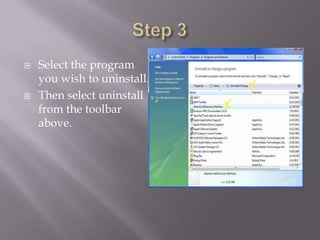
Step 3Select the program you wish to uninstall.Then select uninstall from the toolbar above.
ConclusionFollowing these steps should allow you to uninstall any software application.For more assistance contact the technical support of the product developer.

Uninstalling a program

  • 1.
    How to UNINSTALLA PROGRAMPhillipe FergusonIT 190 Unit 4Kaplan University
  • 2.
    Step 1Start byclicking the start menu.Scroll to the menu on the right and select the Control Panel.
  • 3.
    Step 2Underneath thetitle Programs select Uninstall a program.
  • 4.
    Step 3Select theprogram you wish to uninstall.Then select uninstall from the toolbar above.
  • 5.
    ConclusionFollowing these stepsshould allow you to uninstall any software application.For more assistance contact the technical support of the product developer.