Scheduling a Proctored Exam
with ‘Take Exam via Webcam’*
through UNC Online
Participating UNC System Campuses
ASU, ECU, ECSU, FSU, NCCU, UNCG, UNCP, UNCW, WCU and
WSSU
*For online exam types (paper based, offline computer based and online+paper
based exams must be scheduled via UNC Online with face-to-face proctors).
*Campus codes of academic integrity and conduct are applicable during online
exam appointments.
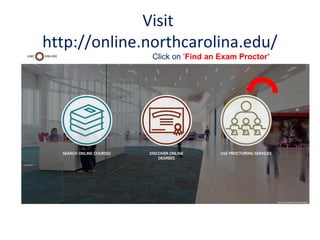
Visit
http://online.northcarolina.edu/
Click on ‘Find an Exam Proctor’
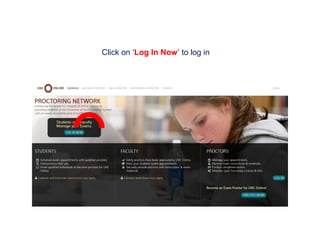
Click on ‘Log In Now’ to log in
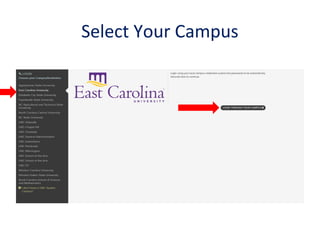
Select Your Campus
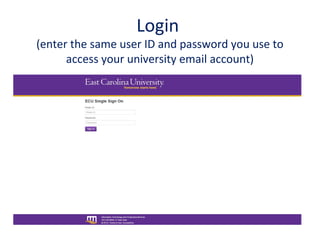
Login
(enter the same user ID and password you use to
access your university email account)
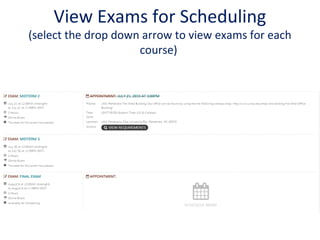
View Exams for Scheduling
(select the drop down arrow to view exams for each
course)
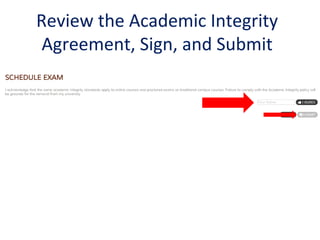
Review the Academic Integrity
Agreement, Sign, and Submit
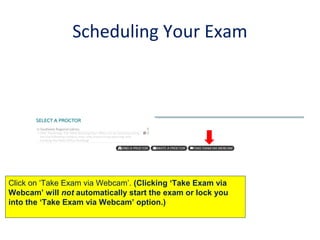
Scheduling Your Exam
Click on ‘Take Exam via Webcam’. (Clicking ‘Take Exam via
Webcam’ will not automatically start the exam or lock you
into the ‘Take Exam via Webcam’ option.)
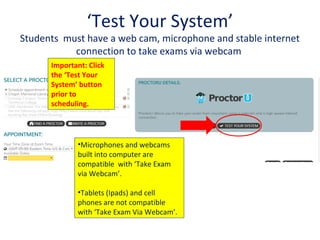
‘Test Your System’
Students must have a web cam, microphone and stable internet
connection to take exams via webcam
Important: Click
the ‘Test Your
System’ button
prior to
scheduling.
•Microphones and webcams
built into computer are
compatible with ‘Take Exam
via Webcam’.
•Tablets (Ipads) and cell
phones are not compatible
with ‘Take Exam Via Webcam’.
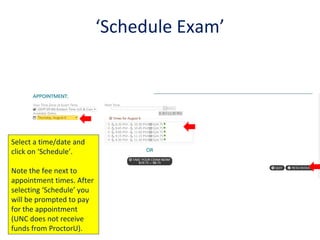
‘Schedule Exam’
Select a time/date and
click on ‘Schedule’.
Note the fee next to
appointment times. After
selecting ‘Schedule’ you
will be prompted to pay
for the appointment
(UNC does not receive
funds from ProctorU).
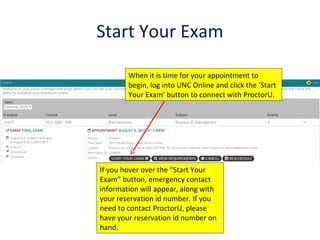
Start Your Exam
When it is time for your appointment to
begin, log into UNC Online and click the ‘Start
Your Exam’ button to connect with ProctorU.
If you hover over the “Start Your
Exam” button, emergency contact
information will appear, along with
your reservation id number. If you
need to contact ProctorU, please
have your reservation id number on
hand.
Emergency Contact Information
• If you are experiencing technical issues with a
webcam appointment ("Take Exam via
Webcam"/ProctorU), please do the following:
call 1-855-772-8678 or 925-273-7588. Select
Option 2 (Advocates) or Option 3 (Assessment
Services). There is live coverage for these two
extensions from 7 am to 7 pm CST 7 days a
week. Outside of that window email
advocate@proctoru.com
More info on ‘Take Exam via Webcam’…
• Online appointments occur in real time with live proctors.
• Proctors are based in ProctorU headquarters with support staff (proctors do not proctor
from home).
• All proctors have passed FERPA training and proctor training.
• Proctors monitor students’ faces, computer screens and audio throughout appointments
(including the times students cannot view proctors).
• Proctors perform two student identification checks before the start of appointments.
• Students must be on time for appointments (there are no refunds for missed
appointments).
• Proctors remote into students’ computer to enter exam passwords.
• Exam durations start after proctors complete student identification checks and enter
exam passwords into students’ computers.
• UNC system campuses do not receive funds from ProctorU.
• Please contact us at proctors@online.northcarolina.edu
if you have additional questions or concerns.

UNC Online Proctoring Network for Faculty - Scheduling Take Exam Via Webcam

  • 1.
    Scheduling a ProctoredExam with ‘Take Exam via Webcam’* through UNC Online Participating UNC System Campuses ASU, ECU, ECSU, FSU, NCCU, UNCG, UNCP, UNCW, WCU and WSSU *For online exam types (paper based, offline computer based and online+paper based exams must be scheduled via UNC Online with face-to-face proctors). *Campus codes of academic integrity and conduct are applicable during online exam appointments.
  • 2.
  • 3.
    Click on ‘LogIn Now’ to log in
  • 4.
  • 5.
    Login (enter the sameuser ID and password you use to access your university email account)
  • 6.
    View Exams forScheduling (select the drop down arrow to view exams for each course)
  • 7.
    Review the AcademicIntegrity Agreement, Sign, and Submit
  • 8.
    Scheduling Your Exam Clickon ‘Take Exam via Webcam’. (Clicking ‘Take Exam via Webcam’ will not automatically start the exam or lock you into the ‘Take Exam via Webcam’ option.)
  • 9.
    ‘Test Your System’ Studentsmust have a web cam, microphone and stable internet connection to take exams via webcam Important: Click the ‘Test Your System’ button prior to scheduling. •Microphones and webcams built into computer are compatible with ‘Take Exam via Webcam’. •Tablets (Ipads) and cell phones are not compatible with ‘Take Exam Via Webcam’.
  • 10.
    ‘Schedule Exam’ Select atime/date and click on ‘Schedule’. Note the fee next to appointment times. After selecting ‘Schedule’ you will be prompted to pay for the appointment (UNC does not receive funds from ProctorU).
  • 11.
    Start Your Exam Whenit is time for your appointment to begin, log into UNC Online and click the ‘Start Your Exam’ button to connect with ProctorU. If you hover over the “Start Your Exam” button, emergency contact information will appear, along with your reservation id number. If you need to contact ProctorU, please have your reservation id number on hand.
  • 12.
    Emergency Contact Information •If you are experiencing technical issues with a webcam appointment ("Take Exam via Webcam"/ProctorU), please do the following: call 1-855-772-8678 or 925-273-7588. Select Option 2 (Advocates) or Option 3 (Assessment Services). There is live coverage for these two extensions from 7 am to 7 pm CST 7 days a week. Outside of that window email advocate@proctoru.com
  • 13.
    More info on‘Take Exam via Webcam’… • Online appointments occur in real time with live proctors. • Proctors are based in ProctorU headquarters with support staff (proctors do not proctor from home). • All proctors have passed FERPA training and proctor training. • Proctors monitor students’ faces, computer screens and audio throughout appointments (including the times students cannot view proctors). • Proctors perform two student identification checks before the start of appointments. • Students must be on time for appointments (there are no refunds for missed appointments). • Proctors remote into students’ computer to enter exam passwords. • Exam durations start after proctors complete student identification checks and enter exam passwords into students’ computers. • UNC system campuses do not receive funds from ProctorU. • Please contact us at proctors@online.northcarolina.edu if you have additional questions or concerns.