Twitter topic sentiment
analysis
CREATED BY RAHUL JHA
Background
 This is a simple twitter sentiment analysis project I did during my mid semester break.
It takes a topic and number of inputs to analyse and gives you a nice pictorial
representation of the overall sentiment of that topic.
 On a daily basis, we are constantly bombarded by facts and figures by advertisement
agencies, governments, people etcetera. How will we get to know whether these facts
makes sense or not. I always desired to know what common people think about any
particular topic which is popular right now. I don’t want to just believe on a particular
figure blindly. Then it struck me why not use my newly acquired knowledge of Python
for this purpose. Hence, I got motivated to do this project. Now, I don’t rely on anyone
telling me how common people feel about a particular topic. I can just open up my
script and within few minutes, I can get real time analysis of twitter data about a certain
topic.
Tools Used
 Twitter API
 Twitter is an Excellent source of data about public opinion. It also contains some
sensitive information. Not anyone can get access to this data. As of 20th October 2018,
one need to fill developers form to get the access of this API.
 Python: Specifically, following libraries of the python are used:
 Tweepy: To interact with the Twitter API.
 TextBlob: To do text and sentiment analysis.
 Matplotlib: To plot the results in a Pie char to show the final sentiment.
Python Script
Loading
Libraries and
dependencies
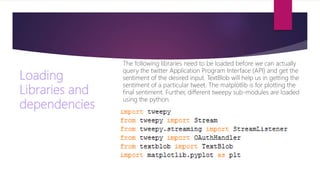
The following libraries need to be loaded before we can actually
query the twitter Application Program Interface (API) and get the
sentiment of the desired input. TextBlob will help us in getting the
sentiment of a particular tweet. The matplotlib is for plotting the
final sentiment. Further, different tweepy sub-modules are loaded
using the python.
Making Connection with Twitter
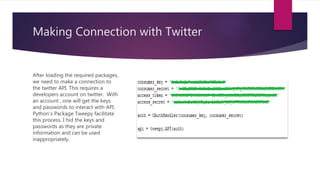
After loading the required packages,
we need to make a connection to
the twitter API. This requires a
developers account on twitter. With
an account , one will get the keys
and passwords to interact with API.
Python’s Package Tweepy facilitate
this process. I hid the keys and
passwords as they are private
information and can be used
inappropriately.
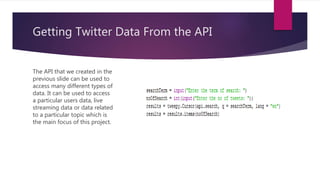
Getting Twitter Data From the API
The API that we created in the
previous slide can be used to
access many different types of
data. It can be used to access
a particular users data, live
streaming data or data related
to a particular topic which is
the main focus of this project.
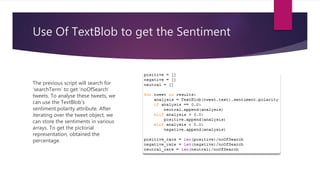
Use Of TextBlob to get the Sentiment
The previous script will search for
‘searchTerm’ to get ‘noOfSearch’
tweets. To analyse these tweets, we
can use the TextBlob’s
sentiment.polarity attribute. After
iterating over the tweet object, we
can store the sentiments in various
arrays. To get the pictorial
representation, obtained the
percentage.
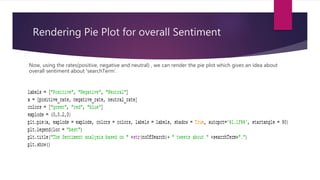
Rendering Pie Plot for overall Sentiment
Now, using the rates(positive, negative and neutral) , we can render the pie plot which gives an idea about
overall sentiment about ‘searchTerm’.
We are done with the script. Now, after executing the
script, it will prompt us for two inputs. The first will be
the term that we want to get the sentiment of and the
next will be ‘How many tweets we want to analyse?’.
Now, lets run the scripts for few times and analyse the
sentiment about some common topics.
First
Execution
with
‘metoo’ tag
Metoo with
More
Tweets(1000)
Twitter on (Modi and Rahul)
Twitter on Modi and Rahul(500 tweets)
Twitter on Modi and Rahul(1000 tweets)
Reason For the strange result
In the previous slide, it seems like a lot of people are neutral about Rahul Gandhi
which is actually the case as many people use sarcasm for Rahul Gandhi. The TextBlob
is not good at detecting sarcasm and humour. It can only detect the positive and
negative sentiment using some of the keywords which are a strong indicator of either
of the sentiment. If it does not find any positive or negative phrase in the tweet, it
gives a 0 polarity score which mean no sentiment at all.
Results on Modi is quite alarming for the ruling party as almost 1/3rd of the tweets are
negative. Considering the image of PM, this results is rather alarming.
Lalit Modi: The
result makes sense
as there is negative
emotions against
lalit modi.
Demonetization: Again, there are
large percentage of tweets as
neutral which can also be a sarcasm
or humor against the government’s
move. There were many who were
actually neutral about this move.
Considering the tweet “It is good
move but needs a robust
infrastructure”. This statement is
obviously neutral. The high
percentage indicate that there are
large number of people who aren’t
quite sure about the move.
The main motive behind this was to create a tool which can
work for us and tell us what is the general sentiment of people
on twitter about a certain topic. In twitter, most of the things
work as a particular keyword. Such as #metoo, #narendramodi,
#raga etcetera. Hence, keywords can tell us hidden stories.
I intend to create a more advanced version of this in future such
as getting live sentiment analysis for which advanced machine
capabilities are required.
This finishes the project.

Twitter sentiment analysis

  • 1.
  • 2.
    Background  This isa simple twitter sentiment analysis project I did during my mid semester break. It takes a topic and number of inputs to analyse and gives you a nice pictorial representation of the overall sentiment of that topic.  On a daily basis, we are constantly bombarded by facts and figures by advertisement agencies, governments, people etcetera. How will we get to know whether these facts makes sense or not. I always desired to know what common people think about any particular topic which is popular right now. I don’t want to just believe on a particular figure blindly. Then it struck me why not use my newly acquired knowledge of Python for this purpose. Hence, I got motivated to do this project. Now, I don’t rely on anyone telling me how common people feel about a particular topic. I can just open up my script and within few minutes, I can get real time analysis of twitter data about a certain topic.
  • 3.
    Tools Used  TwitterAPI  Twitter is an Excellent source of data about public opinion. It also contains some sensitive information. Not anyone can get access to this data. As of 20th October 2018, one need to fill developers form to get the access of this API.  Python: Specifically, following libraries of the python are used:  Tweepy: To interact with the Twitter API.  TextBlob: To do text and sentiment analysis.  Matplotlib: To plot the results in a Pie char to show the final sentiment.
  • 4.
  • 5.
    Loading Libraries and dependencies The followinglibraries need to be loaded before we can actually query the twitter Application Program Interface (API) and get the sentiment of the desired input. TextBlob will help us in getting the sentiment of a particular tweet. The matplotlib is for plotting the final sentiment. Further, different tweepy sub-modules are loaded using the python.
  • 6.
    Making Connection withTwitter After loading the required packages, we need to make a connection to the twitter API. This requires a developers account on twitter. With an account , one will get the keys and passwords to interact with API. Python’s Package Tweepy facilitate this process. I hid the keys and passwords as they are private information and can be used inappropriately.
  • 7.
    Getting Twitter DataFrom the API The API that we created in the previous slide can be used to access many different types of data. It can be used to access a particular users data, live streaming data or data related to a particular topic which is the main focus of this project.
  • 8.
    Use Of TextBlobto get the Sentiment The previous script will search for ‘searchTerm’ to get ‘noOfSearch’ tweets. To analyse these tweets, we can use the TextBlob’s sentiment.polarity attribute. After iterating over the tweet object, we can store the sentiments in various arrays. To get the pictorial representation, obtained the percentage.
  • 9.
    Rendering Pie Plotfor overall Sentiment Now, using the rates(positive, negative and neutral) , we can render the pie plot which gives an idea about overall sentiment about ‘searchTerm’.
  • 10.
    We are donewith the script. Now, after executing the script, it will prompt us for two inputs. The first will be the term that we want to get the sentiment of and the next will be ‘How many tweets we want to analyse?’. Now, lets run the scripts for few times and analyse the sentiment about some common topics.
  • 11.
  • 12.
  • 13.
    Twitter on (Modiand Rahul)
  • 14.
    Twitter on Modiand Rahul(500 tweets)
  • 15.
    Twitter on Modiand Rahul(1000 tweets)
  • 16.
    Reason For thestrange result In the previous slide, it seems like a lot of people are neutral about Rahul Gandhi which is actually the case as many people use sarcasm for Rahul Gandhi. The TextBlob is not good at detecting sarcasm and humour. It can only detect the positive and negative sentiment using some of the keywords which are a strong indicator of either of the sentiment. If it does not find any positive or negative phrase in the tweet, it gives a 0 polarity score which mean no sentiment at all. Results on Modi is quite alarming for the ruling party as almost 1/3rd of the tweets are negative. Considering the image of PM, this results is rather alarming.
  • 17.
    Lalit Modi: The resultmakes sense as there is negative emotions against lalit modi.
  • 18.
    Demonetization: Again, thereare large percentage of tweets as neutral which can also be a sarcasm or humor against the government’s move. There were many who were actually neutral about this move. Considering the tweet “It is good move but needs a robust infrastructure”. This statement is obviously neutral. The high percentage indicate that there are large number of people who aren’t quite sure about the move.
  • 19.
    The main motivebehind this was to create a tool which can work for us and tell us what is the general sentiment of people on twitter about a certain topic. In twitter, most of the things work as a particular keyword. Such as #metoo, #narendramodi, #raga etcetera. Hence, keywords can tell us hidden stories. I intend to create a more advanced version of this in future such as getting live sentiment analysis for which advanced machine capabilities are required. This finishes the project.