A	
  Snapshot	
  from	
  my	
  YouTube	
  Tutorial	
  

     I	
  find	
  that	
  many	
  clients	
  new	
  to	
  YouTube	
  (or	
  not	
  so	
  
     new)	
  are	
  not	
  yet	
  aware	
  of	
  the	
  capabilities	
  they	
  have	
  
     to	
  change	
  the	
  look	
  and	
  feel	
  of	
  their	
  design.	
  	
  Here	
  
     are	
  some	
  basic	
  tips	
  to	
  go	
  beyond	
  the	
  template!	


Soaring	
  Solutions,	
  LLC	
  
                                                                                            1	
  
Social	
  Media	
  for	
  Business-­‐	
  	
  YouTube 	


  Design	
  &	
  Personalize	
  Your	
  Channel	
  	
  
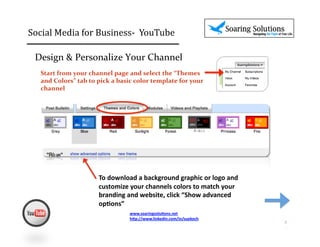
    Start	
  from	
  your	
  channel	
  page	
  and	
  select	
  the	
  “Themes	
  
    and	
  Colors”	
  tab	
  to	
  pick	
  a	
  basic	
  color	
  template	
  for	
  your	
  
    channel	


                                   To	
  download	
  a	
  background	
  graphic	
  or	
  logo	
  and	
  
                                   customize	
  your	
  channels	
  colors	
  to	
  match	
  your	
  
                                   branding	
  and	
  website,	
  click	
  “Show	
  advanced	
  
                                   op,ons”	
  
                                                    www.soaringsolu,ons.net	
  
                                                    h1p://www.linkedin.com/in/suekoch	
  	
  
                                                                                                           2	
  
Social	
  Media	
  for	
  Business-­‐	
  	
  YouTube 	


  Match	
  your	
  logo	
  &	
  website	
  colors	
  

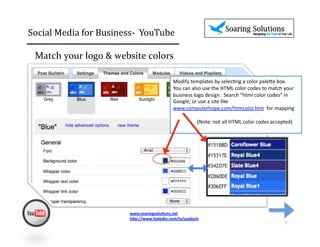
                                                             Modify	
  templates	
  by	
  selec2ng	
  a	
  color	
  pale6e	
  box.	


                                                             You	
  can	
  also	
  use	
  the	
  HTML	
  color	
  codes	
  to	
  match	
  your	
  
                                                             business	
  logo	
  design.	
  	
  Search	
  “html	
  color	
  codes”	
  in	
  
                                                             Google,	
  or	
  use	
  a	
  site	
  like	
  	
  
                                                             www.computerhope.com/htmcolor.htm	
  	
  for	
  mapping	


  (Note:	
  not	
  all	
  HTML	
  color	
  codes	
  accepted)	


                                    www.soaringsolu,ons.net	
  
                                    h1p://www.linkedin.com/in/suekoch	
  	
  
                                                                                                                                                                                             3	
  
Social	
  Media	
  for	
  Business-­‐	
  	
  YouTube 	


  Design	
  &	
  Personalize	
  	
  
  Your	
  Channel	


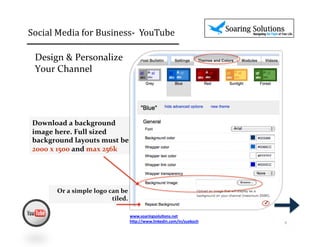
 Download	
  a	
  background	
  
 image	
  here.	
  Full	
  sized	
  
 background	
  layouts	
  must	
  be	
  	
  
 2000	
  x	
  1500	
  and	
  max	
  256k	


           Or	
  a	
  simple	
  logo	
  can	
  be	
  
                                         tiled.	
  	
  
                                                                                                        ✓


                                                      www.soaringsolu,ons.net	
  
                                                      h1p://www.linkedin.com/in/suekoch	
  	
               4	
  
Social	
  Media	
  for	
  Business-­‐	
  	
  YouTube 	


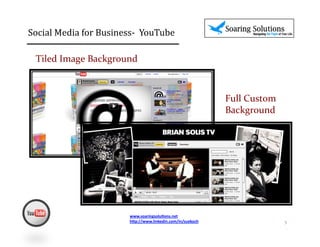
  Tiled	
  Image	
  Background	


                                                                                      Full	
  Custom	
  
                                                                                      Background	


                                    www.soaringsolu,ons.net	
  
                                    h1p://www.linkedin.com/in/suekoch	
  	
                                5	
  
http://soaringsolutions.net	


                                  6	
  

Tutorial Snapshot- Design Beyond the Template

  • 1.
    A  Snapshot  from  my  YouTube  Tutorial   I  find  that  many  clients  new  to  YouTube  (or  not  so   new)  are  not  yet  aware  of  the  capabilities  they  have   to  change  the  look  and  feel  of  their  design.    Here   are  some  basic  tips  to  go  beyond  the  template!   Soaring  Solutions,  LLC   1  
  • 2.
    Social  Media  for  Business-­‐    YouTube       Design  &  Personalize  Your  Channel     Start  from  your  channel  page  and  select  the  “Themes   and  Colors”  tab  to  pick  a  basic  color  template  for  your   channel   To  download  a  background  graphic  or  logo  and   customize  your  channels  colors  to  match  your   branding  and  website,  click  “Show  advanced   op,ons”   www.soaringsolu,ons.net   h1p://www.linkedin.com/in/suekoch     2  
  • 3.
    Social  Media  for  Business-­‐    YouTube       Match  your  logo  &  website  colors   Modify  templates  by  selec2ng  a  color  pale6e  box.       You  can  also  use  the  HTML  color  codes  to  match  your   business  logo  design.    Search  “html  color  codes”  in   Google,  or  use  a  site  like     www.computerhope.com/htmcolor.htm    for  mapping                                        (Note:  not  all  HTML  color  codes  accepted)   www.soaringsolu,ons.net   h1p://www.linkedin.com/in/suekoch     3  
  • 4.
    Social  Media  for  Business-­‐    YouTube       Design  &  Personalize     Your  Channel   Download  a  background   image  here.  Full  sized   background  layouts  must  be     2000  x  1500  and  max  256k   Or  a  simple  logo  can  be   tiled.     ✓ www.soaringsolu,ons.net   h1p://www.linkedin.com/in/suekoch     4  
  • 5.
    Social  Media  for  Business-­‐    YouTube       Tiled  Image  Background   Full  Custom   Background   www.soaringsolu,ons.net   h1p://www.linkedin.com/in/suekoch     5  
  • 6.