C# Dictionary
C# - Dictionary<TKey, TValue>
• a generic collection that
stores key-value pairs in no
particular order.
Dictionary Characteristics
• Dictionary<TKey, TValue> stores key-value
pairs.
• Comes under System.Collections.Generic
namespace.
• Implements IDictionary<TKey, TValue>
interface.
• Keys must be unique and cannot be null.
• Values can be null or duplicate.
• Values can be accessed by passing associated
key in the indexer e.g. myDictionary[key]
• Elements are stored as KeyValuePair<TKey,
TValue> objects.
Creating a Dictionary
• You can create the Dictionary<TKey, TValue>
object by passing the type of keys and values
it can store.
using System;
using System.Collections.Generic;
public class Program
{
public static void Main()
{
IDictionary<int, string> numberNames = new Dictionary<int, string>();
numberNames.Add(1,"One"); //adding key/value using the Add() method
numberNames.Add(3,"Three");
numberNames.Add(2,"Two");
foreach(KeyValuePair<int, string> kvp in numberNames)
Console.WriteLine("Key: {0}, Value: {1}", kvp.Key, kvp.Value);
Creating a Dictionary
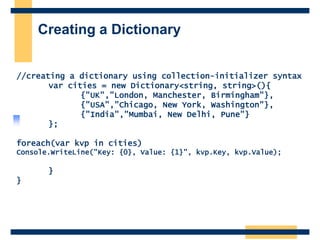
//creating a dictionary using collection-initializer syntax
var cities = new Dictionary<string, string>(){
{"UK","London, Manchester, Birmingham"},
{"USA","Chicago, New York, Washington"},
{"India","Mumbai, New Delhi, Pune"}
};
foreach(var kvp in cities)
Console.WriteLine("Key: {0}, Value: {1}", kvp.Key, kvp.Value);
}
}
Access Dictionary Elements
• The Dictionary can be accessed using indexer.
Specify a key to get the associated value. You can
also use the ElementAt() method to get a
KeyValuePair from the specified index.
using System;
using System.Linq;
using System.Collections.Generic;
public class Program
{
public static void Main()
{
var cities = new Dictionary<string, string>(){
{"UK", "London, Manchester, Birmingham"},
{"USA", "Chicago, New York, Washington"},
{"India", "Mumbai, New Delhi, Pune"}
};
Console.WriteLine(cities["UK"]); //prints value of UK key
Console.WriteLine(cities["USA"]);//prints value of USA key
//Console.WriteLine(cities["France"]); // run-time exception: Key does not exist
Access Dictionary Elements
//use ContainsKey() to check for an unknown key
if(cities.ContainsKey("France")){
Console.WriteLine(cities["France"]);
}
//use TryGetValue() to get a value of unknown key
string result;
if(cities.TryGetValue("France", out result))
{
Console.WriteLine(result);
}
Console.WriteLine("---access elements using for loop---");
//use ElementAt() to retrieve key-value pair using index
for (int i = 0; i < cities.Count; i++)
{
Console.WriteLine("Key: {0}, Value: {1}",
cities.ElementAt(i).Key,
cities.ElementAt(i).Value);
}
}
}
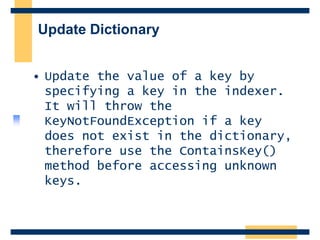
Update Dictionary
• Update the value of a key by
specifying a key in the indexer.
It will throw the
KeyNotFoundException if a key
does not exist in the dictionary,
therefore use the ContainsKey()
method before accessing unknown
keys.
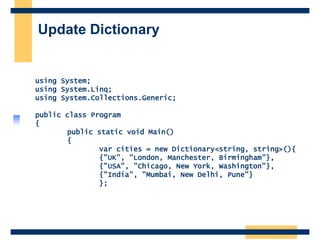
Update Dictionary
using System;
using System.Linq;
using System.Collections.Generic;
public class Program
{
public static void Main()
{
var cities = new Dictionary<string, string>(){
{"UK", "London, Manchester, Birmingham"},
{"USA", "Chicago, New York, Washington"},
{"India", "Mumbai, New Delhi, Pune"}
};
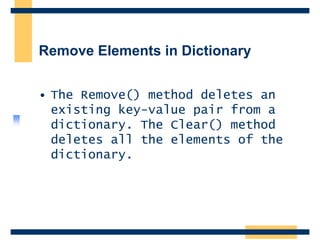
Remove Elements in Dictionary
• The Remove() method deletes an
existing key-value pair from a
dictionary. The Clear() method
deletes all the elements of the
dictionary.
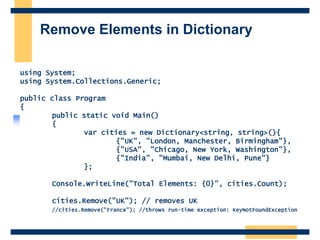
Remove Elements in Dictionary
using System;
using System.Collections.Generic;
public class Program
{
public static void Main()
{
var cities = new Dictionary<string, string>(){
{"UK", "London, Manchester, Birmingham"},
{"USA", "Chicago, New York, Washington"},
{"India", "Mumbai, New Delhi, Pune"}
};
Console.WriteLine("Total Elements: {0}", cities.Count);
cities.Remove("UK"); // removes UK
//cities.Remove("France"); //throws run-time exception: KeyNotFoundException
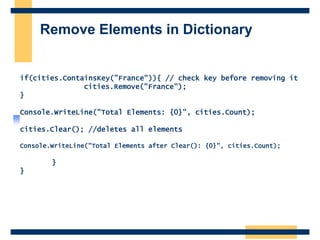
Remove Elements in Dictionary
if(cities.ContainsKey("France")){ // check key before removing it
cities.Remove("France");
}
Console.WriteLine("Total Elements: {0}", cities.Count);
cities.Clear(); //deletes all elements
Console.WriteLine("Total Elements after Clear(): {0}", cities.Count);
}
}

Topic 10 Computer Programming C# Dictionary.pptx

  • 1.
  • 2.
    C# - Dictionary<TKey,TValue> • a generic collection that stores key-value pairs in no particular order.
  • 3.
    Dictionary Characteristics • Dictionary<TKey,TValue> stores key-value pairs. • Comes under System.Collections.Generic namespace. • Implements IDictionary<TKey, TValue> interface. • Keys must be unique and cannot be null. • Values can be null or duplicate. • Values can be accessed by passing associated key in the indexer e.g. myDictionary[key] • Elements are stored as KeyValuePair<TKey, TValue> objects.
  • 4.
    Creating a Dictionary •You can create the Dictionary<TKey, TValue> object by passing the type of keys and values it can store. using System; using System.Collections.Generic; public class Program { public static void Main() { IDictionary<int, string> numberNames = new Dictionary<int, string>(); numberNames.Add(1,"One"); //adding key/value using the Add() method numberNames.Add(3,"Three"); numberNames.Add(2,"Two"); foreach(KeyValuePair<int, string> kvp in numberNames) Console.WriteLine("Key: {0}, Value: {1}", kvp.Key, kvp.Value);
  • 5.
    Creating a Dictionary //creatinga dictionary using collection-initializer syntax var cities = new Dictionary<string, string>(){ {"UK","London, Manchester, Birmingham"}, {"USA","Chicago, New York, Washington"}, {"India","Mumbai, New Delhi, Pune"} }; foreach(var kvp in cities) Console.WriteLine("Key: {0}, Value: {1}", kvp.Key, kvp.Value); } }
  • 6.
    Access Dictionary Elements •The Dictionary can be accessed using indexer. Specify a key to get the associated value. You can also use the ElementAt() method to get a KeyValuePair from the specified index. using System; using System.Linq; using System.Collections.Generic; public class Program { public static void Main() { var cities = new Dictionary<string, string>(){ {"UK", "London, Manchester, Birmingham"}, {"USA", "Chicago, New York, Washington"}, {"India", "Mumbai, New Delhi, Pune"} }; Console.WriteLine(cities["UK"]); //prints value of UK key Console.WriteLine(cities["USA"]);//prints value of USA key //Console.WriteLine(cities["France"]); // run-time exception: Key does not exist
  • 7.
    Access Dictionary Elements //useContainsKey() to check for an unknown key if(cities.ContainsKey("France")){ Console.WriteLine(cities["France"]); } //use TryGetValue() to get a value of unknown key string result; if(cities.TryGetValue("France", out result)) { Console.WriteLine(result); } Console.WriteLine("---access elements using for loop---"); //use ElementAt() to retrieve key-value pair using index for (int i = 0; i < cities.Count; i++) { Console.WriteLine("Key: {0}, Value: {1}", cities.ElementAt(i).Key, cities.ElementAt(i).Value); } } }
  • 8.
    Update Dictionary • Updatethe value of a key by specifying a key in the indexer. It will throw the KeyNotFoundException if a key does not exist in the dictionary, therefore use the ContainsKey() method before accessing unknown keys.
  • 9.
    Update Dictionary using System; usingSystem.Linq; using System.Collections.Generic; public class Program { public static void Main() { var cities = new Dictionary<string, string>(){ {"UK", "London, Manchester, Birmingham"}, {"USA", "Chicago, New York, Washington"}, {"India", "Mumbai, New Delhi, Pune"} };
  • 10.
    Remove Elements inDictionary • The Remove() method deletes an existing key-value pair from a dictionary. The Clear() method deletes all the elements of the dictionary.
  • 11.
    Remove Elements inDictionary using System; using System.Collections.Generic; public class Program { public static void Main() { var cities = new Dictionary<string, string>(){ {"UK", "London, Manchester, Birmingham"}, {"USA", "Chicago, New York, Washington"}, {"India", "Mumbai, New Delhi, Pune"} }; Console.WriteLine("Total Elements: {0}", cities.Count); cities.Remove("UK"); // removes UK //cities.Remove("France"); //throws run-time exception: KeyNotFoundException
  • 12.
    Remove Elements inDictionary if(cities.ContainsKey("France")){ // check key before removing it cities.Remove("France"); } Console.WriteLine("Total Elements: {0}", cities.Count); cities.Clear(); //deletes all elements Console.WriteLine("Total Elements after Clear(): {0}", cities.Count); } }