Tomcat Overview
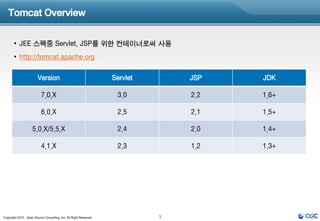
• JEE 스펙중 Servlet, JSP를 위한 컨테이너로써 사용
• http://tomcat.apache.org
Version Servlet JSP JDK
7.0.X 3.0 2.2 1.6+
6.0.X 2.5 2.1 1.5+
5.0.X/5.5.X 2.4 2.0 1.4+
4.1.X 2.3 1.2 1.3+
Copyright 2012 , Open Source Consulting, Inc. All Right Reserved 1
3.
Tomcat Install
• Download
http://tomcat.apache.org/download-70.cgi
• Install
[root@ip-10-144-81-93 ~]# wget http://www.us.apache.org/dist/tomcat/tomcat-7/v7.0.35/bin/apache-tomcat-7.0.35.zip
[root@ip-10-144-81-93 ~]# unzip unzip apache-tomcat-7.0.35.zip
Copyright 2012 , Open Source Consulting, Inc. All Right Reserved 2
4.
Tomcat Directory
[root@ip-10-144-81-93 apache-tomcat-7.0.35]# ls -al
total 136
drwxr-xr-x 9 root root 4096 Jan 10 22:54 .
dr-xr-x--- 10 root root 4096 Feb 5 23:10 ..
-rw-r--r-- 1 root root 57862 Jan 10 22:54 LICENSE
-rw-r--r-- 1 root root 1228 Jan 10 22:54 NOTICE 실행 바이너리 스크립트
-rw-r--r-- 1 root root 9054 Jan 10 22:54 RELEASE-NOTES
서버 환경 설정 파일
-rw-r--r-- 1 root root 16641 Jan 10 22:54 RUNNING.txt
drwxr-xr-x 2 root root 4096 Jan 10 22:54 bin
Tomcat 구동 라이브러리
drwxr-xr-x 2 root root 4096 Jan 10 22:54 conf
drwxr-xr-x 2 root root 4096 Jan 10 22:54 lib 로그 저장 디렉토리
drwxr-xr-x 2 root root 4096 Jan 10 22:53 logs
임시 작업 디렉토리
drwxr-xr-x 2 root root 4096 Jan 10 22:54 temp
drwxr-xr-x 7 root root 4096 Jan 10 22:54 webapps
디플로이 애플리케이션
drwxr-xr-x 2 root root 4096 Jan 10 22:53 work
Tomcat 작업 디렉토리
Copyright 2012 , Open Source Consulting, Inc. All Right Reserved 3
5.
Tomcat Architecture
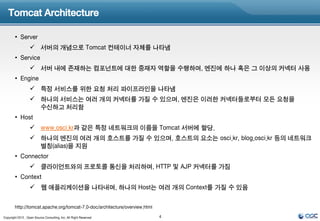
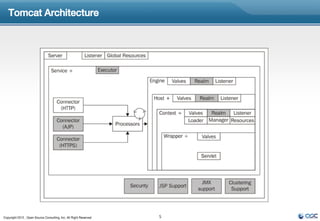
• Server
서버의 개념으로 Tomcat 컨테이너 자체를 나타냄
• Service
서버 내에 존재하는 컴포넌트에 대한 중재자 역할을 수행하며, 엔진에 하나 혹은 그 이상의 커넥터 사용
• Engine
특정 서비스를 위한 요청 처리 파이프라인을 나타냄
하나의 서비스는 여러 개의 커넥터를 가질 수 있으며, 엔진은 이러한 커넥터들로부터 모든 요청을
수신하고 처리함
• Host
www.osci.kr과 같은 특정 네트워크의 이름을 Tomcat 서버에 할당.
하나의 엔진의 여러 개의 호스트를 가질 수 있으며, 호스트의 요소는 osci.kr, blog.osci.kr 등의 네트워크
별칭(alias)을 지원
• Connector
클라이언트와의 프로토콜 통신을 처리하며, HTTP 및 AJP 커넥터를 가짐
• Context
웹 애플리케이션을 나타내며, 하나의 Host는 여러 개의 Context를 가질 수 있음
http://tomcat.apache.org/tomcat-7.0-doc/architecture/overview.html
Copyright 2012 , Open Source Consulting, Inc. All Right Reserved 4
Tomcat Connectors
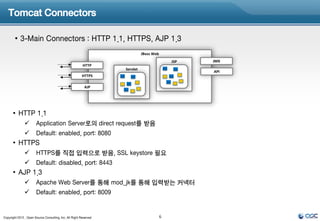
• 3-Main Connectors : HTTP 1.1, HTTPS, AJP 1.3
JBoss Web
JSP JMX
HTTP
Servlet
API
HTTPS
AJP
• HTTP 1.1
Application Server로의 direct request를 받음
Default: enabled, port: 8080
• HTTPS
HTTPS를 직접 입력으로 받음, SSL keystore 필요
Default: disabled, port: 8443
• AJP 1.3
Apache Web Server를 통해 mod_jk를 통해 입력받는 커넥터
Default: enabled, port: 8009
Copyright 2012 , Open Source Consulting, Inc. All Right Reserved 6
8.
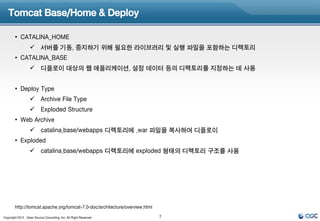
Tomcat Base/Home &Deploy
• CATALINA_HOME
서버를 기동, 중지하기 위해 필요한 라이브러리 및 실행 파일을 포함하는 디렉토리
• CATALINA_BASE
디플로이 대상의 웹 애플리케이션, 설정 데이터 등의 디렉토리를 지정하는 데 사용
• Deploy Type
Archive File Type
Exploded Structure
• Web Archive
catalina.base/webapps 디렉토리에 .war 파일을 복사하여 디플로이
• Exploded
catalina.base/webapps 디렉토리에 exploded 형태의 디렉토리 구조를 사용
http://tomcat.apache.org/tomcat-7.0-doc/architecture/overview.html
Copyright 2012 , Open Source Consulting, Inc. All Right Reserved 7
9.
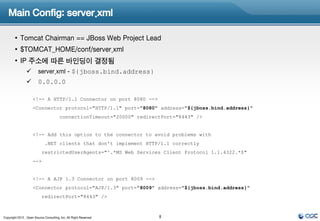
Main Config: server.xml
• Tomcat Chairman == JBoss Web Project Lead
• $TOMCAT_HOME/conf/server.xml
• IP 주소에 따른 바인딩이 결정됨
server.xml - ${jboss.bind.address}
0.0.0.0
<!-- A HTTP/1.1 Connector on port 8080 -->
<Connector protocol="HTTP/1.1" port="8080" address="${jboss.bind.address}"
connectionTimeout="20000" redirectPort="8443" />
<!-- Add this option to the connector to avoid problems with
.NET clients that don't implement HTTP/1.1 correctly
restrictedUserAgents="^.*MS Web Services Client Protocol 1.1.4322.*$"
-->
<!-- A AJP 1.3 Connector on port 8009 -->
<Connector protocol="AJP/1.3" port="8009" address="${jboss.bind.address}"
redirectPort="8443" />
Copyright 2012 , Open Source Consulting, Inc. All Right Reserved 8
10.
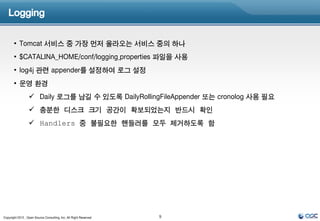
Logging
• Tomcat 서비스 중 가장 먼저 올라오는 서비스 중의 하나
• $CATALINA_HOME/conf/logging.properties 파일을 사용
• log4j 관련 appender를 설정하여 로그 설정
• 운영 환경
Daily 로그를 남길 수 있도록 DailyRollingFileAppender 또는 cronolog 사용 필요
충분한 디스크 크기 공간이 확보되었는지 반드시 확인
Handlers 중 불필요한 핸들러를 모두 제거하도록 함
Copyright 2012 , Open Source Consulting, Inc. All Right Reserved 9
11.
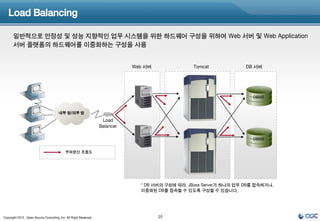
Load Balancing
일반적으로 안정성 및 성능 지향적인 업무 시스템을 위한 하드웨어 구성을 위하여 Web 서버 및 Web Application
서버 플랫폼의 하드웨어를 이중화하는 구성을 사용
Web 서버 Tomcat DB 서버
DBMS
내부 망/외부 망
Load
Balancer
DBMS
부하분산 흐름도
* DB 서버의 구성에 따라, JBoss Server가 하나의 업무 DB를 접속하거나,
이중화된 DB를 접속할 수 있도록 구성할 수 있습니다.
Copyright 2012 , Open Source Consulting, Inc. All Right Reserved 10
12.
Load Balancing
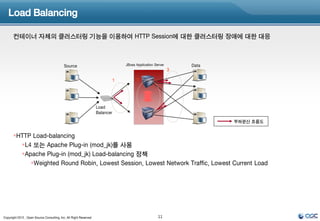
컨테이너 자체의 클러스터링 기능을 이용하여 HTTP Session에 대한 클러스터링 장애에 대한 대응
Source JBoss Application Server Data
3
1 2
Load
Balancer
부하분산 흐름도
HTTP Load-balancing
L4 또는 Apache Plug-in (mod_jk)를 사용
Apache Plug-in (mod_jk) Load-balancing 정책
Weighted Round Robin, Lowest Session, Lowest Network Traffic, Lowest Current Load
Copyright 2012 , Open Source Consulting, Inc. All Right Reserved 11
13.
Apache HTTPD
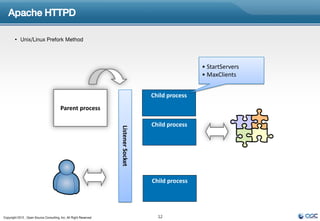
• Unix/Linux Prefork Method
• StartServers
• MaxClients
Child process
Parent process
Child process
Listener Socket
Child process
Copyright 2012 , Open Source Consulting, Inc. All Right Reserved 12
14.
Apache HTTPD
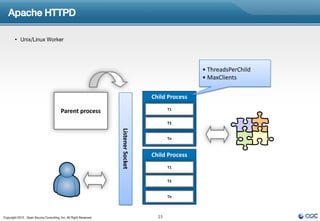
• Unix/Linux Worker
• ThreadsPerChild
• MaxClients
Child Process
T1
Parent process
Listener Socket T2
Tn
Child Process
T1
T2
Tn
Copyright 2012 , Open Source Consulting, Inc. All Right Reserved 13
15.
Apache Modules &Tomcat
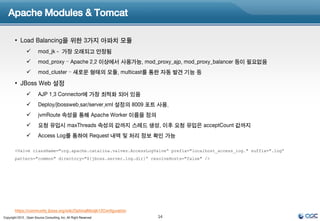
• Load Balancing을 위한 3가지 아파치 모듈
mod_jk - 가장 오래되고 안정됨
mod_proxy – Apache 2.2 이상에서 사용가능, mod_proxy_ajp, mod_proxy_balancer 등이 필요없음
mod_cluster – 새로운 형태의 모듈, multicast를 통한 자동 발견 기능 등
• JBoss Web 설정
AJP 1.3 Connector에 가장 최적화 되어 있음
Deploy/jbossweb.sar/server.xml 설정의 8009 포트 사용.
jvmRoute 속성을 통해 Apache Worker 이름을 정의
요청 유입시 maxThreads 속성의 값까지 스레드 생성, 이후 요청 유입은 acceptCount 값까지
Access Log를 통하여 Request 내역 및 처리 정보 확인 가능
<Valve className="org.apache.catalina.valves.AccessLogValve“ prefix="localhost_access_log." suffix=".log“
pattern="common" directory="${jboss.server.log.dir}“ resolveHosts="false" />
https://community.jboss.org/wiki/OptimalModjk12Configuration
Copyright 2012 , Open Source Consulting, Inc. All Right Reserved 14
16.
AJP Connector
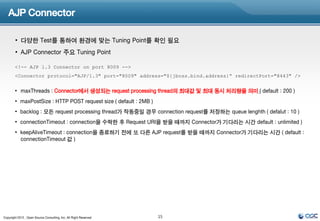
• 다양한 Test를 통하여 환경에 맞는 Tuning Point를 확인 필요
• AJP Connector 주요 Tuning Point
<!-- AJP 1.3 Connector on port 8009 -->
<Connector protocol="AJP/1.3" port="8009" address="${jboss.bind.address}“ redirectPort="8443" />
• maxThreads : Connector에서 생성되는 request processing thread의 최대값 및 최대 동시 처리량을 의미.( default : 200 )
• maxPostSize : HTTP POST request size ( default : 2MB )
• backlog : 모든 request processing thread가 작동중일 경우 connection request를 저장하는 queue lenghth ( defalut : 10 )
• connectionTimeout : connection을 수락한 후 Request URI을 받을 때까지 Connector가 기다리는 시간 default : unlimited )
• keepAliveTimeout : connection을 종료하기 전에 또 다른 AJP request를 받을 때까지 Connector가 기다리는 시간 ( default :
connectionTimeout 값 )
Copyright 2012 , Open Source Consulting, Inc. All Right Reserved 15
17.
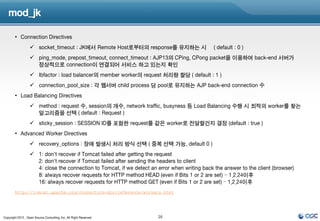
mod_jk
• Connection Directives
socket_timeout : JK에서 Remote Host로부터의 response를 유지하는 시갂 ( default : 0 )
ping_mode, prepost_timeout, connect_timeout : AJP13의 CPing, CPong packet을 이용하여 back-end 서버가
정상적으로 connection이 연결되어 서비스 하고 있는지 확인
lbfactor : load balancer의 member worker의 request 처리량 할당 ( default : 1 )
connection_pool_size : 각 웹서버 child process 당 pool로 유지하는 AJP back-end connection 수
• Load Balancing Directives
method : request 수, session의 개수, network traffic, busyness 등 Load Balancing 수행 시 최적의 worker를 찾는
알고리즘을 선택 ( default : Request )
sticky_session : SESSION ID를 포함한 request를 같은 worker로 전달할건지 결정 (default : true )
• Advanced Worker Directives
recovery_options : 장애 발생시 처리 방식 선택 ( 중복 선택 가능, default 0 )
1: don't recover if Tomcat failed after getting the request
2: don't recover if Tomcat failed after sending the headers to client
4: close the connection to Tomcat, if we detect an error when writing back the answer to the client (browser)
8: always recover requests for HTTP method HEAD (even if Bits 1 or 2 are set) – 1.2.24이후
16: always recover requests for HTTP method GET (even if Bits 1 or 2 are set) – 1.2.24이후
http://tomcat.apache.org/connectors-doc/reference/workers.html
Copyright 2012 , Open Source Consulting, Inc. All Right Reserved 16
18.
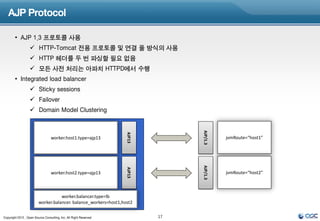
AJP Protocol
• AJP 1.3 프로토콜 사용
HTTP-Tomcat 전용 프로토콜 및 연결 풀 방식의 사용
HTTP 헤더를 두 번 파싱할 필요 없음
모든 사전 처리는 아파치 HTTPD에서 수행
• Integrated load balancer
Sticky sessions
Failover
Domain Model Clustering
AJP/1.3
AJP13
worker.host1.type=ajp13 jvmRoute=“host1”
AJP/1.3
AJP13
worker.host2.type=ajp13 jvmRoute=“host2”
worker.balancer.type=lb
worker.balancer. balance_workers=host1,host2
Copyright 2012 , Open Source Consulting, Inc. All Right Reserved 17
19.
Apache Setting
• mod_jk 컴파일 또는 다운로드 후 modules 디렉토리에 복사
• httpd.conf 파일에 mod_jk.conf를 포함시킴
[root@ip-10-144-81-93 ~]# vi httpd.conf
Include conf/mod_jk.conf
• mod_jk.conf 파일 편집
LoadModule jk_module modules/mod_jk.so
JkWorkersFile conf/workers.properties
JkLogFile logs/mod_jk.log
JkShmFile logs/mod_jk.shm
# Set the jk log level [debug/error/info]
JkLogLevel info
# Select the log format
JkLogStampFormat "[%a %b %d %H:%M:%S %Y] "
# JkOptions indicate to send SSL KEY SIZE,
JkOptions +ForwardKeySize +ForwardURICompatUnparsed -ForwardDirectories
# JkRequestLogFormat set the request format
JkRequestLogFormat "%w %V %T"
# Setting Global JkMount Configuration
JkMount /frontend/*.jsp sli_balancer
JkMount /jkstatus* jkstatus
ErrorLog "logs/sli_error_log"
TransferLog "logs/sli_access_log"
Copyright 2012 , Open Source Consulting, Inc. All Right Reserved 18
20.
Apache Setting(Cont.)
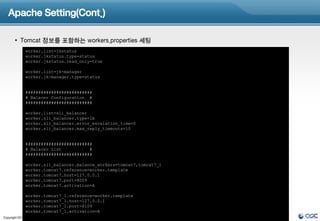
• Tomcat 정보를 포함하는 workers.properties 세팅
worker.list=jkstatus
worker.jkstatus.type=status
worker.jkstatus.read_only=true
worker.list=jk-manager
worker.jk-manager.type=status
##########################
# Balacer Configuration #
##########################
worker.list=sli_balancer
worker.sli_balancer.type=lb
worker.sli_balancer.error_escalation_time=0
worker.sli_balancer.max_reply_timeouts=10
##########################
# Balacer List #
##########################
worker.sli_balancer.balance_workers=tomcat7,tomcat7_1
worker.tomcat7.reference=worker.template
worker.tomcat7.host=127.0.0.1
worker.tomcat7.port=8009
worker.tomcat7.activation=A
worker.tomcat7_1.reference=worker.template
worker.tomcat7_1.host=127.0.0.1
worker.tomcat7_1.port=8109
worker.tomcat7_1.activation=A
Copyright 2012 , Open Source Consulting, Inc. All Right Reserved 19
21.
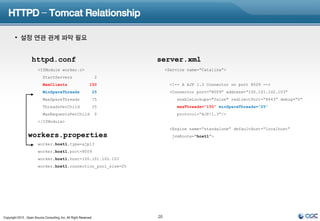
HTTPD – TomcatRelationship
• 설정 연관 관계 파악 필요
httpd.conf server.xml
<IfModule worker.c> <Service name=“Catalina”>
StartServers 2
MaxClients 150 <!-- A AJP 1.3 Connector on port 8009 -->
MinSpareThreads 25 <Connector port=“8009” address=“100.101.102.103”
MaxSpareThreads 75 enableLookups="false" redirectPort=“8443” debug=“0“
ThreadsPerChild 25 maxThreads=“150” minSpareThreads=“25”
MaxRequestsPerChild 0 protocol=“AJP/1.3”/>
</IfModule>
<Engine name=“standalone” defaultHost=“localhost”
workers.properties jvmRoute=“host1”>
worker.host1.type=ajp13
worker.host1.port=8009
worker.host1.host=100.101.102.103
worker.host1.connection_pool_size=25
Copyright 2012 , Open Source Consulting, Inc. All Right Reserved 20
22.
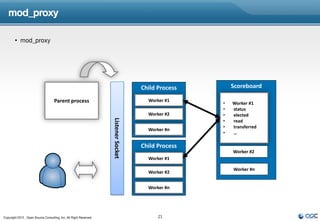
mod_proxy
• mod_proxy
Child Process Scoreboard
Parent process Worker #1
• Worker #1
• status
Listener Socket Worker #2 • elected
• read
• transferred
Worker #n
• …
Child Process
Worker #2
Worker #1
Worker #n
Worker #2
Worker #n
Copyright 2012 , Open Source Consulting, Inc. All Right Reserved 21
23.
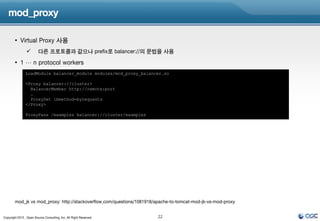
mod_proxy
• Virtual Proxy 사용
다른 프로토콜과 같으나 prefix로 balancer://의 문법을 사용
• 1 … n protocol workers
LoadModule balancer_module modules/mod_proxy_balancer.so
<Proxy balancer://cluster>
BalancerMember http://remote:port
…
ProxySet lbmethod=byrequests
</Proxy>
ProxyPass /examples balancer://cluster/examples
mod_jk vs mod_proxy: http://stackoverflow.com/questions/1081918/apache-to-tomcat-mod-jk-vs-mod-proxy
Copyright 2012 , Open Source Consulting, Inc. All Right Reserved 22



![Tomcat Install
• Download
http://tomcat.apache.org/download-70.cgi
• Install
[root@ip-10-144-81-93 ~]# wget http://www.us.apache.org/dist/tomcat/tomcat-7/v7.0.35/bin/apache-tomcat-7.0.35.zip
[root@ip-10-144-81-93 ~]# unzip unzip apache-tomcat-7.0.35.zip
Copyright 2012 , Open Source Consulting, Inc. All Right Reserved 2](https://image.slidesharecdn.com/tomcat67-130206051107-phpapp02/85/Tomcat6-7-How-To-3-320.jpg)
![Tomcat Directory
[root@ip-10-144-81-93 apache-tomcat-7.0.35]# ls -al
total 136
drwxr-xr-x 9 root root 4096 Jan 10 22:54 .
dr-xr-x--- 10 root root 4096 Feb 5 23:10 ..
-rw-r--r-- 1 root root 57862 Jan 10 22:54 LICENSE
-rw-r--r-- 1 root root 1228 Jan 10 22:54 NOTICE 실행 바이너리 스크립트
-rw-r--r-- 1 root root 9054 Jan 10 22:54 RELEASE-NOTES
서버 환경 설정 파일
-rw-r--r-- 1 root root 16641 Jan 10 22:54 RUNNING.txt
drwxr-xr-x 2 root root 4096 Jan 10 22:54 bin
Tomcat 구동 라이브러리
drwxr-xr-x 2 root root 4096 Jan 10 22:54 conf
drwxr-xr-x 2 root root 4096 Jan 10 22:54 lib 로그 저장 디렉토리
drwxr-xr-x 2 root root 4096 Jan 10 22:53 logs
임시 작업 디렉토리
drwxr-xr-x 2 root root 4096 Jan 10 22:54 temp
drwxr-xr-x 7 root root 4096 Jan 10 22:54 webapps
디플로이 애플리케이션
drwxr-xr-x 2 root root 4096 Jan 10 22:53 work
Tomcat 작업 디렉토리
Copyright 2012 , Open Source Consulting, Inc. All Right Reserved 3](https://image.slidesharecdn.com/tomcat67-130206051107-phpapp02/85/Tomcat6-7-How-To-4-320.jpg)
![Apache Setting
• mod_jk 컴파일 또는 다운로드 후 modules 디렉토리에 복사
• httpd.conf 파일에 mod_jk.conf를 포함시킴
[root@ip-10-144-81-93 ~]# vi httpd.conf
Include conf/mod_jk.conf
• mod_jk.conf 파일 편집
LoadModule jk_module modules/mod_jk.so
JkWorkersFile conf/workers.properties
JkLogFile logs/mod_jk.log
JkShmFile logs/mod_jk.shm
# Set the jk log level [debug/error/info]
JkLogLevel info
# Select the log format
JkLogStampFormat "[%a %b %d %H:%M:%S %Y] "
# JkOptions indicate to send SSL KEY SIZE,
JkOptions +ForwardKeySize +ForwardURICompatUnparsed -ForwardDirectories
# JkRequestLogFormat set the request format
JkRequestLogFormat "%w %V %T"
# Setting Global JkMount Configuration
JkMount /frontend/*.jsp sli_balancer
JkMount /jkstatus* jkstatus
ErrorLog "logs/sli_error_log"
TransferLog "logs/sli_access_log"
Copyright 2012 , Open Source Consulting, Inc. All Right Reserved 18](https://image.slidesharecdn.com/tomcat67-130206051107-phpapp02/85/Tomcat6-7-How-To-19-320.jpg)


![[오픈소스컨설팅] 아파치톰캣 운영가이드 v1.3](https://cdn.slidesharecdn.com/ss_thumbnails/opensourceconsultingtomcatoperationguidev1-181113020525-thumbnail.jpg?width=640&height=640&fit=bounds)


![[오픈소스컨설팅] 스카우터 사용자 가이드 2020](https://cdn.slidesharecdn.com/ss_thumbnails/2020scouteruserguide-200122014357-thumbnail.jpg?width=640&height=640&fit=bounds)


![[오픈소스컨설팅]JBoss AS7/EAP6 - JMS and JMX](https://cdn.slidesharecdn.com/ss_thumbnails/jbossjmsjmx-131218063933-phpapp01-thumbnail.jpg?width=640&height=640&fit=bounds)

![[오픈소스컨설팅]Scouter 설치 및 사용가이드(JBoss)](https://cdn.slidesharecdn.com/ss_thumbnails/scouterjboss-160310001021-thumbnail.jpg?width=640&height=640&fit=bounds)
![[2018] MySQL 이중화 진화기](https://cdn.slidesharecdn.com/ss_thumbnails/cloudinfra03-190131073325-thumbnail.jpg?width=640&height=640&fit=bounds)
![[오픈소스컨설팅]Zabbix Installation and Configuration Guide](https://cdn.slidesharecdn.com/ss_thumbnails/zabbixinstallationconfigurationguide-130702191713-phpapp01-thumbnail.jpg?width=640&height=640&fit=bounds)


![[오픈소스컨설팅] RPM 만들기](https://cdn.slidesharecdn.com/ss_thumbnails/rpm-160303232106-thumbnail.jpg?width=640&height=640&fit=bounds)
![[오픈소스컨설팅]Nginx 1.2.7 설치가이드__v1](https://cdn.slidesharecdn.com/ss_thumbnails/nginx1-2-7v1-130506223255-phpapp01-thumbnail.jpg?width=640&height=640&fit=bounds)
![[오픈소스컨설팅]Nginx jboss 연동가이드__v1](https://cdn.slidesharecdn.com/ss_thumbnails/nginxjbossv1-130506223401-phpapp02-thumbnail.jpg?width=640&height=640&fit=bounds)
![[오픈소스컨설팅]J boss6 7_교육자료](https://cdn.slidesharecdn.com/ss_thumbnails/jboss67-141228212447-conversion-gate01-thumbnail.jpg?width=640&height=640&fit=bounds)
![[오픈소스컨설팅]Day #1 MySQL 엔진소개, 튜닝, 백업 및 복구, 업그레이드방법](https://cdn.slidesharecdn.com/ss_thumbnails/day1mysqlintroduction-141212003401-conversion-gate02-thumbnail.jpg?width=640&height=640&fit=bounds)

![[오픈소스컨설팅]초간단 Cubrid HA구성](https://cdn.slidesharecdn.com/ss_thumbnails/cubridha-130827190729-phpapp02-thumbnail.jpg?width=640&height=640&fit=bounds)


![[오픈소스컨설팅]애플리케이션 빌드 및_배포가이드_v1.0_20140211](https://cdn.slidesharecdn.com/ss_thumbnails/v1-140228182145-phpapp01-thumbnail.jpg?width=640&height=640&fit=bounds)
![[오픈소스컨설팅]엔터프라이즈 오픈소스 도입전략](https://cdn.slidesharecdn.com/ss_thumbnails/random-140622231804-phpapp02-thumbnail.jpg?width=640&height=640&fit=bounds)
![[오픈소스컨설팅] Open Stack Ceph, Neutron, HA, Multi-Region](https://cdn.slidesharecdn.com/ss_thumbnails/openstackoscv0-160718105826-thumbnail.jpg?width=640&height=640&fit=bounds)


![[오픈소스컨설팅]JBoss 5 Detail](https://cdn.slidesharecdn.com/ss_thumbnails/jboss5-130211204214-phpapp02-thumbnail.jpg?width=640&height=640&fit=bounds)


![[JCO 13th] 클라우드 서버를 활용한 서비스 개발 실습 V1.3](https://cdn.slidesharecdn.com/ss_thumbnails/v1-3-130223060925-phpapp02-thumbnail.jpg?width=640&height=640&fit=bounds)

![[오픈소스컨설팅] Atlassian webinar 기본 트러블슈팅(1 of 2)](https://cdn.slidesharecdn.com/ss_thumbnails/atlassianwebinar-1of2-160304080342-thumbnail.jpg?width=640&height=640&fit=bounds)


![[제14회 JCO 컨퍼런스] 개발자를 위한 서버이중화 by JAVACAFE](https://cdn.slidesharecdn.com/ss_thumbnails/jco14javacafefinal-140223223800-phpapp02-thumbnail.jpg?width=640&height=640&fit=bounds)


![[오픈소스컨설팅] 오픈소스 기반 솔루션 방향성 잡기](https://cdn.slidesharecdn.com/ss_thumbnails/solutionidea-210226024013-thumbnail.jpg?width=640&height=640&fit=bounds)
![[오픈소스컨설팅]쿠버네티스를 활용한 개발환경 구축](https://cdn.slidesharecdn.com/ss_thumbnails/opensourceconsutingkubernetesv0-191010000815-thumbnail.jpg?width=640&height=640&fit=bounds)
![[오픈소스컨설팅] 프로메테우스 모니터링 살펴보고 구성하기](https://cdn.slidesharecdn.com/ss_thumbnails/oscprometheus-190422050231-thumbnail.jpg?width=640&height=640&fit=bounds)
![[오픈소스컨설팅] Ansible을 활용한 운영 자동화 교육](https://cdn.slidesharecdn.com/ss_thumbnails/ansibleautomationv1-190221013416-thumbnail.jpg?width=640&height=640&fit=bounds)
![[오픈소스컨설팅] 2019년 클라우드 생존전략](https://cdn.slidesharecdn.com/ss_thumbnails/opensourceconsultingcloudstrategyv2-190109001332-thumbnail.jpg?width=640&height=640&fit=bounds)
![[오픈소스컨설팅] AWS re:Invent 2018 기계학습(ML)부분 후기](https://cdn.slidesharecdn.com/ss_thumbnails/reinventreview-181218230336-thumbnail.jpg?width=640&height=640&fit=bounds)
![[오픈소스컨설팅]Docker기초 실습 교육 20181113_v3](https://cdn.slidesharecdn.com/ss_thumbnails/oscdockereducation20181113hanv3-181113075418-thumbnail.jpg?width=640&height=640&fit=bounds)
![[오픈소스컨설팅]ELK기반 장애예방시스템_구성_2016.12](https://cdn.slidesharecdn.com/ss_thumbnails/opensourceconsulting-elkv2-180716032900-thumbnail.jpg?width=640&height=640&fit=bounds)
![[오픈소스컨설팅] Docker를 활용한 Gitlab CI/CD 구성 테스트](https://cdn.slidesharecdn.com/ss_thumbnails/dockergitlabci-cd-180103202327-thumbnail.jpg?width=640&height=640&fit=bounds)
![[오픈소스컨설팅]클라우드기반U2L마이그레이션 전략 및 고려사항](https://cdn.slidesharecdn.com/ss_thumbnails/u2l-171114134117-thumbnail.jpg?width=640&height=640&fit=bounds)

![[오픈소스컨설팅] Red Hat ReaR (relax and-recover) Quick Guide](https://cdn.slidesharecdn.com/ss_thumbnails/redhatrearrelax-and-recoverquickguidev1-170419093210-thumbnail.jpg?width=640&height=640&fit=bounds)
![[오픈소스컨설팅]Docker on Kubernetes v1](https://cdn.slidesharecdn.com/ss_thumbnails/dockeronkubernetesv1-160830033537-thumbnail.jpg?width=640&height=640&fit=bounds)

![[오픈소스컨설팅]Atlassian JIRA Quick Guide](https://cdn.slidesharecdn.com/ss_thumbnails/jiraquickguidev2-160420123530-thumbnail.jpg?width=640&height=640&fit=bounds)
![[오픈소스컨설팅]레드햇계열리눅스7 운영자가이드 - 기초편](https://cdn.slidesharecdn.com/ss_thumbnails/rhel7-160406045643-thumbnail.jpg?width=640&height=640&fit=bounds)
![[오픈소스컨설팅]systemd on RHEL7](https://cdn.slidesharecdn.com/ss_thumbnails/systemdrhel7-160405035049-thumbnail.jpg?width=640&height=640&fit=bounds)

![[오픈소스컨설팅 뉴스레터] 2016년 1분기](https://cdn.slidesharecdn.com/ss_thumbnails/20161qv0-160308020148-thumbnail.jpg?width=640&height=640&fit=bounds)
