Threadis the basic unit to which an operating system allocates processor time. It is an
independent execution path within a program. You can perform multiple tasks at the same
time by using threads in the program.
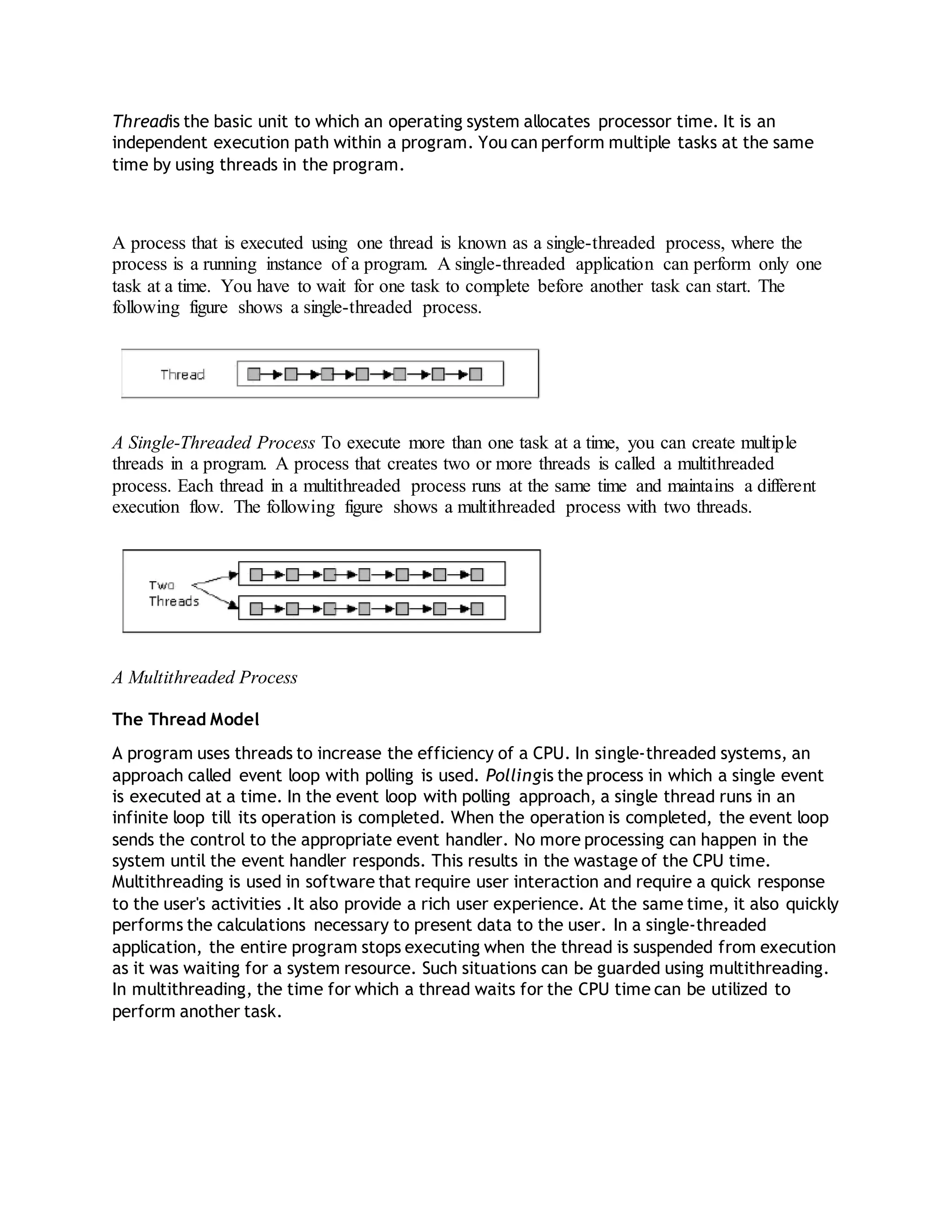
A process that is executed using one thread is known as a single-threaded process, where the
process is a running instance of a program. A single-threaded application can perform only one
task at a time. You have to wait for one task to complete before another task can start. The
following figure shows a single-threaded process.
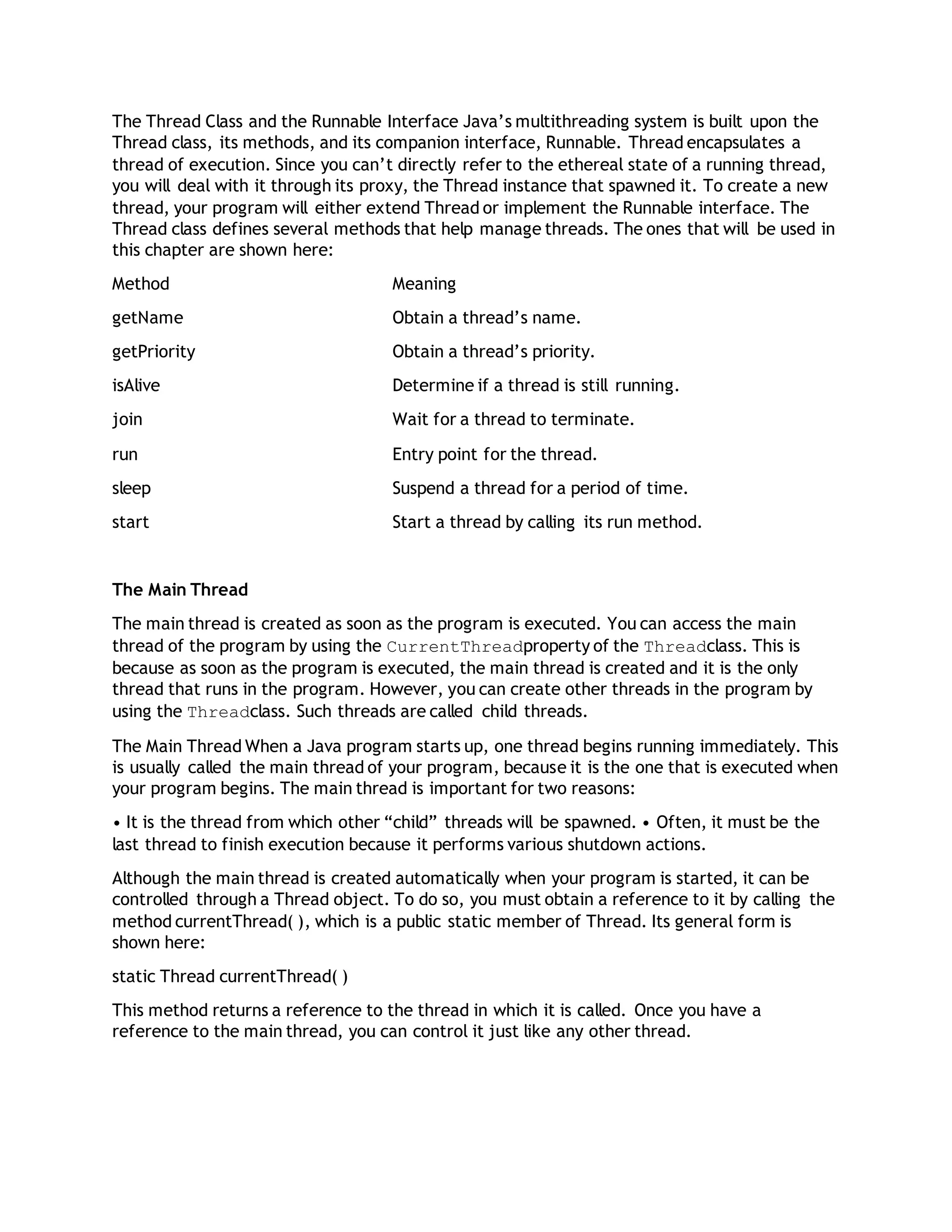
A Single-Threaded Process To execute more than one task at a time, you can create multiple
threads in a program. A process that creates two or more threads is called a multithreaded
process. Each thread in a multithreaded process runs at the same time and maintains a different
execution flow. The following figure shows a multithreaded process with two threads.
A Multithreaded Process
The Thread Model
A program uses threads to increase the efficiency of a CPU. In single-threaded systems, an
approach called event loop with polling is used. Pollingis the process in which a single event
is executed at a time. In the event loop with polling approach, a single thread runs in an
infinite loop till its operation is completed. When the operation is completed, the event loop
sends the control to the appropriate event handler. No more processing can happen in the
system until the event handler responds. This results in the wastage of the CPU time.
Multithreading is used in software that require user interaction and require a quick response
to the user's activities .It also provide a rich user experience. At the same time, it also quickly
performs the calculations necessary to present data to the user. In a single-threaded
application, the entire program stops executing when the thread is suspended from execution
as it was waiting for a system resource. Such situations can be guarded using multithreading.
In multithreading, the time for which a thread waits for the CPU time can be utilized to
perform another task.
The Thread Class and the Runnable Interface Java’s multithreading system is built upon the
Thread class, its methods, and its companion interface, Runnable. Thread encapsulates a
thread of execution. Since you can’t directly refer to the ethereal state of a running thread,
you will deal with it through its proxy, the Thread instance that spawned it. To create a new
thread, your program will either extend Thread or implement the Runnable interface. The
Thread class defines several methods that help manage threads. The ones that will be used in
this chapter are shown here:
Method Meaning
getName Obtain a thread’s name.
getPriority Obtain a thread’s priority.
isAlive Determine if a thread is still running.
join Wait for a thread to terminate.
run Entry point for the thread.
sleep Suspend a thread for a period of time.
start Start a thread by calling its run method.
The Main Thread
The main thread is created as soon as the program is executed. You can access the main
thread of the program by using the CurrentThreadproperty of the Threadclass. This is
because as soon as the program is executed, the main thread is created and it is the only
thread that runs in the program. However, you can create other threads in the program by
using the Threadclass. Such threads are called child threads.
The Main Thread When a Java program starts up, one thread begins running immediately. This
is usually called the main thread of your program, because it is the one that is executed when
your program begins. The main thread is important for two reasons:
• It is the thread from which other “child” threads will be spawned. • Often, it must be the
last thread to finish execution because it performs various shutdown actions.
Although the main thread is created automatically when your program is started, it can be
controlled through a Thread object. To do so, you must obtain a reference to it by calling the
method currentThread( ), which is a public static member of Thread. Its general form is
shown here:
static Thread currentThread( )
This method returns a reference to the thread in which it is called. Once you have a
reference to the main thread, you can control it just like any other thread.
The sleep( ) method causes the thread from which it is called to suspend execution for the
specified period of milliseconds. Its general form is shown here:
static void sleep(long milliseconds) throws InterruptedException
The number of milliseconds to suspend is specified in milliseconds. This method may throw an
InterruptedException. The sleep( ) method has a second form, shown next, which allows you
to specify the period in terms of milliseconds and nanoseconds:
static void sleep(long milliseconds, int nanoseconds) throws InterruptedException
This second form is useful only in environments that allow timing periods as short as
nanoseconds. As the preceding program shows, you can set the name of a thread by using
setName( ). You can obtain the name of a thread by calling getName( ) (but note that this is
not shown in the program). These methods are members of the Thread class and are declared
like this:
final void setName(String threadName)
final String getName( )
Here, threadName specifies the name of the thread.
Creating a Thread
In the most general sense, you create a thread by instantiating an object of type Thread. Java
defines two ways in which this can be accomplished:
• You can implement the Runnable interface.
• You can extend the Thread class, itself.
IMPLEMENTING THE RUNNABLE INTERFACE
The Runnable Interface Signature
public interface Runnable {
void run();
One way to create a thread in java is to implement the Runnable Interface and then
instantiate an object of the class. We need to override the run() method into our class
which is the only method that needs to be implemented. The run() method contains the
logic of the thread.
The procedure for creating threads based on the Runnable interface is as follows:
1. A class implements the Runnable interface, providing the run() method that will be
executed by the thread. An object of this class is a Runnable object.
2. An object of Thread class is created by passing a Runnable object as argument to
the Thread constructor. The Thread object now has a Runnable object that implements
the run() method.
3. The start() method is invoked on the Thread object created in the previous step. The
start() method returns immediately after a thread has been spawned.
4. The thread ends when the run() method ends, either by normal completion or by
throwing an uncaught exception.
To start the thread you need to invoke the start() method
Implementing Runnable The easiest way to create a thread is to create a class that
implements the Runnable interface. Runnable abstracts a unit of executable code. You can
construct a thread on any object that implements Runnable. To implement Runnable, a class
need only implement a single method called run( ), which is declared like this:
public void run( )
Inside run( ), you will define the code that constitutes the new thread. It is important to
understand that run( ) can call other methods, use other classes, and declare variables, just
like the main thread can. The only difference is that run( ) establishes the entry point for
another, concurrent thread of execution within your program. This thread will end when
run( ) returns.
After you create a class that implements Runnable, you will instantiate an object of type
Thread from within that class. Thread defines several constructors. The one that we will use
is shown here:
Thread(Runnable threadOb, String threadName)
In this constructor, threadOb is an instance of a class that implements the Runnable
interface. This defines where execution of the thread will begin. The name of the new thread
is specified by threadName. After the new thread is created, it will not start running until you
call its start( ) method, which is declared within Thread. In essence, start( ) executes a call
to run( ). The start( ) method is shown here:
void start( )
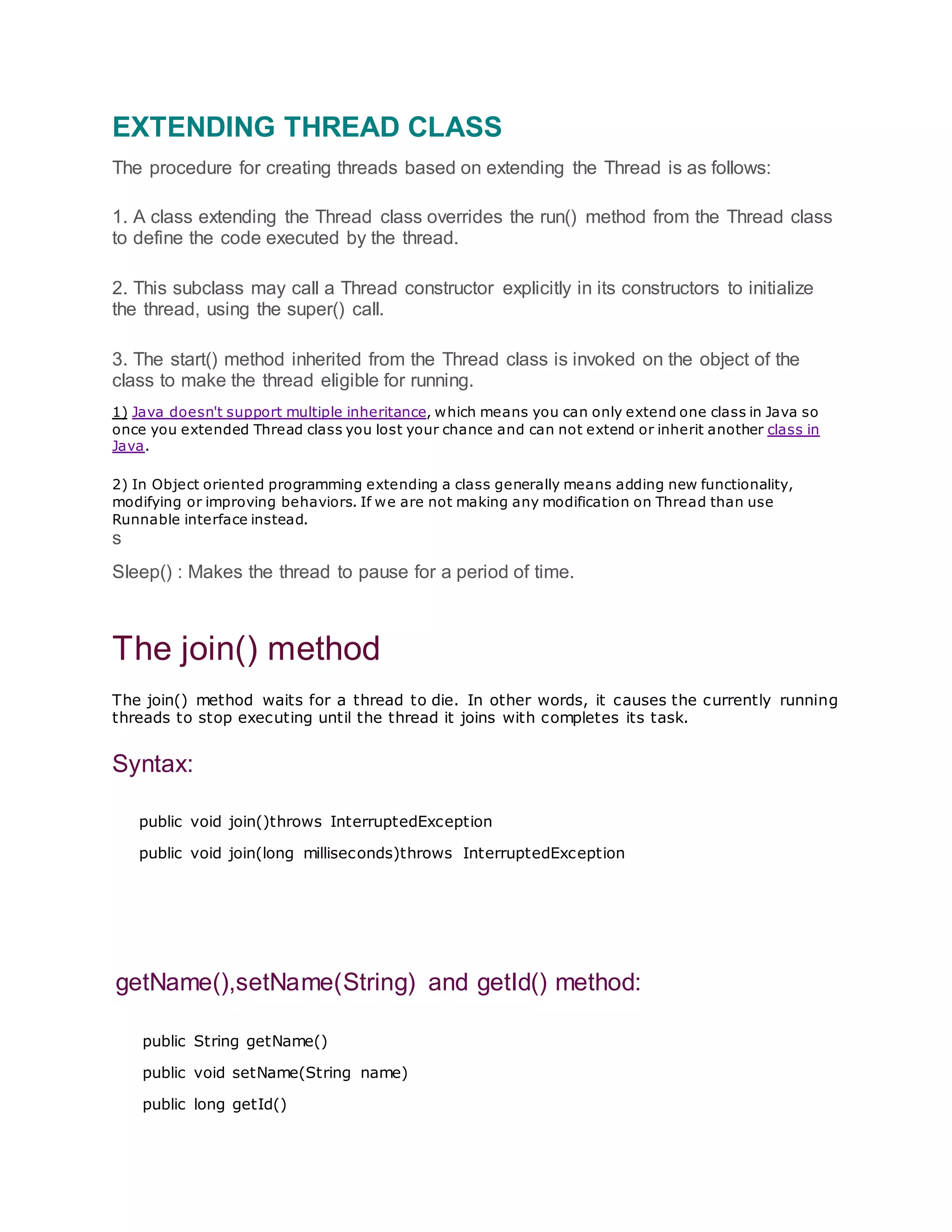
EXTENDING THREAD CLASS
The procedure for creating threads based on extending the Thread is as follows:
1. A class extending the Thread class overrides the run() method from the Thread class
to define the code executed by the thread.
2. This subclass may call a Thread constructor explicitly in its constructors to initialize
the thread, using the super() call.
3. The start() method inherited from the Thread class is invoked on the object of the
class to make the thread eligible for running.
1) Java doesn't support multiple inheritance, which means you can only extend one class in Java so
once you extended Thread class you lost your chance and can not extend or inherit another class in
Java.
2) In Object oriented programming extending a class generally means adding new functionality,
modifying or improving behaviors. If we are not making any modification on Thread than use
Runnable interface instead.
s
Sleep() : Makes the thread to pause for a period of time.
The join() method
The join() method waits for a thread to die. In other words, it causes the currently running
threads to stop executing until the thread it joins with completes its task.
Syntax:
public void join()throws InterruptedException
public void join(long milliseconds)throws InterruptedException
getName(),setName(String) and getId() method:
public String getName()
public void setName(String name)
public long getId()
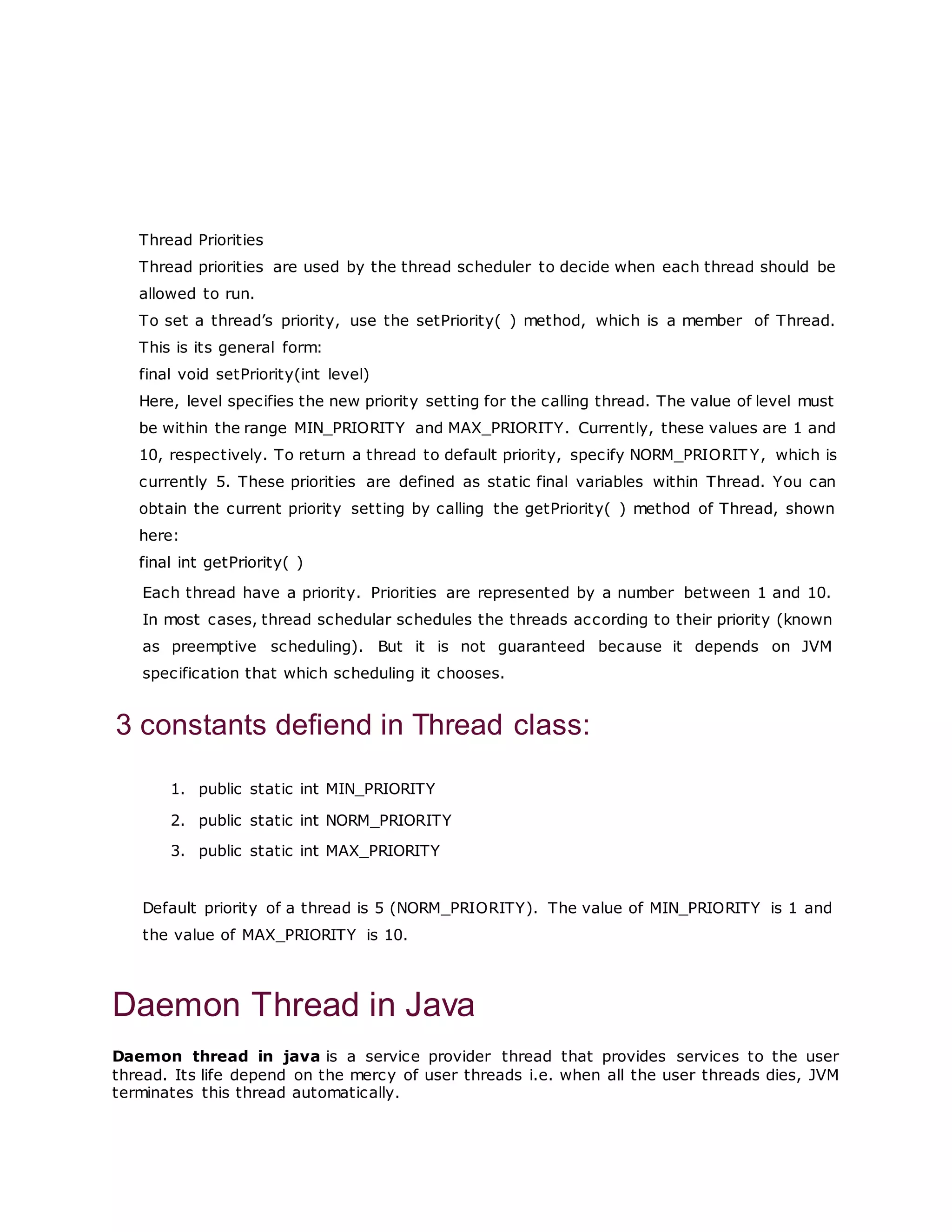
Thread Priorities
Thread priorities are used by the thread scheduler to decide when each thread should be
allowed to run.
To set a thread’s priority, use the setPriority( ) method, which is a member of Thread.
This is its general form:
final void setPriority(int level)
Here, level specifies the new priority setting for the calling thread. The value of level must
be within the range MIN_PRIORITY and MAX_PRIORITY. Currently, these values are 1 and
10, respectively. To return a thread to default priority, specify NORM_PRIORIT Y, which is
currently 5. These priorities are defined as static final variables within Thread. You can
obtain the current priority setting by calling the getPriority( ) method of Thread, shown
here:
final int getPriority( )
Each thread have a priority. Priorities are represented by a number between 1 and 10.
In most cases, thread schedular schedules the threads according to their priority (known
as preemptive scheduling). But it is not guaranteed because it depends on JVM
specification that which scheduling it chooses.
3 constants defiend in Thread class:
1. public static int MIN_PRIORITY
2. public static int NORM_PRIORITY
3. public static int MAX_PRIORITY
Default priority of a thread is 5 (NORM_PRIORITY). The value of MIN_PRIORITY is 1 and
the value of MAX_PRIORITY is 10.
Daemon Thread in Java
Daemon thread in java is a service provider thread that provides services to the user
thread. Its life depend on the mercy of user threads i.e. when all the user threads dies, JVM
terminates this thread automatically.
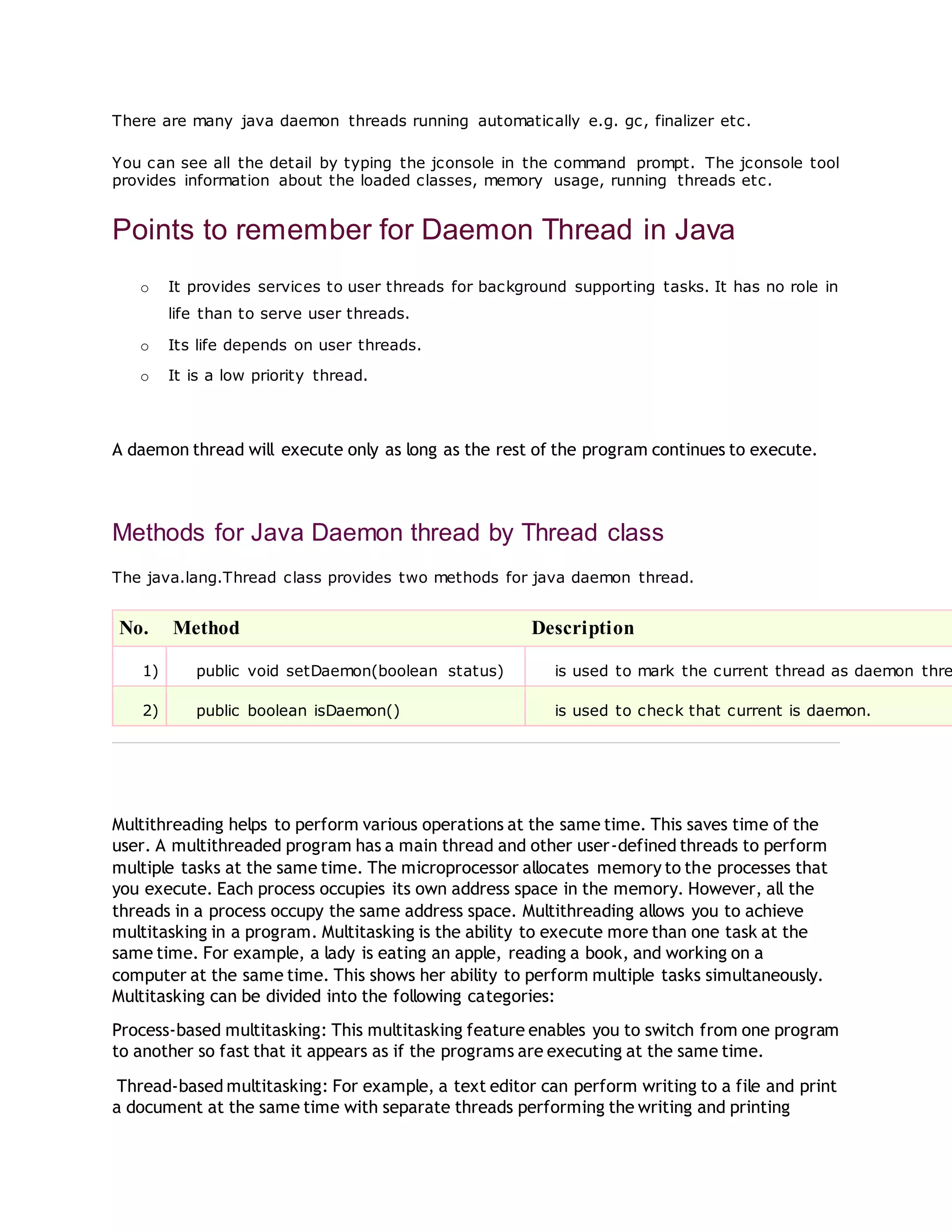
There are many java daemon threads running automatically e.g. gc, finalizer etc.
You can see all the detail by typing the jconsole in the command prompt. The jconsole tool
provides information about the loaded classes, memory usage, running threads etc.
Points to remember for Daemon Thread in Java
o It provides services to user threads for background supporting tasks. It has no role in
life than to serve user threads.
o Its life depends on user threads.
o It is a low priority thread.
A daemon thread will execute only as long as the rest of the program continues to execute.
Methods for Java Daemon thread by Thread class
The java.lang.Thread class provides two methods for java daemon thread.
No. Method Description
1) public void setDaemon(boolean status) is used to mark the current thread as daemon thre
2) public boolean isDaemon() is used to check that current is daemon.
Multithreading helps to perform various operations at the same time. This saves time of the
user. A multithreaded program has a main thread and other user-defined threads to perform
multiple tasks at the same time. The microprocessor allocates memory to the processes that
you execute. Each process occupies its own address space in the memory. However, all the
threads in a process occupy the same address space. Multithreading allows you to achieve
multitasking in a program. Multitasking is the ability to execute more than one task at the
same time. For example, a lady is eating an apple, reading a book, and working on a
computer at the same time. This shows her ability to perform multiple tasks simultaneously.
Multitasking can be divided into the following categories:
Process-based multitasking: This multitasking feature enables you to switch from one program
to another so fast that it appears as if the programs are executing at the same time.
Thread-based multitasking: For example, a text editor can perform writing to a file and print
a document at the same time with separate threads performing the writing and printing
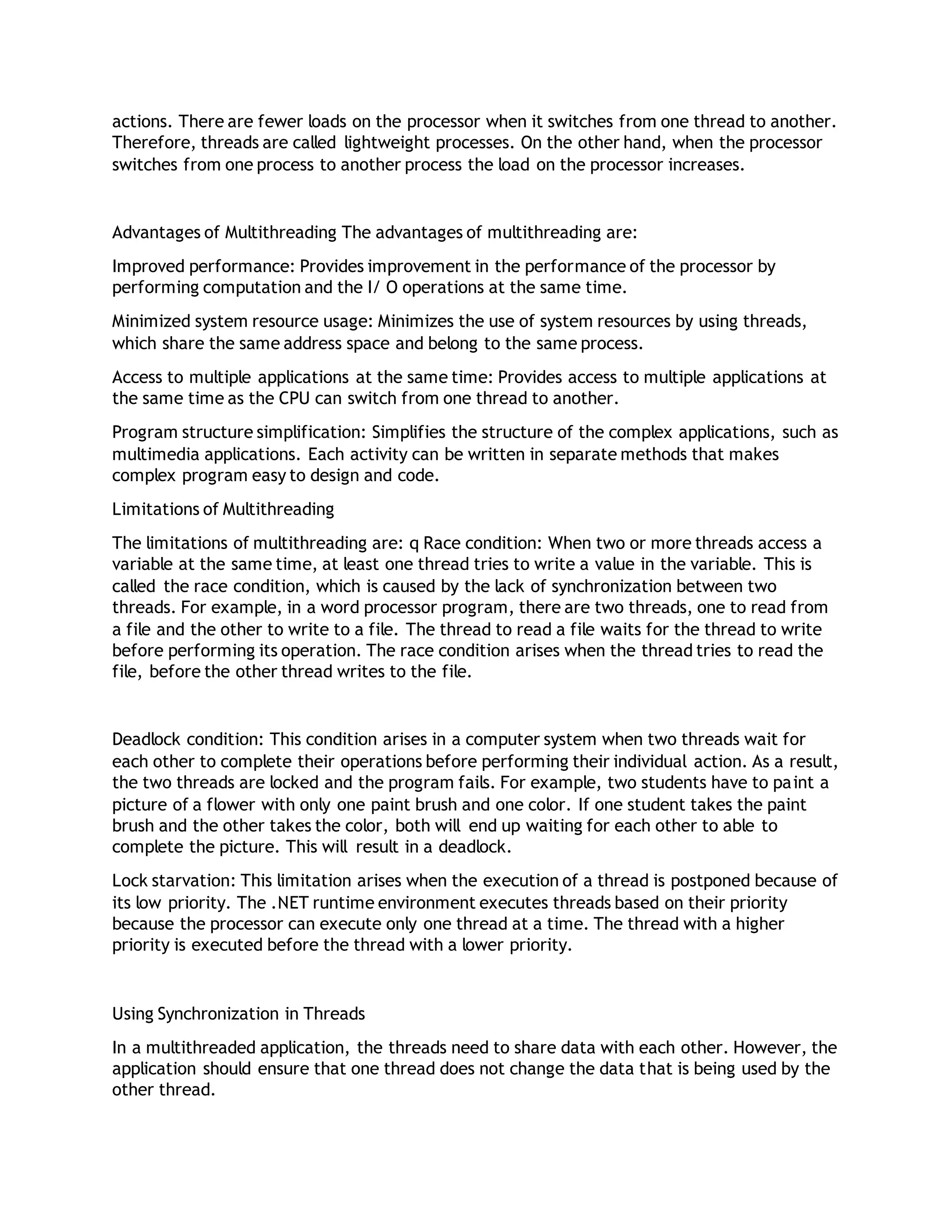
actions. There are fewer loads on the processor when it switches from one thread to another.
Therefore, threads are called lightweight processes. On the other hand, when the processor
switches from one process to another process the load on the processor increases.
Advantages of Multithreading The advantages of multithreading are:
Improved performance: Provides improvement in the performance of the processor by
performing computation and the I/ O operations at the same time.
Minimized system resource usage: Minimizes the use of system resources by using threads,
which share the same address space and belong to the same process.
Access to multiple applications at the same time: Provides access to multiple applications at
the same time as the CPU can switch from one thread to another.
Program structure simplification: Simplifies the structure of the complex applications, such as
multimedia applications. Each activity can be written in separate methods that makes
complex program easy to design and code.
Limitations of Multithreading
The limitations of multithreading are: q Race condition: When two or more threads access a
variable at the same time, at least one thread tries to write a value in the variable. This is
called the race condition, which is caused by the lack of synchronization between two
threads. For example, in a word processor program, there are two threads, one to read from
a file and the other to write to a file. The thread to read a file waits for the thread to write
before performing its operation. The race condition arises when the thread tries to read the
file, before the other thread writes to the file.
Deadlock condition: This condition arises in a computer system when two threads wait for
each other to complete their operations before performing their individual action. As a result,
the two threads are locked and the program fails. For example, two students have to paint a
picture of a flower with only one paint brush and one color. If one student takes the paint
brush and the other takes the color, both will end up waiting for each other to able to
complete the picture. This will result in a deadlock.
Lock starvation: This limitation arises when the execution of a thread is postponed because of
its low priority. The .NET runtime environment executes threads based on their priority
because the processor can execute only one thread at a time. The thread with a higher
priority is executed before the thread with a lower priority.
Using Synchronization in Threads
In a multithreaded application, the threads need to share data with each other. However, the
application should ensure that one thread does not change the data that is being used by the
other thread.
Synchronization of threads ensures that if two or more threads need to access a shared
resource, then that resource is used by only one thread at a time. You can synchronize your
code using the synchronized keyword. You can invoke only one synchronized method for an
object at any given time.
Synchronization is based on the concept of monitoring. A monitor is an object that is used as
a lock to the data members and methods of a class. All objects and classes are associated
with the monitor and only one thread can own the monitor at a given time. To enter an
object's monitor, you need to call a method that has been modified with the synchronized
keyword.
Key to synchronization is the concept of the monitor (also called a semaphore). A monitor is
an object that is used as a mutually exclusive lock, or mutex. Only one thread can own a
monitor at a given time. When a thread acquires a lock, it is said to have entered the
monitor. All other threads attempting to enter the locked monitor will be suspended until the
first thread exits the monitor. These other threads are said to be waiting for the monitor. A
thread that owns a monitor can reenter the same monitor if it so desires.
Java synchronized method
If you declare any method as synchronized, it is known as synchronized method.
Synchronized method is used to lock an object for any shared resource.
When a thread invokes a synchronized method, it automatically acquires the lock for that
object and releases it when the thread completes its task.

Threadnotes

  • 1.
    Threadis the basicunit to which an operating system allocates processor time. It is an independent execution path within a program. You can perform multiple tasks at the same time by using threads in the program. A process that is executed using one thread is known as a single-threaded process, where the process is a running instance of a program. A single-threaded application can perform only one task at a time. You have to wait for one task to complete before another task can start. The following figure shows a single-threaded process. A Single-Threaded Process To execute more than one task at a time, you can create multiple threads in a program. A process that creates two or more threads is called a multithreaded process. Each thread in a multithreaded process runs at the same time and maintains a different execution flow. The following figure shows a multithreaded process with two threads. A Multithreaded Process The Thread Model A program uses threads to increase the efficiency of a CPU. In single-threaded systems, an approach called event loop with polling is used. Pollingis the process in which a single event is executed at a time. In the event loop with polling approach, a single thread runs in an infinite loop till its operation is completed. When the operation is completed, the event loop sends the control to the appropriate event handler. No more processing can happen in the system until the event handler responds. This results in the wastage of the CPU time. Multithreading is used in software that require user interaction and require a quick response to the user's activities .It also provide a rich user experience. At the same time, it also quickly performs the calculations necessary to present data to the user. In a single-threaded application, the entire program stops executing when the thread is suspended from execution as it was waiting for a system resource. Such situations can be guarded using multithreading. In multithreading, the time for which a thread waits for the CPU time can be utilized to perform another task.
  • 2.
    The Thread Classand the Runnable Interface Java’s multithreading system is built upon the Thread class, its methods, and its companion interface, Runnable. Thread encapsulates a thread of execution. Since you can’t directly refer to the ethereal state of a running thread, you will deal with it through its proxy, the Thread instance that spawned it. To create a new thread, your program will either extend Thread or implement the Runnable interface. The Thread class defines several methods that help manage threads. The ones that will be used in this chapter are shown here: Method Meaning getName Obtain a thread’s name. getPriority Obtain a thread’s priority. isAlive Determine if a thread is still running. join Wait for a thread to terminate. run Entry point for the thread. sleep Suspend a thread for a period of time. start Start a thread by calling its run method. The Main Thread The main thread is created as soon as the program is executed. You can access the main thread of the program by using the CurrentThreadproperty of the Threadclass. This is because as soon as the program is executed, the main thread is created and it is the only thread that runs in the program. However, you can create other threads in the program by using the Threadclass. Such threads are called child threads. The Main Thread When a Java program starts up, one thread begins running immediately. This is usually called the main thread of your program, because it is the one that is executed when your program begins. The main thread is important for two reasons: • It is the thread from which other “child” threads will be spawned. • Often, it must be the last thread to finish execution because it performs various shutdown actions. Although the main thread is created automatically when your program is started, it can be controlled through a Thread object. To do so, you must obtain a reference to it by calling the method currentThread( ), which is a public static member of Thread. Its general form is shown here: static Thread currentThread( ) This method returns a reference to the thread in which it is called. Once you have a reference to the main thread, you can control it just like any other thread.
  • 3.
    The sleep( )method causes the thread from which it is called to suspend execution for the specified period of milliseconds. Its general form is shown here: static void sleep(long milliseconds) throws InterruptedException The number of milliseconds to suspend is specified in milliseconds. This method may throw an InterruptedException. The sleep( ) method has a second form, shown next, which allows you to specify the period in terms of milliseconds and nanoseconds: static void sleep(long milliseconds, int nanoseconds) throws InterruptedException This second form is useful only in environments that allow timing periods as short as nanoseconds. As the preceding program shows, you can set the name of a thread by using setName( ). You can obtain the name of a thread by calling getName( ) (but note that this is not shown in the program). These methods are members of the Thread class and are declared like this: final void setName(String threadName) final String getName( ) Here, threadName specifies the name of the thread. Creating a Thread In the most general sense, you create a thread by instantiating an object of type Thread. Java defines two ways in which this can be accomplished: • You can implement the Runnable interface. • You can extend the Thread class, itself. IMPLEMENTING THE RUNNABLE INTERFACE The Runnable Interface Signature public interface Runnable { void run(); One way to create a thread in java is to implement the Runnable Interface and then instantiate an object of the class. We need to override the run() method into our class which is the only method that needs to be implemented. The run() method contains the logic of the thread.
  • 4.
    The procedure forcreating threads based on the Runnable interface is as follows: 1. A class implements the Runnable interface, providing the run() method that will be executed by the thread. An object of this class is a Runnable object. 2. An object of Thread class is created by passing a Runnable object as argument to the Thread constructor. The Thread object now has a Runnable object that implements the run() method. 3. The start() method is invoked on the Thread object created in the previous step. The start() method returns immediately after a thread has been spawned. 4. The thread ends when the run() method ends, either by normal completion or by throwing an uncaught exception. To start the thread you need to invoke the start() method Implementing Runnable The easiest way to create a thread is to create a class that implements the Runnable interface. Runnable abstracts a unit of executable code. You can construct a thread on any object that implements Runnable. To implement Runnable, a class need only implement a single method called run( ), which is declared like this: public void run( ) Inside run( ), you will define the code that constitutes the new thread. It is important to understand that run( ) can call other methods, use other classes, and declare variables, just like the main thread can. The only difference is that run( ) establishes the entry point for another, concurrent thread of execution within your program. This thread will end when run( ) returns. After you create a class that implements Runnable, you will instantiate an object of type Thread from within that class. Thread defines several constructors. The one that we will use is shown here: Thread(Runnable threadOb, String threadName) In this constructor, threadOb is an instance of a class that implements the Runnable interface. This defines where execution of the thread will begin. The name of the new thread is specified by threadName. After the new thread is created, it will not start running until you call its start( ) method, which is declared within Thread. In essence, start( ) executes a call to run( ). The start( ) method is shown here: void start( )
  • 5.
    EXTENDING THREAD CLASS Theprocedure for creating threads based on extending the Thread is as follows: 1. A class extending the Thread class overrides the run() method from the Thread class to define the code executed by the thread. 2. This subclass may call a Thread constructor explicitly in its constructors to initialize the thread, using the super() call. 3. The start() method inherited from the Thread class is invoked on the object of the class to make the thread eligible for running. 1) Java doesn't support multiple inheritance, which means you can only extend one class in Java so once you extended Thread class you lost your chance and can not extend or inherit another class in Java. 2) In Object oriented programming extending a class generally means adding new functionality, modifying or improving behaviors. If we are not making any modification on Thread than use Runnable interface instead. s Sleep() : Makes the thread to pause for a period of time. The join() method The join() method waits for a thread to die. In other words, it causes the currently running threads to stop executing until the thread it joins with completes its task. Syntax: public void join()throws InterruptedException public void join(long milliseconds)throws InterruptedException getName(),setName(String) and getId() method: public String getName() public void setName(String name) public long getId()
  • 6.
    Thread Priorities Thread prioritiesare used by the thread scheduler to decide when each thread should be allowed to run. To set a thread’s priority, use the setPriority( ) method, which is a member of Thread. This is its general form: final void setPriority(int level) Here, level specifies the new priority setting for the calling thread. The value of level must be within the range MIN_PRIORITY and MAX_PRIORITY. Currently, these values are 1 and 10, respectively. To return a thread to default priority, specify NORM_PRIORIT Y, which is currently 5. These priorities are defined as static final variables within Thread. You can obtain the current priority setting by calling the getPriority( ) method of Thread, shown here: final int getPriority( ) Each thread have a priority. Priorities are represented by a number between 1 and 10. In most cases, thread schedular schedules the threads according to their priority (known as preemptive scheduling). But it is not guaranteed because it depends on JVM specification that which scheduling it chooses. 3 constants defiend in Thread class: 1. public static int MIN_PRIORITY 2. public static int NORM_PRIORITY 3. public static int MAX_PRIORITY Default priority of a thread is 5 (NORM_PRIORITY). The value of MIN_PRIORITY is 1 and the value of MAX_PRIORITY is 10. Daemon Thread in Java Daemon thread in java is a service provider thread that provides services to the user thread. Its life depend on the mercy of user threads i.e. when all the user threads dies, JVM terminates this thread automatically.
  • 7.
    There are manyjava daemon threads running automatically e.g. gc, finalizer etc. You can see all the detail by typing the jconsole in the command prompt. The jconsole tool provides information about the loaded classes, memory usage, running threads etc. Points to remember for Daemon Thread in Java o It provides services to user threads for background supporting tasks. It has no role in life than to serve user threads. o Its life depends on user threads. o It is a low priority thread. A daemon thread will execute only as long as the rest of the program continues to execute. Methods for Java Daemon thread by Thread class The java.lang.Thread class provides two methods for java daemon thread. No. Method Description 1) public void setDaemon(boolean status) is used to mark the current thread as daemon thre 2) public boolean isDaemon() is used to check that current is daemon. Multithreading helps to perform various operations at the same time. This saves time of the user. A multithreaded program has a main thread and other user-defined threads to perform multiple tasks at the same time. The microprocessor allocates memory to the processes that you execute. Each process occupies its own address space in the memory. However, all the threads in a process occupy the same address space. Multithreading allows you to achieve multitasking in a program. Multitasking is the ability to execute more than one task at the same time. For example, a lady is eating an apple, reading a book, and working on a computer at the same time. This shows her ability to perform multiple tasks simultaneously. Multitasking can be divided into the following categories: Process-based multitasking: This multitasking feature enables you to switch from one program to another so fast that it appears as if the programs are executing at the same time. Thread-based multitasking: For example, a text editor can perform writing to a file and print a document at the same time with separate threads performing the writing and printing
  • 8.
    actions. There arefewer loads on the processor when it switches from one thread to another. Therefore, threads are called lightweight processes. On the other hand, when the processor switches from one process to another process the load on the processor increases. Advantages of Multithreading The advantages of multithreading are: Improved performance: Provides improvement in the performance of the processor by performing computation and the I/ O operations at the same time. Minimized system resource usage: Minimizes the use of system resources by using threads, which share the same address space and belong to the same process. Access to multiple applications at the same time: Provides access to multiple applications at the same time as the CPU can switch from one thread to another. Program structure simplification: Simplifies the structure of the complex applications, such as multimedia applications. Each activity can be written in separate methods that makes complex program easy to design and code. Limitations of Multithreading The limitations of multithreading are: q Race condition: When two or more threads access a variable at the same time, at least one thread tries to write a value in the variable. This is called the race condition, which is caused by the lack of synchronization between two threads. For example, in a word processor program, there are two threads, one to read from a file and the other to write to a file. The thread to read a file waits for the thread to write before performing its operation. The race condition arises when the thread tries to read the file, before the other thread writes to the file. Deadlock condition: This condition arises in a computer system when two threads wait for each other to complete their operations before performing their individual action. As a result, the two threads are locked and the program fails. For example, two students have to paint a picture of a flower with only one paint brush and one color. If one student takes the paint brush and the other takes the color, both will end up waiting for each other to able to complete the picture. This will result in a deadlock. Lock starvation: This limitation arises when the execution of a thread is postponed because of its low priority. The .NET runtime environment executes threads based on their priority because the processor can execute only one thread at a time. The thread with a higher priority is executed before the thread with a lower priority. Using Synchronization in Threads In a multithreaded application, the threads need to share data with each other. However, the application should ensure that one thread does not change the data that is being used by the other thread.
  • 9.
    Synchronization of threadsensures that if two or more threads need to access a shared resource, then that resource is used by only one thread at a time. You can synchronize your code using the synchronized keyword. You can invoke only one synchronized method for an object at any given time. Synchronization is based on the concept of monitoring. A monitor is an object that is used as a lock to the data members and methods of a class. All objects and classes are associated with the monitor and only one thread can own the monitor at a given time. To enter an object's monitor, you need to call a method that has been modified with the synchronized keyword. Key to synchronization is the concept of the monitor (also called a semaphore). A monitor is an object that is used as a mutually exclusive lock, or mutex. Only one thread can own a monitor at a given time. When a thread acquires a lock, it is said to have entered the monitor. All other threads attempting to enter the locked monitor will be suspended until the first thread exits the monitor. These other threads are said to be waiting for the monitor. A thread that owns a monitor can reenter the same monitor if it so desires. Java synchronized method If you declare any method as synchronized, it is known as synchronized method. Synchronized method is used to lock an object for any shared resource. When a thread invokes a synchronized method, it automatically acquires the lock for that object and releases it when the thread completes its task.