Testing & Quality
Assurance in Software
Development
Effective quality assurance is the backbone of reliable software. It
ensures products meet standards and function as intended.
In this presentation, we'll explore QA practices that make the difference
between software that shines and software that fails.
by Ozías Rondón
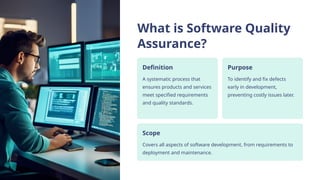
What is Software Quality
Assurance?
Definition
A systematic process that
ensures products and services
meet specified requirements
and quality standards.
Purpose
To identify and fix defects
early in development,
preventing costly issues later.
Scope
Covers all aspects of software development, from requirements to
deployment and maintenance.
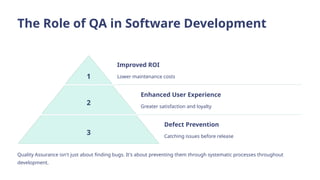
The Role of QA in Software Development
1
Improved ROI
Lower maintenance costs
2
Enhanced User Experience
Greater satisfaction and loyalty
3
Defect Prevention
Catching issues before release
Quality Assurance isn't just about finding bugs. It's about preventing them through systematic processes throughout
development.
Types of Software Testing
Unit Testing
Testing individual components
in isolation to verify they work
as expected.
Integration Testing
Ensuring multiple components
work together properly when
combined.
System Testing
Validating the entire
application against specified
requirements.
Acceptance Testing
Determining if the software
meets business requirements
and user needs.
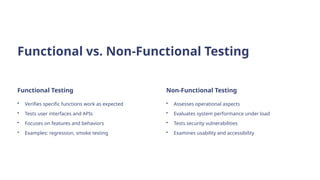
Functional vs. Non-Functional Testing
Functional Testing
• Verifies specific functions work as expected
• Tests user interfaces and APIs
• Focuses on features and behaviors
• Examples: regression, smoke testing
Non-Functional Testing
• Assesses operational aspects
• Evaluates system performance under load
• Tests security vulnerabilities
• Examines usability and accessibility
Manual vs. Automated Testing
Aspect Manual Testing Automated Testing
Speed Slower, labor-intensive Faster, efficient for repetition
Cost Higher long-term cost Higher initial investment
Human Insight Strong for UX issues Limited creative assessment
Best For Exploratory testing Regression and load testing
Test Planning and Strategy
Define Objectives
Establish clear goals for testing based on requirements and risks.
Create Test Cases
Develop detailed scenarios covering all critical paths and edge cases.
Prioritize Efforts
Focus on high-risk, high-impact features first for maximum efficiency.
Allocate Resources
Assign appropriate time, tools, and personnel to testing activities.
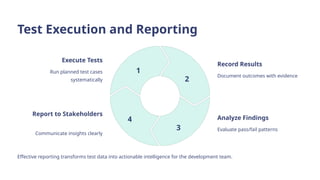
Test Execution and Reporting
Execute Tests
Run planned test cases
systematically
1
Record Results
Document outcomes with evidence
2
Analyze Findings
Evaluate pass/fail patterns
3
Report to Stakeholders
Communicate insights clearly
4
Effective reporting transforms test data into actionable intelligence for the development team.
Defect Management
1
Identify
Discover and document defects with detailed reproduction steps.
2 Categorize
Classify by severity, priority, and affected components.
3
Assign
Delegate to appropriate team members for resolution.
4 Verify
Retest fixed issues to confirm proper resolution.
Continuous Integration and Testing
Automated Builds
Code changes trigger automatic build
processes to detect integration issues
early.
Automated Tests
Tests run automatically with each build
to provide immediate feedback.
Instant Feedback
Developers receive immediate alerts
about build or test failures.
Test-Driven Development (TDD)
Write Test
Create tests that define expected
functionality before writing code.
1 Run Test
Execute the test, which will fail initially.
2
Write Code
Develop minimum code needed to pass
the test.
3
Refactor
Improve code quality while ensuring
tests still pass.
4
Performance Testing
Load Testing
Evaluates system behavior under
expected user loads to identify
bottlenecks.
Stress Testing
Pushes systems beyond normal
capacity to determine breaking points.
Scalability Testing
Assesses how effectively the system
scales with increasing loads.
Security Testing
Vulnerability
Assessment
Systematic review
identifying security
weaknesses in applications.
Scans detect common
exploits and configuration
issues.
Penetration Testing
Ethical hackers attempt to
breach systems. Simulates
real-world attacks to find
exploitable vulnerabilities.
Compliance Checks
Verifies software meets industry regulations. Ensures adherence
to standards like GDPR, HIPAA, or PCI DSS.
User Acceptance Testing (UAT)
1
Prepare Test Environment
Setup production-like systems
2
Train End Users
Equip users with testing knowledge
3
Execute Test Cases
Users validate real-world scenarios
4
Collect & Implement Feedback
Address user concerns before release
Mobile App Testing
Device Fragmentation
Testing across various screen sizes, resolutions, and hardware configurations is
essential.
OS Version Compatibility
Apps must work across multiple Android and iOS versions still in use.
Network Conditions
Testing under varying connection states ensures reliability in real-world
scenarios.
Battery & Resource Usage
Apps should minimize power consumption and memory usage for optimal
performance.
Best Practices in QA
Early QA
Involvement
Include QA from the
requirements
gathering phase to
prevent design
defects.
Cross-
Functional
Collaboration
Foster partnership
between developers
and testers to
enhance quality
awareness.
Continuous
Improvement
Regularly update
skills and refine
processes based on
project
retrospectives.
Tools for QA and Testing
Modern QA relies on specialized tools for test management, automation, and defect tracking to increase efficiency and coverage.
Measuring QA Success
Before QA Improvements After QA Improvements
The Future of QA
1 AI-Powered Testing
Machine learning algorithms will identify patterns and predict defects
before they occur.
2 Shift-Left Approach
Testing will begin earlier in development cycles, with developers taking
on more testing responsibility.
3 DevOps Integration
QA practices will seamlessly blend with development and operations in
unified workflows.
4 Intelligent Test Automation
Self-healing test scripts will adapt to UI changes without manual
intervention.
Elevate Your QA Game with Remixable - Founder
Edition
40%
Faster Testing Cycles
Accelerate your QA process with
streamlined workflows and automation
templates.
90%
Team Collaboration
Enhanced communication features bridge
the gap between developers and testers.
60%
Cost Reduction
Minimize expenses through early defect
detection and efficient resource allocation.
Transform your QA practices today! Click here to get started with Remixable - Founder Edition.

Testing-and-Quality-Assurance-in-Software-Development

  • 1.
    Testing & Quality Assurancein Software Development Effective quality assurance is the backbone of reliable software. It ensures products meet standards and function as intended. In this presentation, we'll explore QA practices that make the difference between software that shines and software that fails. by Ozías Rondón
  • 2.
    What is SoftwareQuality Assurance? Definition A systematic process that ensures products and services meet specified requirements and quality standards. Purpose To identify and fix defects early in development, preventing costly issues later. Scope Covers all aspects of software development, from requirements to deployment and maintenance.
  • 3.
    The Role ofQA in Software Development 1 Improved ROI Lower maintenance costs 2 Enhanced User Experience Greater satisfaction and loyalty 3 Defect Prevention Catching issues before release Quality Assurance isn't just about finding bugs. It's about preventing them through systematic processes throughout development.
  • 4.
    Types of SoftwareTesting Unit Testing Testing individual components in isolation to verify they work as expected. Integration Testing Ensuring multiple components work together properly when combined. System Testing Validating the entire application against specified requirements. Acceptance Testing Determining if the software meets business requirements and user needs.
  • 5.
    Functional vs. Non-FunctionalTesting Functional Testing • Verifies specific functions work as expected • Tests user interfaces and APIs • Focuses on features and behaviors • Examples: regression, smoke testing Non-Functional Testing • Assesses operational aspects • Evaluates system performance under load • Tests security vulnerabilities • Examines usability and accessibility
  • 6.
    Manual vs. AutomatedTesting Aspect Manual Testing Automated Testing Speed Slower, labor-intensive Faster, efficient for repetition Cost Higher long-term cost Higher initial investment Human Insight Strong for UX issues Limited creative assessment Best For Exploratory testing Regression and load testing
  • 7.
    Test Planning andStrategy Define Objectives Establish clear goals for testing based on requirements and risks. Create Test Cases Develop detailed scenarios covering all critical paths and edge cases. Prioritize Efforts Focus on high-risk, high-impact features first for maximum efficiency. Allocate Resources Assign appropriate time, tools, and personnel to testing activities.
  • 8.
    Test Execution andReporting Execute Tests Run planned test cases systematically 1 Record Results Document outcomes with evidence 2 Analyze Findings Evaluate pass/fail patterns 3 Report to Stakeholders Communicate insights clearly 4 Effective reporting transforms test data into actionable intelligence for the development team.
  • 9.
    Defect Management 1 Identify Discover anddocument defects with detailed reproduction steps. 2 Categorize Classify by severity, priority, and affected components. 3 Assign Delegate to appropriate team members for resolution. 4 Verify Retest fixed issues to confirm proper resolution.
  • 10.
    Continuous Integration andTesting Automated Builds Code changes trigger automatic build processes to detect integration issues early. Automated Tests Tests run automatically with each build to provide immediate feedback. Instant Feedback Developers receive immediate alerts about build or test failures.
  • 11.
    Test-Driven Development (TDD) WriteTest Create tests that define expected functionality before writing code. 1 Run Test Execute the test, which will fail initially. 2 Write Code Develop minimum code needed to pass the test. 3 Refactor Improve code quality while ensuring tests still pass. 4
  • 12.
    Performance Testing Load Testing Evaluatessystem behavior under expected user loads to identify bottlenecks. Stress Testing Pushes systems beyond normal capacity to determine breaking points. Scalability Testing Assesses how effectively the system scales with increasing loads.
  • 13.
    Security Testing Vulnerability Assessment Systematic review identifyingsecurity weaknesses in applications. Scans detect common exploits and configuration issues. Penetration Testing Ethical hackers attempt to breach systems. Simulates real-world attacks to find exploitable vulnerabilities. Compliance Checks Verifies software meets industry regulations. Ensures adherence to standards like GDPR, HIPAA, or PCI DSS.
  • 14.
    User Acceptance Testing(UAT) 1 Prepare Test Environment Setup production-like systems 2 Train End Users Equip users with testing knowledge 3 Execute Test Cases Users validate real-world scenarios 4 Collect & Implement Feedback Address user concerns before release
  • 15.
    Mobile App Testing DeviceFragmentation Testing across various screen sizes, resolutions, and hardware configurations is essential. OS Version Compatibility Apps must work across multiple Android and iOS versions still in use. Network Conditions Testing under varying connection states ensures reliability in real-world scenarios. Battery & Resource Usage Apps should minimize power consumption and memory usage for optimal performance.
  • 16.
    Best Practices inQA Early QA Involvement Include QA from the requirements gathering phase to prevent design defects. Cross- Functional Collaboration Foster partnership between developers and testers to enhance quality awareness. Continuous Improvement Regularly update skills and refine processes based on project retrospectives.
  • 17.
    Tools for QAand Testing Modern QA relies on specialized tools for test management, automation, and defect tracking to increase efficiency and coverage.
  • 18.
    Measuring QA Success BeforeQA Improvements After QA Improvements
  • 19.
    The Future ofQA 1 AI-Powered Testing Machine learning algorithms will identify patterns and predict defects before they occur. 2 Shift-Left Approach Testing will begin earlier in development cycles, with developers taking on more testing responsibility. 3 DevOps Integration QA practices will seamlessly blend with development and operations in unified workflows. 4 Intelligent Test Automation Self-healing test scripts will adapt to UI changes without manual intervention.
  • 20.
    Elevate Your QAGame with Remixable - Founder Edition 40% Faster Testing Cycles Accelerate your QA process with streamlined workflows and automation templates. 90% Team Collaboration Enhanced communication features bridge the gap between developers and testers. 60% Cost Reduction Minimize expenses through early defect detection and efficient resource allocation. Transform your QA practices today! Click here to get started with Remixable - Founder Edition.