TestNG Framework for
Extensive Testing and TDD
Next Generation Testing, TestNG - Testing Tool
Narendran Solai Sridharan
19-Feb-2014
Table of Contents
 TestNG Features & Benefits
 TestNG Installation
 TestNG Demo
 JUnit vs TestNG
 TestNG - Links
TestNG Overview
Features
 TestNG is a testing framework inspired by JUnit and NUnit
 Designed to cover all categories of tests: unit, functional, end-to-end, integration etc.,
 Designed to perform Multi threaded testing, to help in load and stress testing.
 Designed to Group Test Scripts and run them selectively.
 Designed to run test scripts based on dependencies & failures.
 Designed to check module performance such as response time with test timeouts.
 Has a flexible plugin API for report creation and for even changing core behavior.
Benefits
 Overcomes the drawbacks of JUNIT Framework.
 One Stop Shop for various kinds of testing.
 Dependency testing, grouping concept to make testing more powerful and easy.
 Thins the gaps between Development and Testing and encourages Test Driven Development (TDD).
 Combined use of several TestNG's features provides a very intuitive and maintainable testing design.
 Easy Migration from JUNIT to TestNG.
 Easy Integration with framework & tools like Spring, Selenium, Guice, Jenkins etc.
 Easy Reporting
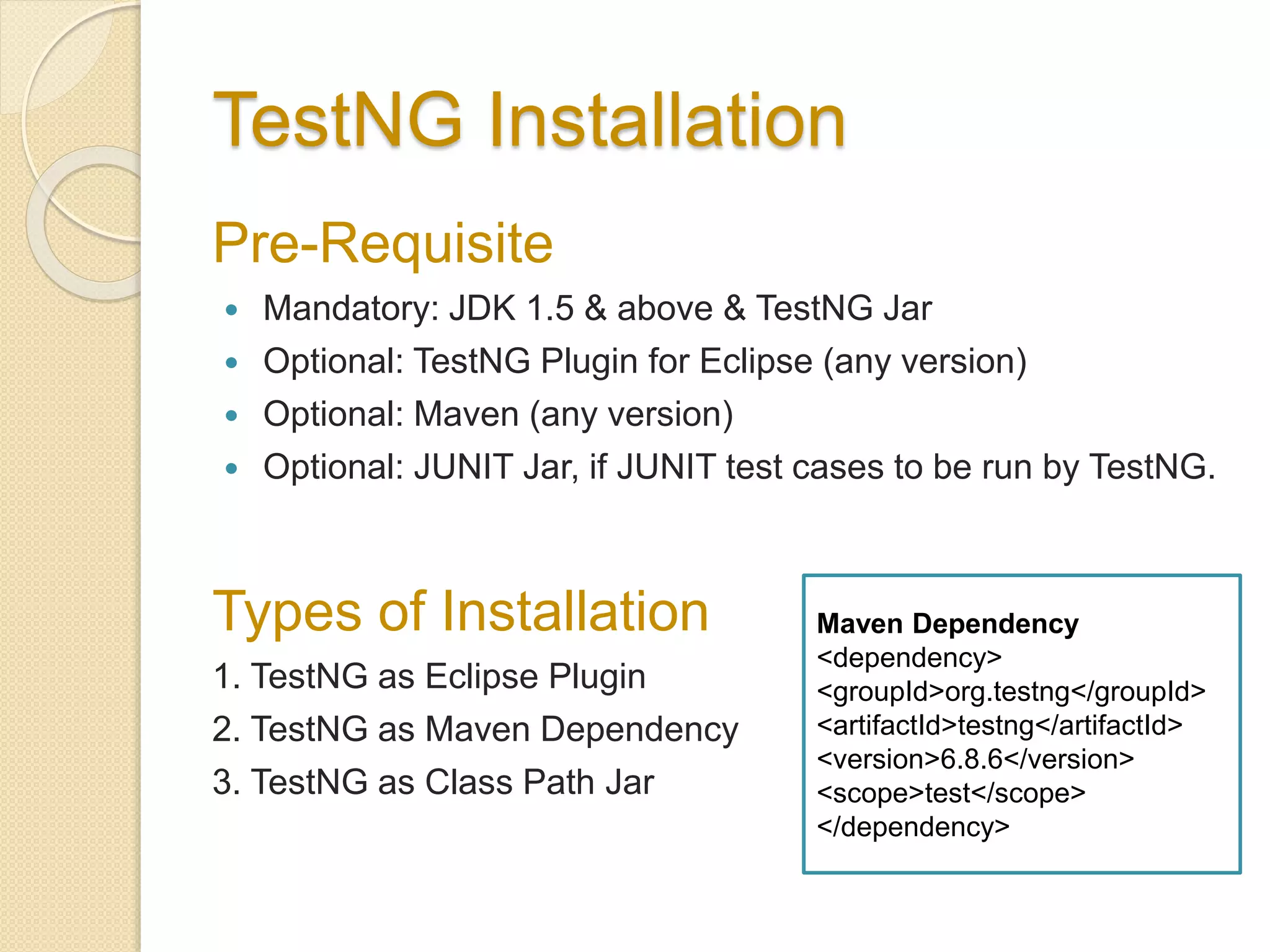
TestNG Installation
Pre-Requisite
 Mandatory: JDK 1.5 & above & TestNG Jar
 Optional: TestNG Plugin for Eclipse (any version)
 Optional: Maven (any version)
 Optional: JUNIT Jar, if JUNIT test cases to be run by TestNG.
Types of Installation
1. TestNG as Eclipse Plugin
2. TestNG as Maven Dependency
3. TestNG as Class Path Jar
Maven Dependency
<dependency>
<groupId>org.testng</groupId>
<artifactId>testng</artifactId>
<version>6.8.6</version>
<scope>test</scope>
</dependency>
TestNG - Demo
1. TestNG XML & YAML Configuration
2. TestNG – “Rhythms of Testing” with Annotations.
3. TestNG – Groups
4. TestNG – Dependency
5. TestNG – Parameters, Data Provider & Factory
6. TestNG – Parallel Execution & Time Outs
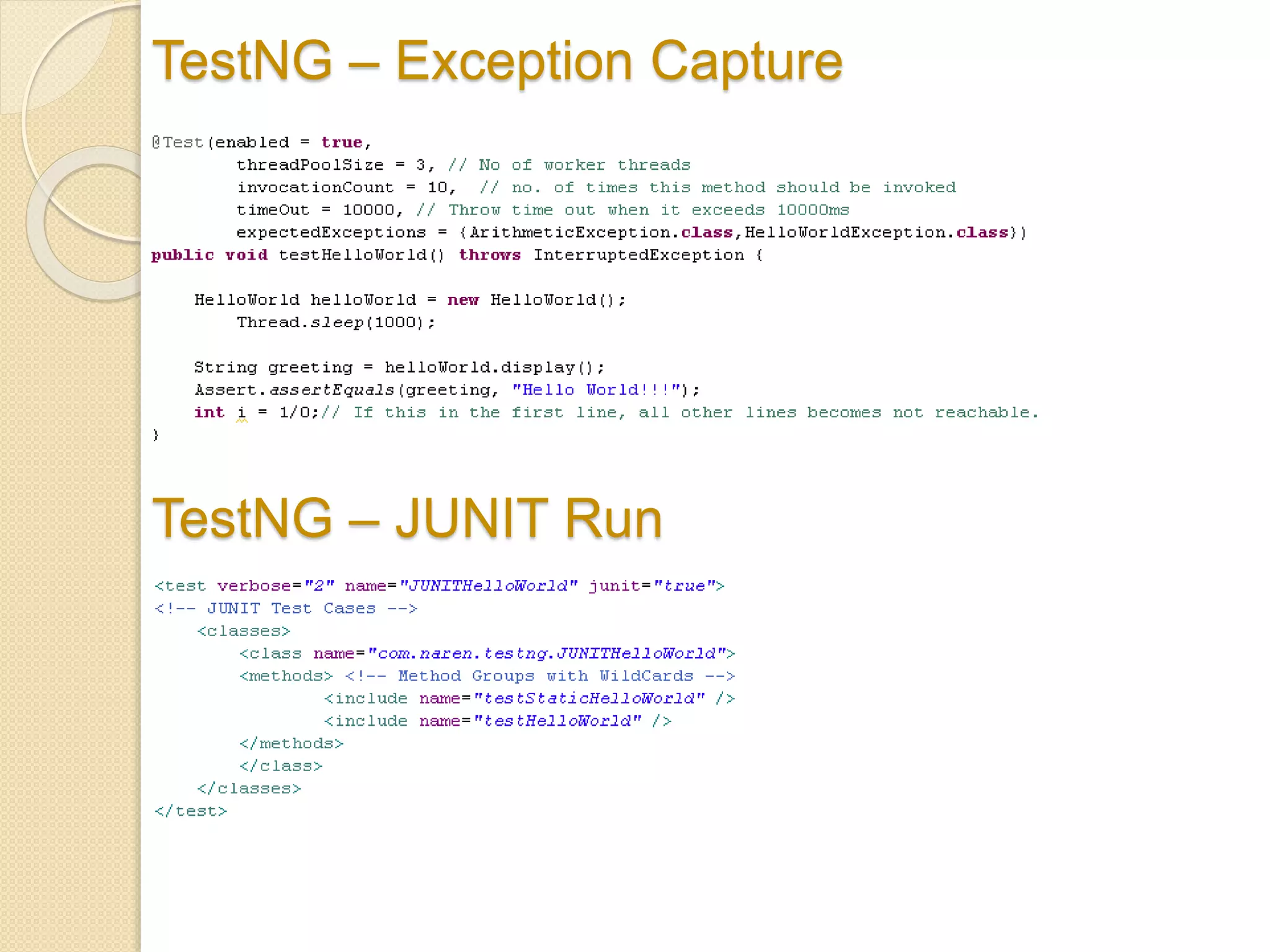
7. TestNG – Exception Capture
8. TestNG – JUNIT Run
9. TestNG – Failure Run
10. TestNG – Report
Other Concepts not in Demo [Bean Shell and advanced
group selection, Annotation Transformers, Method
Interceptors, TestNG Listeners, Dependency injection –
Refer TestNG - Links]
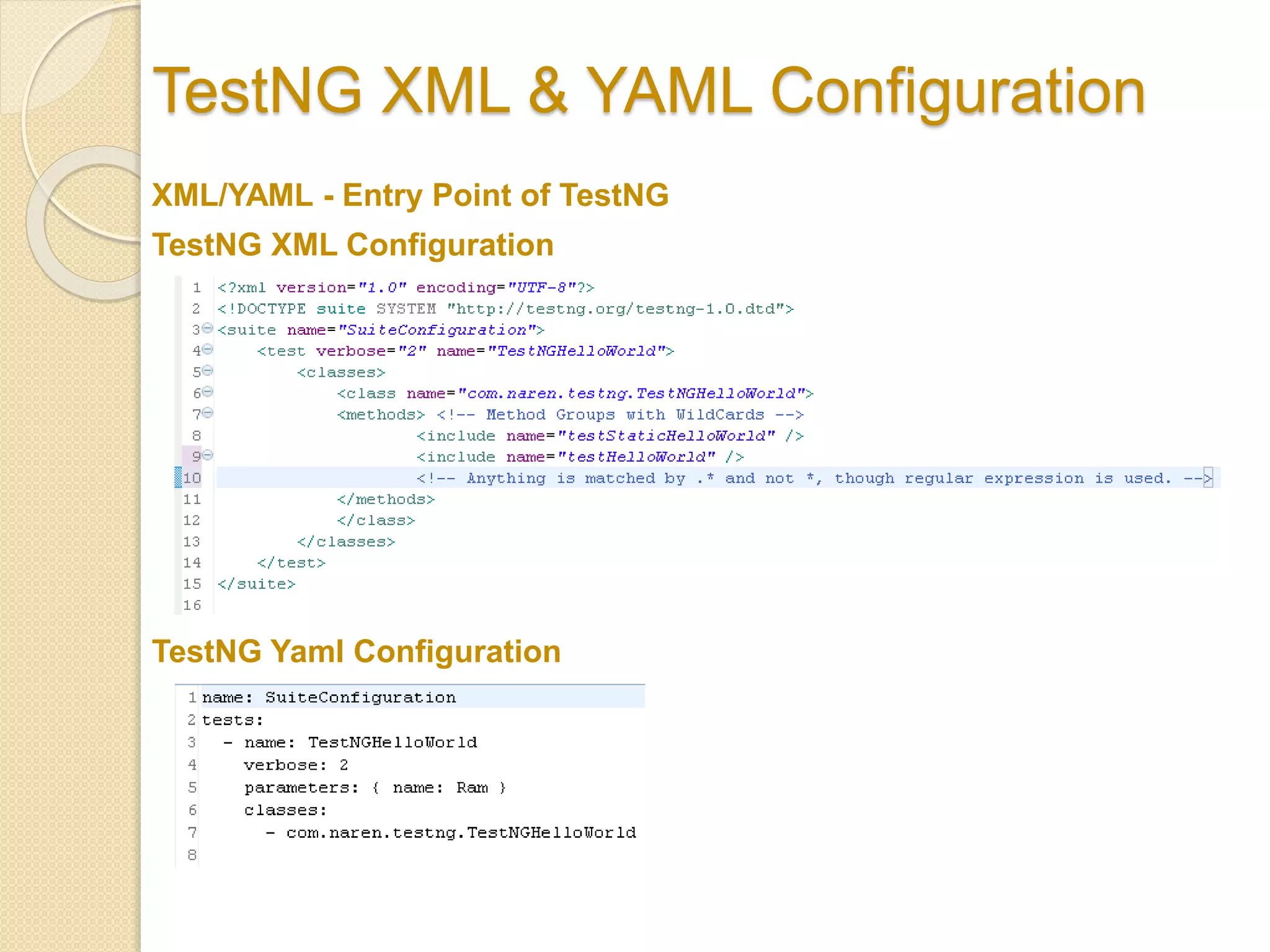
TestNG XML & YAML Configuration
TestNG Yaml Configuration
TestNG XML Configuration
XML/YAML - Entry Point of TestNG
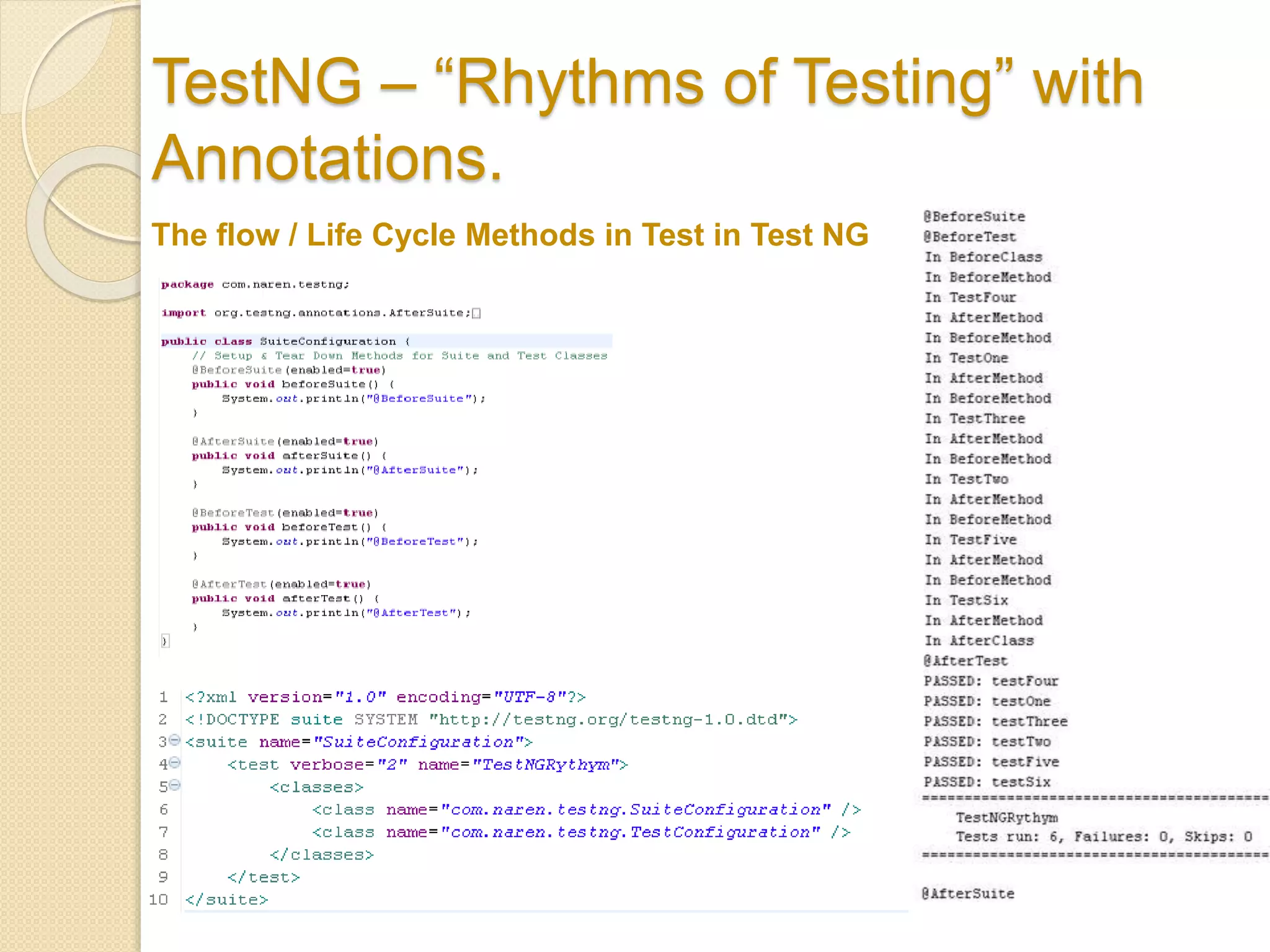
TestNG – “Rhythms of Testing” with
Annotations.
The flow / Life Cycle Methods in Test in Test NG
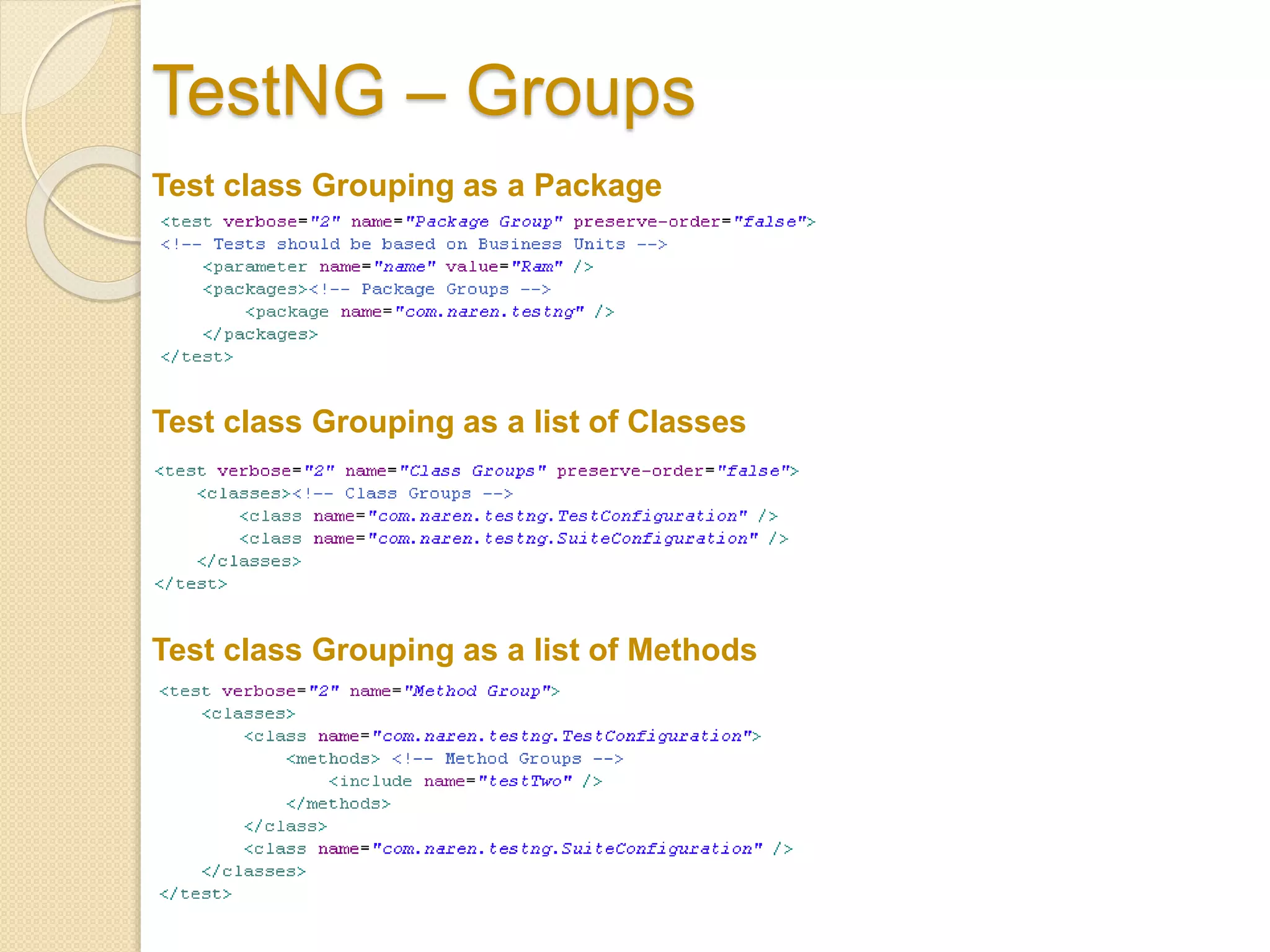
TestNG – Groups
Test class Grouping as a Package
Test class Grouping as a list of Classes
Test class Grouping as a list of Methods
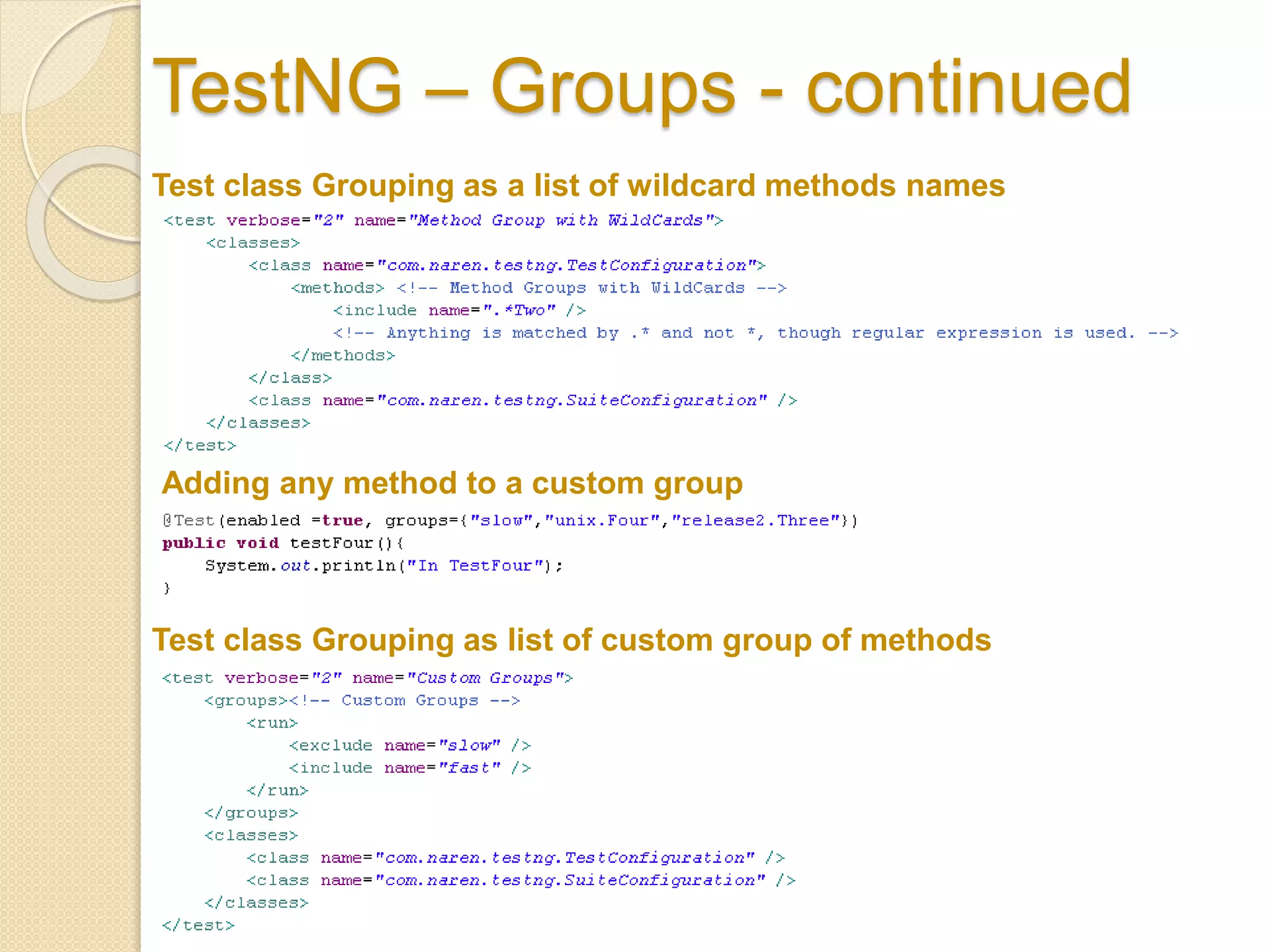
TestNG – Groups - continued
Test class Grouping as a list of wildcard methods names
Test class Grouping as list of custom group of methods
Adding any method to a custom group
TestNG – Groups - continued
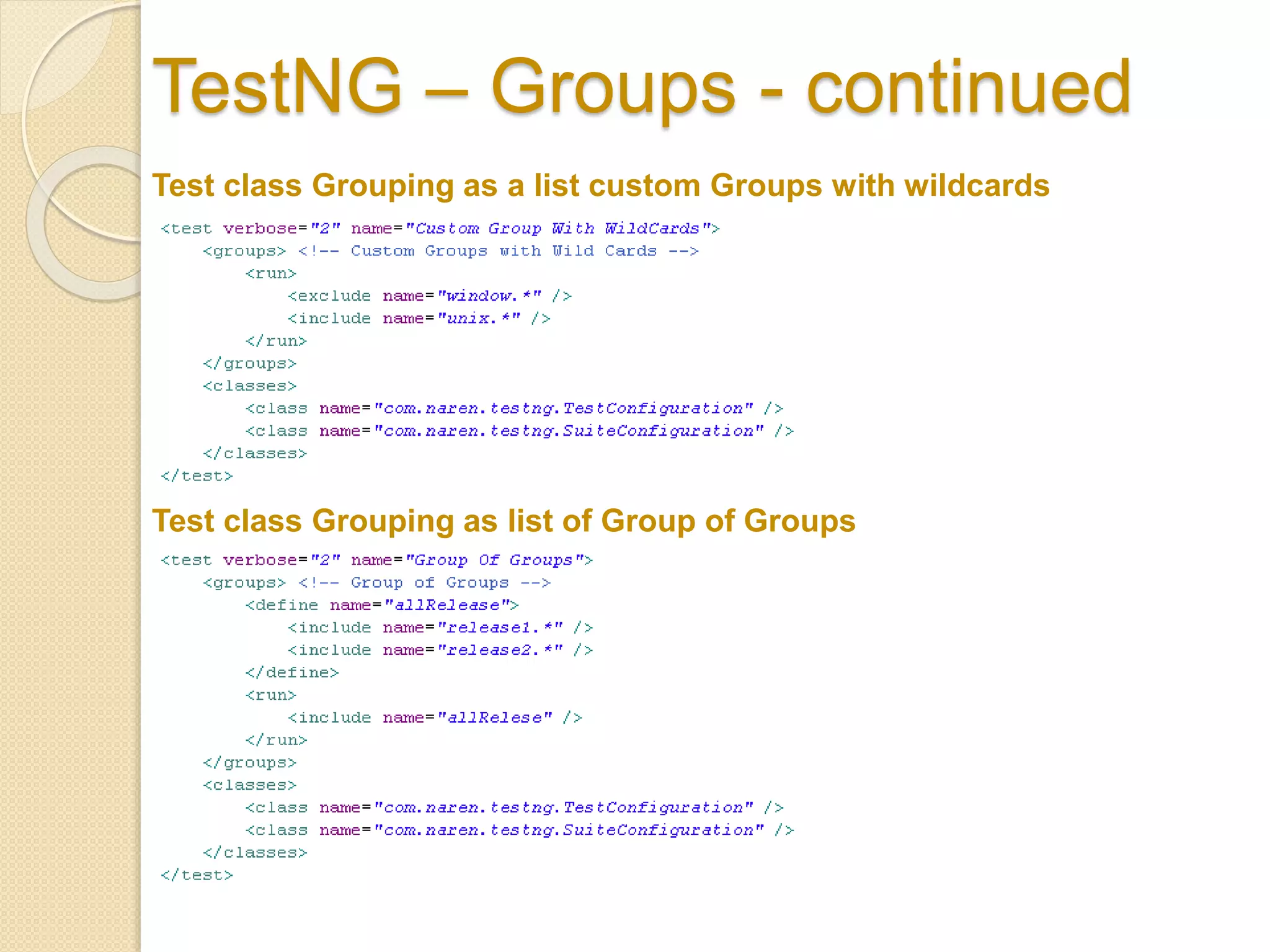
Test class Grouping as a list custom Groups with wildcards
Test class Grouping as list of Group of Groups
TestNG – Groups - continued
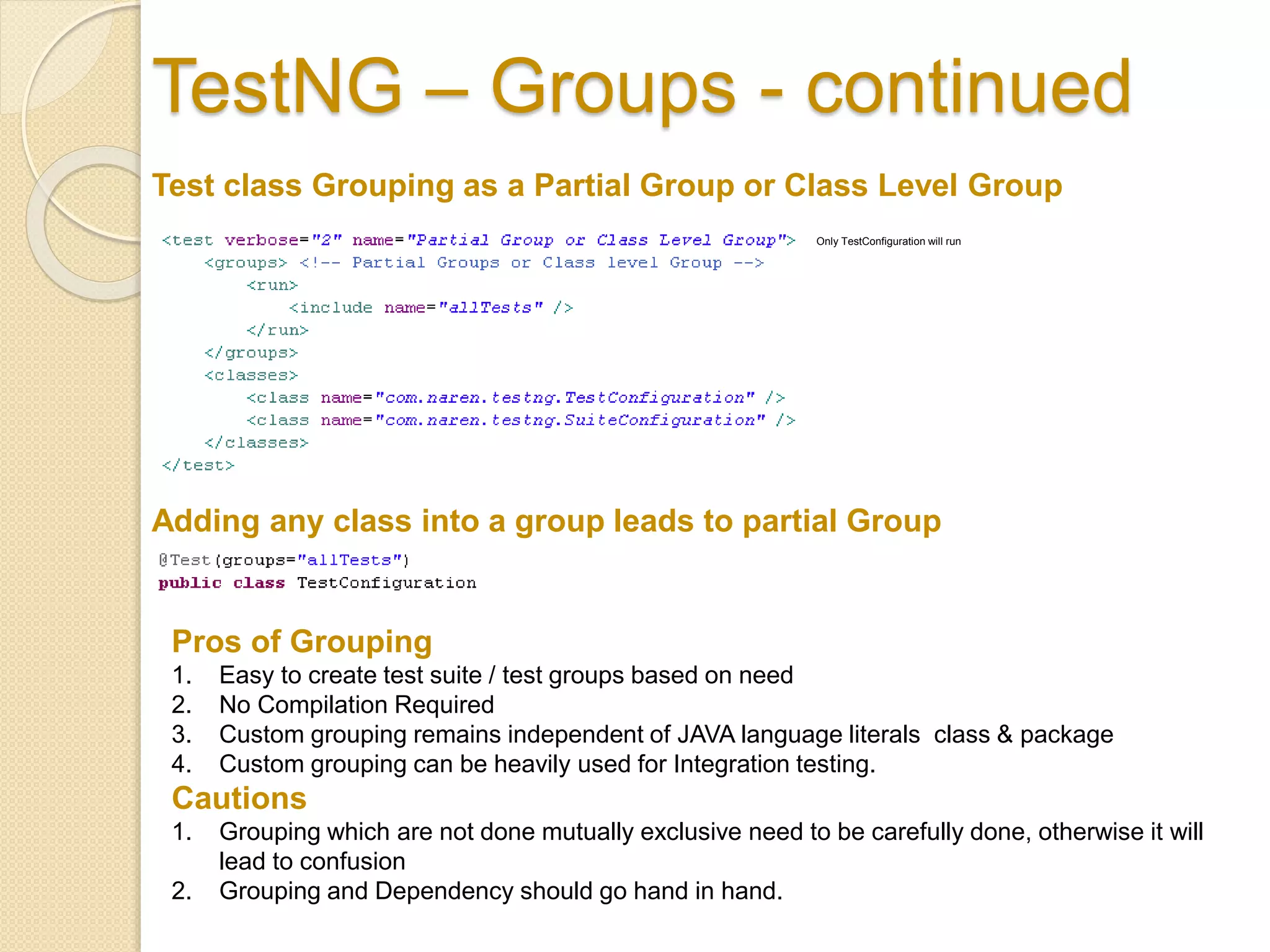
Test class Grouping as a Partial Group or Class Level Group
Only TestConfiguration will run
Adding any class into a group leads to partial Group
Pros of Grouping
1. Easy to create test suite / test groups based on need
2. No Compilation Required
3. Custom grouping remains independent of JAVA language literals class & package
4. Custom grouping can be heavily used for Integration testing.
Cautions
1. Grouping which are not done mutually exclusive need to be carefully done, otherwise it will
lead to confusion
2. Grouping and Dependency should go hand in hand.
TestNG – Dependency
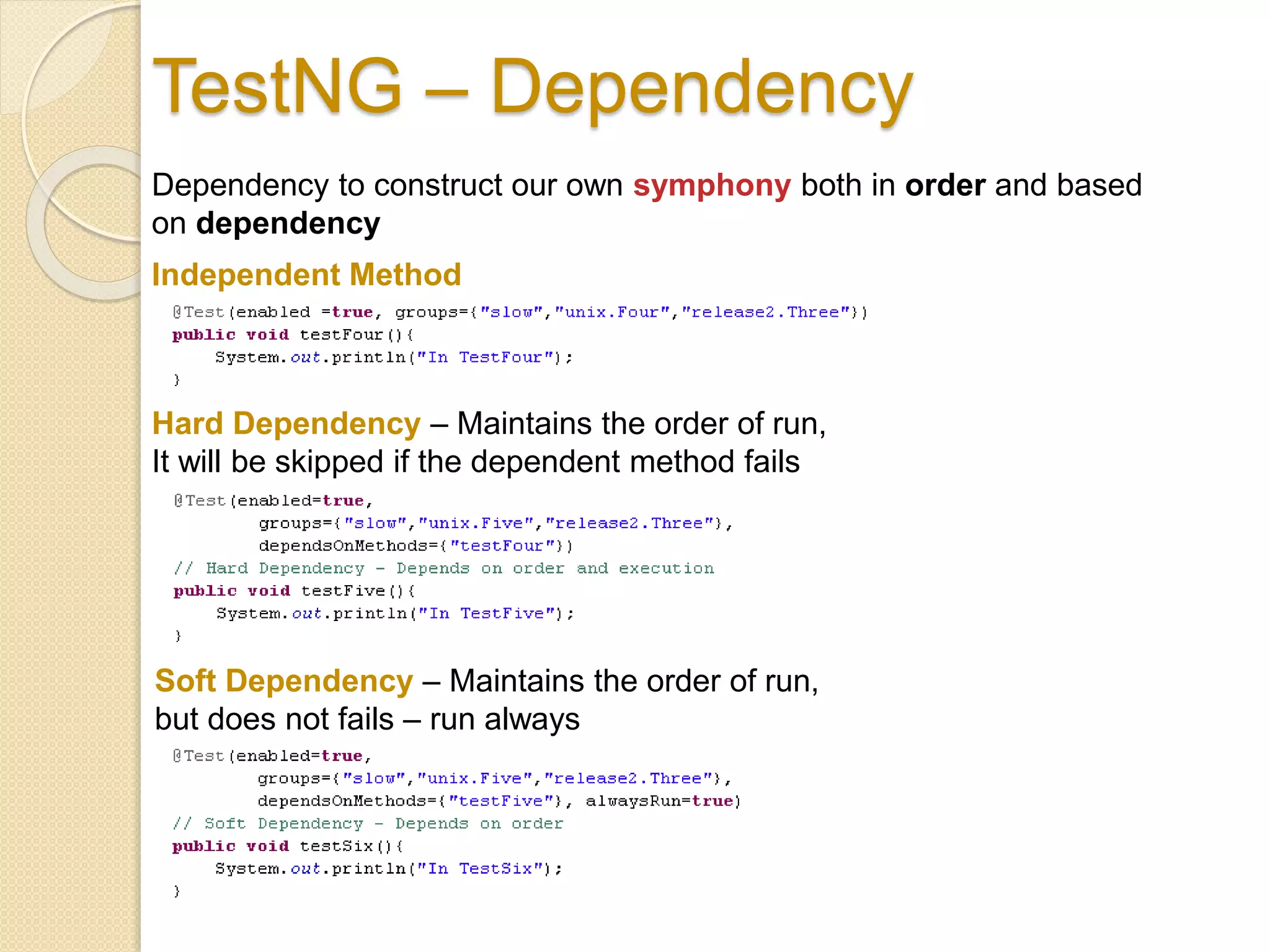
Dependency to construct our own symphony both in order and based
on dependency
Independent Method
Hard Dependency – Maintains the order of run,
It will be skipped if the dependent method fails
Soft Dependency – Maintains the order of run,
but does not fails – run always
TestNG – Dependency -
continued
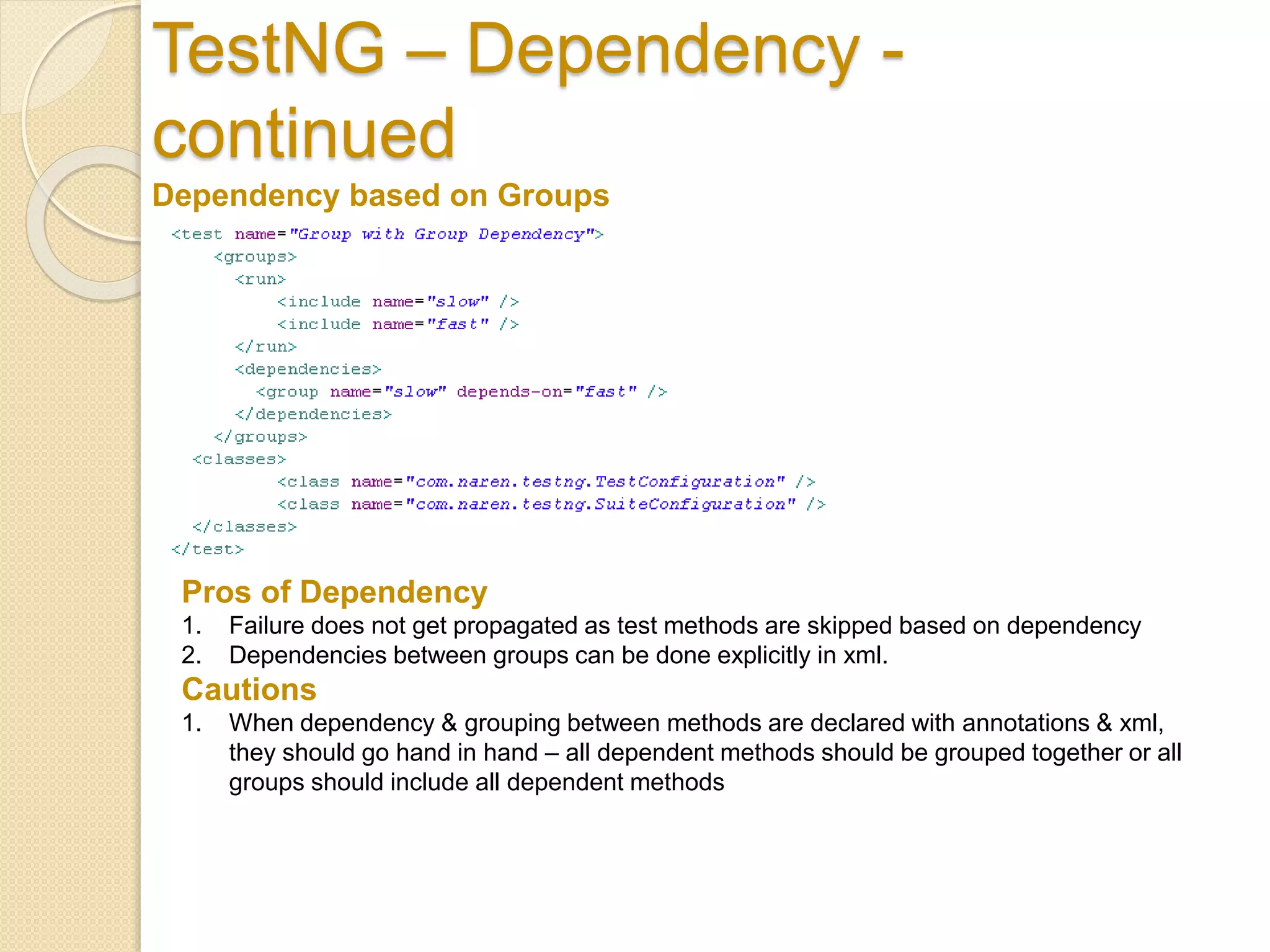
Dependency based on Groups
Pros of Dependency
1. Failure does not get propagated as test methods are skipped based on dependency
2. Dependencies between groups can be done explicitly in xml.
Cautions
1. When dependency & grouping between methods are declared with annotations & xml,
they should go hand in hand – all dependent methods should be grouped together or all
groups should include all dependent methods
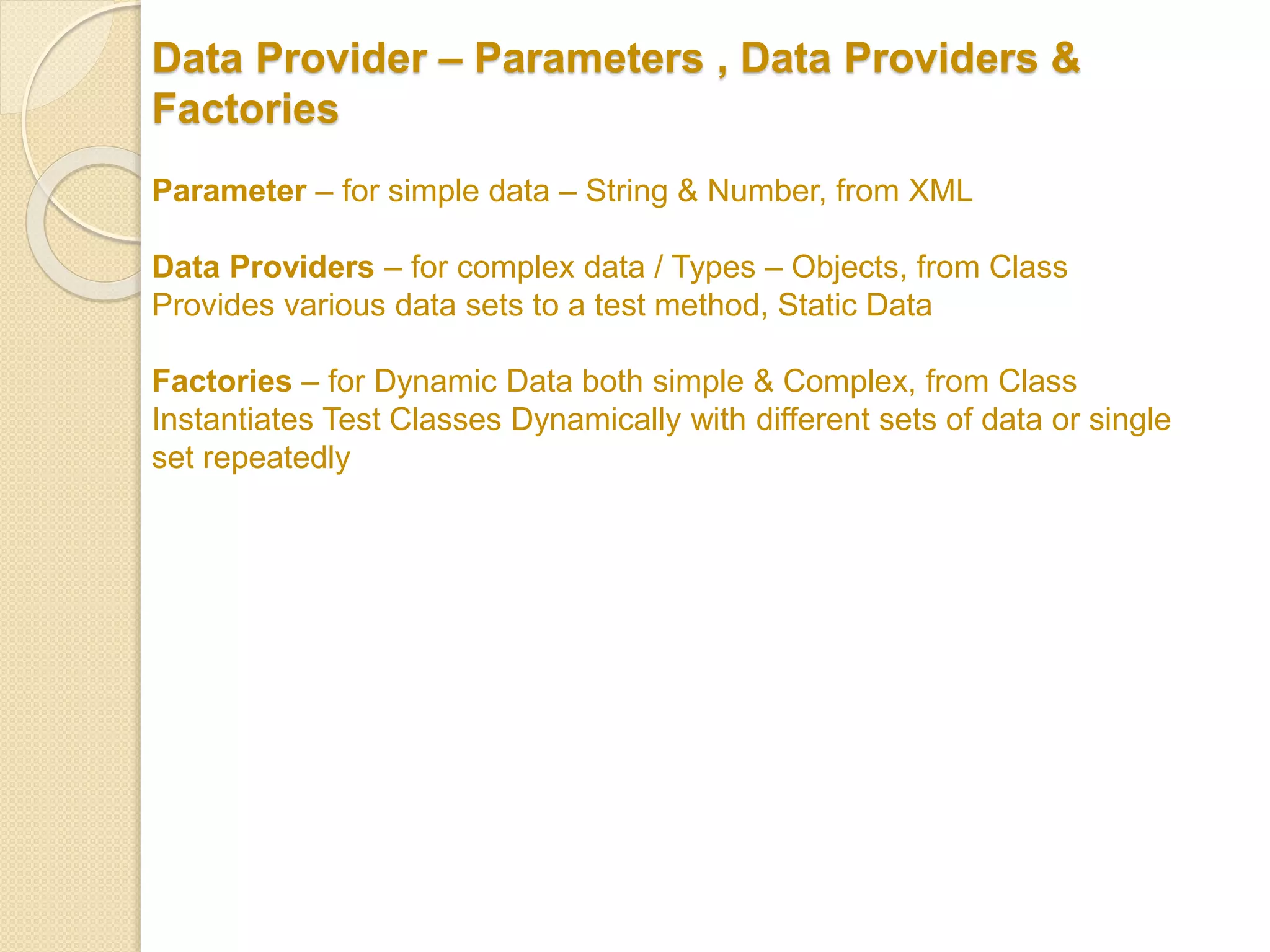
Data Provider – Parameters , Data Providers &
Factories
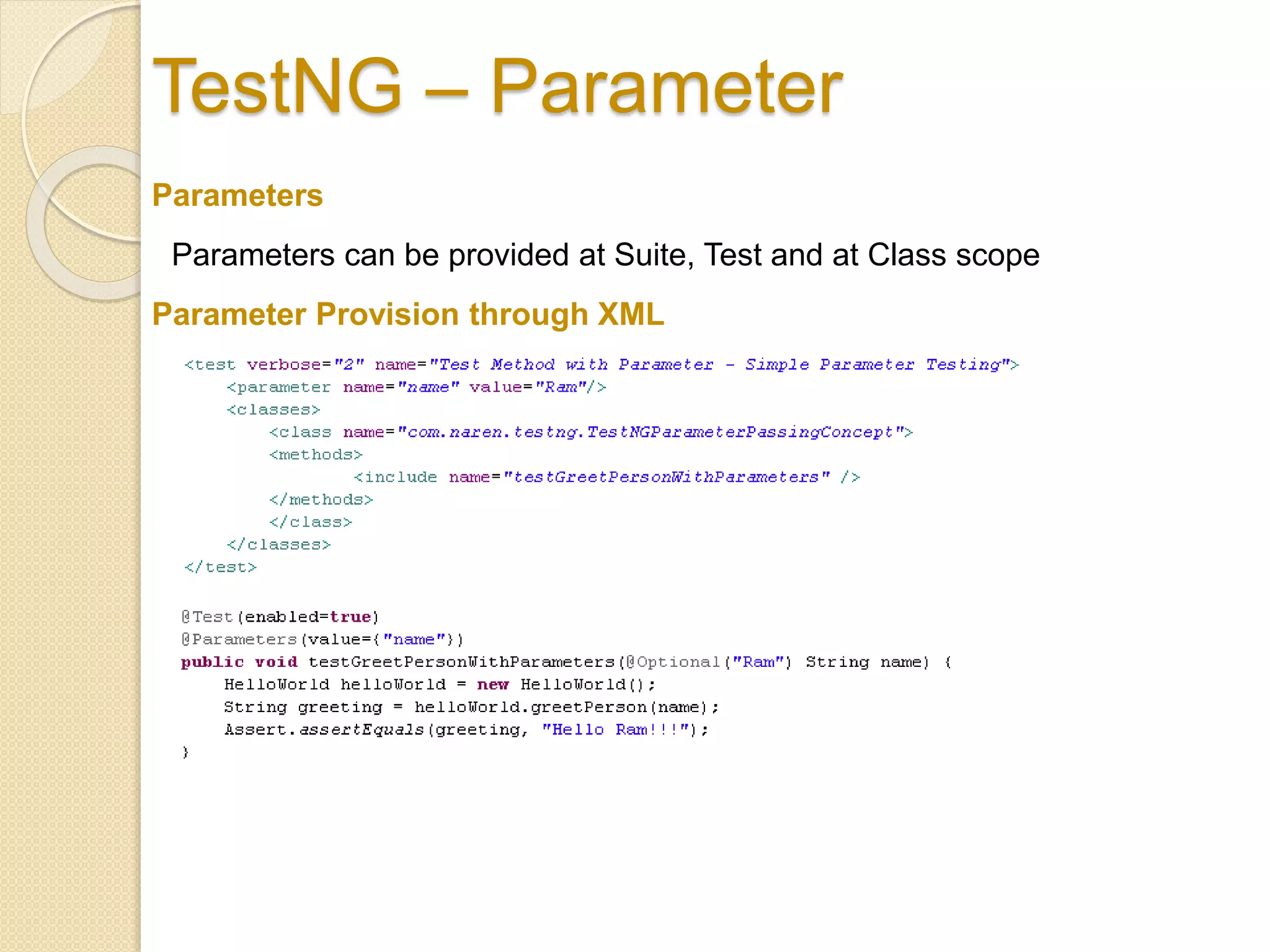
Parameter – for simple data – String & Number, from XML
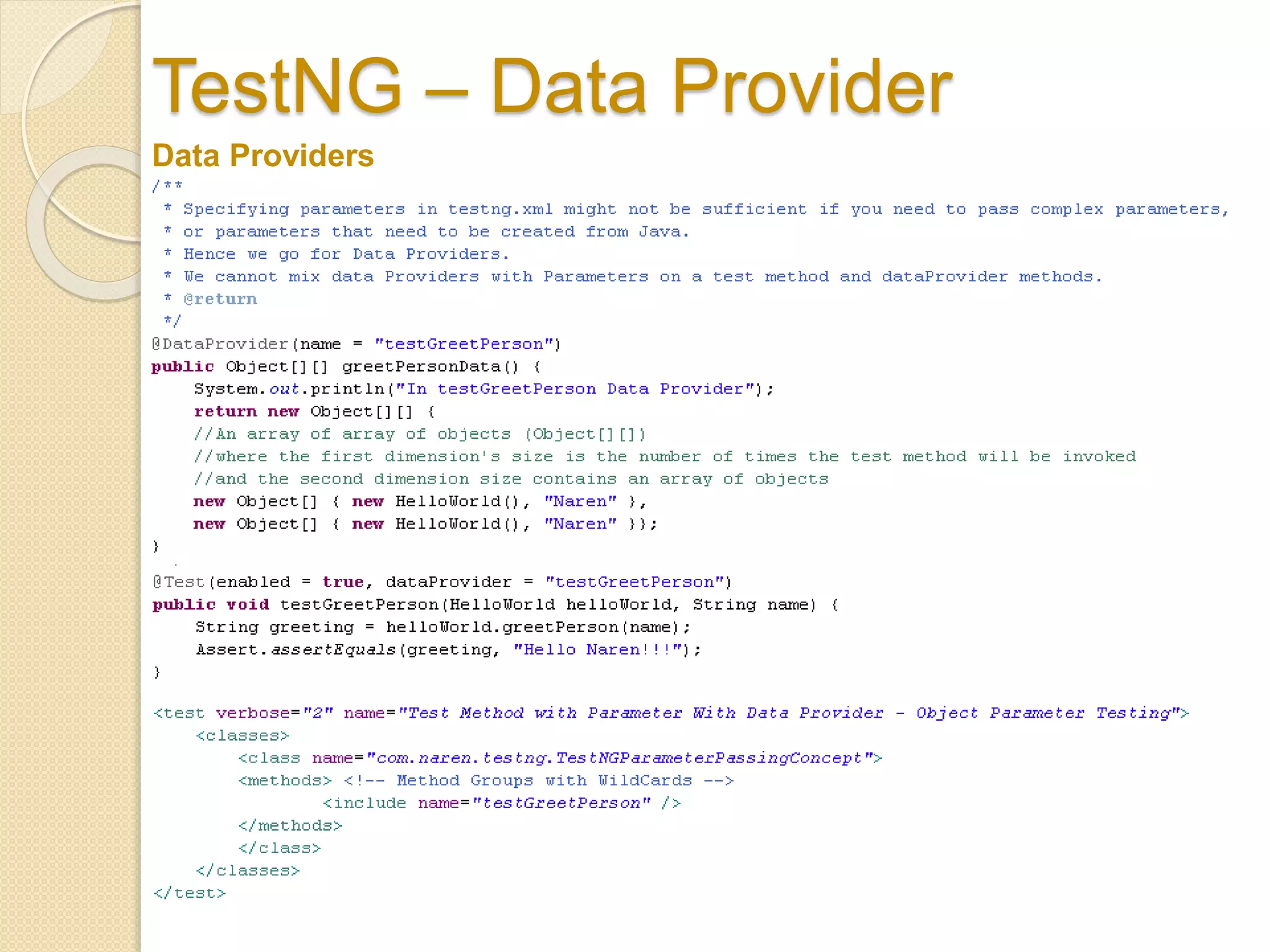
Data Providers – for complex data / Types – Objects, from Class
Provides various data sets to a test method, Static Data
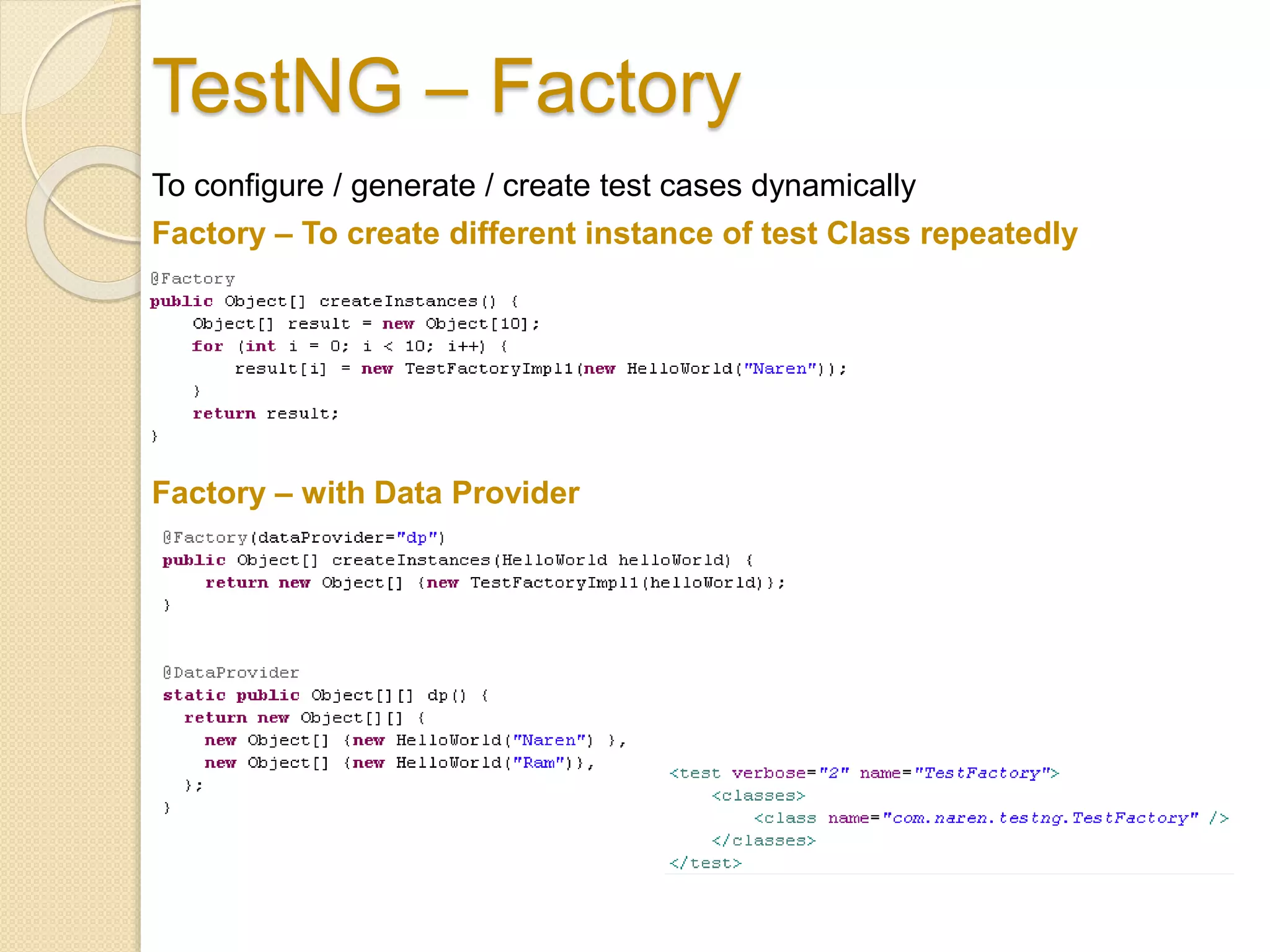
Factories – for Dynamic Data both simple & Complex, from Class
Instantiates Test Classes Dynamically with different sets of data or single
set repeatedly
TestNG – Parameter
Parameters
Parameters can be provided at Suite, Test and at Class scope
Parameter Provision through XML
TestNG – Data Provider
Data Providers
TestNG – Factory
To configure / generate / create test cases dynamically
Factory – To create different instance of test Class repeatedly
Factory – with Data Provider
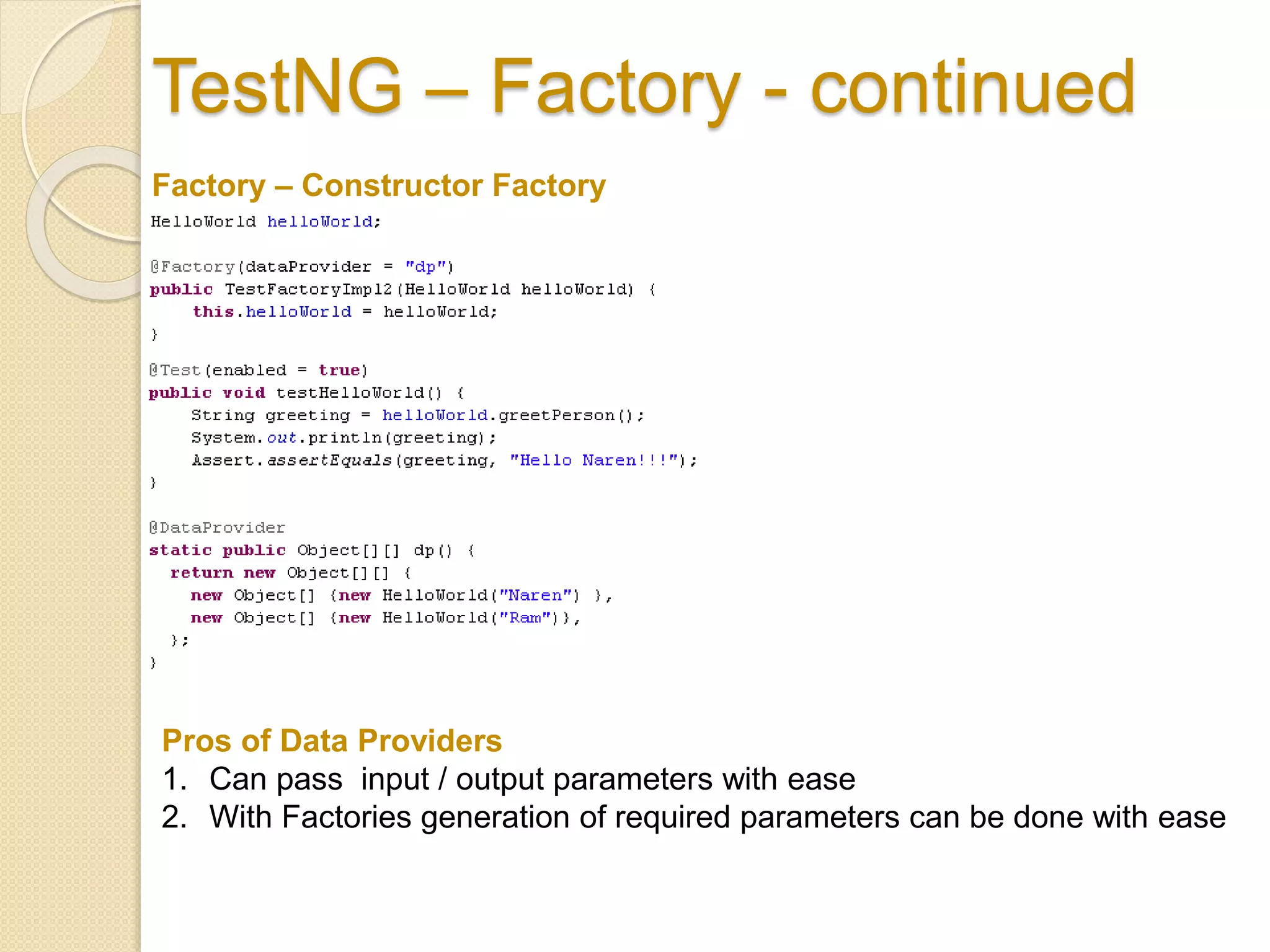
TestNG – Factory - continued
Factory – Constructor Factory
Pros of Data Providers
1. Can pass input / output parameters with ease
2. With Factories generation of required parameters can be done with ease
TestNG – Parallel Execution & Time
Out
More Configurations
TestNG – Exception Capture
TestNG – JUNIT Run
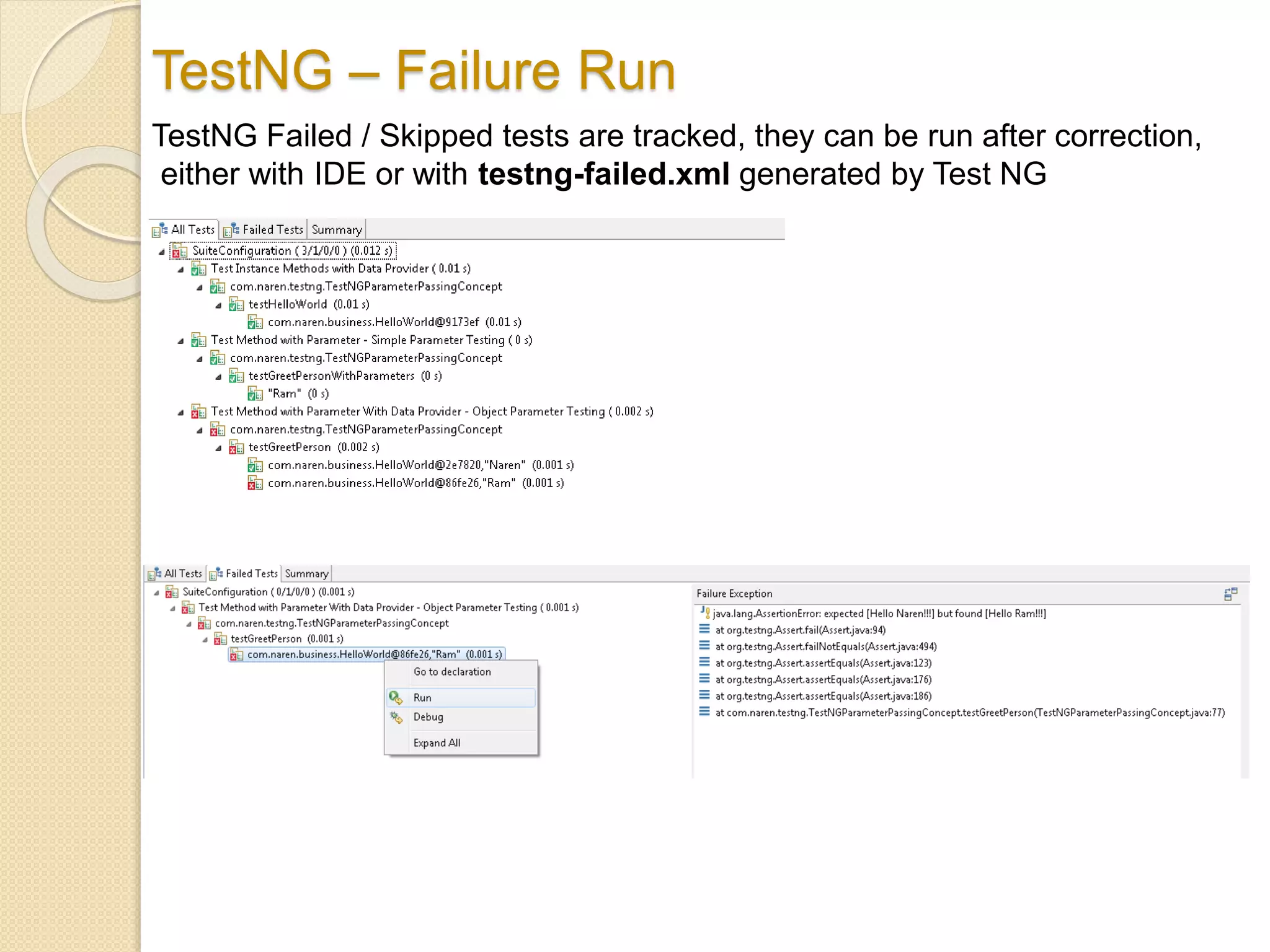
TestNG – Failure Run
TestNG Failed / Skipped tests are tracked, they can be run after correction,
either with IDE or with testng-failed.xml generated by Test NG
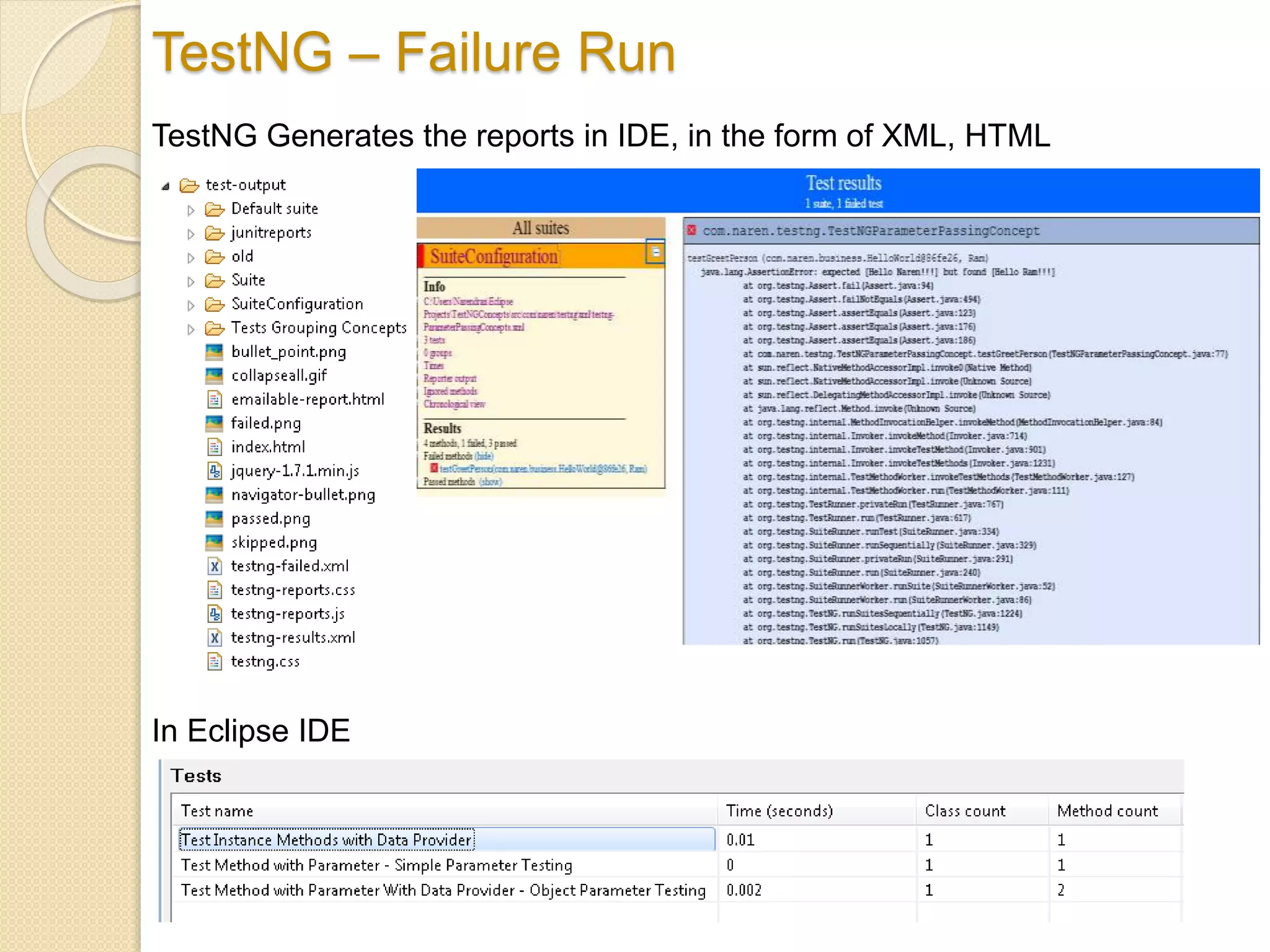
TestNG – Failure Run
TestNG Generates the reports in IDE, in the form of XML, HTML
In Eclipse IDE
TestNG – Listener & Method Interceptor
Implementation
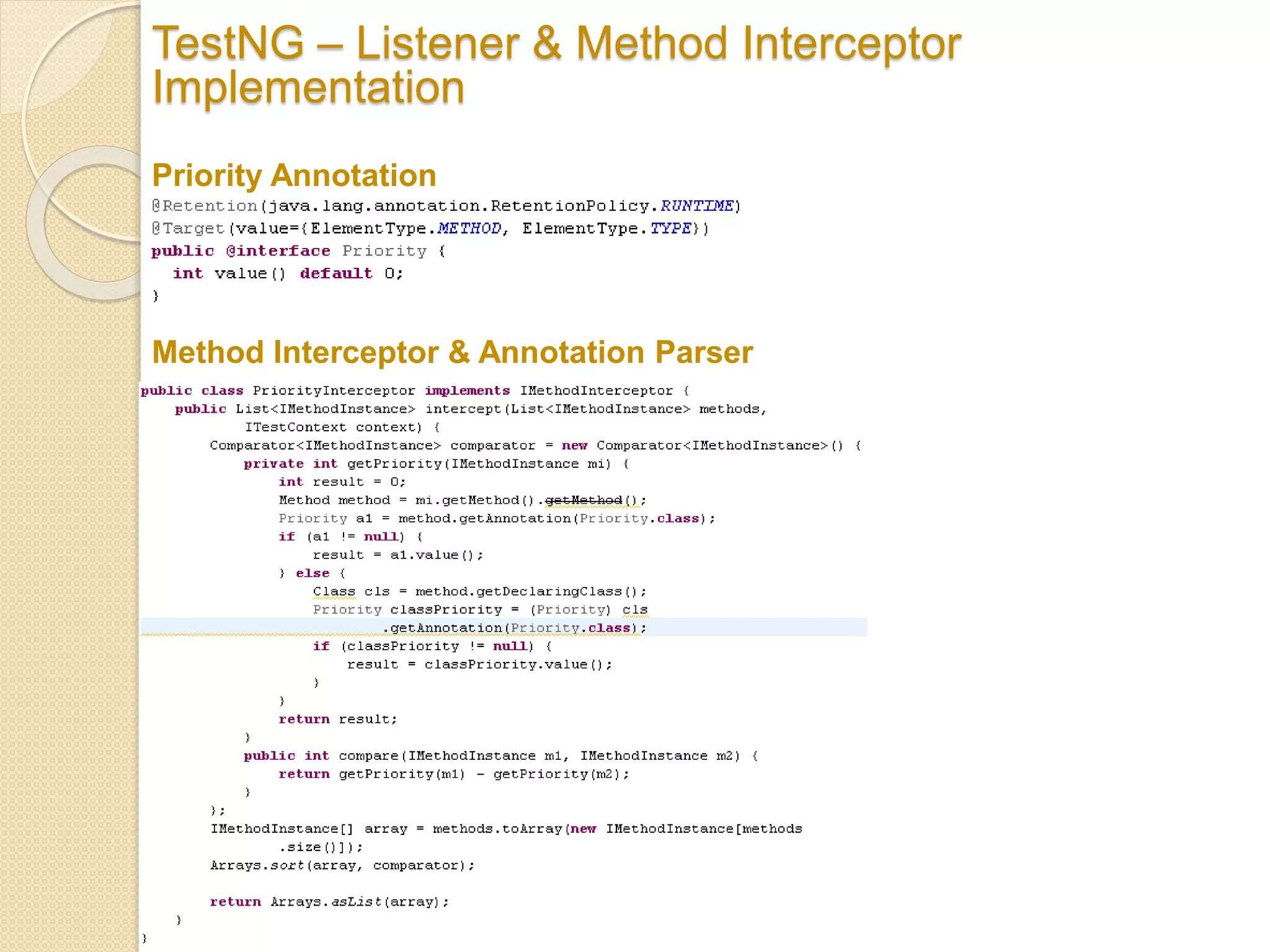
Priority Annotation
Method Interceptor & Annotation Parser
TestNG – Listener & Method Interceptor
Implementation
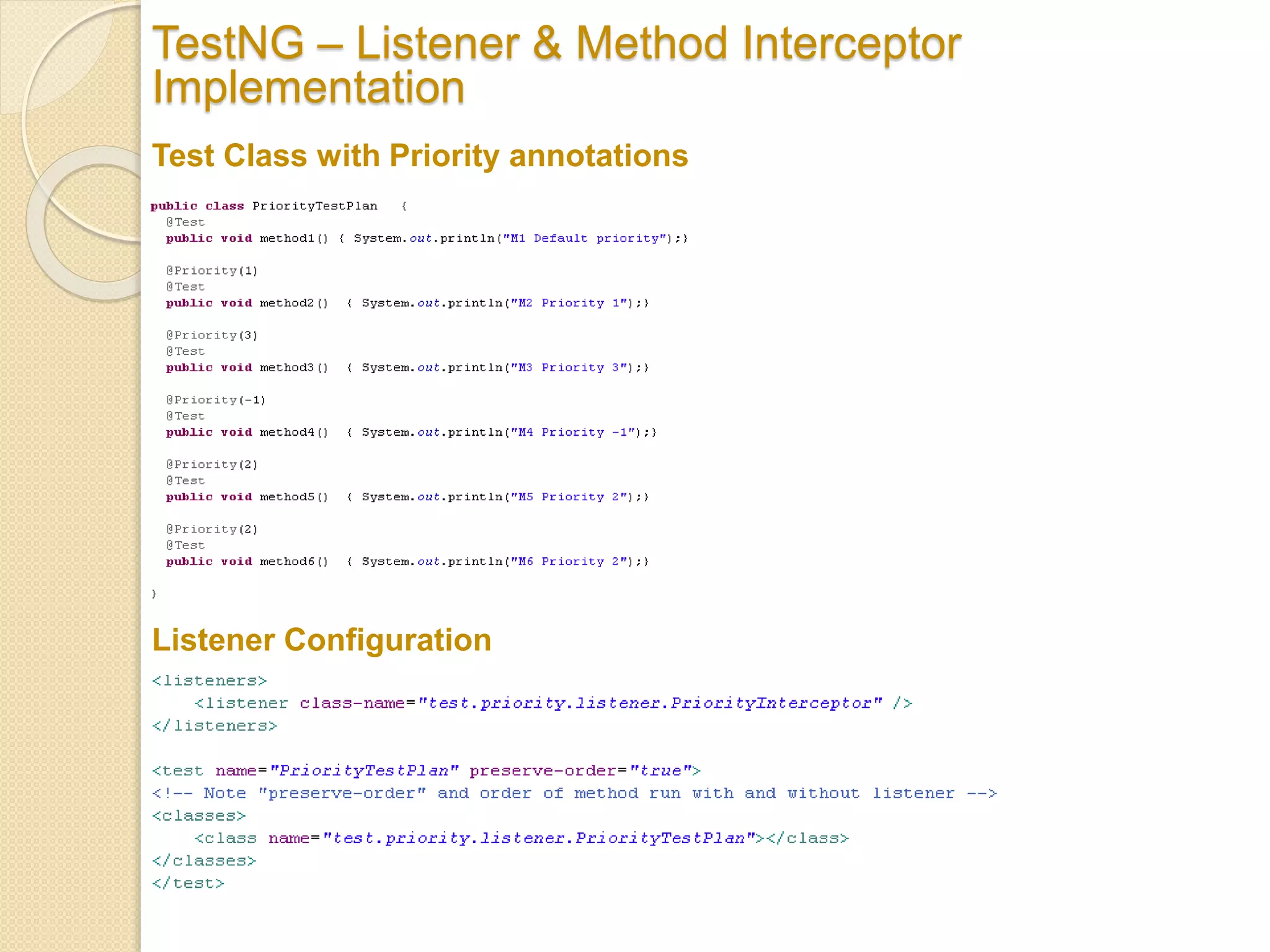
Test Class with Priority annotations
Listener Configuration
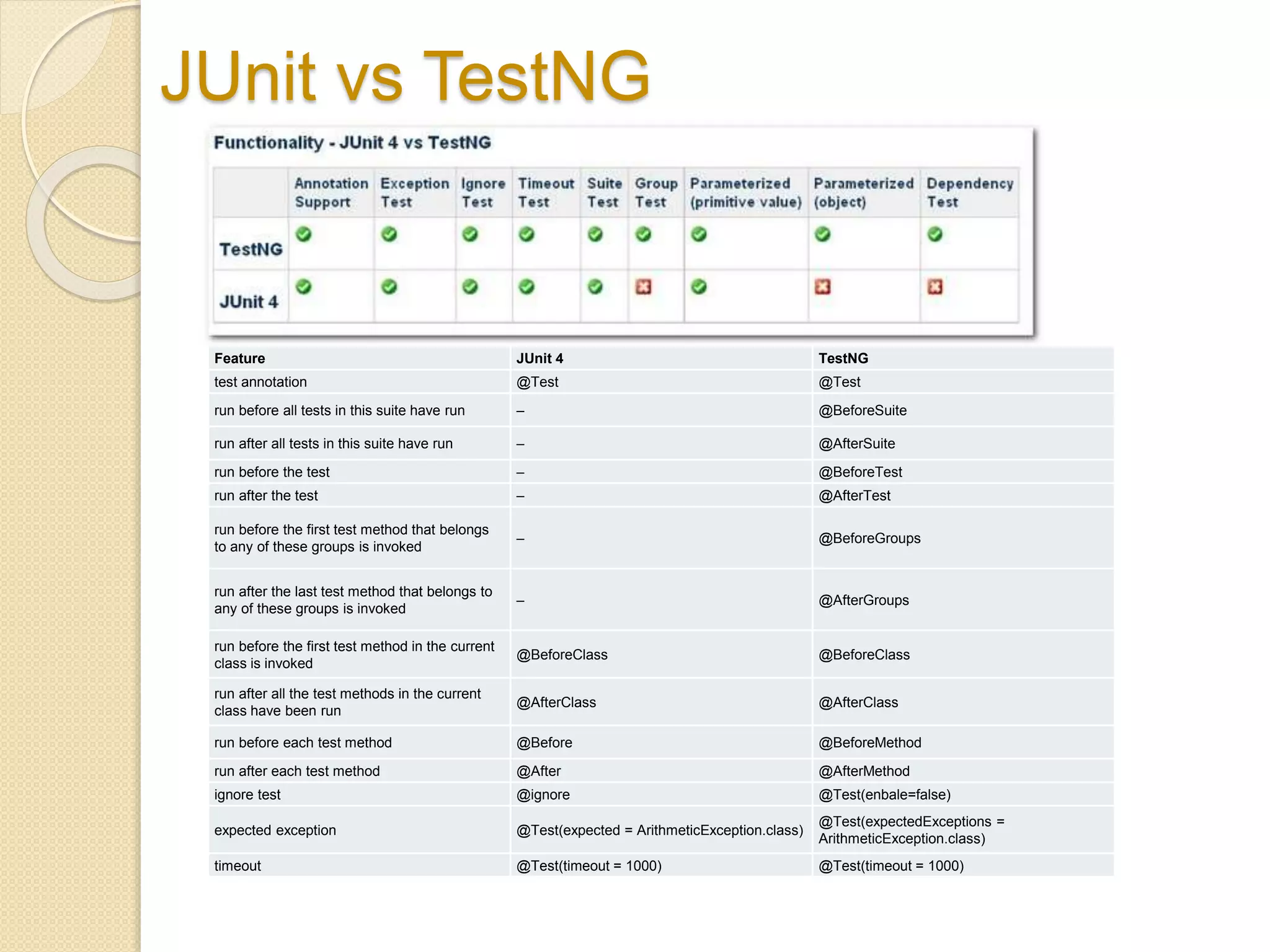
JUnit vs TestNG
Feature JUnit 4 TestNG
test annotation @Test @Test
run before all tests in this suite have run – @BeforeSuite
run after all tests in this suite have run – @AfterSuite
run before the test – @BeforeTest
run after the test – @AfterTest
run before the first test method that belongs
to any of these groups is invoked
– @BeforeGroups
run after the last test method that belongs to
any of these groups is invoked
– @AfterGroups
run before the first test method in the current
class is invoked
@BeforeClass @BeforeClass
run after all the test methods in the current
class have been run
@AfterClass @AfterClass
run before each test method @Before @BeforeMethod
run after each test method @After @AfterMethod
ignore test @ignore @Test(enbale=false)
expected exception @Test(expected = ArithmeticException.class)
@Test(expectedExceptions =
ArithmeticException.class)
timeout @Test(timeout = 1000) @Test(timeout = 1000)
Continued..
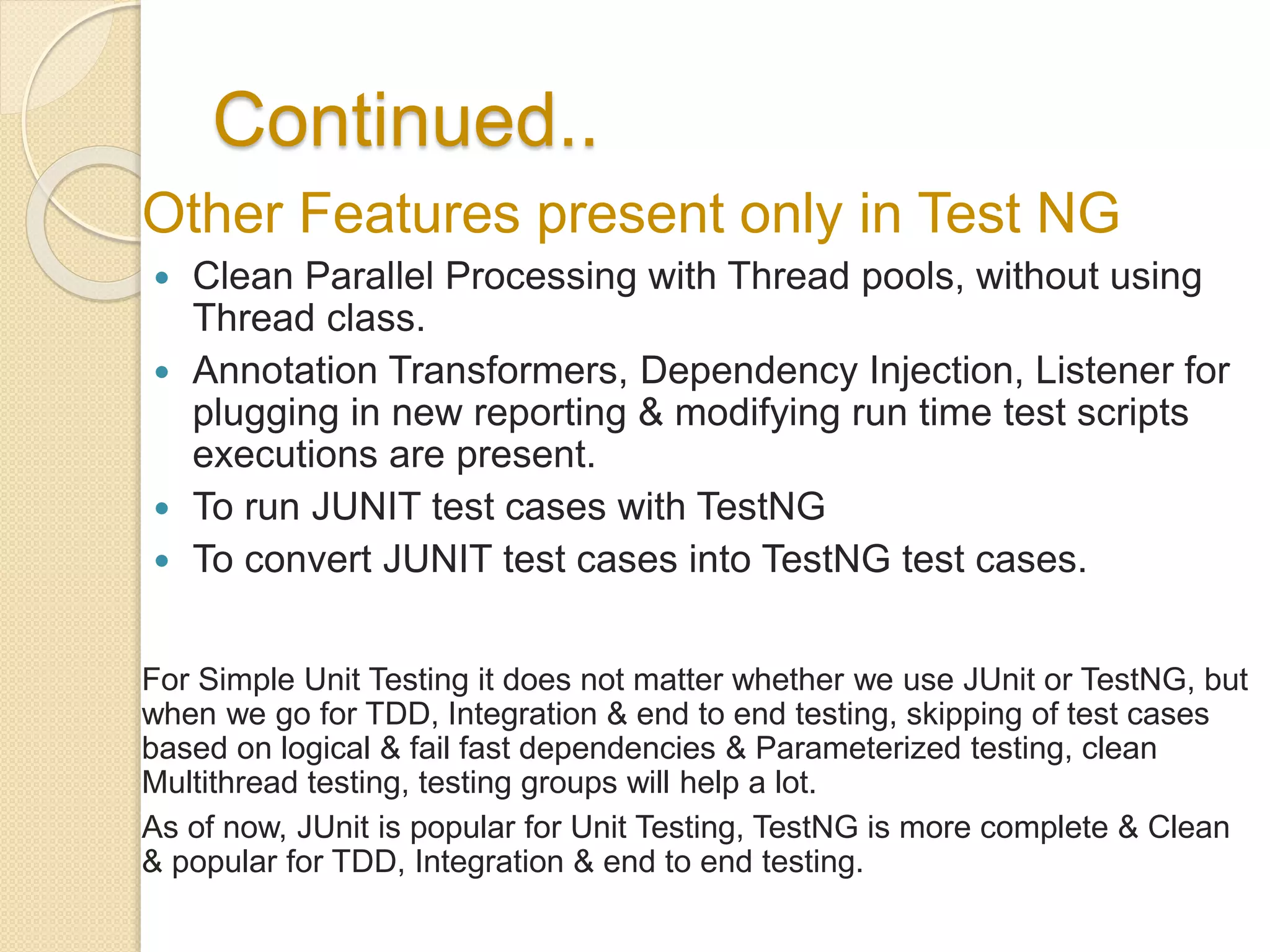
Other Features present only in Test NG
 Clean Parallel Processing with Thread pools, without using
Thread class.
 Annotation Transformers, Dependency Injection, Listener for
plugging in new reporting & modifying run time test scripts
executions are present.
 To run JUNIT test cases with TestNG
 To convert JUNIT test cases into TestNG test cases.
For Simple Unit Testing it does not matter whether we use JUnit or TestNG, but
when we go for TDD, Integration & end to end testing, skipping of test cases
based on logical & fail fast dependencies & Parameterized testing, clean
Multithread testing, testing groups will help a lot.
As of now, JUnit is popular for Unit Testing, TestNG is more complete & Clean
& popular for TDD, Integration & end to end testing.
Groups vs Universes
 We can classify & group test cases as UNIT,
INTEGRATION & SMOKE and with in this
groups we could have Business functional
segregations.
 School of tests which has to be run has to be
grouped.
 Groups formed should be mutually exclusive.
 If Groups are not mutually exclusive, there
should be another group formed which
combines all non exclusive groups without
redundancy.
 A Group can have “N” no. of mutually
exclusive sub groups.
TestNG Documentation
http://testng.org/doc/documentation-main.html
TestNG Download
http://testng.org/doc/download.html
Reference Github link
https://github.com/Schools/TestNGSchool
TestNG – Links
THANKS

Test NG Framework Complete Walk Through

  • 1.
    TestNG Framework for ExtensiveTesting and TDD Next Generation Testing, TestNG - Testing Tool Narendran Solai Sridharan 19-Feb-2014
  • 2.
    Table of Contents TestNG Features & Benefits  TestNG Installation  TestNG Demo  JUnit vs TestNG  TestNG - Links
  • 3.
    TestNG Overview Features  TestNGis a testing framework inspired by JUnit and NUnit  Designed to cover all categories of tests: unit, functional, end-to-end, integration etc.,  Designed to perform Multi threaded testing, to help in load and stress testing.  Designed to Group Test Scripts and run them selectively.  Designed to run test scripts based on dependencies & failures.  Designed to check module performance such as response time with test timeouts.  Has a flexible plugin API for report creation and for even changing core behavior. Benefits  Overcomes the drawbacks of JUNIT Framework.  One Stop Shop for various kinds of testing.  Dependency testing, grouping concept to make testing more powerful and easy.  Thins the gaps between Development and Testing and encourages Test Driven Development (TDD).  Combined use of several TestNG's features provides a very intuitive and maintainable testing design.  Easy Migration from JUNIT to TestNG.  Easy Integration with framework & tools like Spring, Selenium, Guice, Jenkins etc.  Easy Reporting
  • 4.
    TestNG Installation Pre-Requisite  Mandatory:JDK 1.5 & above & TestNG Jar  Optional: TestNG Plugin for Eclipse (any version)  Optional: Maven (any version)  Optional: JUNIT Jar, if JUNIT test cases to be run by TestNG. Types of Installation 1. TestNG as Eclipse Plugin 2. TestNG as Maven Dependency 3. TestNG as Class Path Jar Maven Dependency <dependency> <groupId>org.testng</groupId> <artifactId>testng</artifactId> <version>6.8.6</version> <scope>test</scope> </dependency>
  • 5.
    TestNG - Demo 1.TestNG XML & YAML Configuration 2. TestNG – “Rhythms of Testing” with Annotations. 3. TestNG – Groups 4. TestNG – Dependency 5. TestNG – Parameters, Data Provider & Factory 6. TestNG – Parallel Execution & Time Outs 7. TestNG – Exception Capture 8. TestNG – JUNIT Run 9. TestNG – Failure Run 10. TestNG – Report Other Concepts not in Demo [Bean Shell and advanced group selection, Annotation Transformers, Method Interceptors, TestNG Listeners, Dependency injection – Refer TestNG - Links]
  • 6.
    TestNG XML &YAML Configuration TestNG Yaml Configuration TestNG XML Configuration XML/YAML - Entry Point of TestNG
  • 7.
    TestNG – “Rhythmsof Testing” with Annotations. The flow / Life Cycle Methods in Test in Test NG
  • 8.
    TestNG – Groups Testclass Grouping as a Package Test class Grouping as a list of Classes Test class Grouping as a list of Methods
  • 9.
    TestNG – Groups- continued Test class Grouping as a list of wildcard methods names Test class Grouping as list of custom group of methods Adding any method to a custom group
  • 10.
    TestNG – Groups- continued Test class Grouping as a list custom Groups with wildcards Test class Grouping as list of Group of Groups
  • 11.
    TestNG – Groups- continued Test class Grouping as a Partial Group or Class Level Group Only TestConfiguration will run Adding any class into a group leads to partial Group Pros of Grouping 1. Easy to create test suite / test groups based on need 2. No Compilation Required 3. Custom grouping remains independent of JAVA language literals class & package 4. Custom grouping can be heavily used for Integration testing. Cautions 1. Grouping which are not done mutually exclusive need to be carefully done, otherwise it will lead to confusion 2. Grouping and Dependency should go hand in hand.
  • 12.
    TestNG – Dependency Dependencyto construct our own symphony both in order and based on dependency Independent Method Hard Dependency – Maintains the order of run, It will be skipped if the dependent method fails Soft Dependency – Maintains the order of run, but does not fails – run always
  • 13.
    TestNG – Dependency- continued Dependency based on Groups Pros of Dependency 1. Failure does not get propagated as test methods are skipped based on dependency 2. Dependencies between groups can be done explicitly in xml. Cautions 1. When dependency & grouping between methods are declared with annotations & xml, they should go hand in hand – all dependent methods should be grouped together or all groups should include all dependent methods
  • 14.
    Data Provider –Parameters , Data Providers & Factories Parameter – for simple data – String & Number, from XML Data Providers – for complex data / Types – Objects, from Class Provides various data sets to a test method, Static Data Factories – for Dynamic Data both simple & Complex, from Class Instantiates Test Classes Dynamically with different sets of data or single set repeatedly
  • 15.
    TestNG – Parameter Parameters Parameterscan be provided at Suite, Test and at Class scope Parameter Provision through XML
  • 16.
    TestNG – DataProvider Data Providers
  • 17.
    TestNG – Factory Toconfigure / generate / create test cases dynamically Factory – To create different instance of test Class repeatedly Factory – with Data Provider
  • 18.
    TestNG – Factory- continued Factory – Constructor Factory Pros of Data Providers 1. Can pass input / output parameters with ease 2. With Factories generation of required parameters can be done with ease
  • 19.
    TestNG – ParallelExecution & Time Out More Configurations
  • 20.
    TestNG – ExceptionCapture TestNG – JUNIT Run
  • 21.
    TestNG – FailureRun TestNG Failed / Skipped tests are tracked, they can be run after correction, either with IDE or with testng-failed.xml generated by Test NG
  • 22.
    TestNG – FailureRun TestNG Generates the reports in IDE, in the form of XML, HTML In Eclipse IDE
  • 23.
    TestNG – Listener& Method Interceptor Implementation Priority Annotation Method Interceptor & Annotation Parser
  • 24.
    TestNG – Listener& Method Interceptor Implementation Test Class with Priority annotations Listener Configuration
  • 25.
    JUnit vs TestNG FeatureJUnit 4 TestNG test annotation @Test @Test run before all tests in this suite have run – @BeforeSuite run after all tests in this suite have run – @AfterSuite run before the test – @BeforeTest run after the test – @AfterTest run before the first test method that belongs to any of these groups is invoked – @BeforeGroups run after the last test method that belongs to any of these groups is invoked – @AfterGroups run before the first test method in the current class is invoked @BeforeClass @BeforeClass run after all the test methods in the current class have been run @AfterClass @AfterClass run before each test method @Before @BeforeMethod run after each test method @After @AfterMethod ignore test @ignore @Test(enbale=false) expected exception @Test(expected = ArithmeticException.class) @Test(expectedExceptions = ArithmeticException.class) timeout @Test(timeout = 1000) @Test(timeout = 1000)
  • 26.
    Continued.. Other Features presentonly in Test NG  Clean Parallel Processing with Thread pools, without using Thread class.  Annotation Transformers, Dependency Injection, Listener for plugging in new reporting & modifying run time test scripts executions are present.  To run JUNIT test cases with TestNG  To convert JUNIT test cases into TestNG test cases. For Simple Unit Testing it does not matter whether we use JUnit or TestNG, but when we go for TDD, Integration & end to end testing, skipping of test cases based on logical & fail fast dependencies & Parameterized testing, clean Multithread testing, testing groups will help a lot. As of now, JUnit is popular for Unit Testing, TestNG is more complete & Clean & popular for TDD, Integration & end to end testing.
  • 27.
    Groups vs Universes We can classify & group test cases as UNIT, INTEGRATION & SMOKE and with in this groups we could have Business functional segregations.  School of tests which has to be run has to be grouped.  Groups formed should be mutually exclusive.  If Groups are not mutually exclusive, there should be another group formed which combines all non exclusive groups without redundancy.  A Group can have “N” no. of mutually exclusive sub groups.
  • 28.
  • 29.

Editor's Notes

  • #12 In Junit there is no grouping concept. All these grouping can be done in JUNIT but it has to done in JAVA Code and need to be maintained manually.
  • #13 In JUNIT, there is no test dependency Concept, every test dependency should be hardcoded in JAVA (by method calls) or by Dependency Injection (only for objects) in case if it is an UNIT Test cases Test dependencies are not JAVA type(class) dependencies. Types of Dependencies Based on Hierarchy Class level – Importing Types, fields, methods Method level – Method calls, method parameter, return type Package level – Based on class level Types of Dependency Injection Setter Interface Constructor Lookup Reference
  • #14 Package & Class grouping can be done for UNIT Testing (Maven folder structure does it always). It is appropriate as the test cases have to be changed based on the changes done in application packages and classes. For Screen level testing Custom grouping concept can be used else packing & classification should be based on Screens – Page Object Pattern. Here based on screen changes the grouping need to be changed. Integration test case which become cross functional demands Custom grouping where package and classification will not be enough.
  • #16 Parameters are passed for a TEST or SUITE. In JUNIT static variables are used to for such purposes. Here it can be configured in XML if it is a simple parameter. If the parameter is complex -> Data Providers can be used. Instead of single data, Data Providers can provide a list of data.