Copyright © 2012 Rockwell Automation, Inc. All rights reserved.
Technical Update:
FactoryTalk View v6.1
Compatibility Guidelines
1
FTALK-SP005A-EN-P
Presentation Topics
Copyright © 2012 Rockwell Automation, Inc. All rights reserved. 2
1. 64-bit OS Compatibility
2. Migration Challenges
3. Legacy Tag Database Conversion Tool
4. Other Options for 64-bit OS Compatibility
5. More Detailed Compatibility Guidelines
6. Further Information
64-BIT OS COMPATIBILITY
FactoryTalk View ME and FactoryTalk View SE
Copyright © 2012 Rockwell Automation, Inc. All rights reserved. 3
64-bit OS Compatibility
• Customer Needs
– Support FactoryTalk View on 64-bit OS, including:
• FactoryTalk View Studio
• FactoryTalk View SE Server
• FactoryTalk View SE Station
• FactoryTalk View ME Station
• Analysis
– Limiting factor determined to be the Watcom database, used for the
FactoryTalk View HMI Tag Database.
• Delivering 64-bit OS Compatibility
– Replace Watcom database with SQL Server 2008 R2 Express in the
FactoryTalk View v6.1 release
Copyright © 2012 Rockwell Automation, Inc. All rights reserved. 4
MIGRATION CHALLENGES
FactoryTalk View ME and FactoryTalk View SE
Copyright © 2012 Rockwell Automation, Inc. All rights reserved. 5
Challenges when migrating from 32-bit to
64-bit Operating System
• Challenges
– All FactoryTalk View releases prior to v6.1 have been exclusive to 32-bit OS
computers.
– Moving systems and applications from a 32-bit OS to a 64-bit OS can create
migration challenges
• Helping our customers with the migration
– Created Compatibility Guidelines to help customers migrate previous versions of
FactoryTalk View applications to FactoryTalk View v6.1 on a 64-bit OS
– Created Tag Database Conversion Tool to help with the conversion of projects from
the previous database technology to SQL Server Express
Copyright © 2012 Rockwell Automation, Inc. All rights reserved. 6
Common Compatibility Guidelines
• FactoryTalk View Projects
– Use FactoryTalk View Studio v6.1 on a 32-bit OS to open ME and SE Projects
created with pre-v6.1 FactoryTalk View Studio. This action updates the project
format to v6.1 and migrates the tag database to SQL Server Express. Once opened
using FactoryTalk View Studio v6.1 on a 32-bit OS, the ME and SE Projects can be
moved to a 64-bit OS.
– FactoryTalk View ME and SE Projects that include a Watcom Database must be
converted with the Legacy Tag Database Conversion Tool before they can be
opened with FactoryTalk View Studio v6.1 on a 64-bit OS
• FactoryTalk View .APA Files
– A FactoryTalk View ME or SE .APA file needs to be expanded into a project
structure using Application Manager hosted on a 32-bit OS before using the Legacy
Tag Database Conversion Tool.
Copyright © 2012 Rockwell Automation, Inc. All rights reserved. 7
Common Compatibility Guidelines
• FactoryTalk View MER Files on 32-bit OS
– When creating 5.0, 5.1, 6.0 FactoryTalk View ME Run-Time Files (MER) using
FactoryTalk View Studio v6.1 on a 32-bit OS, the “Convert to Development” option
can be set to either “Allow” or “Disallow”, since the Watcom database can be
included in the MER.
• FactoryTalk View MER Files on 64-bit OS
– When creating 5.0, 5.1, 6.0 FactoryTalk View ME Run-Time Files (MER) using
FactoryTalk View Studio v6.1 on a 64-bit OS, the only “Convert to Development”
option is “Disallow”, since the Watcom database cannot be included in the MER.
Copyright © 2012 Rockwell Automation, Inc. All rights reserved. 8
LEGACY TAG DATABASE
CONVERSION TOOL
FactoryTalk View ME and FactoryTalk View SE
Copyright © 2012 Rockwell Automation, Inc. All rights reserved. 9
Legacy Tag Database Conversion Tool
• Where do I get this tool?
– Posted on the RA Knowledgebase - Answer ID 450509
– Included with FactoryTalk View v6.1
• What versions of FactoryTalk View ME and SE can I use this with?
– Legacy Tag Database Conversion Tool can be used with projects as early as
version 3.2
• What about RSView32 and PanelBuilder 32 Apps?
– Legacy Tag Database Conversion Tool also supports converting RSView32 and
PanelBuilder 32 projects.
• Do I have to convert each project separately?
– Legacy Tag Database Conversion Tool can perform single or multiple project
conversions
Copyright © 2012 Rockwell Automation, Inc. All rights reserved. 10
OTHER OPTIONS FOR 64-BIT OS
COMPATIBILITY
FactoryTalk View ME and FactoryTalk View SE
Copyright © 2012 Rockwell Automation, Inc. All rights reserved. 11
Other options to use FactoryTalk View on a
64-bit Computer
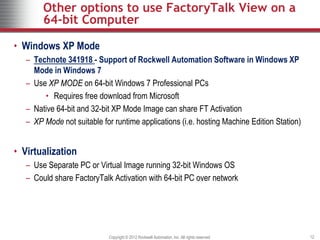
• Windows XP Mode
– Technote 341918 - Support of Rockwell Automation Software in Windows XP
Mode in Windows 7
– Use XP MODE on 64-bit Windows 7 Professional PCs
• Requires free download from Microsoft
– Native 64-bit and 32-bit XP Mode Image can share FT Activation
– XP Mode not suitable for runtime applications (i.e. hosting Machine Edition Station)
• Virtualization
– Use Separate PC or Virtual Image running 32-bit Windows OS
– Could share FactoryTalk Activation with 64-bit PC over network
Copyright © 2012 Rockwell Automation, Inc. All rights reserved. 12
MORE DETAILED COMPATIBILITY
GUIDELINES
FactoryTalk View ME and FactoryTalk View SE
Copyright © 2012 Rockwell Automation, Inc. All rights reserved. 13
FactoryTalk View Project Compatibility
Guidelines
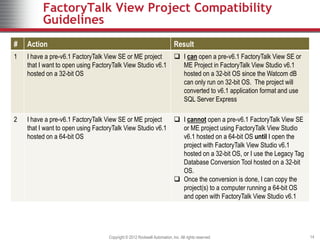
# Action Result
1 I have a pre-v6.1 FactoryTalk View SE or ME project
that I want to open using FactoryTalk View Studio v6.1
hosted on a 32-bit OS
 I can open a pre-v6.1 FactoryTalk View SE or
ME Project in FactoryTalk View Studio v6.1
hosted on a 32-bit OS since the Watcom dB
can only run on 32-bit OS. The project will
converted to v6.1 application format and use
SQL Server Express
2 I have a pre-v6.1 FactoryTalk View SE or ME project
that I want to open using FactoryTalk View Studio v6.1
hosted on a 64-bit OS
 I cannot open a pre-v6.1 FactoryTalk View SE
or ME project using FactoryTalk View Studio
v6.1 hosted on a 64-bit OS until I open the
project with FactoryTalk View Studio v6.1
hosted on a 32-bit OS, or I use the Legacy Tag
Database Conversion Tool hosted on a 32-bit
OS.
 Once the conversion is done, I can copy the
project(s) to a computer running a 64-bit OS
and open with FactoryTalk View Studio v6.1
Copyright © 2012 Rockwell Automation, Inc. All rights reserved. 14
MER Creation Guidance
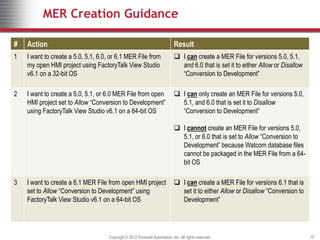
# Action Result
1 I want to create a 5.0, 5.1, 6.0, or 6.1 MER File from
my open HMI project using FactoryTalk View Studio
v6.1 on a 32-bit OS
 I can create a MER File for versions 5.0, 5.1,
and 6.0 that is set it to either Allow or Disallow
“Conversion to Development”
2 I want to create a 5.0, 5.1, or 6.0 MER File from open
HMI project set to Allow “Conversion to Development”
using FactoryTalk View Studio v6.1 on a 64-bit OS
 I can only create an MER File for versions 5.0,
5.1, and 6.0 that is set it to Disallow
“Conversion to Development”
 I cannot create an MER File for versions 5.0,
5.1, or 6.0 that is set to Allow “Conversion to
Development” because Watcom database files
cannot be packaged in the MER File from a 64-
bit OS
3 I want to create a 6.1 MER File from open HMI project
set to Allow “Conversion to Development” using
FactoryTalk View Studio v6.1 on a 64-bit OS
 I can create a MER File for versions 6.1 that is
set it to either Allow or Disallow “Conversion to
Development”
Copyright © 2012 Rockwell Automation, Inc. All rights reserved. 15
MER Restore to Development Guidance
# Action Result
1 I want to “Restore” an MER File created in versions
5.0, 5.1, 6.0, or 6.1 of FactoryTalk View Studio on a
32-bit OS to an MED Project using the corresponding
version of Application Manager on a 32-bit OS
 I can “Restore” this MER File to an MED
Project
2 I want to “Restore” a 5.0, 5.1, or 6.0 MER File created
in versions 5.0, 5.1, 6.0, or 6.1 of FactoryTalk View
Studio on a 32-bit OS to an MED Project using the
v6.1 Application Manager on a 64-bit OS
 I cannot “Restore” the MER File to an MED
Project because the MER contains Watcom
database files and cannot be restored on a 64-
bit OS
3 I want to “Restore” a 5.0, 5.1, or 6.0 MER File created
in FactoryTalk View Studio v6.1 on a 64-bit OS to an
MED Project using any version of Application Manager
on any OS
 Using FactoryTalk View Studio v6.1 on a 64-bit
OS I cannot create a 5.0, 5.1, or 6.0 MER File
that allows “Restore” to MED Project because
the MER File would need to contain Watcom
database files which cannot be created on a
64-bit OS
Copyright © 2012 Rockwell Automation, Inc. All rights reserved. 16
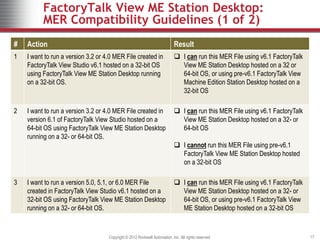
FactoryTalk View ME Station Desktop:
MER Compatibility Guidelines (1 of 2)
# Action Result
1 I want to run a version 3.2 or 4.0 MER File created in
FactoryTalk View Studio v6.1 hosted on a 32-bit OS
using FactoryTalk View ME Station Desktop running
on a 32-bit OS.
 I can run this MER File using v6.1 FactoryTalk
View ME Station Desktop hosted on a 32 or
64-bit OS, or using pre-v6.1 FactoryTalk View
Machine Edition Station Desktop hosted on a
32-bit OS
2 I want to run a version 3.2 or 4.0 MER File created in
version 6.1 of FactoryTalk View Studio hosted on a
64-bit OS using FactoryTalk View ME Station Desktop
running on a 32- or 64-bit OS.
 I can run this MER File using v6.1 FactoryTalk
View ME Station Desktop hosted on a 32- or
64-bit OS
 I cannot run this MER File using pre-v6.1
FactoryTalk View ME Station Desktop hosted
on a 32-bit OS
3 I want to run a version 5.0, 5.1, or 6.0 MER File
created in FactoryTalk View Studio v6.1 hosted on a
32-bit OS using FactoryTalk View ME Station Desktop
running on a 32- or 64-bit OS.
 I can run this MER File using v6.1 FactoryTalk
View ME Station Desktop hosted on a 32- or
64-bit OS, or using pre-v6.1 FactoryTalk View
ME Station Desktop hosted on a 32-bit OS
Copyright © 2012 Rockwell Automation, Inc. All rights reserved. 17
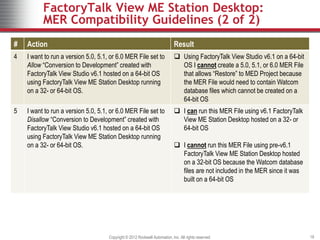
FactoryTalk View ME Station Desktop:
MER Compatibility Guidelines (2 of 2)
# Action Result
4 I want to run a version 5.0, 5.1, or 6.0 MER File set to
Allow “Conversion to Development” created with
FactoryTalk View Studio v6.1 hosted on a 64-bit OS
using FactoryTalk View ME Station Desktop running
on a 32- or 64-bit OS.
 Using FactoryTalk View Studio v6.1 on a 64-bit
OS I cannot create a 5.0, 5.1, or 6.0 MER File
that allows “Restore” to MED Project because
the MER File would need to contain Watcom
database files which cannot be created on a
64-bit OS
5 I want to run a version 5.0, 5.1, or 6.0 MER File set to
Disallow “Conversion to Development” created with
FactoryTalk View Studio v6.1 hosted on a 64-bit OS
using FactoryTalk View ME Station Desktop running
on a 32- or 64-bit OS.
 I can run this MER File using v6.1 FactoryTalk
View ME Station Desktop hosted on a 32- or
64-bit OS
 I cannot run this MER File using pre-v6.1
FactoryTalk View ME Station Desktop hosted
on a 32-bit OS because the Watcom database
files are not included in the MER since it was
built on a 64-bit OS
Copyright © 2012 Rockwell Automation, Inc. All rights reserved. 18
FURTHER INFORMATION
FactoryTalk View ME and FactoryTalk View SE
Copyright © 2012 Rockwell Automation, Inc. All rights reserved. 19
Further Information
• FAQ documents will be created for the FactoryTalk View 6.1 release and
posted on the Software Extranet for both FactoryTalk View ME and
FactoryTalk SE.
• This presentation will also be posted on the Software Extranet
• Tag Database Conversion Tool on RA Knowledgebase
– Answer ID 450509
Copyright © 2012 Rockwell Automation, Inc. All rights reserved. 20
Copyright © 2012 Rockwell Automation, Inc. All rights reserved. 21
Copyright © 2012 Rockwell Automation, Inc. All rights reserved.
22

Technical Update-FactoryTalk View v6.1 Compatibility Guidelines.ppt

  • 1.
    Copyright © 2012Rockwell Automation, Inc. All rights reserved. Technical Update: FactoryTalk View v6.1 Compatibility Guidelines 1 FTALK-SP005A-EN-P
  • 2.
    Presentation Topics Copyright ©2012 Rockwell Automation, Inc. All rights reserved. 2 1. 64-bit OS Compatibility 2. Migration Challenges 3. Legacy Tag Database Conversion Tool 4. Other Options for 64-bit OS Compatibility 5. More Detailed Compatibility Guidelines 6. Further Information
  • 3.
    64-BIT OS COMPATIBILITY FactoryTalkView ME and FactoryTalk View SE Copyright © 2012 Rockwell Automation, Inc. All rights reserved. 3
  • 4.
    64-bit OS Compatibility •Customer Needs – Support FactoryTalk View on 64-bit OS, including: • FactoryTalk View Studio • FactoryTalk View SE Server • FactoryTalk View SE Station • FactoryTalk View ME Station • Analysis – Limiting factor determined to be the Watcom database, used for the FactoryTalk View HMI Tag Database. • Delivering 64-bit OS Compatibility – Replace Watcom database with SQL Server 2008 R2 Express in the FactoryTalk View v6.1 release Copyright © 2012 Rockwell Automation, Inc. All rights reserved. 4
  • 5.
    MIGRATION CHALLENGES FactoryTalk ViewME and FactoryTalk View SE Copyright © 2012 Rockwell Automation, Inc. All rights reserved. 5
  • 6.
    Challenges when migratingfrom 32-bit to 64-bit Operating System • Challenges – All FactoryTalk View releases prior to v6.1 have been exclusive to 32-bit OS computers. – Moving systems and applications from a 32-bit OS to a 64-bit OS can create migration challenges • Helping our customers with the migration – Created Compatibility Guidelines to help customers migrate previous versions of FactoryTalk View applications to FactoryTalk View v6.1 on a 64-bit OS – Created Tag Database Conversion Tool to help with the conversion of projects from the previous database technology to SQL Server Express Copyright © 2012 Rockwell Automation, Inc. All rights reserved. 6
  • 7.
    Common Compatibility Guidelines •FactoryTalk View Projects – Use FactoryTalk View Studio v6.1 on a 32-bit OS to open ME and SE Projects created with pre-v6.1 FactoryTalk View Studio. This action updates the project format to v6.1 and migrates the tag database to SQL Server Express. Once opened using FactoryTalk View Studio v6.1 on a 32-bit OS, the ME and SE Projects can be moved to a 64-bit OS. – FactoryTalk View ME and SE Projects that include a Watcom Database must be converted with the Legacy Tag Database Conversion Tool before they can be opened with FactoryTalk View Studio v6.1 on a 64-bit OS • FactoryTalk View .APA Files – A FactoryTalk View ME or SE .APA file needs to be expanded into a project structure using Application Manager hosted on a 32-bit OS before using the Legacy Tag Database Conversion Tool. Copyright © 2012 Rockwell Automation, Inc. All rights reserved. 7
  • 8.
    Common Compatibility Guidelines •FactoryTalk View MER Files on 32-bit OS – When creating 5.0, 5.1, 6.0 FactoryTalk View ME Run-Time Files (MER) using FactoryTalk View Studio v6.1 on a 32-bit OS, the “Convert to Development” option can be set to either “Allow” or “Disallow”, since the Watcom database can be included in the MER. • FactoryTalk View MER Files on 64-bit OS – When creating 5.0, 5.1, 6.0 FactoryTalk View ME Run-Time Files (MER) using FactoryTalk View Studio v6.1 on a 64-bit OS, the only “Convert to Development” option is “Disallow”, since the Watcom database cannot be included in the MER. Copyright © 2012 Rockwell Automation, Inc. All rights reserved. 8
  • 9.
    LEGACY TAG DATABASE CONVERSIONTOOL FactoryTalk View ME and FactoryTalk View SE Copyright © 2012 Rockwell Automation, Inc. All rights reserved. 9
  • 10.
    Legacy Tag DatabaseConversion Tool • Where do I get this tool? – Posted on the RA Knowledgebase - Answer ID 450509 – Included with FactoryTalk View v6.1 • What versions of FactoryTalk View ME and SE can I use this with? – Legacy Tag Database Conversion Tool can be used with projects as early as version 3.2 • What about RSView32 and PanelBuilder 32 Apps? – Legacy Tag Database Conversion Tool also supports converting RSView32 and PanelBuilder 32 projects. • Do I have to convert each project separately? – Legacy Tag Database Conversion Tool can perform single or multiple project conversions Copyright © 2012 Rockwell Automation, Inc. All rights reserved. 10
  • 11.
    OTHER OPTIONS FOR64-BIT OS COMPATIBILITY FactoryTalk View ME and FactoryTalk View SE Copyright © 2012 Rockwell Automation, Inc. All rights reserved. 11
  • 12.
    Other options touse FactoryTalk View on a 64-bit Computer • Windows XP Mode – Technote 341918 - Support of Rockwell Automation Software in Windows XP Mode in Windows 7 – Use XP MODE on 64-bit Windows 7 Professional PCs • Requires free download from Microsoft – Native 64-bit and 32-bit XP Mode Image can share FT Activation – XP Mode not suitable for runtime applications (i.e. hosting Machine Edition Station) • Virtualization – Use Separate PC or Virtual Image running 32-bit Windows OS – Could share FactoryTalk Activation with 64-bit PC over network Copyright © 2012 Rockwell Automation, Inc. All rights reserved. 12
  • 13.
    MORE DETAILED COMPATIBILITY GUIDELINES FactoryTalkView ME and FactoryTalk View SE Copyright © 2012 Rockwell Automation, Inc. All rights reserved. 13
  • 14.
    FactoryTalk View ProjectCompatibility Guidelines # Action Result 1 I have a pre-v6.1 FactoryTalk View SE or ME project that I want to open using FactoryTalk View Studio v6.1 hosted on a 32-bit OS  I can open a pre-v6.1 FactoryTalk View SE or ME Project in FactoryTalk View Studio v6.1 hosted on a 32-bit OS since the Watcom dB can only run on 32-bit OS. The project will converted to v6.1 application format and use SQL Server Express 2 I have a pre-v6.1 FactoryTalk View SE or ME project that I want to open using FactoryTalk View Studio v6.1 hosted on a 64-bit OS  I cannot open a pre-v6.1 FactoryTalk View SE or ME project using FactoryTalk View Studio v6.1 hosted on a 64-bit OS until I open the project with FactoryTalk View Studio v6.1 hosted on a 32-bit OS, or I use the Legacy Tag Database Conversion Tool hosted on a 32-bit OS.  Once the conversion is done, I can copy the project(s) to a computer running a 64-bit OS and open with FactoryTalk View Studio v6.1 Copyright © 2012 Rockwell Automation, Inc. All rights reserved. 14
  • 15.
    MER Creation Guidance #Action Result 1 I want to create a 5.0, 5.1, 6.0, or 6.1 MER File from my open HMI project using FactoryTalk View Studio v6.1 on a 32-bit OS  I can create a MER File for versions 5.0, 5.1, and 6.0 that is set it to either Allow or Disallow “Conversion to Development” 2 I want to create a 5.0, 5.1, or 6.0 MER File from open HMI project set to Allow “Conversion to Development” using FactoryTalk View Studio v6.1 on a 64-bit OS  I can only create an MER File for versions 5.0, 5.1, and 6.0 that is set it to Disallow “Conversion to Development”  I cannot create an MER File for versions 5.0, 5.1, or 6.0 that is set to Allow “Conversion to Development” because Watcom database files cannot be packaged in the MER File from a 64- bit OS 3 I want to create a 6.1 MER File from open HMI project set to Allow “Conversion to Development” using FactoryTalk View Studio v6.1 on a 64-bit OS  I can create a MER File for versions 6.1 that is set it to either Allow or Disallow “Conversion to Development” Copyright © 2012 Rockwell Automation, Inc. All rights reserved. 15
  • 16.
    MER Restore toDevelopment Guidance # Action Result 1 I want to “Restore” an MER File created in versions 5.0, 5.1, 6.0, or 6.1 of FactoryTalk View Studio on a 32-bit OS to an MED Project using the corresponding version of Application Manager on a 32-bit OS  I can “Restore” this MER File to an MED Project 2 I want to “Restore” a 5.0, 5.1, or 6.0 MER File created in versions 5.0, 5.1, 6.0, or 6.1 of FactoryTalk View Studio on a 32-bit OS to an MED Project using the v6.1 Application Manager on a 64-bit OS  I cannot “Restore” the MER File to an MED Project because the MER contains Watcom database files and cannot be restored on a 64- bit OS 3 I want to “Restore” a 5.0, 5.1, or 6.0 MER File created in FactoryTalk View Studio v6.1 on a 64-bit OS to an MED Project using any version of Application Manager on any OS  Using FactoryTalk View Studio v6.1 on a 64-bit OS I cannot create a 5.0, 5.1, or 6.0 MER File that allows “Restore” to MED Project because the MER File would need to contain Watcom database files which cannot be created on a 64-bit OS Copyright © 2012 Rockwell Automation, Inc. All rights reserved. 16
  • 17.
    FactoryTalk View MEStation Desktop: MER Compatibility Guidelines (1 of 2) # Action Result 1 I want to run a version 3.2 or 4.0 MER File created in FactoryTalk View Studio v6.1 hosted on a 32-bit OS using FactoryTalk View ME Station Desktop running on a 32-bit OS.  I can run this MER File using v6.1 FactoryTalk View ME Station Desktop hosted on a 32 or 64-bit OS, or using pre-v6.1 FactoryTalk View Machine Edition Station Desktop hosted on a 32-bit OS 2 I want to run a version 3.2 or 4.0 MER File created in version 6.1 of FactoryTalk View Studio hosted on a 64-bit OS using FactoryTalk View ME Station Desktop running on a 32- or 64-bit OS.  I can run this MER File using v6.1 FactoryTalk View ME Station Desktop hosted on a 32- or 64-bit OS  I cannot run this MER File using pre-v6.1 FactoryTalk View ME Station Desktop hosted on a 32-bit OS 3 I want to run a version 5.0, 5.1, or 6.0 MER File created in FactoryTalk View Studio v6.1 hosted on a 32-bit OS using FactoryTalk View ME Station Desktop running on a 32- or 64-bit OS.  I can run this MER File using v6.1 FactoryTalk View ME Station Desktop hosted on a 32- or 64-bit OS, or using pre-v6.1 FactoryTalk View ME Station Desktop hosted on a 32-bit OS Copyright © 2012 Rockwell Automation, Inc. All rights reserved. 17
  • 18.
    FactoryTalk View MEStation Desktop: MER Compatibility Guidelines (2 of 2) # Action Result 4 I want to run a version 5.0, 5.1, or 6.0 MER File set to Allow “Conversion to Development” created with FactoryTalk View Studio v6.1 hosted on a 64-bit OS using FactoryTalk View ME Station Desktop running on a 32- or 64-bit OS.  Using FactoryTalk View Studio v6.1 on a 64-bit OS I cannot create a 5.0, 5.1, or 6.0 MER File that allows “Restore” to MED Project because the MER File would need to contain Watcom database files which cannot be created on a 64-bit OS 5 I want to run a version 5.0, 5.1, or 6.0 MER File set to Disallow “Conversion to Development” created with FactoryTalk View Studio v6.1 hosted on a 64-bit OS using FactoryTalk View ME Station Desktop running on a 32- or 64-bit OS.  I can run this MER File using v6.1 FactoryTalk View ME Station Desktop hosted on a 32- or 64-bit OS  I cannot run this MER File using pre-v6.1 FactoryTalk View ME Station Desktop hosted on a 32-bit OS because the Watcom database files are not included in the MER since it was built on a 64-bit OS Copyright © 2012 Rockwell Automation, Inc. All rights reserved. 18
  • 19.
    FURTHER INFORMATION FactoryTalk ViewME and FactoryTalk View SE Copyright © 2012 Rockwell Automation, Inc. All rights reserved. 19
  • 20.
    Further Information • FAQdocuments will be created for the FactoryTalk View 6.1 release and posted on the Software Extranet for both FactoryTalk View ME and FactoryTalk SE. • This presentation will also be posted on the Software Extranet • Tag Database Conversion Tool on RA Knowledgebase – Answer ID 450509 Copyright © 2012 Rockwell Automation, Inc. All rights reserved. 20
  • 21.
    Copyright © 2012Rockwell Automation, Inc. All rights reserved. 21
  • 22.
    Copyright © 2012Rockwell Automation, Inc. All rights reserved. 22