Technical Exclusion in Web Design: A
Comprehensive Guide
This document provides a comprehensive overview of technical exclusion in web design,
drawing insights from Cheap Web Design Singapore's perspective. It explores the concept of
technical exclusion, its various forms, the reasons behind its occurrence, and strategies to
mitigate it, ensuring websites are accessible and inclusive for all users, regardless of their
technical skills or resources.
What is Technical Exclusion?
Technical exclusion in web design refers to situations where individuals are unable to access
or effectively use a website due to their lack of technical skills, outdated technology, limited
internet access, or other technical barriers. This exclusion can manifest in various ways,
preventing users from fully participating in the online experience.
Forms of Technical Exclusion
Technical exclusion can take many forms, including:
• Digital Literacy Barriers: Users may lack the necessary skills to navigate websites,
understand online forms, or use interactive elements. This can be particularly
challenging for older adults, individuals with disabilities, or those with limited
education.
• Technology Constraints: Users may be using outdated browsers, operating systems,
or devices that are not compatible with modern web technologies. This can result in
websites rendering incorrectly, functioning poorly, or being completely inaccessible.
• Connectivity Issues: Users with slow or unreliable internet connections may struggle
to load websites, especially those with large images, videos, or complex scripts. This
can be a significant barrier for users in rural areas or developing countries.
• Accessibility Barriers: Websites that are not designed with accessibility in mind can
exclude users with disabilities, such as those who are blind, visually impaired, deaf, or
have motor impairments. This can include issues with screen reader compatibility,
keyboard navigation, and color contrast.
• Language Barriers: Websites that are only available in one language can exclude users
who do not speak that language. This can be a significant barrier for users who are not
fluent in the dominant language of the internet.
• Cost Barriers: The cost of internet access, devices, and software can be a barrier for
low-income individuals and families. This can limit their ability to access online
resources and participate in the digital economy.
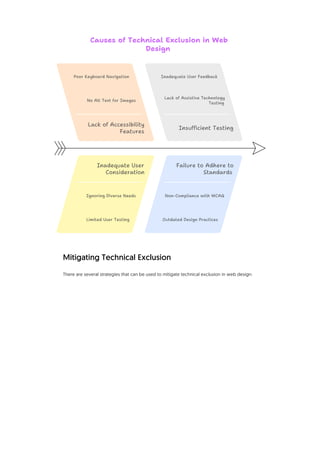
Reasons for Technical Exclusion
Several factors contribute to technical exclusion in web design:
Mitigating Technical Exclusion
There are several strategies that can be used to mitigate technical exclusion in web design:
Causes of Technical Exclusion in Web
Design
Failure to Adhere to
Standards
Ignoring Diverse Needs
Inadequate User Feedback
Inadequate User
Consideration
Insufficient Testing
Lack of Accessibility
Features
Lack of Assistive Technology
Testing
Limited User Testing
No Alt Text for Images
Non-Compliance with WCAG
Outdated Design Practices
Poor Keyboard Navigation
Embrace Universal Design Principles: Universal design is an approach to design that aims to
create products and environments that are usable by all people, to the greatest extent
possible, without the need for adaptation or specialized design. This includes designing
websites that are accessible to users with disabilities, easy to use for older adults, and
compatible with a wide range of devices and browsers.
• Prioritize Accessibility: Accessibility should be a core consideration throughout the
web design process. This includes following accessibility guidelines, such as the Web
Content Accessibility Guidelines (WCAG), and testing websites with assistive
technologies, such as screen readers.
• Optimize for Performance: Websites should be optimized for performance to ensure
that they load quickly and function smoothly, even on slow internet connections. This
includes optimizing images, minimizing code, and using caching techniques.
• Provide Clear and Concise Content: Website content should be written in clear and
concise language that is easy to understand for users with varying levels of literacy.
This includes using headings, subheadings, and bullet points to break up text and
make it easier to scan.
• Offer Multiple Language Options: Websites should offer multiple language options to
cater to users who do not speak the dominant language of the internet. This can be
achieved through the use of translation tools or by providing content in multiple
languages.
• Provide Technical Support: Websites should provide technical support to users who
are experiencing difficulties. This can include FAQs, tutorials, and contact information
for technical support staff.
• Educate Web Designers and Developers: Web designers and developers should be
educated about the importance of technical inclusion and the strategies that can be
used to mitigate it. This can be achieved through training programs, workshops, and
online resources.
• Advocate for Policy Changes: Advocate for policy changes that promote technical
inclusion, such as regulations requiring websites to be accessible to users with
disabilities and initiatives to expand access to affordable internet.
• Use Responsive Web Design: Employ responsive web design techniques to ensure
websites adapt seamlessly to different screen sizes and devices, providing an optimal
viewing experience across desktops, tablets, and smartphones.
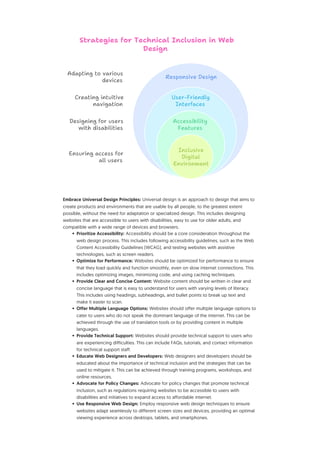
Accessibility
Features
Adapting to various
devices
Creating intuitive
navigation
Designing for users
with disabilities
Ensuring access for
all users
Inclusive
Digital
Environment
Responsive Design
Strategies for Technical Inclusion in Web
Design
User-Friendly
Interfaces
• Progressive Enhancement: Implement progressive enhancement, a strategy that
prioritizes core content and functionality, ensuring it's accessible to all users, regardless
of their browser or device capabilities. Then, layer on advanced features for users with
modern browsers.
Conclusion
Technical exclusion is a significant challenge in web design that can prevent individuals from
accessing and participating in the online world. By understanding the various forms of
technical exclusion, the reasons behind its occurrence, and the strategies that can be used to
mitigate it, we can create websites that are more accessible and inclusive for all users. By
embracing universal design principles, prioritizing accessibility, optimizing for performance,
and providing clear and concise content, we can ensure that everyone has the opportunity
to benefit from the power of the internet. Cheap Web Design Singapore is committed to
promoting technical inclusion and creating websites that are accessible and usable for all.

Technical Exclusion in Web Design_ A Comprehensive Guide.pdf

  • 1.
    Technical Exclusion inWeb Design: A Comprehensive Guide This document provides a comprehensive overview of technical exclusion in web design, drawing insights from Cheap Web Design Singapore's perspective. It explores the concept of technical exclusion, its various forms, the reasons behind its occurrence, and strategies to mitigate it, ensuring websites are accessible and inclusive for all users, regardless of their technical skills or resources. What is Technical Exclusion? Technical exclusion in web design refers to situations where individuals are unable to access or effectively use a website due to their lack of technical skills, outdated technology, limited internet access, or other technical barriers. This exclusion can manifest in various ways, preventing users from fully participating in the online experience. Forms of Technical Exclusion Technical exclusion can take many forms, including: • Digital Literacy Barriers: Users may lack the necessary skills to navigate websites, understand online forms, or use interactive elements. This can be particularly challenging for older adults, individuals with disabilities, or those with limited education. • Technology Constraints: Users may be using outdated browsers, operating systems, or devices that are not compatible with modern web technologies. This can result in websites rendering incorrectly, functioning poorly, or being completely inaccessible. • Connectivity Issues: Users with slow or unreliable internet connections may struggle to load websites, especially those with large images, videos, or complex scripts. This can be a significant barrier for users in rural areas or developing countries. • Accessibility Barriers: Websites that are not designed with accessibility in mind can exclude users with disabilities, such as those who are blind, visually impaired, deaf, or have motor impairments. This can include issues with screen reader compatibility, keyboard navigation, and color contrast. • Language Barriers: Websites that are only available in one language can exclude users who do not speak that language. This can be a significant barrier for users who are not fluent in the dominant language of the internet. • Cost Barriers: The cost of internet access, devices, and software can be a barrier for low-income individuals and families. This can limit their ability to access online resources and participate in the digital economy. Reasons for Technical Exclusion Several factors contribute to technical exclusion in web design:
  • 2.
    Mitigating Technical Exclusion Thereare several strategies that can be used to mitigate technical exclusion in web design: Causes of Technical Exclusion in Web Design Failure to Adhere to Standards Ignoring Diverse Needs Inadequate User Feedback Inadequate User Consideration Insufficient Testing Lack of Accessibility Features Lack of Assistive Technology Testing Limited User Testing No Alt Text for Images Non-Compliance with WCAG Outdated Design Practices Poor Keyboard Navigation
  • 3.
    Embrace Universal DesignPrinciples: Universal design is an approach to design that aims to create products and environments that are usable by all people, to the greatest extent possible, without the need for adaptation or specialized design. This includes designing websites that are accessible to users with disabilities, easy to use for older adults, and compatible with a wide range of devices and browsers. • Prioritize Accessibility: Accessibility should be a core consideration throughout the web design process. This includes following accessibility guidelines, such as the Web Content Accessibility Guidelines (WCAG), and testing websites with assistive technologies, such as screen readers. • Optimize for Performance: Websites should be optimized for performance to ensure that they load quickly and function smoothly, even on slow internet connections. This includes optimizing images, minimizing code, and using caching techniques. • Provide Clear and Concise Content: Website content should be written in clear and concise language that is easy to understand for users with varying levels of literacy. This includes using headings, subheadings, and bullet points to break up text and make it easier to scan. • Offer Multiple Language Options: Websites should offer multiple language options to cater to users who do not speak the dominant language of the internet. This can be achieved through the use of translation tools or by providing content in multiple languages. • Provide Technical Support: Websites should provide technical support to users who are experiencing difficulties. This can include FAQs, tutorials, and contact information for technical support staff. • Educate Web Designers and Developers: Web designers and developers should be educated about the importance of technical inclusion and the strategies that can be used to mitigate it. This can be achieved through training programs, workshops, and online resources. • Advocate for Policy Changes: Advocate for policy changes that promote technical inclusion, such as regulations requiring websites to be accessible to users with disabilities and initiatives to expand access to affordable internet. • Use Responsive Web Design: Employ responsive web design techniques to ensure websites adapt seamlessly to different screen sizes and devices, providing an optimal viewing experience across desktops, tablets, and smartphones. Accessibility Features Adapting to various devices Creating intuitive navigation Designing for users with disabilities Ensuring access for all users Inclusive Digital Environment Responsive Design Strategies for Technical Inclusion in Web Design User-Friendly Interfaces
  • 4.
    • Progressive Enhancement:Implement progressive enhancement, a strategy that prioritizes core content and functionality, ensuring it's accessible to all users, regardless of their browser or device capabilities. Then, layer on advanced features for users with modern browsers. Conclusion Technical exclusion is a significant challenge in web design that can prevent individuals from accessing and participating in the online world. By understanding the various forms of technical exclusion, the reasons behind its occurrence, and the strategies that can be used to mitigate it, we can create websites that are more accessible and inclusive for all users. By embracing universal design principles, prioritizing accessibility, optimizing for performance, and providing clear and concise content, we can ensure that everyone has the opportunity to benefit from the power of the internet. Cheap Web Design Singapore is committed to promoting technical inclusion and creating websites that are accessible and usable for all.