The Biodiversity Heritage Library California Academy of Sciences Phoebe Buguey & Becky Morin May 7 th , 2010
Digitization effort of 12 major natural history repositories   Serve and preserve the  legacy literature (pre-1923)   of biodiversity Abides by copyright laws and respects intellectual and creative property Particular relevance to systematic biology, which tends to rely on historic literature http://www.biodiversitylibrary.org/ Defining BHL
Funding Sources Encyclopedia of Life grant from the John D. and Catherine T. MacArthur Foundation Additional grants have been received from: The Gordon and Betty Moore Foundation The Richard Lounsbery Foundation Institute of Museum and Library Services (IMLS) Generous support from members’ parent institutions
Participating Repositories American Museum of Natural History (New York) Academy of Natural Sciences Philadelphia California Academy of Sciences Field Museum (Chicago) Natural History Museum (London) Smithsonian Institution Libraries (Washington) Missouri Botanical Gardens (St. Louis) New York Botanical Gardens (New York) Royal Botanic Garden, Kew Botany Libraries, Harvard University Ernst Mayr Library of the Museum of Comparative Zoology, Harvard University Marine Biological Laboratory / Woods Hole Oceanographic Institute
Encyclopedia of Life Partnership between the scientific community and the general public  Goal:  Make knowledge about the world’s organisms freely available to all  Anyone can add text, images, videos, comments or tags  Expert curators ensure quality by authenticating materials http://www.eol.org/
EOL Species Page http://www.eol.org/pages/965332
BHL on EOL
BHL: The Task Core Literature Pre-1923: 100 million pages (?) All Pre-1923 Literature: 120-150 million pages All Literature: 280-320 million pages
BHL: The Achievement Approximately 29.5 million pages (estimated on 05/03/2010) Monthly average: 600,000 pages 1.3 million catalog records 73% are monographs (remainder serials) 63% English 30% date before 1923
BHL Advantages Persistent URL Semantic and structural markup in conformance with NLM DTD Iterative processing of BHL will: Increase the number of name strings in uBio’s NameBank Increase the accuracy of name  string recognition
BHL Advantages Access to rare articles Traveling researchers Researchers with less developed libraries Long-term management of digital assets at no cost to users Publishers’ content is embedded
BHL Portal Library catalog-like interface (browse and search) Provides volume/issue/article/page access Iterative development based on community feedback
BHL: TaxonFinder by uBio BHL uses TaxonFinder Developed by collaborators at uBio.org Locates and identifies scientific names within digital text Certain fonts or other technical limitations may limit results
Generating Bibliographies on BHL: Method 1 Go to “ Tools ” in the upper, right corner
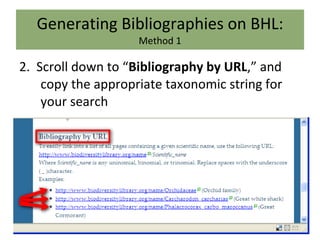
Generating Bibliographies on BHL: Method 1 2.  Scroll down to “ Bibliography by URL ,” and copy the appropriate taxonomic string for your search
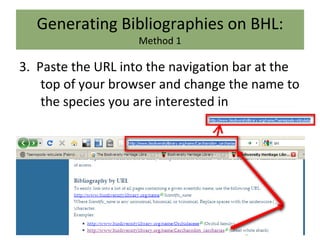
Generating Bibliographies on BHL: Method 1 3.  Paste the URL into the navigation bar at the top of your browser and change the name to the species you are interested in
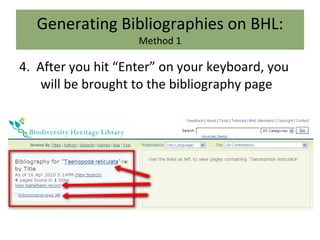
Generating Bibliographies on BHL: Method 1 4.  After you hit “Enter” on your keyboard, you will be brought to the bibliography page
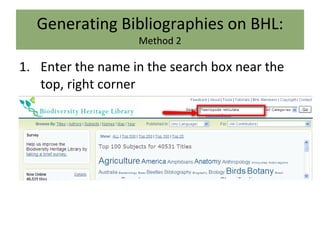
Generating Bibliographies on BHL: Method 2 Enter the name in the search box near the top, right corner
Generating Bibliographies on BHL: Method 2 2.  Select “ Names ” from the dropdown menu to the right of the search box and click “ Go ”
Generating Bibliographies on BHL: Method 2 3.  Select the option that best fits your search
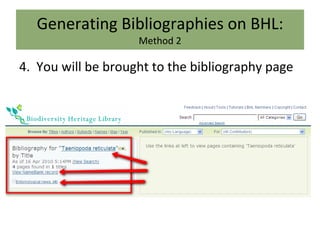
Generating Bibliographies on BHL: Method 2 4.  You will be brought to the bibliography page
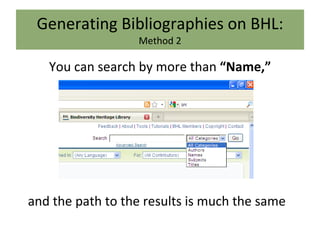
Generating Bibliographies on BHL: Method 2 You can search by more than  “Name,” and the path to the results is much the same
Generating Bibliographies on BHL: Method 3 You can use the tag cloud to browse for your taxon, and clicking on the tag will take you to the bibliography **Note: You can change the number of displayed tags with the  “Show”  feature**
Generating Bibliographies on BHL: Method 3 2.  You can also browse by other topics using the  “Browse by”  feature
BHL: Search Considerations IMPORTANT WARNING! The search box often will not return as many results as the URL method Why? The URL method searches within the text (TaxonFinder)  The search box only searches within the specified field (title, author, etc)
Generating a PDF from BHL Find the title you want to download Select the icon for that book
Generating a PDF from BHL 3.  Click “ Select pages to download ” by hovering your mouse over “ Download/About this book ”
Generating a PDF from BHL 4.  You will need to enter the email address where you want the pages sent
Generating a PDF from BHL 5.  Next you will be asked to fill in basic information for the item you are downloading
Why should I take the time? BHL is a nonprofit resource Easier for the next time/person Community effort to properly disseminate relevant literature
Generating a PDF from BHL 6.  Once you’ve filled out the information, click “ Next ”
Generating a PDF from BHL 7.  Select the pages you want to download **NOTE: You can see a thumbnail of a page by clicking on the corresponding page icon**
Generating a PDF from BHL 8.  Once you’ve selected your pages, click “ Done ”
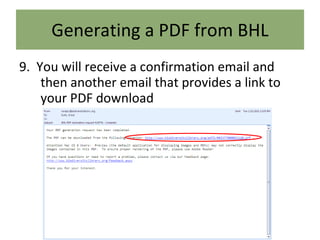
Generating a PDF from BHL 9.  You will receive a confirmation email and then another email that provides a link to your PDF download
What can I do with the content? Published in 1922 or earlier: public domain BHL will NOT seek to assert any intellectual property rights Date of publication after 1923:  Creative Commons Attribution – Noncommercial 2.5 license Responsible Use Noncommercial Attribution Contact copyright holders for commercial use
Contact Us Please contact us with questions: http://research.calacademy.org/library Becky Morin User Services Librarian California Academy of Sciences 55 Music Concourse Drive San Francisco, CA 94118 415-379-5495 (direct) [email_address] Images from  Curtis's Botanical Magazine  and provided courtesy of Biodiversity Heritage Library.  http://www.biodiversitylibrary.org

Teaching BHL

  • 1.
    The Biodiversity HeritageLibrary California Academy of Sciences Phoebe Buguey & Becky Morin May 7 th , 2010
  • 2.
    Digitization effort of12 major natural history repositories Serve and preserve the legacy literature (pre-1923) of biodiversity Abides by copyright laws and respects intellectual and creative property Particular relevance to systematic biology, which tends to rely on historic literature http://www.biodiversitylibrary.org/ Defining BHL
  • 3.
    Funding Sources Encyclopediaof Life grant from the John D. and Catherine T. MacArthur Foundation Additional grants have been received from: The Gordon and Betty Moore Foundation The Richard Lounsbery Foundation Institute of Museum and Library Services (IMLS) Generous support from members’ parent institutions
  • 4.
    Participating Repositories AmericanMuseum of Natural History (New York) Academy of Natural Sciences Philadelphia California Academy of Sciences Field Museum (Chicago) Natural History Museum (London) Smithsonian Institution Libraries (Washington) Missouri Botanical Gardens (St. Louis) New York Botanical Gardens (New York) Royal Botanic Garden, Kew Botany Libraries, Harvard University Ernst Mayr Library of the Museum of Comparative Zoology, Harvard University Marine Biological Laboratory / Woods Hole Oceanographic Institute
  • 5.
    Encyclopedia of LifePartnership between the scientific community and the general public Goal: Make knowledge about the world’s organisms freely available to all Anyone can add text, images, videos, comments or tags Expert curators ensure quality by authenticating materials http://www.eol.org/
  • 6.
    EOL Species Pagehttp://www.eol.org/pages/965332
  • 7.
  • 8.
    BHL: The TaskCore Literature Pre-1923: 100 million pages (?) All Pre-1923 Literature: 120-150 million pages All Literature: 280-320 million pages
  • 9.
    BHL: The AchievementApproximately 29.5 million pages (estimated on 05/03/2010) Monthly average: 600,000 pages 1.3 million catalog records 73% are monographs (remainder serials) 63% English 30% date before 1923
  • 10.
    BHL Advantages PersistentURL Semantic and structural markup in conformance with NLM DTD Iterative processing of BHL will: Increase the number of name strings in uBio’s NameBank Increase the accuracy of name string recognition
  • 11.
    BHL Advantages Accessto rare articles Traveling researchers Researchers with less developed libraries Long-term management of digital assets at no cost to users Publishers’ content is embedded
  • 12.
    BHL Portal Librarycatalog-like interface (browse and search) Provides volume/issue/article/page access Iterative development based on community feedback
  • 13.
    BHL: TaxonFinder byuBio BHL uses TaxonFinder Developed by collaborators at uBio.org Locates and identifies scientific names within digital text Certain fonts or other technical limitations may limit results
  • 14.
    Generating Bibliographies onBHL: Method 1 Go to “ Tools ” in the upper, right corner
  • 15.
    Generating Bibliographies onBHL: Method 1 2. Scroll down to “ Bibliography by URL ,” and copy the appropriate taxonomic string for your search
  • 16.
    Generating Bibliographies onBHL: Method 1 3. Paste the URL into the navigation bar at the top of your browser and change the name to the species you are interested in
  • 17.
    Generating Bibliographies onBHL: Method 1 4. After you hit “Enter” on your keyboard, you will be brought to the bibliography page
  • 18.
    Generating Bibliographies onBHL: Method 2 Enter the name in the search box near the top, right corner
  • 19.
    Generating Bibliographies onBHL: Method 2 2. Select “ Names ” from the dropdown menu to the right of the search box and click “ Go ”
  • 20.
    Generating Bibliographies onBHL: Method 2 3. Select the option that best fits your search
  • 21.
    Generating Bibliographies onBHL: Method 2 4. You will be brought to the bibliography page
  • 22.
    Generating Bibliographies onBHL: Method 2 You can search by more than “Name,” and the path to the results is much the same
  • 23.
    Generating Bibliographies onBHL: Method 3 You can use the tag cloud to browse for your taxon, and clicking on the tag will take you to the bibliography **Note: You can change the number of displayed tags with the “Show” feature**
  • 24.
    Generating Bibliographies onBHL: Method 3 2. You can also browse by other topics using the “Browse by” feature
  • 25.
    BHL: Search ConsiderationsIMPORTANT WARNING! The search box often will not return as many results as the URL method Why? The URL method searches within the text (TaxonFinder) The search box only searches within the specified field (title, author, etc)
  • 26.
    Generating a PDFfrom BHL Find the title you want to download Select the icon for that book
  • 27.
    Generating a PDFfrom BHL 3. Click “ Select pages to download ” by hovering your mouse over “ Download/About this book ”
  • 28.
    Generating a PDFfrom BHL 4. You will need to enter the email address where you want the pages sent
  • 29.
    Generating a PDFfrom BHL 5. Next you will be asked to fill in basic information for the item you are downloading
  • 30.
    Why should Itake the time? BHL is a nonprofit resource Easier for the next time/person Community effort to properly disseminate relevant literature
  • 31.
    Generating a PDFfrom BHL 6. Once you’ve filled out the information, click “ Next ”
  • 32.
    Generating a PDFfrom BHL 7. Select the pages you want to download **NOTE: You can see a thumbnail of a page by clicking on the corresponding page icon**
  • 33.
    Generating a PDFfrom BHL 8. Once you’ve selected your pages, click “ Done ”
  • 34.
    Generating a PDFfrom BHL 9. You will receive a confirmation email and then another email that provides a link to your PDF download
  • 35.
    What can Ido with the content? Published in 1922 or earlier: public domain BHL will NOT seek to assert any intellectual property rights Date of publication after 1923: Creative Commons Attribution – Noncommercial 2.5 license Responsible Use Noncommercial Attribution Contact copyright holders for commercial use
  • 36.
    Contact Us Pleasecontact us with questions: http://research.calacademy.org/library Becky Morin User Services Librarian California Academy of Sciences 55 Music Concourse Drive San Francisco, CA 94118 415-379-5495 (direct) [email_address] Images from Curtis's Botanical Magazine and provided courtesy of Biodiversity Heritage Library. http://www.biodiversitylibrary.org

Editor's Notes

  • #6 Why free to all is important: interdis. And geograph of biodiversity
  • #8 Ubio and Taxonfinder before this ~ programmers with them in mind