Tax Deducted At Source (TDS)
LearningObjectives
Bycompletingthis tutorial,youwill beableto:
• Understandeverything aboutTaxDeductedat
Source(TDS)
• Explainhow TDS iscalculated
• Claim TDS through the Self Serve Ticket
Dashboard
 Experience the ease of claiming TDS through the
Seller dashboard
 Learn how to raise a TDS claim using self serve
ticket dashboard
 Learn how to track a TDS claim ticket
 Points to remember while raising TDS claims
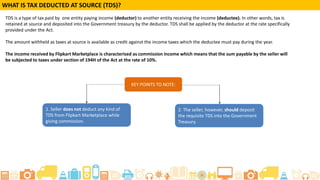
What isTax deducted at Source(TDS)?
• TDSisa methodof tax collection paid by one entity paying
income (deductor)to another entity receivingthe income
(deductee).
• Inother words, tax isretained from the seller anddeposited
intothe Government treasury bythe Flipkart.
• TDSshall beapplied by Flipkart at the rate specifically
providedunder the Act.
• The commission Flipkart deducted from you (which is
equivalent to commissionyou payto Flipkart) includes the
TDS.
• Youwill needto file aclaim with Flipkart after payingthe TDS
to the government.
What isTax deducted at Source(TDS)?
The income received by Flipkart is characterised as commission income which means that the sum
payable by the seller will be subjected to taxes under Section 194C, 194H & 194I of the Act . Please
refer to the TDS rates mentioned below.
Flipkart
Seller Hub
Seller sends TDS certificate to Flipkart
Flipkart Deducts
commission (including
TDS)during payout
Flipkart checks for accuracy and
process the payments
The seller PayTDS
to government
Flipkart
1111
Seller Government Treasury
Since,we already include the TDS inthe commission, you are entitled to reimbursement from us incase you
pay TDS to the Government. So,to get that reimbursement you need to makea TDSclaim with Flipkart
Internet.
Postvalidation,the TDS amount will be creditedto seller's account duringthe next
payout.
What isTax deducted at Source(TDS)?
2
3
1
4
Claim TDS Through The Self Serve Ticket
Dashboard
The ease of claiming TDS through the Seller
dashboard
With this feature, you will be able to claim TDS easily right
from your seller dashboard, you will be able to:
● Reduce the time spent on emails/calls to seller support
● Track your claims at any time
● Get quicker approval on your claims
● Gets better visibility on the status of your claim
● Share digital signed copies instead of hard copies, saving
on your time and the time spent on the claim
How to Make a TDS Claim
Step 1:Log into your Flipkart Seller
Account
Step 2: Click on “ Contact seller
support” tab
Log in to your seller account and select Contact
Seller Support
Step 3: Click on “Ask for Assistance”
button
Click on Ask for Assistance
Step 4: Select “ Payments &
Settlements” from the dropdown
menu
Select Payments & Settlements
Step 5: Click on “File a TDS claim”
Click on file a TDS claim
You can find the TDS related FAQs here
Step 6: These fields will be pre filled
Add the required details
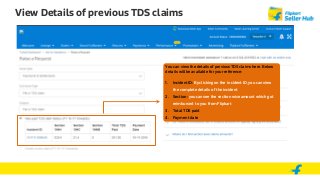
You can view details of previous TDS claims by selecting “ View past TDS claim
history” option . This option will be disabled if you don’t have any TDS claims for
FY 16-17
View Details of previous TDS claims
You can view the details of previous TDS claims here. Below
details will be available for your reference:
1. Incident ID: By clicking on the incident ID, you can view
the complete details of the incident
2. Section: you can see the section wise amount which got
reimbursed to you from Flipkart
3. Total TDS paid
4. Payment date
Step 7: Click on “ Create a new claim” option to raise a claim request.
We strongly recommend you to upload a digitally signed document.
This will ensure faster claim process (payout within 5 days) and you
will not be required to send hard copies of the TDS certificate to
Flipkart .
You will get to chose 3 options by clicking on “ Create a new claim”
button:
1. Upload digitally signed TDS form 16 A
2. If you don’t have “ digitally signed TDS form 16A”, register with
EMudhra (E-sign Now!) to instantly get a digital signature on your
document
3. You can upload the manually signed soft copy documents. In
such a case, there will be a delay in the payouts (20-30 days ) and you
will have to send the hard copies to Flipkart to complete the claim
process.
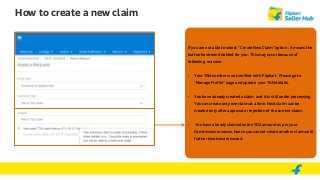
How to create a new claim
If you are not able to select “ Create New Claim” option , it means the
button has been disabled for you . This may occur because of
following reasons:
• Your TAN number is not verified with Flipkart. Please go to
“Manage Profile” page and update your TAN details.
• You have already created a claim and it is still under processing.
You can create only one claim at a time. Next claim can be
created only after approval or rejection of the current claim.
• You have already claimed entire TDS amount as per your
Commission invoices, hence you cannot create another claim until
further invoices are issued.
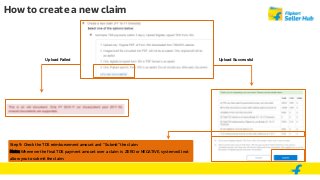
Step 8:
Option 1: Upload the digitally signed TDS certificate:
The system will validate below points to ensure the correct document
is uploaded:
1. Is the Digital signature present in the document uploaded?
2. Is the Digital signature Valid?
3. Format of the file ( Only pdf is allowed)
4. Name of the document should match the name on the digital
signature
5. Was this certificate used in the previous claim? If yes , was there
any reimbursement done for this Certificate already?
How to create a new claim
There are 2 options to create a claim
Option 1: Upload Digitally signed TDS certificate . This is the most recommended process as the payouts will be done faster ( within 5 days )
Option 2 : Upload the hand signed soft copy of the original TDS certificate and send the original hard copy to Flipkart. This will take
minimum 45 days to clear the payouts
Upload Failed Upload Successful
Step 9: Check the TDS reimbursement amount and “Submit” the claim.
Note: Whenever the final TDS payment amount over a claim is ZERO or NEGATIVE, system will not
allow you to submit the claim.
How to create a new claim
If you don’t have “Digitally Signed TDS certificate, register with
EMudhra (E-sign Now!) to instantly do a digital signature on your
document with a one time subscription, which costs only 500/-
annually for signing upto 15 documents.
How to create a new claim
Option 2: You can upload the hand signed soft copy of the original
documents. But you will have to send the hard copies to Flipkart.
This process may lead to delay in TDS payouts.
Hand signed soft copy of the original documents to be sent to the
address mentioned below:
Flipkart office,
Mantri Commercio,
2nd Floor, Tower B, Survey no-51/2, 51/ 3, 51/4
Devarabeesanahalli Village, Survey no-39/5
Kariyammana Agrahara Village,
Varthur Hobli, Bangalore South ,Taluk,
Bangalore- 560034
How to create a new claim
Step 1:Log into your Flipkart Seller
Account
Step 2: Go to Invoices tab under
Payments dashboard
Step 3: Click on Claim TDS button.
You will be redirected to the self serve
ticket page and have to follow the
steps explained in earlier slides
How to claim TDS through Payments dashboard
How to Track Your TDS Request
View of all the TDS claim tickets
In your Tickets Dashboard, you can
check the status of your ticket. Click on
the Reference ID for more details
Detailed View of the Created Ticket
Here you can view complete details of
the Support Ticket
Points to remember
1. You can raise TDS claims for Invoices issued in FY 2016-
2017 using TDS self serve ticket dashboard
2. You should refer the ‘Invoice level TDS calculation guide
for TDS section wise amount breakup
3. You can upload the digitally signed TDS certificate to get
faster claims and can use e-Mudhra services for the task
4. There is no need to send the hard copies if you have
already uploaded digitally signed TDS certificates
Summary
By completing this tutorial, you learned:
● How to raise a TDS claim using self serve ticket dashboard
● The ease of claiming TDS through the Seller dashboard
● Points to remember while raising TDS claims
Thank You

TDS Claim procecss

  • 1.
    Tax Deducted AtSource (TDS)
  • 2.
    LearningObjectives Bycompletingthis tutorial,youwill beableto: •Understandeverything aboutTaxDeductedat Source(TDS) • Explainhow TDS iscalculated • Claim TDS through the Self Serve Ticket Dashboard  Experience the ease of claiming TDS through the Seller dashboard  Learn how to raise a TDS claim using self serve ticket dashboard  Learn how to track a TDS claim ticket  Points to remember while raising TDS claims
  • 3.
    What isTax deductedat Source(TDS)? • TDSisa methodof tax collection paid by one entity paying income (deductor)to another entity receivingthe income (deductee). • Inother words, tax isretained from the seller anddeposited intothe Government treasury bythe Flipkart. • TDSshall beapplied by Flipkart at the rate specifically providedunder the Act. • The commission Flipkart deducted from you (which is equivalent to commissionyou payto Flipkart) includes the TDS. • Youwill needto file aclaim with Flipkart after payingthe TDS to the government.
  • 4.
    What isTax deductedat Source(TDS)? The income received by Flipkart is characterised as commission income which means that the sum payable by the seller will be subjected to taxes under Section 194C, 194H & 194I of the Act . Please refer to the TDS rates mentioned below.
  • 5.
    Flipkart Seller Hub Seller sendsTDS certificate to Flipkart Flipkart Deducts commission (including TDS)during payout Flipkart checks for accuracy and process the payments The seller PayTDS to government Flipkart 1111 Seller Government Treasury Since,we already include the TDS inthe commission, you are entitled to reimbursement from us incase you pay TDS to the Government. So,to get that reimbursement you need to makea TDSclaim with Flipkart Internet. Postvalidation,the TDS amount will be creditedto seller's account duringthe next payout. What isTax deducted at Source(TDS)? 2 3 1 4
  • 6.
    Claim TDS ThroughThe Self Serve Ticket Dashboard
  • 7.
    The ease ofclaiming TDS through the Seller dashboard With this feature, you will be able to claim TDS easily right from your seller dashboard, you will be able to: ● Reduce the time spent on emails/calls to seller support ● Track your claims at any time ● Get quicker approval on your claims ● Gets better visibility on the status of your claim ● Share digital signed copies instead of hard copies, saving on your time and the time spent on the claim
  • 8.
    How to Makea TDS Claim
  • 9.
    Step 1:Log intoyour Flipkart Seller Account Step 2: Click on “ Contact seller support” tab Log in to your seller account and select Contact Seller Support
  • 10.
    Step 3: Clickon “Ask for Assistance” button Click on Ask for Assistance
  • 11.
    Step 4: Select“ Payments & Settlements” from the dropdown menu Select Payments & Settlements
  • 12.
    Step 5: Clickon “File a TDS claim” Click on file a TDS claim
  • 13.
    You can findthe TDS related FAQs here Step 6: These fields will be pre filled Add the required details You can view details of previous TDS claims by selecting “ View past TDS claim history” option . This option will be disabled if you don’t have any TDS claims for FY 16-17
  • 14.
    View Details ofprevious TDS claims You can view the details of previous TDS claims here. Below details will be available for your reference: 1. Incident ID: By clicking on the incident ID, you can view the complete details of the incident 2. Section: you can see the section wise amount which got reimbursed to you from Flipkart 3. Total TDS paid 4. Payment date
  • 15.
    Step 7: Clickon “ Create a new claim” option to raise a claim request. We strongly recommend you to upload a digitally signed document. This will ensure faster claim process (payout within 5 days) and you will not be required to send hard copies of the TDS certificate to Flipkart . You will get to chose 3 options by clicking on “ Create a new claim” button: 1. Upload digitally signed TDS form 16 A 2. If you don’t have “ digitally signed TDS form 16A”, register with EMudhra (E-sign Now!) to instantly get a digital signature on your document 3. You can upload the manually signed soft copy documents. In such a case, there will be a delay in the payouts (20-30 days ) and you will have to send the hard copies to Flipkart to complete the claim process. How to create a new claim
  • 16.
    How to createa new claim If you are not able to select “ Create New Claim” option , it means the button has been disabled for you . This may occur because of following reasons: • Your TAN number is not verified with Flipkart. Please go to “Manage Profile” page and update your TAN details. • You have already created a claim and it is still under processing. You can create only one claim at a time. Next claim can be created only after approval or rejection of the current claim. • You have already claimed entire TDS amount as per your Commission invoices, hence you cannot create another claim until further invoices are issued.
  • 17.
    Step 8: Option 1:Upload the digitally signed TDS certificate: The system will validate below points to ensure the correct document is uploaded: 1. Is the Digital signature present in the document uploaded? 2. Is the Digital signature Valid? 3. Format of the file ( Only pdf is allowed) 4. Name of the document should match the name on the digital signature 5. Was this certificate used in the previous claim? If yes , was there any reimbursement done for this Certificate already? How to create a new claim There are 2 options to create a claim Option 1: Upload Digitally signed TDS certificate . This is the most recommended process as the payouts will be done faster ( within 5 days ) Option 2 : Upload the hand signed soft copy of the original TDS certificate and send the original hard copy to Flipkart. This will take minimum 45 days to clear the payouts
  • 18.
    Upload Failed UploadSuccessful Step 9: Check the TDS reimbursement amount and “Submit” the claim. Note: Whenever the final TDS payment amount over a claim is ZERO or NEGATIVE, system will not allow you to submit the claim. How to create a new claim
  • 19.
    If you don’thave “Digitally Signed TDS certificate, register with EMudhra (E-sign Now!) to instantly do a digital signature on your document with a one time subscription, which costs only 500/- annually for signing upto 15 documents. How to create a new claim
  • 20.
    Option 2: Youcan upload the hand signed soft copy of the original documents. But you will have to send the hard copies to Flipkart. This process may lead to delay in TDS payouts. Hand signed soft copy of the original documents to be sent to the address mentioned below: Flipkart office, Mantri Commercio, 2nd Floor, Tower B, Survey no-51/2, 51/ 3, 51/4 Devarabeesanahalli Village, Survey no-39/5 Kariyammana Agrahara Village, Varthur Hobli, Bangalore South ,Taluk, Bangalore- 560034 How to create a new claim
  • 21.
    Step 1:Log intoyour Flipkart Seller Account Step 2: Go to Invoices tab under Payments dashboard Step 3: Click on Claim TDS button. You will be redirected to the self serve ticket page and have to follow the steps explained in earlier slides How to claim TDS through Payments dashboard
  • 22.
    How to TrackYour TDS Request
  • 23.
    View of allthe TDS claim tickets In your Tickets Dashboard, you can check the status of your ticket. Click on the Reference ID for more details
  • 24.
    Detailed View ofthe Created Ticket Here you can view complete details of the Support Ticket
  • 25.
    Points to remember 1.You can raise TDS claims for Invoices issued in FY 2016- 2017 using TDS self serve ticket dashboard 2. You should refer the ‘Invoice level TDS calculation guide for TDS section wise amount breakup 3. You can upload the digitally signed TDS certificate to get faster claims and can use e-Mudhra services for the task 4. There is no need to send the hard copies if you have already uploaded digitally signed TDS certificates
  • 26.
    Summary By completing thistutorial, you learned: ● How to raise a TDS claim using self serve ticket dashboard ● The ease of claiming TDS through the Seller dashboard ● Points to remember while raising TDS claims
  • 27.