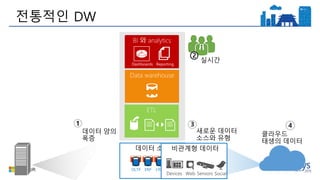
ETL Tool
(SSIS, etc)
EDW
(SQLSvr, Teradata, etc)
Extract
Original Data
Load
Transformed
Data
Transform
BI Tools
Data Marts
Data Lake(s)
Dashboards
Apps
진화하는 분석 방식
7.
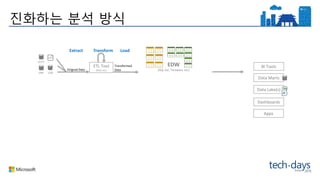
ETL Tool
(SSIS, etc)
EDW
(SQLSvr, Teradata, etc)
Extract
Original Data
Load
Transformed
Data
Transform
BI Tools
Ingest (EL)
Original Data
Data Marts
Data Lake(s)
Dashboards
Apps
진화하는 분석 방식
8.
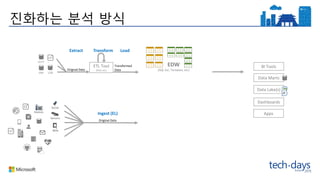
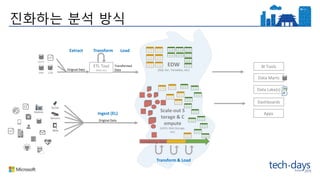
ETL Tool
(SSIS, etc)
EDW
(SQLSvr, Teradata, etc)
Extract
Original Data
Load
Transformed
Data
Transform
BI Tools
Ingest (EL)
Original Data
Scale-out S
torage & C
ompute
(HDFS, Blob Storage,
etc)
Transform & Load
Data Marts
Data Lake(s)
Dashboards
Apps
Streaming data
진화하는 분석 방식
9.
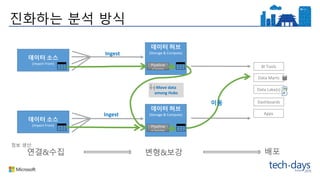
데이터 허브
(Storage &Compute)
데이터 소스
(Import From)
Move data
among Hubs
데이터 허브
(Storage & Compute)
데이터 소스
(Import From)
Ingest
진화하는 분석 방식
연결&수집 변형&보강 배포
정보 생산:
Ingest
이동
BI Tools
Data Marts
Data Lake(s)
Dashboards
Apps
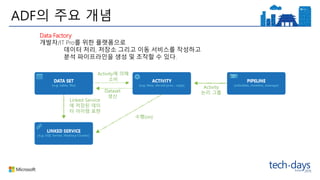
ADF의 주요 개념
Activity에의해
소비
Dataset
생산
수행(on)
Activity
논리 그룹
Linked Service
에 저장된 데이
터 아이템 표현
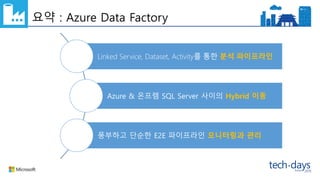
Data Factory
개발자/IT Pro를 위한 플랫폼으로
데이터 처리, 저장소 그리고 이동 서비스를 작성하고
분석 파이프라인을 생성 및 조작할 수 있다.
13.
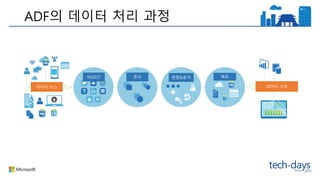
데이터 소스
BI에서 소비
앱에통합
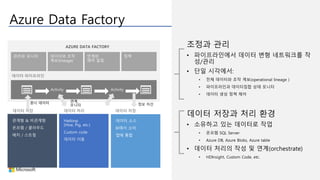
Azure Data Factory
조정과 관리
• 파이프라인에서 데이터 변형 네트워크를 작
성/관리
• 단일 시각에서:
• 전체 데이터와 조작 계보(operational lineage )
• 파이프라인과 데이터집합 상태 모니터
• 데이터 생성 정책 제어
데이터 저장과 처리 환경
• 소유하고 있는 데이터로 작업
• 온프렘 SQL Server
• Azure DB, Azure Blobs, Azure table
• 데이터 처리의 작성 및 연계(orchestrate)
• HDInsight, Custom Code, etc.
관계형 & 비관계형
온프렘 / 클라우드
배치 / 스트림
Hadoop
(Hive, Pig, etc.)
Custom code
데이터 이동
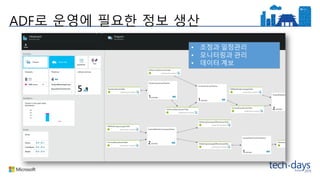
정보 자산원시 데이터 연계,
모니터
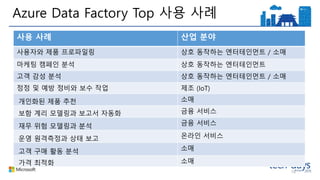
Azure Data FactoryTop 사용 사례
18
사용 사례 산업 분야
사용자와 제품 프로파일링 상호 동작하는 엔터테인먼트 / 소매
마케팅 캠페인 분석 상호 동작하는 엔터테인먼트
고객 감성 분석 상호 동작하는 엔터테인먼트 / 소매
정정 및 예방 정비와 보수 작업 제조 (IoT)
개인화된 제품 추천 소매
보함 계리 모델링과 보고서 자동화 금융 서비스
재무 위험 모델링과 분석 금융 서비스
운영 원격측정과 상태 보고 온라인 서비스
고객 구매 활동 분석 소매
가격 최적화 소매
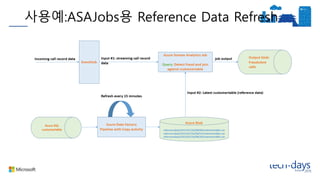
시나리오 분석 :
고객프로파일링 (게임 로그 분석)
Samples on GitHub
https://azure.microsoft.com/en-us/documentation/articles/data-factory-samples/
20.
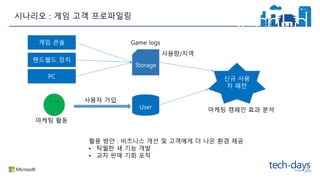
게임 콘솔
핸드헬드 장치
PC
User
시나리오: 게임 고객 프로파일링
Game logs
신규 사용
자 패턴
사용량/지역
활용 방안 : 비즈니스 개선 및 고객에게 더 나은 환경 제공
• 탁월한 새 기능 개발
• 교차 판매 기회 포착
마케팅 캠페인 효과 분석
사용자 가입
마케팅 활동
Storage
21.
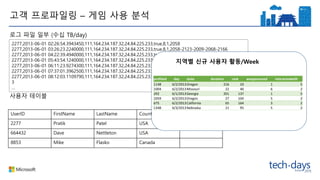
고객 프로파일링 –게임 사용 분석
2277,2013-06-01 02:26:54.3943450,111,164.234.187.32,24.84.225.233,true,8,1,2058
2277,2013-06-01 03:26:23.2240000,111,164.234.187.32,24.84.225.233,true,8,1,2058-2123-2009-2068-2166
2277,2013-06-01 04:22:39.4940000,111,164.234.187.32,24.84.225.233,true,8,1,
2277,2013-06-01 05:43:54.1240000,111,164.234.187.32,24.84.225.233,true,8,1,2058-225545-2309-2068-2166
2277,2013-06-01 06:11:23.9274300,111,164.234.187.32,24.84.225.233,true,8,1,223-2123-2009-4229-9936623
2277,2013-06-01 07:37:01.3962500,111,164.234.187.32,24.84.225.233,true,8,1,
2277,2013-06-01 08:12:03.1109790,111,164.234.187.32,24.84.225.233,true,8,1,234322-2123-2234234-12432-34432
3
…
로그 파일 일부 (수십 TB/day)
사용자 테이블
UserID FirstName LastName Country …
2277 Pratik Patel USA
664432 Dave Nettleton USA
8853 Mike Flasko Canada
지역별 신규 사용자 활동/Week
profileid day state duration rank weaponsused interactedwith
1148 6/2/2013Oregon 216 33 1 5
1004 6/2/2013Missouri 22 40 6 2
292 6/1/2013Georgia 201 137 1 5
1059 6/2/2013Oregon 27 104 5 2
675 6/2/2013California 65 164 3 2
1348 6/3/2013Nebraska 21 95 5 2
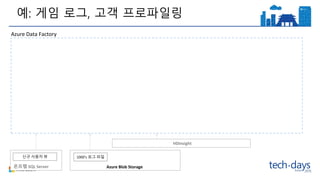
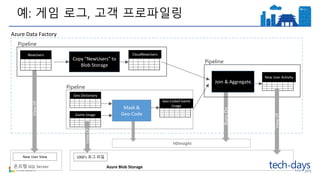
예: 게임 로그,고객 프로파일링
온프렘 SQL Server Azure Blob Storage
1000’s 로그 파일신규 사용자 뷰
Azure Data Factory
HDInsight
26.
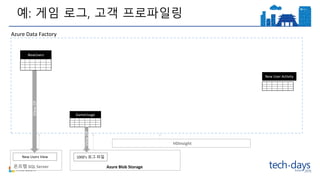
예: 게임 로그,고객 프로파일링
온프렘 SQL Server Azure Blob Storage
1000’s 로그 파일New Users View
Azure Data FactoryViewOf
GameUsage
ViewOf
NewUsers
New User Activity
HDInsight
27.
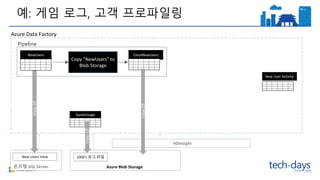
예: 게임 로그,고객 프로파일링
온프렘 SQL Server Azure Blob Storage
1000’s 로그 파일New Users View
Copy “NewUsers” to
Blob Storage
CloudNewUsers
Azure Data FactoryViewOf
GameUsage
ViewOf
NewUsers
New User Activity
ViewOf
Pipeline
HDInsight
28.
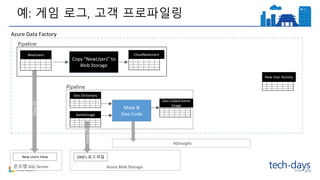
예: 게임 로그,고객 프로파일링
온프렘 SQL Server Azure Blob Storage
1000’s 로그 파일New Users View
CloudNewUsers
Azure Data FactoryViewOf
GameUsage
ViewOf
Mask &
Geo-Code
NewUsers
Geo Dictionary
Geo Coded Game
Usage
HDInsight
New User Activity
Pipeline
Pipeline
Copy “NewUsers” to
Blob Storage
29.
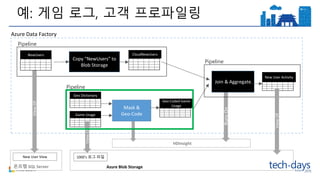
예: 게임 로그,고객 프로파일링
온프렘 SQL Server Azure Blob Storage
1000’s 로그 파일New User View
Copy “NewUsers” to
Blob Storage
CloudNewUsers
Azure Data FactoryViewOf
Game Usage
ViewOf
RunsOn
Mask &
Geo-Code
NewUsers
Geo Dictionary
Geo Coded Game
Usage
Join & Aggregate
HDInsight
New User Activity
ViewOf
Pipeline
Pipeline
Pipeline
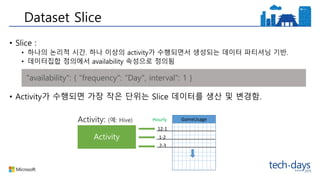
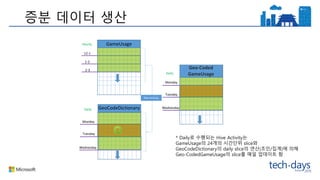
• Slice :
•하나의 논리적 시간. 하나 이상의 activity가 수행되면서 생성되는 데이터 파티셔닝 기반.
• 데이터집합 정의에서 availability 속성으로 정의됨
• Activity가 수행되면 가장 작은 단위는 Slice 데이터를 생산 및 변경함.
Dataset Slice
"availability": { "frequency": "Day", interval": 1 }
Hourly
12-1
1-2
2-3
GameUsageActivity: (예: Hive)
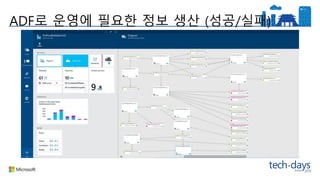
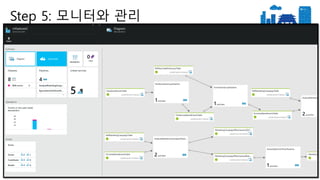
• Is mydata successfully getting produced?
• Is it produced on time?
• Am I alerted quickly of failures?
• What about troubleshooting information?
• Are there any policy warnings or errors?
Step 5: 모니터와 관리
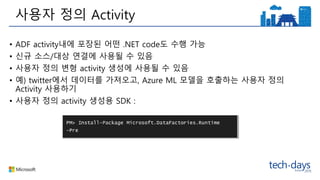
• ADF activity내에포장된 어떤 .NET code도 수행 가능
• 신규 소스/대상 연결에 사용될 수 있음
• 사용자 정의 변형 activity 생성에 사용될 수 있음
• 예) twitter에서 데이터를 가져오고, Azure ML 모델을 호출하는 사용자 정의
Activity 사용하기
• 사용자 정의 activity 생성용 SDK :
사용자 정의 Activity


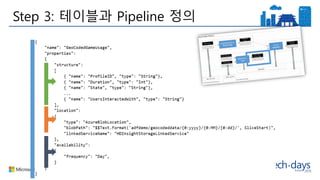
![Step 1 : 온프렘 SQL Server의 신규 사용자 데이터를 클라우드로 복사
{
"name": “NewUsers",
"properties":
{
"structure":
[
{ "name": “UserID", "position": 0, "type": "String"},
{ "name": “FirstName", "position": 1, "type": "String"},
{ "name": “LastName", "position": 2, "type": "String"},
{ "name": “Country", "position": 3, "type": "String"},
{ "name": “State", "position": 4, "type": "String"},
{ "name": “Address", "position": 5, "type": " String "}
],
"location":
{
"type": "OnPremisesSqlServerTableLocation",
"tableName": "RefHaloUsersTable",
"linkedServiceName": "OnPremSqlServerLinkedService"
},
"availability":
{
"frequency": "Day",
"interval": 1,
"waitOnExternal":
{
"retryInterval": "00:01:00",
"retryTimeout": "00:10:00",
"maximumRetry": 3
}
}
}
}
{
"name": “CloudNewUsers",
"properties":
{
"structure":
[
{ "name": “UserID", "position": 0, "type": "String"},
{ "name": “FirstName", "position": 1, "type": "String"},
{ "name": “LastName", "position": 2, "type": "String"},
{ "name": “Country", "position": 3, "type": "String"},
{ "name": “State", "position": 4, "type": "String"},
{ "name": “Address", "position": 5, "type": " String "}
],
"location":
{
"type": "AzureBlobLocation",
"blobPath": "$$Text.Format('adfwalkthrough/refdata/refmarketingcam
paign/')",
"format":
{
"type": "TextFormat",
"columnDelimiter": ","
},
"linkedServiceName": "StorageLinkedService"
},
"availability":
{
"frequency": "Day",
"interval": 1,
},
"policy":
{
"validation":
{
"minimumSizeMB": 50.00
}
}
}
"blobPath" : "$$Text.F
ormat(''adfwalkthroug
h/refdata/refmarketin
gcampaign/ {0:yyyy-
MM-dd}', SliceStart)"](https://image.slidesharecdn.com/td2015-151104053011-lva1-app6891/85/Td-2015-31-320.jpg)
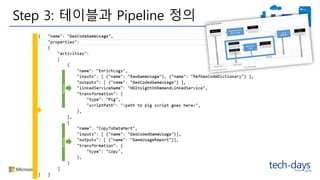
![{
"name": "CopyUsersDataPipeline",
"properties":
{
"description" : "Pipeline to copy regional campaign data from on-prem SQL server to BlobStore)",
"activities":
[
{
"name": "CopyRegionalCampaignDataFromOnprem",
"description": "Copy the Regional data from on-prem SQL server to BlobStore",
"type": "CopyActivity",
"inputs": [ {"name": "NewUsers"} ],
"outputs": [ {"name": "CloudNewUsers"} ],
"transformation":
{
"source":
{
"type": "SqlSource",
"SqlReaderQuery": "select * from dbo.RefHaloUsersTable "
},
"sink":
{
"type": "BlobSink",
"writeBatchSize": 1000000,
}
},
"Policy":
{
"concurrency": 1,
"executionPriorityOrder": "NewestFirst",
"style": "StartOfInterval",
"retry": 0,
"timeout": "01:00:00"
}
}
]
}
}
"$$Text.Format('select * from dbo.RefHaloUsersTable where Timestamp
>= '{0:yyyy-MM-dd}' AND Timestamp < '{1:yyyy-MM-dd}'',
SliceStart, SliceEnd)"
Step 1 : 온프렘 SQL Server의 사용자 데이터를 클라우드로 복사](https://image.slidesharecdn.com/td2015-151104053011-lva1-app6891/85/Td-2015-32-320.jpg)
![Step 2 : Pig 스크립트로 게임 사용 데이터 익명화하기
RawStats = LOAD '$LOGINPUT' USING PigStorage(',') AS (Profi
leID:chararray, SessionStart:chararray, Duration:int, SrcIPAddres
s:chararray, GameType:chararray, Multiplayer:chararray, EndRan
k:int, WeaponsUsed:int, UsersInteractedWith:chararray);
{
"name": "EnrichGameLogsPipeline",
"properties":
{
"description": "Uses pig script to geocode game usage logs by state and hide last octet of IP address, producing enriched game logs (v1.0)",
"activities":
[
{
"name": "PigEnrichLogs",
"description": "Enrich logs using pig",
"type": "HDInsightActivity",
"inputs": [ {"name": "GameUsageEventsTable"}, {"name": "RefGeoCodeDictionaryTable"} ],
"outputs": [ {"name": "EnrichedGameEventsTable"} ],
"linkedServiceName": "HDInsightLinkedService",
"transformation":
{
"type": "Pig",
"extendedProperties":
{
"LOGINPUT": "$$Text.Format('wasb://adfwalkthrough@anandsub14.blob.core.windows.net/logs/partitionedgameevents/yearno={0:yyyy}/monthno={0:%M}/dayno={0:%d}/', SliceStart)",
"MAPINPUT": "wasb://adfwalkthrough@anandsub14.blob.core.windows.net/refdata/refgeocodedictionary/",
"LOGOUTPUT": "$$Text.Format('wasb://adfwalkthrough@anandsub14.blob.core.windows.net/logs/enrichedgameevents/yearno={0:yyyy}/monthno={0:%M}/dayno={0:%d}/', SliceStart)"
},
"scriptPath": "adfwalkthroughscriptsenrichlogs.pig",
"scriptLinkedService": "StorageLinkedService"
},
"policy":
{
"Concurrency": 1,
"ExecutionPriorityOrder": "OldestFirst",
"Retry": 1,
"Timeout": "01:00:00"
}
}
]
}
}](https://image.slidesharecdn.com/td2015-151104053011-lva1-app6891/85/Td-2015-34-320.jpg)
![Step 2 : 조인, 집계 후 처리된 데이터 자산을 Azure SQL DB로 이동
{
"name": "CopyGameUsageToSQL",
"properties":
{
"description": "copy game usage data to a data mart for consumption via BI tools",
"activities":
[
{
"name":"CopyGameUsage",
"description":"copy from blob to sql",
"type":"CopyActivity",
"inputs":[
{
"name":"EnrichedGameEventsTable"
}
],
"outputs":[
{
"name":"GameUsageReport"
}
],
"transformation":{
"source":{
"type":"BlobSource",
"blobColumnSeparators":","
},
"type": "SqlSink",
"writeBatchSize": 1000000,
"writeBatchTimeout": "01:00:00",
"SqlWriterTableType": "MarketingCampaignEffectivenessType",
"SqlWriterStoredProcedureName": "spEgressOverwriteMarketingCampaignEffectiveness"
}
},
"policy":{
"concurrency":1,
"executionPriorityOrder":"OldestFirst",
"retry":0,
"timeout":"01:00:00"
}
}
]
}
}](https://image.slidesharecdn.com/td2015-151104053011-lva1-app6891/85/Td-2015-35-320.jpg)
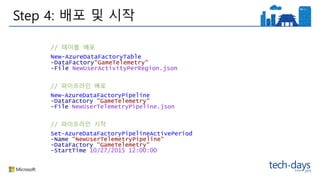

![DotNet Activity
ADF activity내에 포함된 어떤 C# code도 수행할
수 있음
"Activities":
[
{
"Name": "CustomActivity",
"Type": "CustomActivity",
"Inputs": [{"Name": "InputBlob1"},
{"Name": "InputBlob2"}],
"Outputs": [{"Name": "OutputBlob"}],
"LinkedServiceName": "HDInsightLinkedService",
"Transformation":
{
"AssemblyName": "CustomActivityBlobSample.dll",
“EntryPoint": "Microsoft.DataFactories.Samples.CustomActivityBlobSample",
"PackageLinkedService": "LinkedService-CA-AzureStorage",
"PackageFile": "activitystore/Debug.zip",
"ExtendedProperties":
{
"StartTime": "$$Text.Format('{0:yyyyMMddHH-mm}', SliceStart)"
}
},
"Policy":
{
"Concurrency": 1,
"ExecutionPriorityOrder": "OldestFirst",
"Retry": 3,
"Timeout": "00:30:00",
"Delay": "00:00:00"
}
}
]](https://image.slidesharecdn.com/td2015-151104053011-lva1-app6891/85/Td-2015-48-320.jpg)
![[Td 2015]틱틱대도 써야 하는 windows 10 앱 개발, c# tips & tricks(송기수)](https://cdn.slidesharecdn.com/ss_thumbnails/td2015windows10ctipstricks-151104053021-lva1-app6892-thumbnail.jpg?width=640&height=640&fit=bounds)
![[Td 2015]구름 위로 올려 어느 곳에서든 연결되는 서비스 azure 앱 서비스(이종인)](https://cdn.slidesharecdn.com/ss_thumbnails/td2015azure-151104051707-lva1-app6892-thumbnail.jpg?width=640&height=640&fit=bounds)

![[TD 2015] Microsoft Azure IaaS v2(최정현)](https://cdn.slidesharecdn.com/ss_thumbnails/td2015microsoftazureiaasv2-151116073922-lva1-app6892-thumbnail.jpg?width=640&height=640&fit=bounds)


![[Td 2015]windows 10 엔터프라이즈 시나리오 part II 보안 및 관리(권순만)](https://cdn.slidesharecdn.com/ss_thumbnails/td2015windows10partii-151104063832-lva1-app6891-thumbnail.jpg?width=640&height=640&fit=bounds)


![[우리가 데이터를 쓰는 법] 모바일 게임 로그 데이터 분석 이야기 - 엔터메이트 공신배 팀장](https://cdn.slidesharecdn.com/ss_thumbnails/5-160415084345-thumbnail.jpg?width=640&height=640&fit=bounds)


![[코세나, kosena] 빅데이터 구축 및 제안 가이드](https://cdn.slidesharecdn.com/ss_thumbnails/random-161220075637-thumbnail.jpg?width=640&height=640&fit=bounds)


![[E-commerce & Retail Day] Data Freedom을 위한 Database 최적화 전략](https://cdn.slidesharecdn.com/ss_thumbnails/datafreedomdatabase-171027021754-thumbnail.jpg?width=640&height=640&fit=bounds)
![[AWSKRUG] 데이터 얼마까지 알아보셨어요?](https://cdn.slidesharecdn.com/ss_thumbnails/aa-190614060527-thumbnail.jpg?width=640&height=640&fit=bounds)


![[Partner TechForum] 고객을 360도로 이해하고 수익으로 연결하는 글로벌 선도 금융 기업들의 데이터 플랫폼 활용 사례](https://cdn.slidesharecdn.com/ss_thumbnails/treasuredatatechforrm2017-171122013630-thumbnail.jpg?width=640&height=640&fit=bounds)
![[2018] 효율적인 데이터 관리를 위한 플랫폼 개발기](https://cdn.slidesharecdn.com/ss_thumbnails/machinebigdata06-190212052349-thumbnail.jpg?width=640&height=640&fit=bounds)


![[NDC 2011] 게임 개발자를 위한 데이터분석의 도입](https://cdn.slidesharecdn.com/ss_thumbnails/ndc2011ver5-140313211642-phpapp01-thumbnail.jpg?width=640&height=640&fit=bounds)


![[Td 2015] 국내에서 처음으로 선보이는 microsoft 차세대 서버 운영 체제 windows server 2016](https://cdn.slidesharecdn.com/ss_thumbnails/td2015microsoftwindowsserver2016-151123012941-lva1-app6892-thumbnail.jpg?width=640&height=640&fit=bounds)
![[TD 2015] windows server에서 만나보는 docker와 windows container(최한홍)](https://cdn.slidesharecdn.com/ss_thumbnails/td2015windowsserverdockerwindowscontainer-151116073947-lva1-app6891-thumbnail.jpg?width=640&height=640&fit=bounds)
![[TD2015] 이 시대에 소규모 게임 개발팀이 마소와 함께 살아가는 방법(송용성)](https://cdn.slidesharecdn.com/ss_thumbnails/td2015-151112084414-lva1-app6892-thumbnail.jpg?width=640&height=640&fit=bounds)
![[Td 2015]두근두근 asp.net 5(한상훈)](https://cdn.slidesharecdn.com/ss_thumbnails/td2015asp-151106010553-lva1-app6891-thumbnail.jpg?width=640&height=640&fit=bounds)
![[Td 2015]windows 10 엔터프라이즈 시나리오 part I 배포 및 이미징(박성기)](https://cdn.slidesharecdn.com/ss_thumbnails/td2015windows10parti-151104063752-lva1-app6891-thumbnail.jpg?width=640&height=640&fit=bounds)
![[Td 2015]함께하면 더 좋은 windows 10과 인텔 스카이레이크, 아키텍쳐와 인텔 그래픽스 최적화 살펴보기(하태동)](https://cdn.slidesharecdn.com/ss_thumbnails/td2015windows10-151104053109-lva1-app6892-thumbnail.jpg?width=640&height=640&fit=bounds)
![[Td 2015]프로그래밍 언어의 f1머신 c++을 타고 windows 10 uwp 앱 개발의 세계로~(유영천)](https://cdn.slidesharecdn.com/ss_thumbnails/td2015f1cwindows10uwp-151104053044-lva1-app6892-thumbnail.jpg?width=640&height=640&fit=bounds)
![[Td 2015]조막만한 화면에서 대박만한 화면까지. 고생 끝 적응(adaptive ui) 시작(권영철)](https://cdn.slidesharecdn.com/ss_thumbnails/td2015-151104052947-lva1-app6892-thumbnail.jpg?width=640&height=640&fit=bounds)
![[Td 2015]알아두면 핵 이득! vc++로 안드로이드 개발하기(김성엽)](https://cdn.slidesharecdn.com/ss_thumbnails/td2015vc-151104052852-lva1-app6892-thumbnail.jpg?width=640&height=640&fit=bounds)
![[Td 2015]박애주의 office 365, 멀티플랫폼과 사랑에 빠지다(최한홍)](https://cdn.slidesharecdn.com/ss_thumbnails/td2015office365-151104052831-lva1-app6892-thumbnail.jpg?width=640&height=640&fit=bounds)
![[Td 2015]맨땅에 헤딩하고 터득한 스토어 공략법(돈벌기)(육주용)](https://cdn.slidesharecdn.com/ss_thumbnails/td2015-151104052734-lva1-app6892-thumbnail.jpg?width=640&height=640&fit=bounds)
![[Td 2015]라즈베리파이에 windows 10 io t core 맛있게 발라 먹기(유정현)](https://cdn.slidesharecdn.com/ss_thumbnails/td2015windows10iotcore-151104052603-lva1-app6891-thumbnail.jpg?width=640&height=640&fit=bounds)
![[Td 2015]디버깅, 어디까지 해봤니 당신이 아마도 몰랐을 디버깅 꿀팁 공개(김희준)](https://cdn.slidesharecdn.com/ss_thumbnails/td2015-151104052537-lva1-app6891-thumbnail.jpg?width=640&height=640&fit=bounds)
![[Td 2015]녹슨 c++ 코드에 모던 c++로 기름칠하기(옥찬호)](https://cdn.slidesharecdn.com/ss_thumbnails/td2015cc-151104051810-lva1-app6891-thumbnail.jpg?width=640&height=640&fit=bounds)
![[Td 2015]너에게만 나는 반응해 반응형 응용프로그램(이규원)](https://cdn.slidesharecdn.com/ss_thumbnails/td2015-151104051723-lva1-app6892-thumbnail.jpg?width=640&height=640&fit=bounds)
![[Td 2015]각이 다른 mvc6! 그 여섯 번째 이야기!(최지훈)](https://cdn.slidesharecdn.com/ss_thumbnails/td2015mvc6-151104051613-lva1-app6892-thumbnail.jpg?width=640&height=640&fit=bounds)
![[Td 2015]개발하기 바쁜데 푸시서버와 메시지큐는 있는거 쓸래요(김영재)](https://cdn.slidesharecdn.com/ss_thumbnails/td2015-151104051535-lva1-app6891-thumbnail.jpg?width=640&height=640&fit=bounds)
![[Td 2015]python을 azure에서 사용하는법(배권한)](https://cdn.slidesharecdn.com/ss_thumbnails/td2015pythonazure-151104051509-lva1-app6891-thumbnail.jpg?width=640&height=640&fit=bounds)
![[Td 2015]microsoft 개발자들을 위한 달콤한 hadoop, hd insight(최종욱)](https://cdn.slidesharecdn.com/ss_thumbnails/td2015microsofthadoophdinsight-151104051358-lva1-app6891-thumbnail.jpg?width=640&height=640&fit=bounds)
![[Td 2015]general session 세상을 품은 플랫폼과 그 가능성에 대하여(기술에반젤리스트)](https://cdn.slidesharecdn.com/ss_thumbnails/td2015generalsession-151104051255-lva1-app6892-thumbnail.jpg?width=640&height=640&fit=bounds)