








Software Development
Software Engineering, I
SystemAnalysis and Design ,
COMP 617 Designing Real-Time Software
An abbreviated lecture for Software Development
course
An overview of System Analyst’s activities, and a crash
course for software development
Dalhousie University July 11,
By : Professor Lili Saghafi
proflilisaghafi@gmail.com
@Lili_PLS
Professor Lili Saghafi
lili.saghafi@mail.mcgill.ca
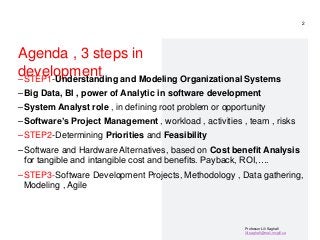
Agenda , 3 steps in
development
–STEP1-Understanding and Modeling Organizational Systems
–Big Data, BI , power of Analytic in software development
–System Analyst role , in defining root problem or opportunity
–Software’s Project Management , workload , activities , team , risks
–STEP2-Determining Priorities and Feasibility
–Software and Hardware Alternatives, based on Cost benefit Analysis
for tangible and intangible cost and benefits. Payback, ROI,….
–STEP3-Software Development Projects, Methodology , Data gathering,
Modeling , Agile
2
“Computers are useless.
- Pablo
Picasso
They can only give
you
answers.”
3/13/2017
3
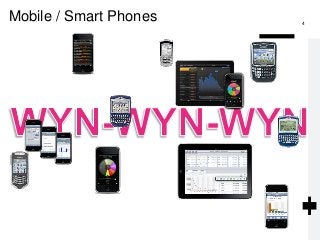
Mobile / Smart Phones 4
5
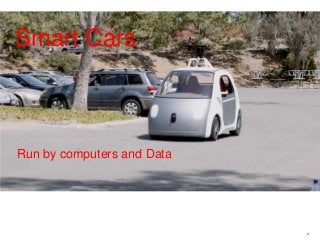
Run by computers and Data
Smart Cars
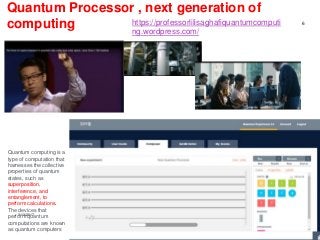
Quantum Processor , next generation of
computing
http://research.ibm.com/ibm-
q/quantum-primer/
3/13/2017
6
https://professorlilisaghafiquantumcomputi
ng.wordpress.com/
Quantum computing is a
type of computation that
harnesses the collective
properties of quantum
states, such as
superposition,
interference, and
entanglement, to
perform calculations.
The devices that
perform quantum
computations are known
as quantum computers
GE rugs
8
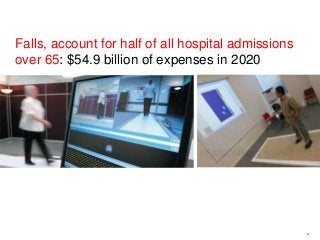
Falls, account for half of all hospital admissions
over 65: $54.9 billion of expenses in 2020
All is about Data and Computers
–From fridges that scan and order to suppliers
–To Toilets that generate data about the user, urine sample provide to
Blockchain (A blockchain is a growing list of records, called blocks, that
are securely linked together using cryptography) , ….
–Printer, When your enrolled printer, is connected to the Internet,
your printer automatically orders ink for you because it knows when
you are low on ink. Your printer orders ink when your cartridges have
enough ink to print twice the number of average pages included in your
monthly plan.
–All is about data , computers & IoT
• The average number of connected devices per household in 2020 were
50.
• 2021, 35 billion IoT devices were installed around the world.
1. Data needs to be collected strategically
2. Data needs to be clean
3. Data needs to be secure
4. Data needs to be accessible
What Is Big Data? Big data is
big
–I mean really…
Did you know that THIS MORNING
there is more data in the world
than EVER BEFORE?!
Typical sizes are being in
the range of multiple
zettabyte.
1021 bytes equals to 1
zettabyte or one billion
terabytes forms a
zettabyte.
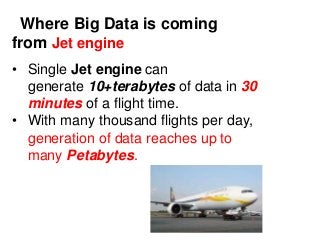
Where Big Data is coming
from
New York Stock Exchange
– The New York Stock Exchange generates about 10 terabyte of new
trade data per day. (2021)
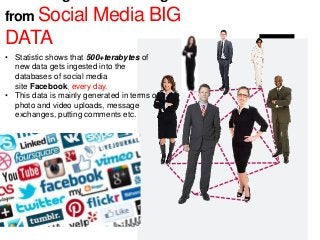
from Social Media BIG
DATA
• Statistic shows that 500+terabytes of
new data gets ingested into the
databases of social media
site Facebook, every day.
• This data is mainly generated in terms of
photo and video uploads, message
exchanges, putting comments etc.
Where Big Data is coming
from Jet engine
• Single Jet engine can
generate 10+terabytes of data in 30
minutes of a flight time.
• With many thousand flights per day,
generation of data reaches up to
many Petabytes.
Real-time computer systems , uses Big Data , BI and
Power of Analytics
• A real-time application, or RTA, is an application that
functions within a time frame that the user senses as
immediate or current.
• The latency must be less than a defined value, usually
measured in seconds.
• The use of real-time applications is part of real-time
computing.
• Applications and examples of real-time systems appear as part of our
daily life such as vehicle control systems for automobile and
aircraft, traffic control systems, medical systems, home utilities,
and security monitors and control systems, etc.
14
As part of RTA, vehicle control systems for aircraft
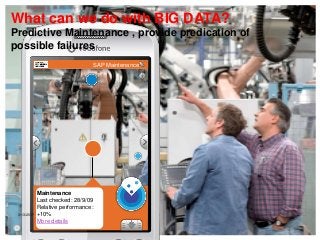
Predictive Maintenance , provide predication of
possible failures
What can we do with BIG DATA?
SAP Maintenance
Maintenance
Last checked: 28/9/09
Relative performance:
+10%
More details
3/13/2017
16
What can we do with BIG DATA?
Predictive Maintenance , provide predication of
possible failures
17
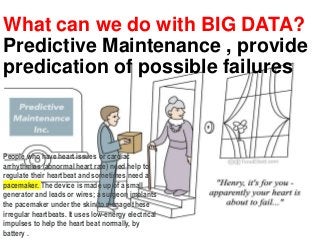
What can we do with BIG DATA?
Predictive Maintenance , provide
predication of possible failures
People who have heart issues or cardiac
arrhythmias (abnormal heart rate) need help to
regulate their heartbeat and sometimes need a
pacemaker. The device is made up of a small
generator and leads or wires; a surgeon implants
the pacemaker under the skin to manage these
irregular heartbeats. It uses low-energy electrical
impulses to help the heart beat normally, by
battery .
Filter by: Maintenance History
Tower Pipe 3
Last Maintenance: 2 Weeks
E 0.1km
Photo by Thomas Hawk, Flickr
3/13/2017
18
technology that presents us with virtual
objects and information in our field of
vision. If I am looking at a plant, for
example, and point my smartphone
towards that plant, it may give me more
information, such as names of area,
Pipes locations, etc.
What can we
do with BIG
DATA?
Augmented
Reality
software
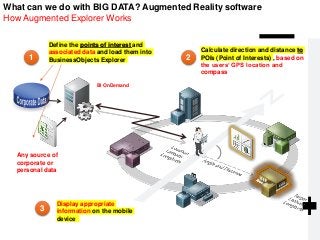
What can we do with BIG DATA? Augmented Reality software
How Augmented Explorer Works
1 2
3
Define the points of interest and
associated data and load them into
BusinessObjects Explorer
Calculate direction and distance to
POIs (Point of Interests) , based on
the users’ GPS location and
compass
Display appropriate
information on the mobile
device
Any source of
corporate or
personal data
BI OnDemand
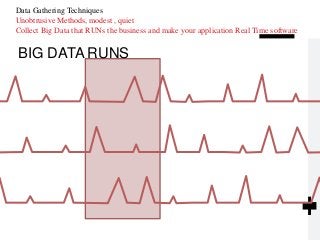
BIG DATA RUNS
Data Gathering Techniques
Unobtrusive Methods, modest , quiet
Collect Big Data that RUNs the business and make your application Real Time software
The importance of Big Data with BI and
Analytic in development of software solutions
• BI and Analytics is more strategic than ever – especially because analytics is
now used to CREATE processes, not just record what’s happening.
• Business users are demanding more self-service access to data (executive
dashboard ), and new tools allow this more easily than ever before – but it will
require new approaches.
• The days of gigantic data warehouses are over, to be replaced by more flexible
access to multiple different sources (with Blockchain technology which is a
growing list of records, called blocks, that are securely linked together using
cryptography) – with, eventually, technology doing more of the hard lifting.
• Artificial intelligence is coming, and it’s going to be more than an add-on
technology: we will have to fundamentally rethink many business processes
and ultimately have more real time software solutions .
• Finally, there’s really only one factor I’ve seen that has been common to every BI
solution development failure I’ve seen in my 25-year career – a breakdown of
communication and trust between analytics teams, and their “customers”.
• It’s almost impossible to under-invest in keeping that relationship healthy.
21
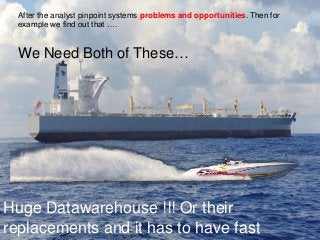
We Need Both of These…
After the analyst pinpoint systems problems and opportunities. Then for
example we find out that ….
Huge Datawarehouse !!! Or their
replacements and it has to have fast
It makes Live
Business
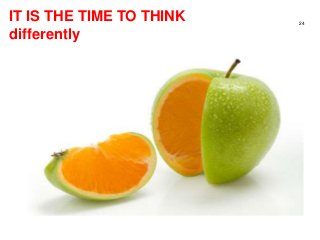
IT IS THE TIME TO THINK
differently
24
Software for anyone
25
Simple
26
27
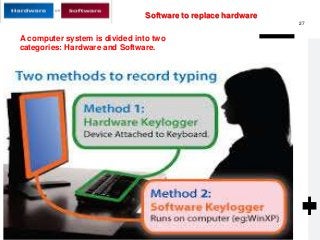
A computer system is divided into two
categories: Hardware and Software.
Software to replace hardware
Professor Lili Saghafi
lili.saghafi@mail.mcgill.ca
Development of software solution from small to
Large like ERP application, follow the almost the
same rules.
– Enterprise Resource Planning (E R P) is an integrated organizational
information system
– Software, that helps the flow of information between the functional
areas within the organization
– E R P systems are moving to cloud computing
– Like all other software development many issues must be overcome for the
E R P installation to be declared a success:
1. User acceptance
2. Integration with legacy systems and the supply chain
3. Upgrading functionality (and complexity) of E R P modules
4. Reorganizing work life of users and decision makers
5. Expanded reach across several organizations
28
Professor Lili Saghafi
lili.saghafi@mail.mcgill.ca
Software Development
Step1-Understanding
Organizations are Systems
1. Understand that organizations and their members,
are systems, and that analysts need to take a
systems perspective.
2. The development process is a PROJECT and need
Project Management capability
3. Information Gathering and Collecting Data , by 7
techniques
4. Depict systems graphically ( modeling ) using context-
level data flow diagrams, and entity-relationship
models, use cases, and use case scenarios.
5. Recognize that different levels of management
require different systems.
6. Comprehend that organizational culture impacts the
design of information systems.
29
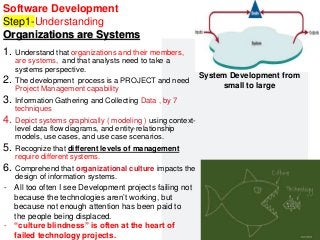
System Development from
small to large
- All too often I see Development projects failing not
because the technologies aren’t working, but
because not enough attention has been paid to
the people being displaced.
- “culture blindness” is often at the heart of
failed technology projects.
Professor Lili Saghafi
lili.saghafi@mail.mcgill.ca
For example
–Several years ago an executive dashboard
project was very nearly ruined by one of the
executive assistants.
– The dashboard was designed to replace and
automate many hours of manual work that the
assistant had been carrying out for years.
–Despite her deep expertise in:
– what data was required,
– what problems there were with the data sources,
– etc.,
–She wasn’t included in the project. SO She
resisted the project.
–Given her expertise, she was able to point out the
ways that the project would provide less valuable
information than her highly-customized manual
process, and had the support of the executives
who already had what they wanted.
–Eventually somebody came to their senses, helped
her transition to a role more adapted to her data
skills, and made sure that the IT team worked
30
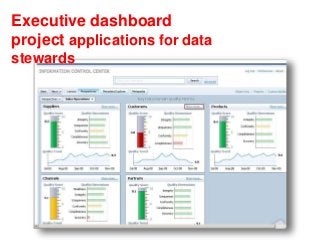
Executive dashboard
project applications for data
stewards
32
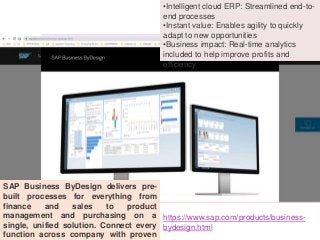
SAP Business ByDesign delivers pre-
built processes for everything from
finance and sales to product
management and purchasing on a
single, unified solution. Connect every
function across company with proven
•Intelligent cloud ERP: Streamlined end-to-
end processes
•Instant value: Enables agility to quickly
adapt to new opportunities
•Business impact: Real-time analytics
included to help improve profits and
efficiency
https://www.sap.com/products/business-
bydesign.html
Professor Lili Saghafi
lili.saghafi@mail.mcgill.ca
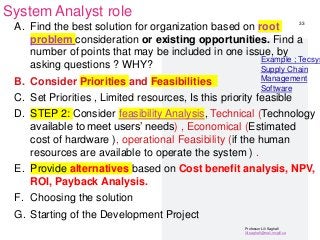
System Analyst role
A. Find the best solution for organization based on root
problem consideration or existing opportunities. Find a
number of points that may be included in one issue, by
asking questions ? WHY?
B. Consider Priorities and Feasibilities
C. Set Priorities , Limited resources, Is this priority feasible
D. STEP 2: Consider feasibility Analysis, Technical (Technology
available to meet users’ needs) , Economical (Estimated
cost of hardware ), operational Feasibility (if the human
resources are available to operate the system ) .
E. Provide alternatives based on Cost benefit analysis, NPV,
ROI, Payback Analysis.
F. Choosing the solution
G. Starting of the Development Project
33
Example ; Tecsys
Supply Chain
Management
Software
Professor Lili Saghafi
lili.saghafi@mail.mcgill.ca
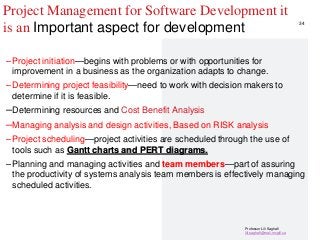
Project Management for Software Development it
is an Important aspect for development
–Project initiation—begins with problems or with opportunities for
improvement in a business as the organization adapts to change.
–Determining project feasibility—need to work with decision makers to
determine if it is feasible.
–Determining resources and Cost Benefit Analysis
–Managing analysis and design activities, Based on RISK analysis
–Project scheduling—project activities are scheduled through the use of
tools such as Gantt charts and PERT diagrams.
–Planning and managing activities and team members—part of assuring
the productivity of systems analysis team members is effectively managing
scheduled activities.
34
Professor Lili Saghafi
lili.saghafi@mail.mcgill.ca
Questio
n
@Lili_PL
Why?
YES NO
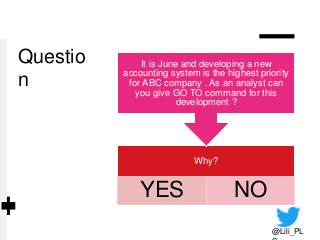
It is June and developing a new
accounting system is the highest priority
for ABC company . As an analyst can
you give GO TO command for this
development ?
Professor Lili Saghafi
lili.saghafi@mail.mcgill.ca
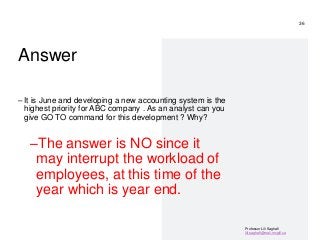
Answer
– It is June and developing a new accounting system is the
highest priority for ABC company . As an analyst can you
give GO TO command for this development ? Why?
–The answer is NO since it
may interrupt the workload of
employees, at this time of the
year which is year end.
36
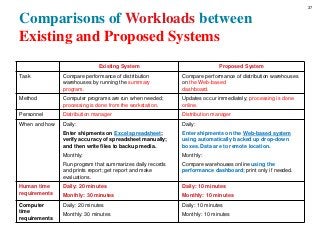
Comparisons of Workloads between
Existing and Proposed Systems
Blank Existing System Proposed System
Task Compare performance of distribution
warehouses by running the summary
program.
Compare performance of distribution warehouses
on the Web-based
dashboard.
Method Computer programs are run when needed;
processing is done from the workstation.
Updates occur immediately; processing is done
online.
Personnel Distribution manager Distribution manager
When and how Daily:
Enter shipments on Excel spreadsheet;
verify accuracy of spreadsheet manually;
and then write files to backup media.
Monthly:
Run program that summarizes daily records
and prints report; get report and make
evaluations.
Daily:
Enter shipments on the Web-based system
using automatically backed up drop-down
boxes. Data are to remote location.
Monthly:
Compare warehouses online using the
performance dashboard; print only if needed.
Human time
requirements
Daily: 20 minutes
Monthly: 30 minutes
Daily: 10 minutes
Monthly: 10 minutes
Computer
time
requirements
Daily: 20 minutes
Monthly: 30 minutes
Daily: 10 minutes
Monthly: 10 minutes
37
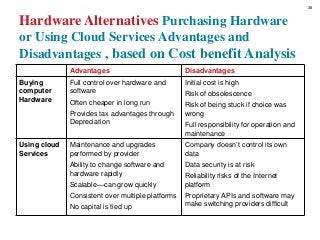
Hardware Alternatives Purchasing Hardware
or Using Cloud Services Advantages and
Disadvantages , based on Cost benefit Analysis
Blank Advantages Disadvantages
Buying
computer
Hardware
Full control over hardware and
software
Often cheaper in long run
Provides tax advantages through
Depreciation
Initial cost is high
Risk of obsolescence
Risk of being stuck if choice was
wrong
Full responsibility for operation and
maintenance
Using cloud
Services
Maintenance and upgrades
performed by provider
Ability to change software and
hardware rapidly
Scalable—can grow quickly
Consistent over multiple platforms
No capital is tied up
Company doesn’t control its own
data
Data security is at risk
Reliability risks of the Internet
platform
Proprietary APIs and software may
make switching providers difficult
38
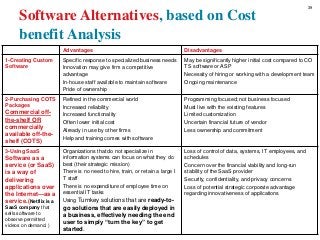
Software Alternatives, based on Cost
benefit Analysis
Advantages Disadvantages
1-Creating Custom
Software
Specific response to specialized business needs
Innovation may give firm a competitive
advantage
In-house staff available to maintain software
Pride of ownership
May be significantly higher initial cost compared to CO
TS software or ASP
Necessity of hiring or working with a development team
Ongoing maintenance
2-Purchasing COTS
Packages
Commercial off-
the-shelf OR
commercially
available off-the-
shelf (COTS)
Refined in the commercial world
Increased reliability
Increased functionality
Often lower initial cost
Already in use by other firms
Help and training comes with software
Programming focused; not business focused
Must live with the existing features
Limited customization
Uncertain financial future of vendor
Less ownership and commitment
3-Using SaaS
Software as a
service (or SaaS)
is a way of
delivering
applications over
the Internet—as a
service.(Netflix is a
SaaS company that
sells software to
observe permitted
videos on demand. )
Organizations that do not specialize in
information systems can focus on what they do
best (their strategic mission)
There is no need to hire, train, or retain a large I
T staff
There is no expenditure of employee time on
essential IT tasks
Using Turnkey solutions that are ready-to-
go solutions that are easily deployed in
a business, effectively needing the end
user to simply “turn the key” to get
started.
Loss of control of data, systems, IT employees, and
schedules
Concern over the financial viability and long-run
stability of the SaaS provider
Security, confidentiality, and privacy concerns
Loss of potential strategic corporate advantage
regarding innovativeness of applications
39
PROJECT PROPOSAL
Suggest 3 alternatives by performing
Cost Benefit
Analysis
To choose among alternatives
Professor Lili Saghafi
lili.saghafi@mail.mcgill.ca
Identifying Benefits and Costs
– Tangible benefits are advantages measurable in dollars
through the use of the information system, like Increase
in the speed of processing
– Intangible benefits are difficult to measure, like Improving
the decision-making process and Enhancing accuracy
– Tangible costs are accurately projected by the systems
analyst and accounting personnel , like Cost of
equipment , Cost of resources
– Intangible costs are difficult to estimate and may not be
known , like Losing a competitive edge, Losing the
reputation of being first
41
Professor Lili Saghafi
lili.saghafi@mail.mcgill.ca
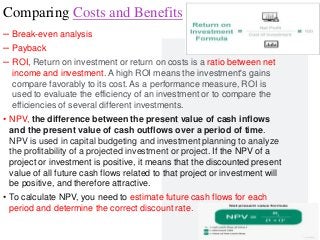
Comparing Costs and Benefits
– Break-even analysis
– Payback
– ROI, Return on investment or return on costs is a ratio between net
income and investment. A high ROI means the investment's gains
compare favorably to its cost. As a performance measure, ROI is
used to evaluate the efficiency of an investment or to compare the
efficiencies of several different investments.
• NPV, the difference between the present value of cash inflows
and the present value of cash outflows over a period of time.
NPV is used in capital budgeting and investment planning to analyze
the profitability of a projected investment or project. If the NPV of a
project or investment is positive, it means that the discounted present
value of all future cash flows related to that project or investment will
be positive, and therefore attractive.
• To calculate NPV, you need to estimate future cash flows for each
period and determine the correct discount rate.
42
STEP 3
Software
Development
Software Development life cycle SDLC last for 5 years
Professor Lili Saghafi
lili.saghafi@mail.mcgill.ca
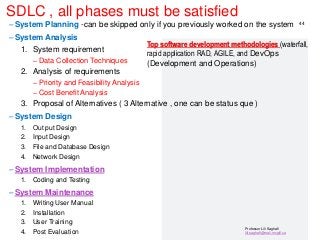
SDLC , all phases must be satisfied
– System Planning -can be skipped only if you previously worked on the system
– System Analysis
1. System requirement
– Data Collection Techniques
2. Analysis of requirements
– Priority and Feasibility Analysis
– Cost Benefit Analysis
3. Proposal of Alternatives ( 3 Alternative , one can be status que )
– System Design
1. Out put Design
2. Input Design
3. File and Database Design
4. Network Design
– System Implementation
1. Coding and Testing
– System Maintenance
1. Writing User Manual
2. Installation
3. User Training
4. Post Evaluation
44
Top software development methodologies (waterfall,
rapid application RAD, AGILE, and DevOps
(Development and Operations)
Professor Lili Saghafi
lili.saghafi@mail.mcgill.ca
`
45
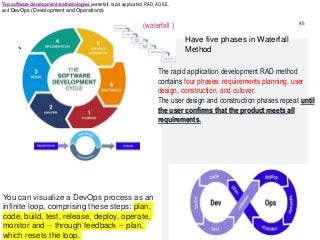
Have five phases in Waterfall
Method
(waterfall )
You can visualize a DevOps process as an
infinite loop, comprising these steps: plan,
code, build, test, release, deploy, operate,
monitor and -- through feedback -- plan,
which resets the loop.
The rapid application development RAD method
contains four phases: requirements planning, user
design, construction, and cutover.
The user design and construction phases repeat until
the user confirms that the product meets all
requirements.
Top software development methodologies (waterfall, rapid application RAD, AGILE,
and DevOps (Development and Operations)
Professor Lili Saghafi
lili.saghafi@mail.mcgill.ca
Agile development methodology
Agile Manifesto
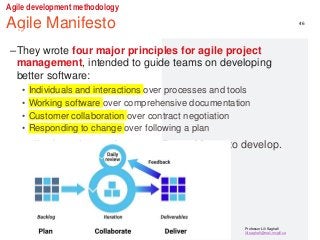
–The Agile Manifesto
–They wrote four major principles for agile project
management, intended to guide teams on developing
better software:
• Individuals and interactions over processes and tools
• Working software over comprehensive documentation
• Customer collaboration over contract negotiation
• Responding to change over following a plan
• applications that are better quality and faster to develop.
46
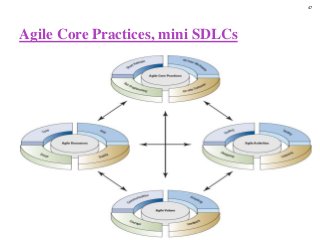
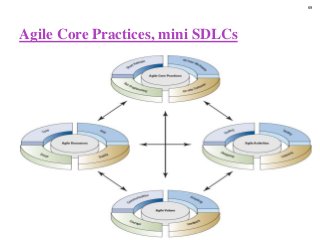
Agile Core Practices, mini SDLCs
47
Professor Lili Saghafi
lili.saghafi@mail.mcgill.ca
Which software development
methodologies to choose?
–When choosing your development
methodology, think about combining the
elements of each method that work best for
your team and your current project.
–In this way, you can create a hybrid
development methodology that’ll get you to
production securely and efficiently.
48
Professor Lili Saghafi
lili.saghafi@mail.mcgill.ca
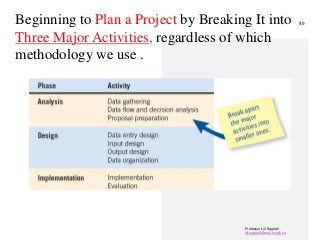
Beginning to Plan a Project by Breaking It into
Three Major Activities, regardless of which
methodology we use .
49
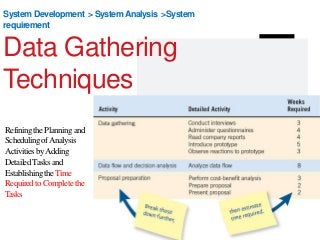
System Development > SystemAnalysis >System
requirement
Data Gathering
Techniques
RefiningthePlanningand
SchedulingofAnalysis
ActivitiesbyAdding
DetailedTasksand
EstablishingtheTime
RequiredtoCompletethe
Tasks
Interactive Methods to Elicit Human Information Requirements
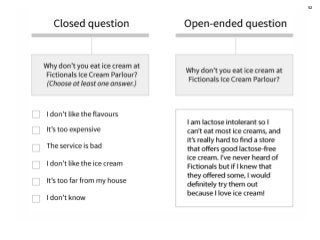
• Interviewing , Interviews and focus groups consist of talking to subjects face-to-face about a specific topic or
issue. Interviews tend to be one-on-one, and focus groups are typically made up of several people. a focus
group should have 3-10 people, plus a moderator. Open-ended, Closed
• Joint Application Design (J A D), J A D is a technique that allows the analyst to accomplish requirements
analysis and design the user interface with the users in a group setting
– Involvement
– Location
– Questionnaires
▪ Writing questions
▪ Using scales
▪ Design
▪ Administering
1. Observations.
2. Documents / FORMS ( filled , unfilled) and records.
3. Online Tracking- To gather behavioral data, you can implement pixels and cookies. These are both tools
that track users’ online behavior across websites and provide insight into what content they’re interested in
and typically engage with.
4. Oral histories and Social Media Monitoring -Monitoring company’s social media channels for follower
engagement is an accessible way to track data about your audience’s interests and motivations. Many
social media platforms have analytics built in, but there are also third-party social platforms that give more
detailed, organized insights pulled from multiple channels.
52
Data Gathering Techniques
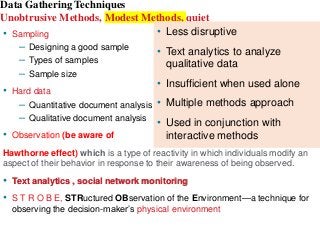
Unobtrusive Methods, Modest Methods, quiet
• Sampling
– Designing a good sample
– Types of samples
– Sample size
• Hard data
– Quantitative document analysis
– Qualitative document analysis
• Observation (be aware of
Hawthorne effect) which is a type of reactivity in which individuals modify an
aspect of their behavior in response to their awareness of being observed.
• Text analytics , social network monitoring
• S T R O B E, STRuctured OBservation of the Environment—a technique for
observing the decision-maker’s physical environment
• Less disruptive
• Text analytics to analyze
qualitative data
• Insufficient when used alone
• Multiple methods approach
• Used in conjunction with
interactive methods
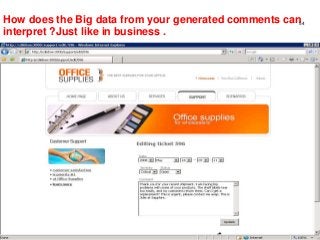
How does the Big data from your generated comments can
interpret ?Just like in business .
54
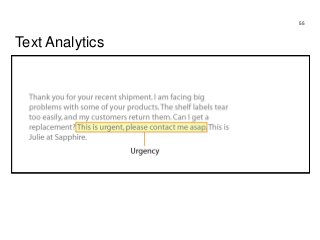
Text Analytics
55
Professor Lili Saghafi
lili.saghafi@mail.mcgill.ca
Question
–What type of question
this one is ?
Once the data are
submitted via the website,
how are they processed?
–OPEN ENDED
–CLOSE ENDED
@Lili_PL
Professor Lili Saghafi
lili.saghafi@mail.mcgill.ca
Answer
57
What type of
question this
one is ?
Once the
data are
submitted via
the website,
how are they
processed?
Open ended question
System Development > System Analysis
>System requirement > Data gathering
Modeling
Depicting Systems Graphically
Professor Lili Saghafi
lili.saghafi@mail.mcgill.ca
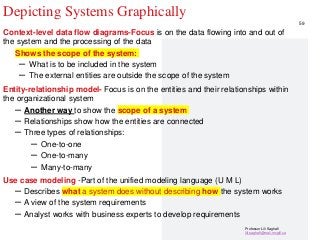
Depicting Systems Graphically
Context-level data flow diagrams-Focus is on the data flowing into and out of
the system and the processing of the data
Shows the scope of the system:
– What is to be included in the system
– The external entities are outside the scope of the system
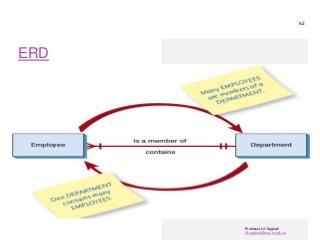
Entity-relationship model- Focus is on the entities and their relationships within
the organizational system
– Another way to show the scope of a system
– Relationships show how the entities are connected
– Three types of relationships:
– One-to-one
– One-to-many
– Many-to-many
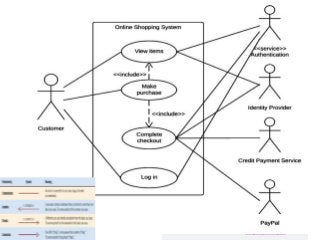
Use case modeling -Part of the unified modeling language (U M L)
– Describes what a system does without describing how the system works
– A view of the system requirements
– Analyst works with business experts to develop requirements
59
Professor Lili Saghafi
lili.saghafi@mail.mcgill.ca
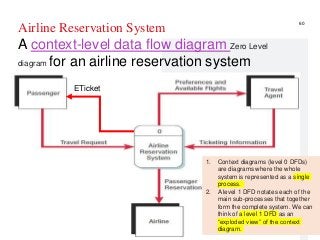
Airline Reservation System
A context-level data flow diagram Zero Level
diagram for an airline reservation system
60
ETicket
1. Context diagrams (level 0 DFDs)
are diagrams where the whole
system is represented as a single
process.
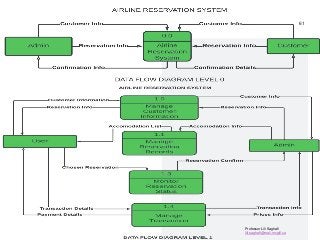
2. A level 1 DFD notates each of the
main sub-processes that together
form the complete system. We can
think of a level 1 DFD as an
“exploded view” of the context
diagram.
Professor Lili Saghafi
lili.saghafi@mail.mcgill.ca
61
Professor Lili Saghafi
lili.saghafi@mail.mcgill.ca
ERD
62
Professor Lili Saghafi
lili.saghafi@mail.mcgill.ca
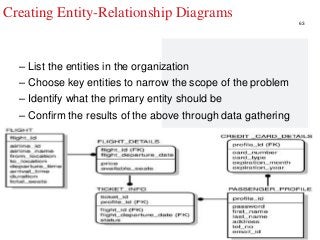
Creating Entity-Relationship Diagrams
– List the entities in the organization
– Choose key entities to narrow the scope of the problem
– Identify what the primary entity should be
– Confirm the results of the above through data gathering
63
Professor Lili Saghafi
lili.saghafi@mail.mcgill.ca
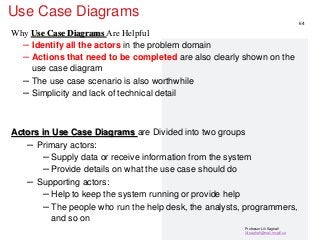
Use Case Diagrams
Why Use Case Diagrams Are Helpful
– Identify all the actors in the problem domain
– Actions that need to be completed are also clearly shown on the
use case diagram
– The use case scenario is also worthwhile
– Simplicity and lack of technical detail
Actors in Use Case Diagrams are Divided into two groups
– Primary actors:
– Supply data or receive information from the system
– Provide details on what the use case should do
– Supporting actors:
– Help to keep the system running or provide help
– The people who run the help desk, the analysts, programmers,
and so on
64
Professor Lili Saghafi
lili.saghafi@mail.mcgill.ca
65
System Development > SystemAnalysis >System
requirement > Datagathering > Modeling
Agile Modeling
Based on Agile Methodology
Information
Strategy
Management
Finance
Business Process
Best
practice
Collaboration
Knowledge
Management
Implement New Strategy Integrate Acquisition
Launch Product
Intelligence = Information + PEOPLE
BIG DATA
BI
DATA
Process
Mining
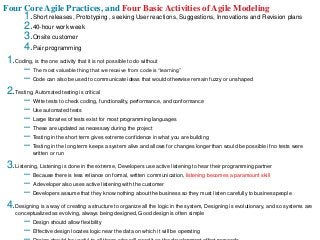
Four Core Agile Practices, and Four Basic Activities of Agile Modeling
1.Short releases, Prototyping , seeking User reactions, Suggestions, Innovations and Revision plans
2.40-hour work week
3.Onsite customer
4.Pair programming
1.Coding, is the one activity that it is not possible to do without
– The most valuable thing that we receive from code is “learning”
– Code can also be used to communicate ideas that would otherwise remain fuzzy or unshaped
2.Testing, Automated testing is critical
– Write tests to check coding, functionality, performance, and conformance
– Use automated tests
– Large libraries of tests exist for most programming languages
– These are updated as necessary during the project
– Testing in the short term gives extreme confidence in what you are building
– Testing in the long term keeps a system alive and allows for changes longer than would be possible if no tests were
written or run
3.Listening, Listening is done in the extreme, Developers use active listening to hear their programming partner
– Because there is less reliance on formal, written communication, listening becomes a paramount skill
– A developer also uses active listening with the customer
– Developers assume that they know nothing about the business so they must listen carefully to businesspeople
4.Designing is a way of creating a structure to organize all the logic in the system, Designing is evolutionary, and so systems are
conceptualized as evolving, always being designed, Good design is often simple
– Design should allow flexibility
– Effective design locates logic near the data on which it will be operating
Agile Core Practices, mini SDLCs
69
System Development >SystemAnalysis >System
requirement >Data gathering >Modeling >Design>
System Specification
System
Implementation
It is the time to write CODE
70
Professor Lili Saghafi
lili.saghafi@mail.mcgill.ca
Less Code VS No Code
– No-code is going to give you a 100% visual UI.
– I'm talking about drag and drops and pointing clicks. All are
included,
– low-code, which is going to give you everything that no code
provides, plus the ability to insert code through scripting.
– So it looks like low codes are in the lead here.
71
Professor Lili Saghafi
lili.saghafi@mail.mcgill.ca
System Implementation
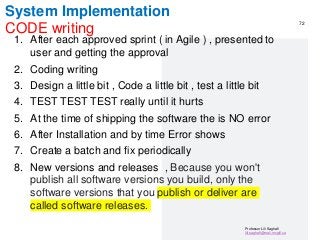
CODE writing
1. After each approved sprint ( in Agile ) , presented to
user and getting the approval
2. Coding writing
3. Design a little bit , Code a little bit , test a little bit
4. TEST TEST TEST really until it hurts
5. At the time of shipping the software the is NO error
6. After Installation and by time Error shows
7. Create a batch and fix periodically
8. New versions and releases , Because you won't
publish all software versions you build, only the
software versions that you publish or deliver are
called software releases.
72
System Development >SystemAnalysis >System
requirement >Data gathering >Modeling >Design>
System Specification> Implantation
System
Maintenance
73
Professor Lili Saghafi
lili.saghafi@mail.mcgill.ca
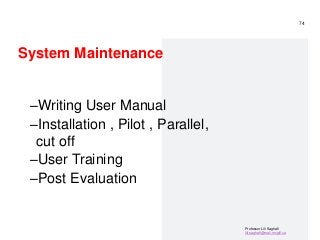
System Maintenance
–Writing User Manual
–Installation , Pilot , Parallel,
cut off
–User Training
–Post Evaluation
74
Professor Lili Saghafi
lili.saghafi@mail.mcgill.ca
Question
Considering risk
factors , what is
the best type of
installation of
new accounting
software in the
month of June ?
75
Professor Lili Saghafi
lili.saghafi@mail.mcgill.ca
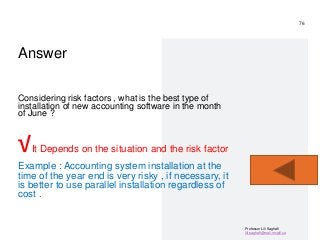
Answer
Considering risk factors , what is the best type of
installation of new accounting software in the month
of June ?
√It Depends on the situation and the risk factor
Example : Accounting system installation at the
time of the year end is very risky , if necessary, it
is better to use parallel installation regardless of
cost .
76
77
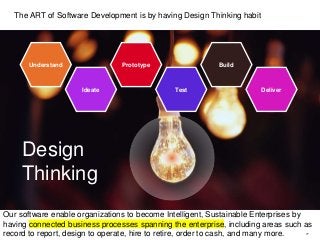
Design
Thinking
Understand
Ideate
Prototype
Test
Build
Deliver
The ART of Software Development is by having Design Thinking habit
Our software enable organizations to become Intelligent, Sustainable Enterprises by
having connected business processes spanning the enterprise, including areas such as
record to report, design to operate, hire to retire, order to cash, and many more.
Professor Lili Saghafi
lili.saghafi@mail.mcgill.ca
References
and Image
Credits
– Systems analysis & design, kendall & kendall
– Agile project
managementhttps://www.Teamwork.Com/project-
management-guide/agile-project-management/
– SAP by design
https://www.Sap.Com/products/business-bydesign.Html
– Kanbanhttps://www.Integrify.Com/blog/posts/kanban-
project-management/
– What is the software development life
cycle?Https://phoenixnap.Com/blog/software-
development-life-
cycle#:~:text=it's%20typically%20divided%20into%20si
x,for%20all%20software%20development%20projects.
– Data collectionhttps://online.Hbs.Edu/blog/post/data-
collection-methods
– History of the agile methodology
https://www.Infoworld.Com/article/3655646/a-brief-
history-of-the-agile-methodology.Html
– Https://timoelliott.Com/blog/
– Manifesto for agile software development
http://agilemanifesto.Org/
– Kopetz, hermann. Real-time systems design principles
for distributed embedded applications, 2011 and 1997
editions, the netherlands: springer
– Real-time systems: the international journal of time-
critical computing systems. The netherlands: springer
78
Thank You!
Professor Lili Saghafi
@Lili_PLS
Any Question?
proflilisaghafi@gmail.com

Software Engineering

  • 1.
    Software Development Software Engineering,I SystemAnalysis and Design , COMP 617 Designing Real-Time Software An abbreviated lecture for Software Development course An overview of System Analyst’s activities, and a crash course for software development Dalhousie University July 11, By : Professor Lili Saghafi proflilisaghafi@gmail.com @Lili_PLS
  • 2.
    Professor Lili Saghafi lili.saghafi@mail.mcgill.ca Agenda, 3 steps in development –STEP1-Understanding and Modeling Organizational Systems –Big Data, BI , power of Analytic in software development –System Analyst role , in defining root problem or opportunity –Software’s Project Management , workload , activities , team , risks –STEP2-Determining Priorities and Feasibility –Software and Hardware Alternatives, based on Cost benefit Analysis for tangible and intangible cost and benefits. Payback, ROI,…. –STEP3-Software Development Projects, Methodology , Data gathering, Modeling , Agile 2
  • 3.
    “Computers are useless. -Pablo Picasso They can only give you answers.” 3/13/2017 3
  • 4.
  • 5.
    5 Run by computersand Data Smart Cars
  • 6.
    Quantum Processor ,next generation of computing http://research.ibm.com/ibm- q/quantum-primer/ 3/13/2017 6 https://professorlilisaghafiquantumcomputi ng.wordpress.com/ Quantum computing is a type of computation that harnesses the collective properties of quantum states, such as superposition, interference, and entanglement, to perform calculations. The devices that perform quantum computations are known as quantum computers
  • 7.
  • 8.
    8 Falls, account forhalf of all hospital admissions over 65: $54.9 billion of expenses in 2020
  • 9.
    All is aboutData and Computers –From fridges that scan and order to suppliers –To Toilets that generate data about the user, urine sample provide to Blockchain (A blockchain is a growing list of records, called blocks, that are securely linked together using cryptography) , …. –Printer, When your enrolled printer, is connected to the Internet, your printer automatically orders ink for you because it knows when you are low on ink. Your printer orders ink when your cartridges have enough ink to print twice the number of average pages included in your monthly plan. –All is about data , computers & IoT • The average number of connected devices per household in 2020 were 50. • 2021, 35 billion IoT devices were installed around the world. 1. Data needs to be collected strategically 2. Data needs to be clean 3. Data needs to be secure 4. Data needs to be accessible
  • 10.
    What Is BigData? Big data is big –I mean really… Did you know that THIS MORNING there is more data in the world than EVER BEFORE?! Typical sizes are being in the range of multiple zettabyte. 1021 bytes equals to 1 zettabyte or one billion terabytes forms a zettabyte.
  • 11.
    Where Big Datais coming from New York Stock Exchange – The New York Stock Exchange generates about 10 terabyte of new trade data per day. (2021)
  • 12.
    from Social MediaBIG DATA • Statistic shows that 500+terabytes of new data gets ingested into the databases of social media site Facebook, every day. • This data is mainly generated in terms of photo and video uploads, message exchanges, putting comments etc.
  • 13.
    Where Big Datais coming from Jet engine • Single Jet engine can generate 10+terabytes of data in 30 minutes of a flight time. • With many thousand flights per day, generation of data reaches up to many Petabytes.
  • 14.
    Real-time computer systems, uses Big Data , BI and Power of Analytics • A real-time application, or RTA, is an application that functions within a time frame that the user senses as immediate or current. • The latency must be less than a defined value, usually measured in seconds. • The use of real-time applications is part of real-time computing. • Applications and examples of real-time systems appear as part of our daily life such as vehicle control systems for automobile and aircraft, traffic control systems, medical systems, home utilities, and security monitors and control systems, etc. 14
  • 15.
    As part ofRTA, vehicle control systems for aircraft Predictive Maintenance , provide predication of possible failures What can we do with BIG DATA?
  • 16.
    SAP Maintenance Maintenance Last checked:28/9/09 Relative performance: +10% More details 3/13/2017 16 What can we do with BIG DATA? Predictive Maintenance , provide predication of possible failures
  • 17.
    17 What can wedo with BIG DATA? Predictive Maintenance , provide predication of possible failures People who have heart issues or cardiac arrhythmias (abnormal heart rate) need help to regulate their heartbeat and sometimes need a pacemaker. The device is made up of a small generator and leads or wires; a surgeon implants the pacemaker under the skin to manage these irregular heartbeats. It uses low-energy electrical impulses to help the heart beat normally, by battery .
  • 18.
    Filter by: MaintenanceHistory Tower Pipe 3 Last Maintenance: 2 Weeks E 0.1km Photo by Thomas Hawk, Flickr 3/13/2017 18 technology that presents us with virtual objects and information in our field of vision. If I am looking at a plant, for example, and point my smartphone towards that plant, it may give me more information, such as names of area, Pipes locations, etc. What can we do with BIG DATA? Augmented Reality software
  • 19.
    What can wedo with BIG DATA? Augmented Reality software How Augmented Explorer Works 1 2 3 Define the points of interest and associated data and load them into BusinessObjects Explorer Calculate direction and distance to POIs (Point of Interests) , based on the users’ GPS location and compass Display appropriate information on the mobile device Any source of corporate or personal data BI OnDemand
  • 20.
    BIG DATA RUNS DataGathering Techniques Unobtrusive Methods, modest , quiet Collect Big Data that RUNs the business and make your application Real Time software
  • 21.
    The importance ofBig Data with BI and Analytic in development of software solutions • BI and Analytics is more strategic than ever – especially because analytics is now used to CREATE processes, not just record what’s happening. • Business users are demanding more self-service access to data (executive dashboard ), and new tools allow this more easily than ever before – but it will require new approaches. • The days of gigantic data warehouses are over, to be replaced by more flexible access to multiple different sources (with Blockchain technology which is a growing list of records, called blocks, that are securely linked together using cryptography) – with, eventually, technology doing more of the hard lifting. • Artificial intelligence is coming, and it’s going to be more than an add-on technology: we will have to fundamentally rethink many business processes and ultimately have more real time software solutions . • Finally, there’s really only one factor I’ve seen that has been common to every BI solution development failure I’ve seen in my 25-year career – a breakdown of communication and trust between analytics teams, and their “customers”. • It’s almost impossible to under-invest in keeping that relationship healthy. 21
  • 22.
    We Need Bothof These… After the analyst pinpoint systems problems and opportunities. Then for example we find out that …. Huge Datawarehouse !!! Or their replacements and it has to have fast
  • 23.
  • 24.
    IT IS THETIME TO THINK differently 24
  • 25.
  • 26.
  • 27.
    27 A computer systemis divided into two categories: Hardware and Software. Software to replace hardware
  • 28.
    Professor Lili Saghafi lili.saghafi@mail.mcgill.ca Developmentof software solution from small to Large like ERP application, follow the almost the same rules. – Enterprise Resource Planning (E R P) is an integrated organizational information system – Software, that helps the flow of information between the functional areas within the organization – E R P systems are moving to cloud computing – Like all other software development many issues must be overcome for the E R P installation to be declared a success: 1. User acceptance 2. Integration with legacy systems and the supply chain 3. Upgrading functionality (and complexity) of E R P modules 4. Reorganizing work life of users and decision makers 5. Expanded reach across several organizations 28
  • 29.
    Professor Lili Saghafi lili.saghafi@mail.mcgill.ca SoftwareDevelopment Step1-Understanding Organizations are Systems 1. Understand that organizations and their members, are systems, and that analysts need to take a systems perspective. 2. The development process is a PROJECT and need Project Management capability 3. Information Gathering and Collecting Data , by 7 techniques 4. Depict systems graphically ( modeling ) using context- level data flow diagrams, and entity-relationship models, use cases, and use case scenarios. 5. Recognize that different levels of management require different systems. 6. Comprehend that organizational culture impacts the design of information systems. 29 System Development from small to large - All too often I see Development projects failing not because the technologies aren’t working, but because not enough attention has been paid to the people being displaced. - “culture blindness” is often at the heart of failed technology projects.
  • 30.
    Professor Lili Saghafi lili.saghafi@mail.mcgill.ca Forexample –Several years ago an executive dashboard project was very nearly ruined by one of the executive assistants. – The dashboard was designed to replace and automate many hours of manual work that the assistant had been carrying out for years. –Despite her deep expertise in: – what data was required, – what problems there were with the data sources, – etc., –She wasn’t included in the project. SO She resisted the project. –Given her expertise, she was able to point out the ways that the project would provide less valuable information than her highly-customized manual process, and had the support of the executives who already had what they wanted. –Eventually somebody came to their senses, helped her transition to a role more adapted to her data skills, and made sure that the IT team worked 30
  • 31.
  • 32.
    32 SAP Business ByDesigndelivers pre- built processes for everything from finance and sales to product management and purchasing on a single, unified solution. Connect every function across company with proven •Intelligent cloud ERP: Streamlined end-to- end processes •Instant value: Enables agility to quickly adapt to new opportunities •Business impact: Real-time analytics included to help improve profits and efficiency https://www.sap.com/products/business- bydesign.html
  • 33.
    Professor Lili Saghafi lili.saghafi@mail.mcgill.ca SystemAnalyst role A. Find the best solution for organization based on root problem consideration or existing opportunities. Find a number of points that may be included in one issue, by asking questions ? WHY? B. Consider Priorities and Feasibilities C. Set Priorities , Limited resources, Is this priority feasible D. STEP 2: Consider feasibility Analysis, Technical (Technology available to meet users’ needs) , Economical (Estimated cost of hardware ), operational Feasibility (if the human resources are available to operate the system ) . E. Provide alternatives based on Cost benefit analysis, NPV, ROI, Payback Analysis. F. Choosing the solution G. Starting of the Development Project 33 Example ; Tecsys Supply Chain Management Software
  • 34.
    Professor Lili Saghafi lili.saghafi@mail.mcgill.ca ProjectManagement for Software Development it is an Important aspect for development –Project initiation—begins with problems or with opportunities for improvement in a business as the organization adapts to change. –Determining project feasibility—need to work with decision makers to determine if it is feasible. –Determining resources and Cost Benefit Analysis –Managing analysis and design activities, Based on RISK analysis –Project scheduling—project activities are scheduled through the use of tools such as Gantt charts and PERT diagrams. –Planning and managing activities and team members—part of assuring the productivity of systems analysis team members is effectively managing scheduled activities. 34
  • 35.
    Professor Lili Saghafi lili.saghafi@mail.mcgill.ca Questio n @Lili_PL Why? YESNO It is June and developing a new accounting system is the highest priority for ABC company . As an analyst can you give GO TO command for this development ?
  • 36.
    Professor Lili Saghafi lili.saghafi@mail.mcgill.ca Answer –It is June and developing a new accounting system is the highest priority for ABC company . As an analyst can you give GO TO command for this development ? Why? –The answer is NO since it may interrupt the workload of employees, at this time of the year which is year end. 36
  • 37.
    Comparisons of Workloadsbetween Existing and Proposed Systems Blank Existing System Proposed System Task Compare performance of distribution warehouses by running the summary program. Compare performance of distribution warehouses on the Web-based dashboard. Method Computer programs are run when needed; processing is done from the workstation. Updates occur immediately; processing is done online. Personnel Distribution manager Distribution manager When and how Daily: Enter shipments on Excel spreadsheet; verify accuracy of spreadsheet manually; and then write files to backup media. Monthly: Run program that summarizes daily records and prints report; get report and make evaluations. Daily: Enter shipments on the Web-based system using automatically backed up drop-down boxes. Data are to remote location. Monthly: Compare warehouses online using the performance dashboard; print only if needed. Human time requirements Daily: 20 minutes Monthly: 30 minutes Daily: 10 minutes Monthly: 10 minutes Computer time requirements Daily: 20 minutes Monthly: 30 minutes Daily: 10 minutes Monthly: 10 minutes 37
  • 38.
    Hardware Alternatives PurchasingHardware or Using Cloud Services Advantages and Disadvantages , based on Cost benefit Analysis Blank Advantages Disadvantages Buying computer Hardware Full control over hardware and software Often cheaper in long run Provides tax advantages through Depreciation Initial cost is high Risk of obsolescence Risk of being stuck if choice was wrong Full responsibility for operation and maintenance Using cloud Services Maintenance and upgrades performed by provider Ability to change software and hardware rapidly Scalable—can grow quickly Consistent over multiple platforms No capital is tied up Company doesn’t control its own data Data security is at risk Reliability risks of the Internet platform Proprietary APIs and software may make switching providers difficult 38
  • 39.
    Software Alternatives, basedon Cost benefit Analysis Advantages Disadvantages 1-Creating Custom Software Specific response to specialized business needs Innovation may give firm a competitive advantage In-house staff available to maintain software Pride of ownership May be significantly higher initial cost compared to CO TS software or ASP Necessity of hiring or working with a development team Ongoing maintenance 2-Purchasing COTS Packages Commercial off- the-shelf OR commercially available off-the- shelf (COTS) Refined in the commercial world Increased reliability Increased functionality Often lower initial cost Already in use by other firms Help and training comes with software Programming focused; not business focused Must live with the existing features Limited customization Uncertain financial future of vendor Less ownership and commitment 3-Using SaaS Software as a service (or SaaS) is a way of delivering applications over the Internet—as a service.(Netflix is a SaaS company that sells software to observe permitted videos on demand. ) Organizations that do not specialize in information systems can focus on what they do best (their strategic mission) There is no need to hire, train, or retain a large I T staff There is no expenditure of employee time on essential IT tasks Using Turnkey solutions that are ready-to- go solutions that are easily deployed in a business, effectively needing the end user to simply “turn the key” to get started. Loss of control of data, systems, IT employees, and schedules Concern over the financial viability and long-run stability of the SaaS provider Security, confidentiality, and privacy concerns Loss of potential strategic corporate advantage regarding innovativeness of applications 39
  • 40.
    PROJECT PROPOSAL Suggest 3alternatives by performing Cost Benefit Analysis To choose among alternatives
  • 41.
    Professor Lili Saghafi lili.saghafi@mail.mcgill.ca IdentifyingBenefits and Costs – Tangible benefits are advantages measurable in dollars through the use of the information system, like Increase in the speed of processing – Intangible benefits are difficult to measure, like Improving the decision-making process and Enhancing accuracy – Tangible costs are accurately projected by the systems analyst and accounting personnel , like Cost of equipment , Cost of resources – Intangible costs are difficult to estimate and may not be known , like Losing a competitive edge, Losing the reputation of being first 41
  • 42.
    Professor Lili Saghafi lili.saghafi@mail.mcgill.ca ComparingCosts and Benefits – Break-even analysis – Payback – ROI, Return on investment or return on costs is a ratio between net income and investment. A high ROI means the investment's gains compare favorably to its cost. As a performance measure, ROI is used to evaluate the efficiency of an investment or to compare the efficiencies of several different investments. • NPV, the difference between the present value of cash inflows and the present value of cash outflows over a period of time. NPV is used in capital budgeting and investment planning to analyze the profitability of a projected investment or project. If the NPV of a project or investment is positive, it means that the discounted present value of all future cash flows related to that project or investment will be positive, and therefore attractive. • To calculate NPV, you need to estimate future cash flows for each period and determine the correct discount rate. 42
  • 43.
    STEP 3 Software Development Software Developmentlife cycle SDLC last for 5 years
  • 44.
    Professor Lili Saghafi lili.saghafi@mail.mcgill.ca SDLC, all phases must be satisfied – System Planning -can be skipped only if you previously worked on the system – System Analysis 1. System requirement – Data Collection Techniques 2. Analysis of requirements – Priority and Feasibility Analysis – Cost Benefit Analysis 3. Proposal of Alternatives ( 3 Alternative , one can be status que ) – System Design 1. Out put Design 2. Input Design 3. File and Database Design 4. Network Design – System Implementation 1. Coding and Testing – System Maintenance 1. Writing User Manual 2. Installation 3. User Training 4. Post Evaluation 44 Top software development methodologies (waterfall, rapid application RAD, AGILE, and DevOps (Development and Operations)
  • 45.
    Professor Lili Saghafi lili.saghafi@mail.mcgill.ca ` 45 Havefive phases in Waterfall Method (waterfall ) You can visualize a DevOps process as an infinite loop, comprising these steps: plan, code, build, test, release, deploy, operate, monitor and -- through feedback -- plan, which resets the loop. The rapid application development RAD method contains four phases: requirements planning, user design, construction, and cutover. The user design and construction phases repeat until the user confirms that the product meets all requirements. Top software development methodologies (waterfall, rapid application RAD, AGILE, and DevOps (Development and Operations)
  • 46.
    Professor Lili Saghafi lili.saghafi@mail.mcgill.ca Agiledevelopment methodology Agile Manifesto –The Agile Manifesto –They wrote four major principles for agile project management, intended to guide teams on developing better software: • Individuals and interactions over processes and tools • Working software over comprehensive documentation • Customer collaboration over contract negotiation • Responding to change over following a plan • applications that are better quality and faster to develop. 46
  • 47.
    Agile Core Practices,mini SDLCs 47
  • 48.
    Professor Lili Saghafi lili.saghafi@mail.mcgill.ca Whichsoftware development methodologies to choose? –When choosing your development methodology, think about combining the elements of each method that work best for your team and your current project. –In this way, you can create a hybrid development methodology that’ll get you to production securely and efficiently. 48
  • 49.
    Professor Lili Saghafi lili.saghafi@mail.mcgill.ca Beginningto Plan a Project by Breaking It into Three Major Activities, regardless of which methodology we use . 49
  • 50.
    System Development >SystemAnalysis >System requirement Data Gathering Techniques RefiningthePlanningand SchedulingofAnalysis ActivitiesbyAdding DetailedTasksand EstablishingtheTime RequiredtoCompletethe Tasks
  • 51.
    Interactive Methods toElicit Human Information Requirements • Interviewing , Interviews and focus groups consist of talking to subjects face-to-face about a specific topic or issue. Interviews tend to be one-on-one, and focus groups are typically made up of several people. a focus group should have 3-10 people, plus a moderator. Open-ended, Closed • Joint Application Design (J A D), J A D is a technique that allows the analyst to accomplish requirements analysis and design the user interface with the users in a group setting – Involvement – Location – Questionnaires ▪ Writing questions ▪ Using scales ▪ Design ▪ Administering 1. Observations. 2. Documents / FORMS ( filled , unfilled) and records. 3. Online Tracking- To gather behavioral data, you can implement pixels and cookies. These are both tools that track users’ online behavior across websites and provide insight into what content they’re interested in and typically engage with. 4. Oral histories and Social Media Monitoring -Monitoring company’s social media channels for follower engagement is an accessible way to track data about your audience’s interests and motivations. Many social media platforms have analytics built in, but there are also third-party social platforms that give more detailed, organized insights pulled from multiple channels.
  • 52.
  • 53.
    Data Gathering Techniques UnobtrusiveMethods, Modest Methods, quiet • Sampling – Designing a good sample – Types of samples – Sample size • Hard data – Quantitative document analysis – Qualitative document analysis • Observation (be aware of Hawthorne effect) which is a type of reactivity in which individuals modify an aspect of their behavior in response to their awareness of being observed. • Text analytics , social network monitoring • S T R O B E, STRuctured OBservation of the Environment—a technique for observing the decision-maker’s physical environment • Less disruptive • Text analytics to analyze qualitative data • Insufficient when used alone • Multiple methods approach • Used in conjunction with interactive methods
  • 54.
    How does theBig data from your generated comments can interpret ?Just like in business . 54
  • 55.
  • 56.
    Professor Lili Saghafi lili.saghafi@mail.mcgill.ca Question –Whattype of question this one is ? Once the data are submitted via the website, how are they processed? –OPEN ENDED –CLOSE ENDED @Lili_PL
  • 57.
    Professor Lili Saghafi lili.saghafi@mail.mcgill.ca Answer 57 Whattype of question this one is ? Once the data are submitted via the website, how are they processed? Open ended question
  • 58.
    System Development >System Analysis >System requirement > Data gathering Modeling Depicting Systems Graphically
  • 59.
    Professor Lili Saghafi lili.saghafi@mail.mcgill.ca DepictingSystems Graphically Context-level data flow diagrams-Focus is on the data flowing into and out of the system and the processing of the data Shows the scope of the system: – What is to be included in the system – The external entities are outside the scope of the system Entity-relationship model- Focus is on the entities and their relationships within the organizational system – Another way to show the scope of a system – Relationships show how the entities are connected – Three types of relationships: – One-to-one – One-to-many – Many-to-many Use case modeling -Part of the unified modeling language (U M L) – Describes what a system does without describing how the system works – A view of the system requirements – Analyst works with business experts to develop requirements 59
  • 60.
    Professor Lili Saghafi lili.saghafi@mail.mcgill.ca AirlineReservation System A context-level data flow diagram Zero Level diagram for an airline reservation system 60 ETicket 1. Context diagrams (level 0 DFDs) are diagrams where the whole system is represented as a single process. 2. A level 1 DFD notates each of the main sub-processes that together form the complete system. We can think of a level 1 DFD as an “exploded view” of the context diagram.
  • 61.
  • 62.
  • 63.
    Professor Lili Saghafi lili.saghafi@mail.mcgill.ca CreatingEntity-Relationship Diagrams – List the entities in the organization – Choose key entities to narrow the scope of the problem – Identify what the primary entity should be – Confirm the results of the above through data gathering 63
  • 64.
    Professor Lili Saghafi lili.saghafi@mail.mcgill.ca UseCase Diagrams Why Use Case Diagrams Are Helpful – Identify all the actors in the problem domain – Actions that need to be completed are also clearly shown on the use case diagram – The use case scenario is also worthwhile – Simplicity and lack of technical detail Actors in Use Case Diagrams are Divided into two groups – Primary actors: – Supply data or receive information from the system – Provide details on what the use case should do – Supporting actors: – Help to keep the system running or provide help – The people who run the help desk, the analysts, programmers, and so on 64
  • 65.
  • 66.
    System Development >SystemAnalysis >System requirement > Datagathering > Modeling Agile Modeling Based on Agile Methodology
  • 67.
    Information Strategy Management Finance Business Process Best practice Collaboration Knowledge Management Implement NewStrategy Integrate Acquisition Launch Product Intelligence = Information + PEOPLE BIG DATA BI DATA Process Mining
  • 68.
    Four Core AgilePractices, and Four Basic Activities of Agile Modeling 1.Short releases, Prototyping , seeking User reactions, Suggestions, Innovations and Revision plans 2.40-hour work week 3.Onsite customer 4.Pair programming 1.Coding, is the one activity that it is not possible to do without – The most valuable thing that we receive from code is “learning” – Code can also be used to communicate ideas that would otherwise remain fuzzy or unshaped 2.Testing, Automated testing is critical – Write tests to check coding, functionality, performance, and conformance – Use automated tests – Large libraries of tests exist for most programming languages – These are updated as necessary during the project – Testing in the short term gives extreme confidence in what you are building – Testing in the long term keeps a system alive and allows for changes longer than would be possible if no tests were written or run 3.Listening, Listening is done in the extreme, Developers use active listening to hear their programming partner – Because there is less reliance on formal, written communication, listening becomes a paramount skill – A developer also uses active listening with the customer – Developers assume that they know nothing about the business so they must listen carefully to businesspeople 4.Designing is a way of creating a structure to organize all the logic in the system, Designing is evolutionary, and so systems are conceptualized as evolving, always being designed, Good design is often simple – Design should allow flexibility – Effective design locates logic near the data on which it will be operating
  • 69.
    Agile Core Practices,mini SDLCs 69
  • 70.
    System Development >SystemAnalysis>System requirement >Data gathering >Modeling >Design> System Specification System Implementation It is the time to write CODE 70
  • 71.
    Professor Lili Saghafi lili.saghafi@mail.mcgill.ca LessCode VS No Code – No-code is going to give you a 100% visual UI. – I'm talking about drag and drops and pointing clicks. All are included, – low-code, which is going to give you everything that no code provides, plus the ability to insert code through scripting. – So it looks like low codes are in the lead here. 71
  • 72.
    Professor Lili Saghafi lili.saghafi@mail.mcgill.ca SystemImplementation CODE writing 1. After each approved sprint ( in Agile ) , presented to user and getting the approval 2. Coding writing 3. Design a little bit , Code a little bit , test a little bit 4. TEST TEST TEST really until it hurts 5. At the time of shipping the software the is NO error 6. After Installation and by time Error shows 7. Create a batch and fix periodically 8. New versions and releases , Because you won't publish all software versions you build, only the software versions that you publish or deliver are called software releases. 72
  • 73.
    System Development >SystemAnalysis>System requirement >Data gathering >Modeling >Design> System Specification> Implantation System Maintenance 73
  • 74.
    Professor Lili Saghafi lili.saghafi@mail.mcgill.ca SystemMaintenance –Writing User Manual –Installation , Pilot , Parallel, cut off –User Training –Post Evaluation 74
  • 75.
    Professor Lili Saghafi lili.saghafi@mail.mcgill.ca Question Consideringrisk factors , what is the best type of installation of new accounting software in the month of June ? 75
  • 76.
    Professor Lili Saghafi lili.saghafi@mail.mcgill.ca Answer Consideringrisk factors , what is the best type of installation of new accounting software in the month of June ? √It Depends on the situation and the risk factor Example : Accounting system installation at the time of the year end is very risky , if necessary, it is better to use parallel installation regardless of cost . 76
  • 77.
    77 Design Thinking Understand Ideate Prototype Test Build Deliver The ART ofSoftware Development is by having Design Thinking habit Our software enable organizations to become Intelligent, Sustainable Enterprises by having connected business processes spanning the enterprise, including areas such as record to report, design to operate, hire to retire, order to cash, and many more.
  • 78.
    Professor Lili Saghafi lili.saghafi@mail.mcgill.ca References andImage Credits – Systems analysis & design, kendall & kendall – Agile project managementhttps://www.Teamwork.Com/project- management-guide/agile-project-management/ – SAP by design https://www.Sap.Com/products/business-bydesign.Html – Kanbanhttps://www.Integrify.Com/blog/posts/kanban- project-management/ – What is the software development life cycle?Https://phoenixnap.Com/blog/software- development-life- cycle#:~:text=it's%20typically%20divided%20into%20si x,for%20all%20software%20development%20projects. – Data collectionhttps://online.Hbs.Edu/blog/post/data- collection-methods – History of the agile methodology https://www.Infoworld.Com/article/3655646/a-brief- history-of-the-agile-methodology.Html – Https://timoelliott.Com/blog/ – Manifesto for agile software development http://agilemanifesto.Org/ – Kopetz, hermann. Real-time systems design principles for distributed embedded applications, 2011 and 1997 editions, the netherlands: springer – Real-time systems: the international journal of time- critical computing systems. The netherlands: springer 78
  • 79.
    Thank You! Professor LiliSaghafi @Lili_PLS Any Question? proflilisaghafi@gmail.com