SUGGESTING CHANGES IN THE SYNCHRO
PRO BEST PRACTICES DOCUMENT
IMPORTANCE OF PLUGIN FOR SYNCHRO PRO
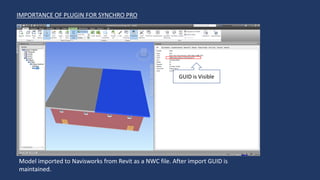
Model imported to Navisworks from Revit as a NWC file. After import GUID is
maintained.
GUID is Visible
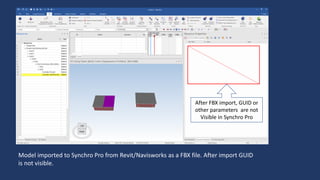
Model imported to Synchro Pro from Revit/Navisworks as a FBX file. After import GUID
is not visible.
After FBX import, GUID or
other parameters are not
Visible in Synchro Pro
Model imported to Synchro Pro from Navisworks as a DWF file. After import GUID is not
visible. Also, Model is not aligned as per the view cube.
After DWF import, GUID or
other parameters are not
Visible in Synchro Pro
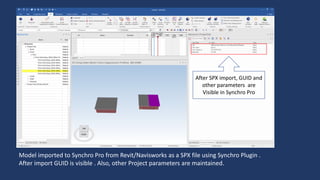
Model imported to Synchro Pro from Revit/Navisworks as a SPX file using Synchro Plugin .
After import GUID is visible . Also, other Project parameters are maintained.
After SPX import, GUID and
other parameters are
Visible in Synchro Pro
WHY GUID OR OTHER PARAMETERS ARE IMPORTANT ?
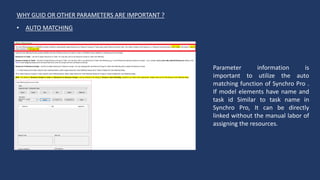
Parameter information is
important to utilize the auto
matching function of Synchro Pro .
If model elements have name and
task id Similar to task name in
Synchro Pro, It can be directly
linked without the manual labor of
assigning the resources.
• AUTO MATCHING
WHY GUID OR OTHER PARAMETERS ARE IMPORTANT ?
Parameter information is
important to create the 3D filters.
This Filters can be used to assign
the resources to the associated
task.
• 3D FILTERS
Synchro Pro best practices needs to be edited.

Synchro Pro Presentation for construction

  • 1.
    SUGGESTING CHANGES INTHE SYNCHRO PRO BEST PRACTICES DOCUMENT
  • 2.
    IMPORTANCE OF PLUGINFOR SYNCHRO PRO Model imported to Navisworks from Revit as a NWC file. After import GUID is maintained. GUID is Visible
  • 3.
    Model imported toSynchro Pro from Revit/Navisworks as a FBX file. After import GUID is not visible. After FBX import, GUID or other parameters are not Visible in Synchro Pro
  • 4.
    Model imported toSynchro Pro from Navisworks as a DWF file. After import GUID is not visible. Also, Model is not aligned as per the view cube. After DWF import, GUID or other parameters are not Visible in Synchro Pro
  • 5.
    Model imported toSynchro Pro from Revit/Navisworks as a SPX file using Synchro Plugin . After import GUID is visible . Also, other Project parameters are maintained. After SPX import, GUID and other parameters are Visible in Synchro Pro
  • 6.
    WHY GUID OROTHER PARAMETERS ARE IMPORTANT ? Parameter information is important to utilize the auto matching function of Synchro Pro . If model elements have name and task id Similar to task name in Synchro Pro, It can be directly linked without the manual labor of assigning the resources. • AUTO MATCHING
  • 7.
    WHY GUID OROTHER PARAMETERS ARE IMPORTANT ? Parameter information is important to create the 3D filters. This Filters can be used to assign the resources to the associated task. • 3D FILTERS
  • 8.
    Synchro Pro bestpractices needs to be edited.