The magic of Redis
hello!
Aaron Weatherall
Senior Software Engineer @ THE ICONIC
@aaronwritesphp
What are going to cover?
What is Redis
The basics. Who, what and why.
Magic Data Types
Not everything is a string!
How safe is my data?
Persistence is the key
Pipelining
Don’t wait.. go FASTER
Redis @ The Iconic
What we use it for
Q & A
Where you find out that I don’t know
everything. :/
What is REDIS?
Redis is an open source (BSD licensed), in-memory data structure
store, used as database, cache and message broker.
Redis stands for REmote DIctionary Server
In-memory databases are able to represent complex data structures in
much simpler ways, compared to disk-based systems.
Redis allows very high read and write speeds, with the limitation that data sets
can't be larger than memory. BUT, don’t worry, redis doesn’t use much memory
(if it’s done right)!
Redis is FREAKING fast.. seriously.. FAST… how fast? Good question!
(without pipelining)
122,556 writes/s
123,601 reads/s
552,028 writes/s
(WITH pipelining)
707,463 reads/s
How much memory does Redis use?
To give you a few examples (all obtained using 64-bit instances):
● An empty instance uses ~ 1MB.
● 1 Million small Keys -> Key/Value pairs ~ 100MB.
● 1 Million Keys -> Hash value, representing an object with 5
fields, use ~ 200 MB.
What Redis is NOT
Redis is NOT a direct replacement for a traditional relational database.
It is NOT for datasets that cannot be fit in RAM.
It’s not always appropriate as a primary data store. If your data doesn’t
make sense in a NoSQL setting, Redis probably isn’t for you
Like MOST noSql databases, it’s not strictly ACID-compliant. It gets
most of the way there, though!
It’s nothing like MySQL.. don’t go there.
Redis Data Types
Keys
A key is the unique address of a piece of data.
Keys are:
● binary safe! You could use a jpg for a key.. please don’t!
● An empty space can be a key! Be careful with your adapter
● Keys can be up to 512mb in length!
● Namespaces are arbitrary.. this:key:is:a:hash is not related to this:key
● Keys can be expired using a TTL.. no need for cleanup scripts!
● Each key name costs memory, so it’s better to go on the side of function.
● Keys are commonly separated by a colon or underscore
e.g. user:me@here.com is useful and meaningfuL! x12345 is NOT!
NOTE: NEVER EVER USE KEYS * ON A PRODUCTION SERVER!
(It’s BLOCKING, meaning no one else can use redis while you use it!)
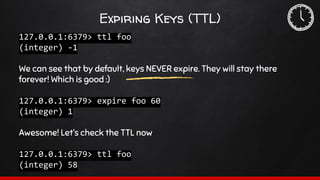
Expiring Keys (TTL)
127.0.0.1:6379> ttl foo
(integer) -1
We can see that by default, keys NEVER expire. They will stay there
forever! Which is good :)
127.0.0.1:6379> expire foo 60
(integer) 1
Awesome! Let’s check the TTL now
127.0.0.1:6379> ttl foo
(integer) 58
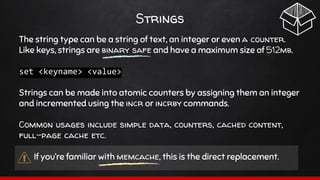
Strings
The string type can be a string of text, an integer or even a counter.
Like keys, strings are binary safe and have a maximum size of 512mb.
set <keyname> <value>
Strings can be made into atomic counters by assigning them an integer
and incremented using the incr or incrby commands.
Common usages include simple data, counters, cached content,
full-page cache etc.
If you’re familiar with memcache, this is the direct replacement.
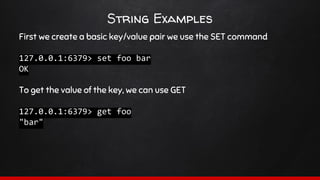
String Examples
First we create a basic key/value pair we use the SET command
127.0.0.1:6379> set foo bar
OK
To get the value of the key, we can use GET
127.0.0.1:6379> get foo
"bar"
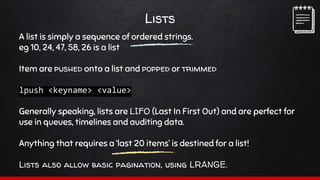
Lists
A list is simply a sequence of ordered strings.
eg 10, 24, 47, 58, 26 is a list
Item are pushed onto a list and popped or trimmed
lpush <keyname> <value>
Generally speaking, lists are LIFO (Last In First Out) and are perfect for
use in queues, timelines and auditing data.
Anything that requires a ‘last 20 items’ is destined for a list!
Lists also allow basic pagination, using LRANGE.
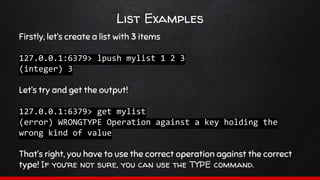
List Examples
Firstly, let’s create a list with 3 items
127.0.0.1:6379> lpush mylist 1 2 3
(integer) 3
Let’s try and get the output!
127.0.0.1:6379> get mylist
(error) WRONGTYPE Operation against a key holding the
wrong kind of value
That’s right, you have to use the correct operation against the correct
type! If you’re not sure, you can use the TYPE command.
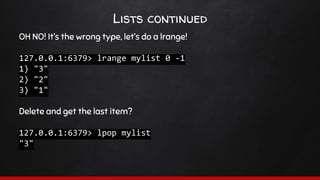
Lists continued
OH NO! It’s the wrong type, let’s do a lrange!
127.0.0.1:6379> lrange mylist 0 -1
1) "3"
2) "2"
3) "1"
Delete and get the last item?
127.0.0.1:6379> lpop mylist
"3"
Hashes
A hashes primary job is to represent an object.
Hashes are effectively an associative array. a key contains sets
of key/value pairs.
Due to the way they are stored, hashes are HIGHLY memory efficient.
A few key pairs are less memory efficient than a hash with a few values!
Next time you’re about to json_encode an array, think again!
hset <keyname> <hash_key> <value>
A hash therefore could look like this:
user:1000 => [‘name’ => ‘Test User’, ‘address’ => ‘1 test St’]
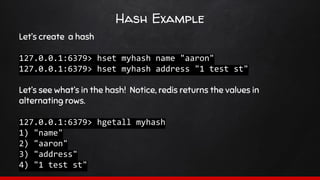
Hash Example
Let’s create a hash
127.0.0.1:6379> hset myhash name "aaron"
127.0.0.1:6379> hset myhash address "1 test st"
Let’s see what’s in the hash! Notice, redis returns the values in
alternating rows.
127.0.0.1:6379> hgetall myhash
1) "name"
2) "aaron"
3) "address"
4) "1 test st"
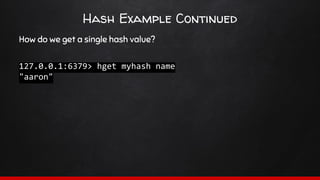
Hash Example Continued
How do we get a single hash value?
127.0.0.1:6379> hget myhash name
"aaron"
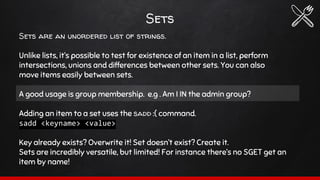
Sets
Sets are an unordered list of strings.
Unlike lists, it’s possible to test for existence of an item in a list, perform
intersections, unions and differences between other sets. You can also
move items easily between sets.
A good usage is group membership. e.g . Am I IN the admin group?
Adding an item to a set uses the sadd :( command.
sadd <keyname> <value>
Key already exists? Overwrite it! Set doesn’t exist? Create it.
Sets are incredibly versatile, but limited! For instance there’s no SGET get an
item by name!
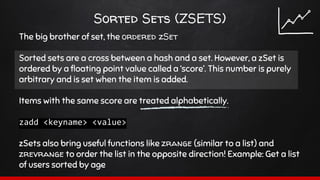
Sorted Sets (ZSETS)
The big brother of set, the ordered zSet
Sorted sets are a cross between a hash and a set. However, a zSet is
ordered by a floating point value called a ‘score’. This number is purely
arbitrary and is set when the item is added.
Items with the same score are treated alphabetically.
zadd <keyname> <value>
zSets also bring useful functions like zrange (similar to a list) and
zrevrange to order the list in the opposite direction! Example: Get a list
of users sorted by age
Hyperloglogs are simply a store that contains a count of unique
elements. Due to the way that they are stored in memory, a HLL is far
more efficient than doing a count.
A count basically needs to know every item it’s seen, therefore it needs
to be able to store the entire list in memory to do the same thing!
Example: How many unique users are logged into the system?
HLL’s teach us the important lesson, that duplication in redis is OK. For
instance, it’s more efficient to store the same piece of data in two
different data types, than to try to squeeze it all from the same place.
HyperLogLogs
PUB/SUB
Redis has a fulling functioning publish/subscription system. Similar to
websockets, clients can SUBscribe to channels and receive PUBlished
messages in real time.
● Publishers have no concept of subscribers, decoupling the two.
● This allows for greater scalability and a more dynamic experience.
● Issue - There’s no HISTORY, only what’s happening now.
There’s probably a whole training session right here, so let’s not go into
too much detail!
how safe is my data
““Redis is only good as a cache!”
~ Every second engineer you meet
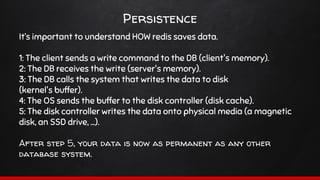
Persistence
It’s important to understand HOW redis saves data.
1: The client sends a write command to the DB (client's memory).
2: The DB receives the write (server's memory).
3: The DB calls the system that writes the data to disk
(kernel's buffer).
4: The OS sends the buffer to the disk controller (disk cache).
5: The disk controller writes the data onto physical media (a magnetic
disk, an SSD drive, ...).
After step 5, your data is now as permanent as any other
database system.
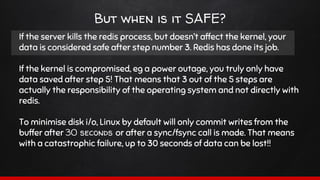
But when is it SAFE?
If the server kills the redis process, but doesn’t affect the kernel, your
data is considered safe after step number 3. Redis has done its job.
If the kernel is compromised, eg a power outage, you truly only have
data saved after step 5! That means that 3 out of the 5 steps are
actually the responsibility of the operating system and not directly with
redis.
To minimise disk i/o, Linux by default will only commit writes from the
buffer after 30 seconds or after a sync/fsync call is made. That means
with a catastrophic failure, up to 30 seconds of data can be lost!!
Snapshots
A simple point in time copy of data.
Snapshots are created when specific conditions are met.
Eg not more than 2 minutes ago with at least 100 new writes.
It writes a .rdb file to disk which can easily be backed up.
This can be configured without restarting the server!
Snapshots Continued
BAD
The durability of this method is limited to the user definitions of save
points. If data is only saved every 15 minutes, in the event of a crash you
could lose up to 15 minutes of writes!
GOOD
The resulting .rdb file can NOT get corrupted! The file is produced by a
child process using an append-only method, ensuring that only
complete transactions are appended.
Should you enable this? Always. Even 15 minutes is better than never!
Append Only File (AOF)
This is the main redis persistence option.
Every time a write operation modified the dataset in memory,
the operation is logged to a file using append only. The log uses the
Redis Protocol, the format used by clients to communicate with redis.
This means the AOF can even be piped to another instance or
parsed to another system. As it’s AOF on successful writes, it
CANNOT be corrupted.
At restart, Redis simply replays all the operations from disk to memory.
Only completed items that affect the dataset are written to the AOF,
hence write and update operations and atomicity is maintained.
Pipelining
Networking 101
Redis is a TCP server using the client-server model. This is called a
Request/Response protocol.
1. User sends a command to Redis and waits
2. Redis acts on and responds to the command
Client and server connect via a network which could either be really fast
(aka a loopback) or really slow (a remote server on another continent)
If the RTT (Round Trip Time) is 250ms (a very slow connection), even if
the server can process 100k requests per second, we’ll only be able to
process a maximum of 4 per second. Ouch!
Request Chaining
Thankfully, even the slowest connections can see enormous speed
increases due to pipelining.
The means that the server doesn’t stop to send a response back
between requests, instead sending them at the end of the batch.
It’s important to note, however that each request needs to be stored in
memory until it’s processed, so it’s better to do them in batches.
Thankfully, redis uses a simple protocol that’s super-easy to write and
read.
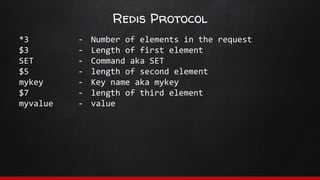
Redis Protocol
*3
$3
SET
$5
mykey
$7
myvalue
- Number of elements in the request
- Length of first element
- Command aka SET
- length of second element
- Key name aka mykey
- length of third element
- value
RTFM
The redis documentation is AMAZING.. seriously.. it’s FAWESOME!
"And you know what the F stands for!" ~ Dave Clark
http://redis.io/commands
redis at work
Our ever increasing usage
Session storage
Full-page cache
User preferences
User profile data
API caching
Associations and recommendations
The Iconic App FEED
thanks!
Any questions?
You can find me at
@aaronwritesphp

#SydPHP - The Magic of Redis

  • 1.
  • 2.
    hello! Aaron Weatherall Senior SoftwareEngineer @ THE ICONIC @aaronwritesphp
  • 3.
    What are goingto cover? What is Redis The basics. Who, what and why. Magic Data Types Not everything is a string! How safe is my data? Persistence is the key Pipelining Don’t wait.. go FASTER Redis @ The Iconic What we use it for Q & A Where you find out that I don’t know everything. :/
  • 4.
    What is REDIS? Redisis an open source (BSD licensed), in-memory data structure store, used as database, cache and message broker. Redis stands for REmote DIctionary Server In-memory databases are able to represent complex data structures in much simpler ways, compared to disk-based systems. Redis allows very high read and write speeds, with the limitation that data sets can't be larger than memory. BUT, don’t worry, redis doesn’t use much memory (if it’s done right)! Redis is FREAKING fast.. seriously.. FAST… how fast? Good question!
  • 5.
    (without pipelining) 122,556 writes/s 123,601reads/s 552,028 writes/s (WITH pipelining) 707,463 reads/s
  • 6.
    How much memorydoes Redis use? To give you a few examples (all obtained using 64-bit instances): ● An empty instance uses ~ 1MB. ● 1 Million small Keys -> Key/Value pairs ~ 100MB. ● 1 Million Keys -> Hash value, representing an object with 5 fields, use ~ 200 MB.
  • 7.
    What Redis isNOT Redis is NOT a direct replacement for a traditional relational database. It is NOT for datasets that cannot be fit in RAM. It’s not always appropriate as a primary data store. If your data doesn’t make sense in a NoSQL setting, Redis probably isn’t for you Like MOST noSql databases, it’s not strictly ACID-compliant. It gets most of the way there, though! It’s nothing like MySQL.. don’t go there.
  • 8.
  • 9.
    Keys A key isthe unique address of a piece of data. Keys are: ● binary safe! You could use a jpg for a key.. please don’t! ● An empty space can be a key! Be careful with your adapter ● Keys can be up to 512mb in length! ● Namespaces are arbitrary.. this:key:is:a:hash is not related to this:key ● Keys can be expired using a TTL.. no need for cleanup scripts! ● Each key name costs memory, so it’s better to go on the side of function. ● Keys are commonly separated by a colon or underscore e.g. user:me@here.com is useful and meaningfuL! x12345 is NOT! NOTE: NEVER EVER USE KEYS * ON A PRODUCTION SERVER! (It’s BLOCKING, meaning no one else can use redis while you use it!)
  • 10.
    Expiring Keys (TTL) 127.0.0.1:6379>ttl foo (integer) -1 We can see that by default, keys NEVER expire. They will stay there forever! Which is good :) 127.0.0.1:6379> expire foo 60 (integer) 1 Awesome! Let’s check the TTL now 127.0.0.1:6379> ttl foo (integer) 58
  • 11.
    Strings The string typecan be a string of text, an integer or even a counter. Like keys, strings are binary safe and have a maximum size of 512mb. set <keyname> <value> Strings can be made into atomic counters by assigning them an integer and incremented using the incr or incrby commands. Common usages include simple data, counters, cached content, full-page cache etc. If you’re familiar with memcache, this is the direct replacement.
  • 12.
    String Examples First wecreate a basic key/value pair we use the SET command 127.0.0.1:6379> set foo bar OK To get the value of the key, we can use GET 127.0.0.1:6379> get foo "bar"
  • 13.
    Lists A list issimply a sequence of ordered strings. eg 10, 24, 47, 58, 26 is a list Item are pushed onto a list and popped or trimmed lpush <keyname> <value> Generally speaking, lists are LIFO (Last In First Out) and are perfect for use in queues, timelines and auditing data. Anything that requires a ‘last 20 items’ is destined for a list! Lists also allow basic pagination, using LRANGE.
  • 14.
    List Examples Firstly, let’screate a list with 3 items 127.0.0.1:6379> lpush mylist 1 2 3 (integer) 3 Let’s try and get the output! 127.0.0.1:6379> get mylist (error) WRONGTYPE Operation against a key holding the wrong kind of value That’s right, you have to use the correct operation against the correct type! If you’re not sure, you can use the TYPE command.
  • 15.
    Lists continued OH NO!It’s the wrong type, let’s do a lrange! 127.0.0.1:6379> lrange mylist 0 -1 1) "3" 2) "2" 3) "1" Delete and get the last item? 127.0.0.1:6379> lpop mylist "3"
  • 16.
    Hashes A hashes primaryjob is to represent an object. Hashes are effectively an associative array. a key contains sets of key/value pairs. Due to the way they are stored, hashes are HIGHLY memory efficient. A few key pairs are less memory efficient than a hash with a few values! Next time you’re about to json_encode an array, think again! hset <keyname> <hash_key> <value> A hash therefore could look like this: user:1000 => [‘name’ => ‘Test User’, ‘address’ => ‘1 test St’]
  • 17.
    Hash Example Let’s createa hash 127.0.0.1:6379> hset myhash name "aaron" 127.0.0.1:6379> hset myhash address "1 test st" Let’s see what’s in the hash! Notice, redis returns the values in alternating rows. 127.0.0.1:6379> hgetall myhash 1) "name" 2) "aaron" 3) "address" 4) "1 test st"
  • 18.
    Hash Example Continued Howdo we get a single hash value? 127.0.0.1:6379> hget myhash name "aaron"
  • 19.
    Sets Sets are anunordered list of strings. Unlike lists, it’s possible to test for existence of an item in a list, perform intersections, unions and differences between other sets. You can also move items easily between sets. A good usage is group membership. e.g . Am I IN the admin group? Adding an item to a set uses the sadd :( command. sadd <keyname> <value> Key already exists? Overwrite it! Set doesn’t exist? Create it. Sets are incredibly versatile, but limited! For instance there’s no SGET get an item by name!
  • 20.
    Sorted Sets (ZSETS) Thebig brother of set, the ordered zSet Sorted sets are a cross between a hash and a set. However, a zSet is ordered by a floating point value called a ‘score’. This number is purely arbitrary and is set when the item is added. Items with the same score are treated alphabetically. zadd <keyname> <value> zSets also bring useful functions like zrange (similar to a list) and zrevrange to order the list in the opposite direction! Example: Get a list of users sorted by age
  • 21.
    Hyperloglogs are simplya store that contains a count of unique elements. Due to the way that they are stored in memory, a HLL is far more efficient than doing a count. A count basically needs to know every item it’s seen, therefore it needs to be able to store the entire list in memory to do the same thing! Example: How many unique users are logged into the system? HLL’s teach us the important lesson, that duplication in redis is OK. For instance, it’s more efficient to store the same piece of data in two different data types, than to try to squeeze it all from the same place. HyperLogLogs
  • 22.
    PUB/SUB Redis has afulling functioning publish/subscription system. Similar to websockets, clients can SUBscribe to channels and receive PUBlished messages in real time. ● Publishers have no concept of subscribers, decoupling the two. ● This allows for greater scalability and a more dynamic experience. ● Issue - There’s no HISTORY, only what’s happening now. There’s probably a whole training session right here, so let’s not go into too much detail!
  • 23.
    how safe ismy data
  • 24.
    ““Redis is onlygood as a cache!” ~ Every second engineer you meet
  • 25.
    Persistence It’s important tounderstand HOW redis saves data. 1: The client sends a write command to the DB (client's memory). 2: The DB receives the write (server's memory). 3: The DB calls the system that writes the data to disk (kernel's buffer). 4: The OS sends the buffer to the disk controller (disk cache). 5: The disk controller writes the data onto physical media (a magnetic disk, an SSD drive, ...). After step 5, your data is now as permanent as any other database system.
  • 26.
    But when isit SAFE? If the server kills the redis process, but doesn’t affect the kernel, your data is considered safe after step number 3. Redis has done its job. If the kernel is compromised, eg a power outage, you truly only have data saved after step 5! That means that 3 out of the 5 steps are actually the responsibility of the operating system and not directly with redis. To minimise disk i/o, Linux by default will only commit writes from the buffer after 30 seconds or after a sync/fsync call is made. That means with a catastrophic failure, up to 30 seconds of data can be lost!!
  • 27.
    Snapshots A simple pointin time copy of data. Snapshots are created when specific conditions are met. Eg not more than 2 minutes ago with at least 100 new writes. It writes a .rdb file to disk which can easily be backed up. This can be configured without restarting the server!
  • 28.
    Snapshots Continued BAD The durabilityof this method is limited to the user definitions of save points. If data is only saved every 15 minutes, in the event of a crash you could lose up to 15 minutes of writes! GOOD The resulting .rdb file can NOT get corrupted! The file is produced by a child process using an append-only method, ensuring that only complete transactions are appended. Should you enable this? Always. Even 15 minutes is better than never!
  • 29.
    Append Only File(AOF) This is the main redis persistence option. Every time a write operation modified the dataset in memory, the operation is logged to a file using append only. The log uses the Redis Protocol, the format used by clients to communicate with redis. This means the AOF can even be piped to another instance or parsed to another system. As it’s AOF on successful writes, it CANNOT be corrupted. At restart, Redis simply replays all the operations from disk to memory. Only completed items that affect the dataset are written to the AOF, hence write and update operations and atomicity is maintained.
  • 30.
  • 31.
    Networking 101 Redis isa TCP server using the client-server model. This is called a Request/Response protocol. 1. User sends a command to Redis and waits 2. Redis acts on and responds to the command Client and server connect via a network which could either be really fast (aka a loopback) or really slow (a remote server on another continent) If the RTT (Round Trip Time) is 250ms (a very slow connection), even if the server can process 100k requests per second, we’ll only be able to process a maximum of 4 per second. Ouch!
  • 32.
    Request Chaining Thankfully, eventhe slowest connections can see enormous speed increases due to pipelining. The means that the server doesn’t stop to send a response back between requests, instead sending them at the end of the batch. It’s important to note, however that each request needs to be stored in memory until it’s processed, so it’s better to do them in batches. Thankfully, redis uses a simple protocol that’s super-easy to write and read.
  • 33.
    Redis Protocol *3 $3 SET $5 mykey $7 myvalue - Numberof elements in the request - Length of first element - Command aka SET - length of second element - Key name aka mykey - length of third element - value
  • 34.
    RTFM The redis documentationis AMAZING.. seriously.. it’s FAWESOME! "And you know what the F stands for!" ~ Dave Clark http://redis.io/commands
  • 35.
  • 36.
    Our ever increasingusage Session storage Full-page cache User preferences User profile data API caching Associations and recommendations The Iconic App FEED
  • 37.
    thanks! Any questions? You canfind me at @aaronwritesphp