Recommended
PPTX
IPV6-HD how ro lubricate oil the jumps over layz
PPTX
PDF
7.1 Network Layer.pdf1234567891011121314
PPTX
CCNA v6.0 ITN - Chapter 06
PPTX
Chp4 Network Layer.pptxdata communication and networking
PPTX
Network Layer.pptx Router.pptxRouter.pptx
PPTX
ITN6_Instructor_Materials_Chapter6git.pptx
PPTX
CCNA (R & S) Module 01 - Introduction to Networks - Chapter 6
PPTX
CCNA 1 Routing and Switching v5.0 Chapter 8
PPTX
CCNA 1 Routing and Switching v5.0 Chapter 6
PPTX
CCNA_RSE_Chp3 - Dynamic Routing of Network
PPTX
CCNA CISCO Chapter 01 Routing Concepts and Network
PPT
PPTX
CCNA_RSE_Chp1-1 Routing Concepts for Network
PPTX
PDF
Day 01 - Network Fundamentals for ccna.pdf
PPTX
PPTX
Lecture Notes- Network Services - Copy.pptx
PPTX
Chapter 6 : Network layer
PPTX
PPTX
PDF
Cisco_Packet_Tracer_Module_Addressing IPv4.pdf
PPT
PPTX
8-Lect_8 Addressing the Network.tcp.pptx
PPTX
PPTX
Itn instructor ppt_chapter6_network_layer
PPTX
PDF
CCNAv5 - S1: Chapter 6 - Network Layer
PPTX
Subject about CHAPTER 1 NETWORKING TODAY.pptx
PPTX
For student FIA/FIS Chapter 4-7 - Cloud Computing.pptx
More Related Content
PPTX
IPV6-HD how ro lubricate oil the jumps over layz
PPTX
PDF
7.1 Network Layer.pdf1234567891011121314
PPTX
CCNA v6.0 ITN - Chapter 06
PPTX
Chp4 Network Layer.pptxdata communication and networking
PPTX
Network Layer.pptx Router.pptxRouter.pptx
PPTX
ITN6_Instructor_Materials_Chapter6git.pptx
PPTX
CCNA (R & S) Module 01 - Introduction to Networks - Chapter 6
Similar to Subject NETWORK LAYER for under graduates.pptx
PPTX
CCNA 1 Routing and Switching v5.0 Chapter 8
PPTX
CCNA 1 Routing and Switching v5.0 Chapter 6
PPTX
CCNA_RSE_Chp3 - Dynamic Routing of Network
PPTX
CCNA CISCO Chapter 01 Routing Concepts and Network
PPT
PPTX
CCNA_RSE_Chp1-1 Routing Concepts for Network
PPTX
PDF
Day 01 - Network Fundamentals for ccna.pdf
PPTX
PPTX
Lecture Notes- Network Services - Copy.pptx
PPTX
Chapter 6 : Network layer
PPTX
PPTX
PDF
Cisco_Packet_Tracer_Module_Addressing IPv4.pdf
PPT
PPTX
8-Lect_8 Addressing the Network.tcp.pptx
PPTX
PPTX
Itn instructor ppt_chapter6_network_layer
PPTX
PDF
CCNAv5 - S1: Chapter 6 - Network Layer
More from nuruddinrazali
PPTX
Subject about CHAPTER 1 NETWORKING TODAY.pptx
PPTX
For student FIA/FIS Chapter 4-7 - Cloud Computing.pptx
PPTX
Chapter 1-2 - Basic online terminologies.pptx
PPTX
Chapter 1-5 - Expert System for basic ICT.pptx
PPTX
Mock Lecturer - SAD for interview session.pptx
PPTX
Chapter 1-5 - Expert System for Basic ICT.pptx
PPTX
Chapter 1-1 - Information Communication Technology.pptx
PPTX
Chapter 2 class fis/fia INFORMATION SYSTEM.pptx
PPTX
IIUM E-Coupon Project Closing Summary.pptx
PPTX
Chapter 1-7- Voice Recognition presentation.pptx
PPTX
Chapter 3-2 - Social Informatics - Impact.pptx
PPTX
Chapter 3-4 - Social Informatics - Applications and Chalanges.pptx
PPTX
Chapter 1-5 - Expert System presentation.pptx
PPTX
Ocres V2 Closing presentation during closing meeting.pptx
PPTX
Closing presentation for system dvelopment.pptx
PPTX
Chapter 3-5 - Social Informatics - Awareness.pptx
PPTX
Chapter 3-1 - Social Informatics - Introduction.pptx
PPTX
Introduction to Basic Information Communication Technology FIS1113/FIA1123- M...
PPTX
Chapter1 - Artificial Intelligence (AI).pptx
PPTX
Ch1 - Artificial Intelligence Introduction.pptx
Recently uploaded
PDF
Caribbean Examinations Council Literacy and Numeracy Standards
PDF
BÀI GIẢNG POWERPOINT CHÍNH KHÓA PHIÊN BẢN AI TIẾNG ANH 6 CẢ NĂM, THEO TỪNG BÀ...
PDF
GIÁO ÁN KẾ HOẠCH BÀI DẠY NĂNG LỰC SỐ MÔN TIẾNG ANH LỚP 10 CẢ NĂM - GLOBAL SUC...
PDF
GIÁO ÁN KẾ HOẠCH BÀI DẠY NĂNG LỰC SỐ MÔN TIẾNG ANH LỚP 11 CẢ NĂM - GLOBAL SUC...
PDF
Agents in Artificial Intelligence: Types, Architecture and Real-World Examples
PPTX
special senses-eye, ear, nose, tongue.pptx
DOCX
COMMUNITY HEALTH NURSING OSCE CHECKLIST.docx
PDF
Geography unit 7-Population-Distribution`.pdf
PDF
McDowell Technical Community College Early Childhood Program Equitable Workfo...
PPTX
Insertion of Suppositories..........pptx
PDF
ĐỀ MINH HỌA KỲ THI TỐT NGHIỆP TRUNG HỌC PHỔ THÔNG NĂM 2026 MÔN TIẾNG ANH 2026...
PDF
NCA New Family Orientation 2026 Dosemagen.pdf
PPTX
YSPH VMOC Special Report - Measles - The Americas 1-18-2026
PPTX
Exploring car engine oil and lubricants purpose and functions
PPTX
OXYGEN ADMINISTRATION/THERAPY ......pptx
PPTX
NMR Spectroscopy: Principles and Applications
PDF
RPT FORM 1 English (2026 academic session) SMKTS.pdf
PPTX
Activity on Job position in Odoo 19 Recruitment
PPTX
Contract Act 1872 - Sections 10, 11 13-by Judge Nazmul Hasan.pptx
PPTX
Introduction of Carbohydrates - Dr.M.Jothimuniyandi
Subject NETWORK LAYER for under graduates.pptx 1. 2. 2
© 2016 Cisco and/or its affiliates. All rights reserved. Cisco Confidential
8.1 Network Layer
Characteristics
3. 3
© 2016 Cisco and/or its affiliates. All rights reserved. Cisco Confidential
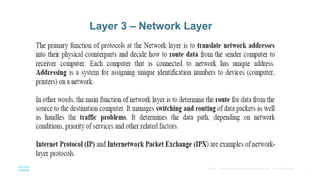
Layer 3 – Network Layer
4. 4
© 2016 Cisco and/or its affiliates. All rights reserved. Cisco Confidential
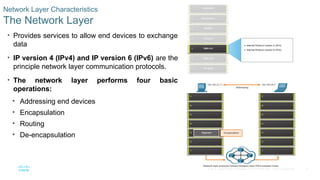
Network Layer Characteristics
The Network Layer
• Provides services to allow end devices to exchange
data
• IP version 4 (IPv4) and IP version 6 (IPv6) are the
principle network layer communication protocols.
• The network layer performs four basic
operations:
• Addressing end devices
• Encapsulation
• Routing
• De-encapsulation
5. 5
© 2016 Cisco and/or its affiliates. All rights reserved. Cisco Confidential
Network Layer Characteristics
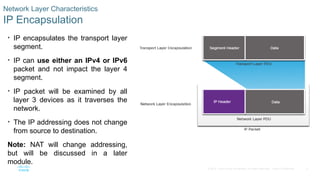
IP Encapsulation
• IP encapsulates the transport layer
segment.
• IP can use either an IPv4 or IPv6
packet and not impact the layer 4
segment.
• IP packet will be examined by all
layer 3 devices as it traverses the
network.
• The IP addressing does not change
from source to destination.
Note: NAT will change addressing,
but will be discussed in a later
module.
6. 6
© 2016 Cisco and/or its affiliates. All rights reserved. Cisco Confidential
Network Layer Characteristics
Characteristics of IP
IP is meant to have low overhead and may be described as:
• Connectionless
• Best Effort
• Media Independent
7. 7
© 2016 Cisco and/or its affiliates. All rights reserved. Cisco Confidential
Network Layer Characteristics
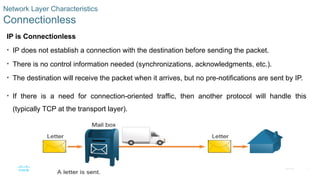
Connectionless
IP is Connectionless
• IP does not establish a connection with the destination before sending the packet.
• There is no control information needed (synchronizations, acknowledgments, etc.).
• The destination will receive the packet when it arrives, but no pre-notifications are sent by IP.
• If there is a need for connection-oriented traffic, then another protocol will handle this
(typically TCP at the transport layer).
8. 8
© 2016 Cisco and/or its affiliates. All rights reserved. Cisco Confidential
Network Layer Characteristics
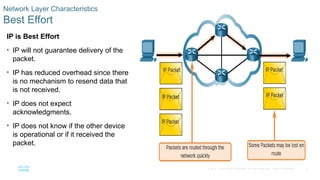
Best Effort
IP is Best Effort
• IP will not guarantee delivery of the
packet.
• IP has reduced overhead since there
is no mechanism to resend data that
is not received.
• IP does not expect
acknowledgments.
• IP does not know if the other device
is operational or if it received the
packet.
9. 9
© 2016 Cisco and/or its affiliates. All rights reserved. Cisco Confidential
Network Layer Characteristics
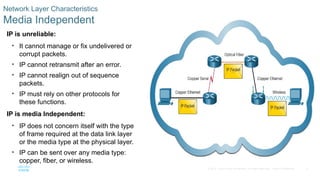
Media Independent
IP is unreliable:
• It cannot manage or fix undelivered or
corrupt packets.
• IP cannot retransmit after an error.
• IP cannot realign out of sequence
packets.
• IP must rely on other protocols for
these functions.
IP is media Independent:
• IP does not concern itself with the type
of frame required at the data link layer
or the media type at the physical layer.
• IP can be sent over any media type:
copper, fiber, or wireless.
10. 10
© 2016 Cisco and/or its affiliates. All rights reserved. Cisco Confidential
8.2 IPv4 Packet
11. 11
© 2016 Cisco and/or its affiliates. All rights reserved. Cisco Confidential
IPv4 Packet
IPv4 Packet Header
IPv4 is the primary communication protocol for the network layer.
The network header has many purposes:
• It ensures the packet is sent in the correct direction (to the destination).
• It contains information for network layer processing in various fields.
• The information in the header is used by all layer 3 devices that handle the packet
12. 12
© 2016 Cisco and/or its affiliates. All rights reserved. Cisco Confidential
IPv4 Packet
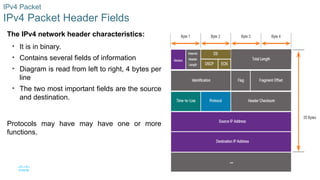
IPv4 Packet Header Fields
The IPv4 network header characteristics:
• It is in binary.
• Contains several fields of information
• Diagram is read from left to right, 4 bytes per
line
• The two most important fields are the source
and destination.
Protocols may have may have one or more
functions.
13. 13
© 2016 Cisco and/or its affiliates. All rights reserved. Cisco Confidential
8.3 IPv6 Packets
14. 14
© 2016 Cisco and/or its affiliates. All rights reserved. Cisco Confidential
IPv6 Packets
Limitations of IPv4
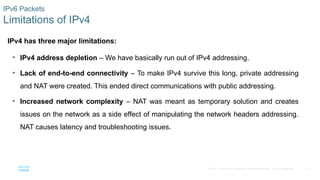
IPv4 has three major limitations:
• IPv4 address depletion – We have basically run out of IPv4 addressing.
• Lack of end-to-end connectivity – To make IPv4 survive this long, private addressing
and NAT were created. This ended direct communications with public addressing.
• Increased network complexity – NAT was meant as temporary solution and creates
issues on the network as a side effect of manipulating the network headers addressing.
NAT causes latency and troubleshooting issues.
15. 15
© 2016 Cisco and/or its affiliates. All rights reserved. Cisco Confidential
IPv6 Packets
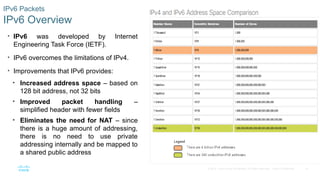
IPv6 Overview
• IPv6 was developed by Internet
Engineering Task Force (IETF).
• IPv6 overcomes the limitations of IPv4.
• Improvements that IPv6 provides:
• Increased address space – based on
128 bit address, not 32 bits
• Improved packet handling –
simplified header with fewer fields
• Eliminates the need for NAT – since
there is a huge amount of addressing,
there is no need to use private
addressing internally and be mapped to
a shared public address
16. 16
© 2016 Cisco and/or its affiliates. All rights reserved. Cisco Confidential
IPv6 Packets
IPv4 Packet Header Fields in the IPv6 Packet Header
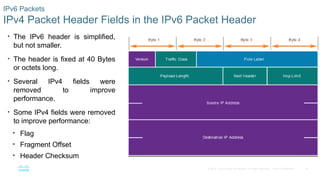
• The IPv6 header is simplified,
but not smaller.
• The header is fixed at 40 Bytes
or octets long.
• Several IPv4 fields were
removed to improve
performance.
• Some IPv4 fields were removed
to improve performance:
• Flag
• Fragment Offset
• Header Checksum
17. 17
© 2016 Cisco and/or its affiliates. All rights reserved. Cisco Confidential
IPv6 Packets
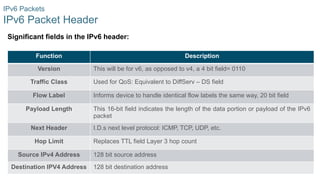
IPv6 Packet Header
Significant fields in the IPv6 header:
Function Description
Version This will be for v6, as opposed to v4, a 4 bit field= 0110
Traffic Class Used for QoS: Equivalent to DiffServ – DS field
Flow Label Informs device to handle identical flow labels the same way, 20 bit field
Payload Length This 16-bit field indicates the length of the data portion or payload of the IPv6
packet
Next Header I.D.s next level protocol: ICMP, TCP, UDP, etc.
Hop Limit Replaces TTL field Layer 3 hop count
Source IPv4 Address 128 bit source address
Destination IPV4 Address 128 bit destination address
18. 18
© 2016 Cisco and/or its affiliates. All rights reserved. Cisco Confidential
8.4 How a Host Routes
19. 19
© 2016 Cisco and/or its affiliates. All rights reserved. Cisco Confidential
How a Host Routes
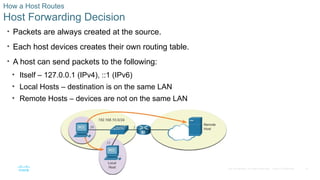
Host Forwarding Decision
• Packets are always created at the source.
• Each host devices creates their own routing table.
• A host can send packets to the following:
• Itself – 127.0.0.1 (IPv4), ::1 (IPv6)
• Local Hosts – destination is on the same LAN
• Remote Hosts – devices are not on the same LAN
20. 20
© 2016 Cisco and/or its affiliates. All rights reserved. Cisco Confidential
How a Host Routes
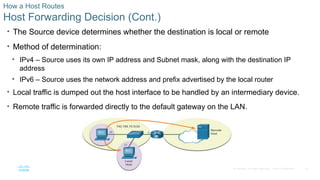
Host Forwarding Decision (Cont.)
• The Source device determines whether the destination is local or remote
• Method of determination:
• IPv4 – Source uses its own IP address and Subnet mask, along with the destination IP
address
• IPv6 – Source uses the network address and prefix advertised by the local router
• Local traffic is dumped out the host interface to be handled by an intermediary device.
• Remote traffic is forwarded directly to the default gateway on the LAN.
21. 21
© 2016 Cisco and/or its affiliates. All rights reserved. Cisco Confidential
How a Host Routes
Default Gateway
A router or layer 3 switch can be a default-gateway.
Features of a Default Gateway (DGW):
• It must have an IP address in the same range as the rest of the LAN.
• It can accept data from the LAN and is capable of forwarding traffic off of the LAN.
• It can route to other networks.
If a device has no default gateway or a bad default gateway, its traffic will not be
able to leave the LAN.
22. 22
© 2016 Cisco and/or its affiliates. All rights reserved. Cisco Confidential
How a Host Routes
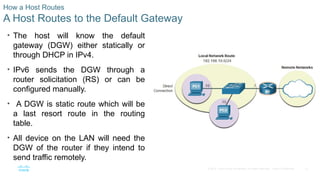
A Host Routes to the Default Gateway
• The host will know the default
gateway (DGW) either statically or
through DHCP in IPv4.
• IPv6 sends the DGW through a
router solicitation (RS) or can be
configured manually.
• A DGW is static route which will be
a last resort route in the routing
table.
• All device on the LAN will need the
DGW of the router if they intend to
send traffic remotely.
23. 23
© 2016 Cisco and/or its affiliates. All rights reserved. Cisco Confidential
How a Host Routes
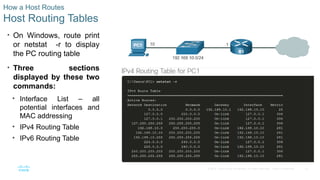
Host Routing Tables
• On Windows, route print
or netstat -r to display
the PC routing table
• Three sections
displayed by these two
commands:
• Interface List – all
potential interfaces and
MAC addressing
• IPv4 Routing Table
• IPv6 Routing Table
24. 24
© 2016 Cisco and/or its affiliates. All rights reserved. Cisco Confidential
8.5 Introduction to Routing
25. 25
© 2016 Cisco and/or its affiliates. All rights reserved. Cisco Confidential
Introduction to Routing
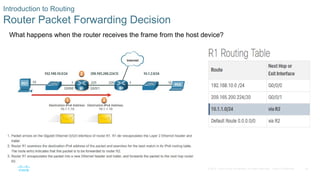
Router Packet Forwarding Decision
What happens when the router receives the frame from the host device?
26. 26
© 2016 Cisco and/or its affiliates. All rights reserved. Cisco Confidential
Introduction to Routing
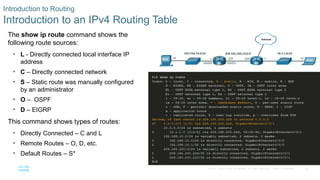
Introduction to an IPv4 Routing Table
The show ip route command shows the
following route sources:
• L - Directly connected local interface IP
address
• C – Directly connected network
• S – Static route was manually configured
by an administrator
• O – OSPF
• D – EIGRP
This command shows types of routes:
• Directly Connected – C and L
• Remote Routes – O, D, etc.
• Default Routes – S*
Editor's Notes #3 Network Layer
Device Related: ROUTER/ MULTI LAYER SWITCH
- Manages addressing and routing of the packets #10 Topic 8.2
Discuss the fields of the IPv4 Packet.
Note that the Identification field is not for sequencing like TCP (1 of 5, 2 of 5, etc.). #13 Topic 8.3
Explain many of the limitations of IPv4.
Compare the IPv6 simplicity to IPv4s complexity.
Explain why certain fields are eliminated and this improves IPv6, such as check sum, fragmentation, etc.
Explain the use of the EH field. #18 Topic 8.4
Use the mail analogy to explain host routing – three letters (internal – significant other that lives with you, not mailed = 127.0.0.1; local – friend in the same zip code (US), use in-town box = send out interface; remote – friend in a different zip code (US), use out-of-town box = send to DGW.
Explain DGW, consider showing complex network with visible IP addressing on Routers and have students give the DGW for different devices.
Make sure students understand L2 switches also need a DGW. #21 8 – Network Layer #24 Topic 8.5
Explain the differences of a host routing table and router routing table.
Explain how a router will build its table and then use it. It may be helpful to remember the L3 routing table has two basic functions to forward or to filter. If a destination makes a match in the routing table it will be forwarded, if there is no match it is discarded.
Compare and contrast static and dynamic routing when learning about remote routes. The strengths of one are the weaknesses of the other and vice versa.
#26 8 – Network Layer
8.5 – Introduction to Routing
8.5.6 – Introduction to an IPv4 Routing Table
8.5.7 – Check Your Understanding – Introduction to Routing