

Get Trained on:
Workshop Agenda
Day 1
1.Understanding Struts2
2.Architecture of Struts2
3.Features of Struts2
4.Environment Setup
5.Understanding Configuration of Project
Day 1 Continue
6.Practical Lab
7.Introduction to Hibernate
8.Demo of Struts2 Application
Understanding Struts2
•Apache Struts 2 is an elegant, extensible framework for
creating enterprise-ready Java web applications.
•The framework is designed to streamline the full
development cycle, from building, to deploying, to
maintaining applications over time.
•To make web development easier for the developers.
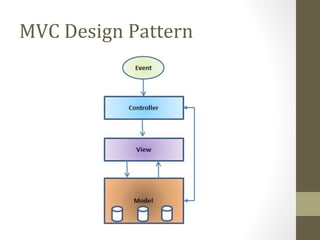
MVC Design Pattern
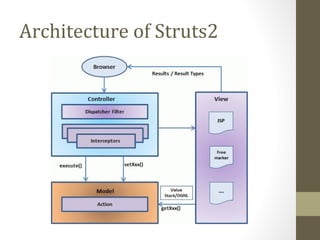
Architecture of Struts2
What kind of MVC is Struts2
Struts 2 is pull MVC
Request Life Cycle
• User sends a request to the server for requesting for
some resource (i.e pages).
• The FilterDispatcher looks at the request and then
determines the appropriate Action.
• Configured interceptors functionalities applies such as
validation, file upload etc.
• Selected action is executed to perform the
requested operation.
• Again, configured interceptors are applied to do any
post-processing if required.
• Finally the result is prepared by the view and returns
the result to the user.
Features of Struts2
• POJO forms and POJO actions
• Tag Support
• AJAX Support
• Easy Integration
Features continued…
• Template Support
• Plugin Support
• Profiling
• Easy to modify tags
• Promote less configuration
• View Technologies (JSP, Velocity, Freemarker,etc)
Environment Setup
4 Simple Steps:
•Step 1 - Setup Java Development Kit (JDK)
•Step 2 - Setup Apache Tomcat
•Step 3 - Setup Eclipse (IDE)
•Step 4 - Setup Struts2 Libraries
Understand Configuring
Project
4 Simple Steps
•Create an Action Class
•Create a View
•Create a launch page
•Now configure all of them
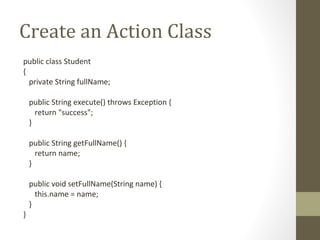
Create an Action Class
public class Student
{
private String fullName;
public String execute() throws Exception {
return "success";
}
public String getFullName() {
return name;
}
public void setFullName(String name) {
this.name = name;
}
}
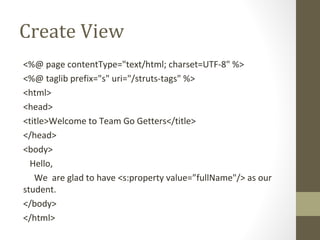
Create View
<%@ page contentType="text/html; charset=UTF-8" %>
<%@ taglib prefix="s" uri="/struts-tags" %>
<html>
<head>
<title>Welcome to Team Go Getters</title>
</head>
<body>
Hello,
We are glad to have <s:property value=”fullName"/> as our
student.
</body>
</html>
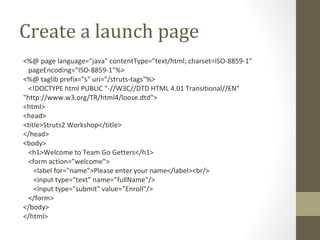
Create a launch page
<%@ page language="java" contentType="text/html; charset=ISO-8859-1"
pageEncoding="ISO-8859-1"%>
<%@ taglib prefix="s" uri="/struts-tags"%>
<!DOCTYPE html PUBLIC "-//W3C//DTD HTML 4.01 Transitional//EN"
"http://www.w3.org/TR/html4/loose.dtd">
<html>
<head>
<title>Struts2 Workshop</title>
</head>
<body>
<h1>Welcome to Team Go Getters</h1>
<form action=”welcome">
<label for="name">Please enter your name</label><br/>
<input type="text" name=”fullName"/>
<input type="submit" value=”Enroll"/>
</form>
</body>
</html>
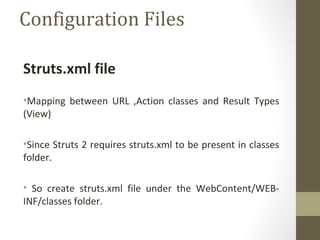
Configuration Files
Struts.xml file
•Mapping between URL ,Action classes and Result Types
(View)
•Since Struts 2 requires struts.xml to be present in classes
folder.
• So create struts.xml file under the WebContent/WEB-
INF/classes folder.
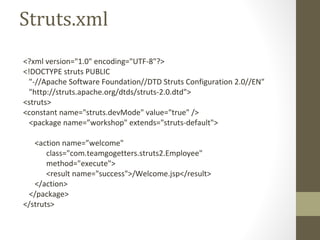
Struts.xml
<?xml version="1.0" encoding="UTF-8"?>
<!DOCTYPE struts PUBLIC
"-//Apache Software Foundation//DTD Struts Configuration 2.0//EN"
"http://struts.apache.org/dtds/struts-2.0.dtd">
<struts>
<constant name="struts.devMode" value="true" />
<package name=”workshop" extends="struts-default">
<action name=”welcome"
class="com.teamgogetters.struts2.Employee"
method="execute">
<result name="success">/Welcome.jsp</result>
</action>
</package>
</struts>
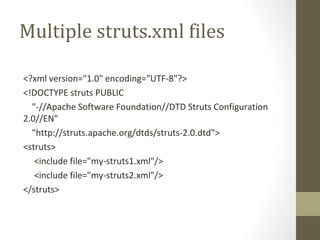
Multiple struts.xml files
<?xml version="1.0" encoding="UTF-8"?>
<!DOCTYPE struts PUBLIC
"-//Apache Software Foundation//DTD Struts Configuration
2.0//EN"
"http://struts.apache.org/dtds/struts-2.0.dtd">
<struts>
<include file="my-struts1.xml"/>
<include file="my-struts2.xml"/>
</struts>
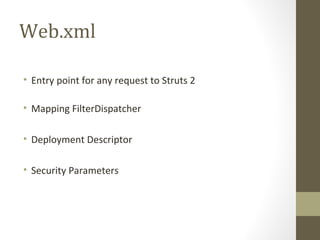
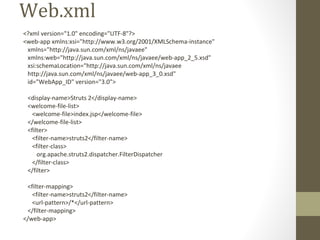
Web.xml
• Entry point for any request to Struts 2
• Mapping FilterDispatcher
• Deployment Descriptor
• Security Parameters
Web.xml
<?xml version="1.0" encoding="UTF-8"?>
<web-app xmlns:xsi="http://www.w3.org/2001/XMLSchema-instance"
xmlns="http://java.sun.com/xml/ns/javaee"
xmlns:web="http://java.sun.com/xml/ns/javaee/web-app_2_5.xsd"
xsi:schemaLocation="http://java.sun.com/xml/ns/javaee
http://java.sun.com/xml/ns/javaee/web-app_3_0.xsd"
id="WebApp_ID" version="3.0">
<display-name>Struts 2</display-name>
<welcome-file-list>
<welcome-file>index.jsp</welcome-file>
</welcome-file-list>
<filter>
<filter-name>struts2</filter-name>
<filter-class>
org.apache.struts2.dispatcher.FilterDispatcher
</filter-class>
</filter>
<filter-mapping>
<filter-name>struts2</filter-name>
<url-pattern>/*</url-pattern>
</filter-mapping>
</web-app>
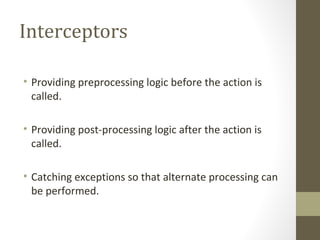
Interceptors
• Providing preprocessing logic before the action is
called.
• Providing post-processing logic after the action is
called.
• Catching exceptions so that alternate processing can
be performed.
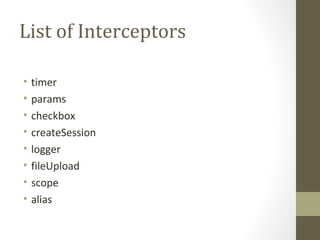
List of Interceptors
• timer
• params
• checkbox
• createSession
• logger
• fileUpload
• scope
• alias
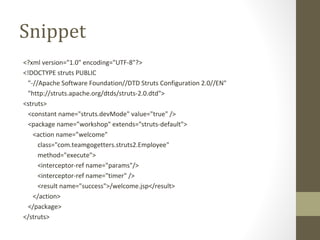
Snippet
<?xml version="1.0" encoding="UTF-8"?>
<!DOCTYPE struts PUBLIC
"-//Apache Software Foundation//DTD Struts Configuration 2.0//EN"
"http://struts.apache.org/dtds/struts-2.0.dtd">
<struts>
<constant name="struts.devMode" value="true" />
<package name=”workshop" extends="struts-default">
<action name=”welcome"
class="com.teamgogetters.struts2.Employee"
method="execute">
<interceptor-ref name="params"/>
<interceptor-ref name="timer" />
<result name="success">/welcome.jsp</result>
</action>
</package>
</struts>
Result and Result Types
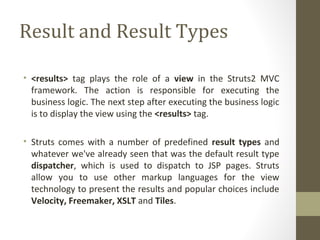
• <results> tag plays the role of a view in the Struts2 MVC
framework. The action is responsible for executing the
business logic. The next step after executing the business logic
is to display the view using the <results> tag.
• Struts comes with a number of predefined result types and
whatever we've already seen that was the default result type
dispatcher, which is used to dispatch to JSP pages. Struts
allow you to use other markup languages for the view
technology to present the results and popular choices include
Velocity, Freemaker, XSLT and Tiles.
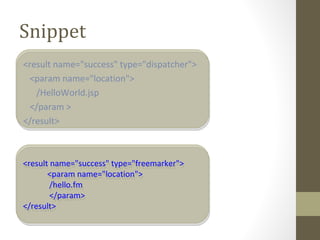
Snippet
<result name="success" type="dispatcher">
<param name="location">
/HelloWorld.jsp
</param >
</result>
<result name="success" type="freemarker">
<param name="location">
/hello.fm
</param>
</result>
<result name="success" type="freemarker">
<param name="location">
/hello.fm
</param>
</result>
Practical Lab
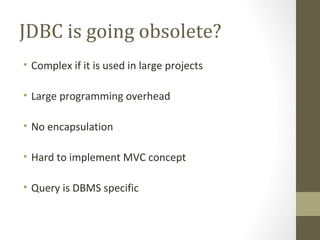
JDBC is going obsolete?
• Complex if it is used in large projects
• Large programming overhead
• No encapsulation
• Hard to implement MVC concept
• Query is DBMS specific
What’s Next ?
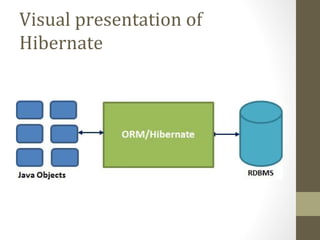
Hibernate: ORM
• Hibernate is a high-performance Object/Relational
persistence and query service
• Hibernate takes care of the mapping from Java classes to
database tables
• Hibernate data query and retrieval facilities
ORM New Generation
1. Let business code access objects rather than DB tables.
2. Hides details of SQL queries from OO logic.
3. Based on JDBC 'under the hood’
4. No need to deal with the database implementation.
ORM New Generation…
5. Entities based on business concepts rather than
database structure.
6. Transaction management and automatic key
generation.
7. Fast development of application.
Visual presentation of
Hibernate
Hold your breathe till
tomorrow
Demo

Strut2-Spring-Hibernate

  • 2.
  • 3.
    Workshop Agenda Day 1 1.UnderstandingStruts2 2.Architecture of Struts2 3.Features of Struts2 4.Environment Setup 5.Understanding Configuration of Project
  • 4.
    Day 1 Continue 6.PracticalLab 7.Introduction to Hibernate 8.Demo of Struts2 Application
  • 5.
    Understanding Struts2 •Apache Struts2 is an elegant, extensible framework for creating enterprise-ready Java web applications. •The framework is designed to streamline the full development cycle, from building, to deploying, to maintaining applications over time. •To make web development easier for the developers.
  • 6.
  • 7.
  • 8.
    What kind ofMVC is Struts2 Struts 2 is pull MVC
  • 9.
    Request Life Cycle •User sends a request to the server for requesting for some resource (i.e pages). • The FilterDispatcher looks at the request and then determines the appropriate Action. • Configured interceptors functionalities applies such as validation, file upload etc.
  • 10.
    • Selected actionis executed to perform the requested operation. • Again, configured interceptors are applied to do any post-processing if required. • Finally the result is prepared by the view and returns the result to the user.
  • 11.
    Features of Struts2 •POJO forms and POJO actions • Tag Support • AJAX Support • Easy Integration
  • 12.
    Features continued… • TemplateSupport • Plugin Support • Profiling • Easy to modify tags • Promote less configuration • View Technologies (JSP, Velocity, Freemarker,etc)
  • 13.
    Environment Setup 4 SimpleSteps: •Step 1 - Setup Java Development Kit (JDK) •Step 2 - Setup Apache Tomcat •Step 3 - Setup Eclipse (IDE) •Step 4 - Setup Struts2 Libraries
  • 14.
    Understand Configuring Project 4 SimpleSteps •Create an Action Class •Create a View •Create a launch page •Now configure all of them
  • 15.
    Create an ActionClass public class Student { private String fullName; public String execute() throws Exception { return "success"; } public String getFullName() { return name; } public void setFullName(String name) { this.name = name; } }
  • 16.
    Create View <%@ pagecontentType="text/html; charset=UTF-8" %> <%@ taglib prefix="s" uri="/struts-tags" %> <html> <head> <title>Welcome to Team Go Getters</title> </head> <body> Hello, We are glad to have <s:property value=”fullName"/> as our student. </body> </html>
  • 17.
    Create a launchpage <%@ page language="java" contentType="text/html; charset=ISO-8859-1" pageEncoding="ISO-8859-1"%> <%@ taglib prefix="s" uri="/struts-tags"%> <!DOCTYPE html PUBLIC "-//W3C//DTD HTML 4.01 Transitional//EN" "http://www.w3.org/TR/html4/loose.dtd"> <html> <head> <title>Struts2 Workshop</title> </head> <body> <h1>Welcome to Team Go Getters</h1> <form action=”welcome"> <label for="name">Please enter your name</label><br/> <input type="text" name=”fullName"/> <input type="submit" value=”Enroll"/> </form> </body> </html>
  • 18.
    Configuration Files Struts.xml file •Mappingbetween URL ,Action classes and Result Types (View) •Since Struts 2 requires struts.xml to be present in classes folder. • So create struts.xml file under the WebContent/WEB- INF/classes folder.
  • 19.
    Struts.xml <?xml version="1.0" encoding="UTF-8"?> <!DOCTYPEstruts PUBLIC "-//Apache Software Foundation//DTD Struts Configuration 2.0//EN" "http://struts.apache.org/dtds/struts-2.0.dtd"> <struts> <constant name="struts.devMode" value="true" /> <package name=”workshop" extends="struts-default"> <action name=”welcome" class="com.teamgogetters.struts2.Employee" method="execute"> <result name="success">/Welcome.jsp</result> </action> </package> </struts>
  • 20.
    Multiple struts.xml files <?xmlversion="1.0" encoding="UTF-8"?> <!DOCTYPE struts PUBLIC "-//Apache Software Foundation//DTD Struts Configuration 2.0//EN" "http://struts.apache.org/dtds/struts-2.0.dtd"> <struts> <include file="my-struts1.xml"/> <include file="my-struts2.xml"/> </struts>
  • 21.
    Web.xml • Entry pointfor any request to Struts 2 • Mapping FilterDispatcher • Deployment Descriptor • Security Parameters
  • 22.
    Web.xml <?xml version="1.0" encoding="UTF-8"?> <web-appxmlns:xsi="http://www.w3.org/2001/XMLSchema-instance" xmlns="http://java.sun.com/xml/ns/javaee" xmlns:web="http://java.sun.com/xml/ns/javaee/web-app_2_5.xsd" xsi:schemaLocation="http://java.sun.com/xml/ns/javaee http://java.sun.com/xml/ns/javaee/web-app_3_0.xsd" id="WebApp_ID" version="3.0"> <display-name>Struts 2</display-name> <welcome-file-list> <welcome-file>index.jsp</welcome-file> </welcome-file-list> <filter> <filter-name>struts2</filter-name> <filter-class> org.apache.struts2.dispatcher.FilterDispatcher </filter-class> </filter> <filter-mapping> <filter-name>struts2</filter-name> <url-pattern>/*</url-pattern> </filter-mapping> </web-app>
  • 23.
    Interceptors • Providing preprocessinglogic before the action is called. • Providing post-processing logic after the action is called. • Catching exceptions so that alternate processing can be performed.
  • 24.
    List of Interceptors •timer • params • checkbox • createSession • logger • fileUpload • scope • alias
  • 25.
    Snippet <?xml version="1.0" encoding="UTF-8"?> <!DOCTYPEstruts PUBLIC "-//Apache Software Foundation//DTD Struts Configuration 2.0//EN" "http://struts.apache.org/dtds/struts-2.0.dtd"> <struts> <constant name="struts.devMode" value="true" /> <package name=”workshop" extends="struts-default"> <action name=”welcome" class="com.teamgogetters.struts2.Employee" method="execute"> <interceptor-ref name="params"/> <interceptor-ref name="timer" /> <result name="success">/welcome.jsp</result> </action> </package> </struts>
  • 26.
    Result and ResultTypes • <results> tag plays the role of a view in the Struts2 MVC framework. The action is responsible for executing the business logic. The next step after executing the business logic is to display the view using the <results> tag. • Struts comes with a number of predefined result types and whatever we've already seen that was the default result type dispatcher, which is used to dispatch to JSP pages. Struts allow you to use other markup languages for the view technology to present the results and popular choices include Velocity, Freemaker, XSLT and Tiles.
  • 27.
    Snippet <result name="success" type="dispatcher"> <paramname="location"> /HelloWorld.jsp </param > </result> <result name="success" type="freemarker"> <param name="location"> /hello.fm </param> </result> <result name="success" type="freemarker"> <param name="location"> /hello.fm </param> </result>
  • 28.
  • 29.
    JDBC is goingobsolete? • Complex if it is used in large projects • Large programming overhead • No encapsulation • Hard to implement MVC concept • Query is DBMS specific
  • 30.
  • 31.
    Hibernate: ORM • Hibernateis a high-performance Object/Relational persistence and query service • Hibernate takes care of the mapping from Java classes to database tables • Hibernate data query and retrieval facilities
  • 32.
    ORM New Generation 1.Let business code access objects rather than DB tables. 2. Hides details of SQL queries from OO logic. 3. Based on JDBC 'under the hood’ 4. No need to deal with the database implementation.
  • 33.
    ORM New Generation… 5.Entities based on business concepts rather than database structure. 6. Transaction management and automatic key generation. 7. Fast development of application.
  • 34.
  • 35.
    Hold your breathetill tomorrow
  • 36.