Streamline and
Simplify your
SAP® Customer
Master Data
Processes with
Automation
Andrew Hayden | Precisely
Introductions
Does this sound familiar??
Customer Data Headaches
Your processes for creating and managing customer master data are
challenging, to say the least
• You use Excel workbooks to create and manage SAP customer
• Creating a new customer takes forever
• Multiple departments interact with Customer Data updates, changes, and additions in an ad hoc
process
How can you make this better?
4
Agenda
• Challenges with SAP master data
• Customer master data
• Digital transformation, data, and processes
• The value of the Precisely Automate Platform
• Success Stories
• Key takeaways
• Questions
The
complexity of
SAP master
data
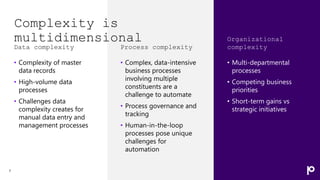
Complexity is
multidimensional
Data complexity
• Complexity of master
data records
• High-volume data
processes
• Challenges data
complexity creates for
manual data entry and
management processes
7
Process complexity
• Complex, data-intensive
business processes
involving multiple
constituents are a
challenge to automate
• Process governance and
tracking
• Human-in-the-loop
processes pose unique
challenges for
automation
Organizational
complexity
• Multi-departmental
processes
• Competing business
priorities
• Short-term gains vs
strategic initiatives
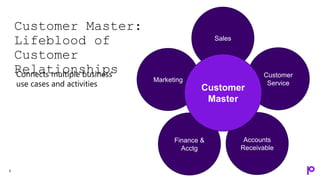
Customer Master
Customer Master:
Lifeblood of
Customer
Relationships
9
Sales
Customer
Service
Accounts
Receivable
Marketing
Finance &
Acctg
Connects multiple business
use cases and activities
Customer
Master
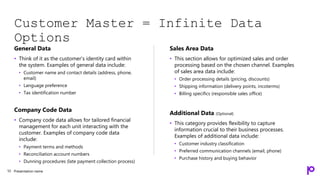
Customer Master = Infinite Data
Options
General Data
• Think of it as the customer's identity card within
the system. Examples of general data include:
• Customer name and contact details (address, phone,
email)
• Language preference
• Tax identification number
Company Code Data
• Company code data allows for tailored financial
management for each unit interacting with the
customer. Examples of company code data
include:
• Payment terms and methods
• Reconciliation account numbers
• Dunning procedures (late payment collection process)
Sales Area Data
• This section allows for optimized sales and order
processing based on the chosen channel. Examples
of sales area data include:
• Order processing details (pricing, discounts)
• Shipping information (delivery points, incoterms)
• Billing specifics (responsible sales office)
Additional Data (Optional)
• This category provides flexibility to capture
information crucial to their business processes.
Examples of additional data include:
• Customer industry classification
• Preferred communication channels (email, phone)
• Purchase history and buying behavior
Presentation name
10
Customer
Record
Challenges
Presentation name
11
Data Creation &
Management
Processes
Data Quality &
Consistency
Data Integration
Challenges
Data Complexity
& Redundancy
Operational
Red Flags
Order
Fulfillment Errors
Shipping
Delays
Inconsistent or
inaccurate
customer data
can lead to:
Wrong products shipped,
incorrect billing, and
customer dissatisfaction
Missing address data or
inaccurate prices being
charged, cost time and money
Inventory
Mismanagement
Financial
Reporting
Inaccuracies
Incorrect orders, ship
dates, and missed shipments
lead to wasted resources
and lost sales
opportunities
Misleading profitability
calculations and income
issues
12
Technology is a means to
an end: Data is the
currency of digital
transformation
- HfS Research Blog
Data
Process
Interdependence of process and
data
Interdependence of process and data
The Precisely
Automate Platform
15
Automate Studio
Precisely Automate Portfolio
16
STANDALONE
Exchange data with SAP
quickly and easily using Excel
• Data creation and maintenance
• Data migration
• Operational reporting
• Data stewardship
GOVERNED
Share, manage, & control Precisely
across the enterprise
• Basic 2-step workflow
• Centralized management
• Granular control of licenses, users &
policies
• Extensive audit and ROI reporting
• Server-side job execution
WORKFLOW-ENABLED
Automate and streamline SAP
processes using workflows
• Advanced form and workflow
capabilities
• Advanced data stewardship capabilities
via web forms
• Detailed process analytics
Business users
work in Excel
Business users work
in Excel or web forms
Automate Studio Manager
Business users
work in Excel
Automate Evolve
+
A complete automation platform
Excel to SAP
Exchange data with SAP
quickly and easily using
Excel
Form & Workflow
Automate and accelerate
SAP business processes
with integrated forms and
workflows
Excel Workflow
Automate and accelerate
SAP business processes
through Excel file
management workflows
Process
Automation
Data
Automation
18
Replace multiple GUI
screens with business-
friendly Excel
Automate
Studio
The right capabilities
to get SAP work done
faster and improve
data quality.
19
Mass create
& update
using Excel
Data
stewardship
Low-code /
No-code
design
Deep SAP
integration
What you can do with Automate
Studio
20
Create
operational
reports
Automate
any SAP
business
process
Streamline data
migration and
conversions
Fiori Automation
with Automate
Studio
Presentation name
21
ASUG survey results for Fiori use
22
13%
57%
28%
2%
Yes, we moved entirely to web-based UIs and primarily use Fiori apps.
Yes, we are using Fiori apps for some use cases or LOBs, but still using
the SAP GUI.
Not yet, but we are planning to use Fiori in the future.
No plans to use Fiori, we will continue to use the SAP GUI.
Precisely/ASUG 2023 Survey
SAP Fiori Apps
23
Fiori Apps provide a simplified,
modern web-based interface
Fiori App types
• Transactional – Perform data
input/maintenance tasks, ex:
create sales order, PO, journal
entry and master data, like BP or
products
• Factsheet - Display contextual
information and key facts about
objects, often allows drilldown
• Analytical – Role-based insights
into real-time operations via
charts/graphs
Studio automates draft-
based Transactional SAPUI5 Fiori apps
Transactional
Factsheet
Analytical
REORDER Annimation
Customer challenges with SAP Fiori
Apps
• Unchanged from ECC and SAP GUI
• Manual data entry
• Slow
• Complex processes
• Error-prone
• Certain complex SAP processes are only available
as Fiori apps in SAP S/4HANA
• Commodity Codes
• Fiori Launchpad can mask the true nature of app
• UI5 Fiori App
• WebDyn Pro Fiori App
• SAP GUI for HTML process
SAP Fiori App Automation - New Module
25
Use Fiori app automation for
• Repetitive tasks
• Higher volume
• Complexity – Many steps
• Find object, open, edit, click tab, scroll
down, drill down, etc.
• Meet the needs of business teams
• Efficiency, accuracy, consistency, and
performance
• No surface automation – determines API
call(s) for you
• Provide true citizen development of SAP
automations
Demonstrations
Presentation name
27
A complete automation platform
Excel to SAP
Exchange data with SAP
quickly and easily using
Excel
Form & Workflow
Automate and accelerate
SAP business processes
with integrated forms and
workflows
Excel Workflow
Automate and accelerate
SAP business processes
through Excel file
management workflows
Process
Automation
Data
Automation
Automate Evolve
The right combination of
capabilities to automate data-
intensive processes.
29
Enterprise-
grade
workflow &
automation
Robust data
Stewardship
Deep SAP
integration
No-code,
low-code
software
Form-based
automation
Build in data
guardrails to ensure
your data is right
the first time.
30
New Materials
Process
Create Materials
Validate
Form &
Workflow
Automate record
creation with forms
and workflow across
multiple contributors
Process
Initiator
Enter basic
material
information
Contributor 1
Contributor 2
Contributor 3
Approver
Start with
create form
SAP
Automate Evolve
Outside
Contributor
Portal
Participan
t
Evolve Demo
(optional)
• Bullets describing what you’re
going to show
• Bullets describing what you’re
going to show
• Bullets describing what you’re
going to show
32
Make an impact across your business
Financial
Accounting
Controlling
Sales and
Distribution
Materials
Management
Plant
Maintenance
Asset
Management
Project
Systems
Production
Planning
Quality
Management
Human
Resources
Empowering business
teams to make an impact
Customer &
Vendor 97% 6 Days
How the Automate Platform is
helping SAP enterprises optimize
customer and vendor
management
Reduction in time to create a
customer
• Agility and speed
• Increases competitive advantage
Eliminated from customer create
process
• Speed
• Improved employee productivity
87% 75%
Reduction in time needed to qualify
vendors and materials
• Speed
• Process visibility
• Improved productivity
Reduction in SAP data entry time
• Agility and speed
• Improved process efficiency
Wrap-up
Precisely Automate Benefits
Agility Speed Improved data
quality
Business team
focus
Automation
flexibility
Scalability More precise
reporting &
forecasting
Process visibility
The global leader
in data integrity software
Our data integrity software, data
enrichment products, and strategic
services deliver accuracy,
consistency, and context to power
confident business decisions.
Brands you trust, trust us
Data leaders partner with us
of the Fortune 100
99
Customers in more than
100
2,500
employees
customers
12,000
countries
Integrate
Enrich Locate
Verify
Data
Integrity
Suite
Questions?
Thank you!
Let’s continue the
conversation…
Contact us
Set up a 30-minute
personalized demo
+1-877-700-0970
“Get in touch” on
www.precisely.com
www.precisely.com
Demos
White Papers
Case Studies

Streamline and Simplify your SAP® Customer Master Data Processes with Automation

  • 1.
    Streamline and Simplify your SAP®Customer Master Data Processes with Automation Andrew Hayden | Precisely
  • 2.
  • 3.
    Does this soundfamiliar??
  • 4.
    Customer Data Headaches Yourprocesses for creating and managing customer master data are challenging, to say the least • You use Excel workbooks to create and manage SAP customer • Creating a new customer takes forever • Multiple departments interact with Customer Data updates, changes, and additions in an ad hoc process How can you make this better? 4
  • 5.
    Agenda • Challenges withSAP master data • Customer master data • Digital transformation, data, and processes • The value of the Precisely Automate Platform • Success Stories • Key takeaways • Questions
  • 6.
  • 7.
    Complexity is multidimensional Data complexity •Complexity of master data records • High-volume data processes • Challenges data complexity creates for manual data entry and management processes 7 Process complexity • Complex, data-intensive business processes involving multiple constituents are a challenge to automate • Process governance and tracking • Human-in-the-loop processes pose unique challenges for automation Organizational complexity • Multi-departmental processes • Competing business priorities • Short-term gains vs strategic initiatives
  • 8.
  • 9.
  • 10.
    Customer Master =Infinite Data Options General Data • Think of it as the customer's identity card within the system. Examples of general data include: • Customer name and contact details (address, phone, email) • Language preference • Tax identification number Company Code Data • Company code data allows for tailored financial management for each unit interacting with the customer. Examples of company code data include: • Payment terms and methods • Reconciliation account numbers • Dunning procedures (late payment collection process) Sales Area Data • This section allows for optimized sales and order processing based on the chosen channel. Examples of sales area data include: • Order processing details (pricing, discounts) • Shipping information (delivery points, incoterms) • Billing specifics (responsible sales office) Additional Data (Optional) • This category provides flexibility to capture information crucial to their business processes. Examples of additional data include: • Customer industry classification • Preferred communication channels (email, phone) • Purchase history and buying behavior Presentation name 10
  • 11.
    Customer Record Challenges Presentation name 11 Data Creation& Management Processes Data Quality & Consistency Data Integration Challenges Data Complexity & Redundancy
  • 12.
    Operational Red Flags Order Fulfillment Errors Shipping Delays Inconsistentor inaccurate customer data can lead to: Wrong products shipped, incorrect billing, and customer dissatisfaction Missing address data or inaccurate prices being charged, cost time and money Inventory Mismanagement Financial Reporting Inaccuracies Incorrect orders, ship dates, and missed shipments lead to wasted resources and lost sales opportunities Misleading profitability calculations and income issues 12
  • 13.
    Technology is ameans to an end: Data is the currency of digital transformation - HfS Research Blog
  • 14.
    Data Process Interdependence of processand data Interdependence of process and data
  • 15.
  • 16.
    Automate Studio Precisely AutomatePortfolio 16 STANDALONE Exchange data with SAP quickly and easily using Excel • Data creation and maintenance • Data migration • Operational reporting • Data stewardship GOVERNED Share, manage, & control Precisely across the enterprise • Basic 2-step workflow • Centralized management • Granular control of licenses, users & policies • Extensive audit and ROI reporting • Server-side job execution WORKFLOW-ENABLED Automate and streamline SAP processes using workflows • Advanced form and workflow capabilities • Advanced data stewardship capabilities via web forms • Detailed process analytics Business users work in Excel Business users work in Excel or web forms Automate Studio Manager Business users work in Excel Automate Evolve +
  • 17.
    A complete automationplatform Excel to SAP Exchange data with SAP quickly and easily using Excel Form & Workflow Automate and accelerate SAP business processes with integrated forms and workflows Excel Workflow Automate and accelerate SAP business processes through Excel file management workflows Process Automation Data Automation
  • 18.
    18 Replace multiple GUI screenswith business- friendly Excel
  • 19.
    Automate Studio The right capabilities toget SAP work done faster and improve data quality. 19 Mass create & update using Excel Data stewardship Low-code / No-code design Deep SAP integration
  • 20.
    What you cando with Automate Studio 20 Create operational reports Automate any SAP business process Streamline data migration and conversions
  • 21.
  • 22.
    ASUG survey resultsfor Fiori use 22 13% 57% 28% 2% Yes, we moved entirely to web-based UIs and primarily use Fiori apps. Yes, we are using Fiori apps for some use cases or LOBs, but still using the SAP GUI. Not yet, but we are planning to use Fiori in the future. No plans to use Fiori, we will continue to use the SAP GUI. Precisely/ASUG 2023 Survey
  • 23.
    SAP Fiori Apps 23 FioriApps provide a simplified, modern web-based interface Fiori App types • Transactional – Perform data input/maintenance tasks, ex: create sales order, PO, journal entry and master data, like BP or products • Factsheet - Display contextual information and key facts about objects, often allows drilldown • Analytical – Role-based insights into real-time operations via charts/graphs Studio automates draft- based Transactional SAPUI5 Fiori apps Transactional Factsheet Analytical REORDER Annimation
  • 24.
    Customer challenges withSAP Fiori Apps • Unchanged from ECC and SAP GUI • Manual data entry • Slow • Complex processes • Error-prone • Certain complex SAP processes are only available as Fiori apps in SAP S/4HANA • Commodity Codes • Fiori Launchpad can mask the true nature of app • UI5 Fiori App • WebDyn Pro Fiori App • SAP GUI for HTML process
  • 25.
    SAP Fiori AppAutomation - New Module 25 Use Fiori app automation for • Repetitive tasks • Higher volume • Complexity – Many steps • Find object, open, edit, click tab, scroll down, drill down, etc. • Meet the needs of business teams • Efficiency, accuracy, consistency, and performance • No surface automation – determines API call(s) for you • Provide true citizen development of SAP automations
  • 26.
  • 27.
  • 28.
    A complete automationplatform Excel to SAP Exchange data with SAP quickly and easily using Excel Form & Workflow Automate and accelerate SAP business processes with integrated forms and workflows Excel Workflow Automate and accelerate SAP business processes through Excel file management workflows Process Automation Data Automation
  • 29.
    Automate Evolve The rightcombination of capabilities to automate data- intensive processes. 29 Enterprise- grade workflow & automation Robust data Stewardship Deep SAP integration No-code, low-code software
  • 30.
    Form-based automation Build in data guardrailsto ensure your data is right the first time. 30 New Materials Process Create Materials Validate
  • 31.
    Form & Workflow Automate record creationwith forms and workflow across multiple contributors Process Initiator Enter basic material information Contributor 1 Contributor 2 Contributor 3 Approver Start with create form SAP Automate Evolve Outside Contributor Portal Participan t
  • 32.
    Evolve Demo (optional) • Bulletsdescribing what you’re going to show • Bullets describing what you’re going to show • Bullets describing what you’re going to show 32
  • 33.
    Make an impactacross your business Financial Accounting Controlling Sales and Distribution Materials Management Plant Maintenance Asset Management Project Systems Production Planning Quality Management Human Resources
  • 34.
  • 35.
    Customer & Vendor 97%6 Days How the Automate Platform is helping SAP enterprises optimize customer and vendor management Reduction in time to create a customer • Agility and speed • Increases competitive advantage Eliminated from customer create process • Speed • Improved employee productivity 87% 75% Reduction in time needed to qualify vendors and materials • Speed • Process visibility • Improved productivity Reduction in SAP data entry time • Agility and speed • Improved process efficiency
  • 36.
  • 37.
    Precisely Automate Benefits AgilitySpeed Improved data quality Business team focus Automation flexibility Scalability More precise reporting & forecasting Process visibility
  • 38.
    The global leader indata integrity software Our data integrity software, data enrichment products, and strategic services deliver accuracy, consistency, and context to power confident business decisions. Brands you trust, trust us Data leaders partner with us of the Fortune 100 99 Customers in more than 100 2,500 employees customers 12,000 countries Integrate Enrich Locate Verify Data Integrity Suite
  • 39.
  • 40.
  • 42.
    Let’s continue the conversation… Contactus Set up a 30-minute personalized demo +1-877-700-0970 “Get in touch” on www.precisely.com www.precisely.com Demos White Papers Case Studies

Editor's Notes

  • #3 Before we get started, see if these sound familiar…
  • #4 Before we get started, see if these sound familiar…
  • #5 See if this sounds familiar…
  • #6 Keep those two scenarios in mind as we go through the rest of the presentation. So, what are we going to talk about today…
  • #7 Note to sales: Use this slide to explain that there’s a ton of SAP master data outside of the big four domains. There’s more to SAP Master Data than just “The Big Four” materials, customer, vendor, and finance; there is everything associated with that master data. Essentially, it’s every process in your business and this is just the tip of the iceberg when it comes to complexity.
  • #8 Complexity is a multi-dimensional barrier to automation and optimization Complexity is a recurring theme throughout this survey. Organizations running SAP ERP systems make it clear in their responses that complexity is a significant pain point across multiple dimensions. It presents challenges to implementing automation and is a barrier to process optimization. At the same time, SAP users are looking to automation as a way to overcome the complexities presented by SAP itself. For this to happen, we need to understand the multiple dimensions of complexity at play in the SAP environment and how they intersect with automation and optimization. Data complexity The complexity associated with SAP data creation and maintenance. SAP master data records are complex, data-intensive, and, when managed manually, prone to error. Frequently, SAP records have complex data structures with dozens of objects and fields, all of which must be correct to support the business effectively. As the pace of data growth accelerates, data complexity becomes an even greater challenge for organizations. Process complexity The complexity associated with the business processes needed to create and manage SAP data. Many of the most critical SAP processes require the participation of constituents across an organization. Processes such as account creation, materials management, and the updating or extension of records must be governed and tracked to remain compliant. Due to their complexity, these human-in-the-loop processes are often some of the last to be automated, yet they can deliver some of the highest ROI when automated properly. Organizational complexity The complexity associated with business organizations and priorities. The organizational interdependencies associated with processes that cross multiple departments inside large organizations are not always well understood. Moreover, business priorities of individual departments are often in conflict. Getting everyone on the same page and agreeing to a set of priorities is challenging. If developing an automation solution takes too long, it can be de-prioritized in favor of a different program that delivers short-term gains.
  • #9 Why are we going to focus on material master today? It is often the master data use case that we hear companies struggling with the most. It is complex, touches on many parts of your business, and if you are managing your material master data manually in the SAP GUI, chances are you struggle to keep up with the sheer volume of additions, changes, and the needs of the various departments that need to contribute to, review or approve materials and product data. We hear constantly about the struggles people are having with MM01 and MM02. But it’s not just the complexity of the data. Complexity is multidimensional.
  • #10 The Central Nervous System of Your Enterprise: SAP Material Master Data Imagine the human body. The nervous system, a complex network of cells and pathways, coordinates and regulates every function, from blinking to breathing to digestion. Similarly, in an enterprise, SAP Material Master data acts as the central nervous system, connecting and informing a wide range of crucial operations. Data Threads Weaving Through Every Department: Sales & Marketing: Accurate product descriptions, pricing, and availability in the Material Master fuel accurate quotes, orders, and customer interactions. Purchasing & Procurement: Material specifications, lead times, and supplier information guide efficient sourcing and cost negotiation. Inventory Management: Stock levels, reorder points, and storage locations in the Master data optimize warehouse operations and prevent stockouts. Production & Manufacturing: Bill of materials (BOMs) linked to the Master data ensure the right components are available for production, minimizing delays and waste. Finance & Accounting: Costing data in the Master feeds accurate product pricing, profitability analysis, and financial reporting. A Tangled Web, But Worth Untangling: Maintaining data integrity across these interconnected functions is crucial. Inconsistent or inaccurate material data can lead to: Order fulfillment errors: Wrong products shipped, incorrect pricing, and customer dissatisfaction. Production delays: Missing components or inaccurate BOMs halt production lines, costing time and money. Inventory mismanagement: Overstocking or understocking lead to wasted resources and lost sales opportunities. Financial reporting inaccuracies: Misleading profitability calculations and compliance issues. Mastering the Master Data: To harness the full potential of Material Master data, companies need to: Centralize and standardize data: Implement master data management (MDM) solutions to ensure a single source of truth for all material information. Automate data integration: Use data integration tools to seamlessly update material data across different systems and departments. Enforce data governance: Establish clear ownership, access controls, and quality standards for data maintenance. Train employees: Educate all personnel on the importance of data quality and best practices for data entry and validation. By treating SAP Material Master data with the respect it deserves, companies can unlock a world of improved efficiency, accuracy, and profitability. Remember, just like a healthy nervous system keeps the body functioning smoothly, accurate and well-maintained Material Master data keeps the enterprise running like a well-oiled machine. Visualizing the Connections: Imagine a spider web: Each strand represents a department or function connected to the central hub of Material Master data. Think of a traffic light: Green light for smooth operations with accurate data, yellow light for potential issues with inconsistencies, and red light for complete chaos with unreliable data. Picture a puzzle: Each piece of Material Master data contributes to the bigger picture of a well-functioning enterprise. By understanding these connections and actively managing your Material Master data, you can empower your enterprise to reach its full potential.
  • #12 Customer master data presents many challenges, most of which fall into these four categories. Data Complexity and Redundancy: SAP customer master data can encompass hundreds of fields across multiple segments and departments of the business. This complexity can make navigating, understanding, and maintaining data consistency a challenge. Redundant data requirements and related data objects across segments increase the risk of errors and misinterpretation. Data creation and management processes: Closely related to the process complexity, the complexity and volume of data in customer master records create their own set of challenges. Especially when you are dealing with high volumes of data creation and maintenance. Data Quality and Consistency: Ensuring accurate, complete, and up-to-date customer data across all segments requires significant effort. Manual data entry is prone to errors, and process inconsistencies can arise from different departments using separate workstreams and data sources. Integration Challenges: SAP customer master data must often be integrated and coordinated with other systems like CRM (Salesforce) or marketing automation platforms (Eloqua, Marketo). This integration process can be complex and error-prone if not executed effectively.
  • #13  Identifying a company's struggles with customer master data can be like detecting a faint illness – the symptoms might be subtle, but they point to deeper issues. Here are some telltale signs to watch out for: Operational Red Flags: - Order fulfillment errors – These include issues around shipping the wrong products, incorrect billing, shipping incorrect quantities and ultimately customer dissatisfaction Shipping Delays – These can be caused by missing or incorrect address information, inaccurate prices and other missing or incorrect information that can result in shipping delays Inventory Mismanagement – Poor customer master data can indirectly lead to incorrect products being shipped, missed shipments or delayed shipments due to poor data quality, incorrect order SKUs or misalignment between orders and available products Financial Reporting Inaccuracies – Misreported orders, incorrect billing and receivables information and high return rates due to bad data can cause financial reporting innacuracies. All of these challenges and red flags can often be traced back to problems with customer master data.
  • #14 This quote does a great job of summing up the importance of data in executing digital transformation, however, we can argue that it is incomplete. Successful digital transformation requires that you take into account the interdependence of data and the processes that we use to create and manage that data. NOTE: HfS is a research and analyst firm out of the UK specializing in automation.
  • #15 This quote does a great job of summing up the importance of data in executing digital transformation; however, we can argue that it is incomplete. Successful digital transformation requires that you take into account the interdependence of data and the processes that we use to create and manage that data. You cannot do a process improvement initiative without considering the data the process creates or manages. If the process is creating bad data and you improve it, all you are doing is creating a lot of bad data very quickly, and that’s counterproductive. The same idea applies to data quality initiatives. If you implement a data quality initiative without looking at the processes that are delivering bad data, then you will perpetually be doing data quality improvements and cleanup. (Precisely will be happy to sell you data quality solutions, but we also believe you need to fix the processes) By adopting a complete automation platform, that understands the interdependence of process and data – especially for those complex, data-intensive SAP processes like materials management – you can significantly improve your agility and speed while also improving data quality and integrity.
  • #16 This is why the Precisely Automate Platform is such an important part of any automation portfolio. Gartner advises that you don’t try and adopt one automation tool for all of your automation needs – different tools are better for different types of processes. They recommend going with a portfolio approach that adopts a strategic set of tools that can work either independently or in conjunction to help improve your overall business efficiency. The Precisely Automate Platform is perfect for sitting at the center of your automation portfolio and helping you gain efficiencies throughout your SAP Master Data creation and management processes.
  • #17 Note to sales: Use this slide to position that customers can buy Automate Studio, Automate Studio Manager, and Automate Evolve separately, but that Automate Evolve contains all the functionality of Automate Studio and Automate Studio Manager. This slide is best used when you’ve already determined it’s a Automate Studio opportunity. The Precisely Automate portfolio offers a flexible set of offerings that can help you achieve your automation goals. Automate Studio is the premier Excel-to-SAP automation platform for simplifying and streamlining almost any SAP ERP process that does not require workflow. Automate Studio Manager enhances the capabilities of Studio by centralizing and governing Automate Studio processes including capabilities for server-side job execution and scheduling as well as simple two-step workflow. Automate Evolve is our process automation platform that delivers a flexible, scalable solution environment that can automate almost any SAP-centric process challenge. In addition to the process automation and workflow capabilities, Evolve also includes the data management and automation capabilities of our Studio product And, the entire Precisely Automate portfolio includes integrated data stewardship capabilities that help you significantly improve initial data quality. We’ll talk more about the capabilities of the portfolio in a few minutes.
  • #18 Our Automate platform delivers a complete set of automation capabilities from data automation to complex process automation. Data automation enables you to automate mass data creation and management activities such as pricing or materials changes using Excel. On the process automation side Excel workflow enables you to manage the data automation files through a complex workflow. A prime example of Excel workflow is for journal entries in finance. There is a good chance that you are already managing your journal entries in Excel. Excel workflow allows you to manage these Excel files through a contingent review and approval process that uses your business rules to determine the routing and approval process. And once the final approval is received, the data is automatically posted to SAP. No manual data entry at the end of the process.
  • #20 Automate Studio enables the right capabilities to get SAP work done faster and improve data quality. There are four key highlights that set Studio apart from other tools that play in this space. To start, this tool provides the ability to create, update and maintain records in SAP using a familiar interface like Excel. And when we talk about Data Stewardship, we enable your teams to validate data prior to posting into SAP to ensure you deliver accurate data to your SAP ERP and eliminate the amount of time spent manually correcting errors. Unlike many other tools, we have deep SAP integration out of the box with the ability to automate over 4,000 SAP T-codes, whether it be standard or custom. And when we reference low-code, no-code – the tool is truly designed for the business user, requiring no heavy IT background or experience to design or run the scripts or templates.
  • #28 Note: This is a recorded Fiori automation demo which lasts 5:30. It can be played and talked through.
  • #29 Our Automate platform delivers a complete set of automation capabilities from data automation to complex process automation. Data automation enables you to automate mass data creation and management activities such as pricing or materials changes using Excel. On the process automation side Excel workflow enables you to manage the data automation files through a complex workflow. A prime example of Excel workflow is for journal entries in finance. There is a good chance that you are already managing your journal entries in Excel. Excel workflow allows you to manage these Excel files through a contingent review and approval process that uses your business rules to determine the routing and approval process. And once the final approval is received, the data is automatically posted to SAP. No manual data entry at the end of the process.
  • #30 [Note to sales:] The blocks pieces are the top-level capabilities that make us unique in the marketplace. There is a slide on each of these in the first section of the slide library. Here are some points you might want to weave in that positions what Automate Evolve does compared to business process automation (BPA) platforms (like K2, Nintex, Pegasystems, etc.) and master data management (MDM) platforms like SAP MDG: Traditional business process automation platforms streamline processes but do little or nothing to improve data quality. They’re also not designed to handle complex, strategic SAP data processes.   Master data management platforms are great at improving the quality of a few core data attributes but are not designed to automate complex business processes that span data objects and business functions.   Automate Evolve provides the right combination capabilities and enables enterprise organizations to create and maintain strategic data assets faster—data like materials, customers, suppliers, and equipment—while ensuring that data adheres to business rules and company and regulatory procedures.
  • #31 Note to sales: Use this slide to introduce the idea of form-based automation and how it can drive benefits through role-based forms and integrated data stewardship capabilities with Evolve.
  • #32 For example, if you are creating a new material record, the person who initiates the process enters basic account information in the form. Based on this information and rules defined and set up by the customer, Automate Evolve determines who the appropriate contributors are and who needs to approve the final form and then can auto-post the approved data to SAP, thus creating the new material. No more manual routing processed, error-prone data entry, or ungoverned files being shared via email. With the addition of a portal, you can invite outside parties to participate in the workflow, too. For example, vendors can directly update pricing, ship dates, contact information, and more.
  • #33 Note to sales: Edit this slide to tee up your demo. You can also come back to it and the end of the demo to recap on what you’ve showed.
  • #34 The Precisely Automate platform enables you to make an impact across your entire business. Consider how many SAP master data processes touch multiple departments and business units. The Automate platform was developed to work within and across them, helping streamline and improve the most complex, data-intensive processes. We have been doing this for over 20 years. We are intimately familiar with how challenging automating SAP processes can be.
  • #35 Mention citizen development and our history of enabling business teams to develop and deploy automation
  • #36 97% reduction in time to create new customers (Exxon Mobile) (NOTE: Cannot use EM name in marketing or promotions) – Reduced time to create new customers from 144 hours to 6. 6 Days eliminated from customer create process (Multinational oil & Gas company – Not Exxon Mobile) 87% reduction in time needed to qualify vendors and materials (Ascend Performance Materials) (2 years to 3 months) 75% reduction in SAP data entry time (Multinational Oil and Gas company)
  • #38 Agility to quickly adapt to changes in your business environment through flexible workflow automation Also – Low code/no code environment enables faster solution development through citizen development Speed for faster, more efficient processes Improved initial data quality through elimination of manual data entry and integrated data stewardship capabilities Visibility throughout a complex process for: Reporting Process Intelligence Process linking - real-time process tracking (Does this get called out separately?) Audit support Historical comparison/analysis Business team focus – Low code/no code environment enables business teams and those closest to a process to develop automation solutions Automation flexibility - to determine best automation route (attended vs unattended, form or Excel interface, connection to other systems of record through APIs for end-to-end process automation) Scalability to process almost any amount of SAP data as needed by a process step Proven track record – Nearly twenty years of SAP ERP process automation success has demonstrated why Evolve is the leading process automation platform/solution for thousands of customers world-wide.
  • #43 Questions? Can you also do Vendor and Customer masters too? I’m on S4 Hana will this work with my system? I have custom fields in my material master, does this work for those? We often have fields that the business is missing can you make them require even if SAP doesn’t require them? We would love to speak to you in more detail about your product data processes and how we can help you make an impact to your business , so please feel free to reach out to us.