Saving time &
money using
Automate Studio
to query and
post SAP® data
Andrew Hayden |
Precisely
Sigrid Kok |
Precisely
Session 2: Agility and Resiliency
series
Questions!
Agenda:
• Recap: Session 1
• Company wants
• Automate Studio
• Round trip demonstration
• Use cases
• Summary
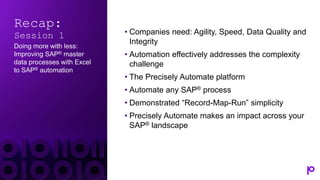
Recap:
Session 1
Doing more with less:
Improving SAP® master
data processes with Excel
to SAP® automation
• Companies need: Agility, Speed, Data Quality and
Integrity
• Automation effectively addresses the complexity
challenge
• The Precisely Automate platform
• Automate any SAP® process
• Demonstrated “Record-Map-Run” simplicity
• Precisely Automate makes an impact across your
SAP® landscape
Optimize staff
Companies want:
Reach ROI faster Realize digital
transformation success
Accelerating digital transformation
Data is the fuel for decision-making today
$1.04 trillion
spent
on
Hyperautomation
by 2026
80% of CEOs
accelerating
digital
transformation
45% of
enterprises
using SAP® are
leveraging
automation
67% spending
more on
technology than
people
Market is growing at 12% per year
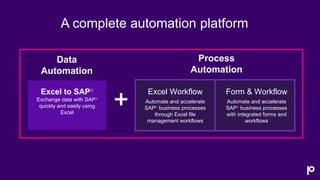
A complete automation platform
Excel to SAP®
Exchange data with SAP®
quickly and easily using
Excel
Form & Workflow
Automate and accelerate
SAP® business processes
with integrated forms and
workflows
Excel Workflow
Automate and accelerate
SAP® business processes
through Excel file
management workflows
Process
Automation
Data
Automation
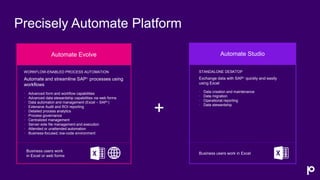
Precisely Automate Platform
WORKFLOW-ENABLED PROCESS AUTOMATION
Automate and streamline SAP® processes using
workflows
• Advanced form and workflow capabilities
• Advanced data stewardship capabilities via web forms
• Data automaton and management (Excel – SAP®)
• Extensive Audit and ROI reporting
• Detailed process analytics
• Process governance
• Centralized management
• Server-side file management and execution
• Attended or unattended automation
• Business-focused, low-code environment
Business users work
in Excel or web forms
Automate Evolve Automate Studio
STANDALONE DESKTOP
Exchange data with SAP® quickly and easily
using Excel
• Data creation and maintenance
• Data migration
• Operational reporting
• Data stewardship
Business users work in Excel
+
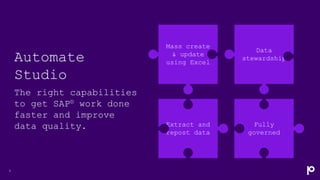
Automate
Studio
The right capabilities
to get SAP® work done
faster and improve
data quality.
9
Mass create
& update
using Excel
Data
stewardship
Fully
governed
Extract and
repost data
Build SAP data exchange scripts in 3
easy steps
Create
the SAP® data
exchange script
Map
the fields to
Excel or form
Run
Exchange data
with SAP® during
workflow
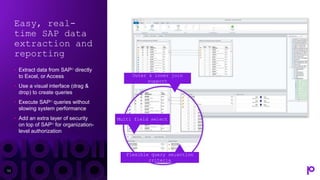
Easy, real-
time SAP data
extraction and
reporting
• Extract data from SAP® directly
to Excel, or Access
• Use a visual interface (drag &
drop) to create queries
• Execute SAP® queries without
slowing system performance
• Add an extra layer of security
on top of SAP® for organization-
level authorization
11
Outer & inner join
support
Multi field select
Flexible query selection
criteria
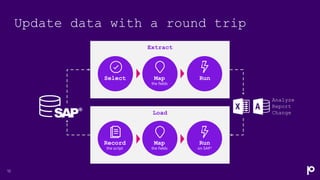
Update data with a round trip
12
the fields
Map
on SAP®
Run
the script
Record
the fields
Map Run
Select
Analyze
Report
Change
Extract
Load
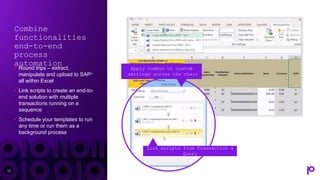
Combine
functionalities
end-to-end
process
automation
• Round trips – extract,
manipulate and upload to SAP®
all within Excel
• Link scripts to create an end-to-
end solution with multiple
transactions running on a
sequence
• Schedule your templates to run
any time or run them as a
background process
13
Apply common or custom
settings across the chain
Link scripts from Transaction &
Query
Automate
Studio
Customer data management
•Sigrid Kok | Precisely
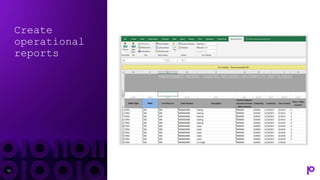
Create
operational
reports
15
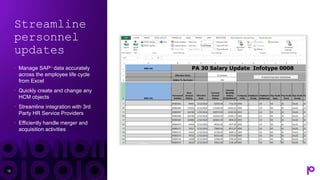
Streamline
personnel
updates
• Manage SAP® data accurately
across the employee life cycle
from Excel
• Quickly create and change any
HCM objects
• Streamline integration with 3rd
Party HR Service Providers
• Efficiently handle merger and
acquisition activities
16
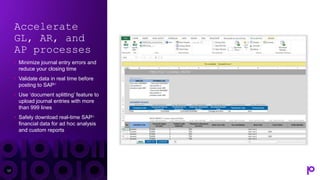
Accelerate
GL, AR, and
AP processes
• Minimize journal entry errors and
reduce your closing time
• Validate data in real time before
posting to SAP®
• Use ‘document splitting’ feature to
upload journal entries with more
than 999 lines
• Safely download real-time SAP®
financial data for ad hoc analysis
and custom reports
17
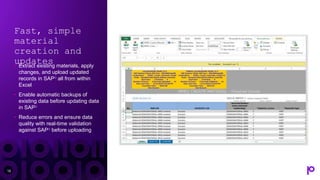
Fast, simple
material
creation and
updates
• Extract existing materials, apply
changes, and upload updated
records in SAP® all from within
Excel
• Enable automatic backups of
existing data before updating data
in SAP®
• Reduce errors and ensure data
quality with real-time validation
against SAP® before uploading
18
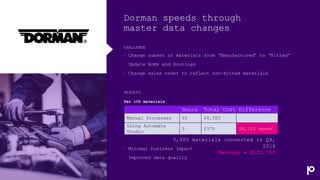
CHALLENGE
Dorman speeds through
master data changes
• Change subset of materials from ‘Manufactured’ to ‘Kitted’
• Update BoMs and Routings
• Change sales order to reflect non-kitted materials
RESULTS
• Minimal business impact
• Improved data quality
Hours Total Cost Difference
Manual Processes 60 $4,500
Using Automate
Studio
5 $375 $4,125 saved
3,000 materials converted in Q4,
2016
Savings = $123,750
Per 100 materials
20
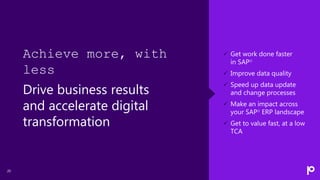
 Get work done faster
in SAP®
 Improve data quality
 Speed up data update
and change processes
 Make an impact across
your SAP® ERP landscape
 Get to value fast, at a low
TCA
Achieve more, with
less
Drive business results
and accelerate digital
transformation
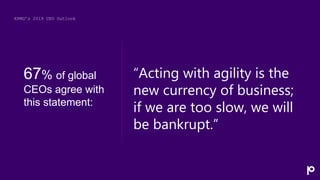
KPMG’s 2019 CEO Outlook
“Acting with agility is the
new currency of business;
if we are too slow, we will
be bankrupt.”
67% of global
CEOs agree with
this statement:
Winshuttle is
now part of
Precisely,
the leader in
data
integrity
The global leader
in data integrity
software
Our data integrity
software, data enrichment
products, and strategic
services deliver accuracy,
consistency, and context
to power confident
business decisions.
Brands you trust, trust us
Data leaders partner with us
of the Fortune
100
99
Customers in more than
100
2,500
employees
customers
12,000
countries
Integrate
Enrich Locate
Verify
Data
Integrity
Suite
Let’s continue the
conversation…
Contact us
Set up a 30-minute
personalized demo
+1-877-700-0970
“Get in touch” on
www.precisely.com
www.precisely.com
Demos
White Papers
Case Studies
Thank you!

Saving Time And Money Using Automate Studio To Query and Post SAP® Data

  • 1.
    Saving time & moneyusing Automate Studio to query and post SAP® data Andrew Hayden | Precisely Sigrid Kok | Precisely Session 2: Agility and Resiliency series
  • 2.
  • 3.
    Agenda: • Recap: Session1 • Company wants • Automate Studio • Round trip demonstration • Use cases • Summary
  • 4.
    Recap: Session 1 Doing morewith less: Improving SAP® master data processes with Excel to SAP® automation • Companies need: Agility, Speed, Data Quality and Integrity • Automation effectively addresses the complexity challenge • The Precisely Automate platform • Automate any SAP® process • Demonstrated “Record-Map-Run” simplicity • Precisely Automate makes an impact across your SAP® landscape
  • 5.
    Optimize staff Companies want: ReachROI faster Realize digital transformation success
  • 6.
    Accelerating digital transformation Datais the fuel for decision-making today $1.04 trillion spent on Hyperautomation by 2026 80% of CEOs accelerating digital transformation 45% of enterprises using SAP® are leveraging automation 67% spending more on technology than people Market is growing at 12% per year
  • 7.
    A complete automationplatform Excel to SAP® Exchange data with SAP® quickly and easily using Excel Form & Workflow Automate and accelerate SAP® business processes with integrated forms and workflows Excel Workflow Automate and accelerate SAP® business processes through Excel file management workflows Process Automation Data Automation
  • 8.
    Precisely Automate Platform WORKFLOW-ENABLEDPROCESS AUTOMATION Automate and streamline SAP® processes using workflows • Advanced form and workflow capabilities • Advanced data stewardship capabilities via web forms • Data automaton and management (Excel – SAP®) • Extensive Audit and ROI reporting • Detailed process analytics • Process governance • Centralized management • Server-side file management and execution • Attended or unattended automation • Business-focused, low-code environment Business users work in Excel or web forms Automate Evolve Automate Studio STANDALONE DESKTOP Exchange data with SAP® quickly and easily using Excel • Data creation and maintenance • Data migration • Operational reporting • Data stewardship Business users work in Excel +
  • 9.
    Automate Studio The right capabilities toget SAP® work done faster and improve data quality. 9 Mass create & update using Excel Data stewardship Fully governed Extract and repost data
  • 10.
    Build SAP dataexchange scripts in 3 easy steps Create the SAP® data exchange script Map the fields to Excel or form Run Exchange data with SAP® during workflow
  • 11.
    Easy, real- time SAPdata extraction and reporting • Extract data from SAP® directly to Excel, or Access • Use a visual interface (drag & drop) to create queries • Execute SAP® queries without slowing system performance • Add an extra layer of security on top of SAP® for organization- level authorization 11 Outer & inner join support Multi field select Flexible query selection criteria
  • 12.
    Update data witha round trip 12 the fields Map on SAP® Run the script Record the fields Map Run Select Analyze Report Change Extract Load
  • 13.
    Combine functionalities end-to-end process automation • Round trips– extract, manipulate and upload to SAP® all within Excel • Link scripts to create an end-to- end solution with multiple transactions running on a sequence • Schedule your templates to run any time or run them as a background process 13 Apply common or custom settings across the chain Link scripts from Transaction & Query
  • 14.
  • 15.
  • 16.
    Streamline personnel updates • Manage SAP®data accurately across the employee life cycle from Excel • Quickly create and change any HCM objects • Streamline integration with 3rd Party HR Service Providers • Efficiently handle merger and acquisition activities 16
  • 17.
    Accelerate GL, AR, and APprocesses • Minimize journal entry errors and reduce your closing time • Validate data in real time before posting to SAP® • Use ‘document splitting’ feature to upload journal entries with more than 999 lines • Safely download real-time SAP® financial data for ad hoc analysis and custom reports 17
  • 18.
    Fast, simple material creation and updates •Extract existing materials, apply changes, and upload updated records in SAP® all from within Excel • Enable automatic backups of existing data before updating data in SAP® • Reduce errors and ensure data quality with real-time validation against SAP® before uploading 18
  • 19.
    CHALLENGE Dorman speeds through masterdata changes • Change subset of materials from ‘Manufactured’ to ‘Kitted’ • Update BoMs and Routings • Change sales order to reflect non-kitted materials RESULTS • Minimal business impact • Improved data quality Hours Total Cost Difference Manual Processes 60 $4,500 Using Automate Studio 5 $375 $4,125 saved 3,000 materials converted in Q4, 2016 Savings = $123,750 Per 100 materials
  • 20.
    20  Get workdone faster in SAP®  Improve data quality  Speed up data update and change processes  Make an impact across your SAP® ERP landscape  Get to value fast, at a low TCA Achieve more, with less Drive business results and accelerate digital transformation
  • 21.
    KPMG’s 2019 CEOOutlook “Acting with agility is the new currency of business; if we are too slow, we will be bankrupt.” 67% of global CEOs agree with this statement:
  • 22.
    Winshuttle is now partof Precisely, the leader in data integrity
  • 23.
    The global leader indata integrity software Our data integrity software, data enrichment products, and strategic services deliver accuracy, consistency, and context to power confident business decisions. Brands you trust, trust us Data leaders partner with us of the Fortune 100 99 Customers in more than 100 2,500 employees customers 12,000 countries Integrate Enrich Locate Verify Data Integrity Suite
  • 24.
    Let’s continue the conversation… Contactus Set up a 30-minute personalized demo +1-877-700-0970 “Get in touch” on www.precisely.com www.precisely.com Demos White Papers Case Studies
  • 25.

Editor's Notes

  • #2 Note to sales:
  • #4 What are we going to talk about today…
  • #6 Talk track In addition to the critical needs our businesses have, we also want to achieve a number of objectives that will help us remain competitive, these include: 1.) The desire to optimize our staffs – We have spent the better part of the past two decades right sizing, down sizing, and scaling our organizations to be as efficient as possible for today’s business conditions. The problem is that the market keeps evolving, and we gather more business-critical data every day. We want to find ways to help make the staff we have today more efficient and effective. 2.) We want to reach ROI faster. One of the early struggles with automation has been that it can be difficult to measure, or has a return on investment horizon that is too long to justify the up-front cost.
  • #7 Gartner – And growing at 12% CAGR KPMG KPMG ASUG Gartner
  • #8 Our Automate platform delivers a complete set of automation capabilities from data automation to complex process automation. Data automation enables you to automate mass data creation and management activities such as pricing or materials changes using Excel. On the process automation side Excel workflow enables you to manage the data automation files through a complex workflow. A prime example of Excel workflow is for journal entries in finance. There is a good chance that you are already managing your journal entries in Excel. Excel workflow allows you to manage these Excel files through a contingent review and approval process that uses your business rules to determine the routing and approval process. And once the final approval is received, the data is automatically posted to SAP. No manual data entry at the end of the process.
  • #9 Buying in to the Automate Platform gives you the combined capabilities of Evolve and Studio to deliver end-to-end automation for complex, data-intensive SAP-centric processes. When you adopt a Hyperautomation strategy as the heart of your digital transformation efforts, the Precisely Automate platform gives you a solid foundation on which to achieve tangible, measurable digital transformation and business goals. In a few minutes we’ll talk more about the capabilities of the Precisely Automate platform and how they deliver on the promise of Hyperautomation.
  • #12 Note to sales: Extract data from SAP directly to Excel, Access, or an SQL database Use a visual interface (drag & drop) to create queries based on single tables, custom tables, joined tables, infosets or logical databases Execute SAP queries without slowing system performance 1 Add an extra layer of security on top of SAP for organization-level authorization No SQVI or SQ01 skills required
  • #14 Note to sales: Extract data from SAP directly to Excel, Access, or an SQL database Use a visual interface (drag & drop) to create queries based on single tables, custom tables, joined tables, infosets or logical databases Execute SAP queries without slowing system performance 1 Add an extra layer of security on top of SAP for organization-level authorization No SQVI or SQ01 skills required
  • #16 Note to sales: Use this slide to position that in addition to the classic create and update use cases, customers can use Automate Studio to quickly build operational reports in Excel without needing to know SQVI or other technical programming languages.
  • #17 Note to sales:
  • #18 Note to sales:
  • #19 Note to sales:
  • #20 The particular use case I’d like to highlight was changing a subset of materials from manufactured to kitted, which effected BoMs, routings and sales orders.
  • #21 [Note to sales:] Use this slide for a summary of Automate Evolve high-level benefits. Great to use after a high-level intro demo.
  • #22 [General finance and accounting audiences - Can be used to intro your audience specific impact slide] As enterprises become more and more reliant on data and the volume of data we use to manage our businesses grows exponentially, it is more important than ever for companies to be able to react and move quickly. And CEO’s are acknowledging this need to be more agile and able to quickly respond to changes in the business climate.
  • #25 Questions? Can you also do Vendor and Customer masters too? I’m on S4 Hana will this work with my system? I have custom fields in my material master, does this work for those? We often have fields that the business is missing can you make them require even if SAP doesn’t require them? We would love to speak to you in more detail about your product data processes and how we can help you make an impact to your business , so please feel free to reach out to us.