KanbaNet
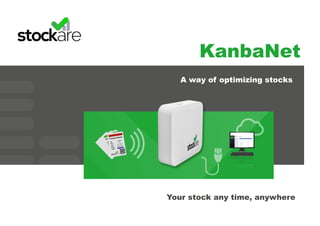
Your stock any time, anywhere
A way of optimizing stocks
KanbaNet
· What is it? 3
· Double bin kanban 4
· Kanban process 5
· Kanban system components 6
RFID tags 8
10
9
11
12
13
14
RFID panel
RFID reader
Stockapp
· KanbaNet process
· Beneficts
· Contact
KANBANET
SYSTEM
3
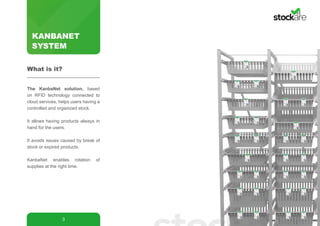
The KanbaNet solution, based
on RFID technology connected to
cloud services, helps users having a
controlled and organized stock.
It allows having products always in
hand for the users.
It avoids issues caused by break of
stock or expired products.
KanbaNet enables rotation of
supplies at the right time.
What is it?
KANBANET
SYSTEM
4
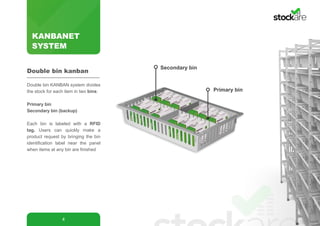
Primary bin
Secondary bin
Double bin KANBAN system divides
the stock for each item in two bins:
Primary bin
Secondary bin (backup)
Each bin is labeled with a RFID
tag. Users can quickly make a
product request by bringing the bin
identification label near the panel
when items at any bin are finished
Double bin kanban
KANBANET
SYSTEM
5
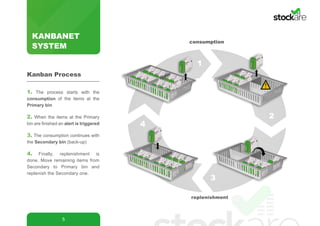
1. The process starts with the
consumption of the items at the
Primary bin
2. When the items at the Primary
bin are finished an alert is triggered
3. The consumption continues with
the Secondary bin (back-up)
4. Finally, replenishment is
done. Move remaining items from
Secondary to Primary bin and
replenish the Secondary one.
Kanban Process
consumption
replenishment
!
4
1
2
3
KANBANET
SYSTEM
6
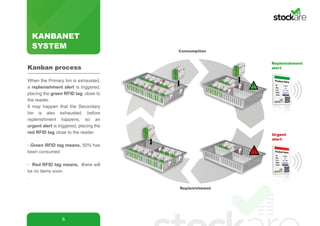
When the Primary bin is exhausted,
a replenishment alert is triggered,
placing the green RFID tag close to
the reader.
It may happen that the Secondary
bin is also exhausted, before
replenishment happens, so an
urgent alert is triggered, placing the
red RFID tag close to the reader.
· Green RFID tag means, 50% has
been consumed
· Red RFID tag means, there will
be no items soon.
.
Kanban process
Consumption
Replenishment
!
!
Replenishment
alert
Urgent
alert
KANBANET
SYSTEM
7
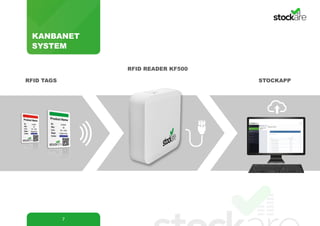
RFID READER KF500
STOCKAPPRFID TAGS
KANBANET
SYSTEM
8
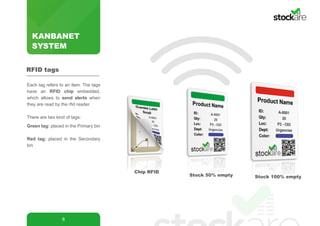
Each tag refers to an item. The tags
have an RFID chip embedded,
which allows to send alerts when
they are read by the rfid reader.
There are two kind of tags:
Green tag: placed in the Primary bin
Red tag: placed in the Secondary
bin
Stock 50% empty
Chip RFID
RFID tags
Stock 100% empty
KANBANET
SYSTEM
9
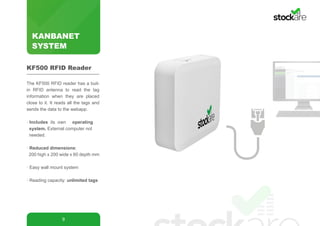
The KF500 RFID reader has a buil-
in RFID antenna to read the tag
information when they are placed
close to it. It reads all the tags and
sends the data to the webapp.
· Includes its own operating 	 	
system. External computer not 	 	
needed.
· Reduced dimensions:
200 high x 200 wide x 60 depth mm
· Easy wall mount system
· Reading capacity: unlimited tags
KF500 RFID Reader
KANBANET
SYSTEM
10
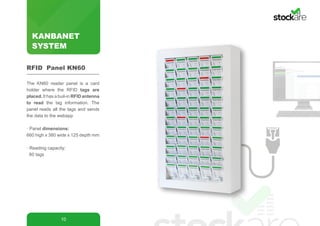
The KN60 reader panel is a card
holder where the RFID tags are
placed. It has a buil-in RFID antenna
to read the tag information. The
panel reads all the tags and sends
the data to the webapp
· Panel dimensions:
660 high x 380 wide x 125 depth mm
· Reading capacity:
60 tags
RFID Panel KN60
KANBANET
SYSTEM
11
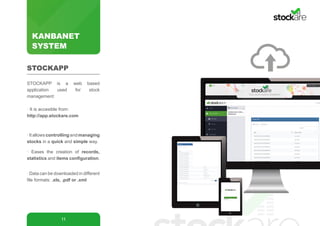
STOCKAPP is a web based
application used for stock
management:
· It is accesible from:
http://app.stockare.com
·Itallowscontrollingandmanaging
stocks in a quick and simple way.
· Eases the creation of records,
statistics and items configuration.
· Data can be downloaded in different
file formats: .xls, .pdf or .xml
STOCKAPP
Request
Request
monitoring
Purchase
managing
KANBANET
SYSTEM
12
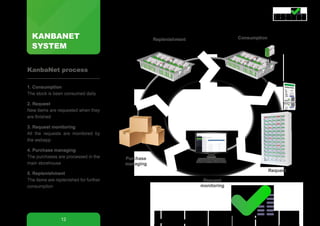
1. Consumption
The stock is been consumed daily
2. Request
New items are requested when they
are finished
3. Request monitoring
All the requests are monitored by
the webapp
4. Purchase managing
The purchases are processed in the
main storehouse
5. Replenishment
The items are replenished for further
consumption
KanbaNet process
Replenishment Consumption
KANBANET
SYSTEM
13
Improves stock organization and
control.
Ensures products are always
available.
Avoids issues caused by stock
out.
Avoids having expired products.
Helps rotating products at the
right time.
Stocks real-time information.
Statistics for further improvement
Access to historic data.
Reduced replenishment time.
Reduces counting time.
Reduces inventory costs.
Reduces errors.
Benefits
SISTEMA
KANBANET
14
Address: 48600, Bilbao, Spain
Phone: (+34) 634 416 953
Twitter: @stockareRFID
LinkedIn: Company Page
Email: support@stockare.com
Partner: www.lapastilla.com
Contact
Bilbao- Stockare main office
Madrid- LaPastilla
LaPastilla C/ Batres, 2C, P. Ind. Ventorro del Cano, 28925 - Alcorcón, Madrid, España
Tlf: +(34) 91 633 22 71 | Móvil: +(34) 630 15 39 21 | lapastilla@lapastilla.com

STOCKARE RFID catalog 2015-2016

  • 1.
    KanbaNet Your stock anytime, anywhere A way of optimizing stocks
  • 2.
    KanbaNet · What isit? 3 · Double bin kanban 4 · Kanban process 5 · Kanban system components 6 RFID tags 8 10 9 11 12 13 14 RFID panel RFID reader Stockapp · KanbaNet process · Beneficts · Contact
  • 3.
    KANBANET SYSTEM 3 The KanbaNet solution,based on RFID technology connected to cloud services, helps users having a controlled and organized stock. It allows having products always in hand for the users. It avoids issues caused by break of stock or expired products. KanbaNet enables rotation of supplies at the right time. What is it?
  • 4.
    KANBANET SYSTEM 4 Primary bin Secondary bin Doublebin KANBAN system divides the stock for each item in two bins: Primary bin Secondary bin (backup) Each bin is labeled with a RFID tag. Users can quickly make a product request by bringing the bin identification label near the panel when items at any bin are finished Double bin kanban
  • 5.
    KANBANET SYSTEM 5 1. The processstarts with the consumption of the items at the Primary bin 2. When the items at the Primary bin are finished an alert is triggered 3. The consumption continues with the Secondary bin (back-up) 4. Finally, replenishment is done. Move remaining items from Secondary to Primary bin and replenish the Secondary one. Kanban Process consumption replenishment ! 4 1 2 3
  • 6.
    KANBANET SYSTEM 6 When the Primarybin is exhausted, a replenishment alert is triggered, placing the green RFID tag close to the reader. It may happen that the Secondary bin is also exhausted, before replenishment happens, so an urgent alert is triggered, placing the red RFID tag close to the reader. · Green RFID tag means, 50% has been consumed · Red RFID tag means, there will be no items soon. . Kanban process Consumption Replenishment ! ! Replenishment alert Urgent alert
  • 7.
  • 8.
    KANBANET SYSTEM 8 Each tag refersto an item. The tags have an RFID chip embedded, which allows to send alerts when they are read by the rfid reader. There are two kind of tags: Green tag: placed in the Primary bin Red tag: placed in the Secondary bin Stock 50% empty Chip RFID RFID tags Stock 100% empty
  • 9.
    KANBANET SYSTEM 9 The KF500 RFIDreader has a buil- in RFID antenna to read the tag information when they are placed close to it. It reads all the tags and sends the data to the webapp. · Includes its own operating system. External computer not needed. · Reduced dimensions: 200 high x 200 wide x 60 depth mm · Easy wall mount system · Reading capacity: unlimited tags KF500 RFID Reader
  • 10.
    KANBANET SYSTEM 10 The KN60 readerpanel is a card holder where the RFID tags are placed. It has a buil-in RFID antenna to read the tag information. The panel reads all the tags and sends the data to the webapp · Panel dimensions: 660 high x 380 wide x 125 depth mm · Reading capacity: 60 tags RFID Panel KN60
  • 11.
    KANBANET SYSTEM 11 STOCKAPP is aweb based application used for stock management: · It is accesible from: http://app.stockare.com ·Itallowscontrollingandmanaging stocks in a quick and simple way. · Eases the creation of records, statistics and items configuration. · Data can be downloaded in different file formats: .xls, .pdf or .xml STOCKAPP
  • 12.
    Request Request monitoring Purchase managing KANBANET SYSTEM 12 1. Consumption The stockis been consumed daily 2. Request New items are requested when they are finished 3. Request monitoring All the requests are monitored by the webapp 4. Purchase managing The purchases are processed in the main storehouse 5. Replenishment The items are replenished for further consumption KanbaNet process Replenishment Consumption
  • 13.
    KANBANET SYSTEM 13 Improves stock organizationand control. Ensures products are always available. Avoids issues caused by stock out. Avoids having expired products. Helps rotating products at the right time. Stocks real-time information. Statistics for further improvement Access to historic data. Reduced replenishment time. Reduces counting time. Reduces inventory costs. Reduces errors. Benefits
  • 14.
    SISTEMA KANBANET 14 Address: 48600, Bilbao,Spain Phone: (+34) 634 416 953 Twitter: @stockareRFID LinkedIn: Company Page Email: support@stockare.com Partner: www.lapastilla.com Contact Bilbao- Stockare main office Madrid- LaPastilla LaPastilla C/ Batres, 2C, P. Ind. Ventorro del Cano, 28925 - Alcorcón, Madrid, España Tlf: +(34) 91 633 22 71 | Móvil: +(34) 630 15 39 21 | lapastilla@lapastilla.com