SENIOR PROJECT 2007-2008
(Step#1 of the ekoSign project)

5. Customer Sends Order
Developing Application that Uses XML
Signatures

Project team members

Hüseyin Çakır, Mehmet Mesut Özışık, Yılmaz Kaya

Abstract: First step of the application which is “Customer sends an order”. This phase includes XML
document signatures and encryption of informations at XML.
Keywords:Customer Sends Order, XML Signature and Encryption.

http://groups.google.com/group/digitalsignature
digitalsignature@googlegroups.com
PRINT DATE: 05/06/08

1
5.1 Introduction
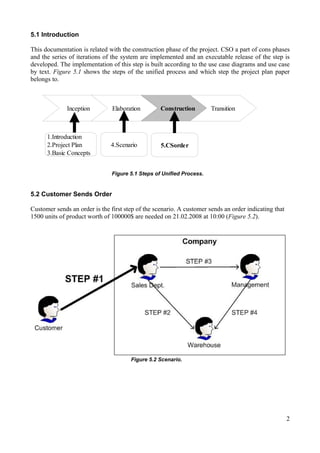
This documentation is related with the construction phase of the project. CSO a part of cons phases
and the series of iterations of the system are implemented and an executable release of the step is
developed. The implementation of this step is built according to the use case diagrams and use case
by text. Figure 5.1 shows the steps of the unified process and which step the project plan paper
belongs to.

Inception

1.Introduction
2.Project Plan
3.Basic Concepts

Elaboration

Construction

4.Scenario

Transition

5.CSorder

Figure 5.1 Steps of Unified Process.

5.2 Customer Sends Order
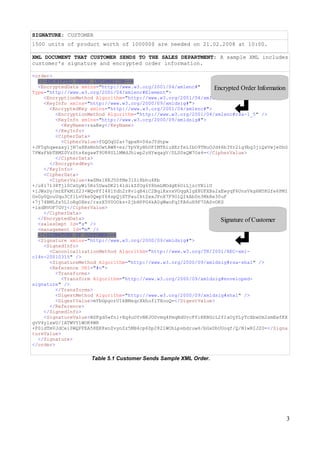
Customer sends an order is the first step of the scenario. A customer sends an order indicating that
1500 units of product worth of 100000$ are needed on 21.02.2008 at 10:00 (Figure 5.2).

Figure 5.2 Scenario.

2
SIGNATURE: CUSTOMER
1500 units of product worth of 100000$ are needed on 21.02.2008 at 10:00.
XML DOCUMENT THAT CUSTOMER SENDS TO THE SALES DEPARTMENT: A sample XML includes
customer's signature and encrypted order information.
<order>
<!-ENCRYPTED ORDER INFORMATION-->
<EncryptedData xmlns="http://www.w3.org/2001/04/xmlenc#"
Encrypted Order Information
Type="http://www.w3.org/2001/04/xmlenc#Element">
<EncryptionMethod Algorithm="http://www.w3.org/2001/04/xmlenc#aes256-cbc" />
<KeyInfo xmlns="http://www.w3.org/2000/09/xmldsig#">
<EncryptedKey xmlns="http://www.w3.org/2001/04/xmlenc#">
<EncryptionMethod Algorithm="http://www.w3.org/2001/04/xmlenc#rsa-1_5" />
<KeyInfo xmlns="http://www.w3.org/2000/09/xmldsig#">
<KeyName>rsaKey</KeyName>
</KeyInfo>
<CipherData>
<CipherValue>fGQOqU2a+7gpaN+D4sJYdtpw
+JF5ghqweaxyljN7a8RsNnhOwtAW8+ez/YpVXyHhOFIMTRiuXErfeLIbO9TNuOJd46b3Yr2ig9bg3jiQxVwjeDhG
7PWaFkbTBMZ0VzSts4xgawT9U88UL1MWdJhiwp2zHYwqagV/DLS0xQW7Os4=</CipherValue>
</CipherData>
</EncryptedKey>
</KeyInfo>
<CipherData>
<CipherValue>kwZMs1XKJ5DfMe31Zi8bhu4Kb
+/u817138Tjl0CxGyWi5Rz5UwaDK214idikZfOg6Y8hmLMOdgE6OiLjzcYNliU
+lJWsDy/mrEFkMlZ23+WQvFfI48lYdh2r8vlqB4iC2BqiKxvxVOqgAIgX8UFXBs2xEwyqF6UnsVkg6M5KGfe6PMI
GvGy0QouUqu3Cf1LvUke0QwpY64spQjXTPauIktZxxJFnX7F9OlQIkAbDn3MkRe30uF
+7j74BMLfs5L1oRgOXez/rxzX5V0OOks+ZjbHPPG4kA0gWwoFqIFA6uH9F7DASvOKS
+ixdBVOF7GVj</CipherValue>
</CipherData>
</EncryptedData>
Signature of Customer
<salesDept Id="s" />
<management Id="m" />
<!-SIGNATURE OF CUSTOMER-->
<Signature xmlns="http://www.w3.org/2000/09/xmldsig#">
<SignedInfo>
<CanonicalizationMethod Algorithm="http://www.w3.org/TR/2001/REC-xmlc14n-20010315" />
<SignatureMethod Algorithm="http://www.w3.org/2000/09/xmldsig#rsa-sha1" />
<Reference URI="#c">
<Transforms>
<Transform Algorithm="http://www.w3.org/2000/09/xmldsig#envelopedsignature" />
</Transforms>
<DigestMethod Algorithm="http://www.w3.org/2000/09/xmldsig#sha1" />
<DigestValue>mYbGpgorUIkBMsqrXkhufiTXooQ=</DigestValue>
</Reference>
</SignedInfo>
<SignatureValue>BSFgd5wfn1+Xq4uOYvNKJOUvmq4PmqBdUvcFfiKKBGcL2fIaOyYLyTcXbwUm2smEwfKX
gvV4ylxwU/IATWVY1WOK4WR
+P0idTmVJdCei0WQFFEA58EK8xnZvynZz5MB4cp6Zp2821WOhLpsbdruw6/bGxDhUUoqf/Q/N1wRIJ20=</Signa
tureValue>
</Signature>
</order>

Table 5.1 Customer Sends Sample XML Order.

3
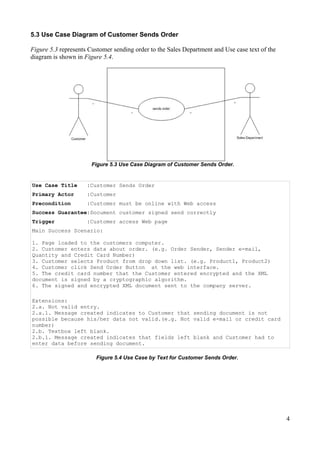
5.3 Use Case Diagram of Customer Sends Order
Figure 5.3 represents Customer sending order to the Sales Department and Use case text of the
diagram is shown in Figure 5.4.

Figure 5.3 Use Case Diagram of Customer Sends Order.

Use Case Title

:Customer Sends Order

Primary Actor

:Customer

Precondition

:Customer must be online with Web access

Success Guarantee:Document customer signed send correctly
Trigger

:Customer access Web page

Main Success Scenario:
1. Page loaded to the customers computer.
2. Customer enters data about order. (e.g. Order Sender, Sender e-mail,
Quantity and Credit Card Number)
3. Customer selects Product from drop down list. (e.g. Product1, Product2)
4. Customer click Send Order Button at the web interface.
5. The credit card number that the Customer entered encrypted and the XML
document is signed by a cryptographic algorithm.
6. The signed and encrypted XML document sent to the company server.
Extensions:
2.a. Not valid entry.
2.a.1. Message created indicates to Customer that sending document is not
possible because his/her data not valid.(e.g. Not valid e-mail or credit card
number)
2.b. Textbox left blank.
2.b.1. Message created indicates that fields left blank and Customer had to
enter data before sending document.
Figure 5.4 Use Case by Text for Customer Sends Order.

4
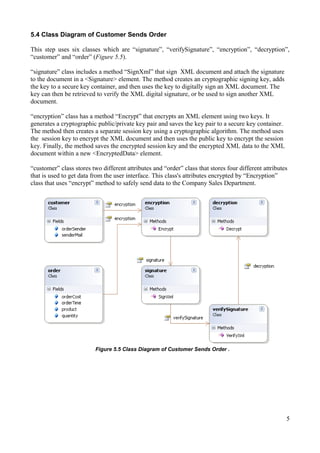
5.4 Class Diagram of Customer Sends Order
This step uses six classes which are “signature”, “verifySignature”, “encryption”, “decryption”,
“customer” and “order” (Figure 5.5).
“signature” class includes a method “SignXml” that sign XML document and attach the signature
to the document in a <Signature> element. The method creates an cryptographic signing key, adds
the key to a secure key container, and then uses the key to digitally sign an XML document. The
key can then be retrieved to verify the XML digital signature, or be used to sign another XML
document.
“encryption” class has a method “Encrypt” that encrypts an XML element using two keys. It
generates a cryptographic public/private key pair and saves the key pair to a secure key container.
The method then creates a separate session key using a cryptographic algorithm. The method uses
the session key to encrypt the XML document and then uses the public key to encrypt the session
key. Finally, the method saves the encrypted session key and the encrypted XML data to the XML
document within a new <EncryptedData> element.
“customer” class stores two different attributes and “order” class that stores four different attributes
that is used to get data from the user interface. This class's attributes encrypted by “Encryption”
class that uses “encrypt” method to safely send data to the Company Sales Department.

Figure 5.5 Class Diagram of Customer Sends Order .

5
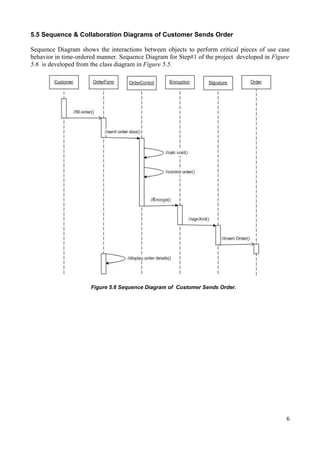
5.5 Sequence & Collaboration Diagrams of Customer Sends Order
Sequence Diagram shows the interactions between objects to perform critical pieces of use case
behavior in time-ordered manner. Sequence Diagram for Step#1 of the project developed in Figure
5.6 is developed from the class diagram in Figure 5.5.

Figure 5.6 Sequence Diagram of Customer Sends Order.

6
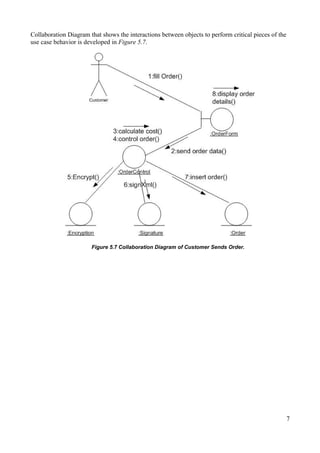
Collaboration Diagram that shows the interactions between objects to perform critical pieces of the
use case behavior is developed in Figure 5.7.

Figure 5.7 Collaboration Diagram of Customer Sends Order.

7
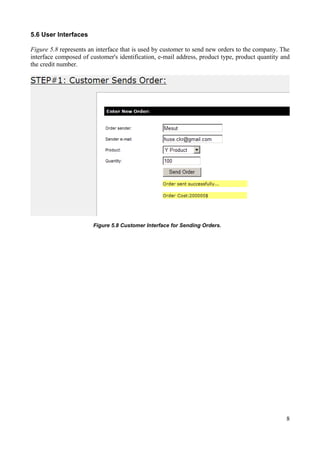
5.6 User Interfaces
Figure 5.8 represents an interface that is used by customer to send new orders to the company. The
interface composed of customer's identification, e-mail address, product type, product quantity and
the credit number.

Figure 5.8 Customer Interface for Sending Orders.

8

Step1customer sendsorder

  • 1.
    SENIOR PROJECT 2007-2008 (Step#1of the ekoSign project) 5. Customer Sends Order Developing Application that Uses XML Signatures Project team members Hüseyin Çakır, Mehmet Mesut Özışık, Yılmaz Kaya Abstract: First step of the application which is “Customer sends an order”. This phase includes XML document signatures and encryption of informations at XML. Keywords:Customer Sends Order, XML Signature and Encryption. http://groups.google.com/group/digitalsignature digitalsignature@googlegroups.com PRINT DATE: 05/06/08 1
  • 2.
    5.1 Introduction This documentationis related with the construction phase of the project. CSO a part of cons phases and the series of iterations of the system are implemented and an executable release of the step is developed. The implementation of this step is built according to the use case diagrams and use case by text. Figure 5.1 shows the steps of the unified process and which step the project plan paper belongs to. Inception 1.Introduction 2.Project Plan 3.Basic Concepts Elaboration Construction 4.Scenario Transition 5.CSorder Figure 5.1 Steps of Unified Process. 5.2 Customer Sends Order Customer sends an order is the first step of the scenario. A customer sends an order indicating that 1500 units of product worth of 100000$ are needed on 21.02.2008 at 10:00 (Figure 5.2). Figure 5.2 Scenario. 2
  • 3.
    SIGNATURE: CUSTOMER 1500 unitsof product worth of 100000$ are needed on 21.02.2008 at 10:00. XML DOCUMENT THAT CUSTOMER SENDS TO THE SALES DEPARTMENT: A sample XML includes customer's signature and encrypted order information. <order> <!-ENCRYPTED ORDER INFORMATION--> <EncryptedData xmlns="http://www.w3.org/2001/04/xmlenc#" Encrypted Order Information Type="http://www.w3.org/2001/04/xmlenc#Element"> <EncryptionMethod Algorithm="http://www.w3.org/2001/04/xmlenc#aes256-cbc" /> <KeyInfo xmlns="http://www.w3.org/2000/09/xmldsig#"> <EncryptedKey xmlns="http://www.w3.org/2001/04/xmlenc#"> <EncryptionMethod Algorithm="http://www.w3.org/2001/04/xmlenc#rsa-1_5" /> <KeyInfo xmlns="http://www.w3.org/2000/09/xmldsig#"> <KeyName>rsaKey</KeyName> </KeyInfo> <CipherData> <CipherValue>fGQOqU2a+7gpaN+D4sJYdtpw +JF5ghqweaxyljN7a8RsNnhOwtAW8+ez/YpVXyHhOFIMTRiuXErfeLIbO9TNuOJd46b3Yr2ig9bg3jiQxVwjeDhG 7PWaFkbTBMZ0VzSts4xgawT9U88UL1MWdJhiwp2zHYwqagV/DLS0xQW7Os4=</CipherValue> </CipherData> </EncryptedKey> </KeyInfo> <CipherData> <CipherValue>kwZMs1XKJ5DfMe31Zi8bhu4Kb +/u817138Tjl0CxGyWi5Rz5UwaDK214idikZfOg6Y8hmLMOdgE6OiLjzcYNliU +lJWsDy/mrEFkMlZ23+WQvFfI48lYdh2r8vlqB4iC2BqiKxvxVOqgAIgX8UFXBs2xEwyqF6UnsVkg6M5KGfe6PMI GvGy0QouUqu3Cf1LvUke0QwpY64spQjXTPauIktZxxJFnX7F9OlQIkAbDn3MkRe30uF +7j74BMLfs5L1oRgOXez/rxzX5V0OOks+ZjbHPPG4kA0gWwoFqIFA6uH9F7DASvOKS +ixdBVOF7GVj</CipherValue> </CipherData> </EncryptedData> Signature of Customer <salesDept Id="s" /> <management Id="m" /> <!-SIGNATURE OF CUSTOMER--> <Signature xmlns="http://www.w3.org/2000/09/xmldsig#"> <SignedInfo> <CanonicalizationMethod Algorithm="http://www.w3.org/TR/2001/REC-xmlc14n-20010315" /> <SignatureMethod Algorithm="http://www.w3.org/2000/09/xmldsig#rsa-sha1" /> <Reference URI="#c"> <Transforms> <Transform Algorithm="http://www.w3.org/2000/09/xmldsig#envelopedsignature" /> </Transforms> <DigestMethod Algorithm="http://www.w3.org/2000/09/xmldsig#sha1" /> <DigestValue>mYbGpgorUIkBMsqrXkhufiTXooQ=</DigestValue> </Reference> </SignedInfo> <SignatureValue>BSFgd5wfn1+Xq4uOYvNKJOUvmq4PmqBdUvcFfiKKBGcL2fIaOyYLyTcXbwUm2smEwfKX gvV4ylxwU/IATWVY1WOK4WR +P0idTmVJdCei0WQFFEA58EK8xnZvynZz5MB4cp6Zp2821WOhLpsbdruw6/bGxDhUUoqf/Q/N1wRIJ20=</Signa tureValue> </Signature> </order> Table 5.1 Customer Sends Sample XML Order. 3
  • 4.
    5.3 Use CaseDiagram of Customer Sends Order Figure 5.3 represents Customer sending order to the Sales Department and Use case text of the diagram is shown in Figure 5.4. Figure 5.3 Use Case Diagram of Customer Sends Order. Use Case Title :Customer Sends Order Primary Actor :Customer Precondition :Customer must be online with Web access Success Guarantee:Document customer signed send correctly Trigger :Customer access Web page Main Success Scenario: 1. Page loaded to the customers computer. 2. Customer enters data about order. (e.g. Order Sender, Sender e-mail, Quantity and Credit Card Number) 3. Customer selects Product from drop down list. (e.g. Product1, Product2) 4. Customer click Send Order Button at the web interface. 5. The credit card number that the Customer entered encrypted and the XML document is signed by a cryptographic algorithm. 6. The signed and encrypted XML document sent to the company server. Extensions: 2.a. Not valid entry. 2.a.1. Message created indicates to Customer that sending document is not possible because his/her data not valid.(e.g. Not valid e-mail or credit card number) 2.b. Textbox left blank. 2.b.1. Message created indicates that fields left blank and Customer had to enter data before sending document. Figure 5.4 Use Case by Text for Customer Sends Order. 4
  • 5.
    5.4 Class Diagramof Customer Sends Order This step uses six classes which are “signature”, “verifySignature”, “encryption”, “decryption”, “customer” and “order” (Figure 5.5). “signature” class includes a method “SignXml” that sign XML document and attach the signature to the document in a <Signature> element. The method creates an cryptographic signing key, adds the key to a secure key container, and then uses the key to digitally sign an XML document. The key can then be retrieved to verify the XML digital signature, or be used to sign another XML document. “encryption” class has a method “Encrypt” that encrypts an XML element using two keys. It generates a cryptographic public/private key pair and saves the key pair to a secure key container. The method then creates a separate session key using a cryptographic algorithm. The method uses the session key to encrypt the XML document and then uses the public key to encrypt the session key. Finally, the method saves the encrypted session key and the encrypted XML data to the XML document within a new <EncryptedData> element. “customer” class stores two different attributes and “order” class that stores four different attributes that is used to get data from the user interface. This class's attributes encrypted by “Encryption” class that uses “encrypt” method to safely send data to the Company Sales Department. Figure 5.5 Class Diagram of Customer Sends Order . 5
  • 6.
    5.5 Sequence &Collaboration Diagrams of Customer Sends Order Sequence Diagram shows the interactions between objects to perform critical pieces of use case behavior in time-ordered manner. Sequence Diagram for Step#1 of the project developed in Figure 5.6 is developed from the class diagram in Figure 5.5. Figure 5.6 Sequence Diagram of Customer Sends Order. 6
  • 7.
    Collaboration Diagram thatshows the interactions between objects to perform critical pieces of the use case behavior is developed in Figure 5.7. Figure 5.7 Collaboration Diagram of Customer Sends Order. 7
  • 8.
    5.6 User Interfaces Figure5.8 represents an interface that is used by customer to send new orders to the company. The interface composed of customer's identification, e-mail address, product type, product quantity and the credit number. Figure 5.8 Customer Interface for Sending Orders. 8