User Experience
Case Study
by Bethany Buer
Helping humans squirrel
away money for later.
Squirrel is a smart savings
account that helps humans
reach their savings goals by
simply sorting their spending.
What is Squirrel?
Some of the things we spend our
money on are essentials…
Others are less so.

These are nonessentials.
Saving money is hard.

Especially when you like to spend.
We have found that an automatic savings withdrawal is the most
effective way to save money over a period of time, but individuals
lack the understanding of their spending habits necessary to set
and meet realistic, informed savings goals.
Problem statement
THE RESEARCH
Research
Key findings
CURRENT BEHAVIOR
• Set up a savings account and pick a random number
to save every month (likely small amount)
• Use an automatic withdrawal so don’t have to think
about it
PROBLEMS THEY WANT TO SOLVE
• Save money but not have to think about it (automatic)
• Control of spending
Interviewed 7 NYC residents, ages 24 - 33
SHARED FRUSTRATIONS
• Want to spend money on current experiences, but
also want to save for the future
• Don’t know their monthly spending habits
Personas
Megan Carson
26 years old
Brooklyn, NY
Salary 50k
Marketing at start-up in Manhattan
Lives with boyfriend in 1 bedroom
BEHAVIORS
Feels guilty about spending habits
Uses disposable income on $4 iced coffees
Doesn’t track spending
Uses (small) monthly automatic withdrawal for savings
GOALS & NEEDS
Track spending habits
Incentives to save
Pay off credit card
Save money for wedding (someday)
“It’s hard to save for
your life 5 years down
the road when you want
to enjoy living right
now.”
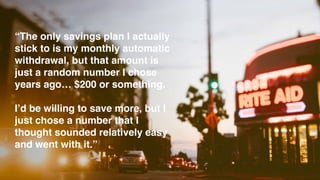
“The only savings plan I actually
stick to is my monthly automatic
withdrawal, but that amount is
just a random number I chose
years ago… $200 or something.
I’d be willing to save more, but I
just chose a number that I
thought sounded relatively easy
and went with it.”
Competitive analysis
“Every few days, Digit checks your
spending habits and removes a few
dollars from your checking account
if you can afford it. Easily withdraw
your money any time, quickly and
with no fees.”
Text-message
based service.
Better for “fun
money” savings.
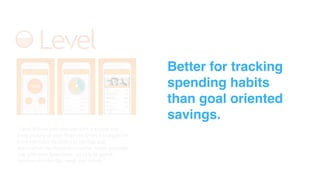
“Level Money provides you with a simple and
clear picture of your finances. Draw a straight line
from everyday decisions to savings and
accomplish the things that matter. Level provides
you with your Spendable - or safe to spend
number - for the day, week and month.”
Better for tracking
spending habits
than goal oriented
savings.
“Invest spare change automatically
from everyday purchases into a
diversified portfolio.”
Focused on
investing “unused
change” and not
helping the user
reach a specific
savings goal.
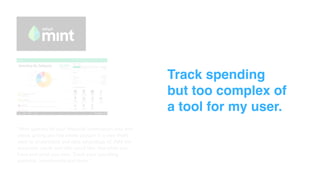
“Mint gathers all your financial information into one
place, giving you the whole picture in a way that’s
easy to understand and take advantage of. Add the
accounts, cards and bills you’d like. See what you
have and what you owe. Track your spending
patterns, investments and more.”
Track spending
but too complex of
a tool for my user.
User flow and site map
Sketches and wireframes
“This looks great and
all… but does your user
care to do all this work?”
Refining the solution
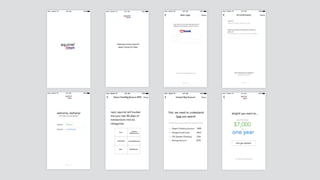
Onboarding
Bank login
To activate their Squirrel account,
the user logs in with their online US
Bank Personal ID and Password.
Choose account
User chooses their primary checking
account they want to link with
Squirrel.
Essential vs. Nonessential
Tutorial on how the user sorts their
spending in two ways; essential and
nonessential.
Review transactions
Sort transactions as essential or
nonessential from most recent,
complete full month.
Onboarding continued
Financial health
Essential and nonessential spending
is added up to show and the user’s
spending habits for the last month.
Set savings goal
Adjust sliders to dollar amount and
timeline. The bottom number
changes as the sliders move.
Monthly spend
Squirrel makes a recommendation
to adjust their nonessential spending
to reach their goal.
Setup automatic transfer
Choose the total dollar amount,
frequency, and time of month for the
automatic transfer.
Squirrel
Spending
Swipe to sort unsorted transactions
and review transactions from current
month.
Goals
See how much money you have in
your Squirrel savings account and
adjust your goal if needed.
Insights
Insight on your health for this month
based on your spending and your
savings goal.
Account settings
Home base to adjust your account
settings and access US Bank
account information.
Always, always return to the user.
I found it very easy to read into my user needs and make the
product that I wanted them to want. Once I returned to the
needs of the user, I was able to create a compelling product
that actually addressed their needs.
What I learned
Thanks!

squirrel_presentation_bethany_buer_final (1)

  • 1.
  • 2.
  • 3.
    Squirrel is asmart savings account that helps humans reach their savings goals by simply sorting their spending.
  • 4.
    What is Squirrel? Someof the things we spend our money on are essentials… Others are less so.
 These are nonessentials.
  • 5.
    Saving money ishard.
 Especially when you like to spend. We have found that an automatic savings withdrawal is the most effective way to save money over a period of time, but individuals lack the understanding of their spending habits necessary to set and meet realistic, informed savings goals. Problem statement
  • 6.
  • 7.
    Key findings CURRENT BEHAVIOR •Set up a savings account and pick a random number to save every month (likely small amount) • Use an automatic withdrawal so don’t have to think about it PROBLEMS THEY WANT TO SOLVE • Save money but not have to think about it (automatic) • Control of spending Interviewed 7 NYC residents, ages 24 - 33 SHARED FRUSTRATIONS • Want to spend money on current experiences, but also want to save for the future • Don’t know their monthly spending habits
  • 8.
  • 9.
    Megan Carson 26 yearsold Brooklyn, NY Salary 50k Marketing at start-up in Manhattan Lives with boyfriend in 1 bedroom BEHAVIORS Feels guilty about spending habits Uses disposable income on $4 iced coffees Doesn’t track spending Uses (small) monthly automatic withdrawal for savings GOALS & NEEDS Track spending habits Incentives to save Pay off credit card Save money for wedding (someday)
  • 10.
    “It’s hard tosave for your life 5 years down the road when you want to enjoy living right now.”
  • 11.
    “The only savingsplan I actually stick to is my monthly automatic withdrawal, but that amount is just a random number I chose years ago… $200 or something. I’d be willing to save more, but I just chose a number that I thought sounded relatively easy and went with it.”
  • 12.
  • 13.
    “Every few days,Digit checks your spending habits and removes a few dollars from your checking account if you can afford it. Easily withdraw your money any time, quickly and with no fees.” Text-message based service. Better for “fun money” savings.
  • 14.
    “Level Money providesyou with a simple and clear picture of your finances. Draw a straight line from everyday decisions to savings and accomplish the things that matter. Level provides you with your Spendable - or safe to spend number - for the day, week and month.” Better for tracking spending habits than goal oriented savings.
  • 15.
    “Invest spare changeautomatically from everyday purchases into a diversified portfolio.” Focused on investing “unused change” and not helping the user reach a specific savings goal.
  • 16.
    “Mint gathers allyour financial information into one place, giving you the whole picture in a way that’s easy to understand and take advantage of. Add the accounts, cards and bills you’d like. See what you have and what you owe. Track your spending patterns, investments and more.” Track spending but too complex of a tool for my user.
  • 17.
    User flow andsite map
  • 20.
  • 23.
    “This looks greatand all… but does your user care to do all this work?”
  • 24.
  • 28.
    Onboarding Bank login To activatetheir Squirrel account, the user logs in with their online US Bank Personal ID and Password. Choose account User chooses their primary checking account they want to link with Squirrel. Essential vs. Nonessential Tutorial on how the user sorts their spending in two ways; essential and nonessential. Review transactions Sort transactions as essential or nonessential from most recent, complete full month.
  • 29.
    Onboarding continued Financial health Essentialand nonessential spending is added up to show and the user’s spending habits for the last month. Set savings goal Adjust sliders to dollar amount and timeline. The bottom number changes as the sliders move. Monthly spend Squirrel makes a recommendation to adjust their nonessential spending to reach their goal. Setup automatic transfer Choose the total dollar amount, frequency, and time of month for the automatic transfer.
  • 30.
    Squirrel Spending Swipe to sortunsorted transactions and review transactions from current month. Goals See how much money you have in your Squirrel savings account and adjust your goal if needed. Insights Insight on your health for this month based on your spending and your savings goal. Account settings Home base to adjust your account settings and access US Bank account information.
  • 31.
    Always, always returnto the user. I found it very easy to read into my user needs and make the product that I wanted them to want. Once I returned to the needs of the user, I was able to create a compelling product that actually addressed their needs. What I learned
  • 32.